The document contains Java code for a JavaFX application that creates a graphical interface with an alpha-masked image and a color-adjusted image view. It includes methods for creating an image, applying color adjustments based on hue, and generating a gradient ring shape. The application sets up a scene and displays the original and modified images side by side.
![mport javafx.application.Application;
import javafx.scene.Node;
import javafx.scene.Scene;
import javafx.scene.SnapshotParameters;
import javafx.scene.effect.ColorAdjust;
import javafx.scene.image.Image;
import javafx.scene.image.ImageView;
import javafx.scene.image.WritableImage;
import javafx.scene.layout.HBox;
import javafx.scene.paint.Color;
import javafx.scene.paint.CycleMethod;
import javafx.scene.paint.RadialGradient;
import javafx.scene.paint.Stop;
import javafx.scene.shape.Circle;
import javafx.stage.Stage;
public class Main extends Application {
@Override
public void start(Stage primaryStage) {
HBox root = new HBox();
// create alpha masked image
Image image = createImage(createAlphaMaskedRing(200));
// create original imageview
ImageView original = new ImageView( image);
// create imageview with color adjustment
ImageView modified = new ImageView( image);
// colorAdjust effect
ColorAdjust colorAdjust = new ColorAdjust();
// set saturation to 1, otherwise hue won't have an effect
colorAdjust.setSaturation(1);
// define target color
Color targetColor = Color.GREEN;
// calculate hue: map from [0,360] to [-1,1]; TODO: here's the problem
double hue = map( targetColor.getHue(), 0, 360, -1, 1);
colorAdjust.setHue(hue);
// apply color adjustment](https://image.slidesharecdn.com/mportjavafx-230409073000-28ab41a9/85/mport-javafx-application-Application-import-javafx-scene-Node-im-pdf-1-320.jpg)
![mport javafx.application.Application;
import javafx.scene.Node;
import javafx.scene.Scene;
import javafx.scene.SnapshotParameters;
import javafx.scene.effect.ColorAdjust;
import javafx.scene.image.Image;
import javafx.scene.image.ImageView;
import javafx.scene.image.WritableImage;
import javafx.scene.layout.HBox;
import javafx.scene.paint.Color;
import javafx.scene.paint.CycleMethod;
import javafx.scene.paint.RadialGradient;
import javafx.scene.paint.Stop;
import javafx.scene.shape.Circle;
import javafx.stage.Stage;
public class Main extends Application {
@Override
public void start(Stage primaryStage) {
HBox root = new HBox();
// create alpha masked image
Image image = createImage(createAlphaMaskedRing(200));
// create original imageview
ImageView original = new ImageView( image);
// create imageview with color adjustment
ImageView modified = new ImageView( image);
// colorAdjust effect
ColorAdjust colorAdjust = new ColorAdjust();
// set saturation to 1, otherwise hue won't have an effect
colorAdjust.setSaturation(1);
// define target color
Color targetColor = Color.GREEN;
// calculate hue: map from [0,360] to [-1,1]; TODO: here's the problem
double hue = map( targetColor.getHue(), 0, 360, -1, 1);
colorAdjust.setHue(hue);
// apply color adjustment](https://image.slidesharecdn.com/mportjavafx-230409073000-28ab41a9/75/mport-javafx-application-Application-import-javafx-scene-Node-im-pdf-1-2048.jpg)
![CycleMethod.NO_CYCLE,
new Stop(0, Color.WHITE.deriveColor(1,1,1,1)),
new Stop(1, Color.YELLOW.deriveColor(1,1,1,0)));
ring.setFill(gradient1);
return ring;
}
public static double map(double value, double start, double stop, double targetStart, double
targetStop) {
return targetStart + (targetStop - targetStart) * ((value - start) / (stop - start));
}
public static void main(String[] args) {
launch(args);
}
}
Solution
mport javafx.application.Application;
import javafx.scene.Node;
import javafx.scene.Scene;
import javafx.scene.SnapshotParameters;
import javafx.scene.effect.ColorAdjust;
import javafx.scene.image.Image;
import javafx.scene.image.ImageView;
import javafx.scene.image.WritableImage;
import javafx.scene.layout.HBox;
import javafx.scene.paint.Color;
import javafx.scene.paint.CycleMethod;
import javafx.scene.paint.RadialGradient;
import javafx.scene.paint.Stop;
import javafx.scene.shape.Circle;
import javafx.stage.Stage;
public class Main extends Application {
@Override
public void start(Stage primaryStage) {
HBox root = new HBox();](https://image.slidesharecdn.com/mportjavafx-230409073000-28ab41a9/85/mport-javafx-application-Application-import-javafx-scene-Node-im-pdf-3-320.jpg)
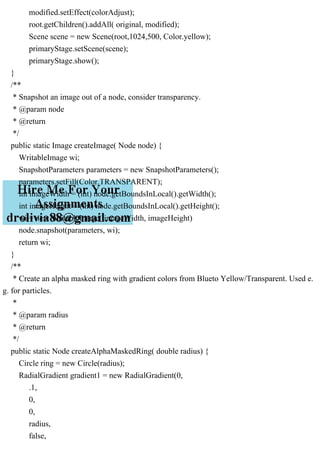
![// create alpha masked image
Image image = createImage(createAlphaMaskedRing(200));
// create original imageview
ImageView original = new ImageView( image);
// create imageview with color adjustment
ImageView modified = new ImageView( image);
// colorAdjust effect
ColorAdjust colorAdjust = new ColorAdjust();
// set saturation to 1, otherwise hue won't have an effect
colorAdjust.setSaturation(1);
// define target color
Color targetColor = Color.GREEN;
// calculate hue: map from [0,360] to [-1,1]; TODO: here's the problem
double hue = map( targetColor.getHue(), 0, 360, -1, 1);
colorAdjust.setHue(hue);
// apply color adjustment
modified.setEffect(colorAdjust);
root.getChildren().addAll( original, modified);
Scene scene = new Scene(root,1024,500, Color.yellow);
primaryStage.setScene(scene);
primaryStage.show();
}
/**
* Snapshot an image out of a node, consider transparency.
* @param node
* @return
*/
public static Image createImage( Node node) {
WritableImage wi;
SnapshotParameters parameters = new SnapshotParameters();
parameters.setFill(Color.TRANSPARENT);
int imageWidth = (int) node.getBoundsInLocal().getWidth();
int imageHeight = (int) node.getBoundsInLocal().getHeight();
wi = new WritableImage( imageWidth, imageHeight)
node.snapshot(parameters, wi);
return wi;](https://image.slidesharecdn.com/mportjavafx-230409073000-28ab41a9/85/mport-javafx-application-Application-import-javafx-scene-Node-im-pdf-4-320.jpg)
![}
/**
* Create an alpha masked ring with gradient colors from Blueto Yellow/Transparent. Used e.
g. for particles.
*
* @param radius
* @return
*/
public static Node createAlphaMaskedRing( double radius) {
Circle ring = new Circle(radius);
RadialGradient gradient1 = new RadialGradient(0,
.1,
0,
0,
radius,
false,
CycleMethod.NO_CYCLE,
new Stop(0, Color.WHITE.deriveColor(1,1,1,1)),
new Stop(1, Color.YELLOW.deriveColor(1,1,1,0)));
ring.setFill(gradient1);
return ring;
}
public static double map(double value, double start, double stop, double targetStart, double
targetStop) {
return targetStart + (targetStop - targetStart) * ((value - start) / (stop - start));
}
public static void main(String[] args) {
launch(args);
}
}](https://image.slidesharecdn.com/mportjavafx-230409073000-28ab41a9/85/mport-javafx-application-Application-import-javafx-scene-Node-im-pdf-5-320.jpg)


![pOH = 14 - pH = 14 - 12.50 = 1.5 pOH = -log[OH-] .pdf](https://cdn.slidesharecdn.com/ss_thumbnails/poh14-ph14-12-230409073009-fbec8be8-thumbnail.jpg?width=640&height=640&fit=bounds)


