Moving OOo to XCanvas, Step 2 –  Draw and Impress  Thorsten Behrens StarOffice/OpenOffice.org Sun Microsystems
Outline The What and the Where of the DrawingLayer What are the problems? How does the architecture look now? Migration plan XCanvas: recap How was XCanvas integrated? Demo
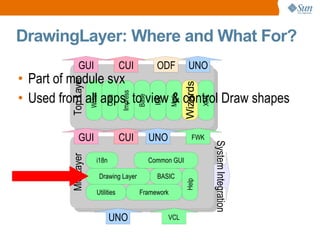
DrawingLayer: Where and What For? Part of module svx Used from all apps, to view & control Draw shapes Top Layer Mid Layer Writer Calc Impress Base IDE Math Wizards XML BASIC Utilities i18n Framework VCL GUI UNO CUI GUI UNO CUI UNO FWK System Integration ODF Common GUI Drawing Layer Help
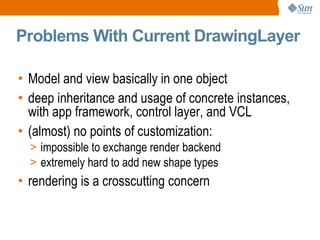
Problems With Current DrawingLayer Model and view basically in one object deep inheritance and usage of concrete instances, with app framework, control layer, and VCL (almost) no points of customization: impossible to exchange render backend extremely hard to add new shape types rendering is a crosscutting concern
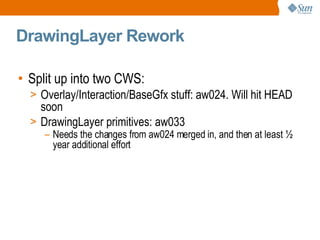
DrawingLayer Rework Split up into two CWS: Overlay/Interaction/BaseGfx stuff: aw024. Will hit HEAD soon DrawingLayer primitives: aw033 Needs the changes from aw024 merged in, and then at least ½ year additional effort
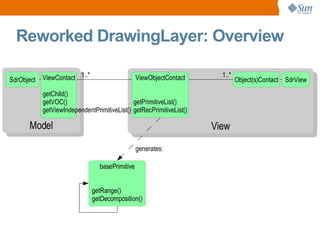
Reworked DrawingLayer: Overview 1..* 1..* generates:
Reworked DrawingLayer: Details Separates model & view (controller: later) SdrObject (model) ObjectContact & ViewObjectContact: view + “content” of the view Bins ad hoc output/geometry generation, instead employs factored-out graphics tooling (basegfx) Provides scene-graph like hierarchy of view content, makes it easy to “plug in” different renderers
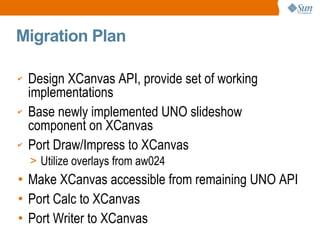
Migration Plan Design XCanvas API, provide set of working implementations Base newly implemented UNO slideshow component on XCanvas Port Draw/Impress to XCanvas Utilize overlays from aw024 Make XCanvas accessible from remaining UNO API Port Calc to XCanvas Port Writer to XCanvas
XCanvas, What Was That Again? 'X' because it's a UNO interface new UNO-API based rendering subsystem for OOo slated to replace VCL's OutputDevice for rendering application content: Impress slideshow (OOo 2.0) Draw/Impress edit view
UNO API for rendering Significantly better portability low impedance towards modern graphics APIs easy to start with, for contributors Separation of concerns XCanvas: rendering toolkit: controls & windowing Speed low impedance towards contemporary graphics hardware Quality ubiquituous alpha compositing anti-aliasing color management Reasons for XCanvas
Contemporary set of render primitives Multitude of backends feasible Stateless, concurrency-friendly design Flexible caching concept Key XCanvas Features
How's XCanvas Plugged In? It's Model/View: you just need to reimplement the view part Tacid assumption: XCanvas output and VCL OutputDevice output must mix on the same area (until all of OOo has been migrated)!
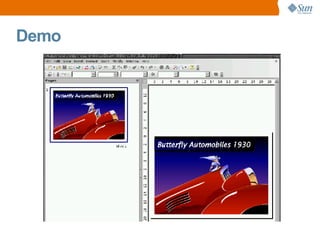
Demo
Further Info OOo Wiki's  DrawingLayer  rework page
Q&A Thorsten Behrens [email_address]

Moving OOo to XCanvas, Step 2 - Draw and Impress

  • 1.
    Moving OOo toXCanvas, Step 2 – Draw and Impress Thorsten Behrens StarOffice/OpenOffice.org Sun Microsystems
  • 2.
    Outline The Whatand the Where of the DrawingLayer What are the problems? How does the architecture look now? Migration plan XCanvas: recap How was XCanvas integrated? Demo
  • 3.
    DrawingLayer: Where andWhat For? Part of module svx Used from all apps, to view & control Draw shapes Top Layer Mid Layer Writer Calc Impress Base IDE Math Wizards XML BASIC Utilities i18n Framework VCL GUI UNO CUI GUI UNO CUI UNO FWK System Integration ODF Common GUI Drawing Layer Help
  • 4.
    Problems With CurrentDrawingLayer Model and view basically in one object deep inheritance and usage of concrete instances, with app framework, control layer, and VCL (almost) no points of customization: impossible to exchange render backend extremely hard to add new shape types rendering is a crosscutting concern
  • 5.
    DrawingLayer Rework Splitup into two CWS: Overlay/Interaction/BaseGfx stuff: aw024. Will hit HEAD soon DrawingLayer primitives: aw033 Needs the changes from aw024 merged in, and then at least ½ year additional effort
  • 6.
    Reworked DrawingLayer: Overview1..* 1..* generates:
  • 7.
    Reworked DrawingLayer: DetailsSeparates model & view (controller: later) SdrObject (model) ObjectContact & ViewObjectContact: view + “content” of the view Bins ad hoc output/geometry generation, instead employs factored-out graphics tooling (basegfx) Provides scene-graph like hierarchy of view content, makes it easy to “plug in” different renderers
  • 8.
    Migration Plan DesignXCanvas API, provide set of working implementations Base newly implemented UNO slideshow component on XCanvas Port Draw/Impress to XCanvas Utilize overlays from aw024 Make XCanvas accessible from remaining UNO API Port Calc to XCanvas Port Writer to XCanvas
  • 9.
    XCanvas, What WasThat Again? 'X' because it's a UNO interface new UNO-API based rendering subsystem for OOo slated to replace VCL's OutputDevice for rendering application content: Impress slideshow (OOo 2.0) Draw/Impress edit view
  • 10.
    UNO API forrendering Significantly better portability low impedance towards modern graphics APIs easy to start with, for contributors Separation of concerns XCanvas: rendering toolkit: controls & windowing Speed low impedance towards contemporary graphics hardware Quality ubiquituous alpha compositing anti-aliasing color management Reasons for XCanvas
  • 11.
    Contemporary set ofrender primitives Multitude of backends feasible Stateless, concurrency-friendly design Flexible caching concept Key XCanvas Features
  • 12.
    How's XCanvas PluggedIn? It's Model/View: you just need to reimplement the view part Tacid assumption: XCanvas output and VCL OutputDevice output must mix on the same area (until all of OOo has been migrated)!
  • 13.
  • 14.
    Further Info OOoWiki's DrawingLayer rework page
  • 15.
    Q&A Thorsten Behrens[email_address]