An Introduction
Deepak Kumar | @_deepak0
An Introduction
Deepak Kumar | @_deepak0
MongoDB
● Document oriented
  a. Objects are mapped as documents
  b. Documents can be embedded
  c. Dynamically typed
● No Schema
● High availability
  a. Replication through sharding.
  b. Automatic failover
● Easy scaling
  a. Auto shrading ( auto partitioning data across servers)
● Speed
Programming Language Support
Supported by all the popular programming
languages (C++, Java, Python, Ruby, Go, Haskel
etc...) and web frameworks ( Rails, Django etc).
Interesting Fact


There are MongoDB systems that exceed one
       million operations per second.
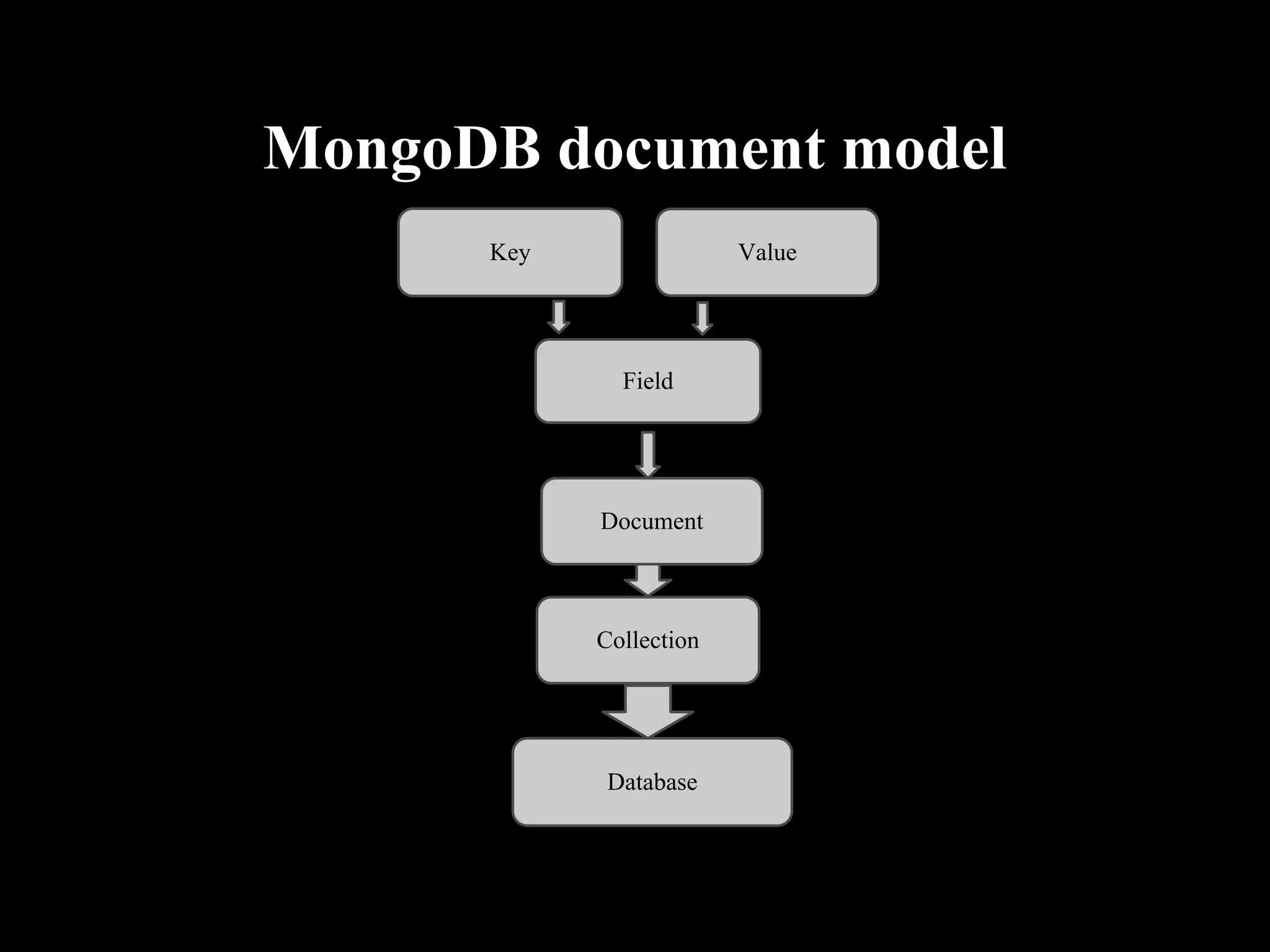
MongoDB document model
Key         Key                Value


                    Field


                  Document


                  Collection


                   Database
Data Types Supported
●   String
●   Number
●   Boolean
●   Date
●   Null
●   Array
●   Object ID
●   Binary data
●   Regular Expression
Why should we use Mongodb
●   Easy to scale
●   Coding velocity (agility)
●   No impedance mismatch
●   Allows dynamic schema ( No Schema, agility)
●   Easier to store and manipulate polymorphic data
●   Variety of Indexing
●   A MapReduce tool.
Impedance Mismatch
In object relational mapping an object in
programming language is mapped to a record in
database. So if the data is simple and database
support it then there is no mismatch.

But if the data is polymorphic and have unsupported
types then the mapping will be difficult which
causes a impedance mismatch.

In mongodb data is of JSON format so it can map
well to the object.
Where should we avoid MongoDB
● Problems with SQL support.
● Systems with heavy emphasis on complex
  transactions such as banking.
● Data Warehousing whose underlying database
  are schema based.
Indexing
● Indexing can be done on a field
● Indexing can be done on an embedded object.
● Sparse indexing - Indexing based existence of
  field.
● TTL index
● Geospatial Index ( Location based access)
● Geohaystack index (Bucket based small regions)
MongoDB/ Components
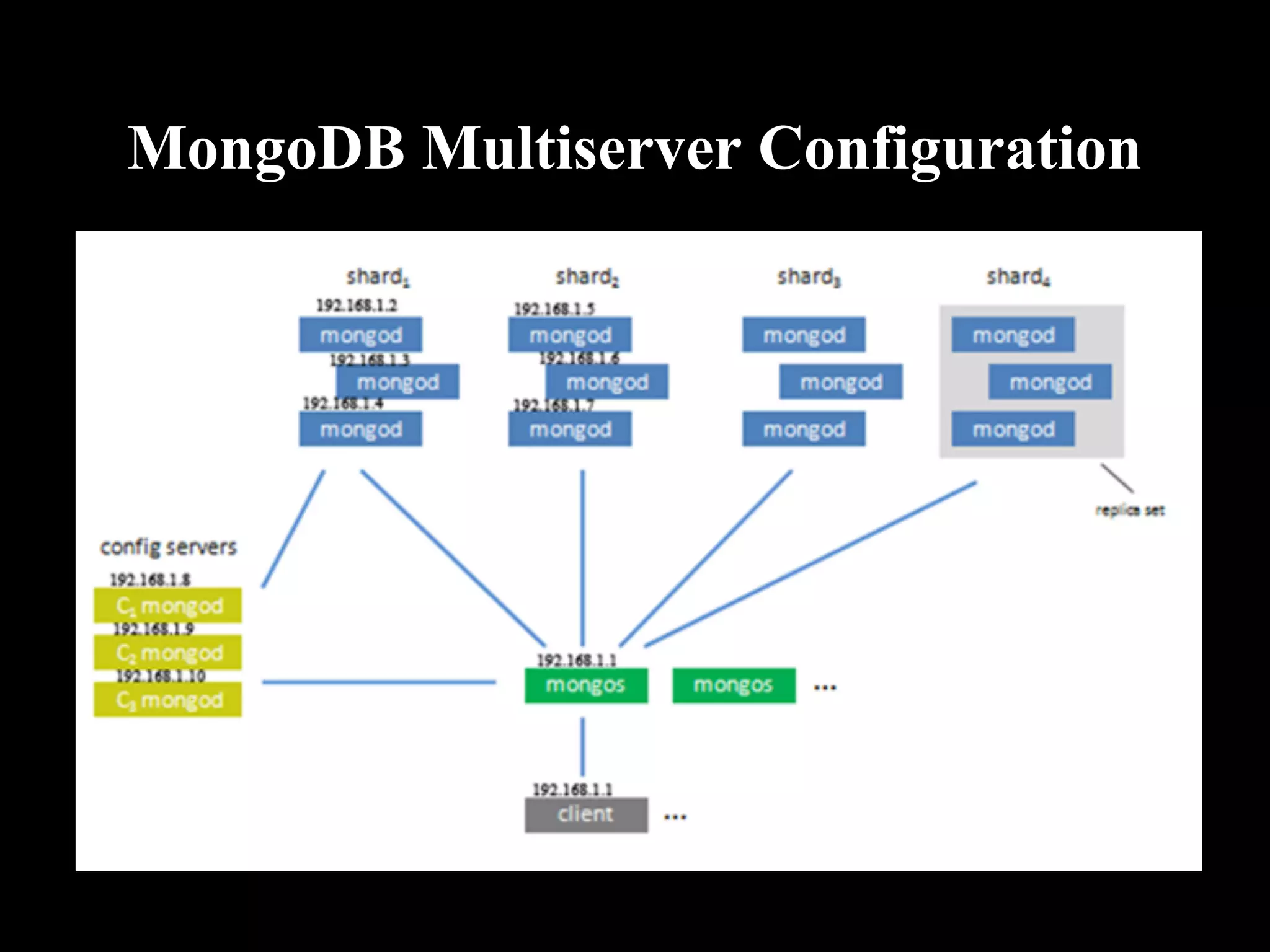
● Mongod => Database Process
● Mongoes => Shrading Controller
● Mongo => Database Shell ( javascript shell)
MongoDB/Utilities
● mongodump => Dump tool for backup and
  snapshot
● mongorestore => Restore a dump
● mongoexport => Export a single collection to
  JSON or CSV
● mongoimport => Import from JSON or CSV
● mongofiles => Utility for putting and getting
  files from MongoDB GridFS
● mongostat => Performance statistics tool
Single Server Configuration
● Install mongodb
● create a database directory
  eg: mkdir -p /data/db
● create a configuration file (optional)
  eg: /etc/mongodb.conf
● start the mongodb server
  sudo mongod -f /etc/mongodb.conf OR use init
  script.
● connect to the database using javascript console
  mongo
  You will get connected to test database.
MongoDB Multiserver Configuration
Third party Software Used With
                MogoDB
Boost => Portable open source C++ libraries.
V8     => Javascript runtime.
PCRE => Perl compatible regular expression.
MD5 => Message Digest Algorithm
Snappy => fast compression and decompression tool
Edda - Admin Tool

● Edda provides a graphical visualization of
  mongodb servers .

● Edda provides an easy way to check the status in
  multiserver configuration.
Companies Using MongoDB
●   Foursquare
●   MTV networks
●   Disney
●   Customlnk
●   Sourceforge
●   Wowmakers
●   and many others ....
Thanks
Questions ?

Mongodb (1)

  • 1.
  • 2.
  • 3.
    MongoDB ● Document oriented a. Objects are mapped as documents b. Documents can be embedded c. Dynamically typed ● No Schema ● High availability a. Replication through sharding. b. Automatic failover ● Easy scaling a. Auto shrading ( auto partitioning data across servers) ● Speed
  • 4.
    Programming Language Support Supportedby all the popular programming languages (C++, Java, Python, Ruby, Go, Haskel etc...) and web frameworks ( Rails, Django etc).
  • 5.
    Interesting Fact There areMongoDB systems that exceed one million operations per second.
  • 6.
    MongoDB document model Key Key Value Field Document Collection Database
  • 7.
    Data Types Supported ● String ● Number ● Boolean ● Date ● Null ● Array ● Object ID ● Binary data ● Regular Expression
  • 8.
    Why should weuse Mongodb ● Easy to scale ● Coding velocity (agility) ● No impedance mismatch ● Allows dynamic schema ( No Schema, agility) ● Easier to store and manipulate polymorphic data ● Variety of Indexing ● A MapReduce tool.
  • 9.
    Impedance Mismatch In objectrelational mapping an object in programming language is mapped to a record in database. So if the data is simple and database support it then there is no mismatch. But if the data is polymorphic and have unsupported types then the mapping will be difficult which causes a impedance mismatch. In mongodb data is of JSON format so it can map well to the object.
  • 10.
    Where should weavoid MongoDB ● Problems with SQL support. ● Systems with heavy emphasis on complex transactions such as banking. ● Data Warehousing whose underlying database are schema based.
  • 11.
    Indexing ● Indexing canbe done on a field ● Indexing can be done on an embedded object. ● Sparse indexing - Indexing based existence of field. ● TTL index ● Geospatial Index ( Location based access) ● Geohaystack index (Bucket based small regions)
  • 12.
    MongoDB/ Components ● Mongod=> Database Process ● Mongoes => Shrading Controller ● Mongo => Database Shell ( javascript shell)
  • 13.
    MongoDB/Utilities ● mongodump =>Dump tool for backup and snapshot ● mongorestore => Restore a dump ● mongoexport => Export a single collection to JSON or CSV ● mongoimport => Import from JSON or CSV ● mongofiles => Utility for putting and getting files from MongoDB GridFS ● mongostat => Performance statistics tool
  • 14.
    Single Server Configuration ●Install mongodb ● create a database directory eg: mkdir -p /data/db ● create a configuration file (optional) eg: /etc/mongodb.conf ● start the mongodb server sudo mongod -f /etc/mongodb.conf OR use init script. ● connect to the database using javascript console mongo You will get connected to test database.
  • 15.
  • 16.
    Third party SoftwareUsed With MogoDB Boost => Portable open source C++ libraries. V8 => Javascript runtime. PCRE => Perl compatible regular expression. MD5 => Message Digest Algorithm Snappy => fast compression and decompression tool
  • 17.
    Edda - AdminTool ● Edda provides a graphical visualization of mongodb servers . ● Edda provides an easy way to check the status in multiserver configuration.
  • 18.
    Companies Using MongoDB ● Foursquare ● MTV networks ● Disney ● Customlnk ● Sourceforge ● Wowmakers ● and many others ....
  • 19.
  • 20.