Monetizing with PayPal on MobilePraveen Alavilli,  Developer EvangelistAnshu Gupta, Mobile Product DevelopmentFabio Sisinni, Director, Mobile Product Management Kent Griffin,  Mobile Product Manager
AgendaWhat is PayPal ?
PayPal on Mobile
For Consumers
For Merchants/Sellers (Mobile Checkout)
For Developers (Mobile Payments Library)
Q & A
DemoWWW.X.COM4/28/102
PayPal Open Global Payments Platform forConsumers
Merchants/Sellers
Developers“Pay Anyone and Receive from Anyone!”(email/phone)WWW.X.COM4/28/103
For ConsumersMobile Web
SMS
Applications:
iPhone
BlackBerry
AndriodWWW.X.COM4/28/104
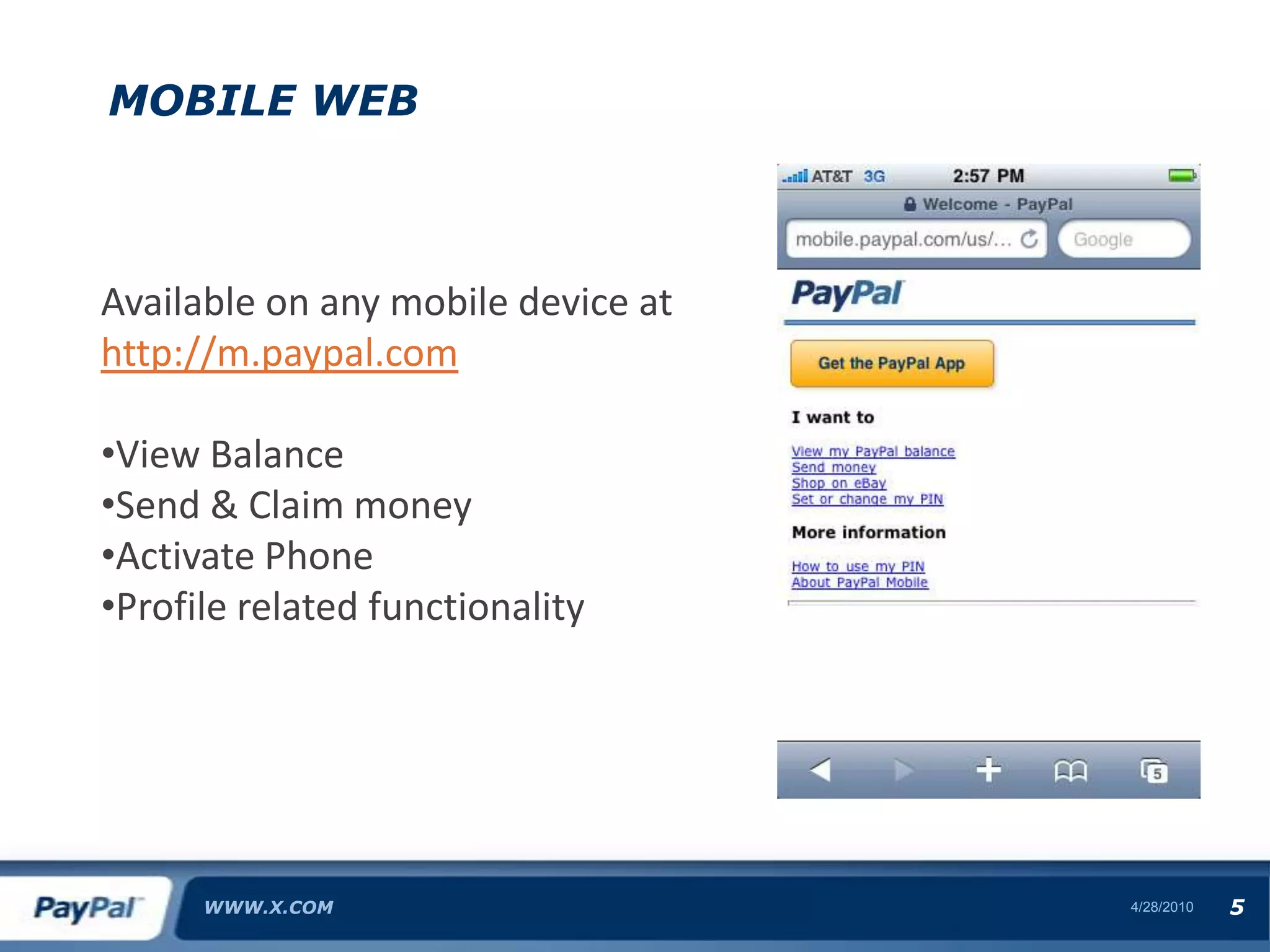
Mobile WebWWW.X.COM4/28/105Available on any mobile device athttp://m.paypal.comView Balance
Send & Claim money
Activate Phone
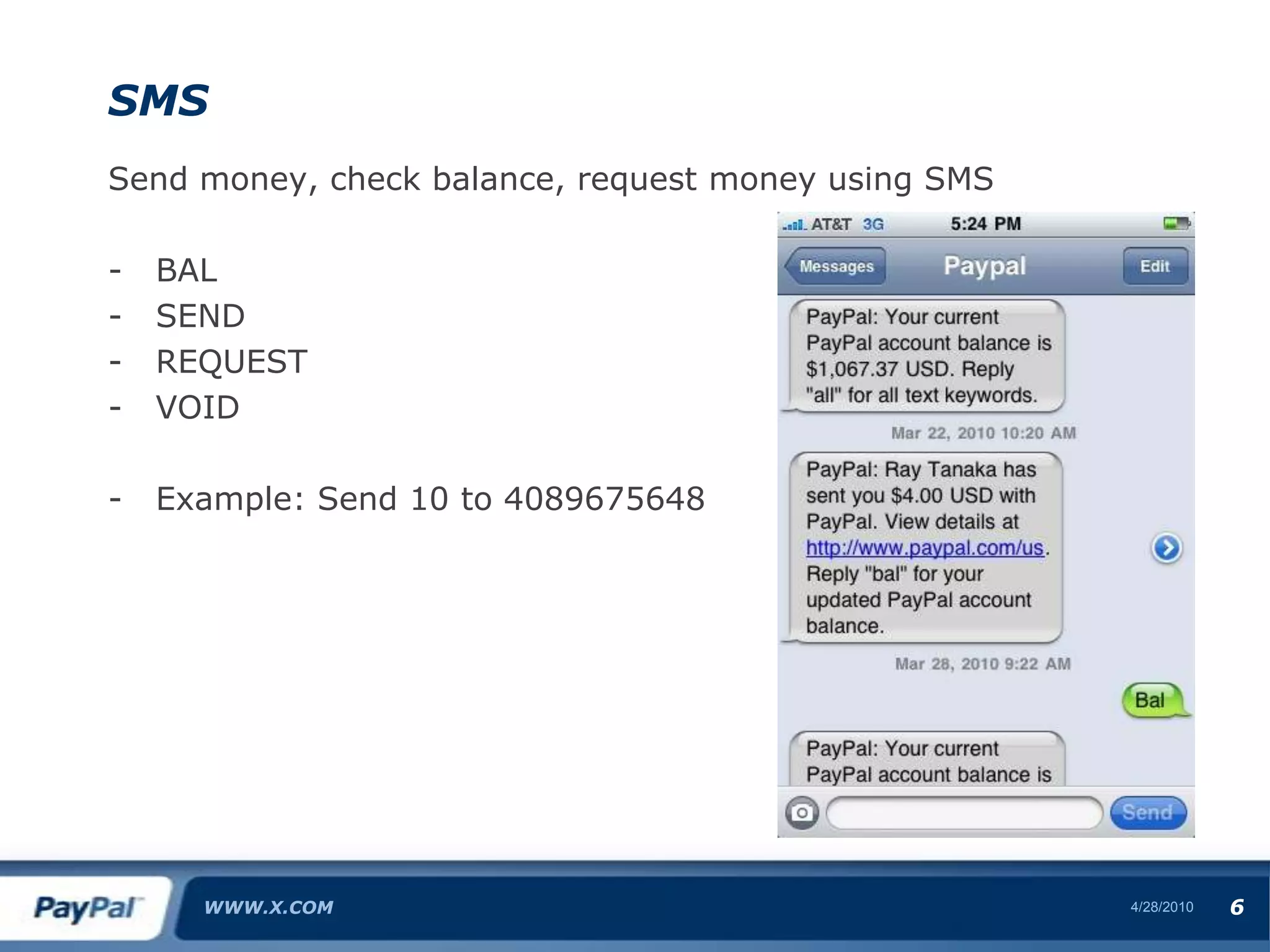
Profile related functionality SMSSend money, check balance, request money using SMSBAL
SEND
REQUEST
VOID
Example: Send 10 to 4089675648WWW.X.COM4/28/106
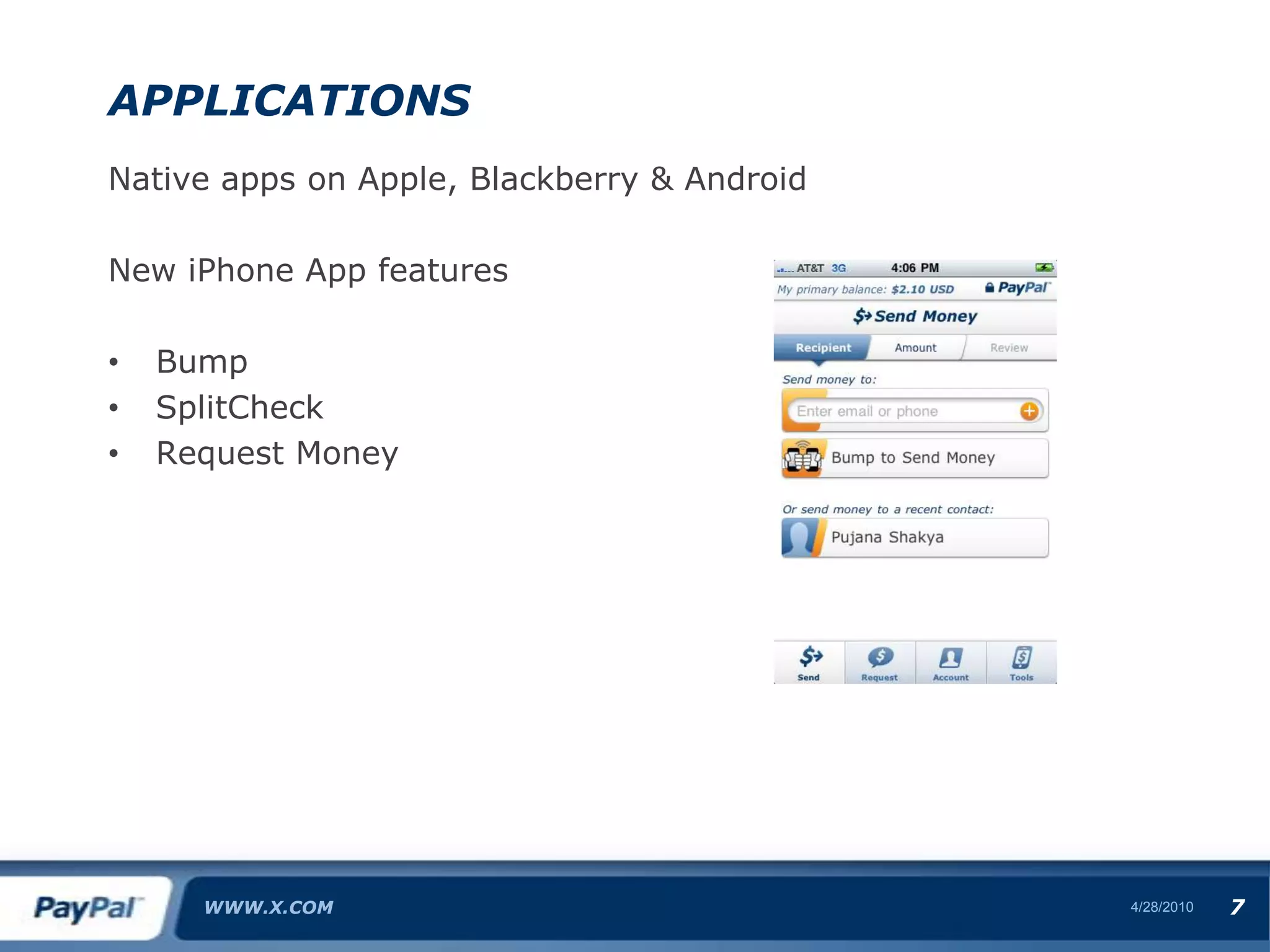
ApplicationsNative apps on Apple, Blackberry & AndroidNew iPhone App featuresBump
SplitCheck
Request MoneyWWW.X.COM4/28/107
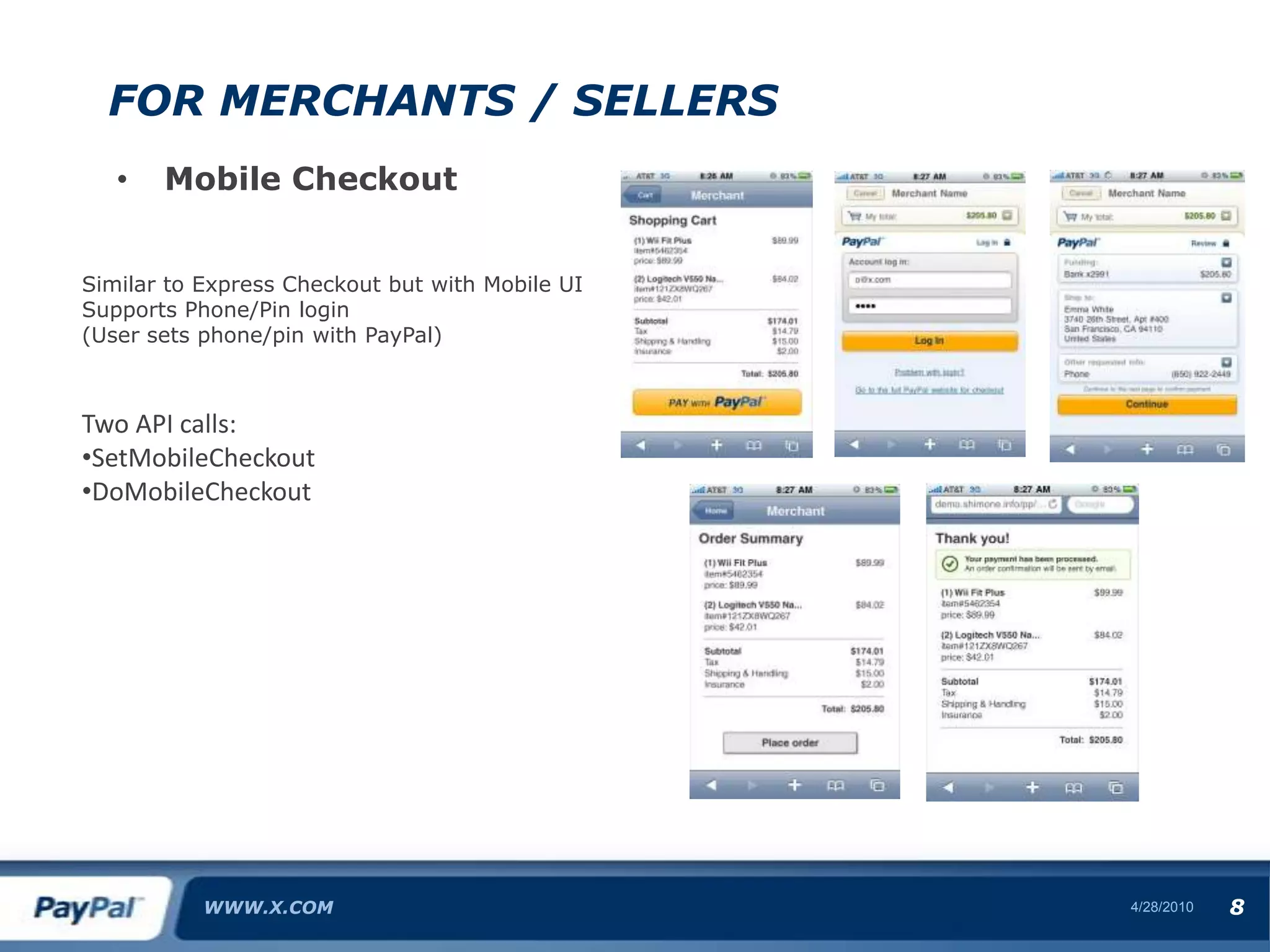
For Merchants / SellersMobile CheckoutWWW.X.COM4/28/108Similar to Express Checkout but with Mobile UISupports Phone/Pin login(User sets phone/pin with PayPal)Two API calls:SetMobileCheckout

Monetizing with PayPal on Mobile

  • 1.
    Monetizing with PayPalon MobilePraveen Alavilli, Developer EvangelistAnshu Gupta, Mobile Product DevelopmentFabio Sisinni, Director, Mobile Product Management Kent Griffin, Mobile Product Manager
  • 2.
  • 3.
  • 4.
  • 5.
  • 6.
    For Developers (MobilePayments Library)
  • 7.
  • 8.
  • 9.
    PayPal Open GlobalPayments Platform forConsumers
  • 10.
  • 11.
    Developers“Pay Anyone andReceive from Anyone!”(email/phone)WWW.X.COM4/28/103
  • 12.
  • 13.
  • 14.
  • 15.
  • 16.
  • 17.
  • 18.
    Mobile WebWWW.X.COM4/28/105Available onany mobile device athttp://m.paypal.comView Balance
  • 19.
  • 20.
  • 21.
    Profile related functionalitySMSSend money, check balance, request money using SMSBAL
  • 22.
  • 23.
  • 24.
  • 25.
    Example: Send 10to 4089675648WWW.X.COM4/28/106
  • 26.
    ApplicationsNative apps onApple, Blackberry & AndroidNew iPhone App featuresBump
  • 27.
  • 28.
  • 29.
    For Merchants /SellersMobile CheckoutWWW.X.COM4/28/108Similar to Express Checkout but with Mobile UISupports Phone/Pin login(User sets phone/pin with PayPal)Two API calls:SetMobileCheckout
  • 30.
  • 31.
  • 32.
  • 33.
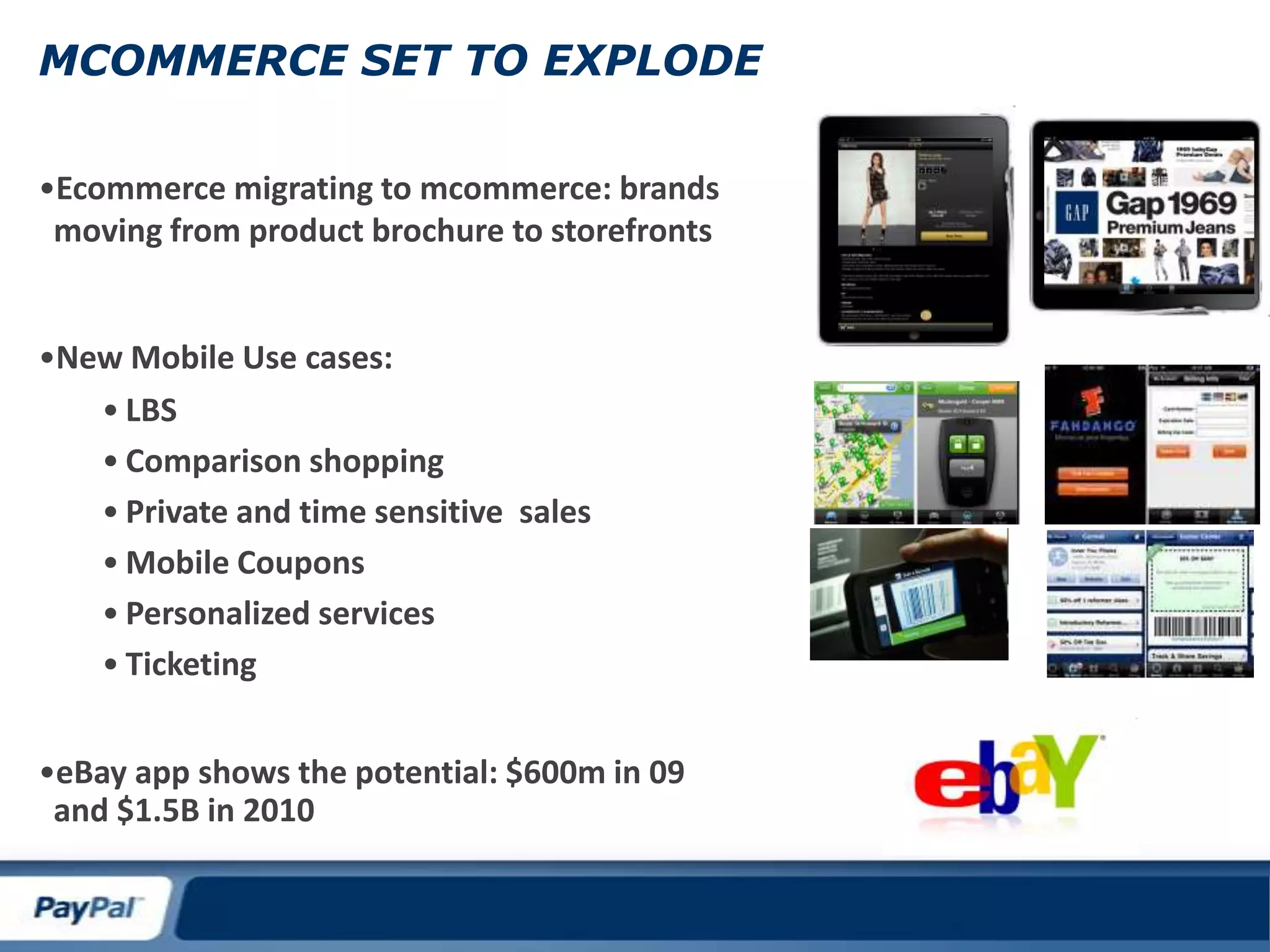
    MCOMMERCE SET TOEXPLODEEcommerce migrating to mcommerce: brands moving from product brochure to storefronts
  • 34.
  • 35.
  • 36.
  • 37.
    Private and timesensitive sales
  • 38.
  • 39.
  • 40.
  • 41.
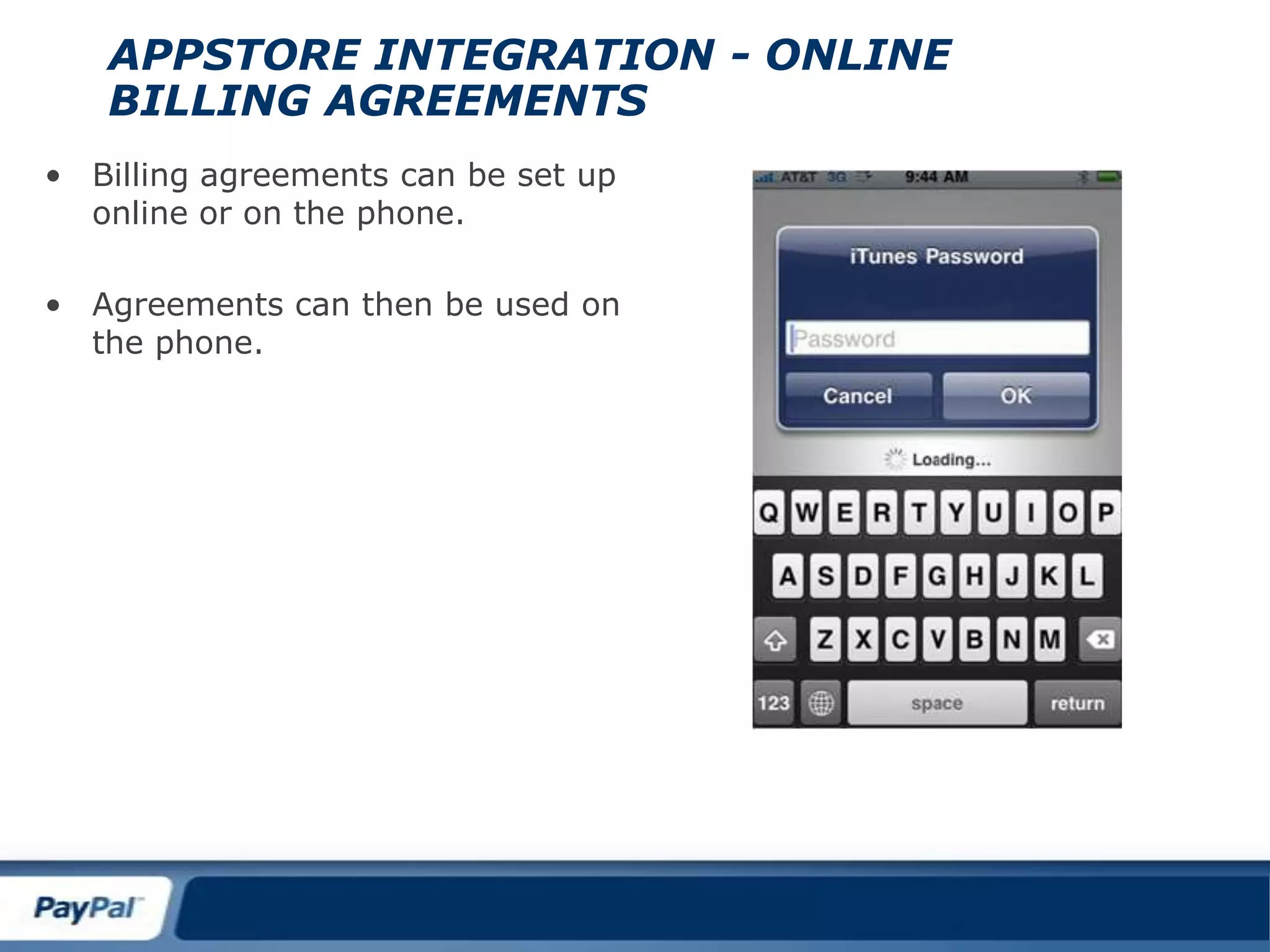
    eBay app showsthe potential: $600m in 09 and $1.5B in 2010Appstore integration - ONLINE BILLING AGREEMENTSBilling agreements can be set up online or on the phone.
  • 42.
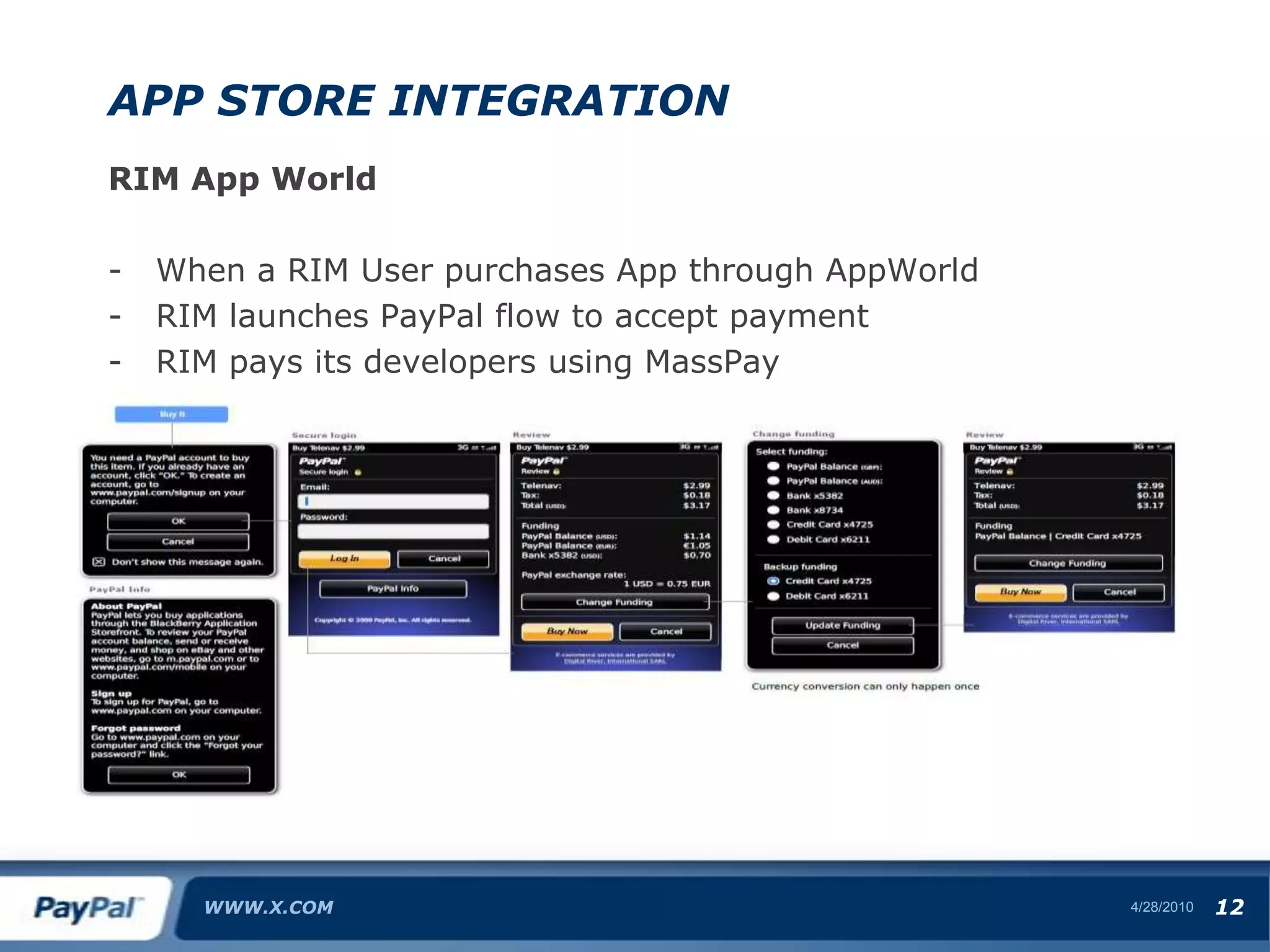
    Agreements can thenbe used on the phone.ApP Store integrationRIM App WorldWhen a RIM User purchases App through AppWorld
  • 43.
    RIM launches PayPalflow to accept payment
  • 44.
    RIM pays itsdevelopers using MassPayWWW.X.COM4/28/1012
  • 45.
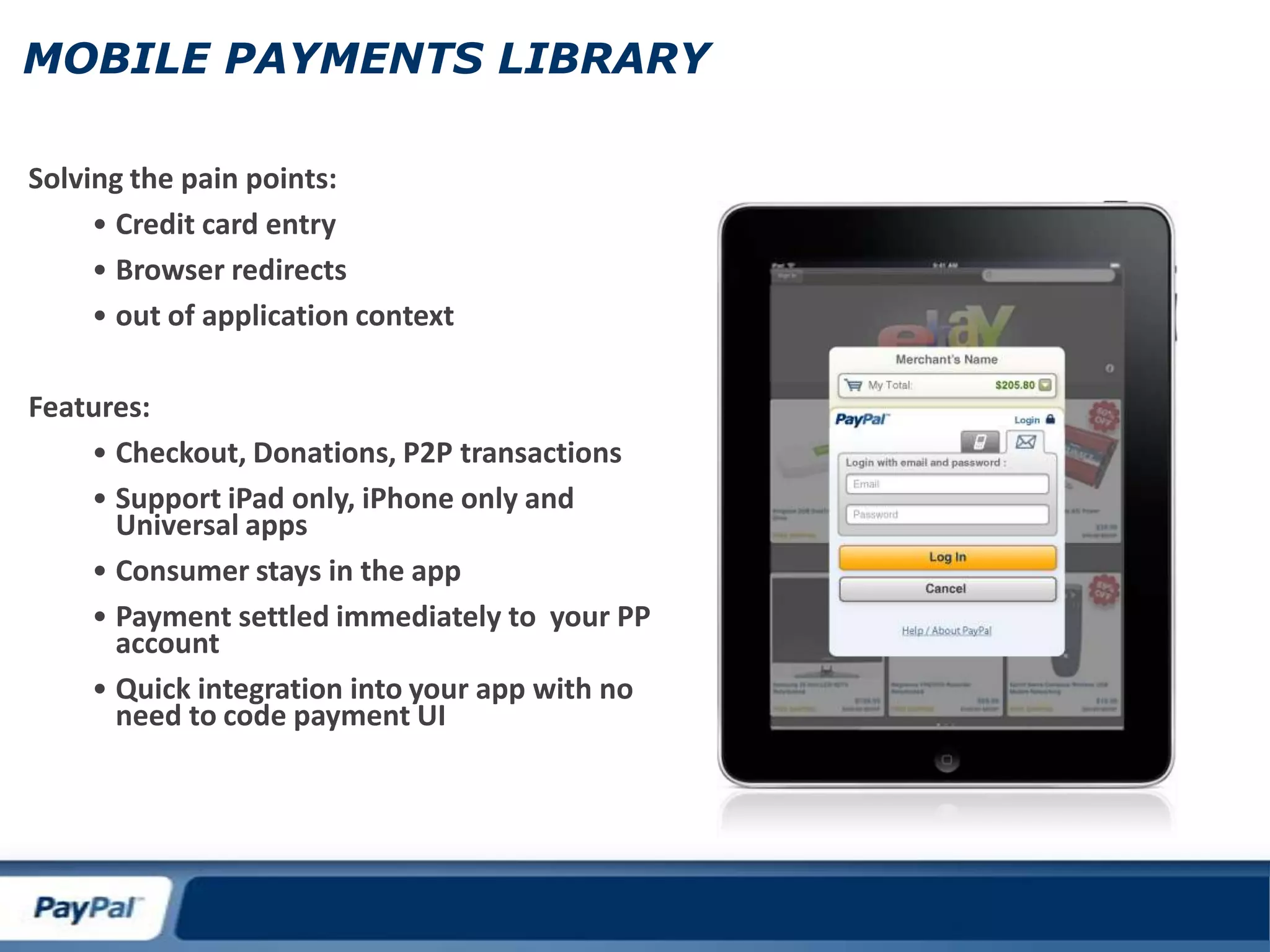
    MOBILE PAYMENTS LIBRARYSolvingthe pain points:Credit card entry
  • 46.
  • 47.
    out of applicationcontextFeatures:Checkout, Donations, P2P transactions
  • 48.
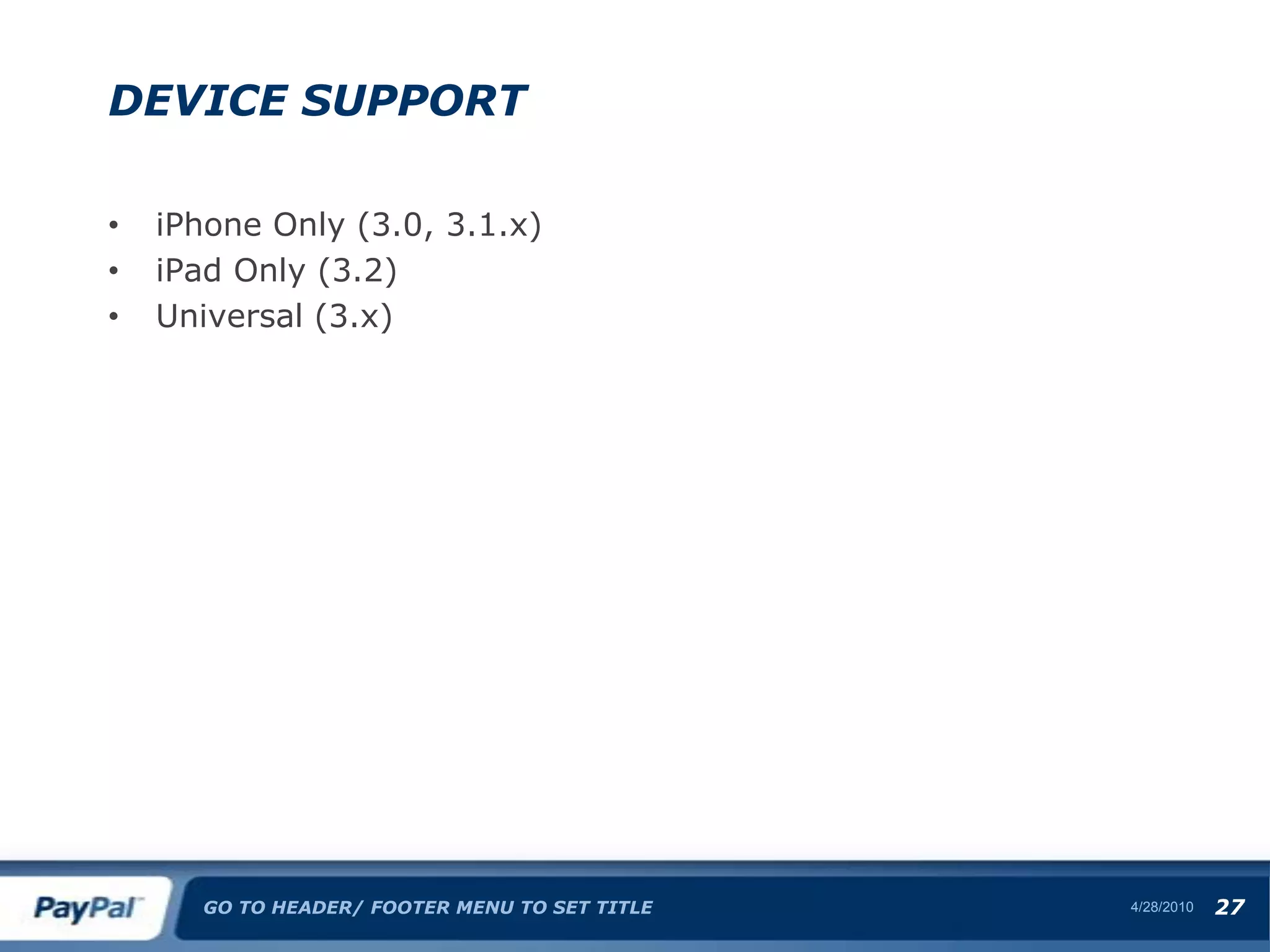
    Support iPad only,iPhone only and Universal apps
  • 49.
  • 50.
    Payment settled immediatelyto your PP account
  • 51.
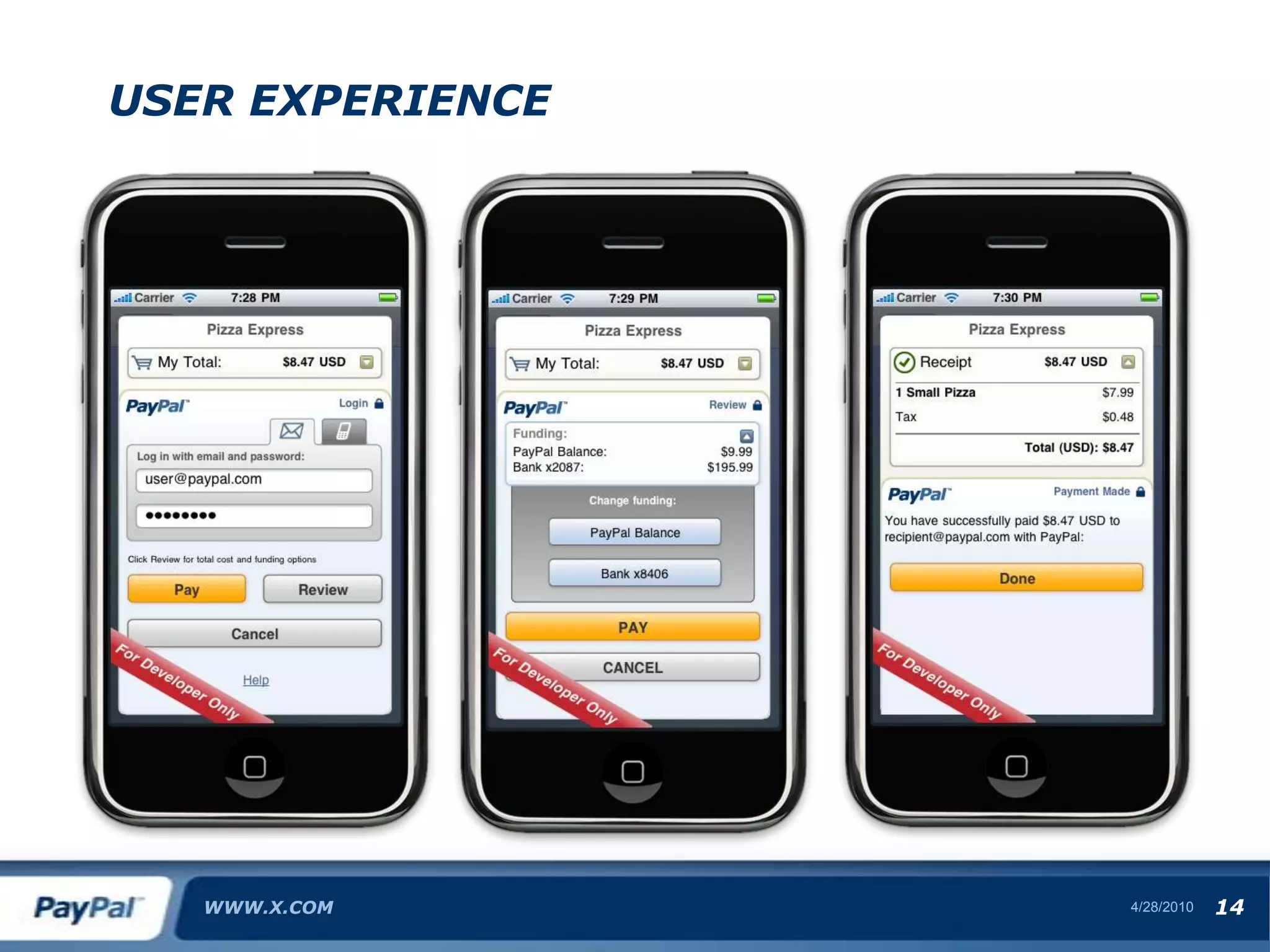
    Quick integration intoyour app with no need to code payment UIUSER experience WWW.X.COM4/28/1014
  • 52.
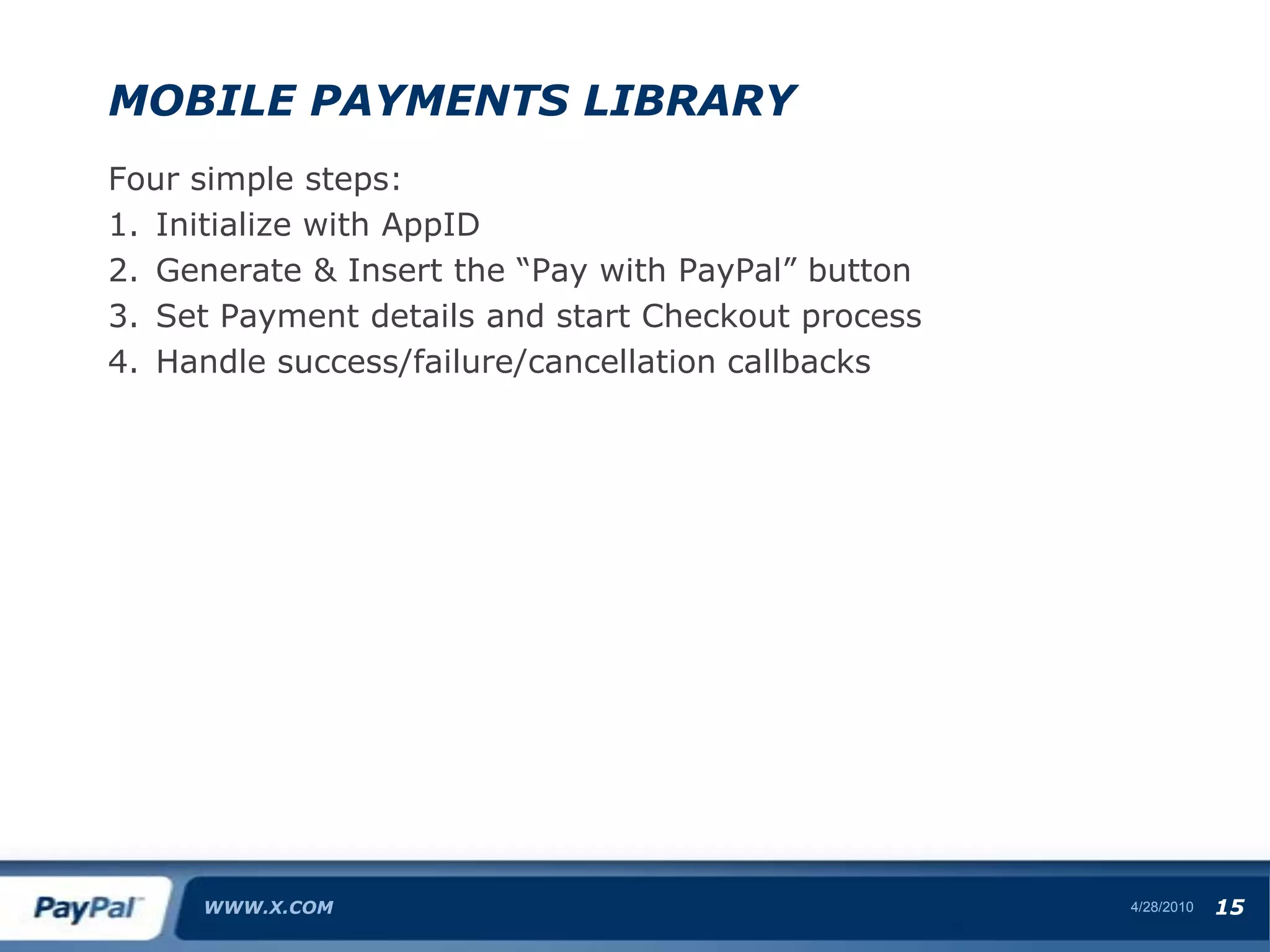
    Mobile Payments LibraryFoursimple steps:Initialize with AppIDGenerate & Insert the “Pay with PayPal” buttonSet Payment details and start Checkout processHandle success/failure/cancellation callbacksWWW.X.COM4/28/1015
  • 53.
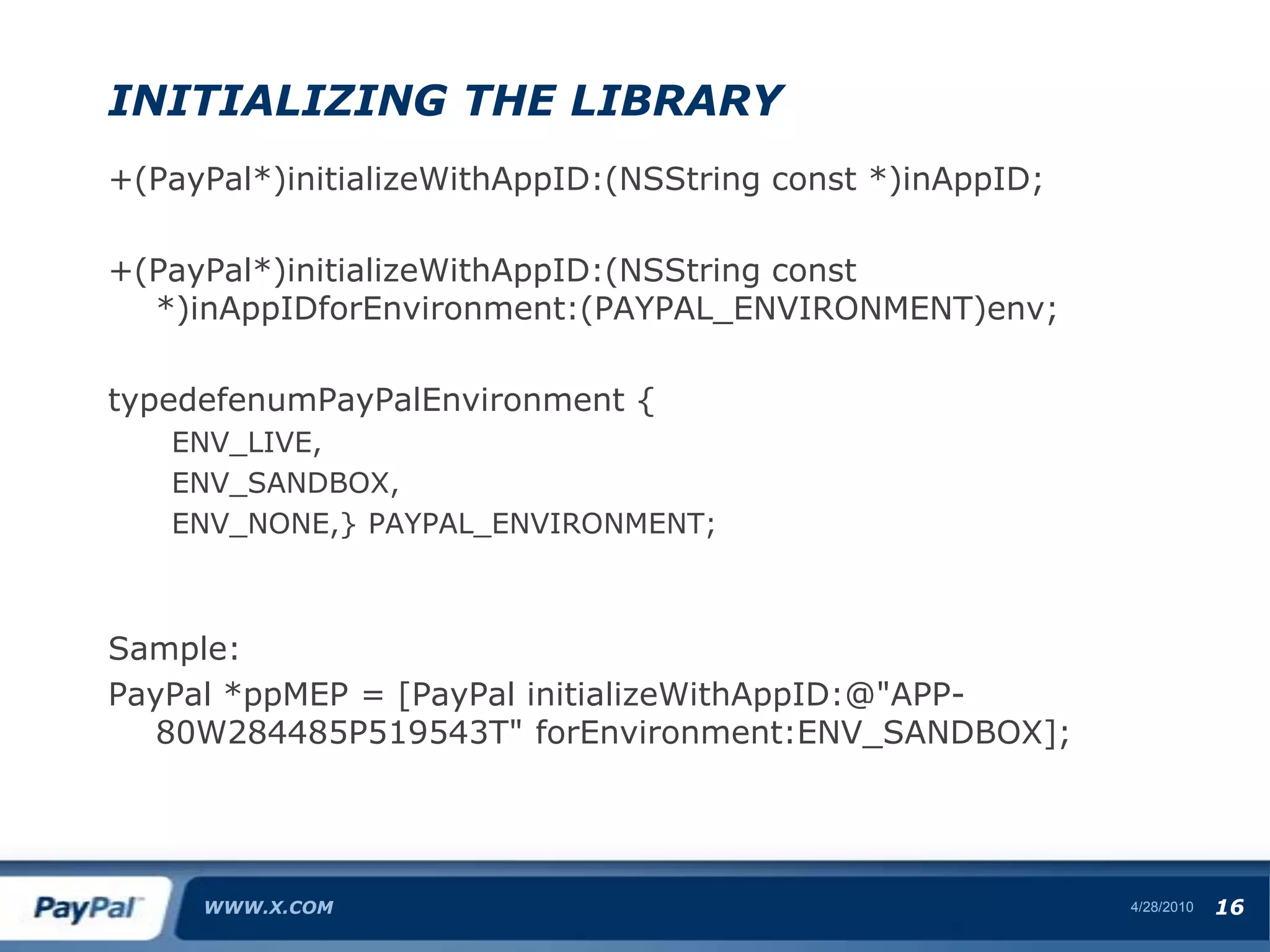
    Initializing the Library+(PayPal*)initializeWithAppID:(NSStringconst *)inAppID;+(PayPal*)initializeWithAppID:(NSString const *)inAppIDforEnvironment:(PAYPAL_ENVIRONMENT)env;typedefenumPayPalEnvironment {ENV_LIVE,ENV_SANDBOX,ENV_NONE,} PAYPAL_ENVIRONMENT;Sample:PayPal *ppMEP = [PayPal initializeWithAppID:@"APP-80W284485P519543T" forEnvironment:ENV_SANDBOX];WWW.X.COM4/28/1016
  • 54.
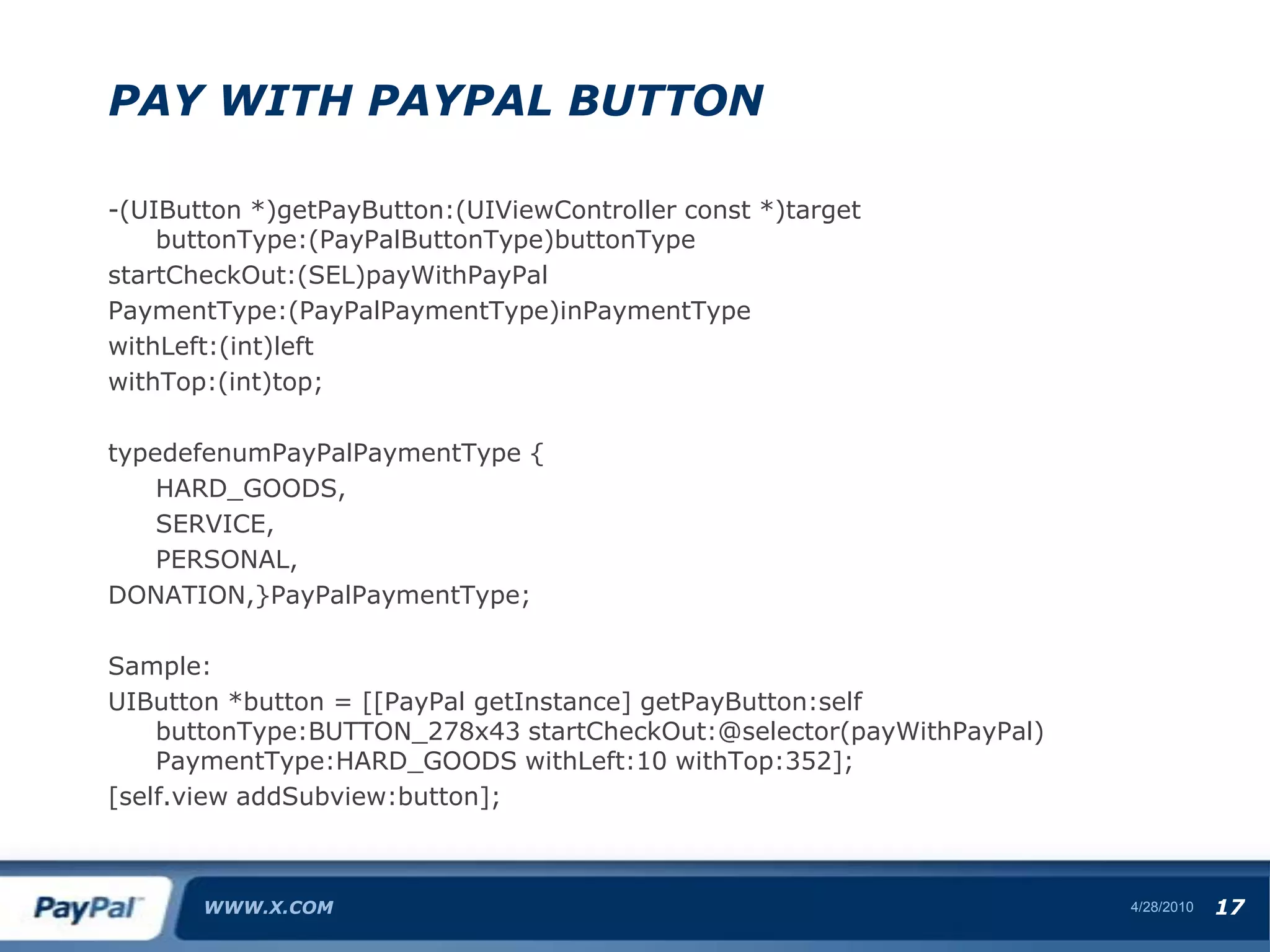
    Pay with PayPalbutton-(UIButton *)getPayButton:(UIViewController const *)target buttonType:(PayPalButtonType)buttonTypestartCheckOut:(SEL)payWithPayPalPaymentType:(PayPalPaymentType)inPaymentTypewithLeft:(int)leftwithTop:(int)top;typedefenumPayPalPaymentType { HARD_GOODS, SERVICE, PERSONAL,DONATION,}PayPalPaymentType;Sample:UIButton *button = [[PayPal getInstance] getPayButton:self buttonType:BUTTON_278x43 startCheckOut:@selector(payWithPayPal) PaymentType:HARD_GOODS withLeft:10 withTop:352];[self.view addSubview:button];WWW.X.COM4/28/1017
  • 55.
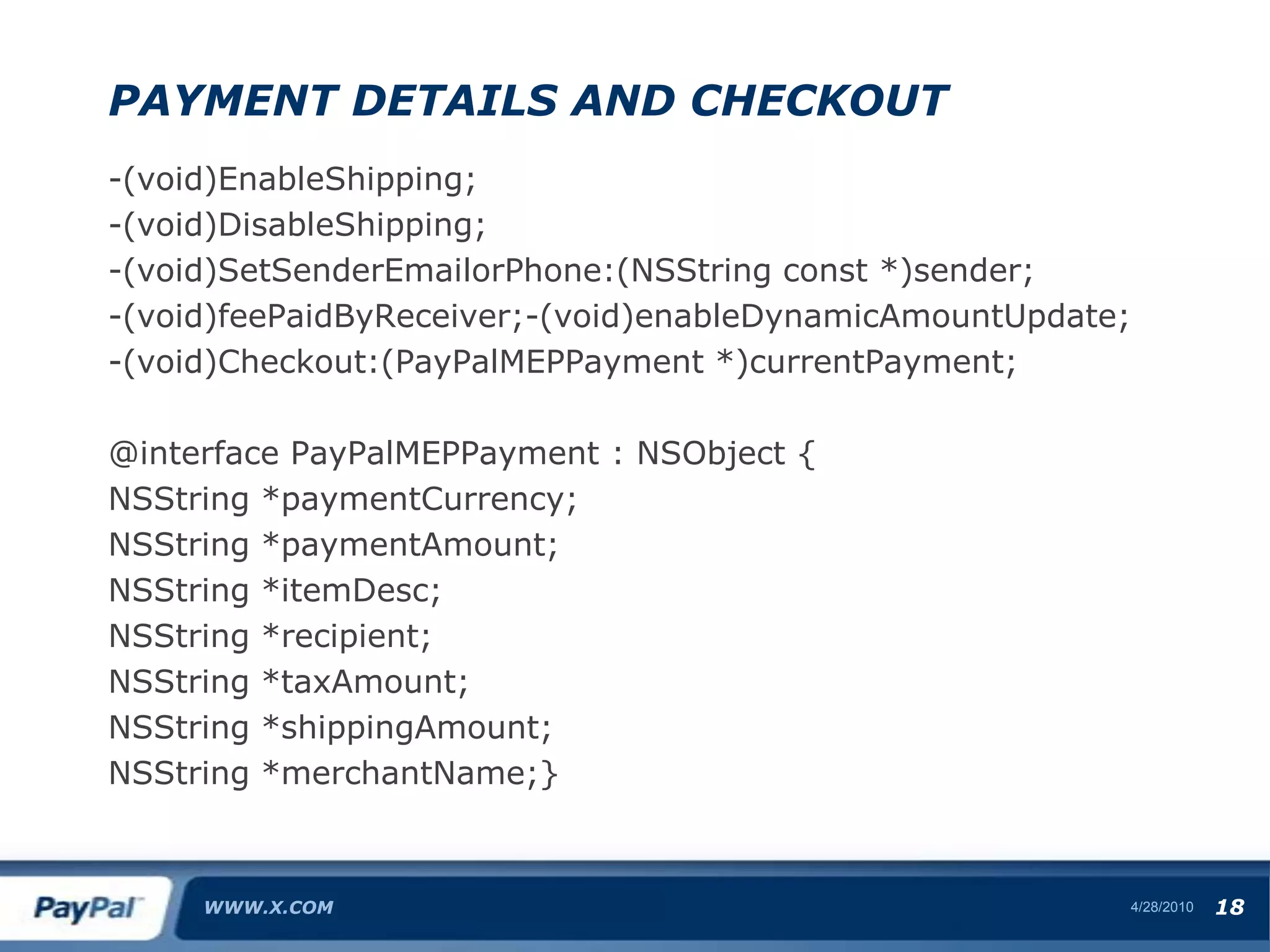
    Payment Details andCheckout-(void)EnableShipping;-(void)DisableShipping;-(void)SetSenderEmailorPhone:(NSString const *)sender;-(void)feePaidByReceiver;-(void)enableDynamicAmountUpdate;-(void)Checkout:(PayPalMEPPayment *)currentPayment;@interface PayPalMEPPayment : NSObject {NSString *paymentCurrency;NSString *paymentAmount;NSString *itemDesc;NSString *recipient;NSString *taxAmount;NSString *shippingAmount;NSString *merchantName;}WWW.X.COM4/28/1018
  • 56.
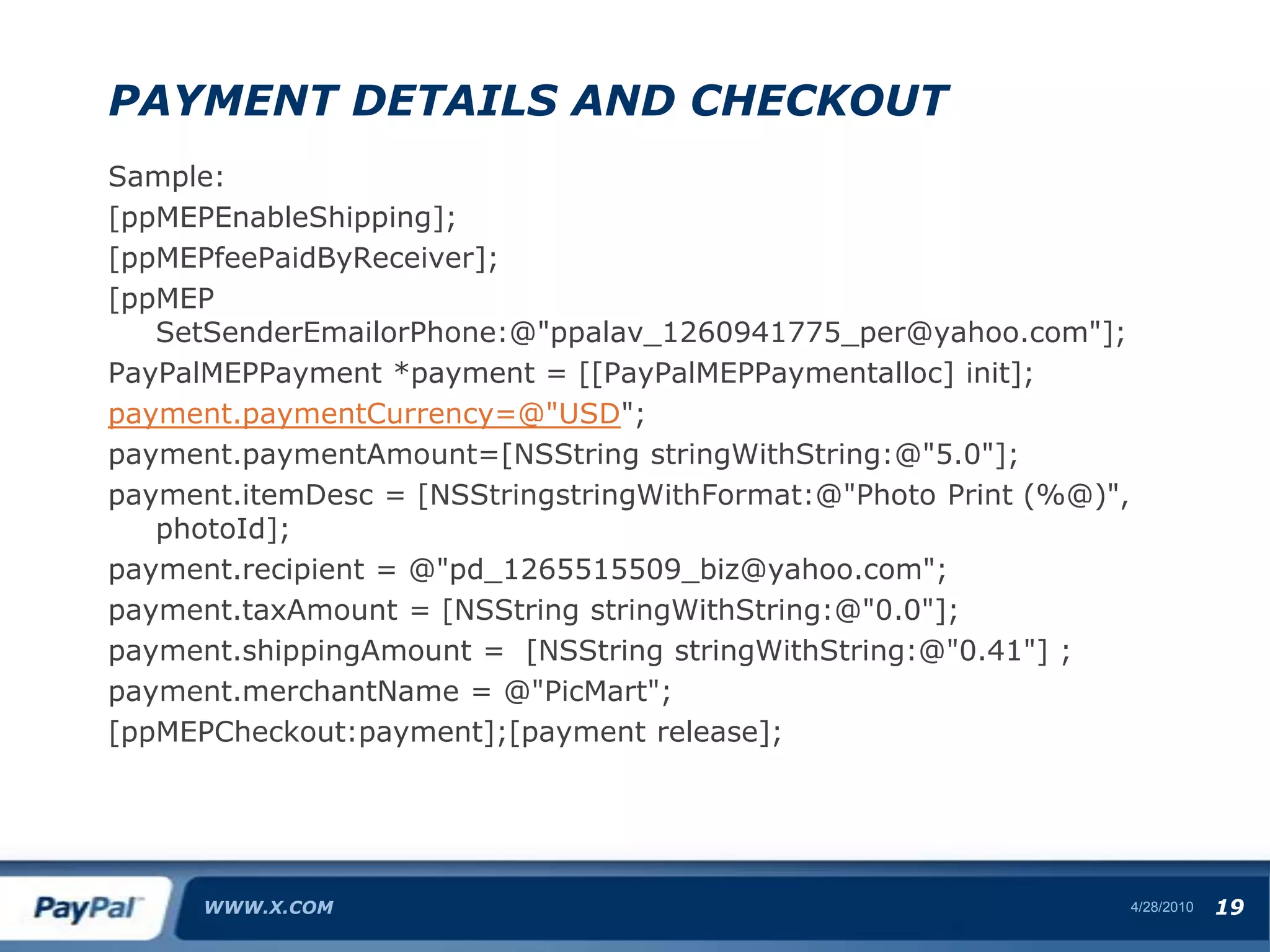
    Payment Details andCheckoutSample:[ppMEPEnableShipping];[ppMEPfeePaidByReceiver];[ppMEP SetSenderEmailorPhone:@"ppalav_1260941775_per@yahoo.com"];PayPalMEPPayment *payment = [[PayPalMEPPaymentalloc] init];payment.paymentCurrency=@"USD";payment.paymentAmount=[NSString stringWithString:@"5.0"];payment.itemDesc = [NSStringstringWithFormat:@"Photo Print (%@)", photoId];payment.recipient = @"pd_1265515509_biz@yahoo.com";payment.taxAmount = [NSString stringWithString:@"0.0"];payment.shippingAmount = [NSString stringWithString:@"0.41"] ;payment.merchantName = @"PicMart";[ppMEPCheckout:payment];[payment release];WWW.X.COM4/28/1019
  • 57.
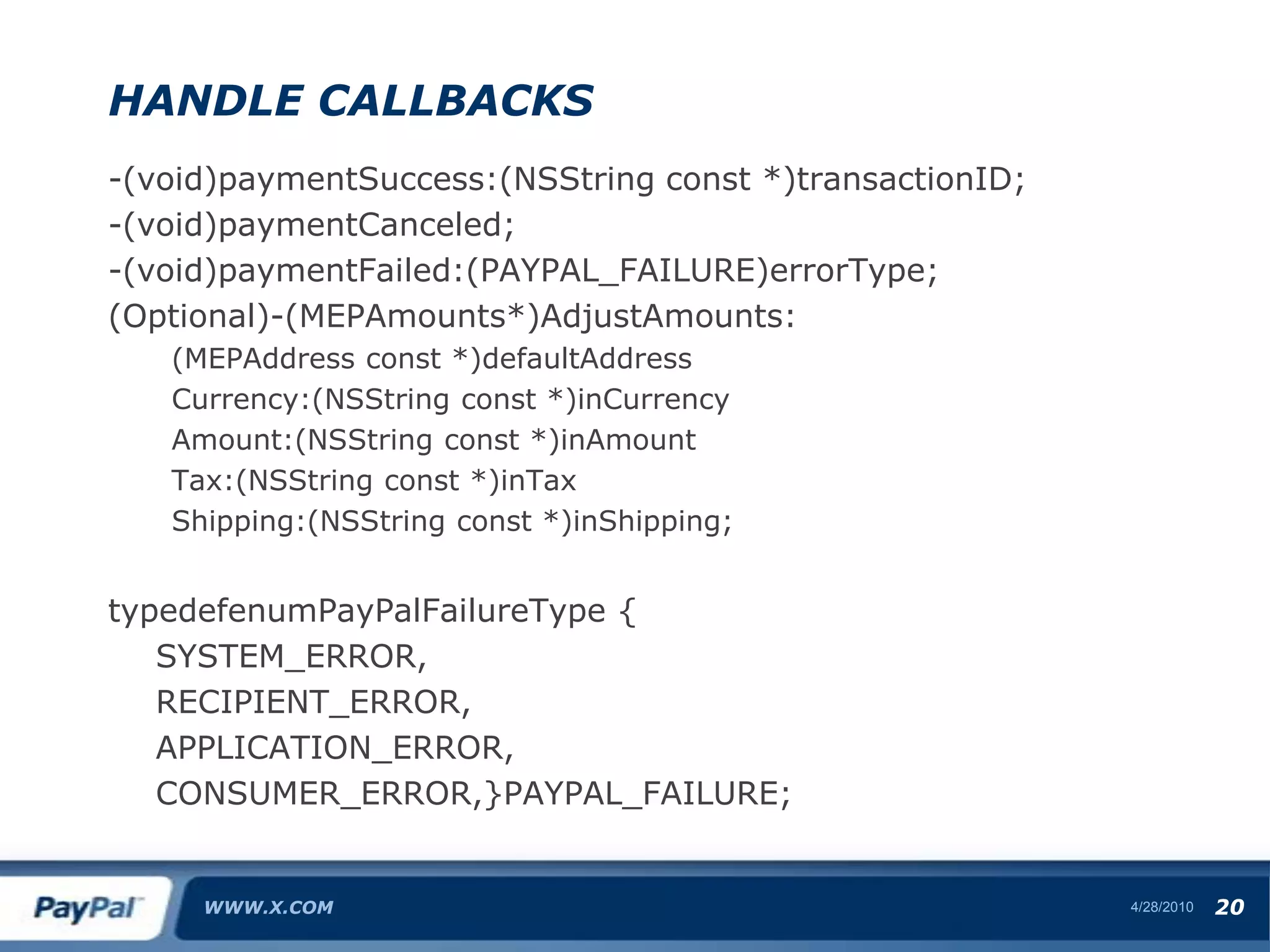
    Handle Callbacks-(void)paymentSuccess:(NSString const*)transactionID;-(void)paymentCanceled;-(void)paymentFailed:(PAYPAL_FAILURE)errorType;(Optional)-(MEPAmounts*)AdjustAmounts:(MEPAddress const *)defaultAddressCurrency:(NSString const *)inCurrencyAmount:(NSString const *)inAmountTax:(NSString const *)inTaxShipping:(NSString const *)inShipping;typedefenumPayPalFailureType { SYSTEM_ERROR, RECIPIENT_ERROR, APPLICATION_ERROR, CONSUMER_ERROR,}PAYPAL_FAILURE;WWW.X.COM4/28/1020
  • 58.
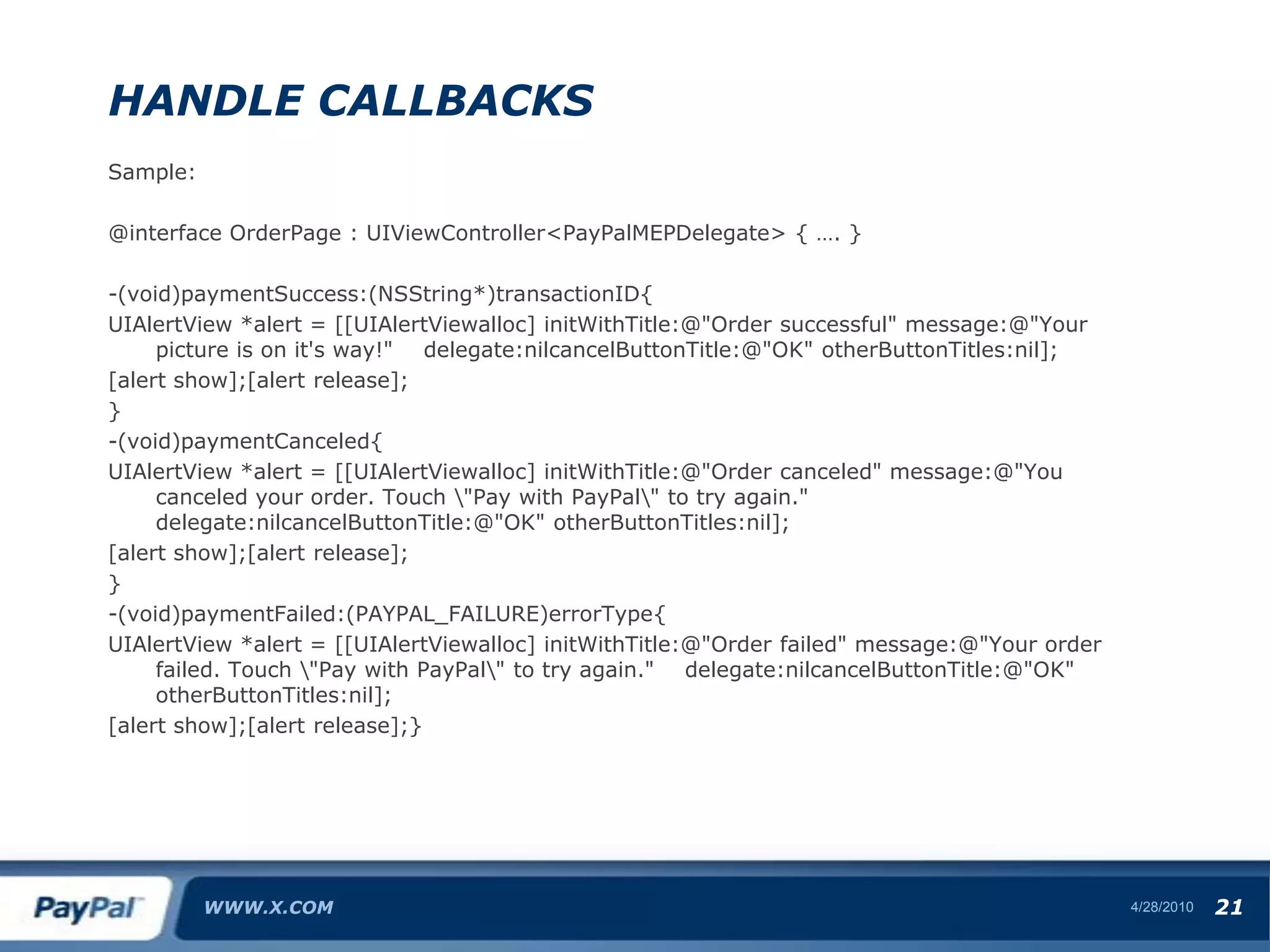
    Handle CallbacksSample:@interface OrderPage: UIViewController<PayPalMEPDelegate> { …. }-(void)paymentSuccess:(NSString*)transactionID{UIAlertView *alert = [[UIAlertViewalloc] initWithTitle:@"Order successful" message:@"Your picture is on it's way!" delegate:nilcancelButtonTitle:@"OK" otherButtonTitles:nil];[alert show];[alert release];}-(void)paymentCanceled{UIAlertView *alert = [[UIAlertViewalloc] initWithTitle:@"Order canceled" message:@"You canceled your order. Touch \"Pay with PayPal\" to try again." delegate:nilcancelButtonTitle:@"OK" otherButtonTitles:nil];[alert show];[alert release];}-(void)paymentFailed:(PAYPAL_FAILURE)errorType{UIAlertView *alert = [[UIAlertViewalloc] initWithTitle:@"Order failed" message:@"Your order failed. Touch \"Pay with PayPal\" to try again." delegate:nilcancelButtonTitle:@"OK" otherButtonTitles:nil];[alert show];[alert release];}WWW.X.COM4/28/1021
  • 59.
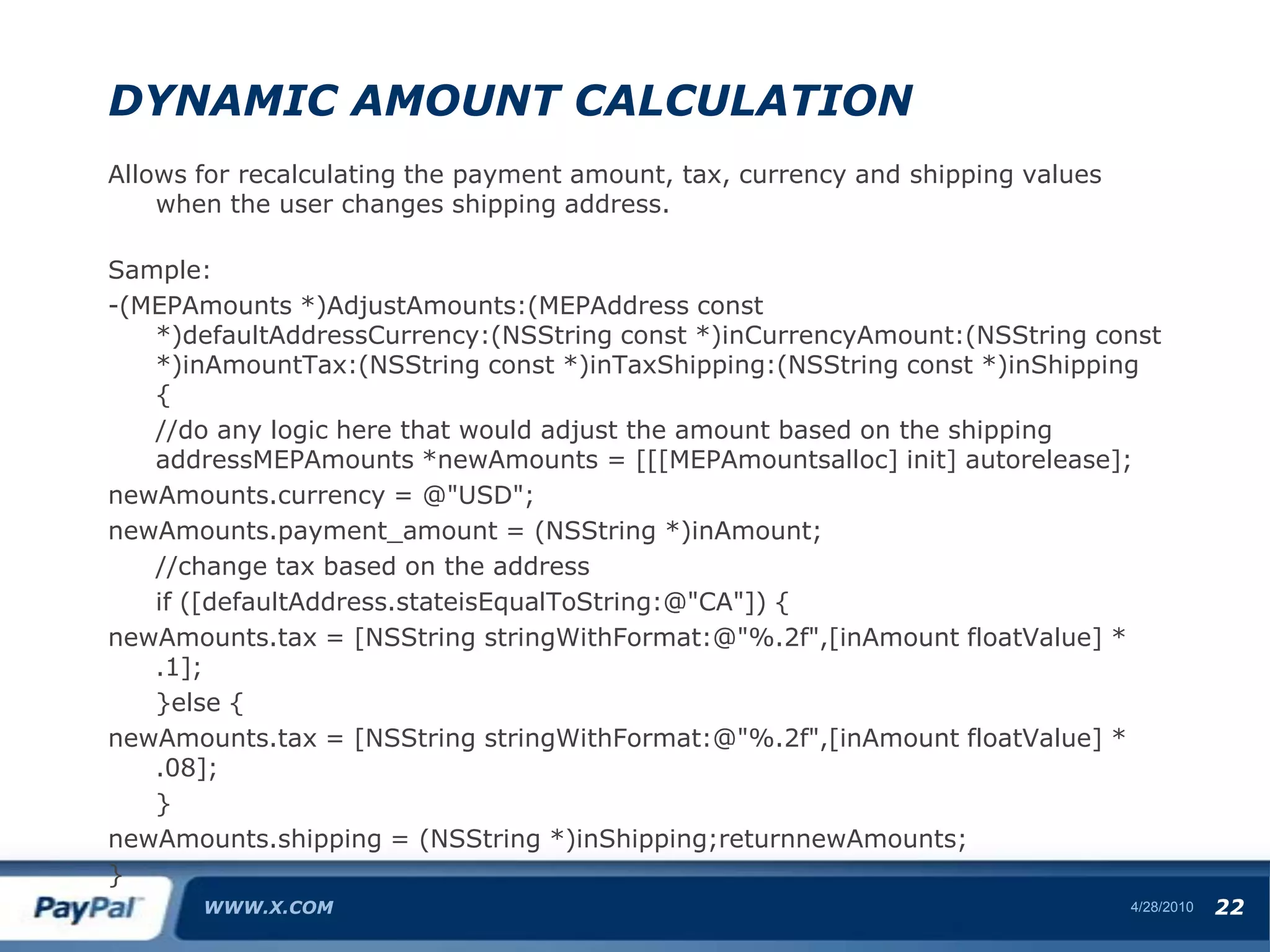
    Dynamic Amount CalculationAllowsfor recalculating the payment amount, tax, currency and shipping values when the user changes shipping address.Sample:-(MEPAmounts *)AdjustAmounts:(MEPAddress const *)defaultAddressCurrency:(NSString const *)inCurrencyAmount:(NSString const *)inAmountTax:(NSString const *)inTaxShipping:(NSString const *)inShipping { //do any logic here that would adjust the amount based on the shipping addressMEPAmounts *newAmounts = [[[MEPAmountsalloc] init] autorelease];newAmounts.currency = @"USD";newAmounts.payment_amount = (NSString *)inAmount; //change tax based on the address if ([defaultAddress.stateisEqualToString:@"CA"]) {newAmounts.tax = [NSString stringWithFormat:@"%.2f",[inAmount floatValue] * .1]; }else {newAmounts.tax = [NSString stringWithFormat:@"%.2f",[inAmount floatValue] * .08]; }newAmounts.shipping = (NSString *)inShipping;returnnewAmounts;}WWW.X.COM4/28/1022
  • 60.
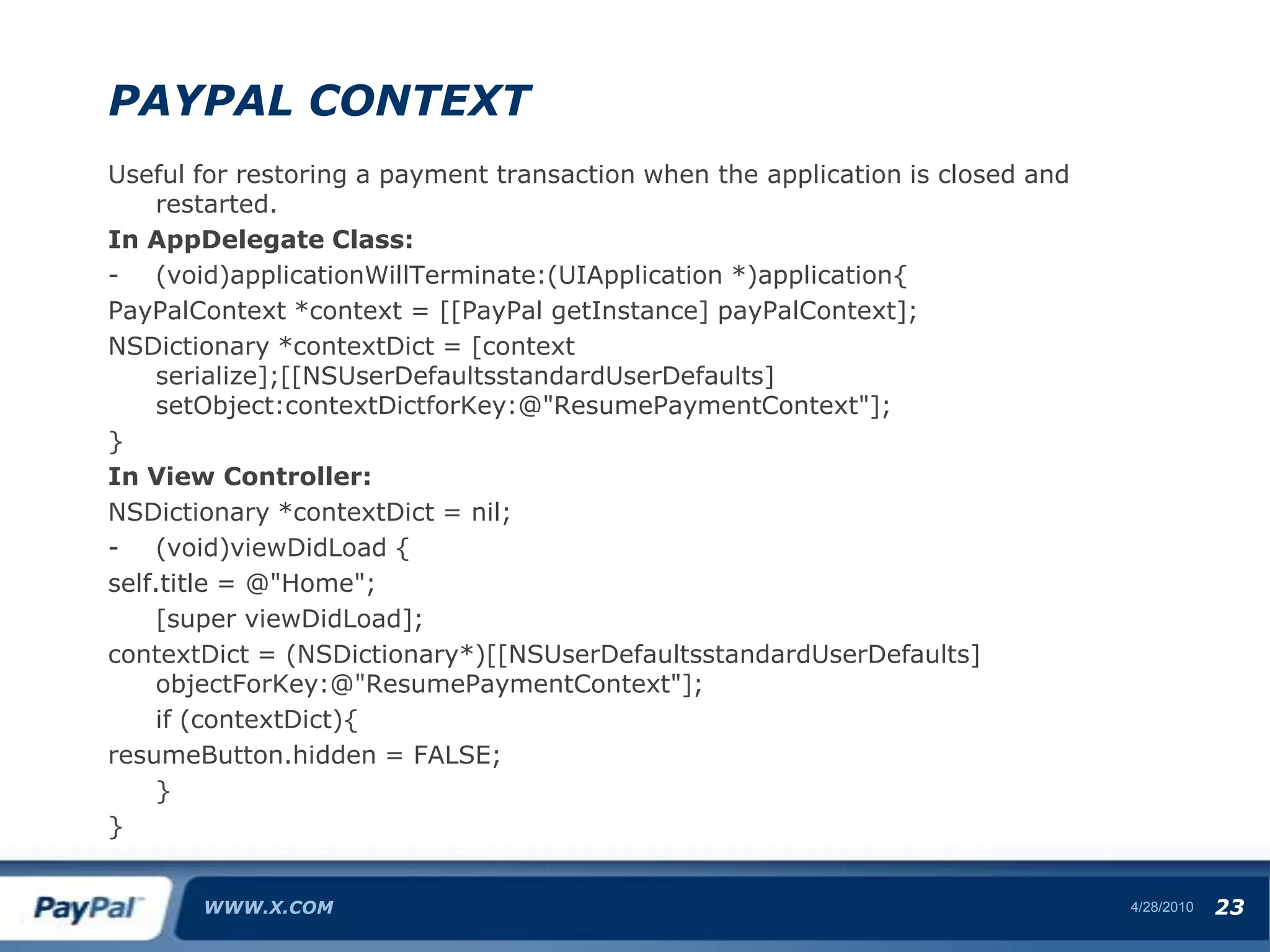
    PayPal ContextUseful forrestoring a payment transaction when the application is closed and restarted.In AppDelegate Class:(void)applicationWillTerminate:(UIApplication *)application{PayPalContext *context = [[PayPal getInstance] payPalContext];NSDictionary *contextDict = [context serialize];[[NSUserDefaultsstandardUserDefaults] setObject:contextDictforKey:@"ResumePaymentContext"];}In View Controller:NSDictionary *contextDict = nil;(void)viewDidLoad {self.title = @"Home"; [super viewDidLoad];contextDict = (NSDictionary*)[[NSUserDefaultsstandardUserDefaults] objectForKey:@"ResumePaymentContext"]; if (contextDict){resumeButton.hidden = FALSE; }}WWW.X.COM4/28/1023
  • 61.
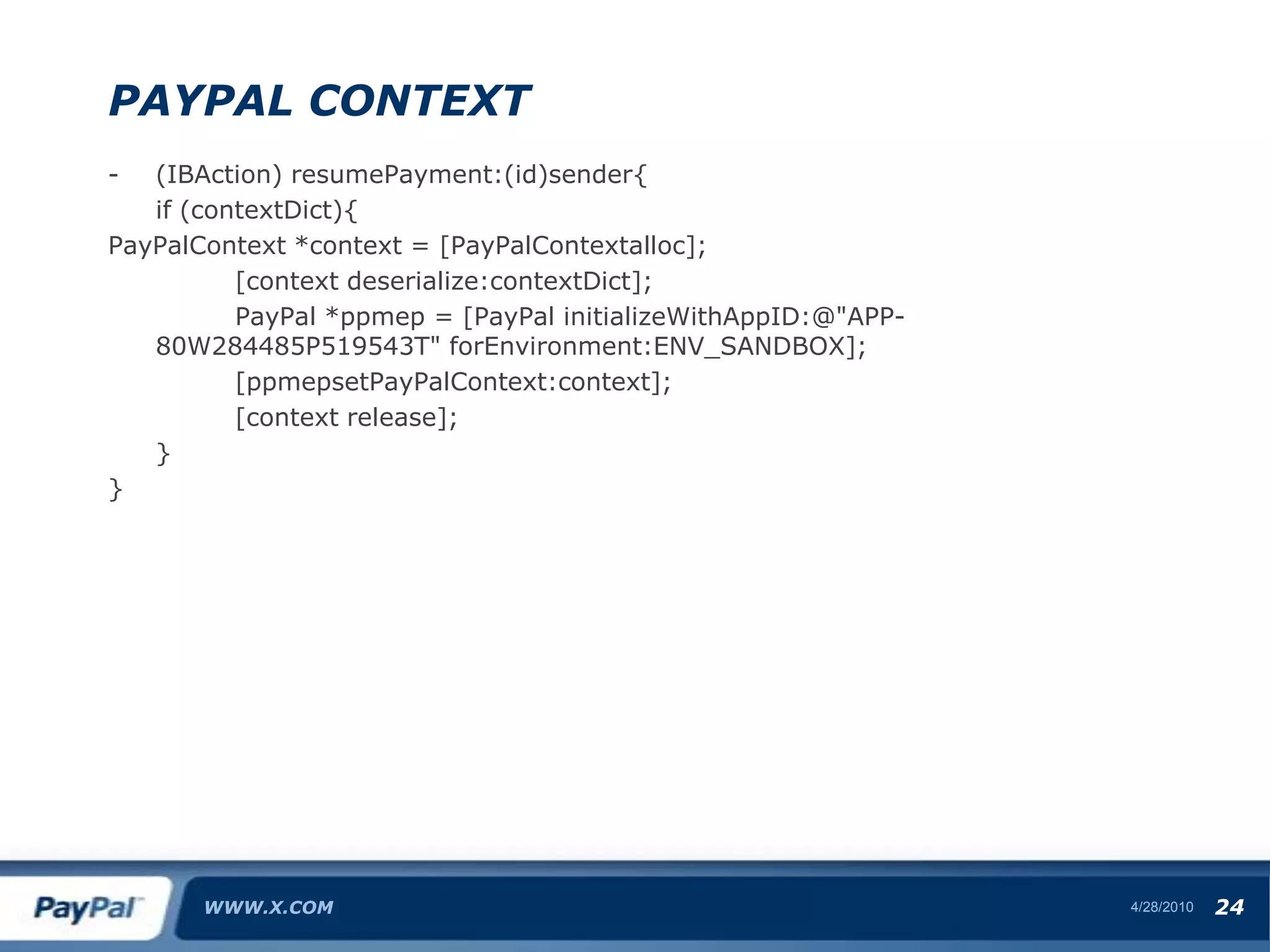
    PayPal Context(IBAction) resumePayment:(id)sender{ if(contextDict){PayPalContext *context = [PayPalContextalloc]; [context deserialize:contextDict]; PayPal *ppmep = [PayPal initializeWithAppID:@"APP-80W284485P519543T" forEnvironment:ENV_SANDBOX]; [ppmepsetPayPalContext:context]; [context release]; }}WWW.X.COM4/28/1024
  • 62.
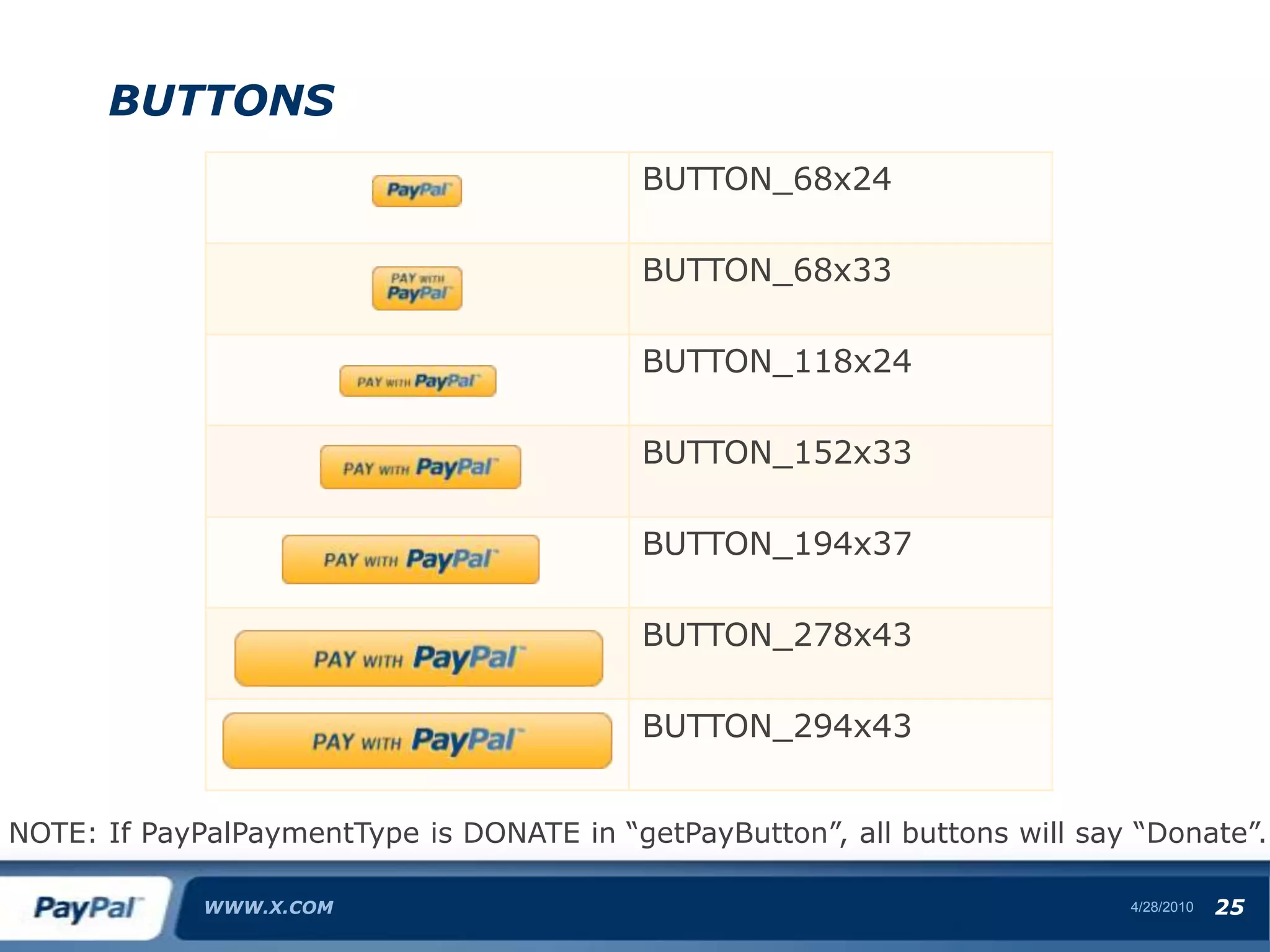
    ButtonsWWW.X.COM4/28/1025NOTE: If PayPalPaymentTypeis DONATE in “getPayButton”, all buttons will say “Donate”.
  • 63.
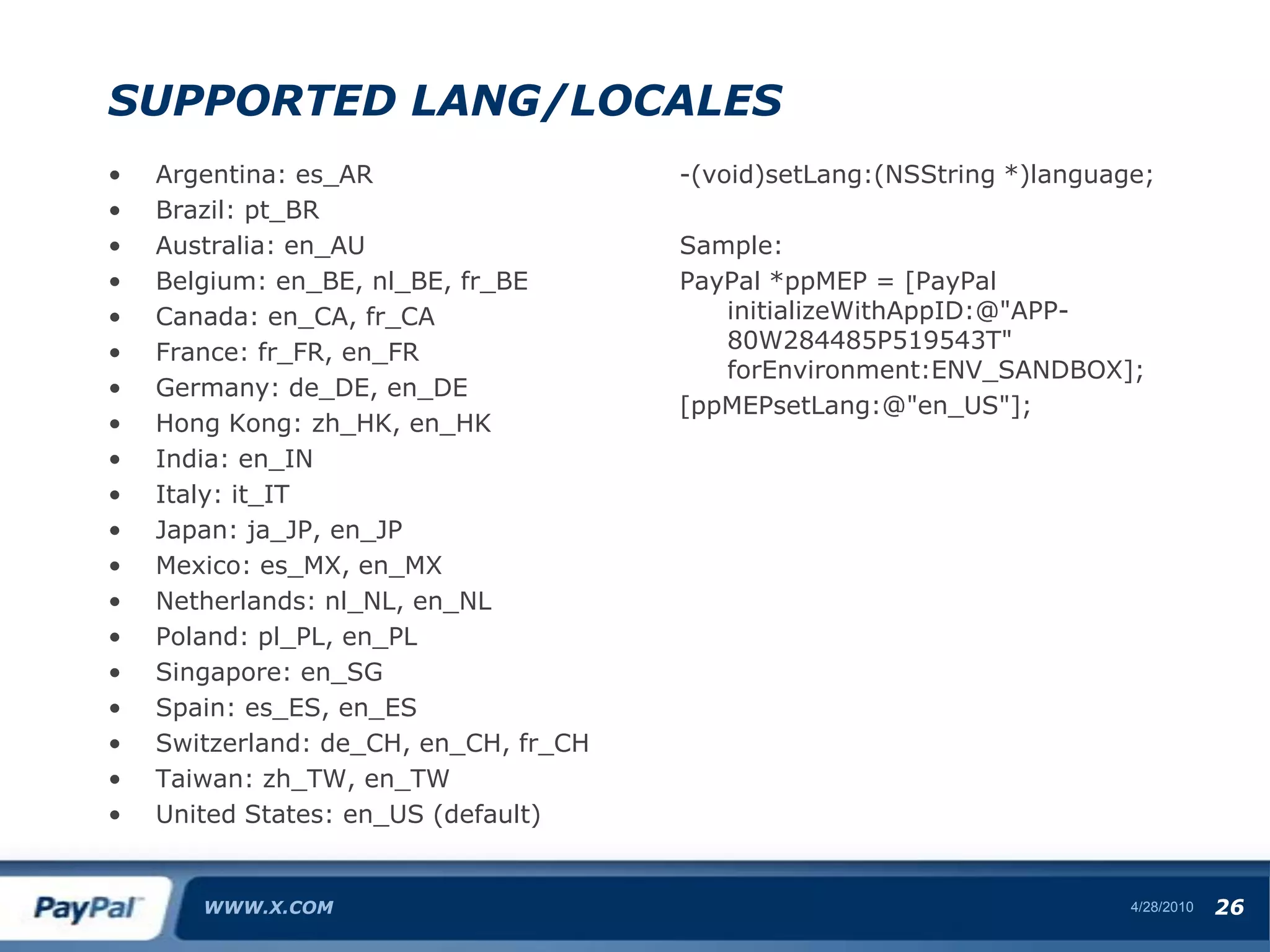
    Supported Lang/LocalesArgentina: es_ARBrazil:pt_BRAustralia: en_AUBelgium: en_BE, nl_BE, fr_BECanada: en_CA, fr_CAFrance: fr_FR, en_FRGermany: de_DE, en_DEHong Kong: zh_HK, en_HKIndia: en_INItaly: it_ITJapan: ja_JP, en_JPMexico: es_MX, en_MXNetherlands: nl_NL, en_NLPoland: pl_PL, en_PLSingapore: en_SGSpain: es_ES, en_ESSwitzerland: de_CH, en_CH, fr_CHTaiwan: zh_TW, en_TWUnited States: en_US (default)-(void)setLang:(NSString *)language;Sample:PayPal *ppMEP = [PayPal initializeWithAppID:@"APP-80W284485P519543T" forEnvironment:ENV_SANDBOX];[ppMEPsetLang:@"en_US"];WWW.X.COM4/28/1026
  • 64.
  • 65.
  • 66.
    Universal (3.x)GO TOHEADER/ FOOTER MENU TO SET TITLE4/28/1027
  • 67.
    Q & ALetus know what you need!(30% of our roadmap is based on your feedback)www.x.comTwitter: @paypalx, @ppalavilliwww.facebook.com/paypalx
  • 68.
  • 69.
    Baublet – MichaelRobinsonWWW.X.COM4/28/1029