Mojito training
Keshavaprasad B S
● What is Mojito?
● Mojito Architecture
● Installation & Setup
● Create a simple weather app
○ Understand application components
○ Deep dive into few of them
● Create a composite mojit
● Lazy Mojit
Agenda
● Mojito is a node module and hence benefits from the speed and
scalability on Node.js. It uses express package of Node.js.
● MVC framework built on YUI3
● Mojito offers:
○ Library for internationalization & localization
○ Device specific presentation
○ Ability to run the same code on either client or the server
○ Integrated unit testing
What is Mojito?
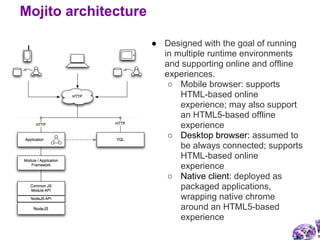
● Designed with the goal of running
in multiple runtime environments
and supporting online and offline
experiences.
○ Mobile browser: supports
HTML-based online
experience; may also support
an HTML5-based offline
experience
○ Desktop browser: assumed to
be always connected; supports
HTML-based online
experience
○ Native client: deployed as
packaged applications,
wrapping native chrome
around an HTML5-based
experience
Mojito architecture
1. Download node from http://nodejs.org.
2. Do npm install mojito
3. alias mojito=~/node_modules/mojito/bin/mojito
4. mojito version
Installation and setup
● Basic unit of composition and reuse in a Mojito application
● Why Mojit? : Module + Widget = Mojit
● Path: <app_name>/mojits/<mojit_name>
● Mojit components:
○ Models
○ Controller
○ Binders
○ View files
● Example: https://github.com/kbsbng/mojito-
examples/tree/master/HelloWorld/mojits/helloWorld
Application components: mojit
● Represent business logic entities and contain code that accesses
and persists data
● Can be shared across mojits
● Path: <app_name>/mojits/<mojit_name>/models.
● Naming convention:
○ For file name: {model_name}.{affinity}.js, where affinity is
server, client or common. For example, flickr.server.js
○ For the YUI module name: {mojit_name}Model
{Model_name}. For example, in photos/models/flickr.
server.js, use the YUI module name photosModelFlickr.
○ For the default model.server.js, use the YUI module name
{mojit_name}Model.
● Example: https://github.com/kbsbng/mojito-
examples/blob/master/HelloWorld/mojits/helloWorld/models/foo.
server.js
Application components: model
● Path: <app_name>/mojits/<mojit_name>/controller.
server.js.
● Naming convention:
○ For the file name: controller.{affinity}.js, where
affinity is common, server, or client.
○ For the YUI module name: use the mojit name.
● Example: https://github.com/kbsbng/mojito-
examples/blob/master/HelloWorld/mojits/helloWorld/controller.
server.js
● Controller <=> Model communication:
○ through ActionContext: ac.models.get
('{model_name}').{model_function}
● Passing data to the view.
○ through ActionContext: ac.done(data).
Application components: controller
● Path:
<app_name>/mojits/<mojit_name>/views/<view_file>
● Naming convention: {controller_function}.[{selector}].
{rendering_engine}.html.
Sample names: index.hb.html, photos.iphone.jade.html,
landing.android.ejs.html.
● Currently supporting templating engines:
○ Mustache
○ Handlebars (default).
● You can fairly easily add support to other templating engines like
jade and ejs.
● Example: https://github.com/kbsbng/mojito-
examples/blob/master/HelloWorld/mojits/helloWorld/binders/index.js
Application components: View
● Runs only on the client side
● Binders can
○ Attach event handlers to the mojit's DOM node
○ Communicate with other mojits on the page
○ Execute actions on the mojit that the binder is attached to
○ Refresh the mojit
● Example: https://github.com/kbsbng/mojito-
examples/blob/master/SimpleWeatherApp/mojits/Weather/binders/i
ndex.js
Application components: binder
Check the code at https://github.com/kbsbng/mojito-
examples/tree/master/SimpleWeatherApp. It:
● Creates a simple weather app to display temperature of Bangalore
by doing YQL query: "select * from weather.forecast where
woeid=2295420"
● Then, see how to add a forecast action to this module to show the
forecast.
Create a simple weather app
● https://github.com/kbsbng/mojito-
examples/blob/master/SimpleWeatherApp/routes.json
Deep dive: routing
● Helpers:
○ For mojit instance, use ac.helpers.set in controller. Examples:
■ https://github.com/kbsbng/mojito-
examples/blob/master/DemoHandlebarHelpers/mojits/Dem
o/controller.server.js
■ https://github.com/kbsbng/mojito-
examples/blob/master/DemoHandlebarHelpers/mojits/Dem
o/views/index.hb.html
○ For global use, use ac.helpers.expose in controller.
● Mojito supplied data:
○ {{mojit_view_id}}
○ {{mojit_assets}} - assets dir of the mojit
Deep dive: template and View Engine
● Example: https://github.com/kbsbng/mojito-
examples/tree/master/SimpleWeatherApp/mojits/Weather
Deep dive: Controller actions, action <=>
view mapping
● Using mojitProxy.invoke:
○ https://github.com/kbsbng/mojito-
examples/blob/master/SimpleWeatherApp/mojits/Weather/binders/index.js
Deep dive: Binder tunneling
● mojito-params-addon: http://developer.yahoo.
com/cocktails/mojito/api/classes/Params.common.html
● mojito-cookies-addon: http://developer.yahoo.
com/cocktails/mojito/api/classes/Cookie.server.html
● mojito-url-addon: http://developer.yahoo.
com/cocktails/mojito/api/classes/Url.common.html
● mojito-assets-addon: http://developer.yahoo.
com/cocktails/mojito/api/classes/Assets.common.html
● mojito-composite-addon: http://developer.yahoo.
com/cocktails/mojito/api/classes/Composite.common.html
● mojito-config-addon: http://developer.yahoo.
com/cocktails/mojito/api/classes/Config.common.html
Built-in components: Addons
● Composite mojits
○ https://github.com/kbsbng/mojito-
examples/blob/master/DemoCompositeMojitApp/application.
json
Built-in components: Mojits:
HTMLFrameMojit
● To use lazy mojit, app should:
○ create a top-level mojit instance of type HTMLFrameMojit
○ deploy the mojit instance of type HTMLFrameMojit to the client
("deploy": true)
○ create a container mojit that has children mojit instances
("children": { ... })
○ defer the dispatch of the mojit instance that will be lazily loaded
("defer": true)
Built-in components: Mojits: LazyMojit
● Defaults.json:
○ defaults for each mojit.
○ Can be overridden by parent mojit
○ Configurable based on context
● Definition.json:
○ metadata for a mojit
○ Configurable based on context
Configuration: application.json, defaults.
json, definition.json
● Launch an app using a context using --context "environment:
<context_name>"
Configuration: launch an app using a
context
● yui.config.debug (default: true)
● yui.config.logLevel (default: debug)
● yui.config.logLevelOrder: (default: ['debug', 'mojito', 'info', 'warn',
'error', 'none'] )
Configuration: logging
● Path:
○ App level: {application_name}/assets
○ Mojit level: {application_name}/mojits/{mojit_name}/assets
● Accessing assets:
○ /static/{application_name}/assets/{asset_file}
○ /static/{mojit_name}/assets/{asset_file}
● Using assets addon
Assets
● http://developer.yahoo.com/cocktails/mojito/docs/
Useful links
Thanks!

Mojito

  • 1.
  • 2.
    ● What isMojito? ● Mojito Architecture ● Installation & Setup ● Create a simple weather app ○ Understand application components ○ Deep dive into few of them ● Create a composite mojit ● Lazy Mojit Agenda
  • 3.
    ● Mojito isa node module and hence benefits from the speed and scalability on Node.js. It uses express package of Node.js. ● MVC framework built on YUI3 ● Mojito offers: ○ Library for internationalization & localization ○ Device specific presentation ○ Ability to run the same code on either client or the server ○ Integrated unit testing What is Mojito?
  • 4.
    ● Designed withthe goal of running in multiple runtime environments and supporting online and offline experiences. ○ Mobile browser: supports HTML-based online experience; may also support an HTML5-based offline experience ○ Desktop browser: assumed to be always connected; supports HTML-based online experience ○ Native client: deployed as packaged applications, wrapping native chrome around an HTML5-based experience Mojito architecture
  • 5.
    1. Download nodefrom http://nodejs.org. 2. Do npm install mojito 3. alias mojito=~/node_modules/mojito/bin/mojito 4. mojito version Installation and setup
  • 6.
    ● Basic unitof composition and reuse in a Mojito application ● Why Mojit? : Module + Widget = Mojit ● Path: <app_name>/mojits/<mojit_name> ● Mojit components: ○ Models ○ Controller ○ Binders ○ View files ● Example: https://github.com/kbsbng/mojito- examples/tree/master/HelloWorld/mojits/helloWorld Application components: mojit
  • 7.
    ● Represent businesslogic entities and contain code that accesses and persists data ● Can be shared across mojits ● Path: <app_name>/mojits/<mojit_name>/models. ● Naming convention: ○ For file name: {model_name}.{affinity}.js, where affinity is server, client or common. For example, flickr.server.js ○ For the YUI module name: {mojit_name}Model {Model_name}. For example, in photos/models/flickr. server.js, use the YUI module name photosModelFlickr. ○ For the default model.server.js, use the YUI module name {mojit_name}Model. ● Example: https://github.com/kbsbng/mojito- examples/blob/master/HelloWorld/mojits/helloWorld/models/foo. server.js Application components: model
  • 8.
    ● Path: <app_name>/mojits/<mojit_name>/controller. server.js. ●Naming convention: ○ For the file name: controller.{affinity}.js, where affinity is common, server, or client. ○ For the YUI module name: use the mojit name. ● Example: https://github.com/kbsbng/mojito- examples/blob/master/HelloWorld/mojits/helloWorld/controller. server.js ● Controller <=> Model communication: ○ through ActionContext: ac.models.get ('{model_name}').{model_function} ● Passing data to the view. ○ through ActionContext: ac.done(data). Application components: controller
  • 9.
    ● Path: <app_name>/mojits/<mojit_name>/views/<view_file> ● Namingconvention: {controller_function}.[{selector}]. {rendering_engine}.html. Sample names: index.hb.html, photos.iphone.jade.html, landing.android.ejs.html. ● Currently supporting templating engines: ○ Mustache ○ Handlebars (default). ● You can fairly easily add support to other templating engines like jade and ejs. ● Example: https://github.com/kbsbng/mojito- examples/blob/master/HelloWorld/mojits/helloWorld/binders/index.js Application components: View
  • 10.
    ● Runs onlyon the client side ● Binders can ○ Attach event handlers to the mojit's DOM node ○ Communicate with other mojits on the page ○ Execute actions on the mojit that the binder is attached to ○ Refresh the mojit ● Example: https://github.com/kbsbng/mojito- examples/blob/master/SimpleWeatherApp/mojits/Weather/binders/i ndex.js Application components: binder
  • 11.
    Check the codeat https://github.com/kbsbng/mojito- examples/tree/master/SimpleWeatherApp. It: ● Creates a simple weather app to display temperature of Bangalore by doing YQL query: "select * from weather.forecast where woeid=2295420" ● Then, see how to add a forecast action to this module to show the forecast. Create a simple weather app
  • 12.
  • 13.
    ● Helpers: ○ Formojit instance, use ac.helpers.set in controller. Examples: ■ https://github.com/kbsbng/mojito- examples/blob/master/DemoHandlebarHelpers/mojits/Dem o/controller.server.js ■ https://github.com/kbsbng/mojito- examples/blob/master/DemoHandlebarHelpers/mojits/Dem o/views/index.hb.html ○ For global use, use ac.helpers.expose in controller. ● Mojito supplied data: ○ {{mojit_view_id}} ○ {{mojit_assets}} - assets dir of the mojit Deep dive: template and View Engine
  • 14.
  • 15.
    ● Using mojitProxy.invoke: ○https://github.com/kbsbng/mojito- examples/blob/master/SimpleWeatherApp/mojits/Weather/binders/index.js Deep dive: Binder tunneling
  • 16.
    ● mojito-params-addon: http://developer.yahoo. com/cocktails/mojito/api/classes/Params.common.html ●mojito-cookies-addon: http://developer.yahoo. com/cocktails/mojito/api/classes/Cookie.server.html ● mojito-url-addon: http://developer.yahoo. com/cocktails/mojito/api/classes/Url.common.html ● mojito-assets-addon: http://developer.yahoo. com/cocktails/mojito/api/classes/Assets.common.html ● mojito-composite-addon: http://developer.yahoo. com/cocktails/mojito/api/classes/Composite.common.html ● mojito-config-addon: http://developer.yahoo. com/cocktails/mojito/api/classes/Config.common.html Built-in components: Addons
  • 17.
    ● Composite mojits ○https://github.com/kbsbng/mojito- examples/blob/master/DemoCompositeMojitApp/application. json Built-in components: Mojits: HTMLFrameMojit
  • 18.
    ● To uselazy mojit, app should: ○ create a top-level mojit instance of type HTMLFrameMojit ○ deploy the mojit instance of type HTMLFrameMojit to the client ("deploy": true) ○ create a container mojit that has children mojit instances ("children": { ... }) ○ defer the dispatch of the mojit instance that will be lazily loaded ("defer": true) Built-in components: Mojits: LazyMojit
  • 19.
    ● Defaults.json: ○ defaultsfor each mojit. ○ Can be overridden by parent mojit ○ Configurable based on context ● Definition.json: ○ metadata for a mojit ○ Configurable based on context Configuration: application.json, defaults. json, definition.json
  • 20.
    ● Launch anapp using a context using --context "environment: <context_name>" Configuration: launch an app using a context
  • 21.
    ● yui.config.debug (default:true) ● yui.config.logLevel (default: debug) ● yui.config.logLevelOrder: (default: ['debug', 'mojito', 'info', 'warn', 'error', 'none'] ) Configuration: logging
  • 22.
    ● Path: ○ Applevel: {application_name}/assets ○ Mojit level: {application_name}/mojits/{mojit_name}/assets ● Accessing assets: ○ /static/{application_name}/assets/{asset_file} ○ /static/{mojit_name}/assets/{asset_file} ● Using assets addon Assets
  • 23.
  • 24.