PRPEARED BY: PROF. NEHA HARDE ©
C PROGRAMMING
Module 1
Introduction to C Programming
Course Outcome (CO1):
Understand the basic syntax and semantics of C.
PRPEARED BY: PROF. NEHA HARDE ©
 What is Computer ?
 Characteristics of computer
 Benefits of computer
 Computer Components
 Input Devices
 Output Devices
 Central Processing Unit
 Memory Unit
Introduction to Components
of a computer system
PRPEARED BY: PROF. NEHA HARDE ©
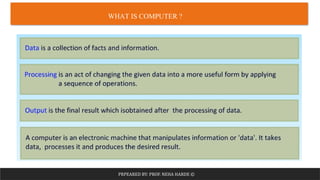
WHAT IS COMPUTER ?
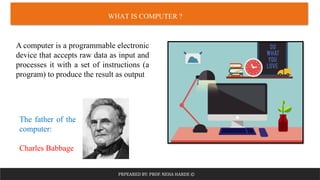
A computer is a programmable electronic
device that accepts raw data as input and
processes it with a set of instructions (a
program) to produce the result as output
The father of the
computer:
Charles Babbage
PRPEARED BY: PROF. NEHA HARDE ©
WHAT IS COMPUTER ?
PRPEARED BY: PROF. NEHA HARDE ©
CHARACTERISTICS OF COMPUTER
Speed Memory Accuracy Diligence Versatile
Multitask
ing
PRPEARED BY: PROF. NEHA HARDE ©
BENEFITS OF COMPUTER
Storage
Increases
Productivity
Connects
to the
Internet
Improves
ability
Provides
an
entertainm
ent
Organizes
data and
information
PRPEARED BY: PROF. NEHA HARDE ©
COMPUTER COMPONENTS
PRPEARED BY: PROF. NEHA HARDE ©
COMPUTER COMPONENTS
 Input is any data or instruction given to the computer
 Input device enables the user to send data, information, or control signals
to a computer
 The prime purpose of input devices are to translate data and information
from human-readable format into electrical impulses
1. Input Devices
PRPEARED BY: PROF. NEHA HARDE ©
INPUT DEVICES
 Keyboard is a basic input device that is
used to enter data into a computer or any
other electronic device by pressing keys
 Mouse is a pointing hand-held input
device which is used to move cursor or
pointer across the screen
PRPEARED BY: PROF. NEHA HARDE ©
 Scanner scans the picture or a document
converts it into a digital format and is
displayed on the screen as an output
 Joystick is a pointing input device like a
mouse and movement of stick controls the
cursor or pointer on the screen
INPUT DEVICES
PRPEARED BY: PROF. NEHA HARDE ©
 Light pen is like a pen. The tip of the light
pen contains a light-sensitive detector that
enables the user to point to or select objects
on the display screen
 Microphone is used to input the sound to
presentations and with webcams for video
conferencing
INPUT DEVICES
PRPEARED BY: PROF. NEHA HARDE ©
COMPUTER COMPONENTS
 The output device displays the result of the processing of raw data that is
entered in the computer through an input device
 It is used to bring out the information from the computer
2. Output Devices
PRPEARED BY: PROF. NEHA HARDE ©
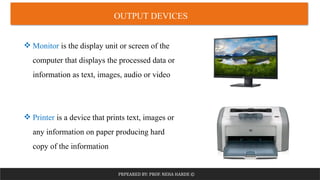
 Monitor is the display unit or screen of the
computer that displays the processed data or
information as text, images, audio or video
 Printer is a device that prints text, images or
any information on paper producing hard
copy of the information
OUTPUT DEVICES
PRPEARED BY: PROF. NEHA HARDE ©
 A projector is an output device that enables
the user to project the output onto a large
surface such as a big screen or wall
 Speaker is an output device connected to a
computer's sound card that outputs sounds
generated by the computer
OUTPUT DEVICES
PRPEARED BY: PROF. NEHA HARDE ©
COMPUTER COMPONENTS
 Brain of the computer system
 It receives instructions from both the hardware and
active software and produces output accordingly
3. Central Processing Unit
PRPEARED BY: PROF. NEHA HARDE ©
CENTRAL PROCESSING UNIT (CPU)
 Control Unit is used to control the entire working
of a computer system and it controls the transfer of
data between memory and input/output devices or
I/O devices
 Arithmetic and Logic Unit is designed to
perform all the basic arithmetic operations and
logical operations
PRPEARED BY: PROF. NEHA HARDE ©
COMPUTER COMPONENTS
 Memory unit is used to retain the program instruction and data for processing
 Two types of memory:
Primary Memory
Secondary Memory
4. Memory Unit
PRPEARED BY: PROF. NEHA HARDE ©
MEMORY UNIT
 Main memory of the computer
 Directly accessed by the CPU
 Volatile
 Faster access
 Semiconductor Memory - Expensive
 Less storage capacity
Primary Memory
PRPEARED BY: PROF. NEHA HARDE ©
Primary Memory
MEMORY UNIT
PRPEARED BY: PROF. NEHA HARDE ©
Primary Memory
MEMORY UNIT
PRPEARED BY: PROF. NEHA HARDE ©
 External Memory
 High storage capacity
 Permanent storage
 Non volatile
 Slower access
 Magnetic or optical memory - Less Expensive
Secondary Memory
MEMORY UNIT
PRPEARED BY: PROF. NEHA HARDE ©
MEMORY UNIT
PRPEARED BY: PROF. NEHA HARDE ©
 What is Algorithm ?
 Characteristics of algorithm
 How to write an algorithm ?
 Flowchart
 Flowchart Symbols
 How to draw a flowchart ?
Introduction to Algorithm
and Flowchart
PRPEARED BY: PROF. NEHA HARDE ©
WHAT IS ALGORITHM
An algorithm can be defined as a finite set of steps, which has to be followed
while carrying out a particular problem
An algorithm is a distinct computational procedure that takes input as a set of
values and results in the output as a set of values by solving the problem
PRPEARED BY: PROF. NEHA HARDE ©
CHARACTERISTICS OF ALGORITHM
• Well defined zero or more inputs
Input
• Generate at least one output
Output
• Each Instruction should be clear
Unambiguous
• Algorithm should terminate after executing
finite no. of instructions
Finiteness
• Every instruction should be fundamental to be
carried out, in principle
Effectiveness
PRPEARED BY: PROF. NEHA HARDE ©
HOW TO WRITE AN ALGORITHM
Step 1: Start
Step 2: Read values num1 and num2.
Step 3: Add num1 and num2 and assign the result to sum.
sum←num1+num2
Step4: Display sum
Step 5: Stop
Example: Add two numbers
PRPEARED BY: PROF. NEHA HARDE ©
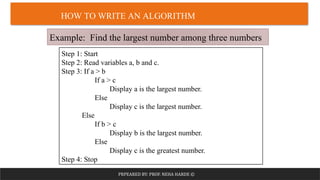
HOW TO WRITE AN ALGORITHM
Step 1: Start
Step 2: Read variables a, b and c.
Step 3: If a > b
If a > c
Display a is the largest number.
Else
Display c is the largest number.
Else
If b > c
Display b is the largest number.
Else
Display c is the greatest number.
Step 4: Stop
Example: Find the largest number among three numbers
PRPEARED BY: PROF. NEHA HARDE ©
FLOWCHART
A flowchart is a visual representation of the sequence
of steps and decisions needed to perform a process
A flowchart is a powerful business tool - With proper
design and construction, it communicates the steps in
a process very effectively and efficiently.
PRPEARED BY: PROF. NEHA HARDE ©
FLOWCHART SYMBOLS
PRPEARED BY: PROF. NEHA HARDE ©
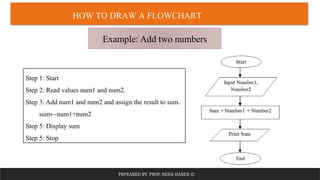
HOW TO DRAW A FLOWCHART
Example: Add two numbers
Step 1: Start
Step 2: Read values num1 and num2.
Step 3: Add num1 and num2 and assign the result to sum.
sum←num1+num2
Step 5: Display sum
Step 5: Stop
PRPEARED BY: PROF. NEHA HARDE ©
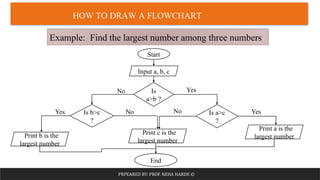
HOW TO DRAW A FLOWCHART
Example: Find the largest number among three numbers
Start
Input a, b, c
Is
a>b ?
Is a>c
?
Yes
Is b>c
?
No
Print a is the
largest number
Yes
Print c is the
largest number
No
No
Print b is the
largest number
Yes
End
PRPEARED BY: PROF. NEHA HARDE ©
 What is Programming Language ?
 Types of Programming Languages
 What is Compiler ?
 What is Interpreter ?
 Compiler Vs Interpreter
 C Programming Language
 Features of C
 Applications of C
 C Program Structure
 Compilation Process
Introduction to C Programming
PRPEARED BY: PROF. NEHA HARDE ©
WHAT IS PROGRAMMING LANGUAGE
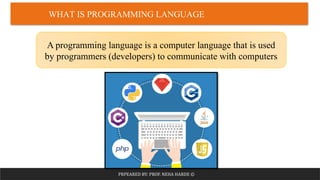
A programming language is a computer language that is used
by programmers (developers) to communicate with computers
PRPEARED BY: PROF. NEHA HARDE ©
TYPES OF PROGRAMMING LANGUAGES
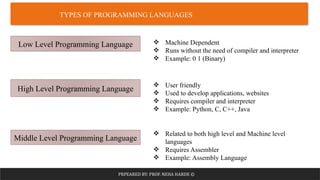
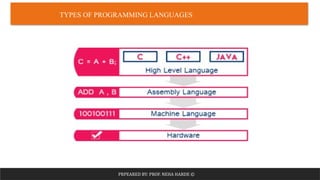
Low Level Programming Language
High Level Programming Language
Middle Level Programming Language
 Machine Dependent
 Runs without the need of compiler and interpreter
 Example: 0 1 (Binary)
 User friendly
 Used to develop applications, websites
 Requires compiler and interpreter
 Example: Python, C, C++, Java
 Related to both high level and Machine level
languages
 Requires Assembler
 Example: Assembly Language
PRPEARED BY: PROF. NEHA HARDE ©
TYPES OF PROGRAMMING LANGUAGES
PRPEARED BY: PROF. NEHA HARDE ©
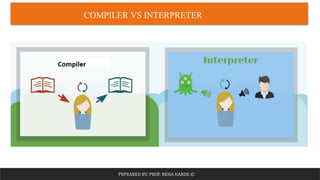
WHAT IS COMPILER ?
A compiler is a computer program that transforms code written
in a high-level programming language into the machine code
PRPEARED BY: PROF. NEHA HARDE ©
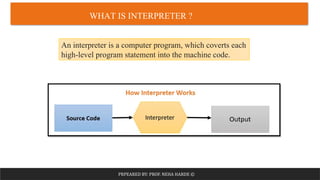
WHAT IS INTERPRETER ?
An interpreter is a computer program, which coverts each
high-level program statement into the machine code.
PRPEARED BY: PROF. NEHA HARDE ©
COMPILER VS INTERPRETER
PRPEARED BY: PROF. NEHA HARDE ©
COMPILER VS INTERPRETER
PRPEARED BY: PROF. NEHA HARDE ©
C PROGRAMMING LANGUAGE
 C is a general-purpose, structured programming language
that is extremely popular, simple, and flexible to use
 Developed in 1972 by Dennis Ritchie at bell laboratories of
AT&T, located in the U.S.A.
 Mother of Programming Languages - C programming is
considered as the base for other programming languages
PRPEARED BY: PROF. NEHA HARDE ©
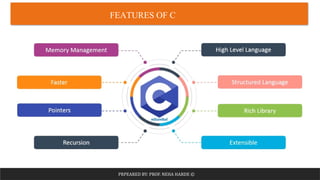
FEATURES OF C
PRPEARED BY: PROF. NEHA HARDE ©
APPLICATIONS OF C
PRPEARED BY: PROF. NEHA HARDE ©
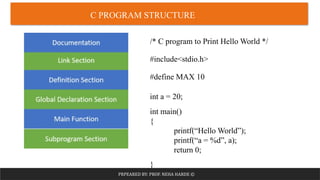
C PROGRAM STRUCTURE
/* C program to Print Hello World */
#include<stdio.h>
#define MAX 10
int a = 20;
int main()
{
printf(“Hello World”);
printf(“a = %d”, a);
return 0;
}
PRPEARED BY: PROF. NEHA HARDE ©
COMPILATION PROCESS
PRPEARED BY: PROF. NEHA HARDE ©
 Constants
 Keywords
 Identifiers
 Variables
 Types of Variables
 Data Types
 Operators
 Unary Operators
 Binary Operators
 Ternary Operators
 Operator Precedence
 Operator Associativity
 Input and Output Functions
 Format Specifiers
 Formatted I/O Functions
 Unformatted I/O Functions
Basics of C
PRPEARED BY: PROF. NEHA HARDE ©
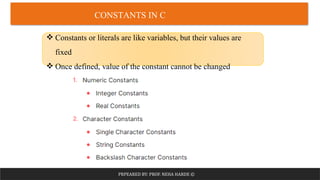
CONSTANTS IN C
 Constants or literals are like variables, but their values are
fixed
 Once defined, value of the constant cannot be changed
PRPEARED BY: PROF. NEHA HARDE ©
CONSTANTS IN C
1. Numeric Constants
Integer Constants: Sequence of digits
• Decimal Integer
Example:
12 250 -4500 0
• Octal Integer
Example:
05 0632
• Hexadecimal Integer
Example:
0X6A 0x79BD 0X346
Rules for Constructing Integer Constants:
 An Integer constant must have at least one
digit
 It can be either positive or negative
 No commas or blanks or special symbols are
allowed
 Allowable range is -32768 to 32767
PRPEARED BY: PROF. NEHA HARDE ©
CONSTANTS IN C
1. Numeric Constants
Real Constants: (Floating point constants)
Numbers having fractional part
Example:
34.89 -22.1845 +0.76
Exponential Representation of Real Constants:
Example:
6.78e3 -0.45E-4
Rules for Constructing Real Constants:
 An real constant must have at least one digit
and decimal point
 It can be either positive or negative
 No commas or blanks or special symbols are
allowed
Mantissa Exponent
PRPEARED BY: PROF. NEHA HARDE ©
CONSTANTS IN C
2. Character Constants
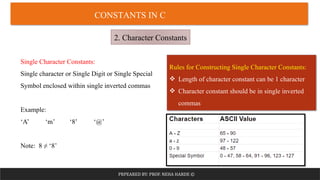
Single Character Constants:
Single character or Single Digit or Single Special
Symbol enclosed within single inverted commas
Example:
‘A’ ‘m’ ‘8’ ‘@’
Note: 8 ≠ ‘8’
Rules for Constructing Single Character Constants:
 Length of character constant can be 1 character
 Character constant should be in single inverted
commas
PRPEARED BY: PROF. NEHA HARDE ©
CONSTANTS IN C
2. Character Constants
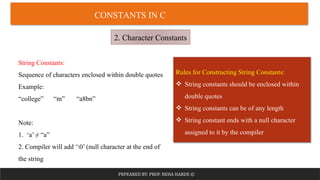
String Constants:
Sequence of characters enclosed within double quotes
Example:
“college” “m” “a8bn”
Note:
1. ‘a’ ≠ “a”
2. Compiler will add ‘0’ (null character at the end of
the string
Rules for Constructing String Constants:
 String constants should be enclosed within
double quotes
 String constants can be of any length
 String constant ends with a null character
assigned to it by the compiler
PRPEARED BY: PROF. NEHA HARDE ©
CONSTANTS IN C
2. Character Constants
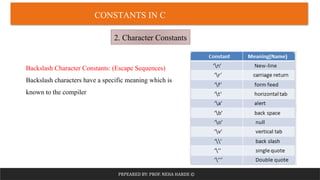
Backslash Character Constants: (Escape Sequences)
Backslash characters have a specific meaning which is
known to the compiler
PRPEARED BY: PROF. NEHA HARDE ©
CONSTANTS IN C
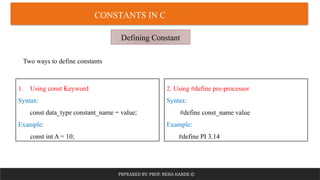
Defining Constant
1. Using const Keyword
Syntax:
const data_type constant_name = value;
Example:
const int A = 10;
2. Using #define pre-processor
Syntax:
#define const_name value
Example:
#define PI 3.14
Two ways to define constants
PRPEARED BY: PROF. NEHA HARDE ©
KEYWORDS IN C
Keywords are the reserved words having specific
meaning defined to the compiler
 32 Keywords in C
 Keywords cannot be used as a variable names
PRPEARED BY: PROF. NEHA HARDE ©
KEYWORDS IN C
PRPEARED BY: PROF. NEHA HARDE ©
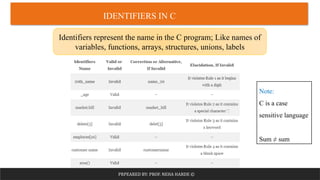
IDENTIFIERS IN C
Identifiers represent the name in the C program; Like names of
variables, functions, arrays, structures, unions, labels
Note:
C is a case
sensitive language
Sum ≠ sum
PRPEARED BY: PROF. NEHA HARDE ©
IDENTIFIERS IN C
Rules for Constructing String Constants:
 An identifier can only have alphanumeric characters (a-z , A-Z , 0-9) (i.e. letters & digits)
and underscore( _ ) symbol.
 Identifier names must be unique
 The first character must be an alphabet or underscore.
 You cannot use a keyword as identifiers.
 Only the first thirty-one (31) characters are significant.
 It must not contain white spaces.
 Identifiers are case-sensitive.
PRPEARED BY: PROF. NEHA HARDE ©
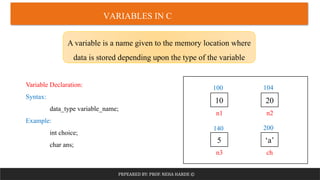
VARIABLES IN C
A variable is a name given to the memory location where
data is stored depending upon the type of the variable
Variable Declaration:
Syntax:
data_type variable_name;
Example:
int choice;
char ans;
10 20
5 ‘a’
n1
ch
n3
n2
100
200
140
104
PRPEARED BY: PROF. NEHA HARDE ©
VARIABLES IN C
Variable Initialization:
Variable initialization means assigning some value to that variable
Example:
int ch;
ch = 10;
OR
Variable Declaration and initialization on the same line
int ch = 10;
PRPEARED BY: PROF. NEHA HARDE ©
TYPES OF VARIABLES
PRPEARED BY: PROF. NEHA HARDE ©
TYPES OF VARIABLES
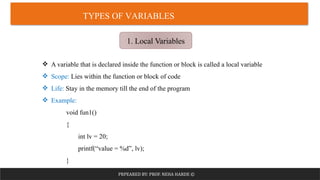
1. Local Variables
 A variable that is declared inside the function or block is called a local variable
 Scope: Lies within the function or block of code
 Life: Stay in the memory till the end of the program
 Example:
void fun1()
{
int lv = 20;
printf(“value = %d”, lv);
}
PRPEARED BY: PROF. NEHA HARDE ©
TYPES OF VARIABLES
2. Global Variables
 A variable that is declared outside the function or block is called a global variable
 Value of global variable can be changed by any function
 Scope: Available to all functions
 Life: Stay in the memory till the end of the program
 Example:
int gv = 10;
void fun1()
{
int lv = 20;
printf(“value of lv = %d n value of gv= %d ”, lv, gv);
}
PRPEARED BY: PROF. NEHA HARDE ©
TYPES OF VARIABLES
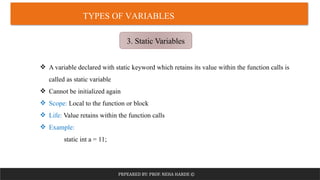
3. Static Variables
 A variable declared with static keyword which retains its value within the function calls is
called as static variable
 Cannot be initialized again
 Scope: Local to the function or block
 Life: Value retains within the function calls
 Example:
static int a = 11;
PRPEARED BY: PROF. NEHA HARDE ©
TYPES OF VARIABLES
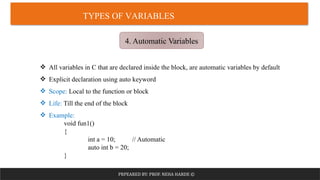
4. Automatic Variables
 All variables in C that are declared inside the block, are automatic variables by default
 Explicit declaration using auto keyword
 Scope: Local to the function or block
 Life: Till the end of the block
 Example:
void fun1()
{
int a = 10; // Automatic
auto int b = 20;
}
PRPEARED BY: PROF. NEHA HARDE ©
TYPES OF VARIABLES
5. External Variables
 We can share a variable in multiple C source files by using an external variable
 extern keyword is used
 Scope: Global in other files too
 Life: Till the end of the program
 Example:
extern int a;
Pro1.c
extern int a = 10;
Pro2.c
#include<stdio.h>
#include “pro1.h”
PRPEARED BY: PROF. NEHA HARDE ©
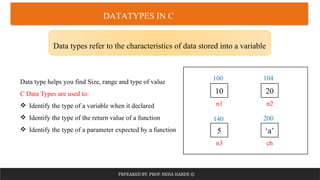
DATATYPES IN C
Data types refer to the characteristics of data stored into a variable
Data type helps you find Size, range and type of value
C Data Types are used to:
 Identify the type of a variable when it declared
 Identify the type of the return value of a function
 Identify the type of a parameter expected by a function
10 20
5 ‘a’
n1
ch
n3
n2
100
200
140
104
PRPEARED BY: PROF. NEHA HARDE ©
DATATYPES IN C
PRPEARED BY: PROF. NEHA HARDE ©
DATATYPES IN C
Primitive Data Types
2𝑏𝑖𝑡 − 1
PRPEARED BY: PROF. NEHA HARDE ©
DATATYPES IN C
Primitive Data Types
PRPEARED BY: PROF. NEHA HARDE ©
DATATYPES IN C
Primitive Data Types
2𝑏𝑖𝑡
− 1
PRPEARED BY: PROF. NEHA HARDE ©
DATATYPES IN C
Primitive Data Types
PRPEARED BY: PROF. NEHA HARDE ©
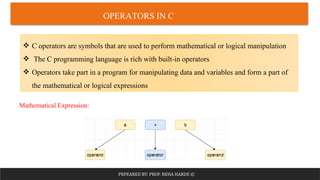
OPERATORS IN C
 C operators are symbols that are used to perform mathematical or logical manipulation
 The C programming language is rich with built-in operators
 Operators take part in a program for manipulating data and variables and form a part of
the mathematical or logical expressions
Mathematical Expression:
PRPEARED BY: PROF. NEHA HARDE ©
OPERATORS IN C
Operators are symbols or a set of symbols that change or assign values, combine
values, or check or verify values in your code
Types of Operators:
1. Unary Operator
2. Binary Operator
3. Ternary Operator
PRPEARED BY: PROF. NEHA HARDE ©
UNARY OPERATORS
Unary Operators are the operators which require single operand to perform any action
1. Sizeof
2. Unary minus
3. Logical NOT
4. Increment
5. Decrement
6. & (Addrss of)
7. * (Value of)
PRPEARED BY: PROF. NEHA HARDE ©
UNARY OPERATORS
Unary Operators are the operators which require single operand to perform any action
1. sizeof: return the size of an operand in bytes (prefix Operator)
Example: sizeof(operand)
2. unary minus: it negates a value (Prefix Operator)
Example: a = -10;
b = -a;
3. Logical NOT: The logical NOT operator inverts the value of a Boolean variable (Prefix Operator)
Example: c = True
a = !c;
PRPEARED BY: PROF. NEHA HARDE ©
UNARY OPERATORS
Unary Operators are the operators which require single operand to perform any action
4. Increment: (Prefix and Postfix)
Increment : ++ (increases a numeric value by 1) a = a + 1
a) Post Increment:
Example: a++
b) Pre Increment:
Example: ++a
PRPEARED BY: PROF. NEHA HARDE ©
UNARY OPERATORS
Unary Operators are the operators which require single operand to perform any action
5. Decrement: (Postfix and Prefix)
Decrement: -- (decreases a numeric value by 1) a = a – 1
a) Post Decrement:
Example: a--
b) Pre Decrement:
Example: --a
PRPEARED BY: PROF. NEHA HARDE ©
UNARY OPERATORS
Unary Operators are the operators which require single operand to perform any action
6. & (Address of): Returns the address of a variable (Prefix Operator)
Example: &a
7. * (Value of): Returns value stored at the address (Works with pointers)
Example: *a
PRPEARED BY: PROF. NEHA HARDE ©
BINARY OPERATORS
Binary Operators are the operators which require two operands to perform any action
1. Arithmetic
2. Relational
3. Logical
4. Bitwise
5. Assignment
PRPEARED BY: PROF. NEHA HARDE ©
BINARY OPERATORS
1. Arithmetic Operators: used to perform arithmetic/mathematical operations
Consider a = 20 and b = 10
PRPEARED BY: PROF. NEHA HARDE ©
BINARY OPERATORS
2. Relational Operators: used to compare two values
Consider
a = 5
b = 10
PRPEARED BY: PROF. NEHA HARDE ©
BINARY OPERATORS
3. Logical Operators: used to test more than one condition
Consider x = 10 and y = 20
PRPEARED BY: PROF. NEHA HARDE ©
BINARY OPERATORS
4. Bitwise Operators: used to perform bit level operations
PRPEARED BY: PROF. NEHA HARDE ©
BINARY OPERATORS
5. Assignment Operators: used for assigning a value to a variable
PRPEARED BY: PROF. NEHA HARDE ©
TERNARY OPERATOR
 The ternary operator is also called as “Conditional Operator”
 Syntax:
Condition ? expression1 : expression2
Example:
x = a > b ? a+10 : b;
 A ternary operator is a short form of if-else
PRPEARED BY: PROF. NEHA HARDE ©
OPERATOR PRECEDENCE
The precedence of operators determines which operator is
executed first if there is more than one operator in an expression
Two ways to solve
= (10+20)*30
=900
=10+(20*30)
=610
PRPEARED BY: PROF. NEHA HARDE ©
OPERATOR PRECEDENCE
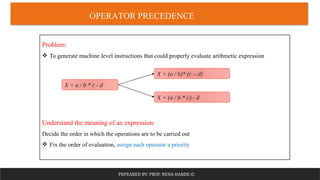
Problem:
 To generate machine level instructions that could properly evaluate arithmetic expression
Understand the meaning of an expression:
Decide the order in which the operations are to be carried out
 Fix the order of evaluation, assign each operator a priority
X = a / b * c - d
X = (a / b * c) - d
X = (a / b)* (c – d)
PRPEARED BY: PROF. NEHA HARDE ©
OPERATOR PRECEDENCE
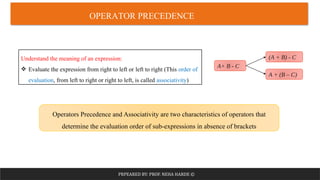
Understand the meaning of an expression:
 Evaluate the expression from right to left or left to right (This order of
evaluation, from left to right or right to left, is called associativity)
A+ B - C
A + (B – C)
(A + B) - C
Operators Precedence and Associativity are two characteristics of operators that
determine the evaluation order of sub-expressions in absence of brackets
PRPEARED BY: PROF. NEHA HARDE ©
OPERATOR PRECEDENCE
PRPEARED BY: PROF. NEHA HARDE ©
OPERATOR ASSOCIATIVITY
PRPEARED BY: PROF. NEHA HARDE ©
PRACTICE QUESTION
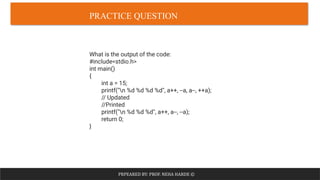
What is the output of the code:
#include<stdio.h>
int main()
{
int a = 15;
printf("n %d %d %d %d", a++, --a, a--, ++a);
// Updated
//Printed
printf("n %d %d %d", a++, a--, --a);
return 0;
}
PRPEARED BY: PROF. NEHA HARDE ©
INPUT OUTPUT FUNCTIONS
PRPEARED BY: PROF. NEHA HARDE ©
FORMAT SPECIFIERS
PRPEARED BY: PROF. NEHA HARDE ©
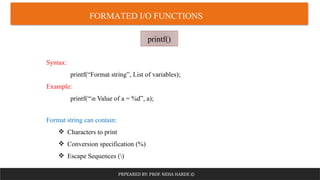
FORMATED I/O FUNCTIONS
printf()
Syntax:
printf(“Format string”, List of variables);
Example:
printf(“n Value of a = %d”, a);
Format string can contain:
 Characters to print
 Conversion specification (%)
 Escape Sequences ()
PRPEARED BY: PROF. NEHA HARDE ©
FORMATED I/O FUNCTIONS
scanf()
Syntax:
scanf(“Format string”, List of addresses of variables);
Example:
scanf(“%d %f %c”, &a, &b, &c);
Format string can contain:
 Conversion specification (%)
PRPEARED BY: PROF. NEHA HARDE ©
UNFORMATED I/O FUNCTIONS
Unformatted Input functions
getch():
getch() is used to get a character from the
console but does not echo to the screen
Library: conio.h
Example:
char ch;
ch = getch();
getche():
getche() is used to get a character from the
console and echo to the screen
Library: conio.h
Example:
char ch;
ch = getche();
PRPEARED BY: PROF. NEHA HARDE ©
UNFORMATED I/O FUNCTIONS
Unformatted Input functions
getchar():
getchar() is used to get or read the input
(i.e a single character) at runtime
Library: stdio.h
Example:
char ch;
ch = getchar();
gets():
gets() accepts single or multiple characters
of string including spaces
Library: stdio.h
Example :
char ch[10];
gets(ch);
PRPEARED BY: PROF. NEHA HARDE ©
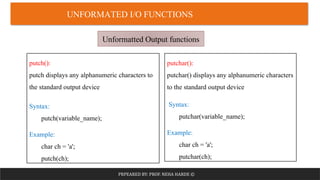
UNFORMATED I/O FUNCTIONS
Unformatted Output functions
putch():
putch displays any alphanumeric characters to
the standard output device
Syntax:
putch(variable_name);
Example:
char ch = 'a';
putch(ch);
putchar():
putchar() displays any alphanumeric characters
to the standard output device
Syntax:
putchar(variable_name);
Example:
char ch = 'a';
putchar(ch);
PRPEARED BY: PROF. NEHA HARDE ©
UNFORMATED I/O FUNCTIONS
Unformatted Output functions
puts():
puts() displays single or multiple characters of string including spaces to the
standard output device
Syntax:
puts(variable_name);
Example:
char ch[10]="Example";
puts(ch);

Module 1 - Introduction to C Programming.pptm (1).pdf

  • 1.
    PRPEARED BY: PROF.NEHA HARDE © C PROGRAMMING Module 1 Introduction to C Programming Course Outcome (CO1): Understand the basic syntax and semantics of C.
  • 2.
    PRPEARED BY: PROF.NEHA HARDE ©  What is Computer ?  Characteristics of computer  Benefits of computer  Computer Components  Input Devices  Output Devices  Central Processing Unit  Memory Unit Introduction to Components of a computer system
  • 3.
    PRPEARED BY: PROF.NEHA HARDE © WHAT IS COMPUTER ? A computer is a programmable electronic device that accepts raw data as input and processes it with a set of instructions (a program) to produce the result as output The father of the computer: Charles Babbage
  • 4.
    PRPEARED BY: PROF.NEHA HARDE © WHAT IS COMPUTER ?
  • 5.
    PRPEARED BY: PROF.NEHA HARDE © CHARACTERISTICS OF COMPUTER Speed Memory Accuracy Diligence Versatile Multitask ing
  • 6.
    PRPEARED BY: PROF.NEHA HARDE © BENEFITS OF COMPUTER Storage Increases Productivity Connects to the Internet Improves ability Provides an entertainm ent Organizes data and information
  • 7.
    PRPEARED BY: PROF.NEHA HARDE © COMPUTER COMPONENTS
  • 8.
    PRPEARED BY: PROF.NEHA HARDE © COMPUTER COMPONENTS  Input is any data or instruction given to the computer  Input device enables the user to send data, information, or control signals to a computer  The prime purpose of input devices are to translate data and information from human-readable format into electrical impulses 1. Input Devices
  • 9.
    PRPEARED BY: PROF.NEHA HARDE © INPUT DEVICES  Keyboard is a basic input device that is used to enter data into a computer or any other electronic device by pressing keys  Mouse is a pointing hand-held input device which is used to move cursor or pointer across the screen
  • 10.
    PRPEARED BY: PROF.NEHA HARDE ©  Scanner scans the picture or a document converts it into a digital format and is displayed on the screen as an output  Joystick is a pointing input device like a mouse and movement of stick controls the cursor or pointer on the screen INPUT DEVICES
  • 11.
    PRPEARED BY: PROF.NEHA HARDE ©  Light pen is like a pen. The tip of the light pen contains a light-sensitive detector that enables the user to point to or select objects on the display screen  Microphone is used to input the sound to presentations and with webcams for video conferencing INPUT DEVICES
  • 12.
    PRPEARED BY: PROF.NEHA HARDE © COMPUTER COMPONENTS  The output device displays the result of the processing of raw data that is entered in the computer through an input device  It is used to bring out the information from the computer 2. Output Devices
  • 13.
    PRPEARED BY: PROF.NEHA HARDE ©  Monitor is the display unit or screen of the computer that displays the processed data or information as text, images, audio or video  Printer is a device that prints text, images or any information on paper producing hard copy of the information OUTPUT DEVICES
  • 14.
    PRPEARED BY: PROF.NEHA HARDE ©  A projector is an output device that enables the user to project the output onto a large surface such as a big screen or wall  Speaker is an output device connected to a computer's sound card that outputs sounds generated by the computer OUTPUT DEVICES
  • 15.
    PRPEARED BY: PROF.NEHA HARDE © COMPUTER COMPONENTS  Brain of the computer system  It receives instructions from both the hardware and active software and produces output accordingly 3. Central Processing Unit
  • 16.
    PRPEARED BY: PROF.NEHA HARDE © CENTRAL PROCESSING UNIT (CPU)  Control Unit is used to control the entire working of a computer system and it controls the transfer of data between memory and input/output devices or I/O devices  Arithmetic and Logic Unit is designed to perform all the basic arithmetic operations and logical operations
  • 17.
    PRPEARED BY: PROF.NEHA HARDE © COMPUTER COMPONENTS  Memory unit is used to retain the program instruction and data for processing  Two types of memory: Primary Memory Secondary Memory 4. Memory Unit
  • 18.
    PRPEARED BY: PROF.NEHA HARDE © MEMORY UNIT  Main memory of the computer  Directly accessed by the CPU  Volatile  Faster access  Semiconductor Memory - Expensive  Less storage capacity Primary Memory
  • 19.
    PRPEARED BY: PROF.NEHA HARDE © Primary Memory MEMORY UNIT
  • 20.
    PRPEARED BY: PROF.NEHA HARDE © Primary Memory MEMORY UNIT
  • 21.
    PRPEARED BY: PROF.NEHA HARDE ©  External Memory  High storage capacity  Permanent storage  Non volatile  Slower access  Magnetic or optical memory - Less Expensive Secondary Memory MEMORY UNIT
  • 22.
    PRPEARED BY: PROF.NEHA HARDE © MEMORY UNIT
  • 23.
    PRPEARED BY: PROF.NEHA HARDE ©  What is Algorithm ?  Characteristics of algorithm  How to write an algorithm ?  Flowchart  Flowchart Symbols  How to draw a flowchart ? Introduction to Algorithm and Flowchart
  • 24.
    PRPEARED BY: PROF.NEHA HARDE © WHAT IS ALGORITHM An algorithm can be defined as a finite set of steps, which has to be followed while carrying out a particular problem An algorithm is a distinct computational procedure that takes input as a set of values and results in the output as a set of values by solving the problem
  • 25.
    PRPEARED BY: PROF.NEHA HARDE © CHARACTERISTICS OF ALGORITHM • Well defined zero or more inputs Input • Generate at least one output Output • Each Instruction should be clear Unambiguous • Algorithm should terminate after executing finite no. of instructions Finiteness • Every instruction should be fundamental to be carried out, in principle Effectiveness
  • 26.
    PRPEARED BY: PROF.NEHA HARDE © HOW TO WRITE AN ALGORITHM Step 1: Start Step 2: Read values num1 and num2. Step 3: Add num1 and num2 and assign the result to sum. sum←num1+num2 Step4: Display sum Step 5: Stop Example: Add two numbers
  • 27.
    PRPEARED BY: PROF.NEHA HARDE © HOW TO WRITE AN ALGORITHM Step 1: Start Step 2: Read variables a, b and c. Step 3: If a > b If a > c Display a is the largest number. Else Display c is the largest number. Else If b > c Display b is the largest number. Else Display c is the greatest number. Step 4: Stop Example: Find the largest number among three numbers
  • 28.
    PRPEARED BY: PROF.NEHA HARDE © FLOWCHART A flowchart is a visual representation of the sequence of steps and decisions needed to perform a process A flowchart is a powerful business tool - With proper design and construction, it communicates the steps in a process very effectively and efficiently.
  • 29.
    PRPEARED BY: PROF.NEHA HARDE © FLOWCHART SYMBOLS
  • 30.
    PRPEARED BY: PROF.NEHA HARDE © HOW TO DRAW A FLOWCHART Example: Add two numbers Step 1: Start Step 2: Read values num1 and num2. Step 3: Add num1 and num2 and assign the result to sum. sum←num1+num2 Step 5: Display sum Step 5: Stop
  • 31.
    PRPEARED BY: PROF.NEHA HARDE © HOW TO DRAW A FLOWCHART Example: Find the largest number among three numbers Start Input a, b, c Is a>b ? Is a>c ? Yes Is b>c ? No Print a is the largest number Yes Print c is the largest number No No Print b is the largest number Yes End
  • 32.
    PRPEARED BY: PROF.NEHA HARDE ©  What is Programming Language ?  Types of Programming Languages  What is Compiler ?  What is Interpreter ?  Compiler Vs Interpreter  C Programming Language  Features of C  Applications of C  C Program Structure  Compilation Process Introduction to C Programming
  • 33.
    PRPEARED BY: PROF.NEHA HARDE © WHAT IS PROGRAMMING LANGUAGE A programming language is a computer language that is used by programmers (developers) to communicate with computers
  • 34.
    PRPEARED BY: PROF.NEHA HARDE © TYPES OF PROGRAMMING LANGUAGES Low Level Programming Language High Level Programming Language Middle Level Programming Language  Machine Dependent  Runs without the need of compiler and interpreter  Example: 0 1 (Binary)  User friendly  Used to develop applications, websites  Requires compiler and interpreter  Example: Python, C, C++, Java  Related to both high level and Machine level languages  Requires Assembler  Example: Assembly Language
  • 35.
    PRPEARED BY: PROF.NEHA HARDE © TYPES OF PROGRAMMING LANGUAGES
  • 36.
    PRPEARED BY: PROF.NEHA HARDE © WHAT IS COMPILER ? A compiler is a computer program that transforms code written in a high-level programming language into the machine code
  • 37.
    PRPEARED BY: PROF.NEHA HARDE © WHAT IS INTERPRETER ? An interpreter is a computer program, which coverts each high-level program statement into the machine code.
  • 38.
    PRPEARED BY: PROF.NEHA HARDE © COMPILER VS INTERPRETER
  • 39.
    PRPEARED BY: PROF.NEHA HARDE © COMPILER VS INTERPRETER
  • 40.
    PRPEARED BY: PROF.NEHA HARDE © C PROGRAMMING LANGUAGE  C is a general-purpose, structured programming language that is extremely popular, simple, and flexible to use  Developed in 1972 by Dennis Ritchie at bell laboratories of AT&T, located in the U.S.A.  Mother of Programming Languages - C programming is considered as the base for other programming languages
  • 41.
    PRPEARED BY: PROF.NEHA HARDE © FEATURES OF C
  • 42.
    PRPEARED BY: PROF.NEHA HARDE © APPLICATIONS OF C
  • 43.
    PRPEARED BY: PROF.NEHA HARDE © C PROGRAM STRUCTURE /* C program to Print Hello World */ #include<stdio.h> #define MAX 10 int a = 20; int main() { printf(“Hello World”); printf(“a = %d”, a); return 0; }
  • 44.
    PRPEARED BY: PROF.NEHA HARDE © COMPILATION PROCESS
  • 45.
    PRPEARED BY: PROF.NEHA HARDE ©  Constants  Keywords  Identifiers  Variables  Types of Variables  Data Types  Operators  Unary Operators  Binary Operators  Ternary Operators  Operator Precedence  Operator Associativity  Input and Output Functions  Format Specifiers  Formatted I/O Functions  Unformatted I/O Functions Basics of C
  • 46.
    PRPEARED BY: PROF.NEHA HARDE © CONSTANTS IN C  Constants or literals are like variables, but their values are fixed  Once defined, value of the constant cannot be changed
  • 47.
    PRPEARED BY: PROF.NEHA HARDE © CONSTANTS IN C 1. Numeric Constants Integer Constants: Sequence of digits • Decimal Integer Example: 12 250 -4500 0 • Octal Integer Example: 05 0632 • Hexadecimal Integer Example: 0X6A 0x79BD 0X346 Rules for Constructing Integer Constants:  An Integer constant must have at least one digit  It can be either positive or negative  No commas or blanks or special symbols are allowed  Allowable range is -32768 to 32767
  • 48.
    PRPEARED BY: PROF.NEHA HARDE © CONSTANTS IN C 1. Numeric Constants Real Constants: (Floating point constants) Numbers having fractional part Example: 34.89 -22.1845 +0.76 Exponential Representation of Real Constants: Example: 6.78e3 -0.45E-4 Rules for Constructing Real Constants:  An real constant must have at least one digit and decimal point  It can be either positive or negative  No commas or blanks or special symbols are allowed Mantissa Exponent
  • 49.
    PRPEARED BY: PROF.NEHA HARDE © CONSTANTS IN C 2. Character Constants Single Character Constants: Single character or Single Digit or Single Special Symbol enclosed within single inverted commas Example: ‘A’ ‘m’ ‘8’ ‘@’ Note: 8 ≠ ‘8’ Rules for Constructing Single Character Constants:  Length of character constant can be 1 character  Character constant should be in single inverted commas
  • 50.
    PRPEARED BY: PROF.NEHA HARDE © CONSTANTS IN C 2. Character Constants String Constants: Sequence of characters enclosed within double quotes Example: “college” “m” “a8bn” Note: 1. ‘a’ ≠ “a” 2. Compiler will add ‘0’ (null character at the end of the string Rules for Constructing String Constants:  String constants should be enclosed within double quotes  String constants can be of any length  String constant ends with a null character assigned to it by the compiler
  • 51.
    PRPEARED BY: PROF.NEHA HARDE © CONSTANTS IN C 2. Character Constants Backslash Character Constants: (Escape Sequences) Backslash characters have a specific meaning which is known to the compiler
  • 52.
    PRPEARED BY: PROF.NEHA HARDE © CONSTANTS IN C Defining Constant 1. Using const Keyword Syntax: const data_type constant_name = value; Example: const int A = 10; 2. Using #define pre-processor Syntax: #define const_name value Example: #define PI 3.14 Two ways to define constants
  • 53.
    PRPEARED BY: PROF.NEHA HARDE © KEYWORDS IN C Keywords are the reserved words having specific meaning defined to the compiler  32 Keywords in C  Keywords cannot be used as a variable names
  • 54.
    PRPEARED BY: PROF.NEHA HARDE © KEYWORDS IN C
  • 55.
    PRPEARED BY: PROF.NEHA HARDE © IDENTIFIERS IN C Identifiers represent the name in the C program; Like names of variables, functions, arrays, structures, unions, labels Note: C is a case sensitive language Sum ≠ sum
  • 56.
    PRPEARED BY: PROF.NEHA HARDE © IDENTIFIERS IN C Rules for Constructing String Constants:  An identifier can only have alphanumeric characters (a-z , A-Z , 0-9) (i.e. letters & digits) and underscore( _ ) symbol.  Identifier names must be unique  The first character must be an alphabet or underscore.  You cannot use a keyword as identifiers.  Only the first thirty-one (31) characters are significant.  It must not contain white spaces.  Identifiers are case-sensitive.
  • 57.
    PRPEARED BY: PROF.NEHA HARDE © VARIABLES IN C A variable is a name given to the memory location where data is stored depending upon the type of the variable Variable Declaration: Syntax: data_type variable_name; Example: int choice; char ans; 10 20 5 ‘a’ n1 ch n3 n2 100 200 140 104
  • 58.
    PRPEARED BY: PROF.NEHA HARDE © VARIABLES IN C Variable Initialization: Variable initialization means assigning some value to that variable Example: int ch; ch = 10; OR Variable Declaration and initialization on the same line int ch = 10;
  • 59.
    PRPEARED BY: PROF.NEHA HARDE © TYPES OF VARIABLES
  • 60.
    PRPEARED BY: PROF.NEHA HARDE © TYPES OF VARIABLES 1. Local Variables  A variable that is declared inside the function or block is called a local variable  Scope: Lies within the function or block of code  Life: Stay in the memory till the end of the program  Example: void fun1() { int lv = 20; printf(“value = %d”, lv); }
  • 61.
    PRPEARED BY: PROF.NEHA HARDE © TYPES OF VARIABLES 2. Global Variables  A variable that is declared outside the function or block is called a global variable  Value of global variable can be changed by any function  Scope: Available to all functions  Life: Stay in the memory till the end of the program  Example: int gv = 10; void fun1() { int lv = 20; printf(“value of lv = %d n value of gv= %d ”, lv, gv); }
  • 62.
    PRPEARED BY: PROF.NEHA HARDE © TYPES OF VARIABLES 3. Static Variables  A variable declared with static keyword which retains its value within the function calls is called as static variable  Cannot be initialized again  Scope: Local to the function or block  Life: Value retains within the function calls  Example: static int a = 11;
  • 63.
    PRPEARED BY: PROF.NEHA HARDE © TYPES OF VARIABLES 4. Automatic Variables  All variables in C that are declared inside the block, are automatic variables by default  Explicit declaration using auto keyword  Scope: Local to the function or block  Life: Till the end of the block  Example: void fun1() { int a = 10; // Automatic auto int b = 20; }
  • 64.
    PRPEARED BY: PROF.NEHA HARDE © TYPES OF VARIABLES 5. External Variables  We can share a variable in multiple C source files by using an external variable  extern keyword is used  Scope: Global in other files too  Life: Till the end of the program  Example: extern int a; Pro1.c extern int a = 10; Pro2.c #include<stdio.h> #include “pro1.h”
  • 65.
    PRPEARED BY: PROF.NEHA HARDE © DATATYPES IN C Data types refer to the characteristics of data stored into a variable Data type helps you find Size, range and type of value C Data Types are used to:  Identify the type of a variable when it declared  Identify the type of the return value of a function  Identify the type of a parameter expected by a function 10 20 5 ‘a’ n1 ch n3 n2 100 200 140 104
  • 66.
    PRPEARED BY: PROF.NEHA HARDE © DATATYPES IN C
  • 67.
    PRPEARED BY: PROF.NEHA HARDE © DATATYPES IN C Primitive Data Types 2𝑏𝑖𝑡 − 1
  • 68.
    PRPEARED BY: PROF.NEHA HARDE © DATATYPES IN C Primitive Data Types
  • 69.
    PRPEARED BY: PROF.NEHA HARDE © DATATYPES IN C Primitive Data Types 2𝑏𝑖𝑡 − 1
  • 70.
    PRPEARED BY: PROF.NEHA HARDE © DATATYPES IN C Primitive Data Types
  • 71.
    PRPEARED BY: PROF.NEHA HARDE © OPERATORS IN C  C operators are symbols that are used to perform mathematical or logical manipulation  The C programming language is rich with built-in operators  Operators take part in a program for manipulating data and variables and form a part of the mathematical or logical expressions Mathematical Expression:
  • 72.
    PRPEARED BY: PROF.NEHA HARDE © OPERATORS IN C Operators are symbols or a set of symbols that change or assign values, combine values, or check or verify values in your code Types of Operators: 1. Unary Operator 2. Binary Operator 3. Ternary Operator
  • 73.
    PRPEARED BY: PROF.NEHA HARDE © UNARY OPERATORS Unary Operators are the operators which require single operand to perform any action 1. Sizeof 2. Unary minus 3. Logical NOT 4. Increment 5. Decrement 6. & (Addrss of) 7. * (Value of)
  • 74.
    PRPEARED BY: PROF.NEHA HARDE © UNARY OPERATORS Unary Operators are the operators which require single operand to perform any action 1. sizeof: return the size of an operand in bytes (prefix Operator) Example: sizeof(operand) 2. unary minus: it negates a value (Prefix Operator) Example: a = -10; b = -a; 3. Logical NOT: The logical NOT operator inverts the value of a Boolean variable (Prefix Operator) Example: c = True a = !c;
  • 75.
    PRPEARED BY: PROF.NEHA HARDE © UNARY OPERATORS Unary Operators are the operators which require single operand to perform any action 4. Increment: (Prefix and Postfix) Increment : ++ (increases a numeric value by 1) a = a + 1 a) Post Increment: Example: a++ b) Pre Increment: Example: ++a
  • 76.
    PRPEARED BY: PROF.NEHA HARDE © UNARY OPERATORS Unary Operators are the operators which require single operand to perform any action 5. Decrement: (Postfix and Prefix) Decrement: -- (decreases a numeric value by 1) a = a – 1 a) Post Decrement: Example: a-- b) Pre Decrement: Example: --a
  • 77.
    PRPEARED BY: PROF.NEHA HARDE © UNARY OPERATORS Unary Operators are the operators which require single operand to perform any action 6. & (Address of): Returns the address of a variable (Prefix Operator) Example: &a 7. * (Value of): Returns value stored at the address (Works with pointers) Example: *a
  • 78.
    PRPEARED BY: PROF.NEHA HARDE © BINARY OPERATORS Binary Operators are the operators which require two operands to perform any action 1. Arithmetic 2. Relational 3. Logical 4. Bitwise 5. Assignment
  • 79.
    PRPEARED BY: PROF.NEHA HARDE © BINARY OPERATORS 1. Arithmetic Operators: used to perform arithmetic/mathematical operations Consider a = 20 and b = 10
  • 80.
    PRPEARED BY: PROF.NEHA HARDE © BINARY OPERATORS 2. Relational Operators: used to compare two values Consider a = 5 b = 10
  • 81.
    PRPEARED BY: PROF.NEHA HARDE © BINARY OPERATORS 3. Logical Operators: used to test more than one condition Consider x = 10 and y = 20
  • 82.
    PRPEARED BY: PROF.NEHA HARDE © BINARY OPERATORS 4. Bitwise Operators: used to perform bit level operations
  • 83.
    PRPEARED BY: PROF.NEHA HARDE © BINARY OPERATORS 5. Assignment Operators: used for assigning a value to a variable
  • 84.
    PRPEARED BY: PROF.NEHA HARDE © TERNARY OPERATOR  The ternary operator is also called as “Conditional Operator”  Syntax: Condition ? expression1 : expression2 Example: x = a > b ? a+10 : b;  A ternary operator is a short form of if-else
  • 85.
    PRPEARED BY: PROF.NEHA HARDE © OPERATOR PRECEDENCE The precedence of operators determines which operator is executed first if there is more than one operator in an expression Two ways to solve = (10+20)*30 =900 =10+(20*30) =610
  • 86.
    PRPEARED BY: PROF.NEHA HARDE © OPERATOR PRECEDENCE Problem:  To generate machine level instructions that could properly evaluate arithmetic expression Understand the meaning of an expression: Decide the order in which the operations are to be carried out  Fix the order of evaluation, assign each operator a priority X = a / b * c - d X = (a / b * c) - d X = (a / b)* (c – d)
  • 87.
    PRPEARED BY: PROF.NEHA HARDE © OPERATOR PRECEDENCE Understand the meaning of an expression:  Evaluate the expression from right to left or left to right (This order of evaluation, from left to right or right to left, is called associativity) A+ B - C A + (B – C) (A + B) - C Operators Precedence and Associativity are two characteristics of operators that determine the evaluation order of sub-expressions in absence of brackets
  • 88.
    PRPEARED BY: PROF.NEHA HARDE © OPERATOR PRECEDENCE
  • 89.
    PRPEARED BY: PROF.NEHA HARDE © OPERATOR ASSOCIATIVITY
  • 90.
    PRPEARED BY: PROF.NEHA HARDE © PRACTICE QUESTION What is the output of the code: #include<stdio.h> int main() { int a = 15; printf("n %d %d %d %d", a++, --a, a--, ++a); // Updated //Printed printf("n %d %d %d", a++, a--, --a); return 0; }
  • 91.
    PRPEARED BY: PROF.NEHA HARDE © INPUT OUTPUT FUNCTIONS
  • 92.
    PRPEARED BY: PROF.NEHA HARDE © FORMAT SPECIFIERS
  • 93.
    PRPEARED BY: PROF.NEHA HARDE © FORMATED I/O FUNCTIONS printf() Syntax: printf(“Format string”, List of variables); Example: printf(“n Value of a = %d”, a); Format string can contain:  Characters to print  Conversion specification (%)  Escape Sequences ()
  • 94.
    PRPEARED BY: PROF.NEHA HARDE © FORMATED I/O FUNCTIONS scanf() Syntax: scanf(“Format string”, List of addresses of variables); Example: scanf(“%d %f %c”, &a, &b, &c); Format string can contain:  Conversion specification (%)
  • 95.
    PRPEARED BY: PROF.NEHA HARDE © UNFORMATED I/O FUNCTIONS Unformatted Input functions getch(): getch() is used to get a character from the console but does not echo to the screen Library: conio.h Example: char ch; ch = getch(); getche(): getche() is used to get a character from the console and echo to the screen Library: conio.h Example: char ch; ch = getche();
  • 96.
    PRPEARED BY: PROF.NEHA HARDE © UNFORMATED I/O FUNCTIONS Unformatted Input functions getchar(): getchar() is used to get or read the input (i.e a single character) at runtime Library: stdio.h Example: char ch; ch = getchar(); gets(): gets() accepts single or multiple characters of string including spaces Library: stdio.h Example : char ch[10]; gets(ch);
  • 97.
    PRPEARED BY: PROF.NEHA HARDE © UNFORMATED I/O FUNCTIONS Unformatted Output functions putch(): putch displays any alphanumeric characters to the standard output device Syntax: putch(variable_name); Example: char ch = 'a'; putch(ch); putchar(): putchar() displays any alphanumeric characters to the standard output device Syntax: putchar(variable_name); Example: char ch = 'a'; putchar(ch);
  • 98.
    PRPEARED BY: PROF.NEHA HARDE © UNFORMATED I/O FUNCTIONS Unformatted Output functions puts(): puts() displays single or multiple characters of string including spaces to the standard output device Syntax: puts(variable_name); Example: char ch[10]="Example"; puts(ch);