Porting business apps to
Windows Phone
Michele Capra aka @piccoloaiutante
What is this talk about ?
‣ My personal experience on porting a business App from Android to
Windows Phone 8.
Introduction
The App
Development tools
Mockup
Code
Integration with OS
App lifecycle
App publish & store
Agenda
‣ The App
‣ Development tools
‣ Mockup
‣ Code and development (UI,
component, languages)
‣ Integration with OS
‣ App lifecycle
‣ App publish and store
Introduction
The App
Development tools
Mockup
Code
Integration with OS
App lifecycle
App publish & store
The MDC client
Introduction
The App
Development tools
Mockup
Code
Integration with OS
App lifecycle
App publish & store
The MDC client
The case study:
‣ Mobile Data Collection (M.E.A.P.)
‣ create mobile application from a Web interface using a series of widgets
‣ deliver Apps to Android Tablet and Phone, iPad, iPhone, Blackberry,
Windows Phone 8, Windows 8 RT/Pro
‣ developed by Gulliver, an italian company.
Introduction
The App
Development tools
Mockup
Code
Integration with OS
App lifecycle
App publish & store
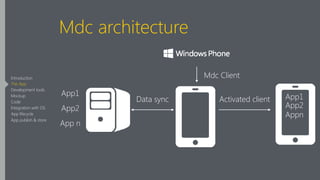
Mdc architecture
App2
App1
App n
Mdc Client
App1
App2
Appn
Data sync Activated client
Introduction
The App
Development tools
Mockup
Code
Integration with OS
App lifecycle
App publish & store
Introduction
The App
Development tools
Mockup
Code
Integration with OS
App lifecycle
App publish & store
Introduction
The App
Development tools
Mockup
Code
Integration with OS
App lifecycle
App publish & store
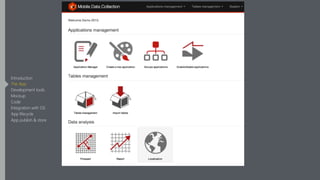
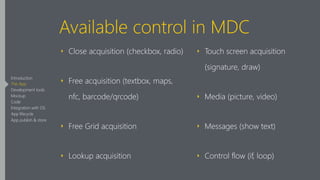
Available control in MDC
‣ Close acquisition (checkbox, radio)
‣ Free acquisition (textbox, maps,
nfc, barcode/qrcode)
‣ Free Grid acquisition
‣ Lookup acquisition
‣ Touch screen acquisition
(signature, draw)
‣ Media (picture, video)
‣ Messages (show text)
‣ Control flow (if, loop)
Introduction
The App
Development tools
Mockup
Code
Integration with OS
App lifecycle
App publish & store
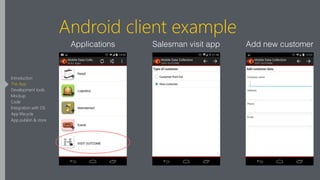
Android client example
Applications Add new customerSalesman visit app
Introduction
The App
Development tools
Mockup
Code
Integration with OS
App lifecycle
App publish & store
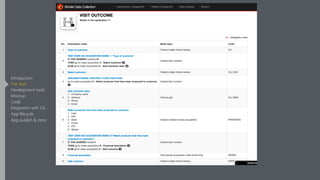
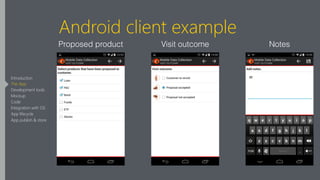
Android client example
Proposed product Visit outcome Notes
Introduction
The App
Development tools
Mockup
Code
Integration with OS
App lifecycle
App publish & store
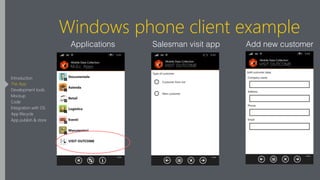
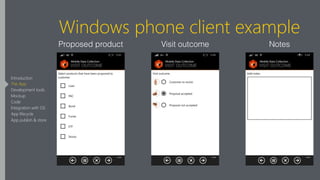
Windows phone client example
Applications Add new customerSalesman visit app
Introduction
The App
Development tools
Mockup
Code
Integration with OS
App lifecycle
App publish & store
Windows phone client example
Proposed product Visit outcome Notes
Introduction
The App
Development tools
Mockup
Code
Integration with OS
App lifecycle
App publish & store
MDC client
‣ Native clients (no Phone Gap)
‣ Proprietary protocol
‣ Occasionally connected
‣ Several different widget (picture, signature, position, textbox..)
Introduction
The App
Development tools
Mockup
Code
Integration with OS
App lifecycle
App publish & store
First big question
Introduction
The App
Development tools
Mockup
Code
Integration with OS
App lifecycle
App publish & store
Which Windows Phone
version to support ?
Introduction
The App
Development tools
Mockup
Code
Integration with OS
App lifecycle
App publish & store
First big question
To support Windows Phone 7 or not?
We chose not to support it:
‣ Clear Microsoft intent to dismiss Windows Phone 7
‣ Some of the components we needed were only for Windows Phone 8.
Android support from 2.3
Introduction
The App
Development tools
Mockup
Code
Integration with OS
App lifecycle
App publish & store
Development tools
Introduction
The App
Development tools
Mockup
Code
Integration with OS
App lifecycle
App publish & store
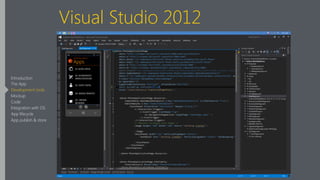
Visual Studio 2012
Introduction
The App
Development tools
Mockup
Code
Integration with OS
App lifecycle
App publish & store
Android IDE
‣ AndroidStudio
‣ Intellij Idea
‣ Eclipse
Introduction
The App
Development tools
Mockup
Code
Integration with OS
App lifecycle
App publish & store
IDE
Both support:
‣ Code completion
‣ Emulator

‣ Debugging
‣ Visual designer
Introduction
The App
Development tools
Mockup
Code
Integration with OS
App lifecycle
App publish & store
IDE
Jet Brains solution could help you:
‣ Intellij Idea keyboard scheme and shortcut are available for Visual
Studio through ReSharper plugin
‣ Code navigation, refactoring shortcuts…
Introduction
The App
Development tools
Mockup
Code
Integration with OS
App lifecycle
App publish & store
Mockup
Introduction
The App
Development tools
Mockup
Code
Integration with OS
App lifecycle
App publish & store
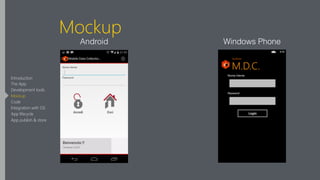
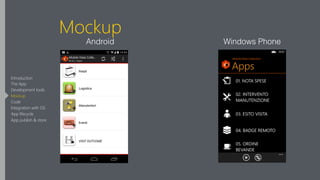
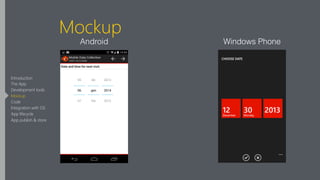
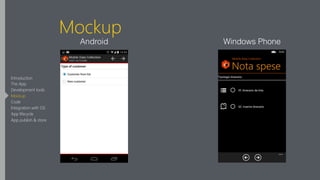
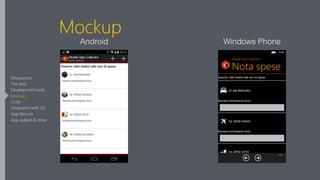
Mockup
‣ UI + Controls + Navigation - Logic
‣ Didn’t look at Android app code
‣ Just investigate
‣ Trying to figure out how to translate App flow from Android to
Modern UI
Introduction
The App
Development tools
Mockup
Code
Integration with OS
App lifecycle
App publish & store
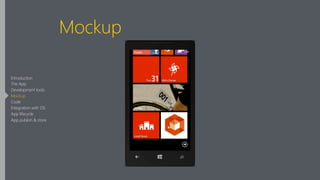
Mockup
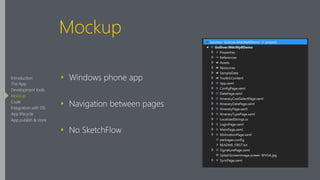
‣ Windows phone app
‣ Navigation between pages
‣ No SketchFlow
Introduction
The App
Development tools
Mockup
Code
Integration with OS
App lifecycle
App publish & store
Mockup
Android Windows Phone
Introduction
The App
Development tools
Mockup
Code
Integration with OS
App lifecycle
App publish & store
Mockup
Android Windows Phone
Introduction
The App
Development tools
Mockup
Code
Integration with OS
App lifecycle
App publish & store
Mockup
Android Windows Phone
Introduction
The App
Development tools
Mockup
Code
Integration with OS
App lifecycle
App publish & store
Mockup
Android Windows Phone
Introduction
The App
Development tools
Mockup
Code
Integration with OS
App lifecycle
App publish & store
Mockup
Android Windows Phone
Introduction
The App
Development tools
Mockup
Code
Integration with OS
App lifecycle
App publish & store
Mockup
Introduction
The App
Development tools
Mockup
Code
Integration with OS
App lifecycle
App publish & store
Component
Introduction
The App
Development tools
Mockup
Code
Integration with OS
App lifecycle
App publish & store
Component
App capabilities:
‣ Take picture
‣ Read BarCode/QR Code
‣ Read NFC
‣ Get GPS coordinate
‣ Take signature
‣ Use web view
‣ Store data in a database
‣ Multi-language support
Introduction
The App
Development tools
Mockup
Code
Integration with OS
App lifecycle
App publish & store
Component
‣ Take picture (Intent → Request CameraTask)
‣ Read BarCode/QR Code (ZXing → ZXing.net)
‣ Read NFC (Intent → Microsoft library to do the job)
‣ Get gps coordinate ( LocationManager → GeoLocator)
Introduction
The App
Development tools
Mockup
Code
Integration with OS
App lifecycle
App publish & store
Component
‣ Take signature (Canvas & Path → InkPresenter)
‣ Use web view (WebView → WebBrowser)
‣ Store data in a database (SQLite → SQLite)
‣ Multilanguage support (Xml file → Multilingual App toolkit)
Introduction
The App
Development tools
Mockup
Code
Integration with OS
App lifecycle
App publish & store
Component - Database
‣ We had to make a choice between:
‣ LocalDb
‣ SQLite
‣ SQLite won because of the experience with other platform
Introduction
The App
Development tools
Mockup
Code
Integration with OS
App lifecycle
App publish & store
So let’s start developing
Introduction
The App
Development tools
Mockup
Code
Integration with OS
App lifecycle
App publish & store
Code
Introduction
The App
Development tools
Mockup
Code
Integration with OS
App lifecycle
App publish & store
Java vs C#
Academic answer for similarities:
‣ Statically strong typed
‣ Class-based, Object-oriented
‣ Semi-interpreted
‣ Garbage collection
Introduction
The App
Development tools
Mockup
Code
Integration with OS
App lifecycle
App publish & store
Java vs C#
‣ convert basic type
‣ change data structure:
‣ Vector<T> → List<T>
‣ HashTable<Integer,Integer> → Dictionary<int,int>
‣ change method name i.e: string.startWith() → string.StartsWith()
‣ StringTokenizer → String.split(string)
Introduction
The App
Development tools
Mockup
Code
Integration with OS
App lifecycle
App publish & store
Java vs C#
Different pattern:
‣ Android: Model-View-Presenter pattern but View and Presenter highly
coupled.
‣ Windows Phone: Model-View-ViewModel pattern, Binding
mechanism.
Introduction
The App
Development tools
Mockup
Code
Integration with OS
App lifecycle
App publish & store
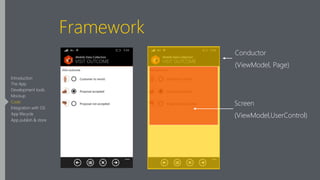
Framework
Caliburn as framework:
‣ Screen-conductor mechanism
‣ Screen: a stateful unit of work existing within the presentation tier of an
application. It’s independent from the application shell.
‣ Conductor: Conductors manage the life cycle state of one or more
screens.
Introduction
The App
Development tools
Mockup
Code
Integration with OS
App lifecycle
App publish & store
Framework
Introduction
The App
Development tools
Mockup
Code
Integration with OS
App lifecycle
App publish & store
Conductor
(ViewModel, Page)
Screen
(ViewModel,UserControl)
Framework
Caliburn as framework:
‣ EventAggregator: messaging between classes
‣ PhoneBootstrapper: custom bootstrapper designed to setup phone
applications.
Introduction
The App
Development tools
Mockup
Code
Integration with OS
App lifecycle
App publish & store
UI
Introduction
The App
Development tools
Mockup
Code
Integration with OS
App lifecycle
App publish & store
XML vs XAML
Similarity:
‣ LinearLayout → StackPanel
‣ TextView, TextEdit → TextBlock,TextBox
‣ ScrollView → ScrollViewer
‣ Radio Group, RadioButton → RadioButton
Introduction
The App
Development tools
Mockup
Code
Integration with OS
App lifecycle
App publish & store
Values vs Xaml style
Android Values:
<color name=“white”>#FFFFFFFF</color>
!
Windows Phone Xaml control style:
<Color x:Key="white">#FFFFFFFF</Color>
Introduction
The App
Development tools
Mockup
Code
Integration with OS
App lifecycle
App publish & store
Integration with OS
Introduction
The App
Development tools
Mockup
Code
Integration with OS
App lifecycle
App publish & store
Integration with OS
‣ Make a phone call
‣ Send an email
‣ Open Map

‣ Navigate to a place
‣ Open link in browser
‣ Open pdf/office file
Introduction
The App
Development tools
Mockup
Code
Integration with OS
App lifecycle
App publish & store
Integration with OS
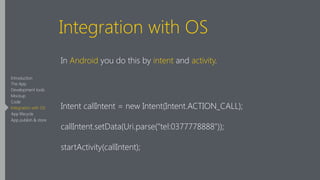
In Android you do this by intent and activity.
!
Intent callIntent = new Intent(Intent.ACTION_CALL);
callIntent.setData(Uri.parse("tel:0377778888"));
startActivity(callIntent);
Introduction
The App
Development tools
Mockup
Code
Integration with OS
App lifecycle
App publish & store
Integration with OS
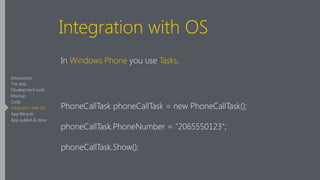
In Windows Phone you use Tasks.
!
PhoneCallTask phoneCallTask = new PhoneCallTask();
phoneCallTask.PhoneNumber = "2065550123";
phoneCallTask.Show();
Introduction
The App
Development tools
Mockup
Code
Integration with OS
App lifecycle
App publish & store
Integration with OS
Sending email in Android.
!
Intent emailIntent = new Intent(android.content.Intent.ACTION_SEND);
emailIntent.putExtra(android.content.Intent.EXTRA_EMAIL, new String[]{to});
startActivity(emailIntent);
Introduction
The App
Development tools
Mockup
Code
Integration with OS
App lifecycle
App publish & store
Integration with OS
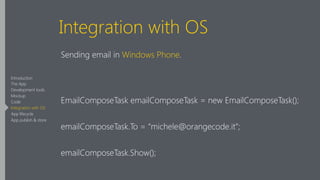
Sending email in Windows Phone.
!
EmailComposeTask emailComposeTask = new EmailComposeTask();
emailComposeTask.To = “michele@orangecode.it”;
emailComposeTask.Show();
Introduction
The App
Development tools
Mockup
Code
Integration with OS
App lifecycle
App publish & store
App lifecycle
Introduction
The App
Development tools
Mockup
Code
Integration with OS
App lifecycle
App publish & store
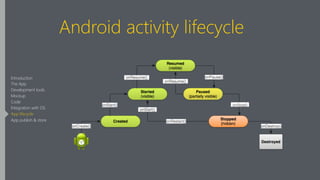
Android activity lifecycle
Introduction
The App
Development tools
Mockup
Code
Integration with OS
App lifecycle
App publish & store
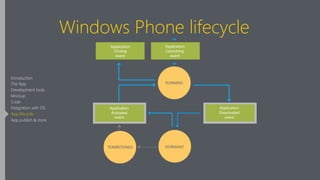
Windows Phone lifecycle
Introduction
The App
Development tools
Mockup
Code
Integration with OS
App lifecycle
App publish & store
Be careful
From Microsoft docs:
“It is possible, however, for an app to be tombstoned after the user
navigates away. In this case, the app is not preserved in memory, but
some information about the app is stored – most importantly for this
topic, the State dictionary of the PhoneApplicationPage object is stored”
Introduction
The App
Development tools
Mockup
Code
Integration with OS
App lifecycle
App publish & store
Be careful
‣ Serialised and deserialise the app state that is not a part of the page
‣ Rebind all the dependencies
‣ Update UI value (i.e: something typed from user before tombstoning)
Introduction
The App
Development tools
Mockup
Code
Integration with OS
App lifecycle
App publish & store
Be careful
Introduction
The App
Development tools
Mockup
Code
Integration with OS
App lifecycle
App publish & store
Store
Introduction
The App
Development tools
Mockup
Code
Integration with OS
App lifecycle
App publish & store
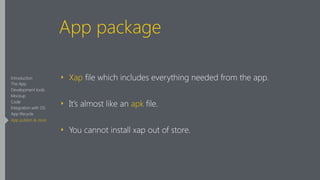
App package
‣ Xap file which includes everything needed from the app.
‣ It’s almost like an apk file.
‣ You cannot install xap out of store.
Introduction
The App
Development tools
Mockup
Code
Integration with OS
App lifecycle
App publish & store
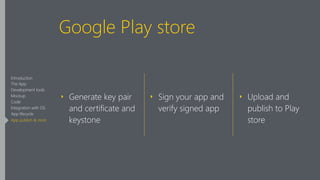
Google Play store
‣ Generate key pair
and certificate and
keystone

‣ Sign your app and
verify signed app

‣ Upload and
publish to Play
store
Introduction
The App
Development tools
Mockup
Code
Integration with OS
App lifecycle
App publish & store
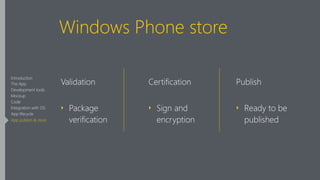
Windows Phone store
Validation
‣ Package
verification
!
Certification
‣ Sign and
encryption
!
Publish
‣ Ready to be
published
Introduction
The App
Development tools
Mockup
Code
Integration with OS
App lifecycle
App publish & store
Windows Store Test Kit
The Windows Phone Windows Phone Store Test Kit (formerly named
Marketplace Test Kit) provides a suite of automated and manual tests to
help prepare your apps to be accepted in the Windows Phone Store the
first time you submit them.
Introduction
The App
Development tools
Mockup
Code
Integration with OS
App lifecycle
App publish & store
Testing for tombstoning
‣ Before upload your xap to store simulate tombstoning and test your
app manually.
‣ Tombstoning could be forced manually by Visual Studio.
Introduction
The App
Development tools
Mockup
Code
Integration with OS
App lifecycle
App publish & store
Recap
‣ The App
‣ Development tools
‣ Mockup
‣ Code and development (UI,
Component, languages)
‣ Integration with OS
‣ App Lifecycle
‣ App publish and store
My personal experience
‣ Java is not far from C#
‣ Build a mockup in order to explore new platform
‣ Keep an eye on app lifecycle
My personal experience
‣ No object mapping SQLite-net is too slow
‣ I doubt that i would reuse a framework
‣ I would rather use a toolkit
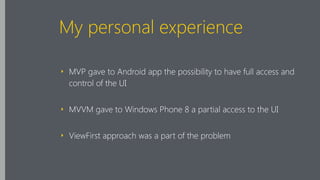
My personal experience
‣ MVP gave to Android app the possibility to have full access and
control of the UI
‣ MVVM gave to Windows Phone 8 a partial access to the UI
‣ ViewFirst approach was a part of the problem
grazie!
@piccoloaiutante

Porting business apps to Windows Phone

  • 1.
    Porting business appsto Windows Phone Michele Capra aka @piccoloaiutante
  • 2.
    What is thistalk about ? ‣ My personal experience on porting a business App from Android to Windows Phone 8. Introduction The App Development tools Mockup Code Integration with OS App lifecycle App publish & store
  • 3.
    Agenda ‣ The App ‣Development tools ‣ Mockup ‣ Code and development (UI, component, languages) ‣ Integration with OS ‣ App lifecycle ‣ App publish and store Introduction The App Development tools Mockup Code Integration with OS App lifecycle App publish & store
  • 4.
    The MDC client Introduction TheApp Development tools Mockup Code Integration with OS App lifecycle App publish & store
  • 5.
    The MDC client Thecase study: ‣ Mobile Data Collection (M.E.A.P.) ‣ create mobile application from a Web interface using a series of widgets ‣ deliver Apps to Android Tablet and Phone, iPad, iPhone, Blackberry, Windows Phone 8, Windows 8 RT/Pro ‣ developed by Gulliver, an italian company. Introduction The App Development tools Mockup Code Integration with OS App lifecycle App publish & store
  • 6.
    Mdc architecture App2 App1 App n MdcClient App1 App2 Appn Data sync Activated client Introduction The App Development tools Mockup Code Integration with OS App lifecycle App publish & store
  • 7.
    Introduction The App Development tools Mockup Code Integrationwith OS App lifecycle App publish & store
  • 8.
    Introduction The App Development tools Mockup Code Integrationwith OS App lifecycle App publish & store
  • 9.
    Available control inMDC ‣ Close acquisition (checkbox, radio) ‣ Free acquisition (textbox, maps, nfc, barcode/qrcode) ‣ Free Grid acquisition ‣ Lookup acquisition ‣ Touch screen acquisition (signature, draw) ‣ Media (picture, video) ‣ Messages (show text) ‣ Control flow (if, loop) Introduction The App Development tools Mockup Code Integration with OS App lifecycle App publish & store
  • 10.
    Android client example ApplicationsAdd new customerSalesman visit app Introduction The App Development tools Mockup Code Integration with OS App lifecycle App publish & store
  • 11.
    Android client example Proposedproduct Visit outcome Notes Introduction The App Development tools Mockup Code Integration with OS App lifecycle App publish & store
  • 12.
    Windows phone clientexample Applications Add new customerSalesman visit app Introduction The App Development tools Mockup Code Integration with OS App lifecycle App publish & store
  • 13.
    Windows phone clientexample Proposed product Visit outcome Notes Introduction The App Development tools Mockup Code Integration with OS App lifecycle App publish & store
  • 14.
    MDC client ‣ Nativeclients (no Phone Gap) ‣ Proprietary protocol ‣ Occasionally connected ‣ Several different widget (picture, signature, position, textbox..) Introduction The App Development tools Mockup Code Integration with OS App lifecycle App publish & store
  • 15.
    First big question Introduction TheApp Development tools Mockup Code Integration with OS App lifecycle App publish & store
  • 16.
    Which Windows Phone versionto support ? Introduction The App Development tools Mockup Code Integration with OS App lifecycle App publish & store
  • 17.
    First big question Tosupport Windows Phone 7 or not? We chose not to support it: ‣ Clear Microsoft intent to dismiss Windows Phone 7 ‣ Some of the components we needed were only for Windows Phone 8. Android support from 2.3 Introduction The App Development tools Mockup Code Integration with OS App lifecycle App publish & store
  • 18.
    Development tools Introduction The App Developmenttools Mockup Code Integration with OS App lifecycle App publish & store
  • 19.
    Visual Studio 2012 Introduction TheApp Development tools Mockup Code Integration with OS App lifecycle App publish & store
  • 20.
    Android IDE ‣ AndroidStudio ‣Intellij Idea ‣ Eclipse Introduction The App Development tools Mockup Code Integration with OS App lifecycle App publish & store
  • 21.
    IDE Both support: ‣ Codecompletion ‣ Emulator
 ‣ Debugging ‣ Visual designer Introduction The App Development tools Mockup Code Integration with OS App lifecycle App publish & store
  • 22.
    IDE Jet Brains solutioncould help you: ‣ Intellij Idea keyboard scheme and shortcut are available for Visual Studio through ReSharper plugin ‣ Code navigation, refactoring shortcuts… Introduction The App Development tools Mockup Code Integration with OS App lifecycle App publish & store
  • 23.
  • 24.
    Mockup ‣ UI +Controls + Navigation - Logic ‣ Didn’t look at Android app code ‣ Just investigate ‣ Trying to figure out how to translate App flow from Android to Modern UI Introduction The App Development tools Mockup Code Integration with OS App lifecycle App publish & store
  • 25.
    Mockup ‣ Windows phoneapp ‣ Navigation between pages ‣ No SketchFlow Introduction The App Development tools Mockup Code Integration with OS App lifecycle App publish & store
  • 26.
    Mockup Android Windows Phone Introduction TheApp Development tools Mockup Code Integration with OS App lifecycle App publish & store
  • 27.
    Mockup Android Windows Phone Introduction TheApp Development tools Mockup Code Integration with OS App lifecycle App publish & store
  • 28.
    Mockup Android Windows Phone Introduction TheApp Development tools Mockup Code Integration with OS App lifecycle App publish & store
  • 29.
    Mockup Android Windows Phone Introduction TheApp Development tools Mockup Code Integration with OS App lifecycle App publish & store
  • 30.
    Mockup Android Windows Phone Introduction TheApp Development tools Mockup Code Integration with OS App lifecycle App publish & store
  • 31.
  • 32.
  • 33.
    Component App capabilities: ‣ Takepicture ‣ Read BarCode/QR Code ‣ Read NFC ‣ Get GPS coordinate ‣ Take signature ‣ Use web view ‣ Store data in a database ‣ Multi-language support Introduction The App Development tools Mockup Code Integration with OS App lifecycle App publish & store
  • 34.
    Component ‣ Take picture(Intent → Request CameraTask) ‣ Read BarCode/QR Code (ZXing → ZXing.net) ‣ Read NFC (Intent → Microsoft library to do the job) ‣ Get gps coordinate ( LocationManager → GeoLocator) Introduction The App Development tools Mockup Code Integration with OS App lifecycle App publish & store
  • 35.
    Component ‣ Take signature(Canvas & Path → InkPresenter) ‣ Use web view (WebView → WebBrowser) ‣ Store data in a database (SQLite → SQLite) ‣ Multilanguage support (Xml file → Multilingual App toolkit) Introduction The App Development tools Mockup Code Integration with OS App lifecycle App publish & store
  • 36.
    Component - Database ‣We had to make a choice between: ‣ LocalDb ‣ SQLite ‣ SQLite won because of the experience with other platform Introduction The App Development tools Mockup Code Integration with OS App lifecycle App publish & store
  • 37.
    So let’s startdeveloping Introduction The App Development tools Mockup Code Integration with OS App lifecycle App publish & store
  • 38.
  • 39.
    Java vs C# Academicanswer for similarities: ‣ Statically strong typed ‣ Class-based, Object-oriented ‣ Semi-interpreted ‣ Garbage collection Introduction The App Development tools Mockup Code Integration with OS App lifecycle App publish & store
  • 40.
    Java vs C# ‣convert basic type ‣ change data structure: ‣ Vector<T> → List<T> ‣ HashTable<Integer,Integer> → Dictionary<int,int> ‣ change method name i.e: string.startWith() → string.StartsWith() ‣ StringTokenizer → String.split(string) Introduction The App Development tools Mockup Code Integration with OS App lifecycle App publish & store
  • 41.
    Java vs C# Differentpattern: ‣ Android: Model-View-Presenter pattern but View and Presenter highly coupled. ‣ Windows Phone: Model-View-ViewModel pattern, Binding mechanism. Introduction The App Development tools Mockup Code Integration with OS App lifecycle App publish & store
  • 42.
    Framework Caliburn as framework: ‣Screen-conductor mechanism ‣ Screen: a stateful unit of work existing within the presentation tier of an application. It’s independent from the application shell. ‣ Conductor: Conductors manage the life cycle state of one or more screens. Introduction The App Development tools Mockup Code Integration with OS App lifecycle App publish & store
  • 43.
    Framework Introduction The App Development tools Mockup Code Integrationwith OS App lifecycle App publish & store Conductor (ViewModel, Page) Screen (ViewModel,UserControl)
  • 44.
    Framework Caliburn as framework: ‣EventAggregator: messaging between classes ‣ PhoneBootstrapper: custom bootstrapper designed to setup phone applications. Introduction The App Development tools Mockup Code Integration with OS App lifecycle App publish & store
  • 45.
  • 46.
    XML vs XAML Similarity: ‣LinearLayout → StackPanel ‣ TextView, TextEdit → TextBlock,TextBox ‣ ScrollView → ScrollViewer ‣ Radio Group, RadioButton → RadioButton Introduction The App Development tools Mockup Code Integration with OS App lifecycle App publish & store
  • 47.
    Values vs Xamlstyle Android Values: <color name=“white”>#FFFFFFFF</color> ! Windows Phone Xaml control style: <Color x:Key="white">#FFFFFFFF</Color> Introduction The App Development tools Mockup Code Integration with OS App lifecycle App publish & store
  • 48.
    Integration with OS Introduction TheApp Development tools Mockup Code Integration with OS App lifecycle App publish & store
  • 49.
    Integration with OS ‣Make a phone call ‣ Send an email ‣ Open Map
 ‣ Navigate to a place ‣ Open link in browser ‣ Open pdf/office file Introduction The App Development tools Mockup Code Integration with OS App lifecycle App publish & store
  • 50.
    Integration with OS InAndroid you do this by intent and activity. ! Intent callIntent = new Intent(Intent.ACTION_CALL); callIntent.setData(Uri.parse("tel:0377778888")); startActivity(callIntent); Introduction The App Development tools Mockup Code Integration with OS App lifecycle App publish & store
  • 51.
    Integration with OS InWindows Phone you use Tasks. ! PhoneCallTask phoneCallTask = new PhoneCallTask(); phoneCallTask.PhoneNumber = "2065550123"; phoneCallTask.Show(); Introduction The App Development tools Mockup Code Integration with OS App lifecycle App publish & store
  • 52.
    Integration with OS Sendingemail in Android. ! Intent emailIntent = new Intent(android.content.Intent.ACTION_SEND); emailIntent.putExtra(android.content.Intent.EXTRA_EMAIL, new String[]{to}); startActivity(emailIntent); Introduction The App Development tools Mockup Code Integration with OS App lifecycle App publish & store
  • 53.
    Integration with OS Sendingemail in Windows Phone. ! EmailComposeTask emailComposeTask = new EmailComposeTask(); emailComposeTask.To = “michele@orangecode.it”; emailComposeTask.Show(); Introduction The App Development tools Mockup Code Integration with OS App lifecycle App publish & store
  • 54.
    App lifecycle Introduction The App Developmenttools Mockup Code Integration with OS App lifecycle App publish & store
  • 55.
    Android activity lifecycle Introduction TheApp Development tools Mockup Code Integration with OS App lifecycle App publish & store
  • 56.
    Windows Phone lifecycle Introduction TheApp Development tools Mockup Code Integration with OS App lifecycle App publish & store
  • 57.
    Be careful From Microsoftdocs: “It is possible, however, for an app to be tombstoned after the user navigates away. In this case, the app is not preserved in memory, but some information about the app is stored – most importantly for this topic, the State dictionary of the PhoneApplicationPage object is stored” Introduction The App Development tools Mockup Code Integration with OS App lifecycle App publish & store
  • 58.
    Be careful ‣ Serialisedand deserialise the app state that is not a part of the page ‣ Rebind all the dependencies ‣ Update UI value (i.e: something typed from user before tombstoning) Introduction The App Development tools Mockup Code Integration with OS App lifecycle App publish & store
  • 59.
    Be careful Introduction The App Developmenttools Mockup Code Integration with OS App lifecycle App publish & store
  • 60.
  • 61.
    App package ‣ Xapfile which includes everything needed from the app. ‣ It’s almost like an apk file. ‣ You cannot install xap out of store. Introduction The App Development tools Mockup Code Integration with OS App lifecycle App publish & store
  • 62.
    Google Play store ‣Generate key pair and certificate and keystone
 ‣ Sign your app and verify signed app
 ‣ Upload and publish to Play store Introduction The App Development tools Mockup Code Integration with OS App lifecycle App publish & store
  • 63.
    Windows Phone store Validation ‣Package verification ! Certification ‣ Sign and encryption ! Publish ‣ Ready to be published Introduction The App Development tools Mockup Code Integration with OS App lifecycle App publish & store
  • 64.
    Windows Store TestKit The Windows Phone Windows Phone Store Test Kit (formerly named Marketplace Test Kit) provides a suite of automated and manual tests to help prepare your apps to be accepted in the Windows Phone Store the first time you submit them. Introduction The App Development tools Mockup Code Integration with OS App lifecycle App publish & store
  • 65.
    Testing for tombstoning ‣Before upload your xap to store simulate tombstoning and test your app manually. ‣ Tombstoning could be forced manually by Visual Studio. Introduction The App Development tools Mockup Code Integration with OS App lifecycle App publish & store
  • 66.
    Recap ‣ The App ‣Development tools ‣ Mockup ‣ Code and development (UI, Component, languages) ‣ Integration with OS ‣ App Lifecycle ‣ App publish and store
  • 67.
    My personal experience ‣Java is not far from C# ‣ Build a mockup in order to explore new platform ‣ Keep an eye on app lifecycle
  • 68.
    My personal experience ‣No object mapping SQLite-net is too slow ‣ I doubt that i would reuse a framework ‣ I would rather use a toolkit
  • 69.
    My personal experience ‣MVP gave to Android app the possibility to have full access and control of the UI ‣ MVVM gave to Windows Phone 8 a partial access to the UI ‣ ViewFirst approach was a part of the problem
  • 70.