MANAGEMENT
INFORMATION SYSTEM
Chapter 1
Introduction to Information Systems
1
OVERVIEW
History of Information Systems (IS)
Evolution in Computer Hardware
Introduction to Computer Architecture
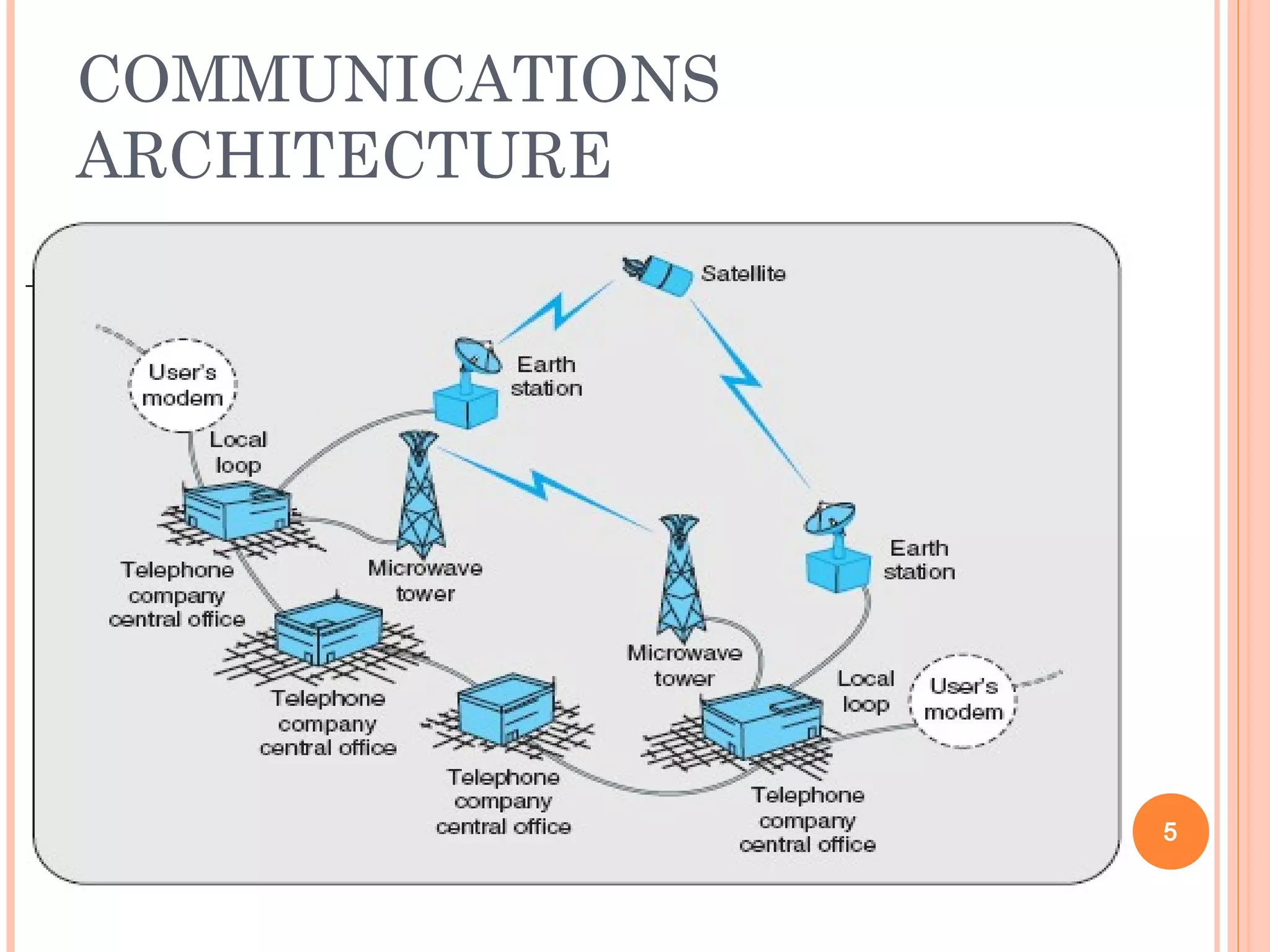
Introduction to Communication Architecture
Computer Applications, MIS
Decision Support System
Problem Solving and Decision Making
Problem Solving Phases
The future of Information Technology 2
HISTORY OF INFORMATION
SYSTEMS
 Evolution in Computer Hardware
Mainframe
Multitasking
 Smaller Computers
Minicomputers
Microcomputers
Personal computers (PC)
3
INTRODUCTION TO COMPUTER
ARCHITECTURE
 Hardware
processor, keyboard, monitor, mouse, printer,
etc.
 Software
application, operating, etc.
 Used to support managerial decision making.
 Modem
hardware device that modulates the digital
signals from a computer into analog signals
(telephone system), and vice versa.
 Direct communication standards
 Wireless networks
4
COMMUNICATIONS
ARCHITECTURE
5
THE EVOLUTION IN COMPUTER
APPLICATIONS
 Information systems
are virtual systems that enable management to
control the operations of the physical system of
the firm.
 Physical system
tangible resources such as materials,
personnel, machines, and money.
 Virtual system
information resources that are used to
represent the physical system.
6
THE PHYSICAL SYSTEM OF THE
FIRM
7
THE EVOLUTION OF
COMPUTER APPLICATIONS
(CONT’D)
Open system
is a firm’s physical system that
interacts with its environment by
means of physical resource flows.
Closed system
one that does not communicate
with its environment.
8
TRANSACTION PROCESSING
SYSTEMS
 Data
facts and figures that are generally unusable
due to their large volume and unrefined
nature.
 Information
processed data that is meaningful; tells users
something.
 Transaction Processing System (TPS)
processes data that reflects the activities of the
firm.
9
A MODEL OF TPS
10
MANAGEMENT INFORMATION
SYSTEMS
 Management Information System (MIS)
 is a computer-based system that makes
information available to users with similar
needs.
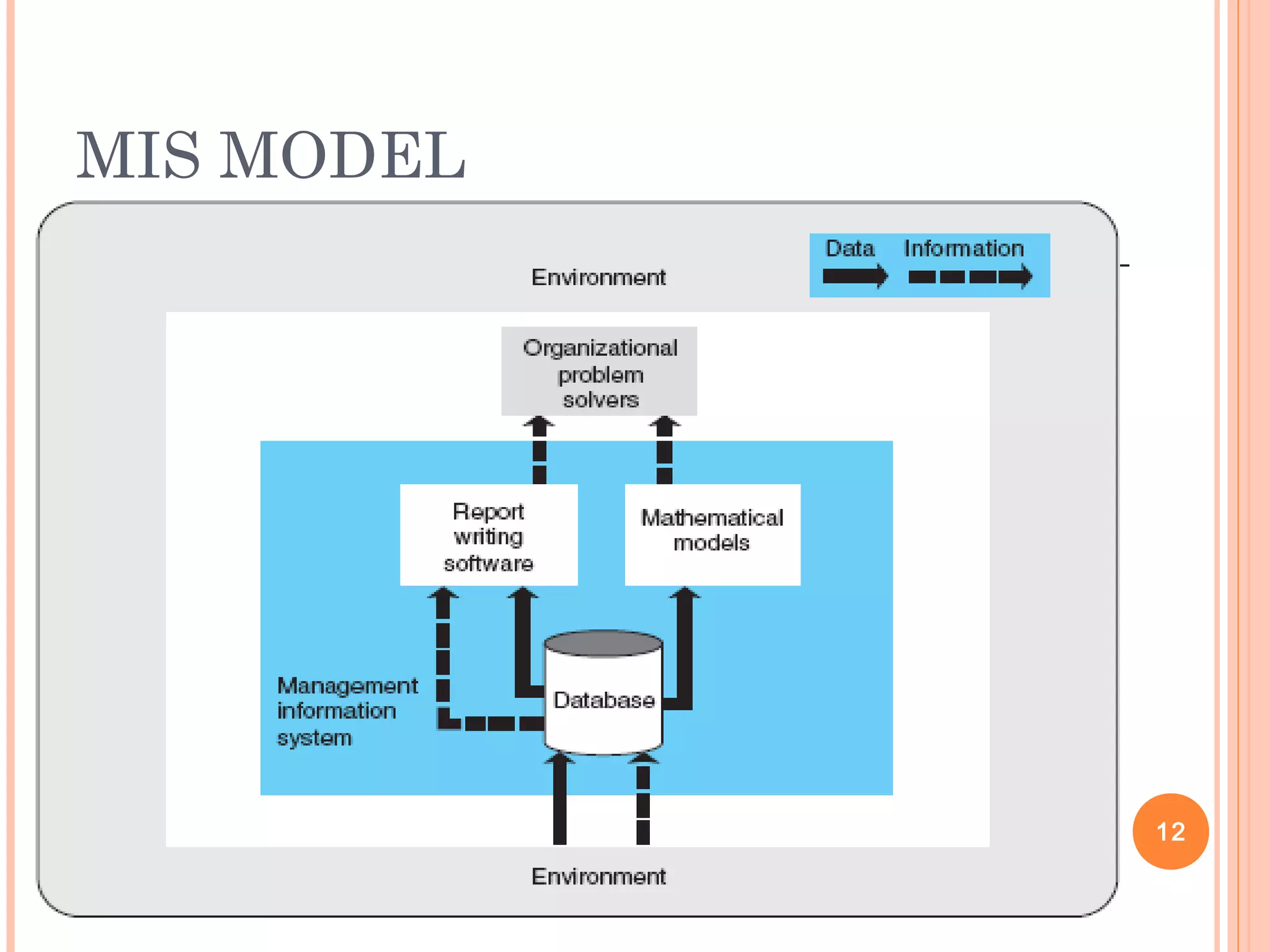
Report-writing software
 produces both periodic and special reports.
Mathematical models
 produces information as a simulation of the firm’s
operations.
11
MIS MODEL
12
MANAGEMENT INFORMATION
SYSTEMS
 Information provided by MIS describes the
firm or one of its major systems.
What has happened in the past.
What is happening now.
What is likely to happen in the future.
 Interorganizational information system
(IOS)
is formed when a firm interacts with
others, such as suppliers. 13
VIRTUAL OFFICE SYSTEMS
 Office automation
use of electronics to facilitate communication.
 Personal productivity systems
use technology to self-manage clerical tasks
such as calendars, address books, etc.
 Virtual office
performing office activities independent of a
particular physical location.
14
DECISION SUPPORT SYSTEMS
 Decision Support System (DSS)
assists management in solving a problem.
 Groupware
group-oriented software.
 Group decision support system (GDSS)
combines groupware and the DSS.
 Artificial intelligence (AI)
the science of providing computers with human
intelligence. 15
DSS MODEL
16
INFORMATION SYSTEM
USERS
 First users were clerical users on TPSs.
 MISs added problem-solvers as users.
 Managerial Levels
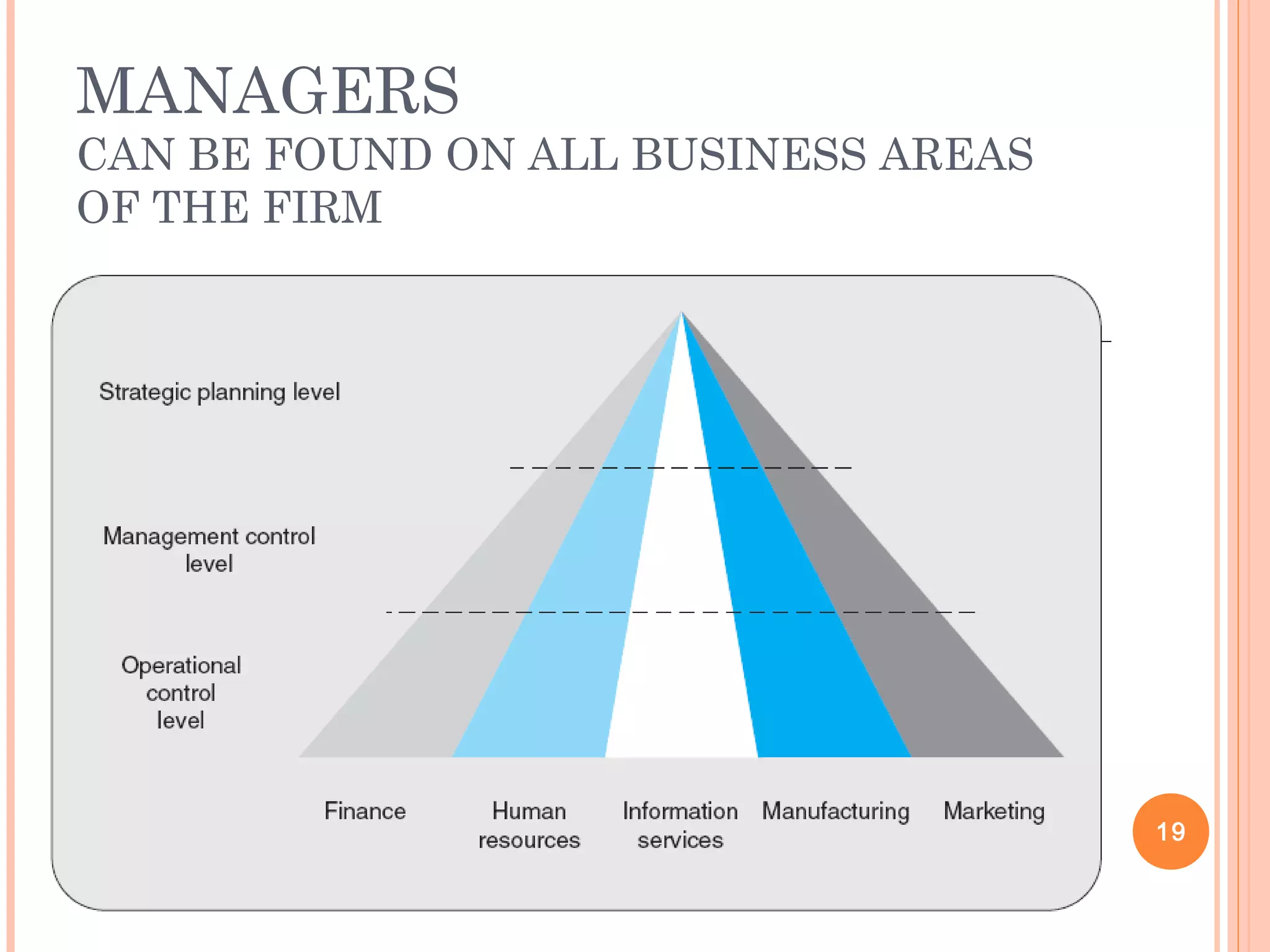
Strategic planning level
Management control level
Operational control level
17
MANAGEMENT LEVELS
CAN INFLUENCE BOTH THE SOURCE
AND PRESENTATION FORM OF
INFORMATION
18
MANAGERS
CAN BE FOUND ON ALL BUSINESS AREAS
OF THE FIRM
19
MANAGEMENT LEVEL MAY
INFLUENCE THE RELATIVE
EMPHASIS ON THE
MANAGEMENT FUNCTION
20
MINTZBERG’S MANAGERIAL
ROLES
21
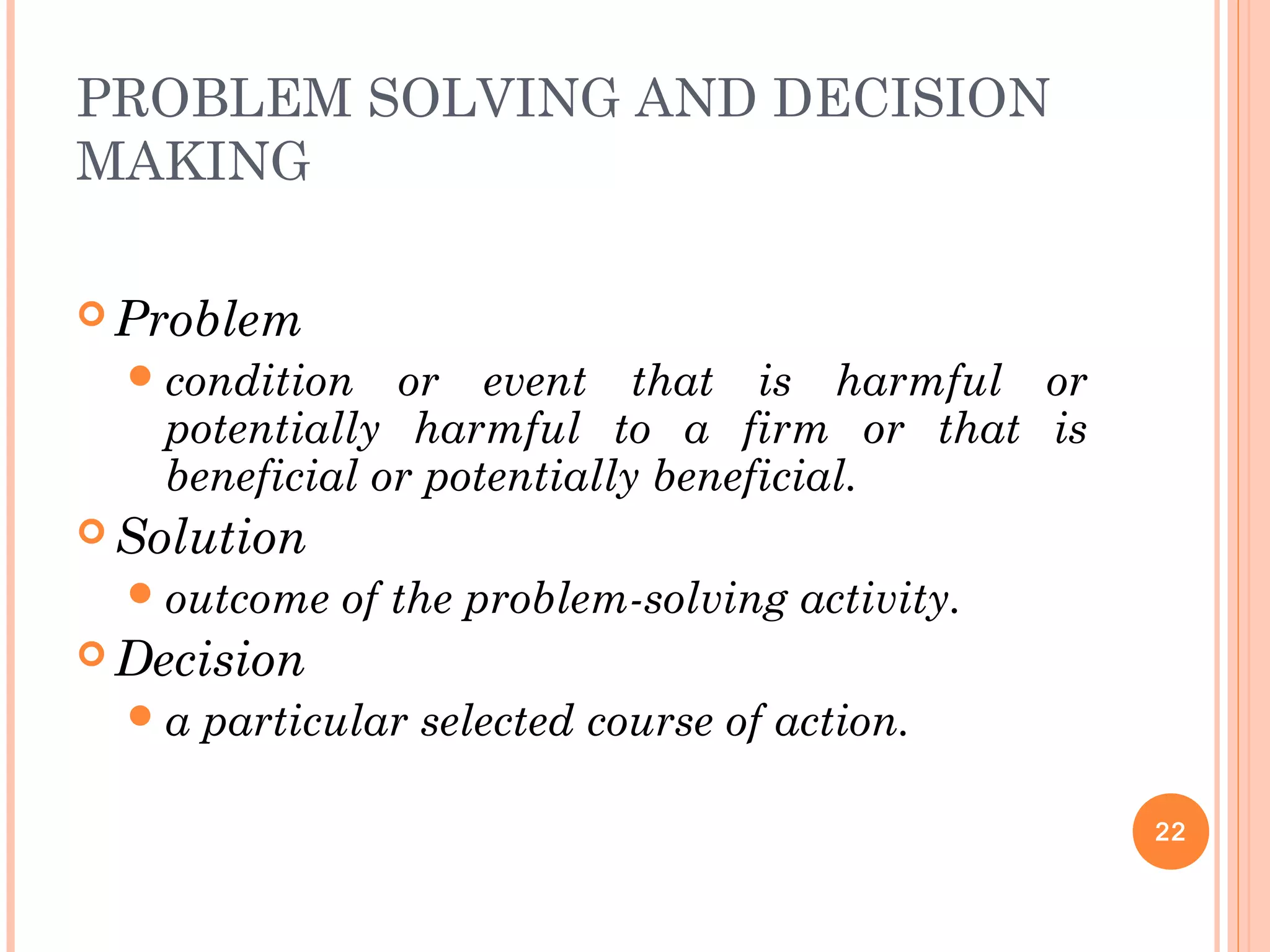
PROBLEM SOLVING AND DECISION
MAKING
 Problem
condition or event that is harmful or
potentially harmful to a firm or that is
beneficial or potentially beneficial.
 Solution
outcome of the problem-solving activity.
 Decision
a particular selected course of action.
22
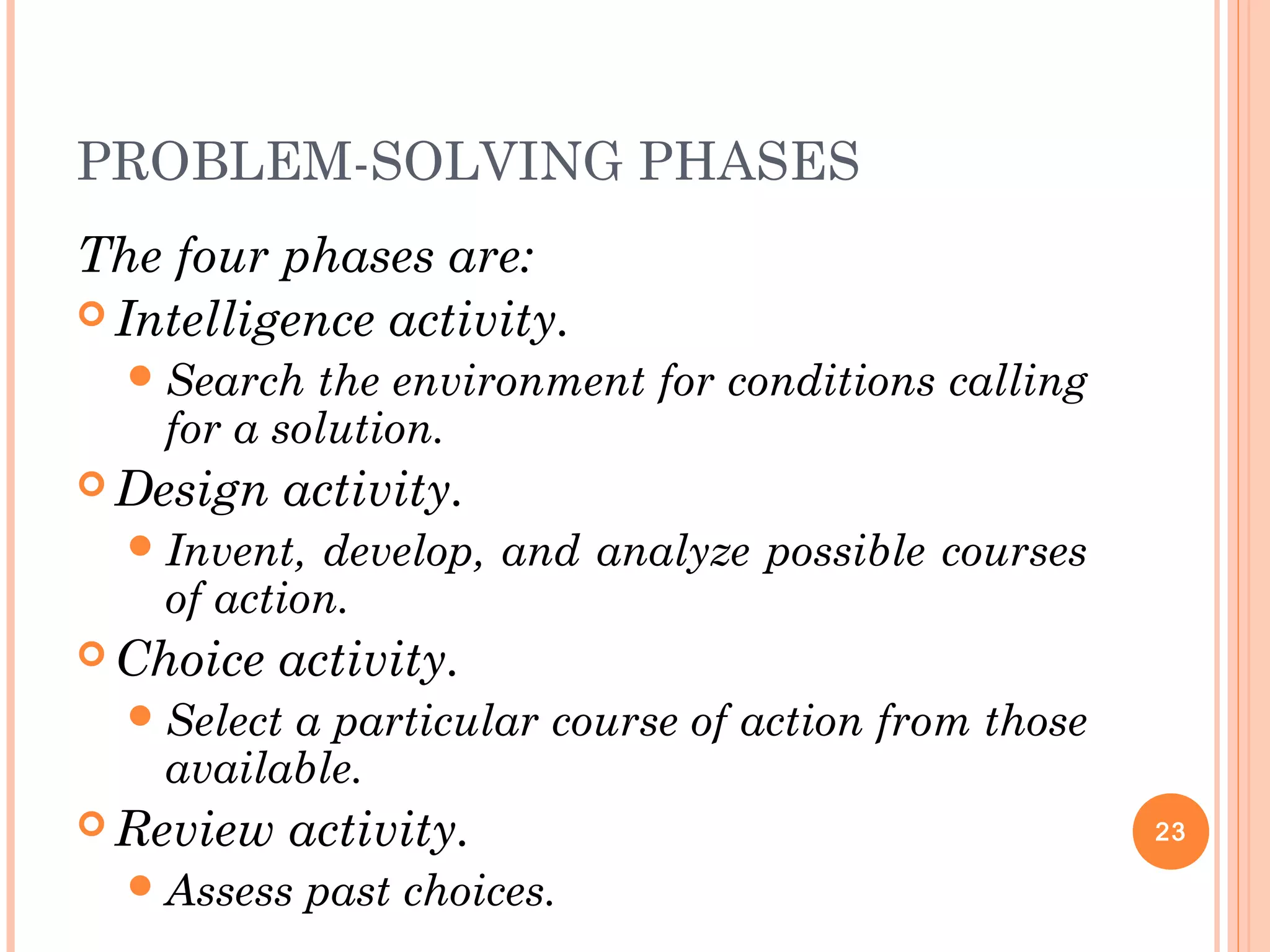
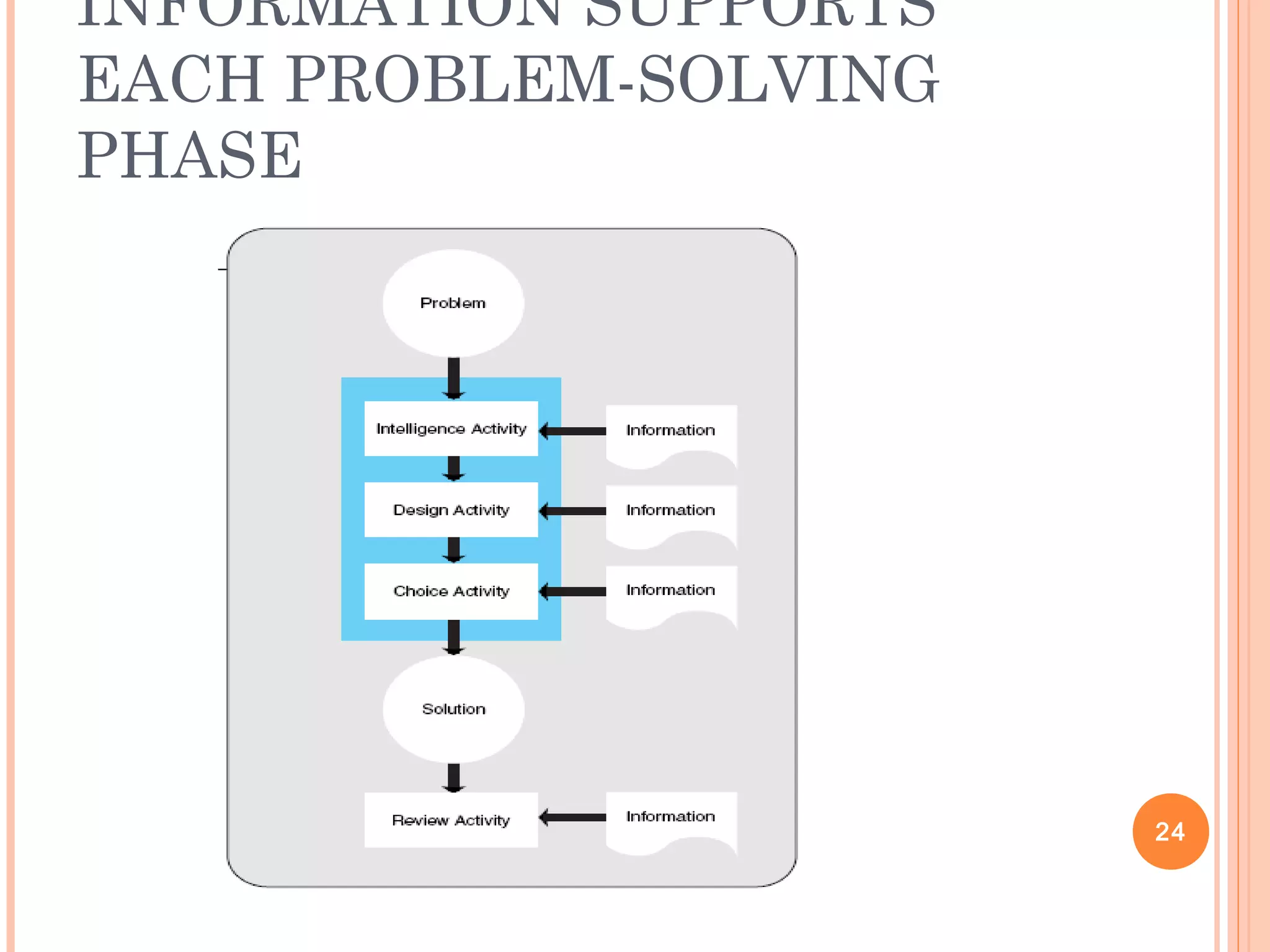
PROBLEM-SOLVING PHASES
The four phases are:
 Intelligence activity.
Search the environment for conditions calling
for a solution.
 Design activity.
Invent, develop, and analyze possible courses
of action.
 Choice activity.
Select a particular course of action from those
available.
 Review activity.
Assess past choices.
23
INFORMATION SUPPORTS
EACH PROBLEM-SOLVING
PHASE
24
THE FUTURE OF INFORMATION
TECHNOLOGY
 Reduced cost and increased power of both
computers and communications.
 Computers and communications are
converging, i.e., cell phones with browsers.
 Future computing will be low cost, small
in size, mobile, and connected.
25
EXTRA: MOORE’S LAW
 Coined in 1960s
 Originally stated that the storage density
of integrated circuits on a silicon chip
doubled about every year
 By the 1970s, the rate doubling had
increased to 18 months, a pace that
continues today
 What this means to users is that power of a
computer doubles about every 18 months
for a given cost 26
EXTRA: MOORE’S LAW
 E.g. Salary comparison
YEARYEAR FRIENDFRIEND YOUYOU
11 $40,000$40,000 $5,000$5,000
33 $57,600$57,600 $20,000$20,000
66 $99,533$99,533 $80,000$80,000
99 $171,993$171,993 $320,000$320,000
1212 $297,203$297,203 $1,280,000$1,280,000
1515 $513,567$513,567 $5,120,000$5,120,000
27

Mis Chap # 1..........

  • 1.
  • 2.
    OVERVIEW History of InformationSystems (IS) Evolution in Computer Hardware Introduction to Computer Architecture Introduction to Communication Architecture Computer Applications, MIS Decision Support System Problem Solving and Decision Making Problem Solving Phases The future of Information Technology 2
  • 3.
    HISTORY OF INFORMATION SYSTEMS Evolution in Computer Hardware Mainframe Multitasking  Smaller Computers Minicomputers Microcomputers Personal computers (PC) 3
  • 4.
    INTRODUCTION TO COMPUTER ARCHITECTURE Hardware processor, keyboard, monitor, mouse, printer, etc.  Software application, operating, etc.  Used to support managerial decision making.  Modem hardware device that modulates the digital signals from a computer into analog signals (telephone system), and vice versa.  Direct communication standards  Wireless networks 4
  • 5.
  • 6.
    THE EVOLUTION INCOMPUTER APPLICATIONS  Information systems are virtual systems that enable management to control the operations of the physical system of the firm.  Physical system tangible resources such as materials, personnel, machines, and money.  Virtual system information resources that are used to represent the physical system. 6
  • 7.
    THE PHYSICAL SYSTEMOF THE FIRM 7
  • 8.
    THE EVOLUTION OF COMPUTERAPPLICATIONS (CONT’D) Open system is a firm’s physical system that interacts with its environment by means of physical resource flows. Closed system one that does not communicate with its environment. 8
  • 9.
    TRANSACTION PROCESSING SYSTEMS  Data factsand figures that are generally unusable due to their large volume and unrefined nature.  Information processed data that is meaningful; tells users something.  Transaction Processing System (TPS) processes data that reflects the activities of the firm. 9
  • 10.
    A MODEL OFTPS 10
  • 11.
    MANAGEMENT INFORMATION SYSTEMS  ManagementInformation System (MIS)  is a computer-based system that makes information available to users with similar needs. Report-writing software  produces both periodic and special reports. Mathematical models  produces information as a simulation of the firm’s operations. 11
  • 12.
  • 13.
    MANAGEMENT INFORMATION SYSTEMS  Informationprovided by MIS describes the firm or one of its major systems. What has happened in the past. What is happening now. What is likely to happen in the future.  Interorganizational information system (IOS) is formed when a firm interacts with others, such as suppliers. 13
  • 14.
    VIRTUAL OFFICE SYSTEMS Office automation use of electronics to facilitate communication.  Personal productivity systems use technology to self-manage clerical tasks such as calendars, address books, etc.  Virtual office performing office activities independent of a particular physical location. 14
  • 15.
    DECISION SUPPORT SYSTEMS Decision Support System (DSS) assists management in solving a problem.  Groupware group-oriented software.  Group decision support system (GDSS) combines groupware and the DSS.  Artificial intelligence (AI) the science of providing computers with human intelligence. 15
  • 16.
  • 17.
    INFORMATION SYSTEM USERS  Firstusers were clerical users on TPSs.  MISs added problem-solvers as users.  Managerial Levels Strategic planning level Management control level Operational control level 17
  • 18.
    MANAGEMENT LEVELS CAN INFLUENCEBOTH THE SOURCE AND PRESENTATION FORM OF INFORMATION 18
  • 19.
    MANAGERS CAN BE FOUNDON ALL BUSINESS AREAS OF THE FIRM 19
  • 20.
    MANAGEMENT LEVEL MAY INFLUENCETHE RELATIVE EMPHASIS ON THE MANAGEMENT FUNCTION 20
  • 21.
  • 22.
    PROBLEM SOLVING ANDDECISION MAKING  Problem condition or event that is harmful or potentially harmful to a firm or that is beneficial or potentially beneficial.  Solution outcome of the problem-solving activity.  Decision a particular selected course of action. 22
  • 23.
    PROBLEM-SOLVING PHASES The fourphases are:  Intelligence activity. Search the environment for conditions calling for a solution.  Design activity. Invent, develop, and analyze possible courses of action.  Choice activity. Select a particular course of action from those available.  Review activity. Assess past choices. 23
  • 24.
  • 25.
    THE FUTURE OFINFORMATION TECHNOLOGY  Reduced cost and increased power of both computers and communications.  Computers and communications are converging, i.e., cell phones with browsers.  Future computing will be low cost, small in size, mobile, and connected. 25
  • 26.
    EXTRA: MOORE’S LAW Coined in 1960s  Originally stated that the storage density of integrated circuits on a silicon chip doubled about every year  By the 1970s, the rate doubling had increased to 18 months, a pace that continues today  What this means to users is that power of a computer doubles about every 18 months for a given cost 26
  • 27.
    EXTRA: MOORE’S LAW E.g. Salary comparison YEARYEAR FRIENDFRIEND YOUYOU 11 $40,000$40,000 $5,000$5,000 33 $57,600$57,600 $20,000$20,000 66 $99,533$99,533 $80,000$80,000 99 $171,993$171,993 $320,000$320,000 1212 $297,203$297,203 $1,280,000$1,280,000 1515 $513,567$513,567 $5,120,000$5,120,000 27