





Migrating to Puppet 4.0
0.27
2.7.x
3.x
3.x future parser
4.x
Puppet 4.0 Language
henrik.lindberg@puppetlabs.com
@hel
notice 1 => 1
notice 1 + 2 => syntax error
notice(1 + 2) => 3
notice 1,2,3 => 1 2 3
notice [1,2,3] => 1 2 3
notice [1,2],3 => 1 2 3
notice 5 in [5] => true
notice (4+1) in [5] => error, not a string
notice 5 in [4+1] => false
notice 5.0 in [5] => false
notice(0xff =~ /5/) => false
notice((0xfe+1) =~/5/) => true
notice { a=>10 } => error, no title
Godzilla on Type
Juggling….
Puppet 4.0
• Language Cleanup
– Sanity, Principle of Least Surprise
– Expressions, Expressions, Expressions
• Features
– Misc enhancements
– Resource Expression Features
– Iteration
– Type System / Optional Typing
– Embedded Puppet Templates (EPP)
– Heredoc
– Data in Modules and Environments
Cleanup
• Language Specification – yes we have one
– https://github.com/puppetlabs/puppet-specifications
• Numbers are Numbers
• No magic to-string for =~ !~ in
• Upper case bare words are Type References
• Empty string is not undef (and thus "thruty")
• Interpolation follows specified rules
• +=, []= removed, no more mutation
Migrating
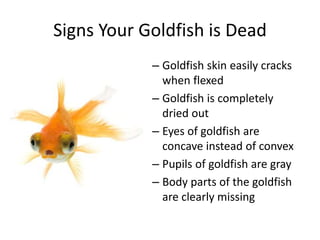
Signs Your Goldfish is Dead
– Goldfish skin easily cracks
when flexed
– Goldfish is completely
dried out
– Eyes of goldfish are
concave instead of convex
– Pupils of goldfish are gray
– Body parts of the goldfish
are clearly missing
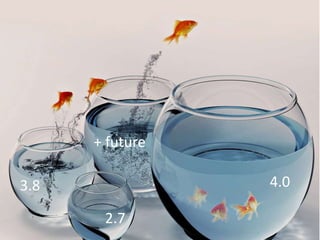
4.0
+ future
3.8
2.7
To 4.x from < 3.8 no parser=future
• First Migrate to latest 3.8.x
– Coming from < 3.0 (released 2012)
• Dynamic Scoping removed
• Address Deprecations
– Switch to Directory Environments
• Legacy Environments removed in 4.x
– Use PE Catalog Preview with same code in two environments
• (demos on youtube)
• Turn on future parser in one to help with migration to 4.x Language
• FOSS users can use similar free catalog compare tools (with more manual work)
– Do changes in backwards compatible way
– Update modules
– Gradually migrate nodes – "future parser" production safe
To 4.x from 3.8 with parser=future
• Relatively painless
– Standup a new 4.x master
• Packaging and paths changed in 4.x
– The "all in one" agent
– Same Ruby everywhere
– New location for config files, hiera data etc.
• Enjoy new PE 2015.3 / 4.3 features
– Application Management
– Data in Modules
Migrating to Puppet 4.0
Language Changes
concat/append/merge/delete 1(6)
• Concatenate Arrays with +
[1,2,3] + [4,5,6] => [1,2,3,4,5,6]
• Merge Hashes with +
{a=>1} + {b=>2} => {a=>1, b=>2}
• Delete with -
[1,2,3] – [2, 3] => [1]
{a=>1, b=>2, c=>3} – [a,c] => {b=>2}
• Append to Array with <<
[1,2,3] << 4 => [1,2,3,4]
[1,2,3] << [4,5,6] => [1,2,3,[4,5,6]]
unfold/splat 2(6)
• Unfold with unary *
$a = [2,3]
$b = [1, *$a, 4] => [1,2,3,4]
• Unfold in case option, selector and call
$a = [1,2,3]
case 1 {
*$a : { # 1 or 2 or 3
}
}
notice *$a => 1,2,3
notice $a => [1,2,3]
substrings 3(6)
• Substring in string
'cd' in "abcde" => true
• Substring with []
"xyzabcdef"[3,3] => "abc"
"xyzabcdef"[3] => "a"
"xyzabcdef"[3,-2] => "abcde"
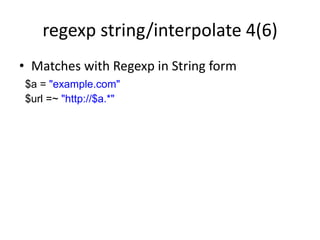
regexp string/interpolate 4(6)
• Matches with Regexp in String form
$a = "example.com"
$url =~ "http://$a.*"
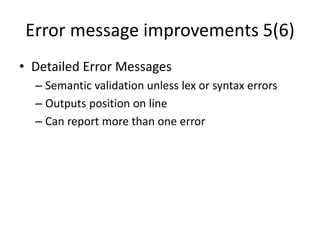
Error message improvements 5(6)
• Detailed Error Messages
– Semantic validation unless lex or syntax errors
– Outputs position on line
– Can report more than one error
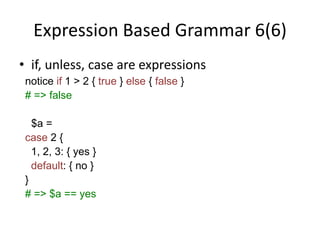
Expression Based Grammar 6(6)
• if, unless, case are expressions
notice if 1 > 2 { true } else { false }
# => false
$a =
case 2 {
1, 2, 3: { yes }
default: { no }
}
# => $a == yes
Resource Expression
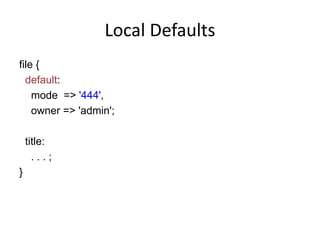
Local Defaults
file {
default:
mode => '444',
owner => 'admin';
title:
. . . ;
}
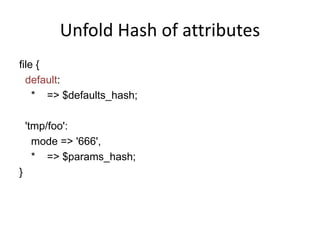
Unfold Hash of attributes
file {
default:
* => $defaults_hash;
'tmp/foo':
mode => '666',
* => $params_hash;
}
Create Resources Equiv. in Puppet
Resource[$type] {
default:
* => $defaults_hash;
$titles:
* => $params_hash;
}
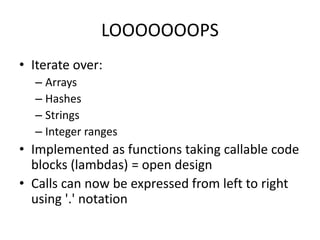
LOOOOOOOPS
• Iterate over:
– Arrays
– Hashes
– Strings
– Integer ranges
• Implemented as functions taking callable code
blocks (lambdas) = open design
• Calls can now be expressed from left to right
using '.' notation
each
• Do something with each element
• Returns LHS
[1,2,3].each |$x| { notice $x }
each([1,2,3]) |$x| { notice $x }
map
• Transform each element
• Returns transformed result
[1,2,3].map |$x| { $x*10 }
=> [10,20,30]
filter
• Produces elements that match
• Returns filtered result
[1,2,3].filter|$x| { $x >= 2 }
=> [2,3]
reduce
• Transforms / reduces many to one
• Feeds seed/previous result into next iteration
• Returns transformed result
[1,2,3].reduce |$result, $x| {
$result + $x
}
=> 6
What do you see?
Shout out the answer….
Next one….
Are you ready?
Two more…
ok?
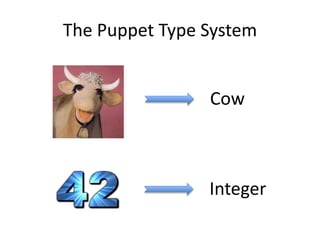
The Puppet Type System
Cow
Integer
Puppet Types
• Puppet Types are first order objects (they can
be assigned and passed around in variables)
• Uses syntax familiar from Resource – i.e. Class,
File, User, where [ ] applied to the type makes
it more specific – e.g. File['foo']
Example Integer
# All integers
Integer
# All integers >=42
Integer[42]
# All integers >=42 and <=142
Integer[42,142]
Automatic type checking!
define mytype(Integer[80,443] $port){
# port guaranteed to be integer
# and between 80 and 443
# otherwise an error
}
Manual type checking!
define mytype($port) {
assert_type(Integer[80,443], $port) |$expected, $got| {
warn("Bad port $got, expected $expected. Using port 80.")
80
}
}
• Code block called if given does not match
• …do what you want, fail, warn, return default
Operations on Type
• Since a Type is a kind of Pattern…
– Match with =~ and !~
– Match in case expression
• Since Types are defined in a hierarchy:
– Compare types with <, <=, >, >=
# is $x an integer ?
$x =~ Integer
# is $t more specific than Integer
$t = Integer[80, 144]
$t < Integer
Type Hierarchy
Any
|- Scalar
| |- Numeric
| | |- Integer[from, to]
| | |- Float[from, to]
| |
| |- String[from, to]
| | |- Enum[*strings]
| | |- Pattern[*patterns]
| |
| |- Boolean
| |- Regexp[pattern_string]
Type Hierarchy
Any
|- Collection
| |- Array[T]
| | |- Tuple[T*, from, to]
| |
| |- Hash[K, V]
| | |- Struct[{ key => T, ...}]
|
|- Variant[T*]
|- Optional[T]
|
|- Undef
|- Default
|
|- Type[T]
Type Hierarchy
Any
|- CatalogEntry
| |- Resource[type_name, title]
| |- Class[class_name]
|
|- Undef
|- Data
| |- Scalar
| |- Array[Data]
| |- Hash[Scalar, Data]
| |- Undef
EPP
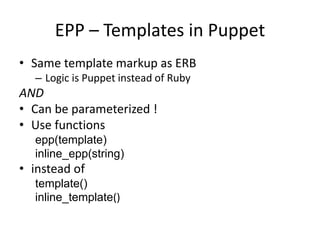
EPP – Templates in Puppet
• Same template markup as ERB
– Logic is Puppet instead of Ruby
AND
• Can be parameterized !
• Use functions
epp(template)
inline_epp(string)
• instead of
template()
inline_template()
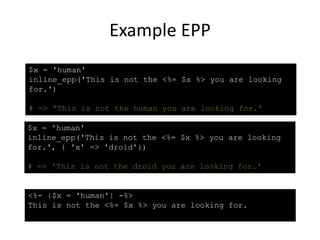
Example EPP
$x = 'human'
inline_epp('This is not the <%= $x %> you are looking
for.', { 'x' => 'droid'})
# => 'This is not the droid you are looking for.'
<%- |$x = 'human'| -%>
This is not the <%= $x %> you are looking for.
$x = 'human'
inline_epp('This is not the <%= $x %> you are looking
for.')
# => 'This is not the human you are looking for.'
Heredoc
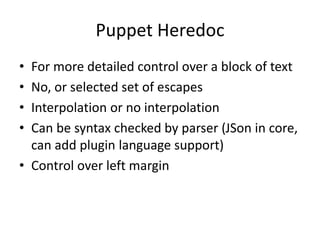
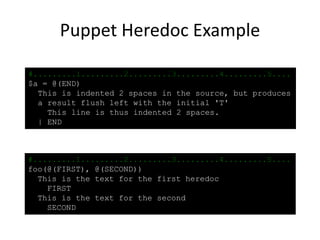
Puppet Heredoc
• For more detailed control over a block of text
• No, or selected set of escapes
• Interpolation or no interpolation
• Can be syntax checked by parser (JSon in core,
can add plugin language support)
• Control over left margin
Heredoc - Syntax
@( ["]<endtag>["] [:<syntax>] [/<escapes>] )
<text>
[|][-] <endtag>
ENDS-HERE
anything not in <text>
"ENDS-HERE"
with interpolation
:json
syntax check result
/tsrn$L turns on escape
/ turns on all
|
set left margin
-
trim trailing
t tab
s space
r return
n new-line
$ $
L <end of line>
Puppet Heredoc Example
#.........1.........2.........3.........4.........5....
$a = @(END)
This is indented 2 spaces in the source, but produces
a result flush left with the initial 'T'
This line is thus indented 2 spaces.
| END
#.........1.........2.........3.........4.........5....
foo(@(FIRST), @(SECOND))
This is the text for the first heredoc
FIRST
This is the text for the second
SECOND
Ruby API
Ruby API
• 4x Function API
– type checked
– dispatch to impl based on given types
– more powerful
– safer
• Binder
– composable type safe injection
– for plugins and data (e.g. syntax checkers, data
providers)
Summary
• Language Cleanup
• More strict
• New Features
• Better Error Messages
• Iteration
• Type System
• Puppet Templates – EPP
• Heredoc
Enjoy Puppet 4
Links
• github/puppetlabs/puppet-specifications
• http://puppet-on-the-edge.blogspot.com/
• Twitter @hel
• IRC helindbe
Just use PE the next time, ok?

Migrating to Puppet 4.0

  • 1.
  • 3.
  • 4.
  • 5.
  • 6.
  • 7.
  • 9.
  • 10.
    notice 1 =>1 notice 1 + 2 => syntax error notice(1 + 2) => 3 notice 1,2,3 => 1 2 3 notice [1,2,3] => 1 2 3 notice [1,2],3 => 1 2 3 notice 5 in [5] => true notice (4+1) in [5] => error, not a string notice 5 in [4+1] => false notice 5.0 in [5] => false notice(0xff =~ /5/) => false notice((0xfe+1) =~/5/) => true notice { a=>10 } => error, no title
  • 11.
  • 12.
    Puppet 4.0 • LanguageCleanup – Sanity, Principle of Least Surprise – Expressions, Expressions, Expressions • Features – Misc enhancements – Resource Expression Features – Iteration – Type System / Optional Typing – Embedded Puppet Templates (EPP) – Heredoc – Data in Modules and Environments
  • 13.
    Cleanup • Language Specification– yes we have one – https://github.com/puppetlabs/puppet-specifications • Numbers are Numbers • No magic to-string for =~ !~ in • Upper case bare words are Type References • Empty string is not undef (and thus "thruty") • Interpolation follows specified rules • +=, []= removed, no more mutation
  • 14.
  • 15.
    Signs Your Goldfishis Dead – Goldfish skin easily cracks when flexed – Goldfish is completely dried out – Eyes of goldfish are concave instead of convex – Pupils of goldfish are gray – Body parts of the goldfish are clearly missing
  • 16.
  • 17.
    To 4.x from< 3.8 no parser=future • First Migrate to latest 3.8.x – Coming from < 3.0 (released 2012) • Dynamic Scoping removed • Address Deprecations – Switch to Directory Environments • Legacy Environments removed in 4.x – Use PE Catalog Preview with same code in two environments • (demos on youtube) • Turn on future parser in one to help with migration to 4.x Language • FOSS users can use similar free catalog compare tools (with more manual work) – Do changes in backwards compatible way – Update modules – Gradually migrate nodes – "future parser" production safe
  • 18.
    To 4.x from3.8 with parser=future • Relatively painless – Standup a new 4.x master • Packaging and paths changed in 4.x – The "all in one" agent – Same Ruby everywhere – New location for config files, hiera data etc. • Enjoy new PE 2015.3 / 4.3 features – Application Management – Data in Modules
  • 19.
  • 20.
  • 21.
    concat/append/merge/delete 1(6) • ConcatenateArrays with + [1,2,3] + [4,5,6] => [1,2,3,4,5,6] • Merge Hashes with + {a=>1} + {b=>2} => {a=>1, b=>2} • Delete with - [1,2,3] – [2, 3] => [1] {a=>1, b=>2, c=>3} – [a,c] => {b=>2} • Append to Array with << [1,2,3] << 4 => [1,2,3,4] [1,2,3] << [4,5,6] => [1,2,3,[4,5,6]]
  • 22.
    unfold/splat 2(6) • Unfoldwith unary * $a = [2,3] $b = [1, *$a, 4] => [1,2,3,4] • Unfold in case option, selector and call $a = [1,2,3] case 1 { *$a : { # 1 or 2 or 3 } } notice *$a => 1,2,3 notice $a => [1,2,3]
  • 23.
    substrings 3(6) • Substringin string 'cd' in "abcde" => true • Substring with [] "xyzabcdef"[3,3] => "abc" "xyzabcdef"[3] => "a" "xyzabcdef"[3,-2] => "abcde"
  • 24.
    regexp string/interpolate 4(6) •Matches with Regexp in String form $a = "example.com" $url =~ "http://$a.*"
  • 25.
    Error message improvements5(6) • Detailed Error Messages – Semantic validation unless lex or syntax errors – Outputs position on line – Can report more than one error
  • 26.
    Expression Based Grammar6(6) • if, unless, case are expressions notice if 1 > 2 { true } else { false } # => false $a = case 2 { 1, 2, 3: { yes } default: { no } } # => $a == yes
  • 27.
  • 28.
    Local Defaults file { default: mode=> '444', owner => 'admin'; title: . . . ; }
  • 29.
    Unfold Hash ofattributes file { default: * => $defaults_hash; 'tmp/foo': mode => '666', * => $params_hash; }
  • 30.
    Create Resources Equiv.in Puppet Resource[$type] { default: * => $defaults_hash; $titles: * => $params_hash; }
  • 32.
    LOOOOOOOPS • Iterate over: –Arrays – Hashes – Strings – Integer ranges • Implemented as functions taking callable code blocks (lambdas) = open design • Calls can now be expressed from left to right using '.' notation
  • 33.
    each • Do somethingwith each element • Returns LHS [1,2,3].each |$x| { notice $x } each([1,2,3]) |$x| { notice $x }
  • 34.
    map • Transform eachelement • Returns transformed result [1,2,3].map |$x| { $x*10 } => [10,20,30]
  • 35.
    filter • Produces elementsthat match • Returns filtered result [1,2,3].filter|$x| { $x >= 2 } => [2,3]
  • 36.
    reduce • Transforms /reduces many to one • Feeds seed/previous result into next iteration • Returns transformed result [1,2,3].reduce |$result, $x| { $result + $x } => 6
  • 37.
    What do yousee? Shout out the answer….
  • 39.
  • 41.
  • 44.
    The Puppet TypeSystem Cow Integer
  • 45.
    Puppet Types • PuppetTypes are first order objects (they can be assigned and passed around in variables) • Uses syntax familiar from Resource – i.e. Class, File, User, where [ ] applied to the type makes it more specific – e.g. File['foo']
  • 46.
    Example Integer # Allintegers Integer # All integers >=42 Integer[42] # All integers >=42 and <=142 Integer[42,142]
  • 47.
    Automatic type checking! definemytype(Integer[80,443] $port){ # port guaranteed to be integer # and between 80 and 443 # otherwise an error }
  • 48.
    Manual type checking! definemytype($port) { assert_type(Integer[80,443], $port) |$expected, $got| { warn("Bad port $got, expected $expected. Using port 80.") 80 } } • Code block called if given does not match • …do what you want, fail, warn, return default
  • 49.
    Operations on Type •Since a Type is a kind of Pattern… – Match with =~ and !~ – Match in case expression • Since Types are defined in a hierarchy: – Compare types with <, <=, >, >= # is $x an integer ? $x =~ Integer # is $t more specific than Integer $t = Integer[80, 144] $t < Integer
  • 50.
    Type Hierarchy Any |- Scalar ||- Numeric | | |- Integer[from, to] | | |- Float[from, to] | | | |- String[from, to] | | |- Enum[*strings] | | |- Pattern[*patterns] | | | |- Boolean | |- Regexp[pattern_string]
  • 51.
    Type Hierarchy Any |- Collection ||- Array[T] | | |- Tuple[T*, from, to] | | | |- Hash[K, V] | | |- Struct[{ key => T, ...}] | |- Variant[T*] |- Optional[T] | |- Undef |- Default | |- Type[T]
  • 52.
    Type Hierarchy Any |- CatalogEntry ||- Resource[type_name, title] | |- Class[class_name] | |- Undef |- Data | |- Scalar | |- Array[Data] | |- Hash[Scalar, Data] | |- Undef
  • 53.
  • 54.
    EPP – Templatesin Puppet • Same template markup as ERB – Logic is Puppet instead of Ruby AND • Can be parameterized ! • Use functions epp(template) inline_epp(string) • instead of template() inline_template()
  • 55.
    Example EPP $x ='human' inline_epp('This is not the <%= $x %> you are looking for.', { 'x' => 'droid'}) # => 'This is not the droid you are looking for.' <%- |$x = 'human'| -%> This is not the <%= $x %> you are looking for. $x = 'human' inline_epp('This is not the <%= $x %> you are looking for.') # => 'This is not the human you are looking for.'
  • 56.
  • 57.
    Puppet Heredoc • Formore detailed control over a block of text • No, or selected set of escapes • Interpolation or no interpolation • Can be syntax checked by parser (JSon in core, can add plugin language support) • Control over left margin
  • 58.
    Heredoc - Syntax @(["]<endtag>["] [:<syntax>] [/<escapes>] ) <text> [|][-] <endtag> ENDS-HERE anything not in <text> "ENDS-HERE" with interpolation :json syntax check result /tsrn$L turns on escape / turns on all | set left margin - trim trailing t tab s space r return n new-line $ $ L <end of line>
  • 59.
    Puppet Heredoc Example #.........1.........2.........3.........4.........5.... $a= @(END) This is indented 2 spaces in the source, but produces a result flush left with the initial 'T' This line is thus indented 2 spaces. | END #.........1.........2.........3.........4.........5.... foo(@(FIRST), @(SECOND)) This is the text for the first heredoc FIRST This is the text for the second SECOND
  • 60.
  • 61.
    Ruby API • 4xFunction API – type checked – dispatch to impl based on given types – more powerful – safer • Binder – composable type safe injection – for plugins and data (e.g. syntax checkers, data providers)
  • 62.
    Summary • Language Cleanup •More strict • New Features • Better Error Messages • Iteration • Type System • Puppet Templates – EPP • Heredoc
  • 63.
  • 64.
  • 65.
    Just use PEthe next time, ok?

Editor's Notes

  • #3 Let's talk about your Puppet installation… Are you perhaps romancing the state of your configuration management system ? Let's see a show of hands…
  • #4 How many are on 0.27 still? I am glad that there are none of you that still cook your bowie knife skewed road-kill dinner over an open fire.
  • #5 How about 2.7 then? Much more inhabitable, but not many modern facilities. And oh, you have to turn down the kerosene lamps when cooking something or you will run out of oxygen…
  • #6 3.x versions up to, but not incuding 3.8 ? Now we have a much more robust house. A quaint rural design done in the Brittish tradition with pipes on the outside, and thick lush wall to wall carpets in the bathrooms… that are never lush and never lush and nice to walk on because – well they are always soggy… … but if we walk around the back of the house…
  • #7 We have been building up the new version in parallel and shipped in with Puppet behind the parser=future feature flag during the Puppet 3.x series. In Puppet 3.5/3.6 is started to be quite decent Since Puppet 3.8 it is also fully supported in Puppet Enterprise.
  • #8 In Puppet 4.0 the modern section is on par with 3.8.x – and during the 4.x series you will see it being built out. As you can see here, the 3.x part is also renovated and some of the old quirky things removed. A large portion of the older implementation is still there though – and this is the part of Puppet that we we will now start addressing. So, how hard is it to migrate ? Well, it depends on where you are starting, and how much customization and creativity you have applied to your older installed puppet…
  • #9 Clearly the amount of work depends on well you stayed within "best practices" and how much code you have "cloned, and now unfortunately own". All puppet labs supported modules and most major modules have been updated to work well with 4.x. In this presentation I will present an overview of the changes in the 4.0 Puppet Language and some of its new features. I will also talk about some of the tools you can use to help you migrate. (Picture: House from Lemony Snicket…)
  • #10 Hi, I am henrik lindberg, and I am here to talk about Puppet 4.0.
  • #11 It all started with things like these amazing 3.x results
  • #12 Grrrr ! If you are interested in going WAT Spelunking, Nick Fagerlund has a repo with "Evil Made Manifests"
  • #13 So, what is in Puppet 4.0 from a language perspective?
  • #15 So, how do you migrate in practice ? If you do it the wrong way you may kill your goldfish.
  • #16 (I found this at a serious Pet Shop on-line giving instructions how to deal with goldfish having jumped out of their bowl – which apparently happens quite often). So how do we prevent that…
  • #17 The way to go is to do this in steps. (I did not include the unsavory 0.27 brownish bowl with algae and floaters …)
  • #20 Big Bang? Smaller Cymbals? How big is your Polar Bear? The 12000 nodes size like at Spotify, of just a handful… Think about the risk/reward
  • #32 While it may not rock your socks off – since the next feature have been out in the future parser since it first arrived in 3.4 – it is still one of the biggest new features…
  • #39 And now for an experiment – Please work with me here, or this will be a perfect lead balloon…
  • #40 COOKIE !!!!
  • #42 COW
  • #44 STRING
  • #45 INTEGER !!! Alright enough fun and games – I think you know where this is going…
  • #46 A Type System is about abstraction. And works just like the process we just used to recognize images of things using our brains pattern matching and abstraction capabilities. There was an image of a Cow, and we matched against what we know characterizes a Cow, and we selected the name for it. The fact that it was not a real cow, but a muppet did not distract us – we were simply not confused by the multiple levels of abstraction. If someone had shouted, "fabric and foam rubber arranged to resemble a cow" – that would also have been correct, only at a different level of abstraction. We did this pattern matching in analog way to how the Puppet Type system matches something like the numeric value 42 to the type Integer, an abstraction describing all integral numbers, just like the word Cow is an abstraction of all cows. Type is simply a pattern matcher similar to how a regular expression is a pattern matcher specific to strings.
  • #47 Lets take a closer look at the Integer type
  • #59 API for plugin of syntax to be finalizd in Puppet 4.0 – will change slightly due to a namespace conflict in puppetx namespace