Cloud Skills Challenge
Luis Beltrán
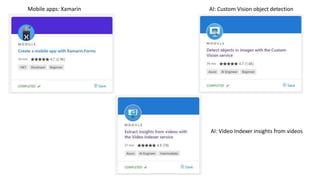
Mobile apps: Xamarin AI: Custom Vision object detection
AI: Video Indexer insights from videos
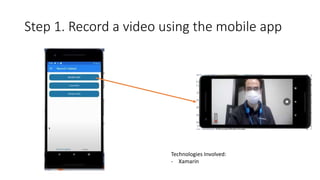
Step 1. Record a video using the mobile app
Technologies Involved:
- Xamarin
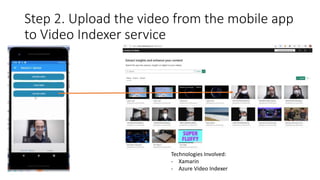
Step 2. Upload the video from the mobile app
to Video Indexer service
Technologies Involved:
- Xamarin
- Azure Video Indexer
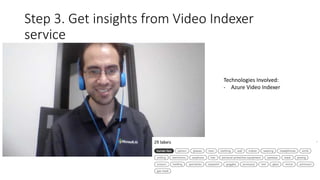
Step 3. Get insights from Video Indexer
service
Technologies Involved:
- Azure Video Indexer
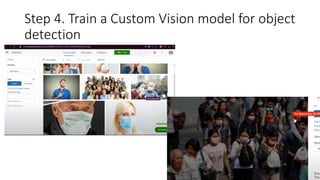
Step 4. Train a Custom Vision model for object
detection
Technologies Involved:
- Xamarin
- Azure Video Indexer
- Custom Vision
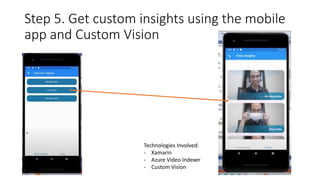
Step 5. Get custom insights using the mobile
app and Custom Vision
Thank you for your attention!
Special thanks to:
Carla Mamani Anthony Quiranza
Open-source project available on GitHub:
https://github.com/icebeam7/FaceMaskVideoDetector

Cloud Skills Challenge.pptx

  • 1.
  • 2.
    Mobile apps: XamarinAI: Custom Vision object detection AI: Video Indexer insights from videos
  • 3.
    Step 1. Recorda video using the mobile app Technologies Involved: - Xamarin
  • 4.
    Step 2. Uploadthe video from the mobile app to Video Indexer service Technologies Involved: - Xamarin - Azure Video Indexer
  • 5.
    Step 3. Getinsights from Video Indexer service Technologies Involved: - Azure Video Indexer
  • 6.
    Step 4. Traina Custom Vision model for object detection
  • 7.
    Technologies Involved: - Xamarin -Azure Video Indexer - Custom Vision Step 5. Get custom insights using the mobile app and Custom Vision
  • 8.
    Thank you foryour attention! Special thanks to: Carla Mamani Anthony Quiranza Open-source project available on GitHub: https://github.com/icebeam7/FaceMaskVideoDetector

Editor's Notes

  • #2 Hello everyone, my name is Luis I am a student from Czech Republic. I hope you’re enjoying the event and getting inspiration from the projects developed by students who participated at the Discover AI event. This is my entry for the Cloud Skills Challenge.
  • #3 During the Cloud Skills Challenge I focused my learning experience in two areas: Mobile applications and artificial intelligence. I learned how to develop mobile apps for Android and iOS devices using Xamarin, how to extract insights from videos using Video Indexer and how to detect objects in images using Azure Custom Vision. It was fun and easy, and the best part is that you can create something with this knowledge, so let’s take a look.
  • #4 I created a mobile application with several options. The first one allows me to record a video within the application. As you can see, I wear a facemask at some point of the video.
  • #5 Second option is to upload this video to my video indexer workspace. Here you can see that the video is sent from the mobile app.
  • #6 Once the video is uploaded and indexed, I can check the insights using the Video Indexer. But what if I want to know if the person is wearing a mask at specific times or not?
  • #7 So that’s where Custom Vision comes in hand. Without any single line of code, I can create a Custom Vision object detection project, then upload images and draw a rectangle where the object of interest is present. After submitting several images, I can train a machine learning model that will detect if there’s a facemask in the picture and where it is located.
  • #8 I can go back to my mobile app and integrate it there. The video indexer services extracts frames or images, then I send these pictures to Custom Vision service and it will tell me if there’s a facemask present or not.
  • #9 So that’s it. This project was created in collaboration with two friends, Carla from Bolivia and Anthony from Ecuador. Special thanks to them, without their hard work this fun project wouldn’t have been created. The solution is available on GitHub by the way. Thanks to the organizers of this challenge, it was great to learn new things and I definitely had fun integrating all the parts. And of course, thanks to all attendees for being here.