




© Copyright SELA Software & Education Labs Ltd. | 14-18 Baruch Hirsch St Bnei Brak, 51202 Israel | www.selagroup.com
SELA DEVELOPER PRACTICE
DECEMBER 20-24, 2015
Ido Katz, Microsoft Azure MVP
Senior Cloud Infrastructure Consultant
Sela Group
Azure Traffic Manager
Mail: idok@sela.co.il
Blog: blogs.microsoft.co.il/idokatz
Twitter: @send2katz
Agenda
Moving to the cloud
Some basics
Why do we need Load Balancer
What is Azure Traffic Manger
Round Robin Profile
Failover Clustering Profile
Demo
Performance Profile
Demo
Other Cloud Solutions
Cloud-based CDN/ADCs
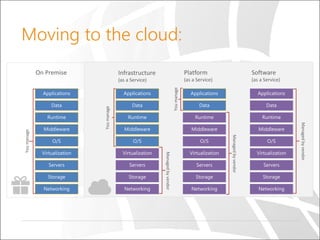
Moving to the cloud:
Some Basics:
Cloud Service:
• Grants a public IP and DNS per CS.
• Contains your Virtual Machines(VMs)
Virtual Machine:
• Hosts your service/application
• Multiple VMs can be under one cloud service.
Why do we need Load Balancer
Load balancing, by its very nature, is the solution
for more than one problem such as:
1. Traffic Redundancy
2. BCP Failover
3. User Experience
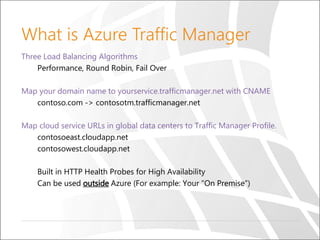
What is Azure Traffic Manager
Three Load Balancing Algorithms
Performance, Round Robin, Fail Over
Map your domain name to yourservice.trafficmanager.net with CNAME
contoso.com -> contosotm.trafficmanager.net
Map cloud service URLs in global data centers to Traffic Manager Profile.
contosoeast.cloudapp.net
contosowest.cloudapp.net
Built in HTTP Health Probes for High Availability
Can be used outside Azure (For example: Your “On Premise”)
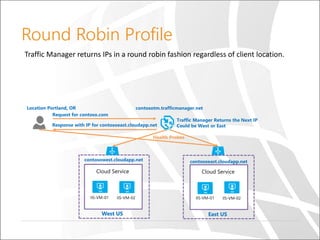
Round Robin Profile
Traffic Manager returns IPs in a round robin fashion regardless of client location.
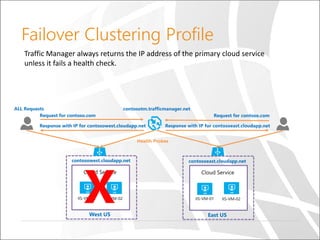
Failover Clustering Profile
X
Traffic Manager always returns the IP address of the primary cloud service
unless it fails a health check.
Demo
Failover Clustering
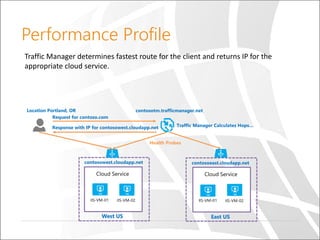
Performance Profile
Traffic Manager determines fastest route for the client and returns IP for the
appropriate cloud service.
Demo
Performance
PowerShell Demo
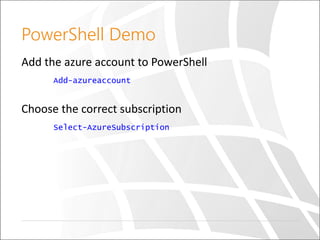
Add the azure account to PowerShell
Add-azureaccount
Choose the correct subscription
Select-AzureSubscription
PowerShell Demo
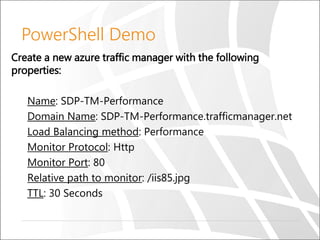
Create a new azure traffic manager with the following
properties:
Name: SDP-TM-Performance
Domain Name: SDP-TM-Performance.trafficmanager.net
Load Balancing method: Performance
Monitor Protocol: Http
Monitor Port: 80
Relative path to monitor: /iis85.jpg
TTL: 30 Seconds
PowerShell Demo
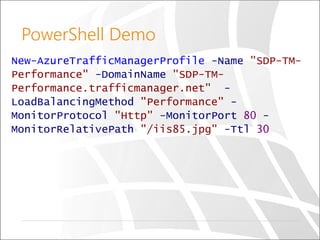
New-AzureTrafficManagerProfile -Name "SDP-TM-
Performance" -DomainName "SDP-TM-
Performance.trafficmanager.net" -
LoadBalancingMethod "Performance" -
MonitorProtocol "Http" -MonitorPort 80 -
MonitorRelativePath "/iis85.jpg" -Ttl 30
PowerShell Demo
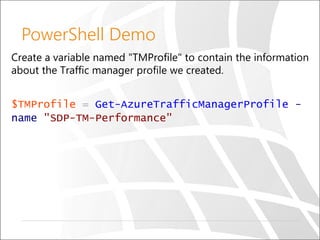
Create a variable named "TMProfile" to contain the information
about the Traffic manager profile we created.
$TMProfile = Get-AzureTrafficManagerProfile -
name "SDP-TM-Performance"
PowerShell Demo
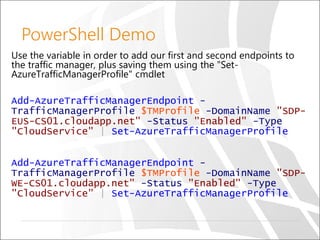
Use the variable in order to add our first and second endpoints to
the traffic manager, plus saving them using the "Set-
AzureTrafficManagerProfile" cmdlet
Add-AzureTrafficManagerEndpoint -
TrafficManagerProfile $TMProfile -DomainName "SDP-
EUS-CS01.cloudapp.net" -Status "Enabled" -Type
"CloudService" | Set-AzureTrafficManagerProfile
Add-AzureTrafficManagerEndpoint -
TrafficManagerProfile $TMProfile -DomainName "SDP-
WE-CS01.cloudapp.net" -Status "Enabled" -Type
"CloudService" | Set-AzureTrafficManagerProfile
PowerShell Demo
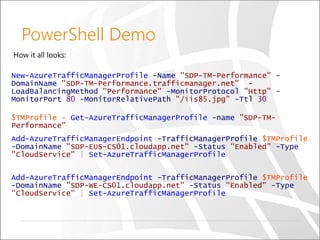
How it all looks:
New-AzureTrafficManagerProfile -Name "SDP-TM-Performance" -
DomainName "SDP-TM-Performance.trafficmanager.net" -
LoadBalancingMethod "Performance" -MonitorProtocol "Http" -
MonitorPort 80 -MonitorRelativePath "/iis85.jpg" -Ttl 30
$TMProfile = Get-AzureTrafficManagerProfile -name "SDP-TM-
Performance"
Add-AzureTrafficManagerEndpoint -TrafficManagerProfile $TMProfile
-DomainName "SDP-EUS-CS01.cloudapp.net" -Status "Enabled" -Type
"CloudService" | Set-AzureTrafficManagerProfile
Add-AzureTrafficManagerEndpoint -TrafficManagerProfile $TMProfile
-DomainName "SDP-WE-CS01.cloudapp.net" -Status "Enabled" -Type
"CloudService" | Set-AzureTrafficManagerProfile
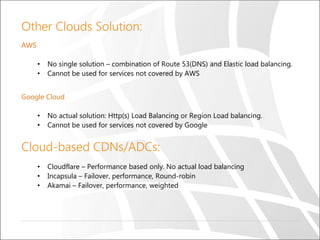
Other Clouds Solution:
AWS
• No single solution – combination of Route 53(DNS) and Elastic load balancing.
• Cannot be used for services not covered by AWS
Google Cloud
• No actual solution: Http(s) Load Balancing or Region Load balancing.
• Cannot be used for services not covered by Google
Cloud-based CDNs/ADCs:
• Cloudflare – Performance based only. No actual load balancing
• Incapsula – Failover, performance, Round-robin
• Akamai – Failover, performance, weighted
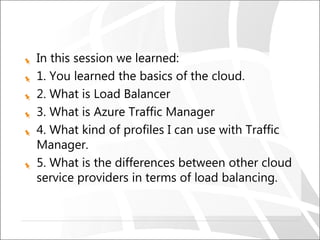
In this session we learned:
1. You learned the basics of the cloud.
2. What is Load Balancer
3. What is Azure Traffic Manager
4. What kind of profiles I can use with Traffic
Manager.
5. What is the differences between other cloud
service providers in terms of load balancing.
Online documentation
Channel 9 -
https://channel9.msdn.com/Blogs/Windows-
Azure/How-Azure-Traffic-Manager-WorksMSDN
Demos -
https://channel9.msdn.com/Shows/Edge/Edge-
Show-86-Windows-Azure-Traffic-Manager-Demos
Microsoft Azure -
https://azure.microsoft.com/en-
us/documentation/articles/traffic-manager-
overview/
Questions

Microsoft Azure Traffic Manager

  • 1.
    © Copyright SELASoftware & Education Labs Ltd. | 14-18 Baruch Hirsch St Bnei Brak, 51202 Israel | www.selagroup.com SELA DEVELOPER PRACTICE DECEMBER 20-24, 2015 Ido Katz, Microsoft Azure MVP Senior Cloud Infrastructure Consultant Sela Group Azure Traffic Manager Mail: idok@sela.co.il Blog: blogs.microsoft.co.il/idokatz Twitter: @send2katz
  • 2.
    Agenda Moving to thecloud Some basics Why do we need Load Balancer What is Azure Traffic Manger Round Robin Profile Failover Clustering Profile Demo Performance Profile Demo Other Cloud Solutions Cloud-based CDN/ADCs
  • 3.
  • 4.
    Some Basics: Cloud Service: •Grants a public IP and DNS per CS. • Contains your Virtual Machines(VMs) Virtual Machine: • Hosts your service/application • Multiple VMs can be under one cloud service.
  • 5.
    Why do weneed Load Balancer Load balancing, by its very nature, is the solution for more than one problem such as: 1. Traffic Redundancy 2. BCP Failover 3. User Experience
  • 6.
    What is AzureTraffic Manager Three Load Balancing Algorithms Performance, Round Robin, Fail Over Map your domain name to yourservice.trafficmanager.net with CNAME contoso.com -> contosotm.trafficmanager.net Map cloud service URLs in global data centers to Traffic Manager Profile. contosoeast.cloudapp.net contosowest.cloudapp.net Built in HTTP Health Probes for High Availability Can be used outside Azure (For example: Your “On Premise”)
  • 7.
    Round Robin Profile TrafficManager returns IPs in a round robin fashion regardless of client location.
  • 8.
    Failover Clustering Profile X TrafficManager always returns the IP address of the primary cloud service unless it fails a health check.
  • 9.
  • 10.
    Performance Profile Traffic Managerdetermines fastest route for the client and returns IP for the appropriate cloud service.
  • 11.
  • 12.
    PowerShell Demo Add theazure account to PowerShell Add-azureaccount Choose the correct subscription Select-AzureSubscription
  • 13.
    PowerShell Demo Create anew azure traffic manager with the following properties: Name: SDP-TM-Performance Domain Name: SDP-TM-Performance.trafficmanager.net Load Balancing method: Performance Monitor Protocol: Http Monitor Port: 80 Relative path to monitor: /iis85.jpg TTL: 30 Seconds
  • 14.
    PowerShell Demo New-AzureTrafficManagerProfile -Name"SDP-TM- Performance" -DomainName "SDP-TM- Performance.trafficmanager.net" - LoadBalancingMethod "Performance" - MonitorProtocol "Http" -MonitorPort 80 - MonitorRelativePath "/iis85.jpg" -Ttl 30
  • 15.
    PowerShell Demo Create avariable named "TMProfile" to contain the information about the Traffic manager profile we created. $TMProfile = Get-AzureTrafficManagerProfile - name "SDP-TM-Performance"
  • 16.
    PowerShell Demo Use thevariable in order to add our first and second endpoints to the traffic manager, plus saving them using the "Set- AzureTrafficManagerProfile" cmdlet Add-AzureTrafficManagerEndpoint - TrafficManagerProfile $TMProfile -DomainName "SDP- EUS-CS01.cloudapp.net" -Status "Enabled" -Type "CloudService" | Set-AzureTrafficManagerProfile Add-AzureTrafficManagerEndpoint - TrafficManagerProfile $TMProfile -DomainName "SDP- WE-CS01.cloudapp.net" -Status "Enabled" -Type "CloudService" | Set-AzureTrafficManagerProfile
  • 17.
    PowerShell Demo How itall looks: New-AzureTrafficManagerProfile -Name "SDP-TM-Performance" - DomainName "SDP-TM-Performance.trafficmanager.net" - LoadBalancingMethod "Performance" -MonitorProtocol "Http" - MonitorPort 80 -MonitorRelativePath "/iis85.jpg" -Ttl 30 $TMProfile = Get-AzureTrafficManagerProfile -name "SDP-TM- Performance" Add-AzureTrafficManagerEndpoint -TrafficManagerProfile $TMProfile -DomainName "SDP-EUS-CS01.cloudapp.net" -Status "Enabled" -Type "CloudService" | Set-AzureTrafficManagerProfile Add-AzureTrafficManagerEndpoint -TrafficManagerProfile $TMProfile -DomainName "SDP-WE-CS01.cloudapp.net" -Status "Enabled" -Type "CloudService" | Set-AzureTrafficManagerProfile
  • 18.
    Other Clouds Solution: AWS •No single solution – combination of Route 53(DNS) and Elastic load balancing. • Cannot be used for services not covered by AWS Google Cloud • No actual solution: Http(s) Load Balancing or Region Load balancing. • Cannot be used for services not covered by Google Cloud-based CDNs/ADCs: • Cloudflare – Performance based only. No actual load balancing • Incapsula – Failover, performance, Round-robin • Akamai – Failover, performance, weighted
  • 19.
    In this sessionwe learned: 1. You learned the basics of the cloud. 2. What is Load Balancer 3. What is Azure Traffic Manager 4. What kind of profiles I can use with Traffic Manager. 5. What is the differences between other cloud service providers in terms of load balancing.
  • 20.
    Online documentation Channel 9- https://channel9.msdn.com/Blogs/Windows- Azure/How-Azure-Traffic-Manager-WorksMSDN Demos - https://channel9.msdn.com/Shows/Edge/Edge- Show-86-Windows-Azure-Traffic-Manager-Demos Microsoft Azure - https://azure.microsoft.com/en- us/documentation/articles/traffic-manager- overview/
  • 21.

Editor's Notes

  • #4 Slide Objectives: Explain the differences and relationship between IaaS, PaaS, and SaaS in more detail. Speaking Points: Here’s another way to look at the cloud services taxonomy and how this taxonomy maps to the components in an IT infrastructure. Packaged Software With packaged software a customer would be responsible for managing the entire stack – ranging from the network connectivity to the applications. IaaS With Infrastructure as a Service, the lower levels of the stack are managed by a vendor. Some of these components can be provided by traditional hosters – in fact most of them have moved to having a virtualized offering. Very few actually provide an OS The customer is still responsible for managing the OS through the Applications. For the developer, an obvious benefit with IaaS is that it frees the developer from many concerns when provisioning physical or virtual machines. This was one of the earliest and primary use cases for Amazon Web Services Elastic Cloud Compute (EC2). Developers were able to readily provision virtual machines (AMIs) on EC2, develop and test solutions and, often, run the results ‘in production’. The only requirement was a credit card to pay for the services. PaaS With Platform as a Service, everything from the network connectivity through the runtime is provided and managed by the platform vendor. The Windows Azure best fits in this category today. In fact because we don’t provide access to the underlying virtualization or operating system today, we’re often referred to as not providing IaaS. PaaS offerings further reduce the developer burden by additionally supporting the platform runtime and related application services. With PaaS, the developer can, almost immediately, begin creating the business logic for an application. Potentially, the increases in productivity are considerable and, because the hardware and operational aspects of the cloud platform are also managed by the cloud platform provider, applications can quickly be taken from an idea to reality very quickly. SaaS Finally, with SaaS, a vendor provides the application and abstracts you from all of the underlying components.