Project Report On
Servicing and Maintenance System
Submitted by
Nikhil D’souza
Seat No.
Under The Guidance Of
Mrs.Deepthi Konduri
Submitted In Partial Fulfilment Of The
Requirement
For Qualifying
T.Y.Bsc. Computer Science Examination
March, 2012
Department Of Computer Science
KishinchandChellaram College
Churchgate, Mumbai-20
ACKNOWLEDGEMENT
The success of this project depends largely on the encouragementand guidelines of many
others. I take this opportunity to express my gratitude to the people who have been
instrumental in the successful completion of this project
.
I would like to show my greatest appreciation to Faculty Mrs Deepthi Konduri. I can’t say
thank you enough for her tremendous support and help. I feel motivated and encouraged
every time I attend her meeting. Without her encouragement and guidance this project
would not have materialized.
I express my thanks to Vice Principal and H.O.D, Mrs Hemlata Bagla, for extending her
support.
My deep sense of gratitude to Proprietor, Relax Air Cool Services,for their support and
guidance. Thanks and Appreciation to the helpful people at Relax Air Cool Services , for
their support.
I would also thank my Institution and my Faculty member without whom this project
would have been a distant reality.
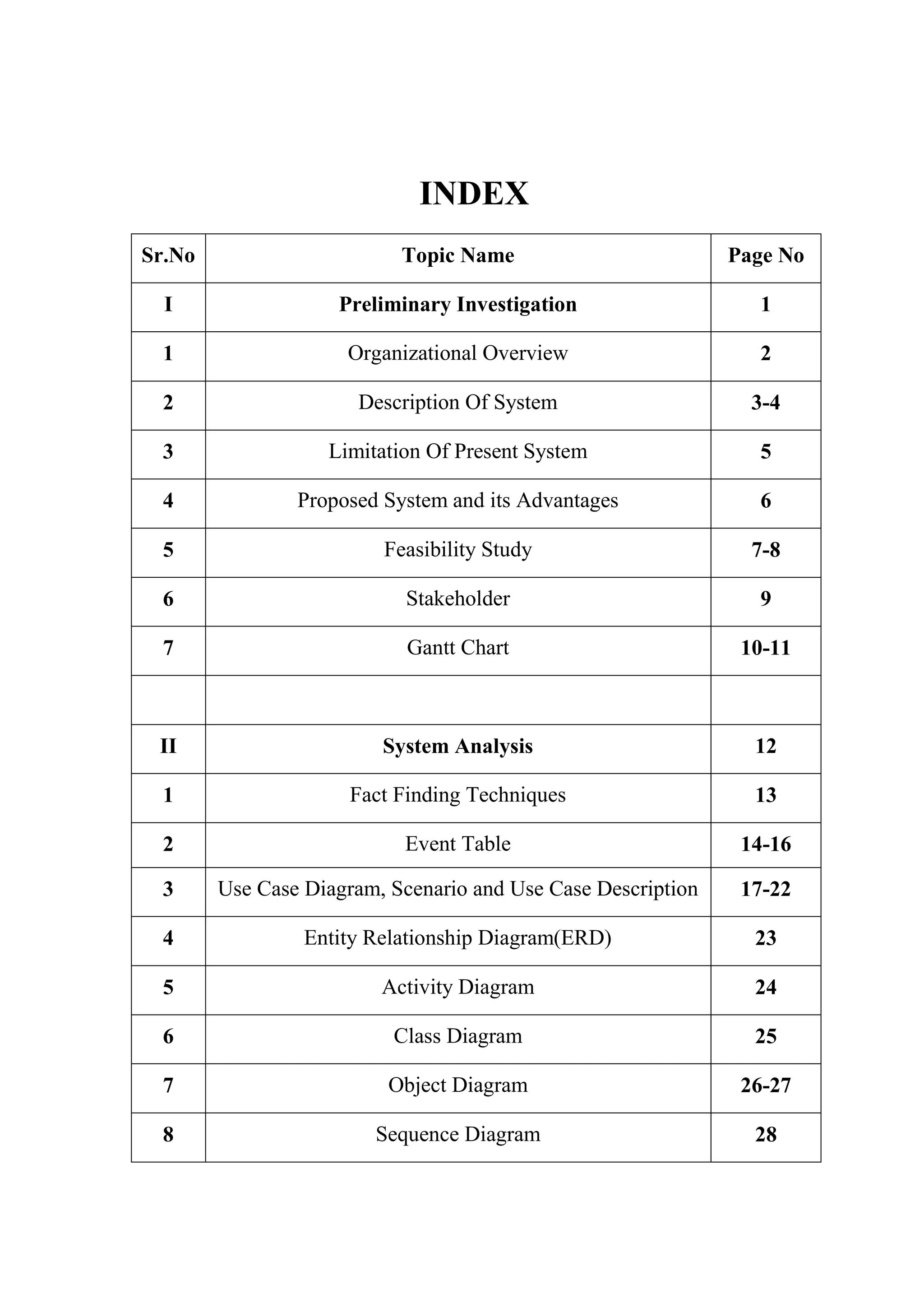
INDEX
Sr.No Topic Name Page No
I Preliminary Investigation 1
1 Organizational Overview 2
2 Description Of System 3-4
3 Limitation Of Present System 5
4 Proposed System and its Advantages 6
5 Feasibility Study 7-8
6 Stakeholder 9
7 Gantt Chart 10-11
II System Analysis 12
1 Fact Finding Techniques 13
2 Event Table 14-16
3 Use Case Diagram, Scenario and Use Case Description 17-22
4 Entity Relationship Diagram(ERD) 23
5 Activity Diagram 24
6 Class Diagram 25
7 Object Diagram 26-27
8 Sequence Diagram 28
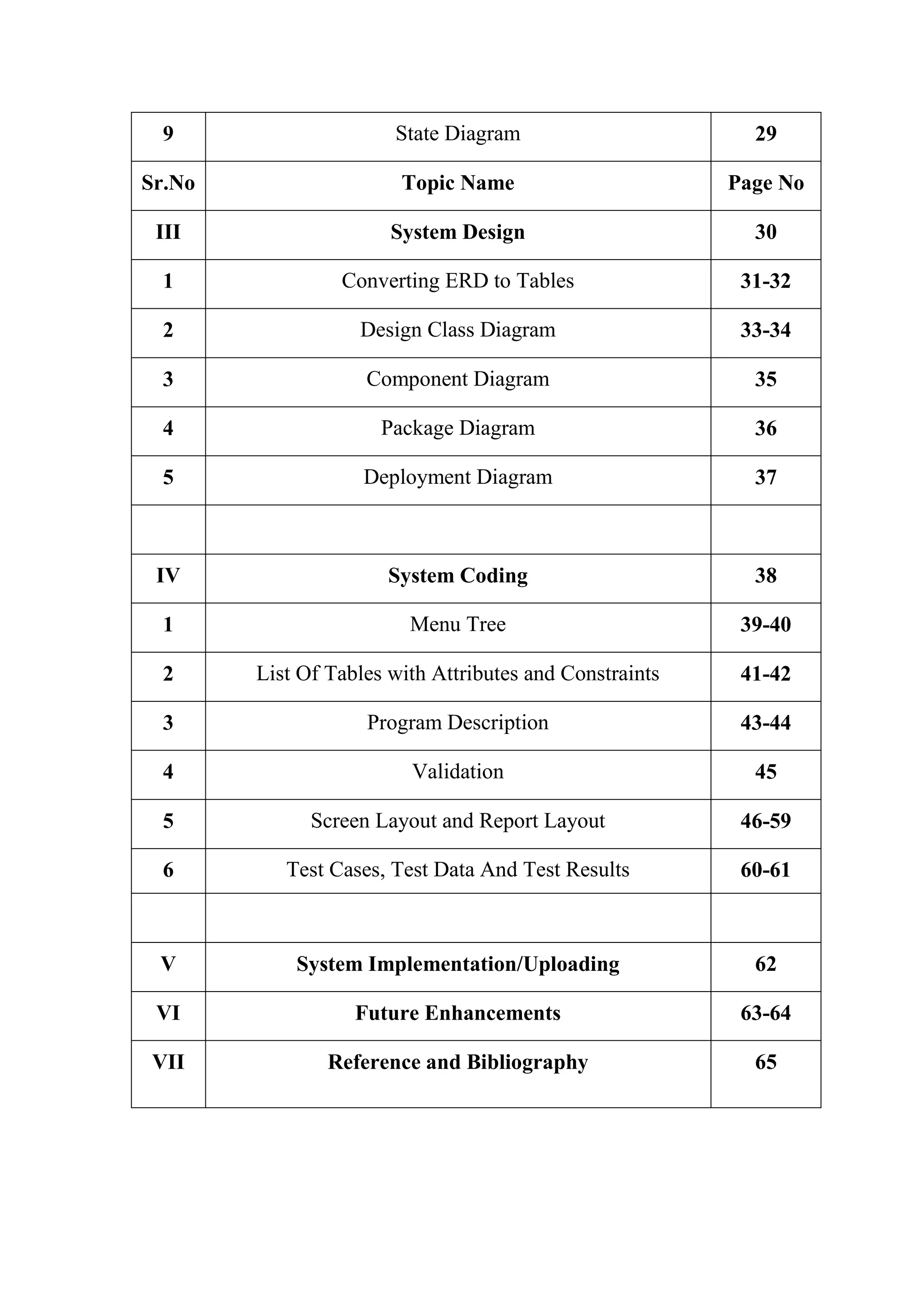
9 State Diagram 29
Sr.No Topic Name Page No
III System Design 30
1 Converting ERD to Tables 31-32
2 Design Class Diagram 33-34
3 Component Diagram 35
4 Package Diagram 36
5 Deployment Diagram 37
IV System Coding 38
1 Menu Tree 39-40
2 List Of Tables with Attributes and Constraints 41-42
3 Program Description 43-44
4 Validation 45
5 Screen Layout and Report Layout 46-59
6 Test Cases, Test Data And Test Results 60-61
V System Implementation/Uploading 62
VI Future Enhancements 63-64
VII Reference and Bibliography 65
Relax Air Cool Service Page 1
PRELIMINARY INVESTIGATION
Relax Air Cool Service Page 2
ORGANISATIONAL OVERVIEW
Name of the Organization:Relax Air Cool Services
Address: Relax Air Cool Services
Director, Mohandas Nair
620/1, Musa House
Near Bank of Baroda
Haines Road,
Jacob Circle,
Mahalaxmi,
Mumbai - 400011,
Maharashtra,
India.
Contact No: 7208182316
Function:
It is one of the recognised professional company providing services for cooling
equipment repairs and maintenance. They adhere to highest quality standards and cater to
almost all major brands in the industry.
Relax Air Cool Services is an established company in the field of cooling equipment
repairs catering to almost every brand in the industry. Started by young and dynamic
technocrats, the firm has grown over the years and now has many renowned clients to its
list. Timely and quality delivery has made them the best choice for their customers.
Their motto is complete customer satisfaction and their expert advice pertaining to
cooling equipment repair services has earned as many laurels which is regarded by them
as one of their major achievements They service all major brands and models. They help
keep existing cooling equipment systems running effectively and efficiently. They are
economical and cost effective and our honest .Their skilled technicians help in successful
cooling equipment repair and maintenance. Their honest evaluation and advice helps
customers avoid major expenses.
Relax Air Cool Service Page 3
They service all major brands and models. They also offer expert cooling equipment
options for every need. Making your home cool and comfortable is what they do. Their
quality cooling equipment repair services are performed by professionally qualified
technicians. Service Experts is fully licensed and insured in cooling equipment repair,
sales, installation and air conditioning maintenance for all brands.
Repairs
 All types of repairs whether on site or in workshop undertaken.
 Imported vacuum pumps and tools are available for repairs and evaluations.
 Spares procurement for different products and models at reasonable charges.
 Services .also provided for refrigerators & deep freezers.
 Estimates for repairs provided.
 Product upgradations suggested and provided after technical study.
Annual Maintenance Contracts
 They provide all types of contracts labour, semicomprehensive and
comprehensive for full range of cooling equipment.
Relax Air Cool Service Page 4
DESCRIPTION OF SYSTEM
Relax air cool services started with a small servicing store with a handful of engineers
.Their current business was running through word of mouth. Slowly and gradually their
business started expanding & started dealing with renowned list of clients. As observed,
it was seen that the clients had to wait for their turn to give their servicing details as the
work was being carried out manually. The details of the services or the annual
maintenance were written down on cards & a copy of the same card was given to the
clients. This was quite a lengthy & time consuming process.
The cards would contain all the basic information about the clients along with the
services to be carried out. The cards were later kept in registers so as to maintain the
records. Whenever an engineer is free he would check for the cards and accordingly
would do the job assigned. After the service is done the manager would call the
concerned client on the number specified on the cards given by the client himself. The
client would check is the work has been carried out satisfactorily and would in turn give
his comments.
Relax Air Cool Service Page 5
LIMITATIONSOF THE SYSTEM
 The work used to be done manually by keeping clients records in registers.
 It was difficult to search regarding the clients information & services provided to
them
 Requires much time & manpower to search for the records
 The bill was written manually
 It is a costly affair in terms of manpower and spare parts sourcing
Relax Air Cool Service Page 6
PROPOSED SYSTEM AND ITS ADVANTAGES
The proposed system is entirely an automated system.It will put the current Working
system to an ease an efficient task management.
The system will be operated by only one user i.e. Administrator. Here the creation and
updation of the customer engineers request becomes easy due to a controlled method of
data input.Also due to user interface an data security there would no trouble of data loss
as everything will be maintained regularly and the backup will also be taken..
The admin can appoint the engineer as per the prior request assigned and the area alloted
to the authorised service provider for the work order closure. The timely based report
generation would be possible due to order and controlled data storage.The administrator
can view the status report and the feedback given by the customer for the betterment of
the organisation and to recognized the current eminence of the firm.
The system will also provide file maintenance and the user want to add a new piece of
detail in the form of product details employee and call category and the backup and
restore service for database maintenance
Relax Air Cool Service Page 7
FEASIBILITY STUDY
This project on serviceand AMC management system is highly feasible. It
accomplishes the entire feasibility requirement to develop a good application.
1) Technical Feasibility:
An important issue for the development of a project is the selection of a suitable
front-end and back – end.when I decided to develop a project, I went through an
extensive study to determine the most suitable platform that suits the needs of the
organization as well as help in development of the project .The aspect of my study
includes the following factors
Front-End Selection
 It must have a GUI that assists employees that are not from IT background.
 Must provide excellent reporting feature with good printing support
According to the above stated features, I selectedVB.NETas the Front-End for
developing my project.
Back-End Selection
 Efficient data handling.
 Operating System Compatible.
 Easy To Install.
 Efficient data Retrieval and Maintenance.
According to the above stated features, I selected SQL SERVER 2005 to be the
Back-End for developing My Project.
2) Economic Feasibility:
 It does not require much development cost.
 As it is not a large scale project it is not expensive.
 The management doesn’t require any licence to use the application and so
it is economical.
 It can be easily operated by one operator,so there is not more expense of
salary or wages for employee
Relax Air Cool Service Page 8
3) Resource Feasibility:
 Being an individual development project it does not require resources like
user or employee
 As the system is easy to operate even if the employee is being transferred
or quitting the job, the system can be operated by a new employee
4) Organizational and cultural Feasibility:
 As the system is quite user friendly and the GUI is fairly simple, the users
should find it easy to handle the system, there will be any resistance in
adapting the new system.
 A perceived loss of control by user or management is also minimal due to
less work involved.
Relax Air Cool Service Page 9
STAKE HOLDERS
 Manager
 Staff/Engineer
 Customers/Clients
 Manager:
The head of the firm. He is responsible to check that all the services & carried out well.
He will assign the jobs to the particular engineers so that they work effectively. He is the
one to deal with the clients and to receive their feedback as well.
 Staff /Engineer:
The ones who are actually involved in the servicing or handling the contracts assigned to
them by the manager.
 Customers/Clients:
The ones who will be requiring the service.
Relax Air Cool Service Page 10
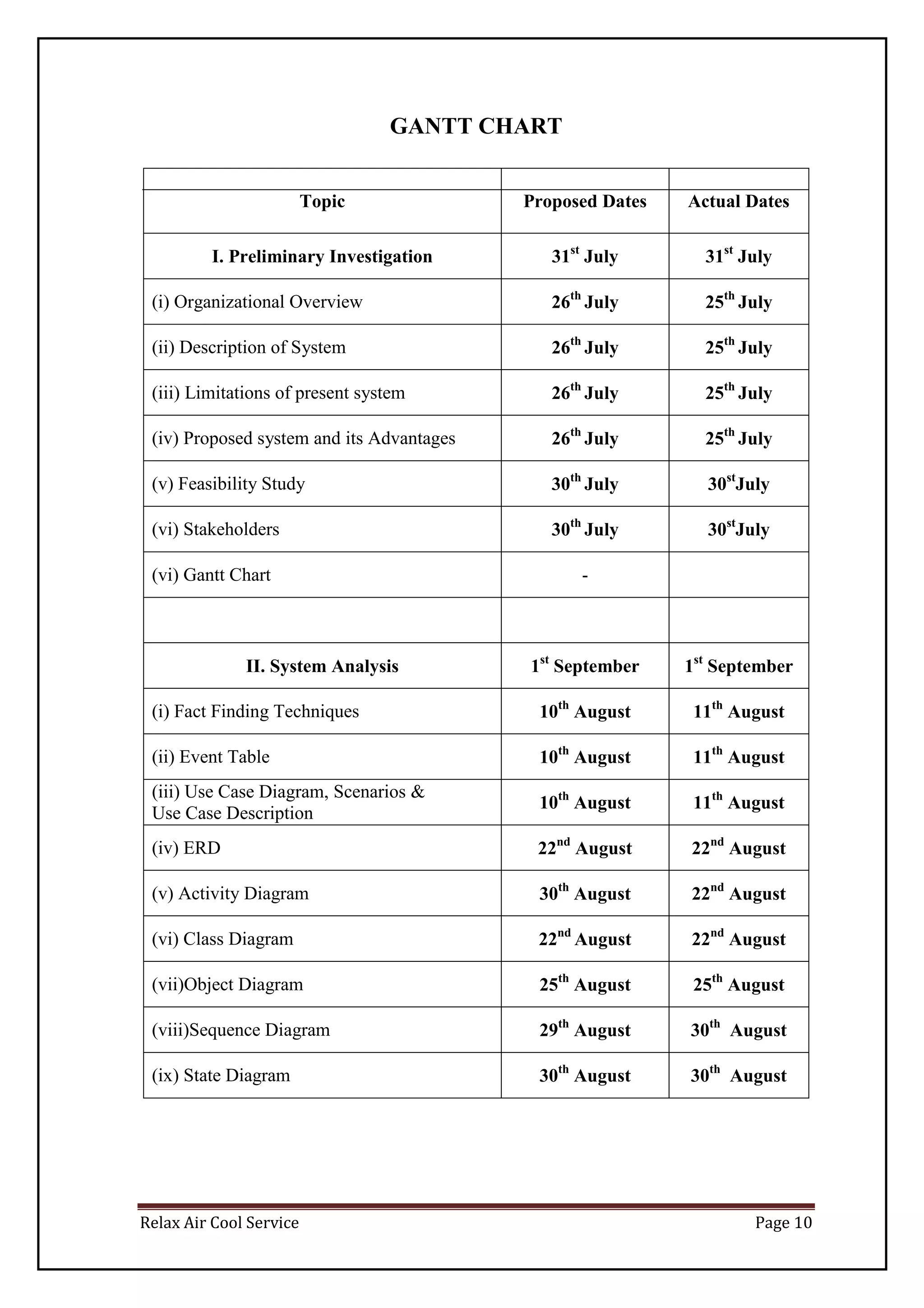
GANTT CHART
Topic Proposed Dates Actual Dates
I. Preliminary Investigation 31st
July 31st
July
(i) Organizational Overview 26th
July 25th
July
(ii) Description of System 26th
July 25th
July
(iii) Limitations of present system 26th
July 25th
July
(iv) Proposed system and its Advantages 26th
July 25th
July
(v) Feasibility Study 30th
July 30st
July
(vi) Stakeholders 30th
July 30st
July
(vi) Gantt Chart -
II. System Analysis 1st
September 1st
September
(i) Fact Finding Techniques 10th
August 11th
August
(ii) Event Table 10th
August 11th
August
(iii) Use Case Diagram, Scenarios &
Use Case Description
10th
August 11th
August
(iv) ERD 22nd
August 22nd
August
(v) Activity Diagram 30th
August 22nd
August
(vi) Class Diagram 22nd
August 22nd
August
(vii)Object Diagram 25th
August 25th
August
(viii)Sequence Diagram 29th
August 30th
August
(ix) State Diagram 30th
August 30th
August
Relax Air Cool Service Page 11
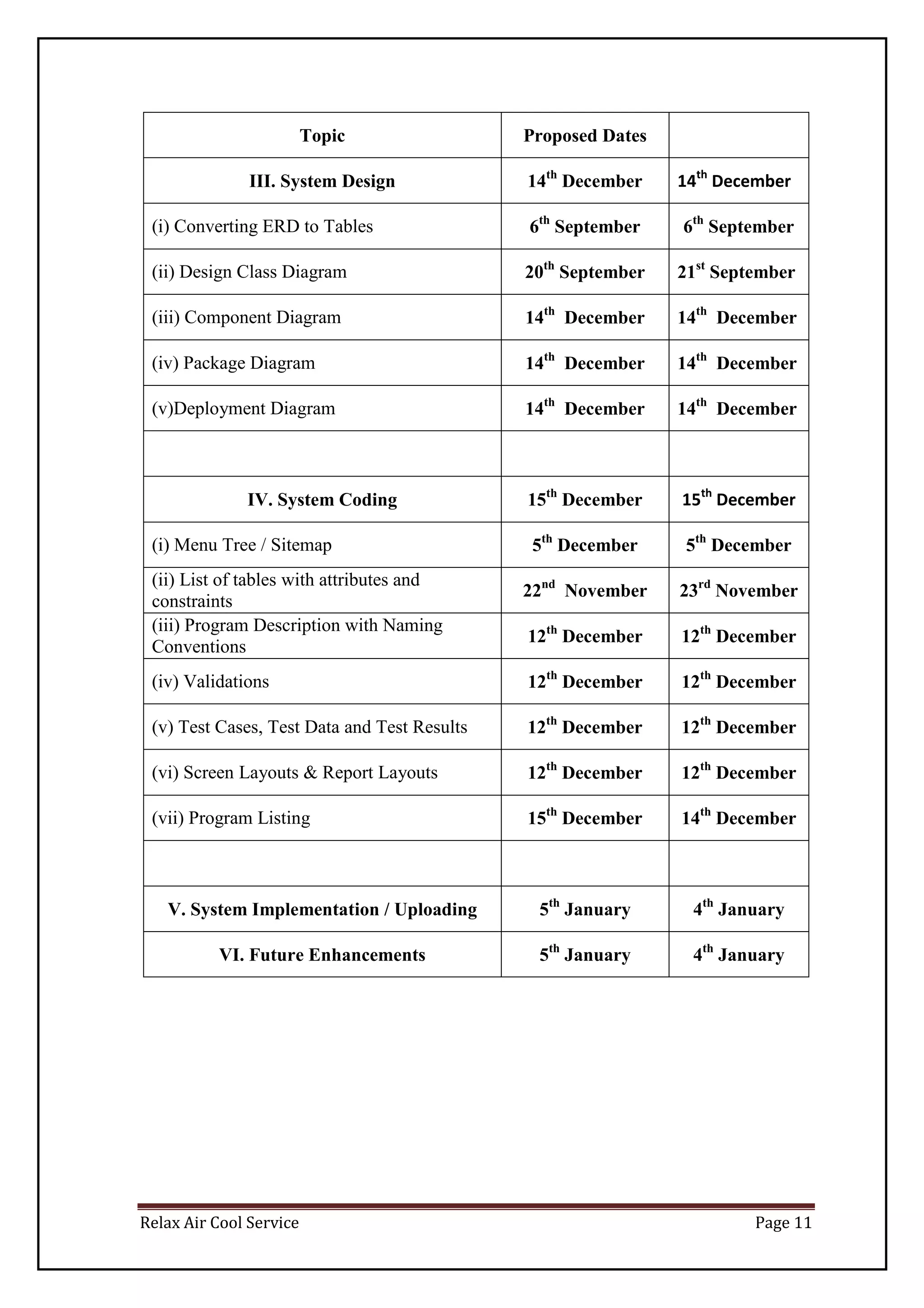
Topic Proposed Dates
III. System Design 14th
December 14th
December
(i) Converting ERD to Tables 6th
September 6th
September
(ii) Design Class Diagram 20th
September 21st
September
(iii) Component Diagram 14th
December 14th
December
(iv) Package Diagram 14th
December 14th
December
(v)Deployment Diagram 14th
December 14th
December
IV. System Coding 15th
December 15th
December
(i) Menu Tree / Sitemap 5th
December 5th
December
(ii) List of tables with attributes and
constraints
22nd
November 23rd
November
(iii) Program Description with Naming
Conventions
12th
December 12th
December
(iv) Validations 12th
December 12th
December
(v) Test Cases, Test Data and Test Results 12th
December 12th
December
(vi) Screen Layouts & Report Layouts 12th
December 12th
December
(vii) Program Listing 15th
December 14th
December
V. System Implementation / Uploading 5th
January 4th
January
VI. Future Enhancements 5th
January 4th
January
Relax Air Cool Service Page 12
SYSTEM ANALYSIS
Relax Air Cool Service Page 13
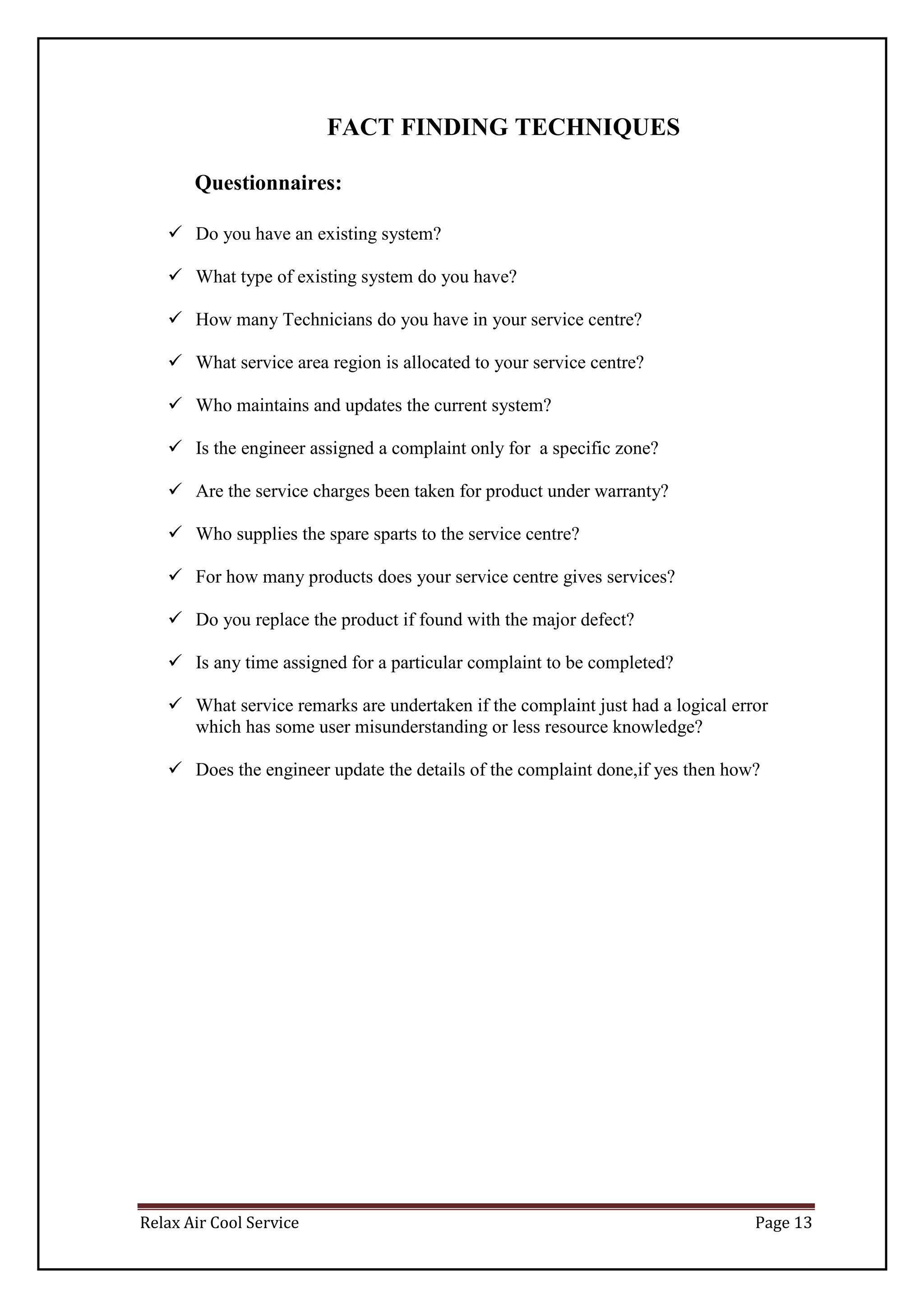
FACT FINDING TECHNIQUES
Questionnaires:
 Do you have an existing system?
 What type of existing system do you have?
 How many Technicians do you have in your service centre?
 What service area region is allocated to your service centre?
 Who maintains and updates the current system?
 Is the engineer assigned a complaint only for a specific zone?
 Are the service charges been taken for product under warranty?
 Who supplies the spare sparts to the service centre?
 For how many products does your service centre gives services?
 Do you replace the product if found with the major defect?
 Is any time assigned for a particular complaint to be completed?
 What service remarks are undertaken if the complaint just had a logical error
which has some user misunderstanding or less resource knowledge?
 Does the engineer update the details of the complaint done,if yes then how?
Relax Air Cool Service Page 14
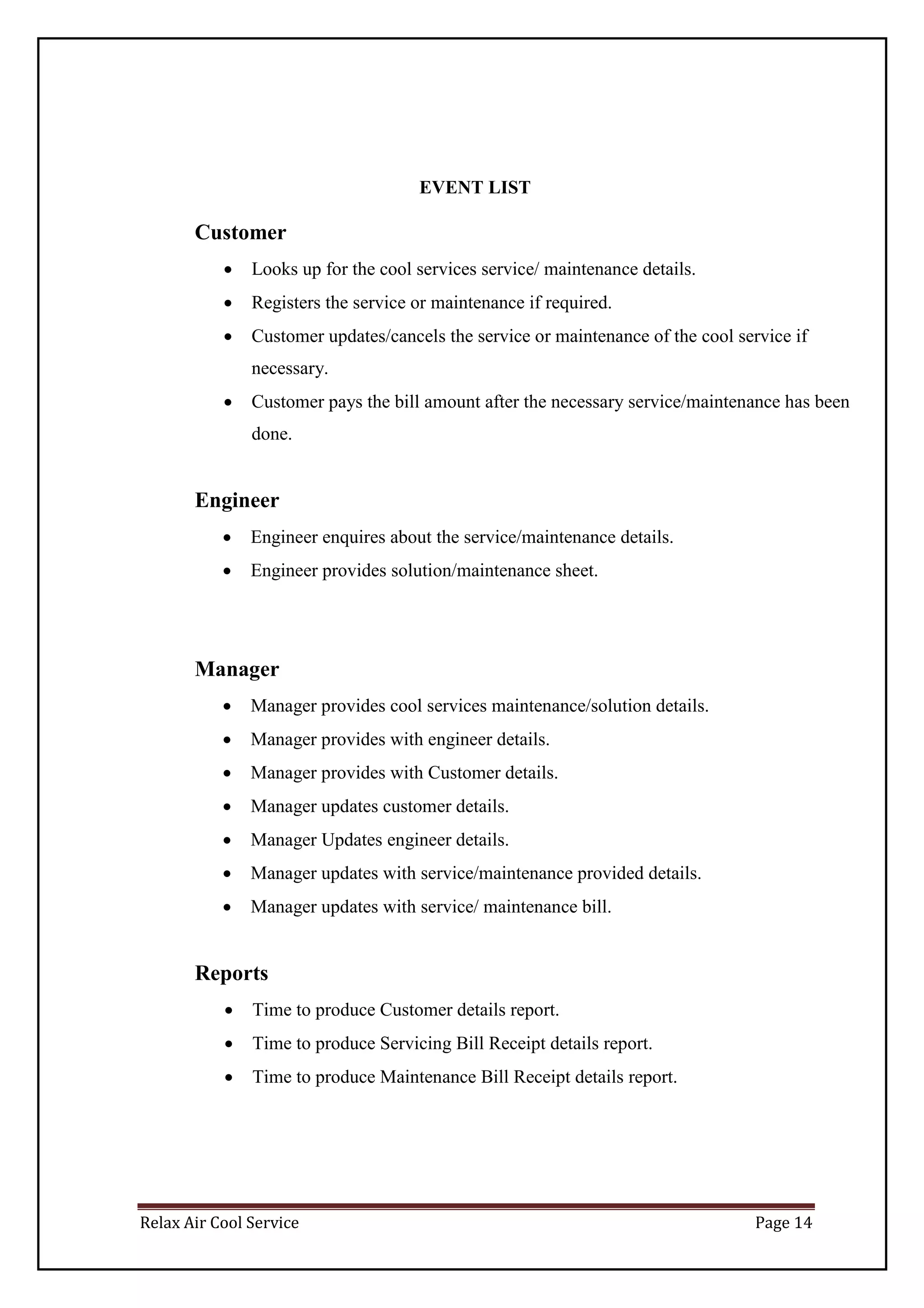
EVENT LIST
Customer
 Looks up for the cool services service/ maintenance details.
 Registers the service or maintenance if required.
 Customer updates/cancels the service or maintenance of the cool service if
necessary.
 Customer pays the bill amount after the necessary service/maintenance has been
done.
Engineer
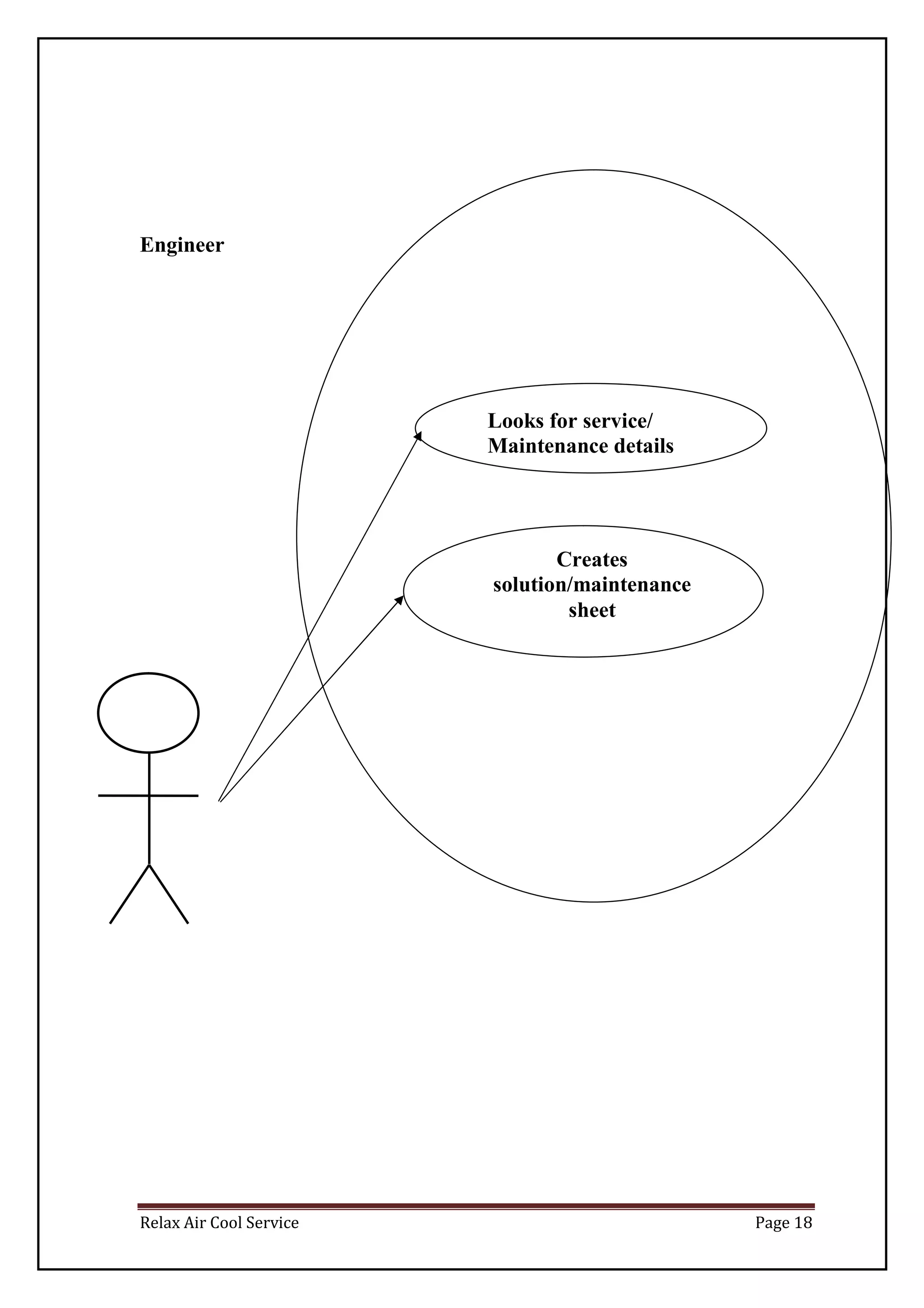
 Engineer enquires about the service/maintenance details.
 Engineer provides solution/maintenance sheet.
Manager
 Manager provides cool services maintenance/solution details.
 Manager provides with engineer details.
 Manager provides with Customer details.
 Manager updates customer details.
 Manager Updates engineer details.
 Manager updates with service/maintenance provided details.
 Manager updates with service/ maintenance bill.
Reports
 Time to produce Customer details report.
 Time to produce Servicing Bill Receipt details report.
 Time to produce Maintenance Bill Receipt details report.
Relax Air Cool Service Page 15
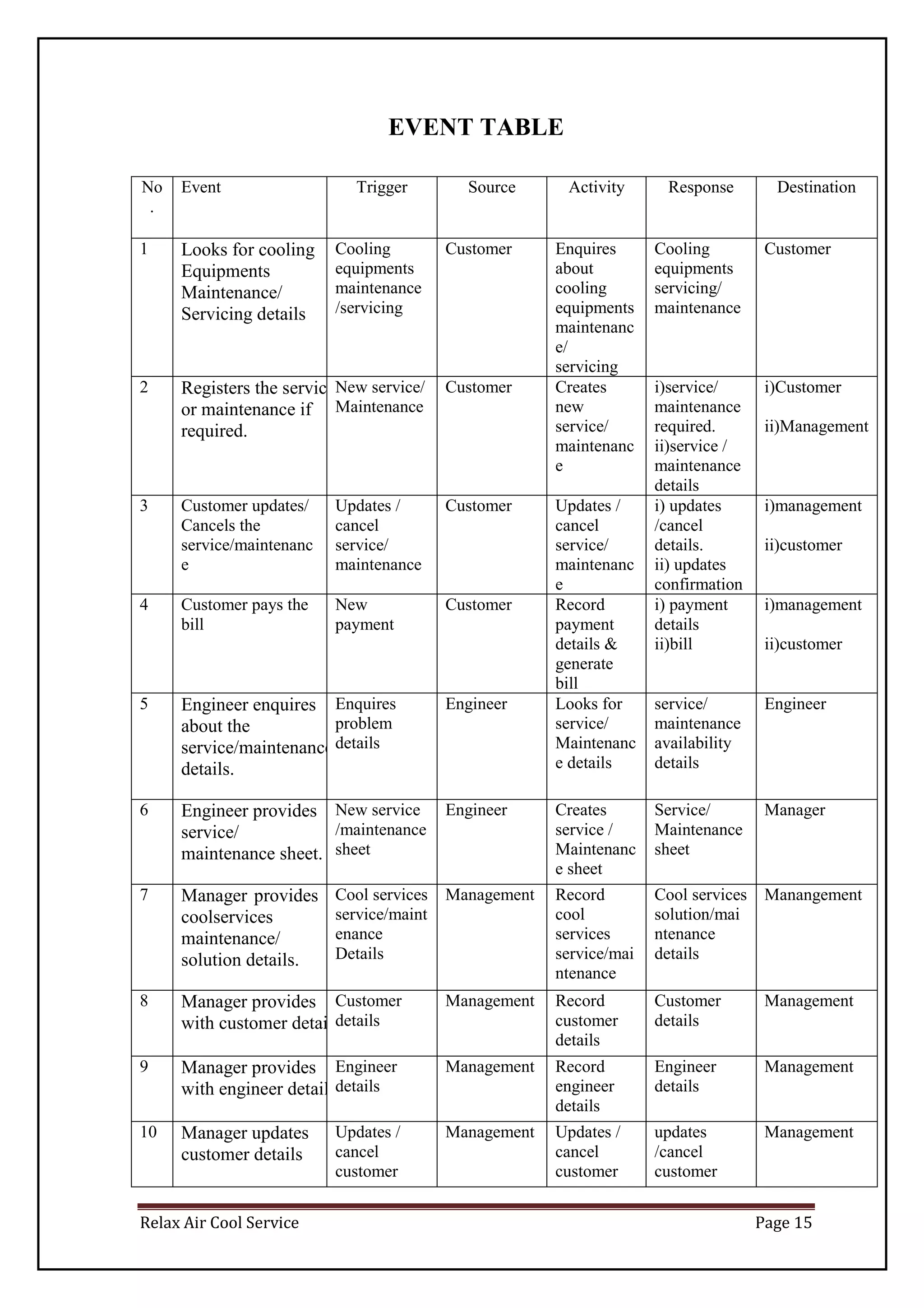
EVENT TABLE
No
.
Event Trigger Source Activity Response Destination
1 Looks for cooling
Equipments
Maintenance/
Servicing details
Cooling
equipments
maintenance
/servicing
Customer Enquires
about
cooling
equipments
maintenanc
e/
servicing
Cooling
equipments
servicing/
maintenance
Customer
2 Registers the service
or maintenance if
required.
New service/
Maintenance
Customer Creates
new
service/
maintenanc
e
i)service/
maintenance
required.
ii)service /
maintenance
details
i)Customer
ii)Management
3 Customer updates/
Cancels the
service/maintenanc
e
Updates /
cancel
service/
maintenance
Customer Updates /
cancel
service/
maintenanc
e
i) updates
/cancel
details.
ii) updates
confirmation
i)management
ii)customer
4 Customer pays the
bill
New
payment
Customer Record
payment
details &
generate
bill
i) payment
details
ii)bill
i)management
ii)customer
5 Engineer enquires
about the
service/maintenance
details.
Enquires
problem
details
Engineer Looks for
service/
Maintenanc
e details
service/
maintenance
availability
details
Engineer
6 Engineer provides
service/
maintenance sheet.
New service
/maintenance
sheet
Engineer Creates
service /
Maintenanc
e sheet
Service/
Maintenance
sheet
Manager
7 Manager provides
coolservices
maintenance/
solution details.
Cool services
service/maint
enance
Details
Management Record
cool
services
service/mai
ntenance
Cool services
solution/mai
ntenance
details
Manangement
8 Manager provides
with customer details
Customer
details
Management Record
customer
details
Customer
details
Management
9 Manager provides
with engineer details
Engineer
details
Management Record
engineer
details
Engineer
details
Management
10 Manager updates
customer details
Updates /
cancel
customer
Management Updates /
cancel
customer
updates
/cancel
customer
Management
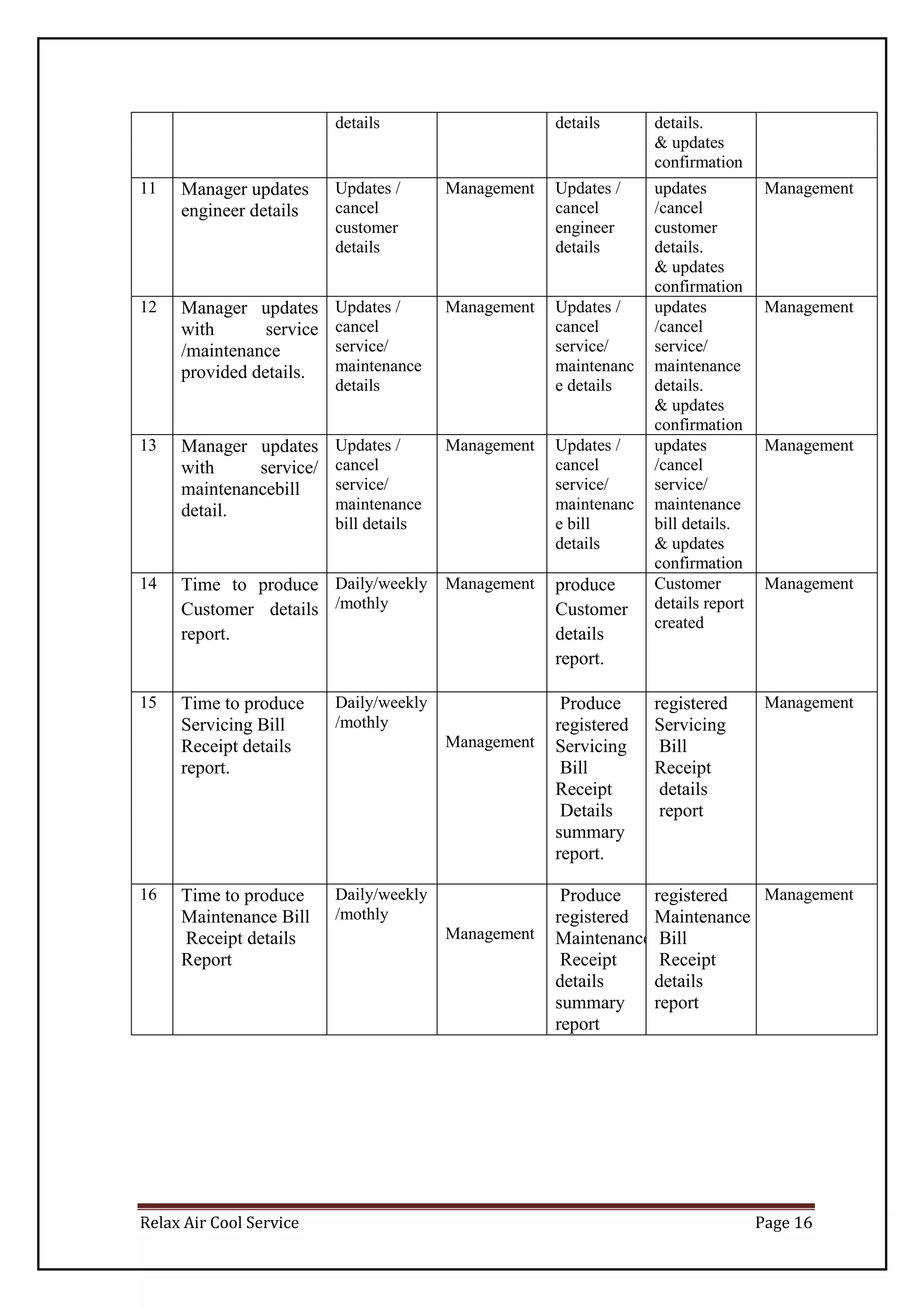
Relax Air Cool Service Page 16
details details details.
& updates
confirmation
11 Manager updates
engineer details
Updates /
cancel
customer
details
Management Updates /
cancel
engineer
details
updates
/cancel
customer
details.
& updates
confirmation
Management
12 Manager updates
with service
/maintenance
provided details.
Updates /
cancel
service/
maintenance
details
Management Updates /
cancel
service/
maintenanc
e details
updates
/cancel
service/
maintenance
details.
& updates
confirmation
Management
13 Manager updates
with service/
maintenancebill
detail.
Updates /
cancel
service/
maintenance
bill details
Management Updates /
cancel
service/
maintenanc
e bill
details
updates
/cancel
service/
maintenance
bill details.
& updates
confirmation
Management
14 Time to produce
Customer details
report.
Daily/weekly
/mothly
Management produce
Customer
details
report.
Customer
details report
created
Management
15 Time to produce
Servicing Bill
Receipt details
report.
Daily/weekly
/mothly
Management
Produce
registered
Servicing
Bill
Receipt
Details
summary
report.
registered
Servicing
Bill
Receipt
details
report
Management
16 Time to produce
Maintenance Bill
Receipt details
Report
Daily/weekly
/mothly
Management
Produce
registered
Maintenance Bill
Receipt
details
summary
report
registered
Maintenance
Bill
Receipt
details
report
Management
Relax Air Cool Service Page 17
USE CASE DIAGRAM, SCENARIO AND USE CASE
DESCRIPTION
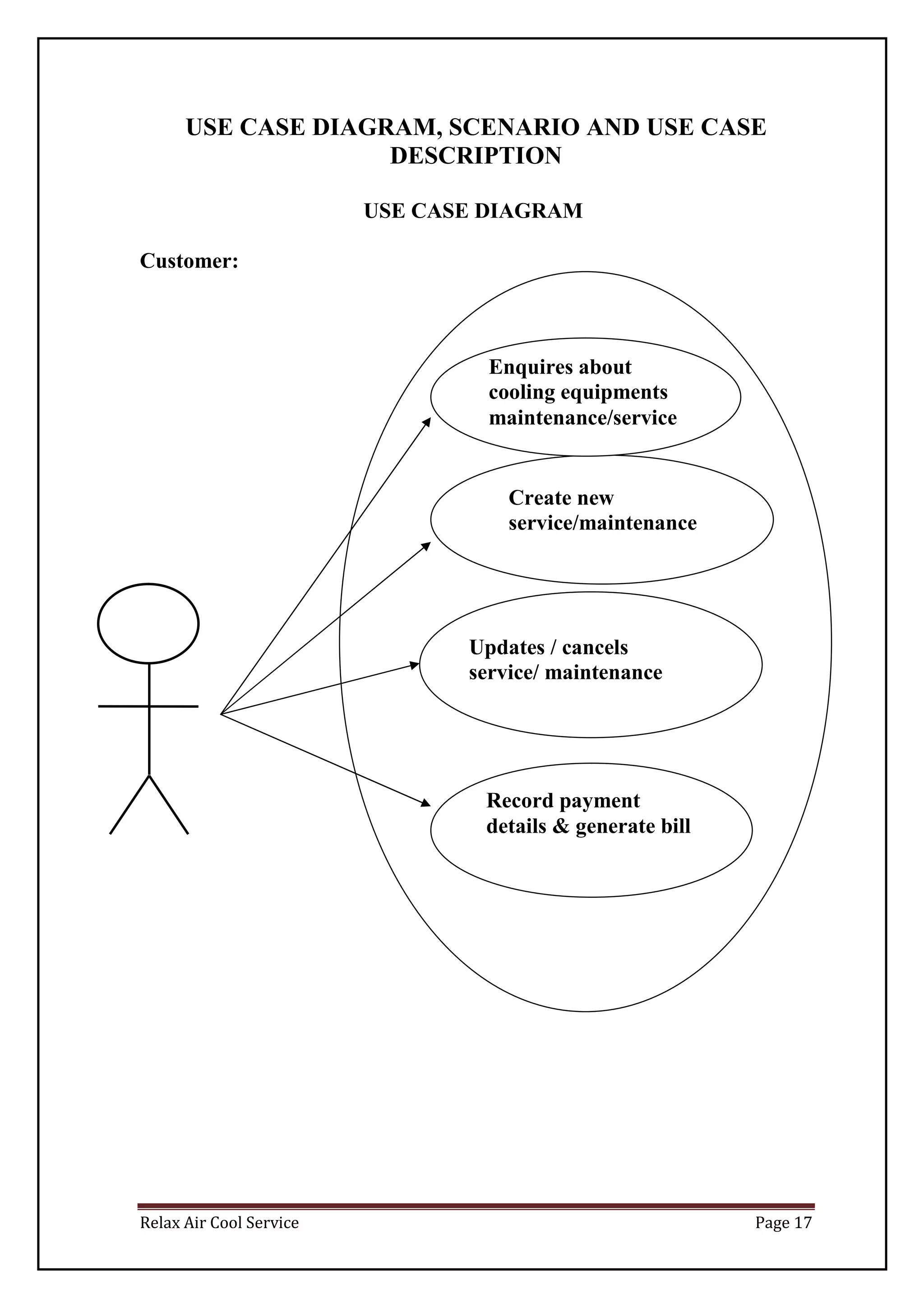
USE CASE DIAGRAM
Customer:
Enquires about
cooling equipments
maintenance/service
Create new
service/maintenance
Updates / cancels
service/ maintenance
Record payment
details & generate bill
Relax Air Cool Service Page 18
Engineer
Looks for service/
Maintenance details
Creates
solution/maintenance
sheet
Relax Air Cool Service Page 19
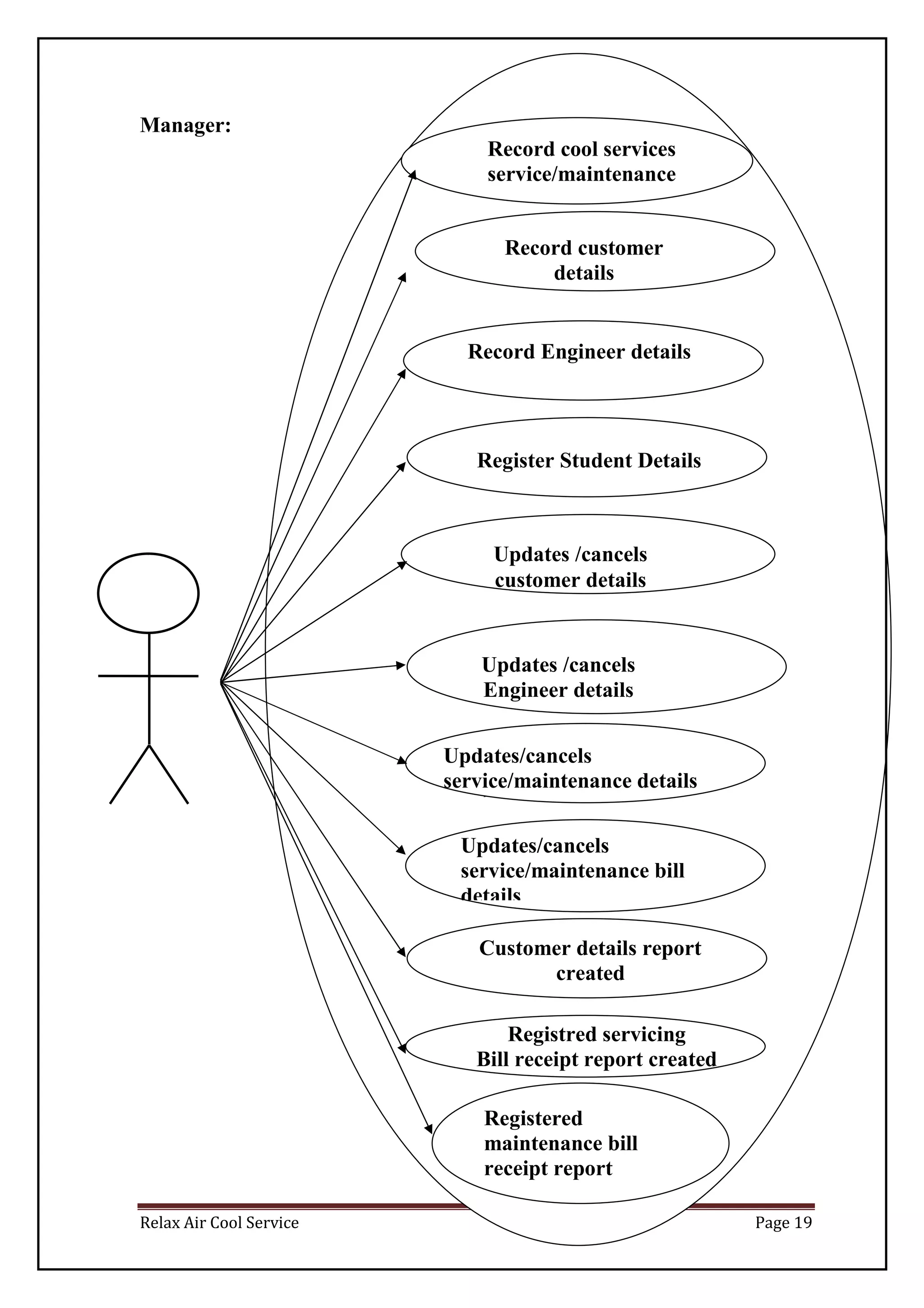
Manager:
Record cool services
service/maintenance
Registred servicing
Bill receipt report created
Customer details report
created
Updates/cancels
service/maintenance bill
details
Updates/cancels
service/maintenance details
cancel
Updates /cancels
Engineer details
Updates /cancels
customer details
Register Student Details
Record Engineer details
Record customer
details
Registered
maintenance bill
receipt report
created
Relax Air Cool Service Page 20
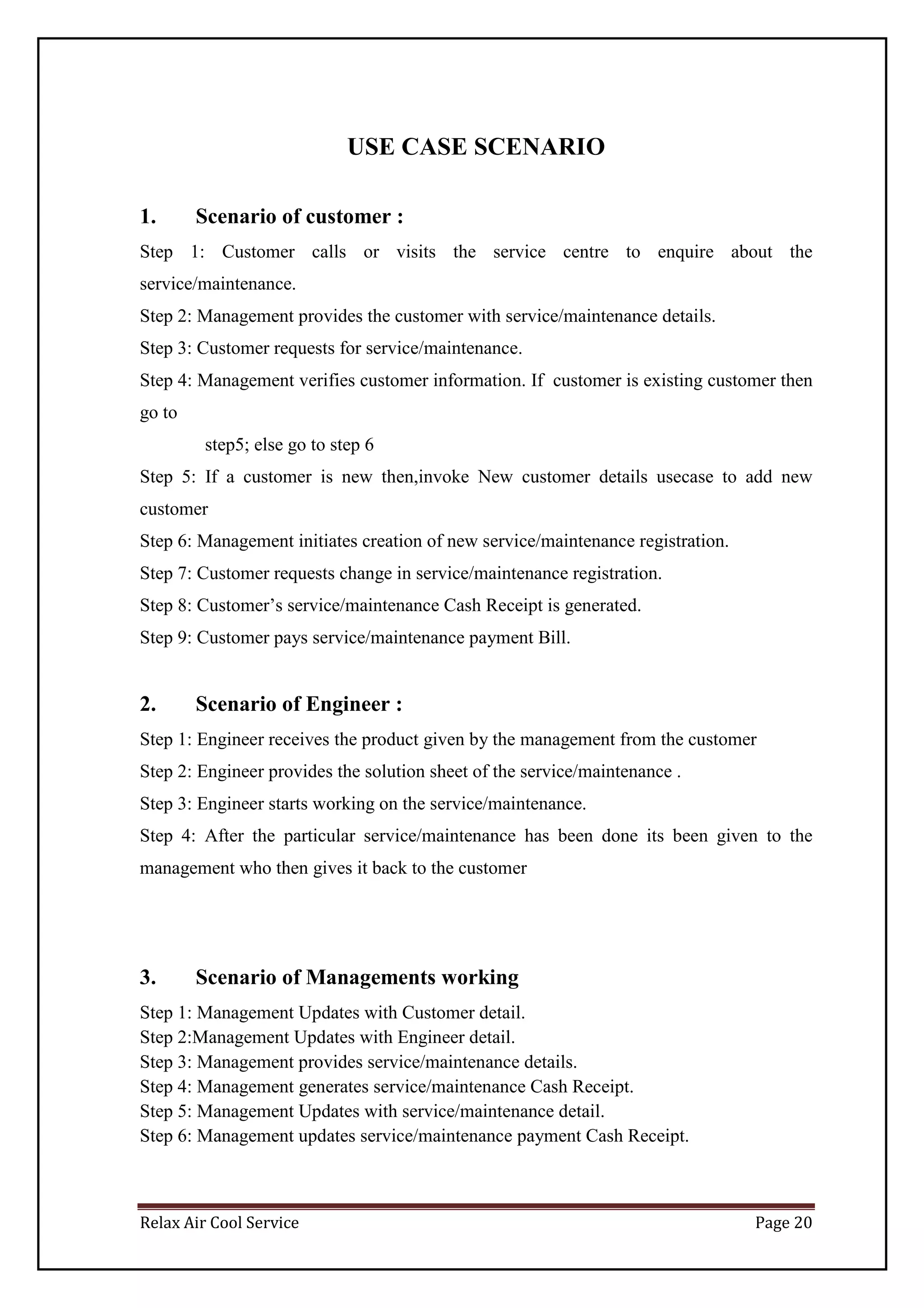
USE CASE SCENARIO
1. Scenario of customer :
Step 1: Customer calls or visits the service centre to enquire about the
service/maintenance.
Step 2: Management provides the customer with service/maintenance details.
Step 3: Customer requests for service/maintenance.
Step 4: Management verifies customer information. If customer is existing customer then
go to
step5; else go to step 6
Step 5: If a customer is new then,invoke New customer details usecase to add new
customer
Step 6: Management initiates creation of new service/maintenance registration.
Step 7: Customer requests change in service/maintenance registration.
Step 8: Customer’s service/maintenance Cash Receipt is generated.
Step 9: Customer pays service/maintenance payment Bill.
2. Scenario of Engineer :
Step 1: Engineer receives the product given by the management from the customer
Step 2: Engineer provides the solution sheet of the service/maintenance .
Step 3: Engineer starts working on the service/maintenance.
Step 4: After the particular service/maintenance has been done its been given to the
management who then gives it back to the customer
3. Scenario of Managements working
Step 1: Management Updates with Customer detail.
Step 2:Management Updates with Engineer detail.
Step 3: Management provides service/maintenance details.
Step 4: Management generates service/maintenance Cash Receipt.
Step 5: Management Updates with service/maintenance detail.
Step 6: Management updates service/maintenance payment Cash Receipt.
Relax Air Cool Service Page 21
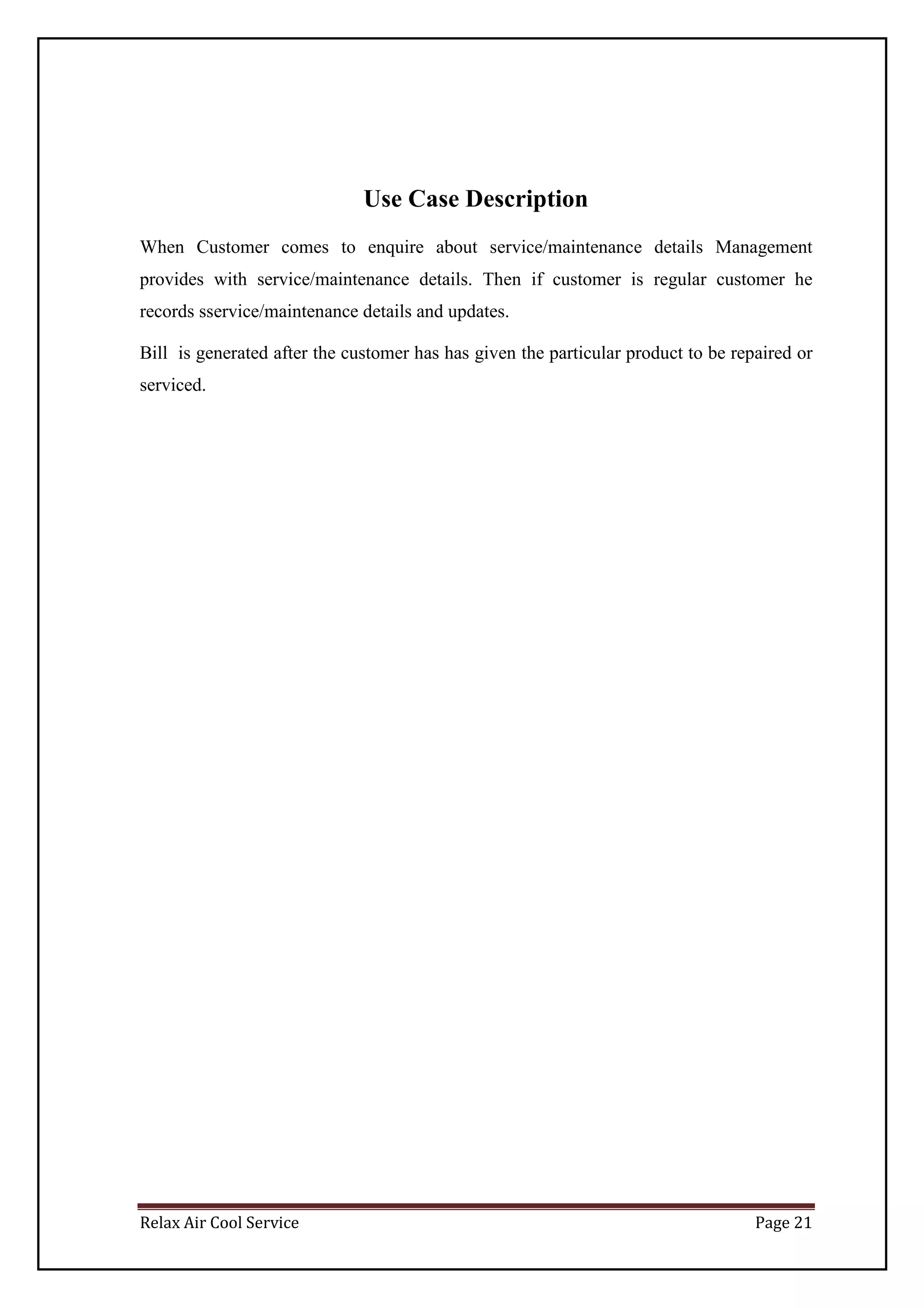
Use Case Description
When Customer comes to enquire about service/maintenance details Management
provides with service/maintenance details. Then if customer is regular customer he
records sservice/maintenance details and updates.
Bill is generated after the customer has has given the particular product to be repaired or
serviced.
Relax Air Cool Service Page 22
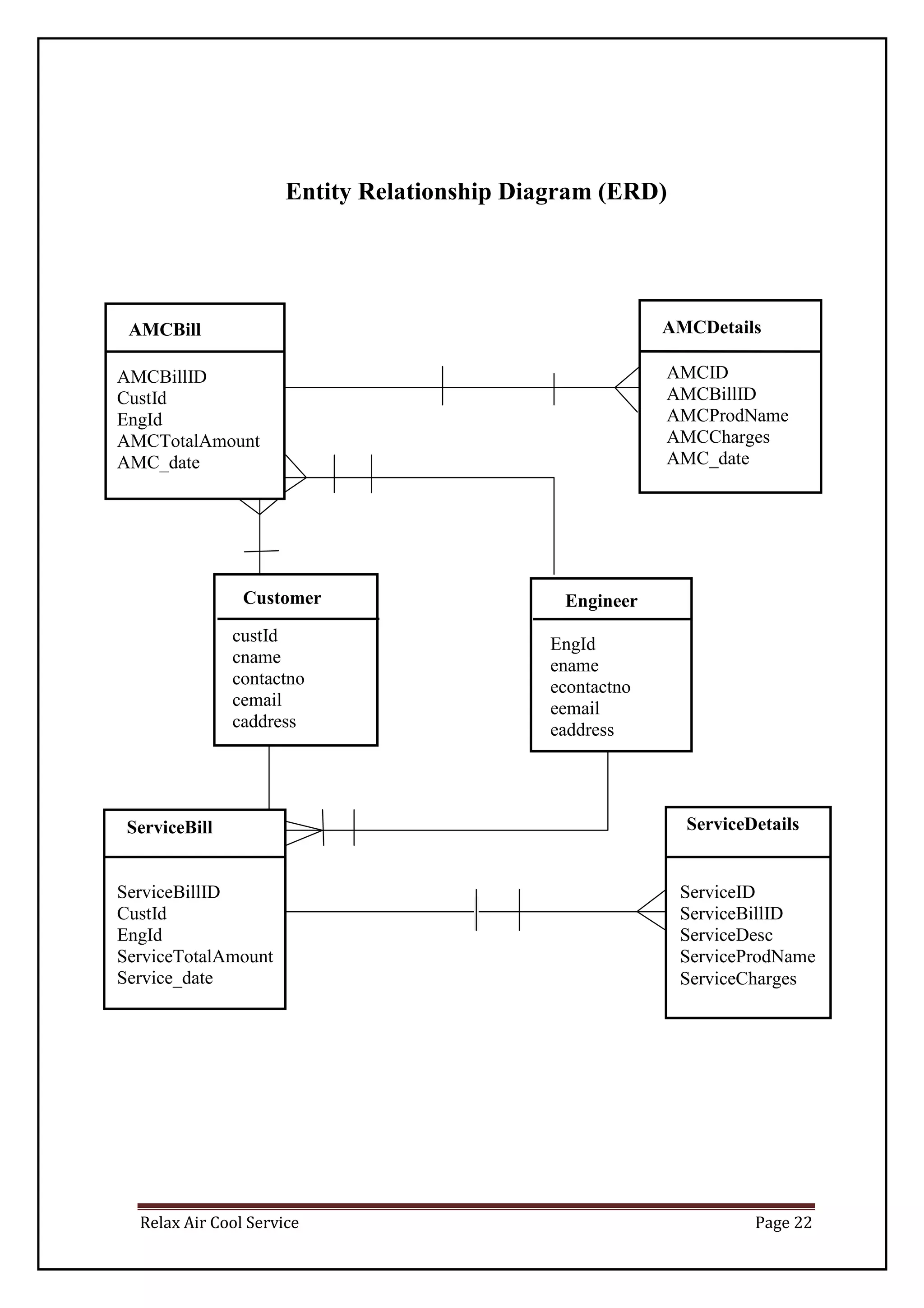
Entity Relationship Diagram (ERD)
EngineerCustomer
AMCBill AMCDetails
ServiceBill ServiceDetails
EngId
ename
econtactno
eemail
eaddress
custId
cname
contactno
cemail
caddress
AMCBillID
CustId
EngId
AMCTotalAmount
AMC_date
AMCID
AMCBillID
AMCProdName
AMCCharges
AMC_date
ServiceBillID
CustId
EngId
ServiceTotalAmount
Service_date
ServiceID
ServiceBillID
ServiceDesc
ServiceProdName
ServiceCharges
Relax Air Cool Service Page 23
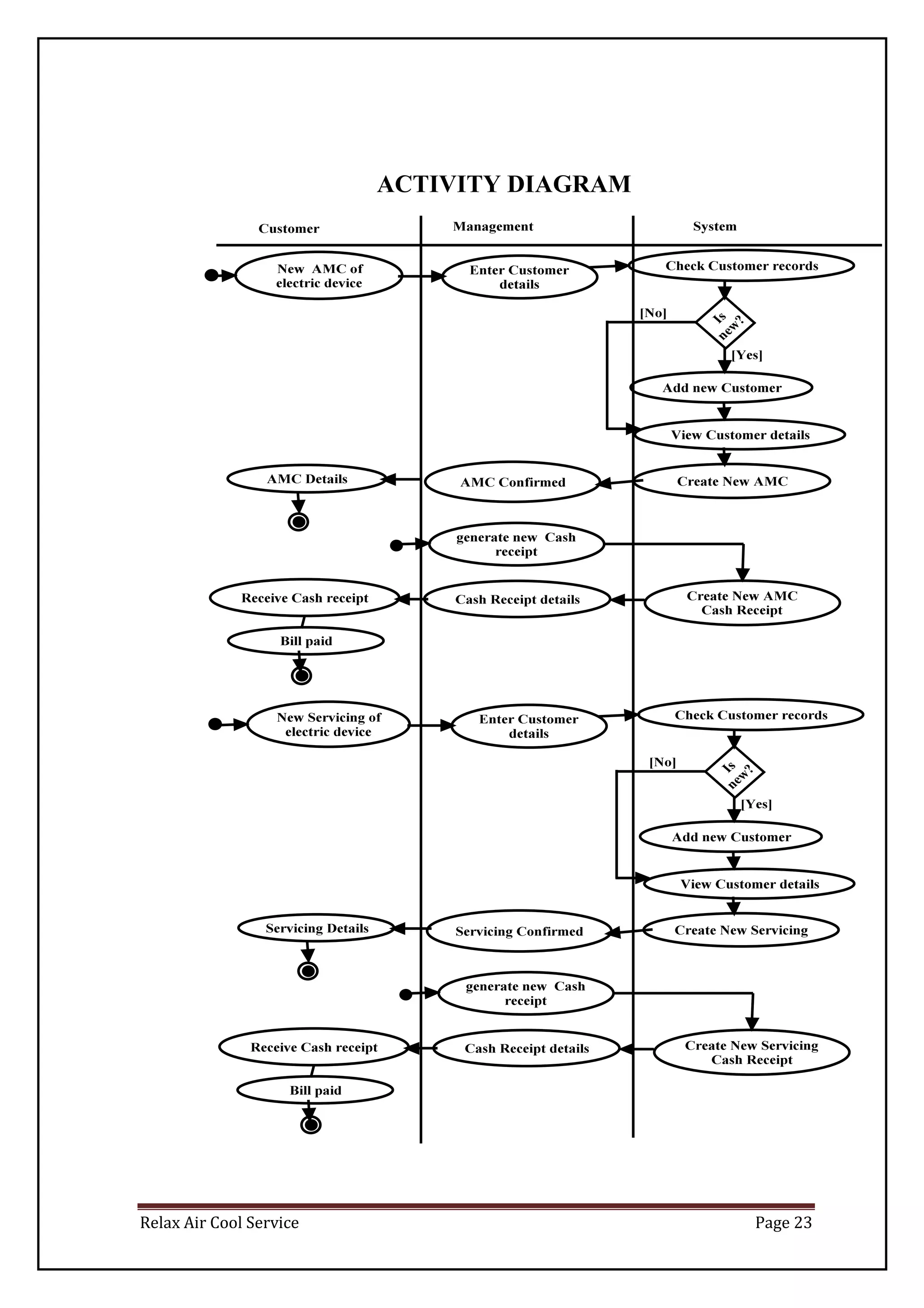
ACTIVITY DIAGRAM
Relax Air Cool Service Page 24
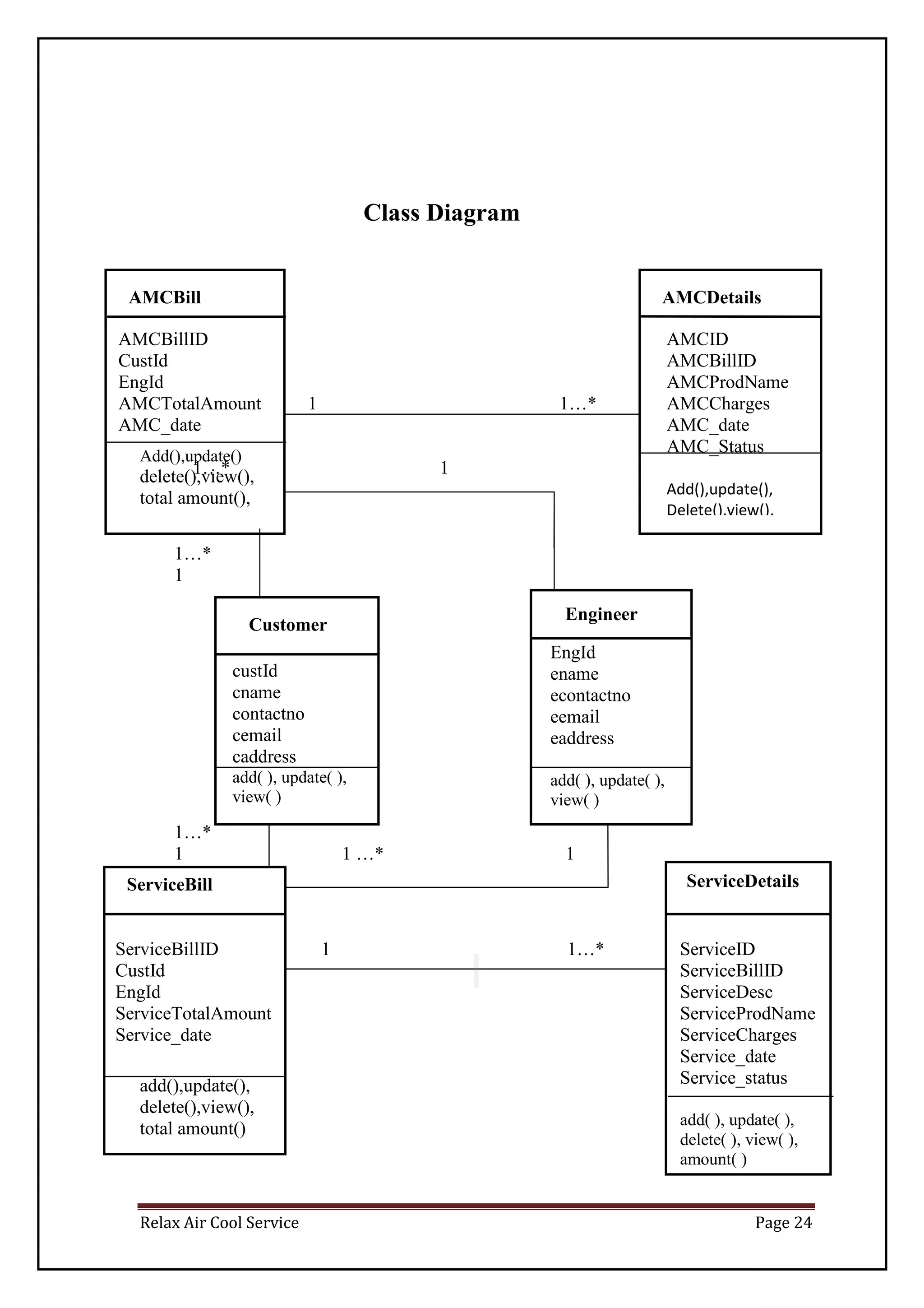
Class Diagram
Add(),update()
delete(),view(),
total amount(),
add(),update(),
delete(),view(),
total amount()
Engineer
Customer
AMCBill AMCDetails
ServiceBill ServiceDetails
EngId
ename
econtactno
eemail
eaddress
add( ), update( ),
view( )
custId
cname
contactno
cemail
caddress
add( ), update( ),
view( )
AMCBillID
CustId
EngId
AMCTotalAmount 1 1…*
AMC_date
1…* 1
1…*
1
1…*
1 1 …* 1
AMCID
AMCBillID
AMCProdName
AMCCharges
AMC_date
AMC_Status
Add(),update(),
Delete(),view(),
ServiceBillID 1 1…*
CustId
EngId
ServiceTotalAmount
Service_date
ServiceID
ServiceBillID
ServiceDesc
ServiceProdName
ServiceCharges
Service_date
Service_status
add( ), update( ),
delete( ), view( ),
amount( )
Relax Air Cool Service Page 25
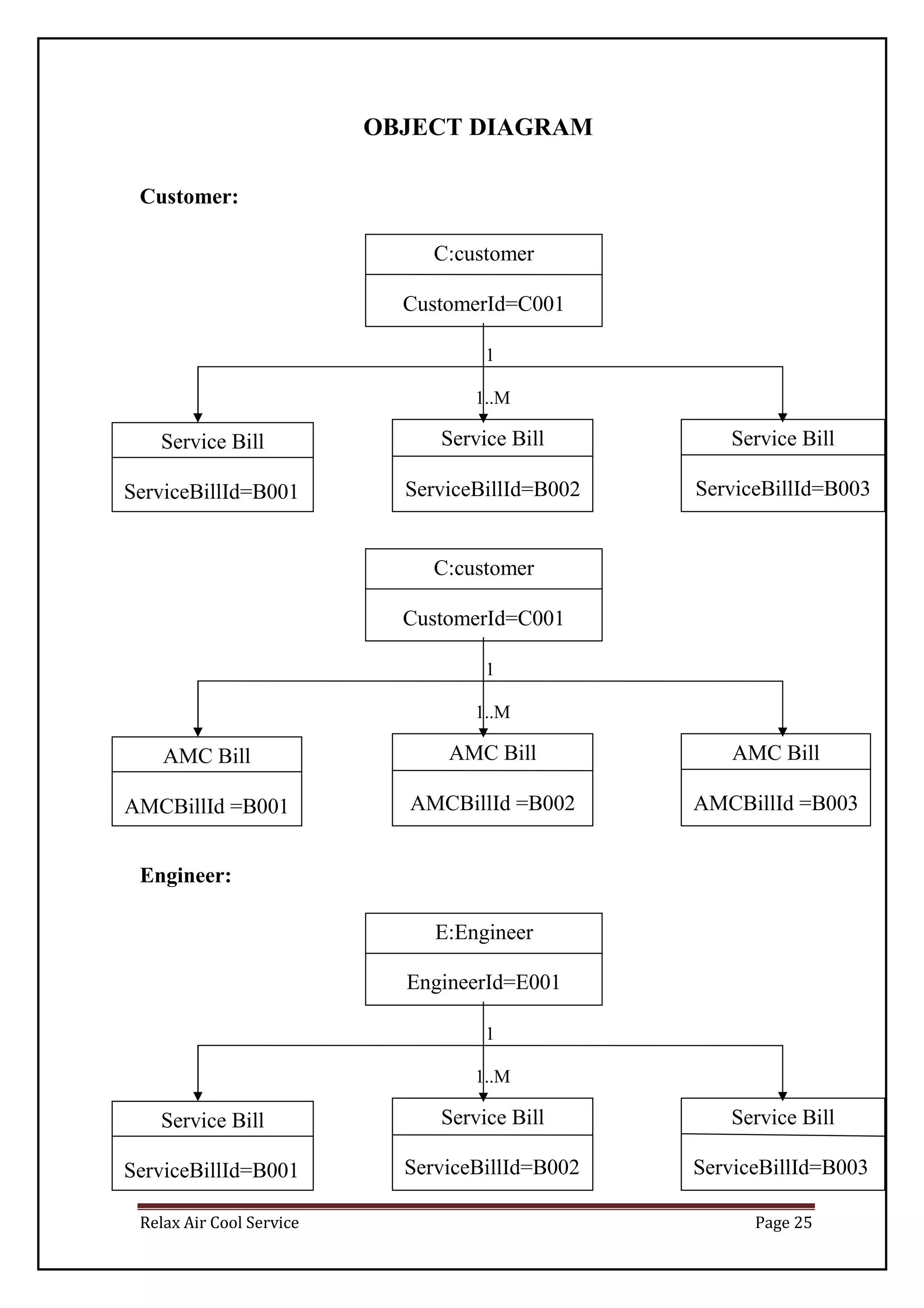
OBJECT DIAGRAM
Customer:
1
1..M
1
1..M
Engineer:
1
1..M
C:customer
CustomerId=C001
Service Bill
ServiceBillId=B001
!
Service Bill
ServiceBillId=B002
Service Bill
ServiceBillId=B003
1
C:customer
CustomerId=C001
AMC Bill
AMCBillId =B001
AMC Bill
AMCBillId =B002
AMC Bill
AMCBillId =B003
E:Engineer
EngineerId=E001
CustomerId=C001
Service Bill
ServiceBillId=B001
1!
Service Bill
ServiceBillId=B002
!
Service Bill
ServiceBillId=B003
!
Relax Air Cool Service Page 26
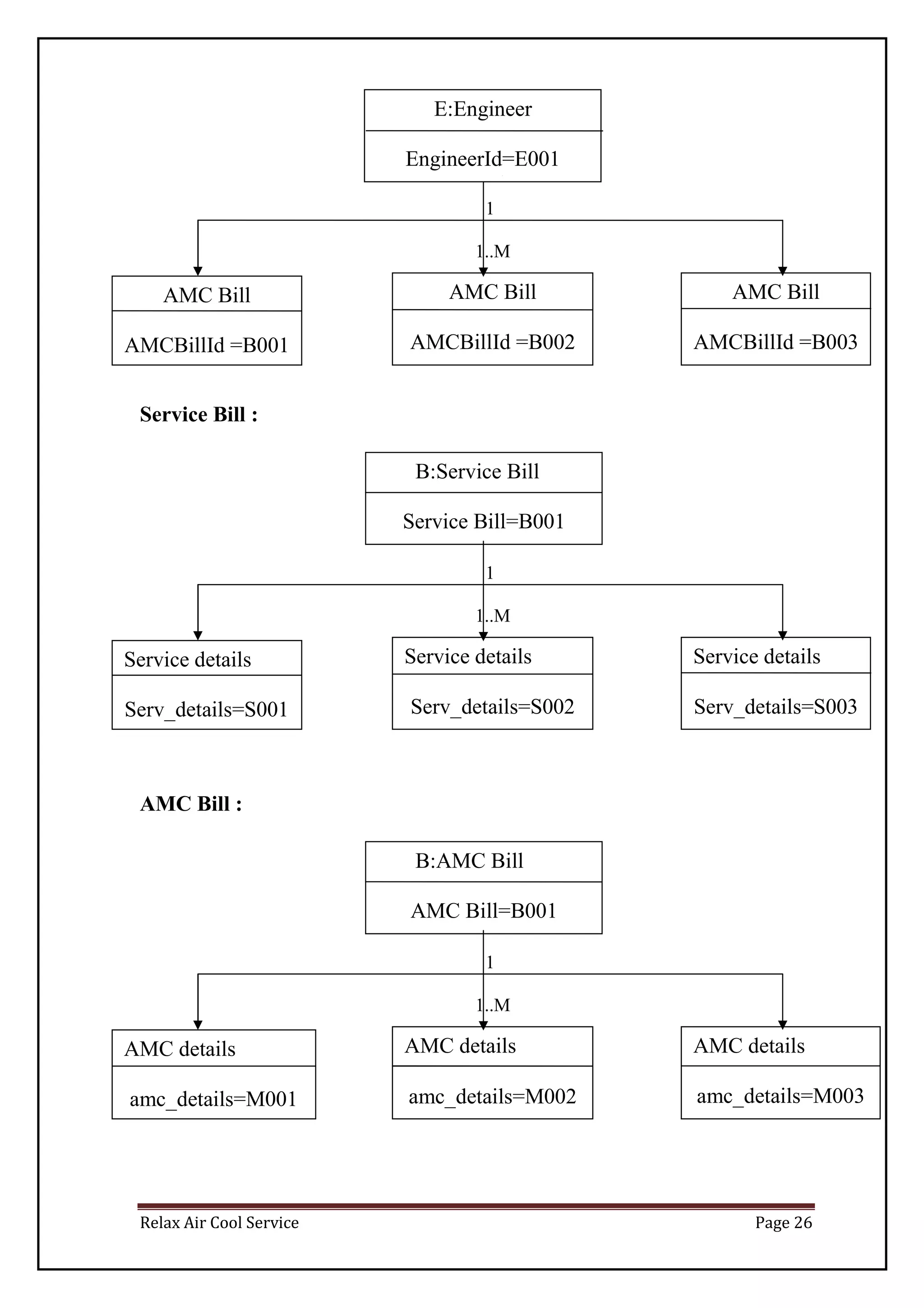
1
1..M
Service Bill :
1
1..M
AMC Bill :
1
1..M
AMC Bill
AMCBillId =B001
AMC Bill
AMCBillId =B002
AMC Bill
AMCBillId =B003
B:Service Bill
Service Bill=B001
Service details
Serv_details=S001
=P001
Service details
Serv_details=S002
Service details
Serv_details=S003
E:Engineer
EngineerId=E001
CustomerId=C001
B:AMC Bill
AMC Bill=B001
AMC details
amc_details=M001
=P001
AMC details
amc_details=M002
AMC details
amc_details=M003
1
Relax Air Cool Service Page 27
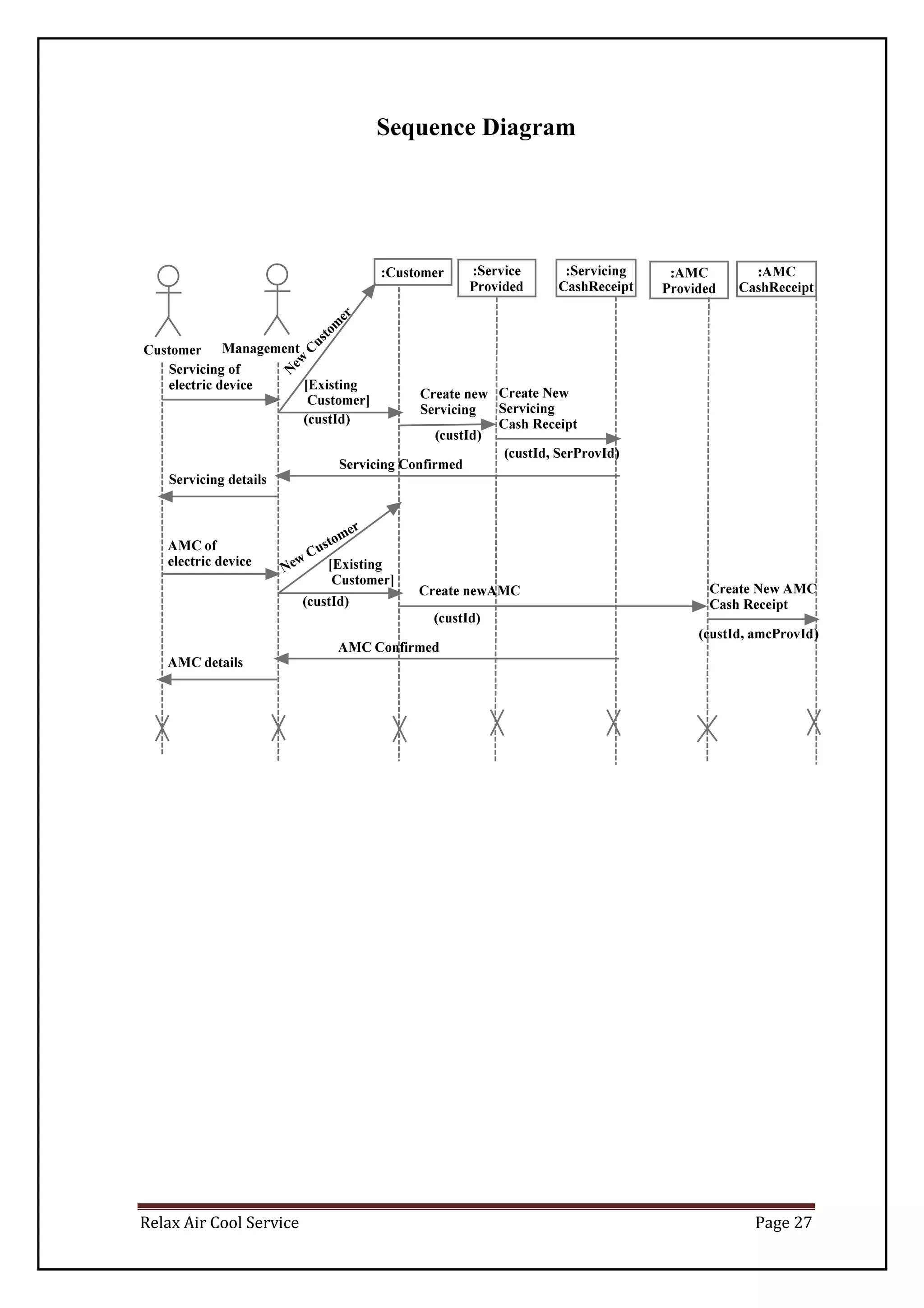
Sequence Diagram
N
ew
C
ustom
er
Relax Air Cool Service Page 28
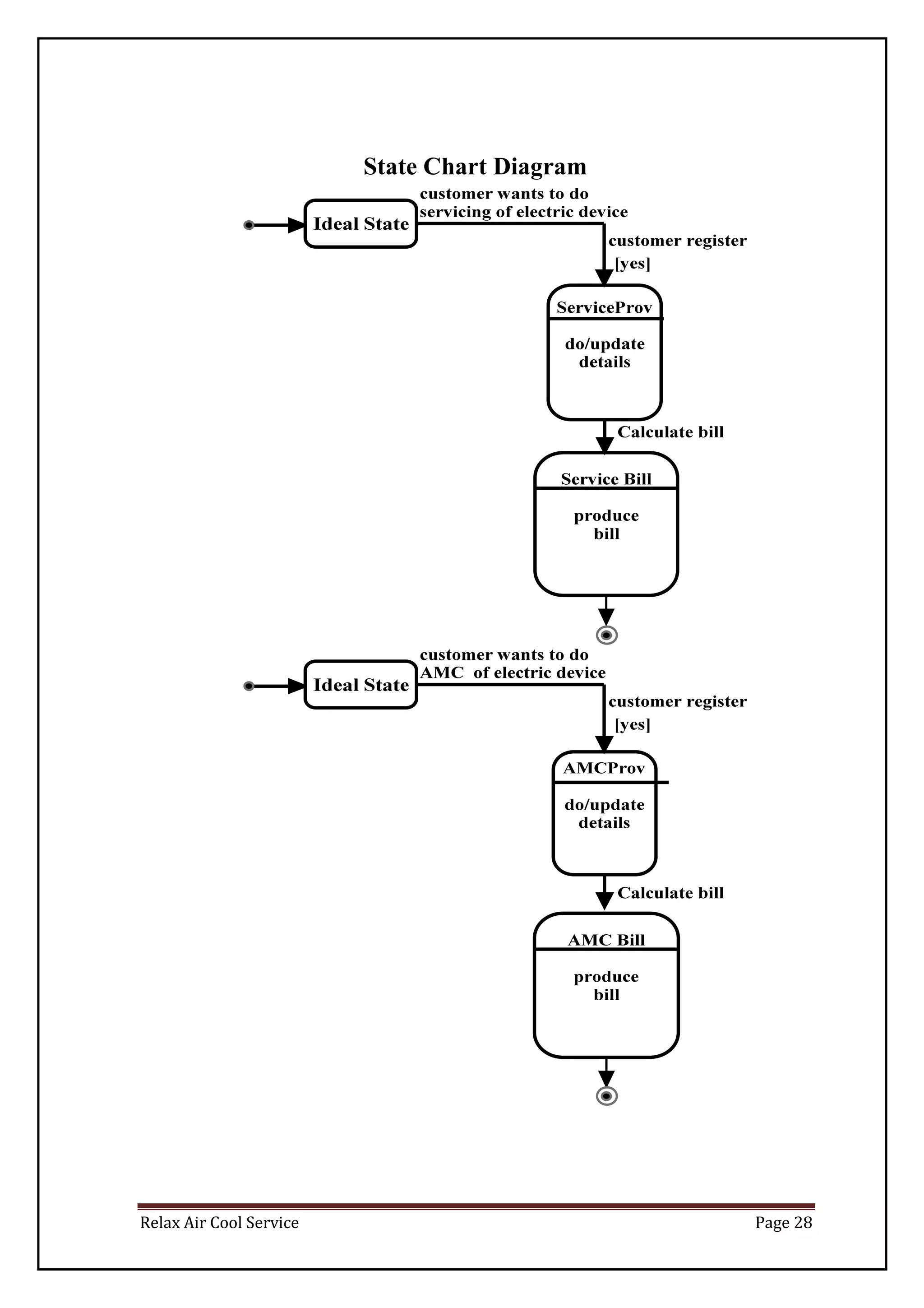
State Chart Diagram
Relax Air Cool Service Page 29
SYSTEM DESIGN
Relax Air Cool Service Page 30
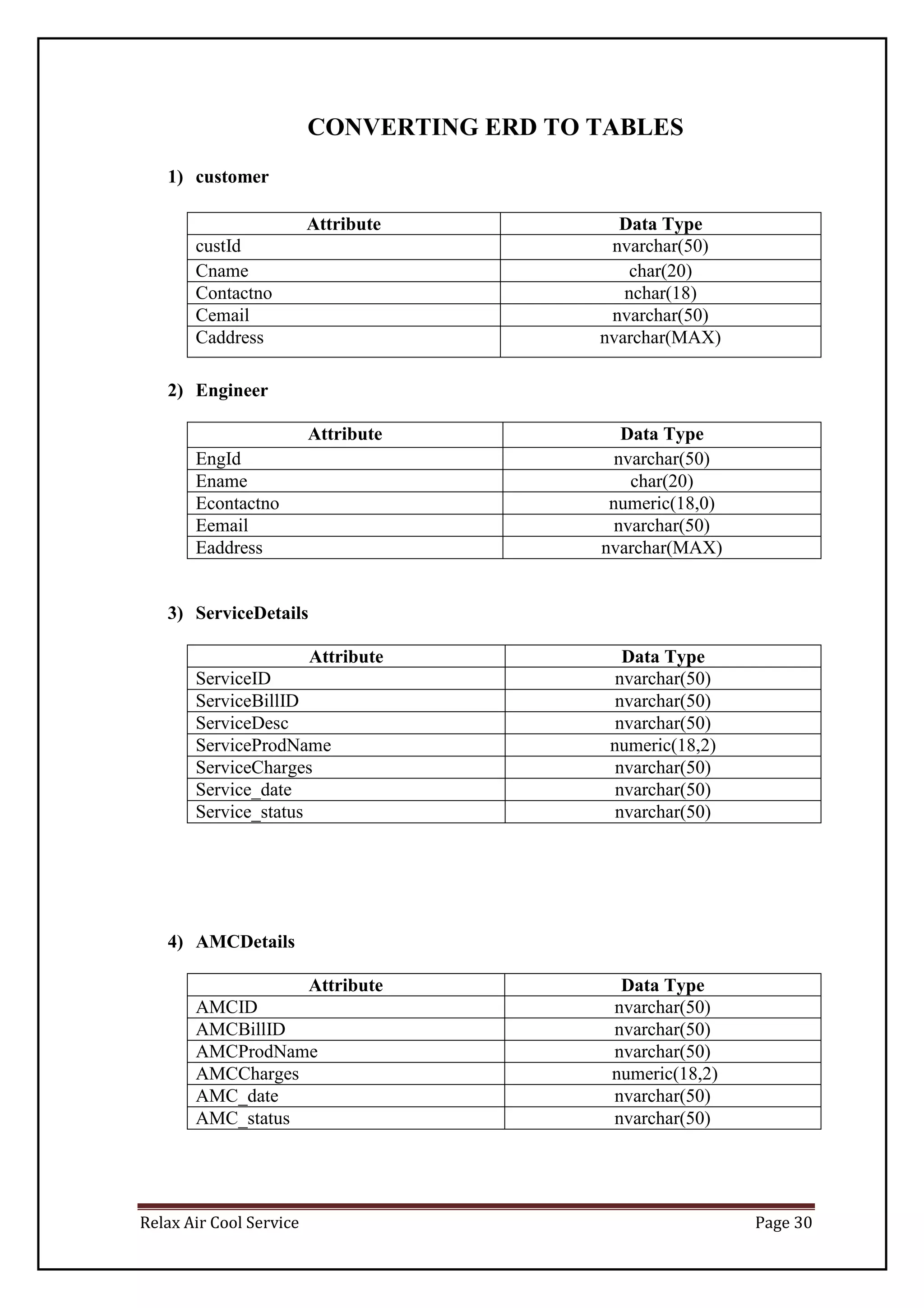
CONVERTING ERD TO TABLES
1) customer
Attribute Data Type
custId nvarchar(50)
Cname char(20)
Contactno nchar(18)
Cemail nvarchar(50)
Caddress nvarchar(MAX)
2) Engineer
Attribute Data Type
EngId nvarchar(50)
Ename char(20)
Econtactno numeric(18,0)
Eemail nvarchar(50)
Eaddress nvarchar(MAX)
3) ServiceDetails
Attribute Data Type
ServiceID nvarchar(50)
ServiceBillID nvarchar(50)
ServiceDesc nvarchar(50)
ServiceProdName numeric(18,2)
ServiceCharges nvarchar(50)
Service_date nvarchar(50)
Service_status nvarchar(50)
4) AMCDetails
Attribute Data Type
AMCID nvarchar(50)
AMCBillID nvarchar(50)
AMCProdName nvarchar(50)
AMCCharges numeric(18,2)
AMC_date nvarchar(50)
AMC_status nvarchar(50)
Relax Air Cool Service Page 31
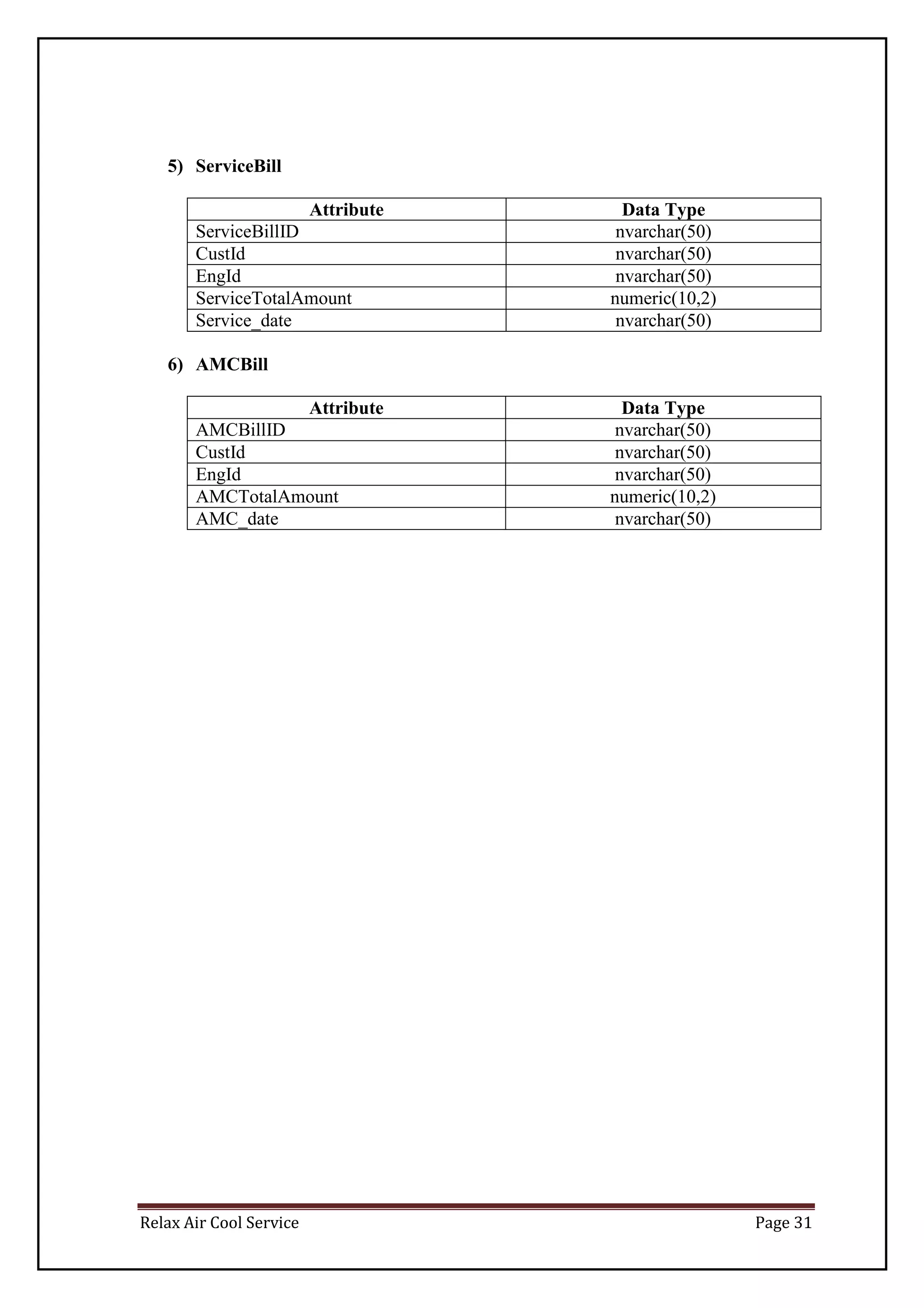
5) ServiceBill
Attribute Data Type
ServiceBillID nvarchar(50)
CustId nvarchar(50)
EngId nvarchar(50)
ServiceTotalAmount numeric(10,2)
Service_date nvarchar(50)
6) AMCBill
Attribute Data Type
AMCBillID nvarchar(50)
CustId nvarchar(50)
EngId nvarchar(50)
AMCTotalAmount numeric(10,2)
AMC_date nvarchar(50)
Relax Air Cool Service Page 32
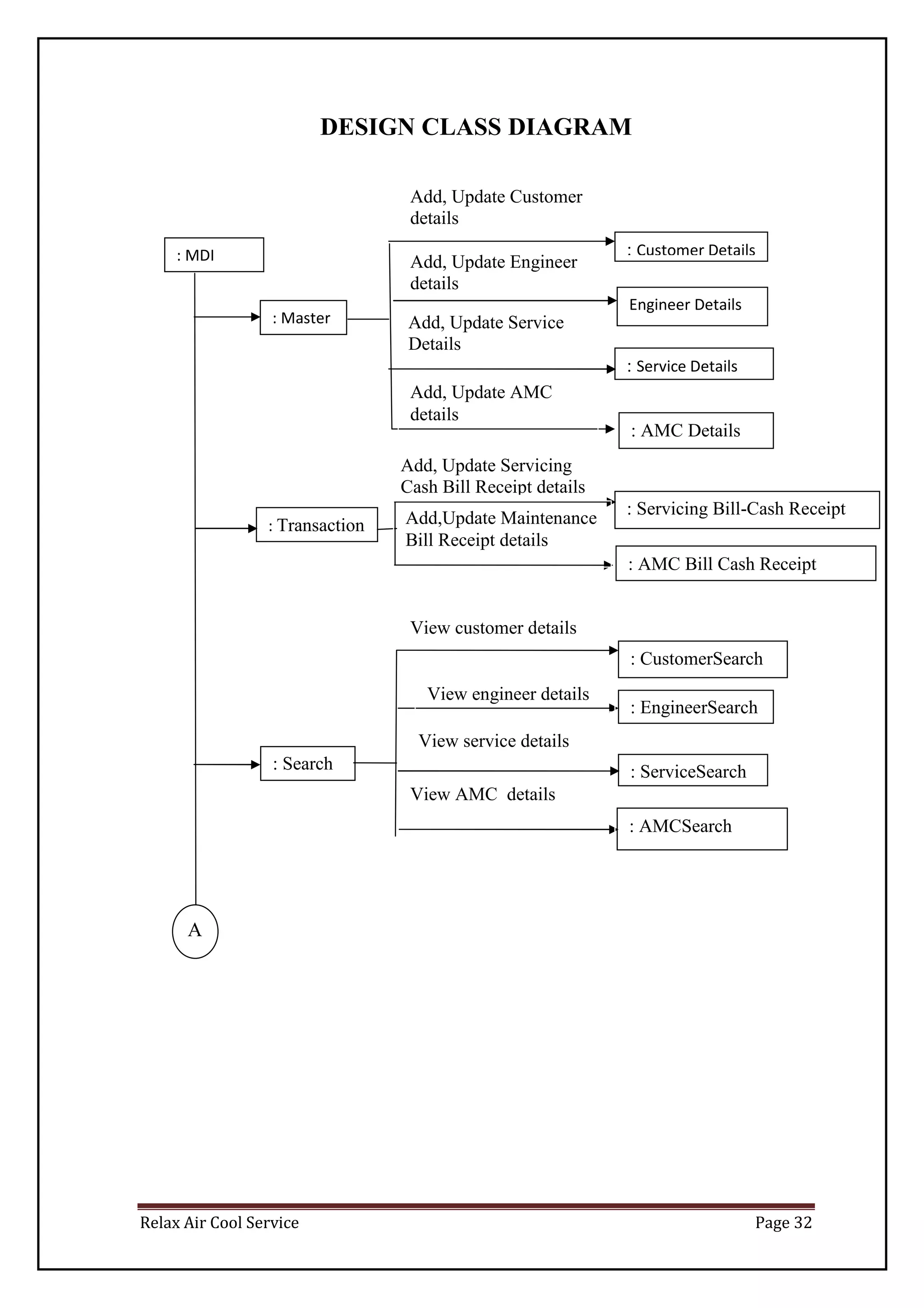
DESIGN CLASS DIAGRAM
: Master
: MDI : Customer Details
: Service Details
: AMC Details
: Servicing Bill-Cash Receipt
Details: Transaction
: AMC Bill Cash Receipt
A
: Search
: CustomerSearch
: EngineerSearch
: ServiceSearch
: AMCSearch
Add, Update Customer
details
Add, Update Engineer
details
Add, Update Service
Details
Add, Update AMC
details
Add, Update Servicing
Cash Bill Receipt details
Add,Update Maintenance
Bill Receipt details
View customer details
View engineer details
View service details
View AMC details
Engineer Details
Relax Air Cool Service Page 33
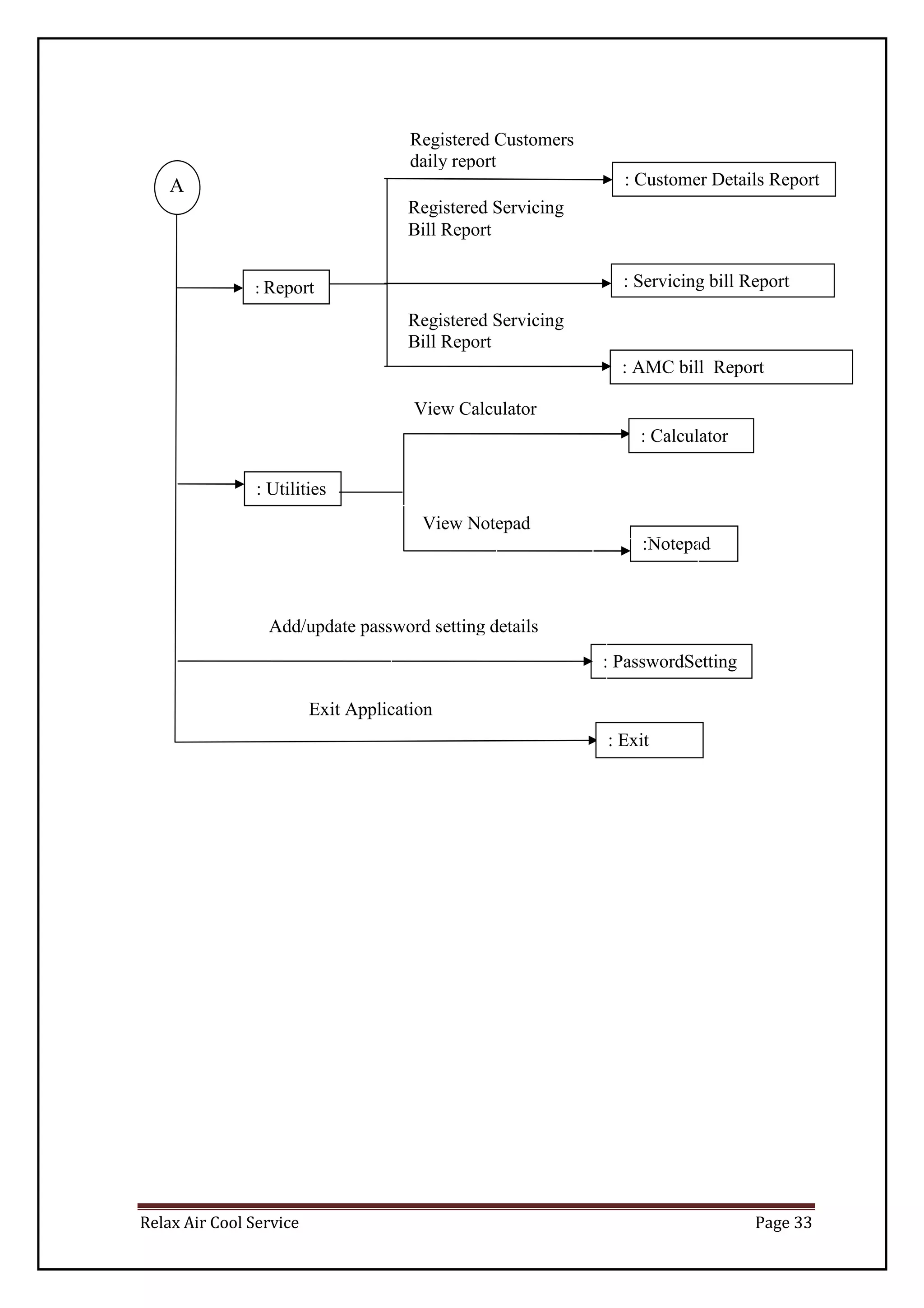
: Report
: Customer Details Report
: Servicing bill Report
: AMC bill Report
A
: Utilities
: Calculator
: PasswordSetting
:Notepad
: Exit
Exit Application
Add/update password setting details
View Calculator
View Notepad
Registered Customers
daily report
Registered Servicing
Bill Report
Registered Servicing
Bill Report
Relax Air Cool Service Page 34
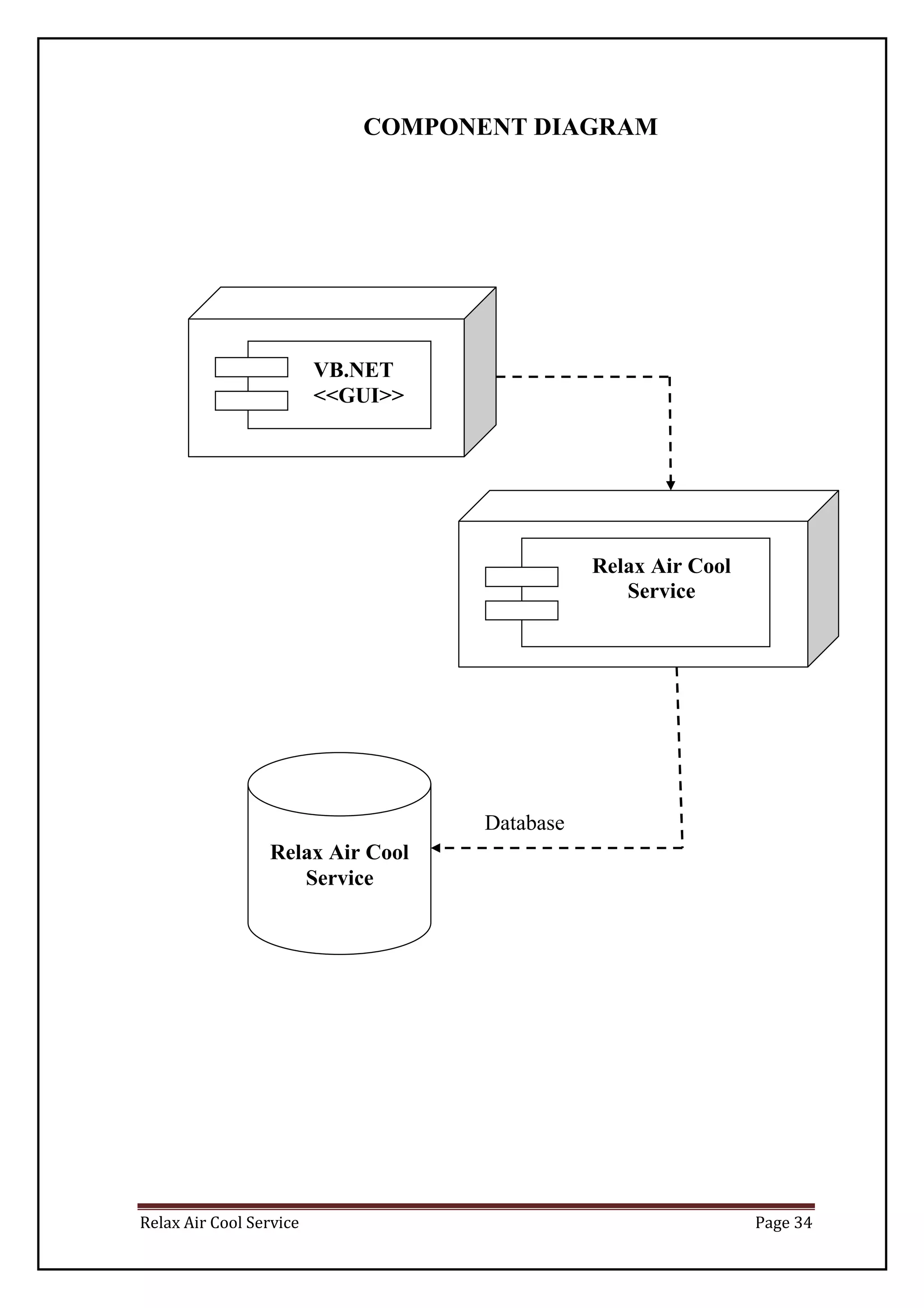
COMPONENT DIAGRAM
Relax Air Cool
Service
VB.NET
<<GUI>>
Relax Air Cool
Service
Database
Relax Air Cool Service Page 35
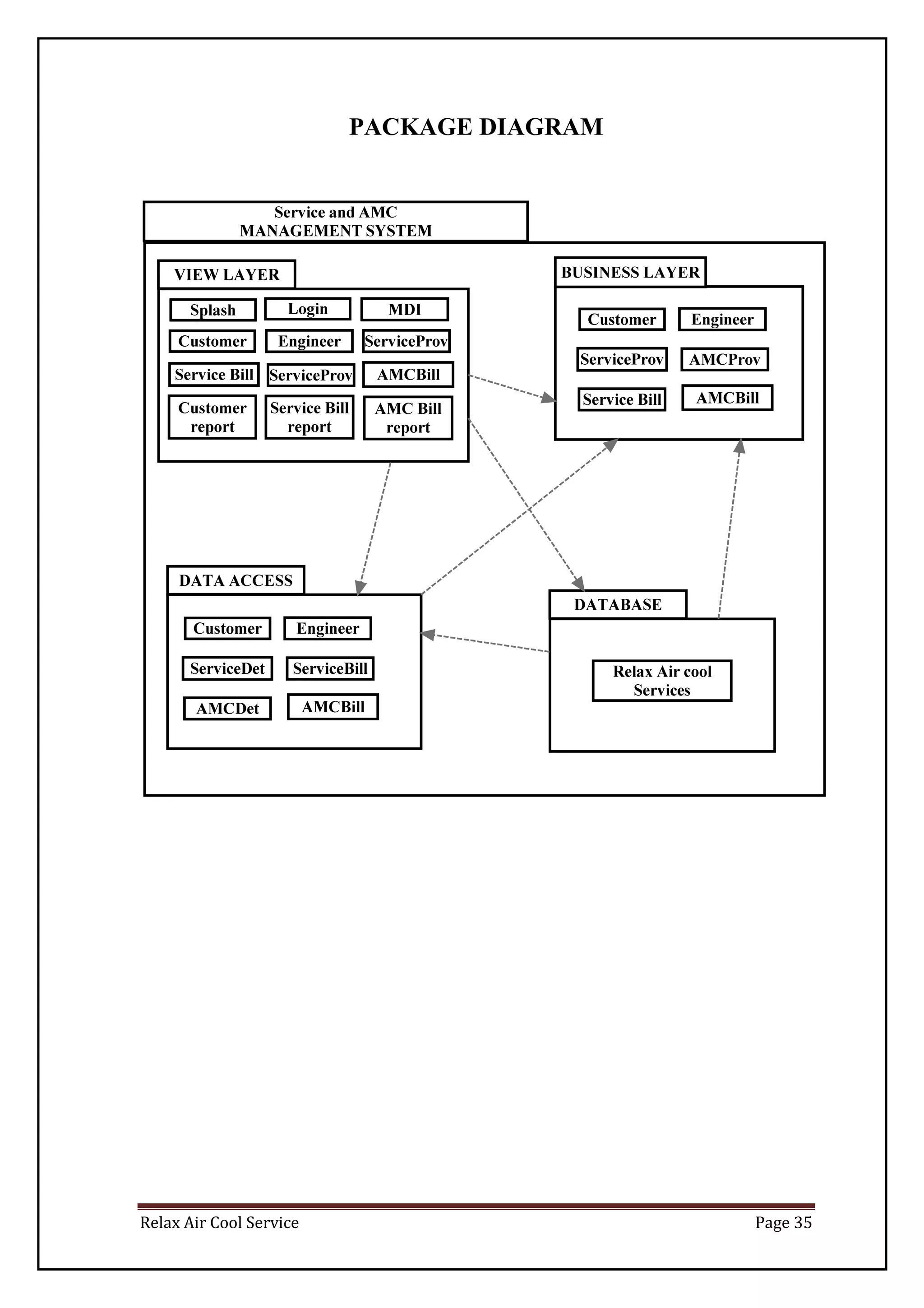
PACKAGE DIAGRAM
Relax Air Cool Service Page 36
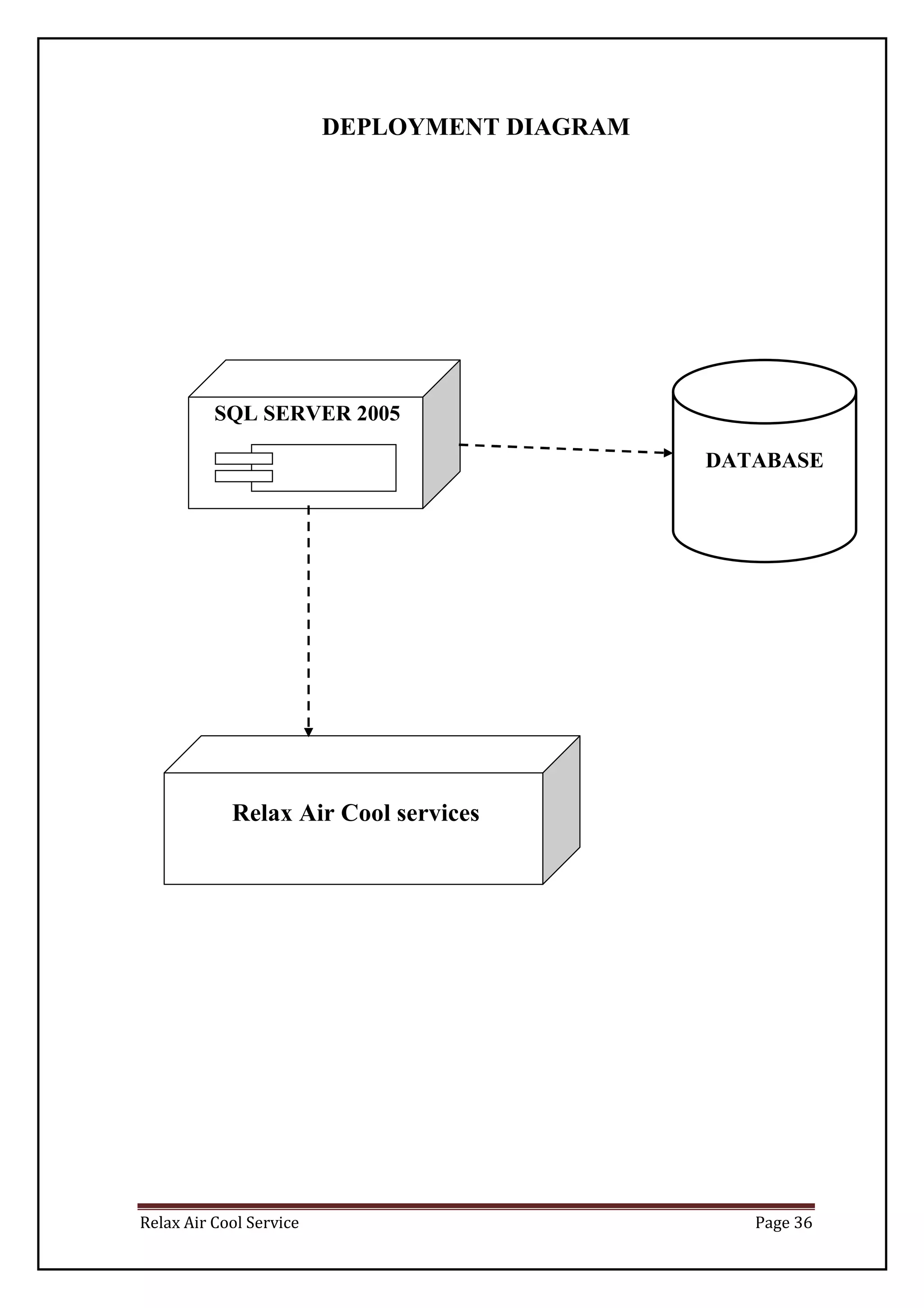
DEPLOYMENT DIAGRAM
DATABASE
Relax Air Cool services
SQL SERVER 2005
Relax Air Cool Service Page 37
SYSTEM CODING
Relax Air Cool Service Page 38
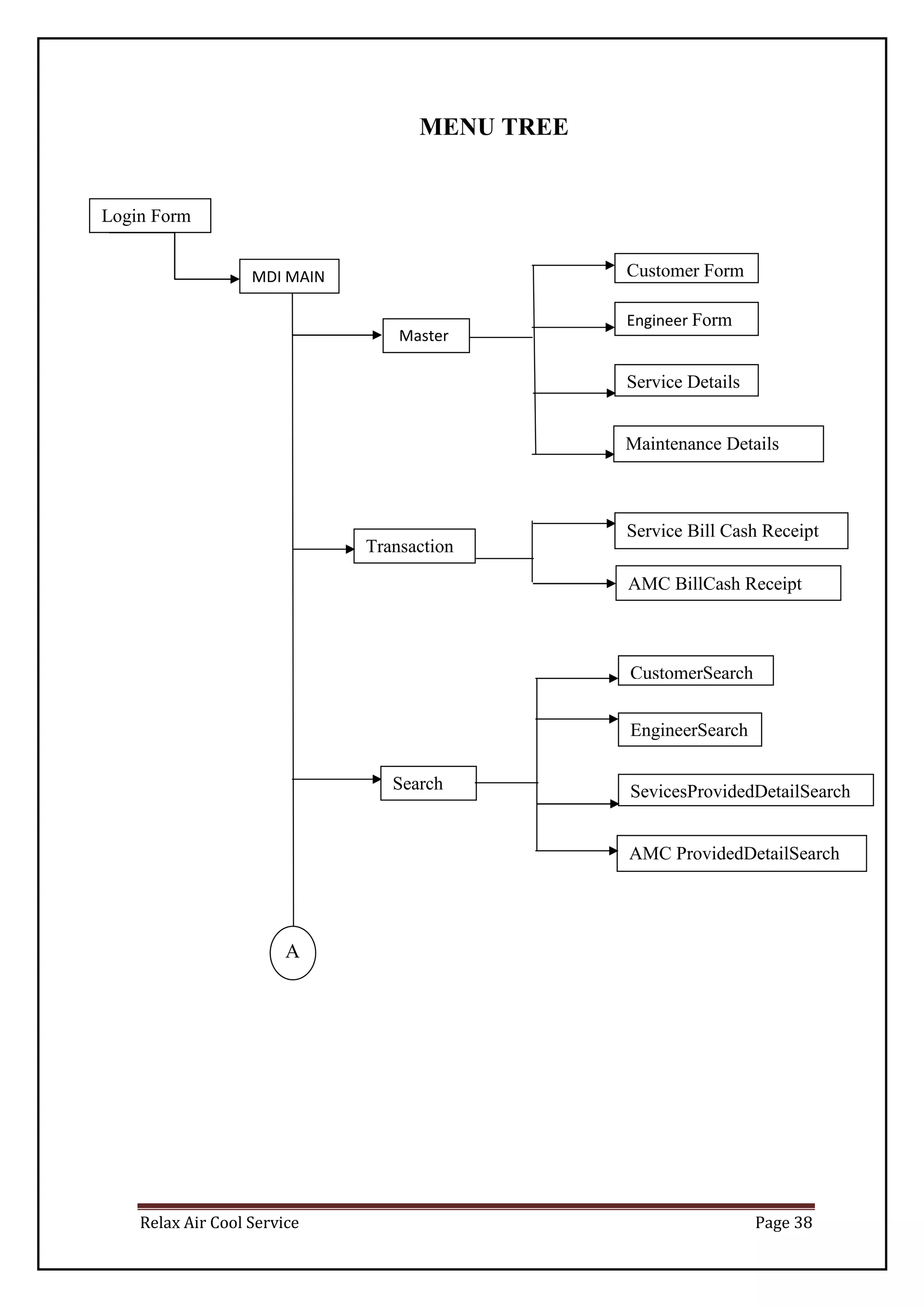
MENU TREE
Master
Login Form
MDI MAIN Customer Form
Engineer Form
Service Details
Maintenance Details
Service Bill Cash Receipt
Transaction
AMC BillCash Receipt
A
Search
CustomerSearch
EngineerSearch
SevicesProvidedDetailSearch
AMC ProvidedDetailSearch
Relax Air Cool Service Page 39
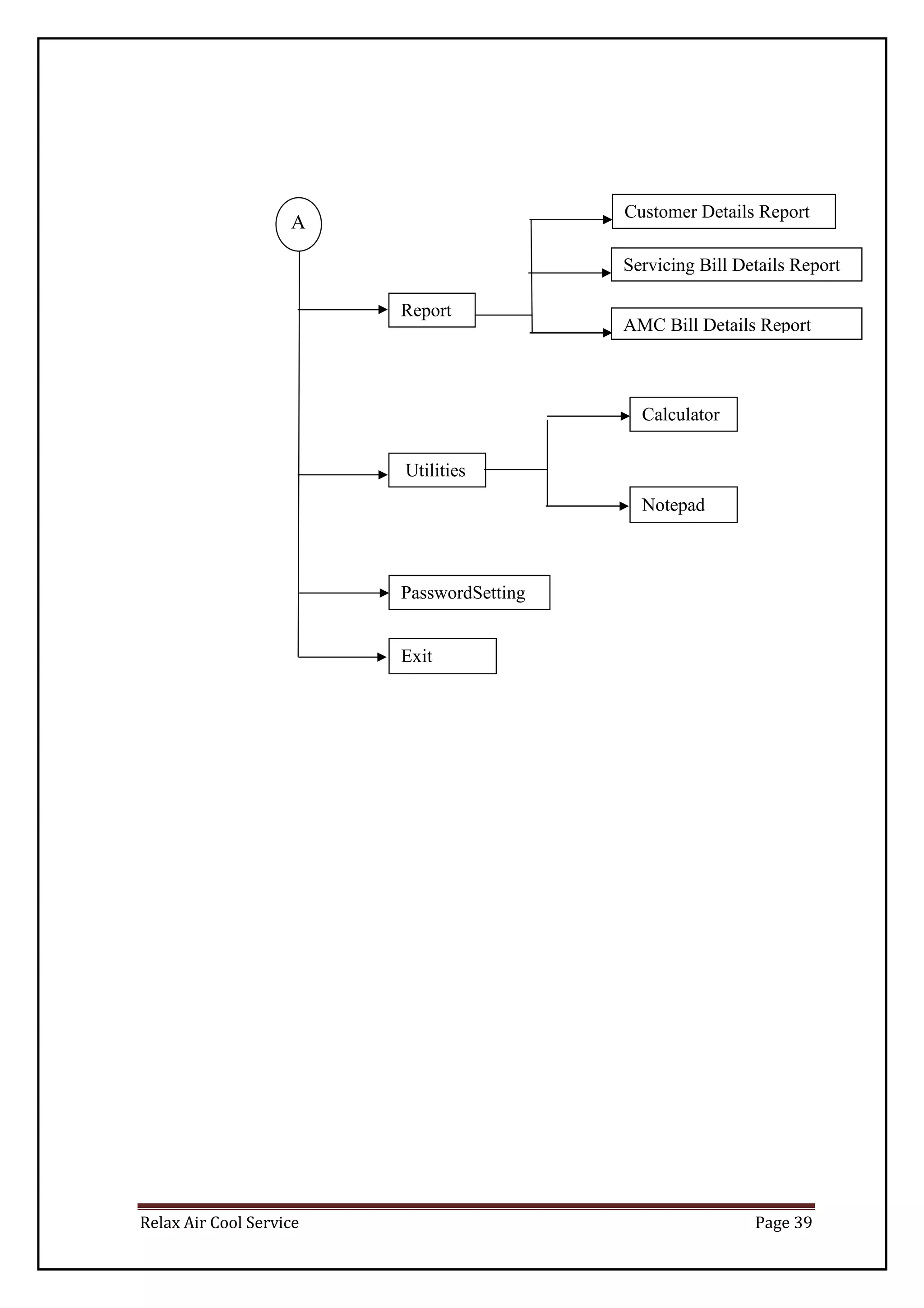
Report
Customer Details Report
Servicing Bill Details Report
AMC Bill Details Report
A
Utilities
Calculator
PasswordSetting
Notepad
Exit
Relax Air Cool Service Page 40
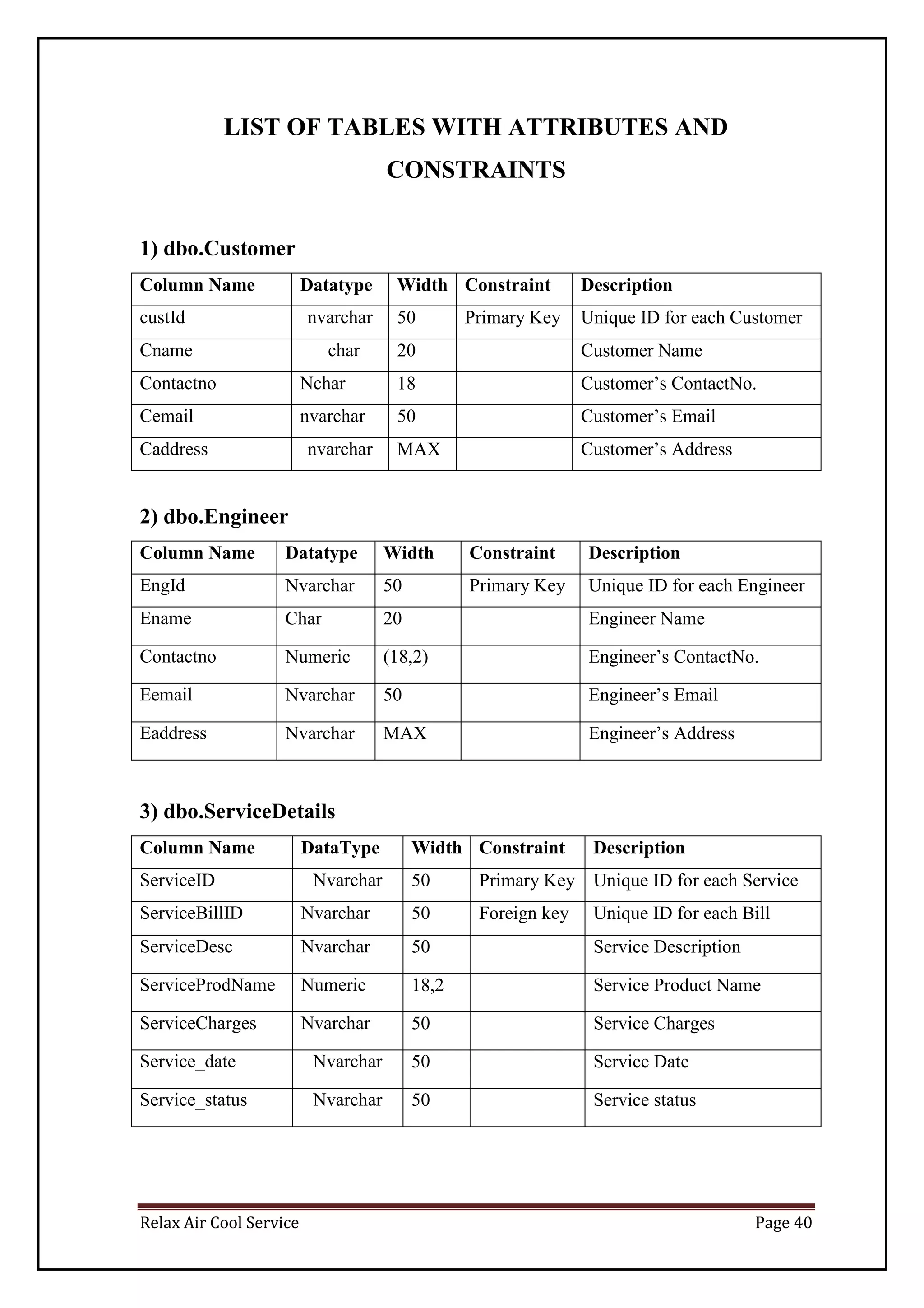
LIST OF TABLES WITH ATTRIBUTES AND
CONSTRAINTS
1) dbo.Customer
Column Name Datatype Width Constraint Description
custId nvarchar 50 Primary Key Unique ID for each Customer
Cname char 20 Customer Name
Contactno Nchar 18 Customer’s ContactNo.
Cemail nvarchar 50 Customer’s Email
Caddress nvarchar MAX Customer’s Address
2) dbo.Engineer
Column Name Datatype Width Constraint Description
EngId Nvarchar 50 Primary Key Unique ID for each Engineer
Ename Char 20 Engineer Name
Contactno Numeric (18,2) Engineer’s ContactNo.
Eemail Nvarchar 50 Engineer’s Email
Eaddress Nvarchar MAX Engineer’s Address
3) dbo.ServiceDetails
Column Name DataType Width Constraint Description
ServiceID Nvarchar 50 Primary Key Unique ID for each Service
ServiceBillID Nvarchar 50 Foreign key Unique ID for each Bill
ServiceDesc Nvarchar 50 Service Description
ServiceProdName Numeric 18,2 Service Product Name
ServiceCharges Nvarchar 50 Service Charges
Service_date Nvarchar 50 Service Date
Service_status Nvarchar 50 Service status
Relax Air Cool Service Page 41
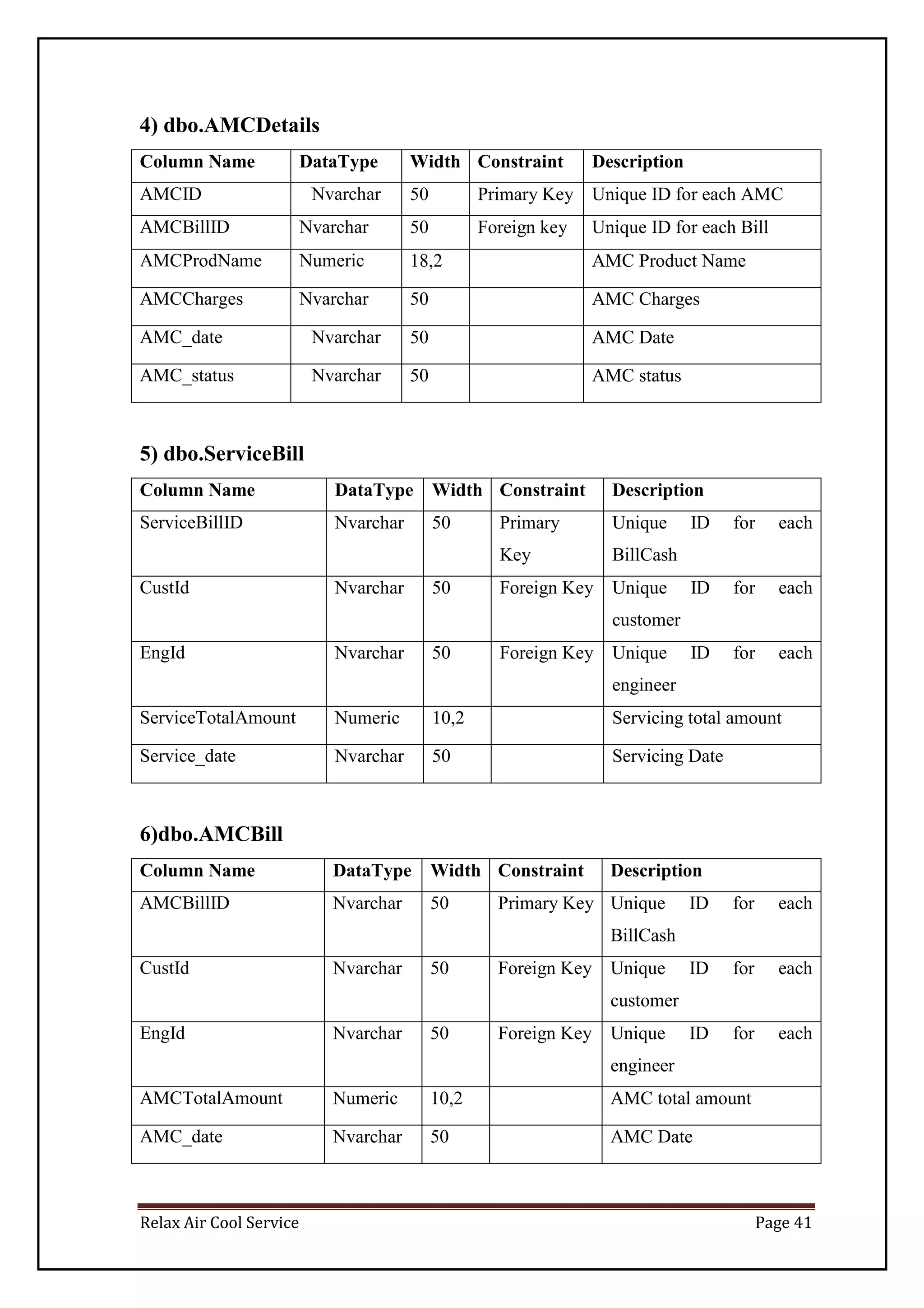
4) dbo.AMCDetails
Column Name DataType Width Constraint Description
AMCID Nvarchar 50 Primary Key Unique ID for each AMC
AMCBillID Nvarchar 50 Foreign key Unique ID for each Bill
AMCProdName Numeric 18,2 AMC Product Name
AMCCharges Nvarchar 50 AMC Charges
AMC_date Nvarchar 50 AMC Date
AMC_status Nvarchar 50 AMC status
5) dbo.ServiceBill
Column Name DataType Width Constraint Description
ServiceBillID Nvarchar 50 Primary
Key
Unique ID for each
BillCash
CustId Nvarchar 50 Foreign Key Unique ID for each
customer
EngId Nvarchar 50 Foreign Key Unique ID for each
engineer
ServiceTotalAmount Numeric 10,2 Servicing total amount
Service_date Nvarchar 50 Servicing Date
6)dbo.AMCBill
Column Name DataType Width Constraint Description
AMCBillID Nvarchar 50 Primary Key Unique ID for each
BillCash
CustId Nvarchar 50 Foreign Key Unique ID for each
customer
EngId Nvarchar 50 Foreign Key Unique ID for each
engineer
AMCTotalAmount Numeric 10,2 AMC total amount
AMC_date Nvarchar 50 AMC Date
Relax Air Cool Service Page 42
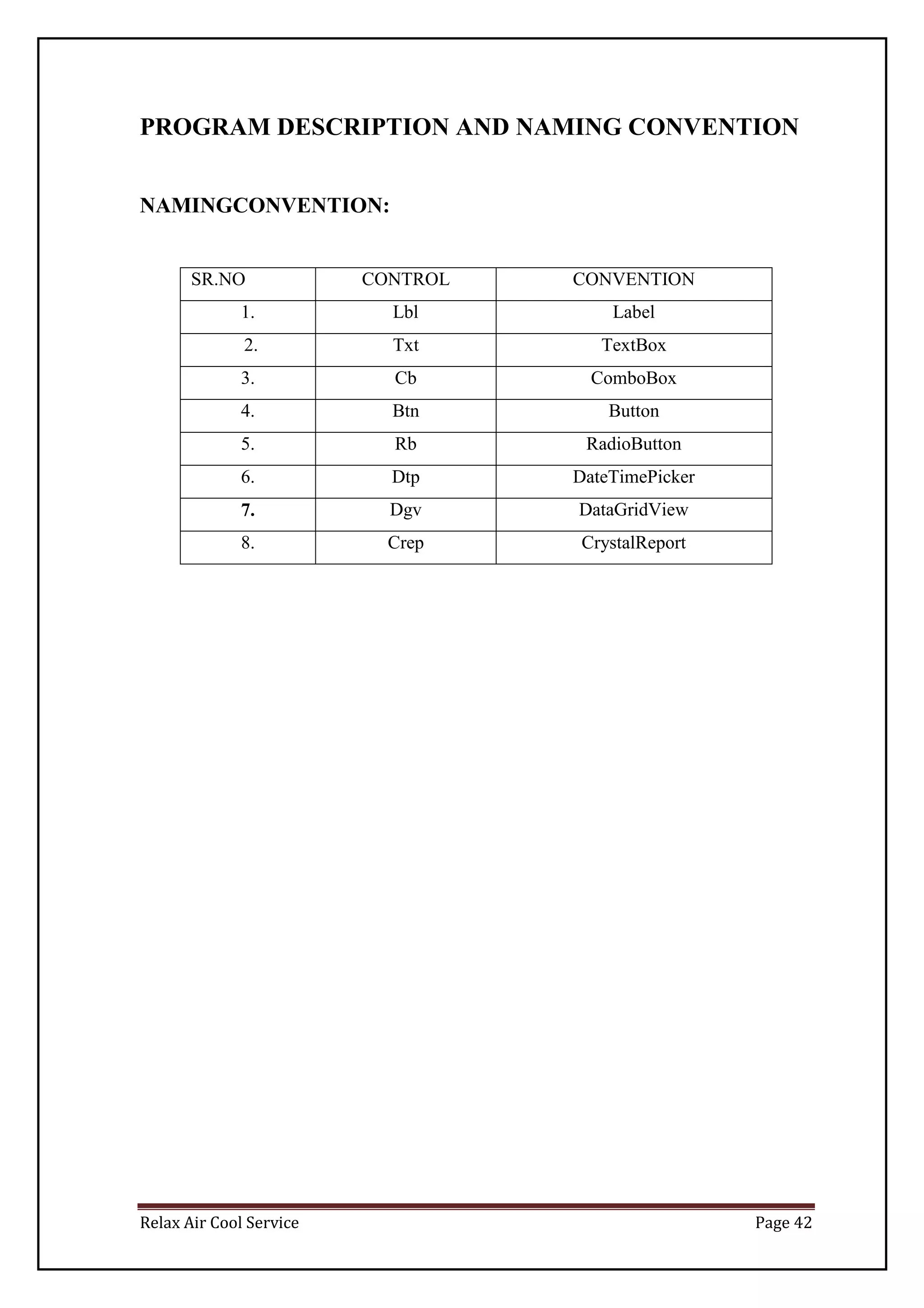
PROGRAM DESCRIPTION AND NAMING CONVENTION
NAMINGCONVENTION:
SR.NO CONTROL CONVENTION
1. Lbl Label
2. Txt TextBox
3. Cb ComboBox
4. Btn Button
5. Rb RadioButton
6. Dtp DateTimePicker
7. Dgv DataGridView
8. Crep CrystalReport
Relax Air Cool Service Page 43
PROGRAM DESCRIPTION:
Sr.No. PROGRAM DESCRIPTION
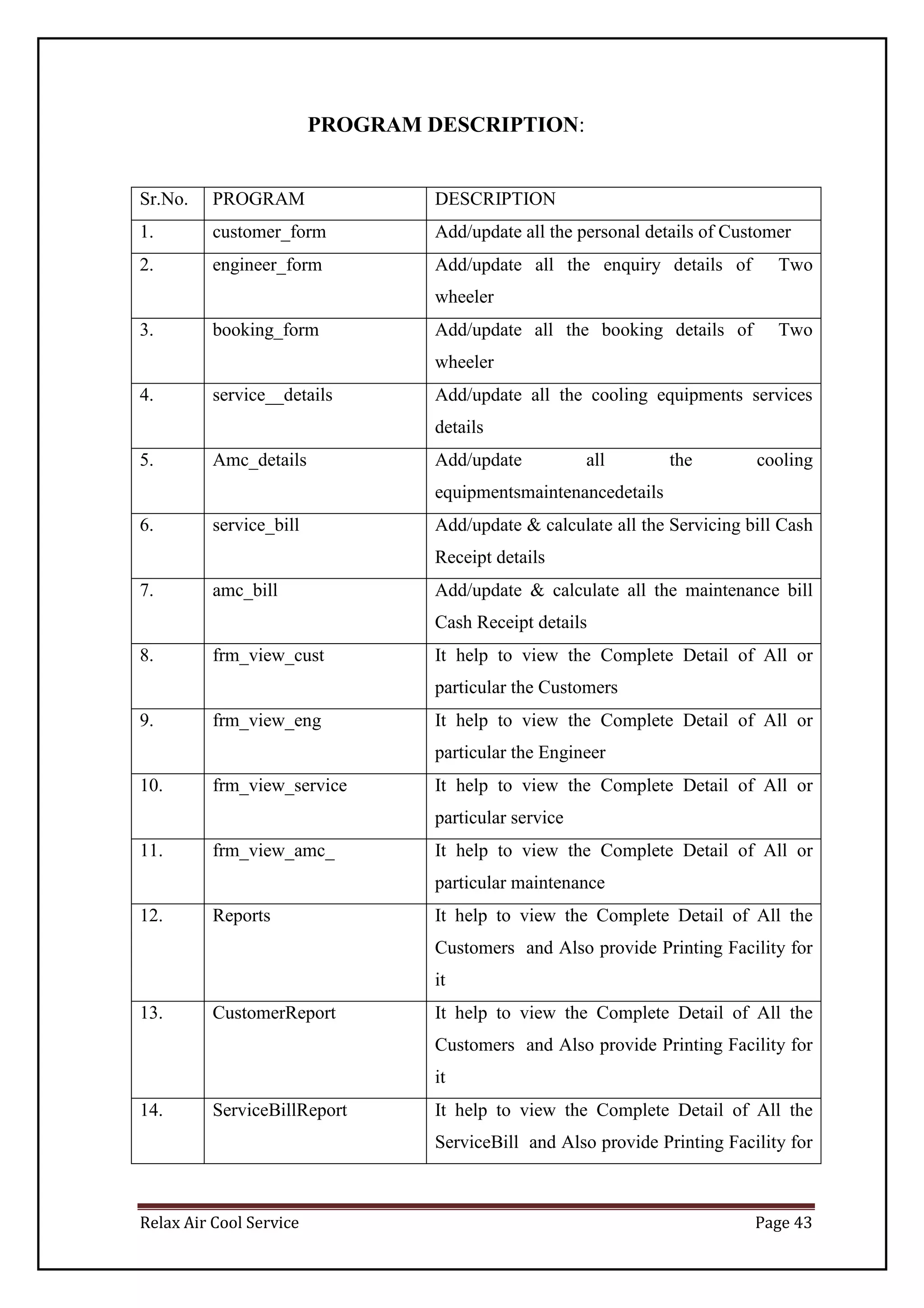
1. customer_form Add/update all the personal details of Customer
2. engineer_form Add/update all the enquiry details of Two
wheeler
3. booking_form Add/update all the booking details of Two
wheeler
4. service__details Add/update all the cooling equipments services
details
5. Amc_details Add/update all the cooling
equipmentsmaintenancedetails
6. service_bill Add/update & calculate all the Servicing bill Cash
Receipt details
7. amc_bill Add/update & calculate all the maintenance bill
Cash Receipt details
8. frm_view_cust It help to view the Complete Detail of All or
particular the Customers
9. frm_view_eng It help to view the Complete Detail of All or
particular the Engineer
10. frm_view_service It help to view the Complete Detail of All or
particular service
11. frm_view_amc_ It help to view the Complete Detail of All or
particular maintenance
12. Reports It help to view the Complete Detail of All the
Customers and Also provide Printing Facility for
it
13. CustomerReport It help to view the Complete Detail of All the
Customers and Also provide Printing Facility for
it
14. ServiceBillReport It help to view the Complete Detail of All the
ServiceBill and Also provide Printing Facility for
Relax Air Cool Service Page 44
it
15. AMCBillReport It help to view the Complete Detail of All the
AMC Bill and Also provide Printing Facility for it
16. Calculator It help in calculation
17. Notepad It display Notepad
18. passwordSetting To set the password
VALIDATIONS
System.Text.RegularExpressions Namespace is Imported for performing validations.
 ^[a-zA-Z ]*$:- is used for validating Name TextBox.
 ^[0-9]*$ :-is used for validating Contact No Text Box and Pincode TextBox.
Relax Air Cool Service Page 45
SCREEN LAYOUTS AND REPORTS LAYOUTS
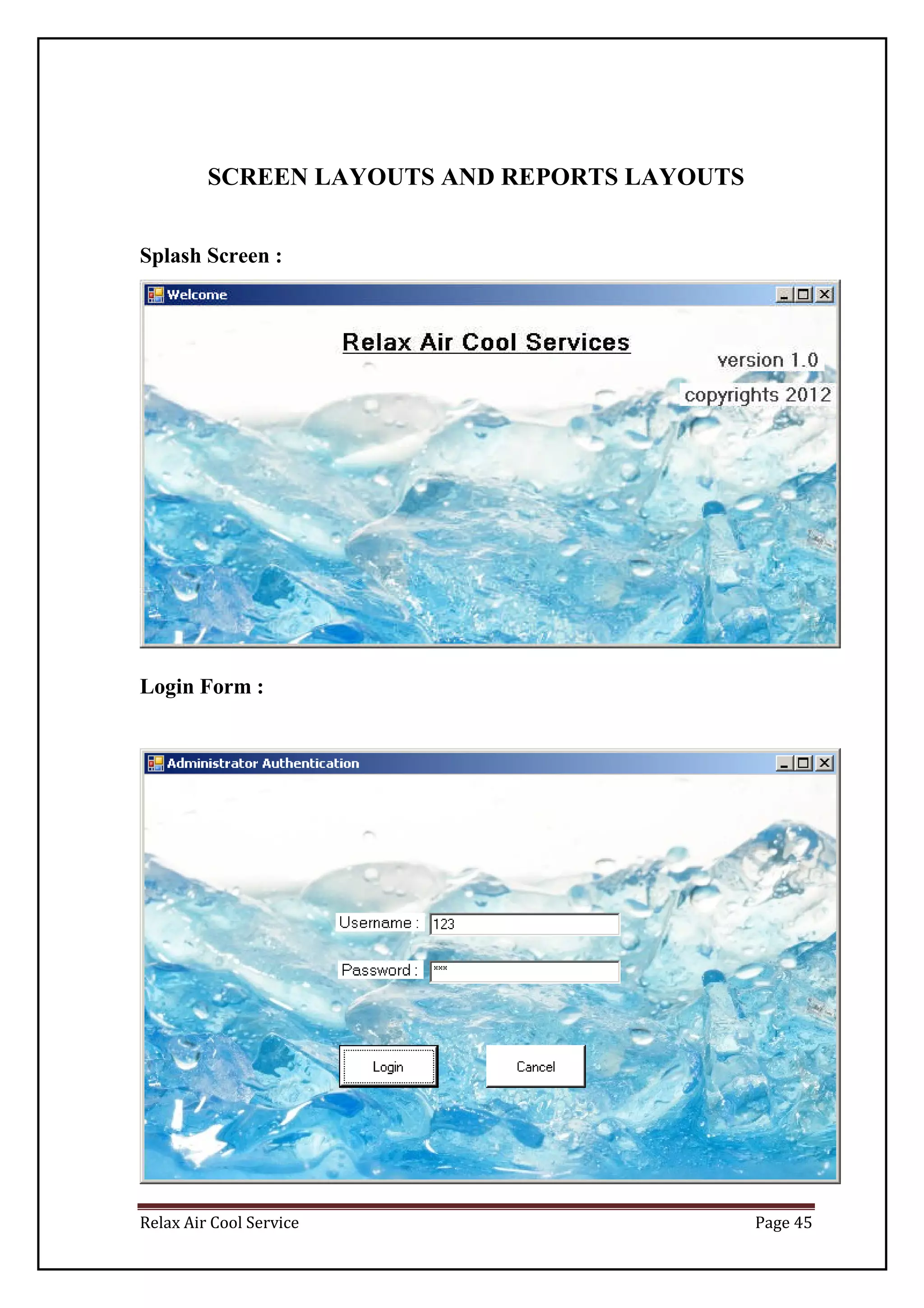
Splash Screen :
Login Form :
Relax Air Cool Service Page 46
MDI Form
Relax Air Cool Service Page 47
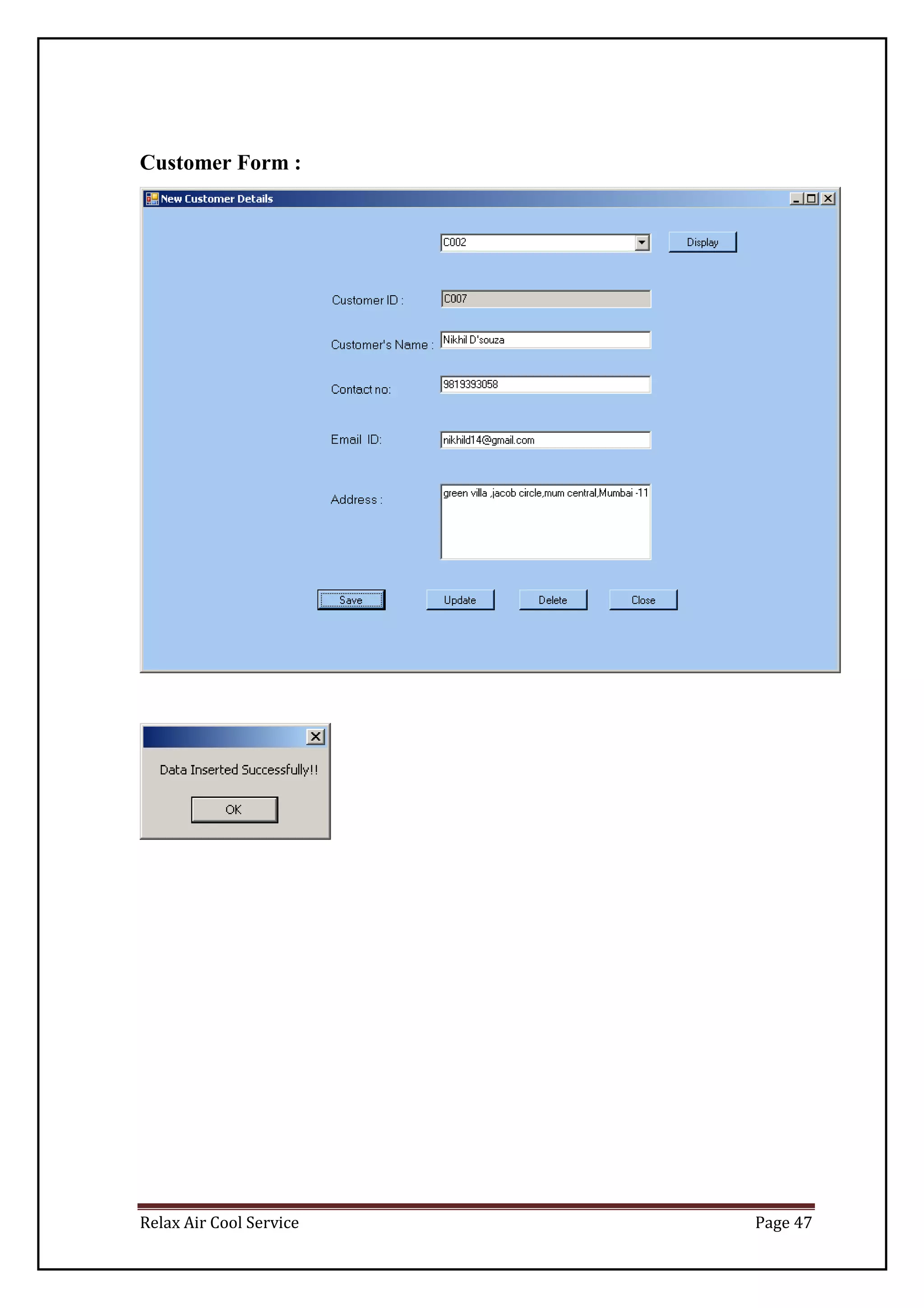
Customer Form :
Relax Air Cool Service Page 48
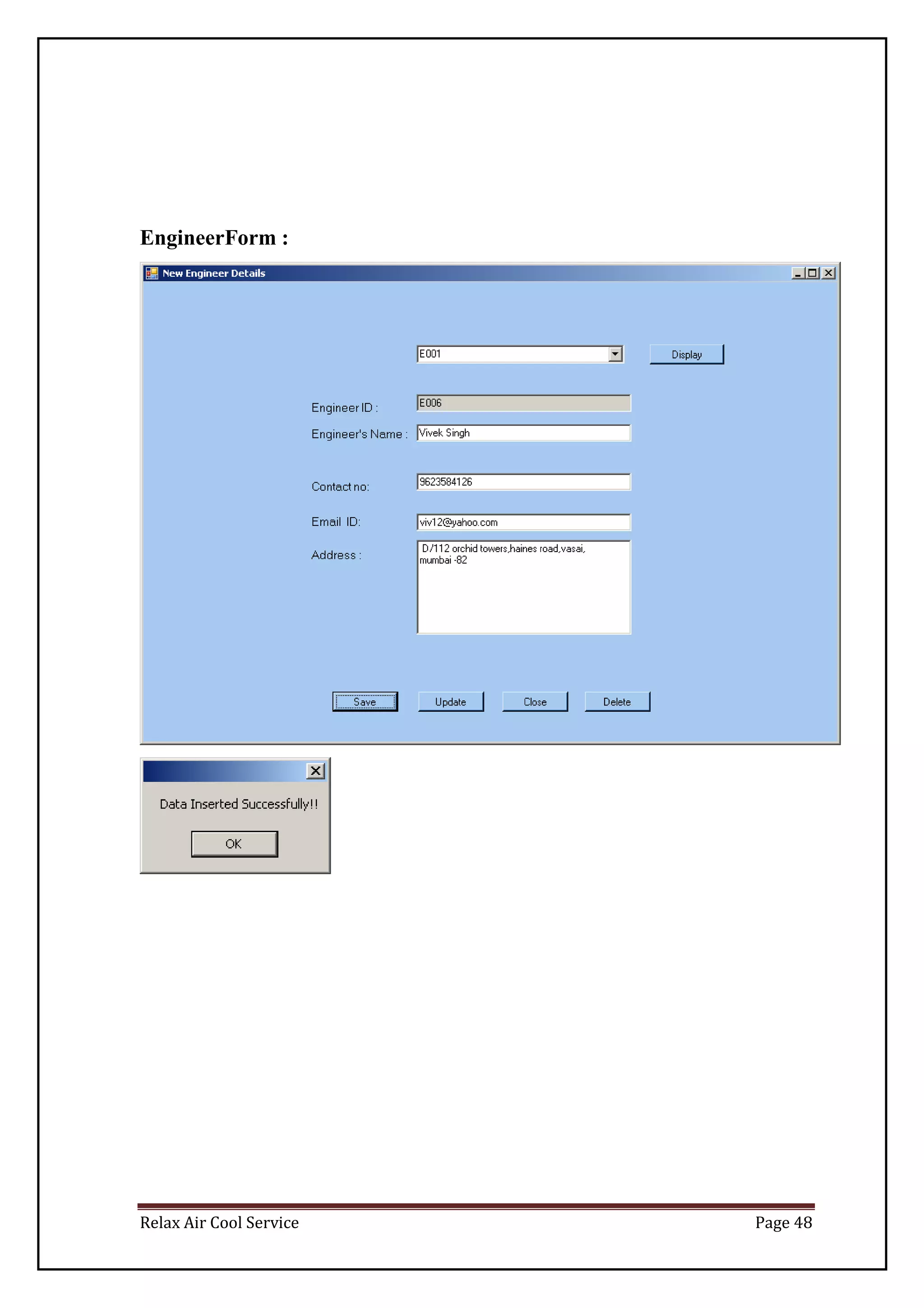
EngineerForm :
Relax Air Cool Service Page 49
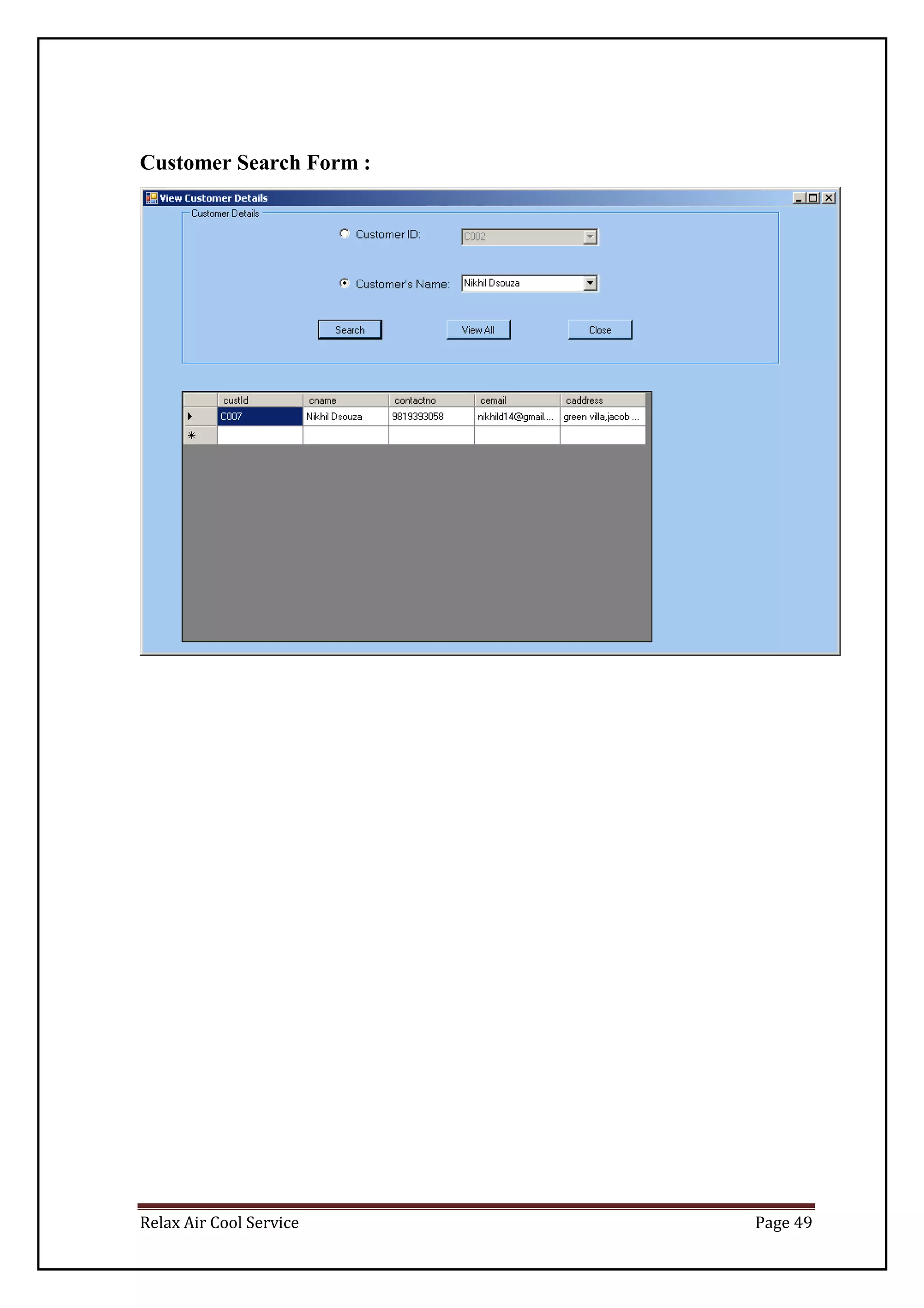
Customer Search Form :
Relax Air Cool Service Page 50
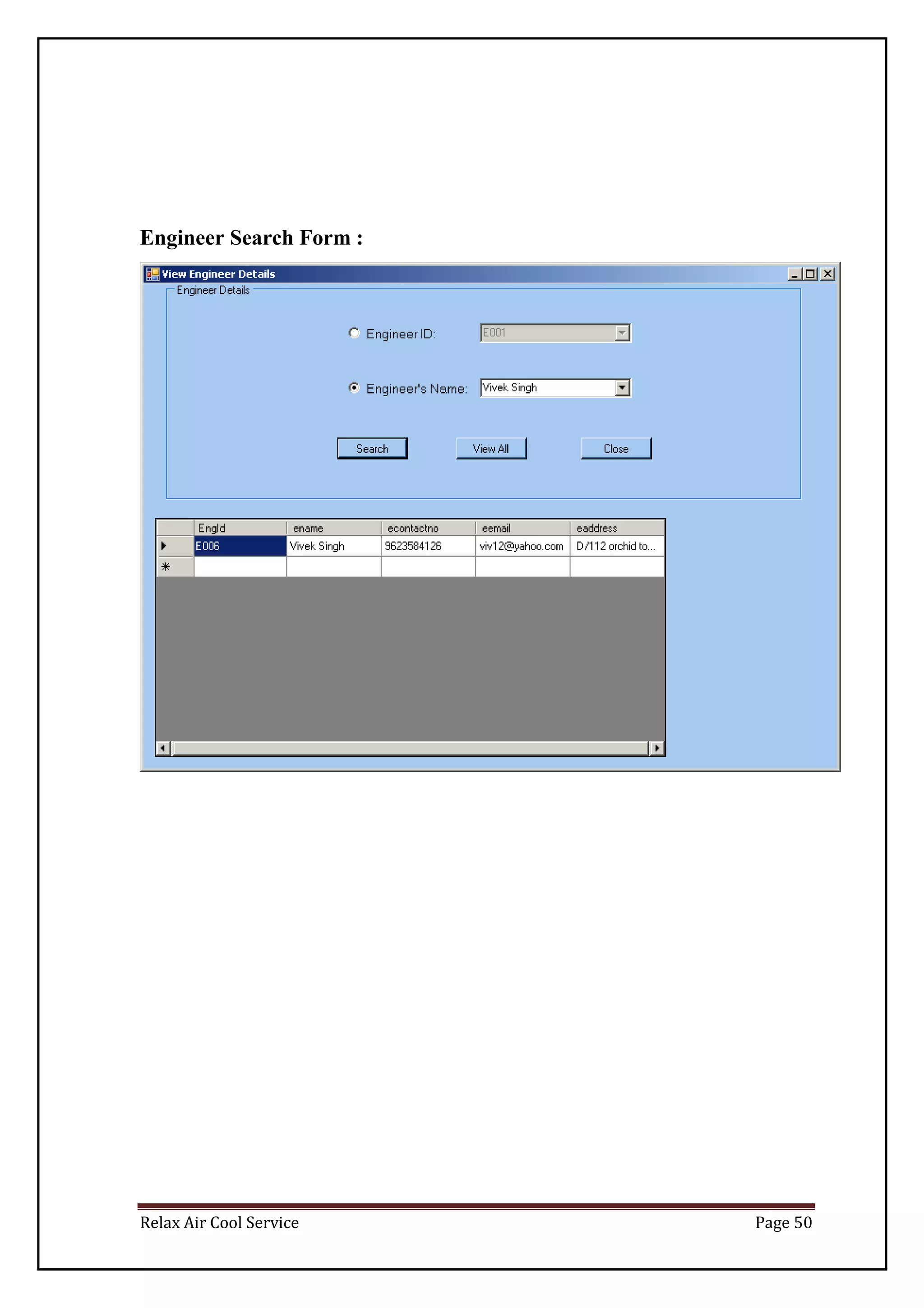
Engineer Search Form :
Relax Air Cool Service Page 51
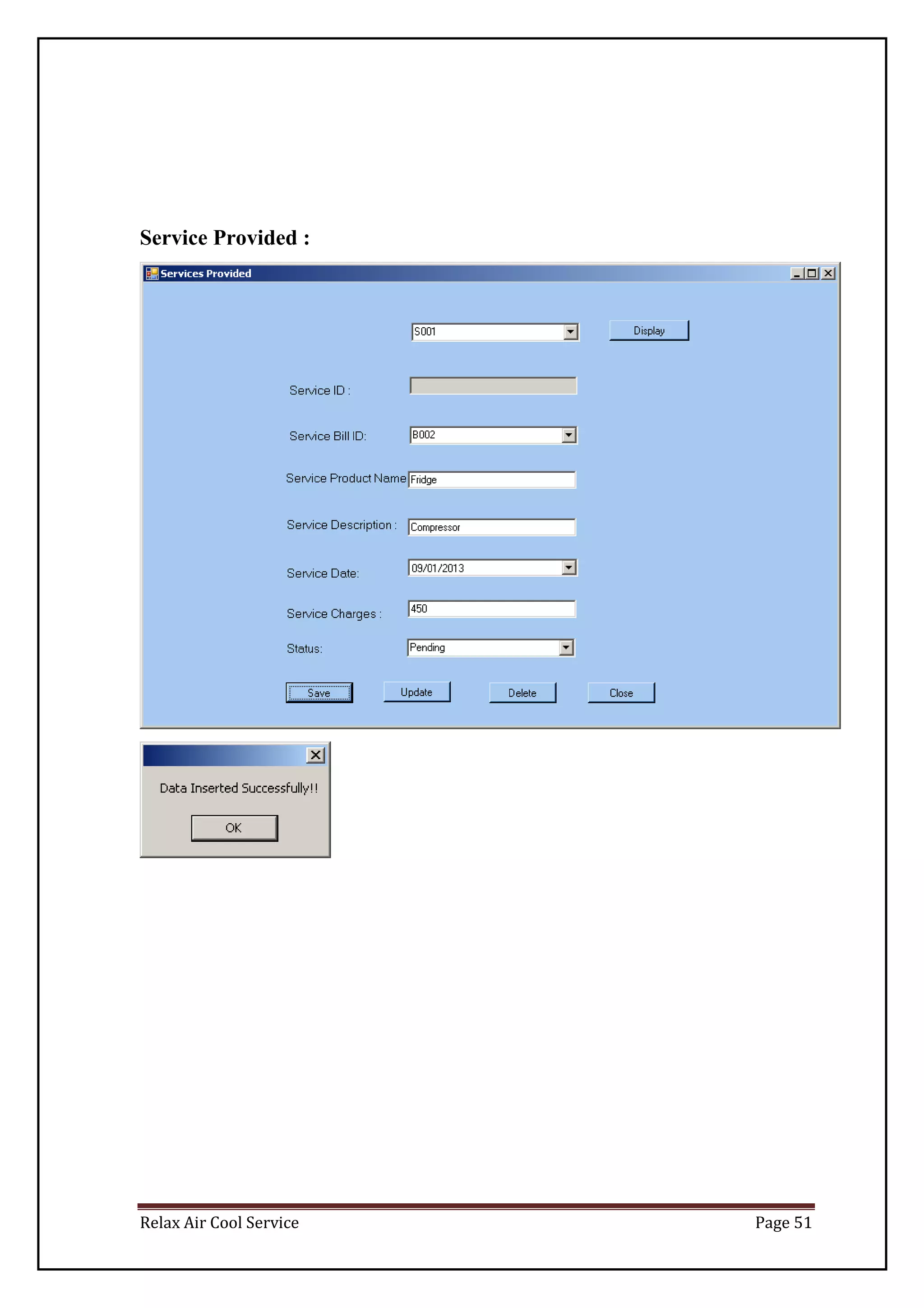
Service Provided :
Relax Air Cool Service Page 52
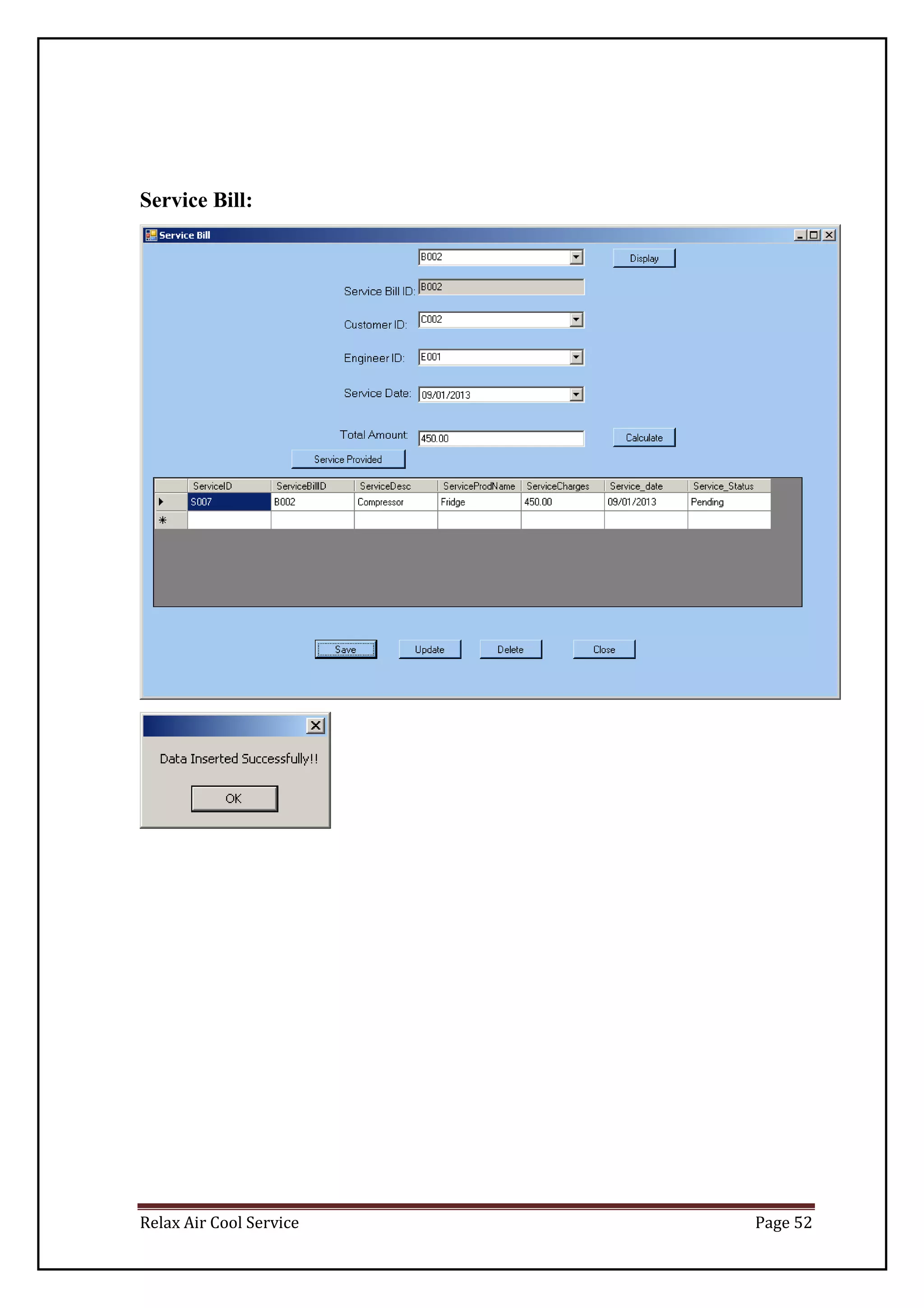
Service Bill:
Relax Air Cool Service Page 53
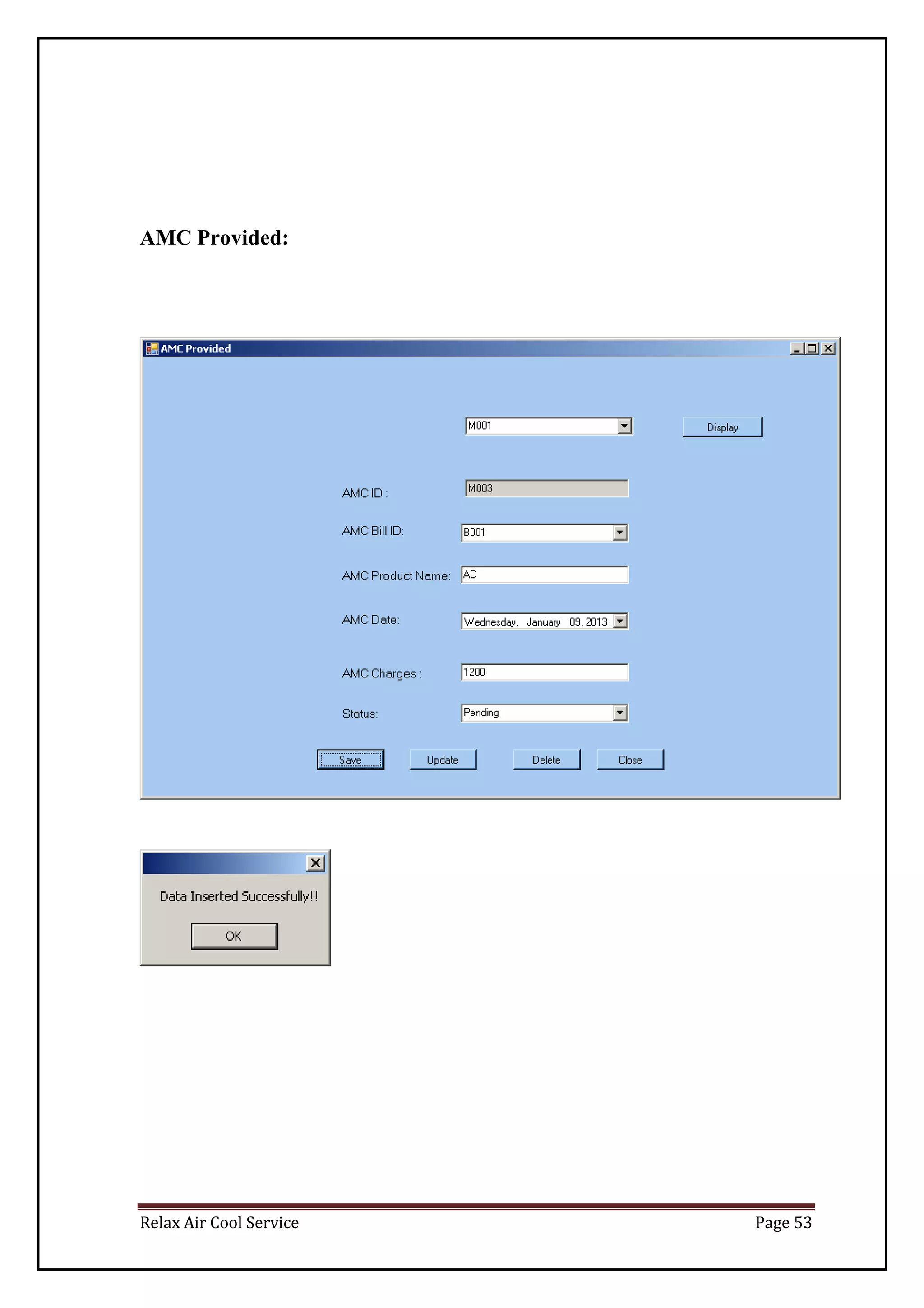
AMC Provided:
Relax Air Cool Service Page 54
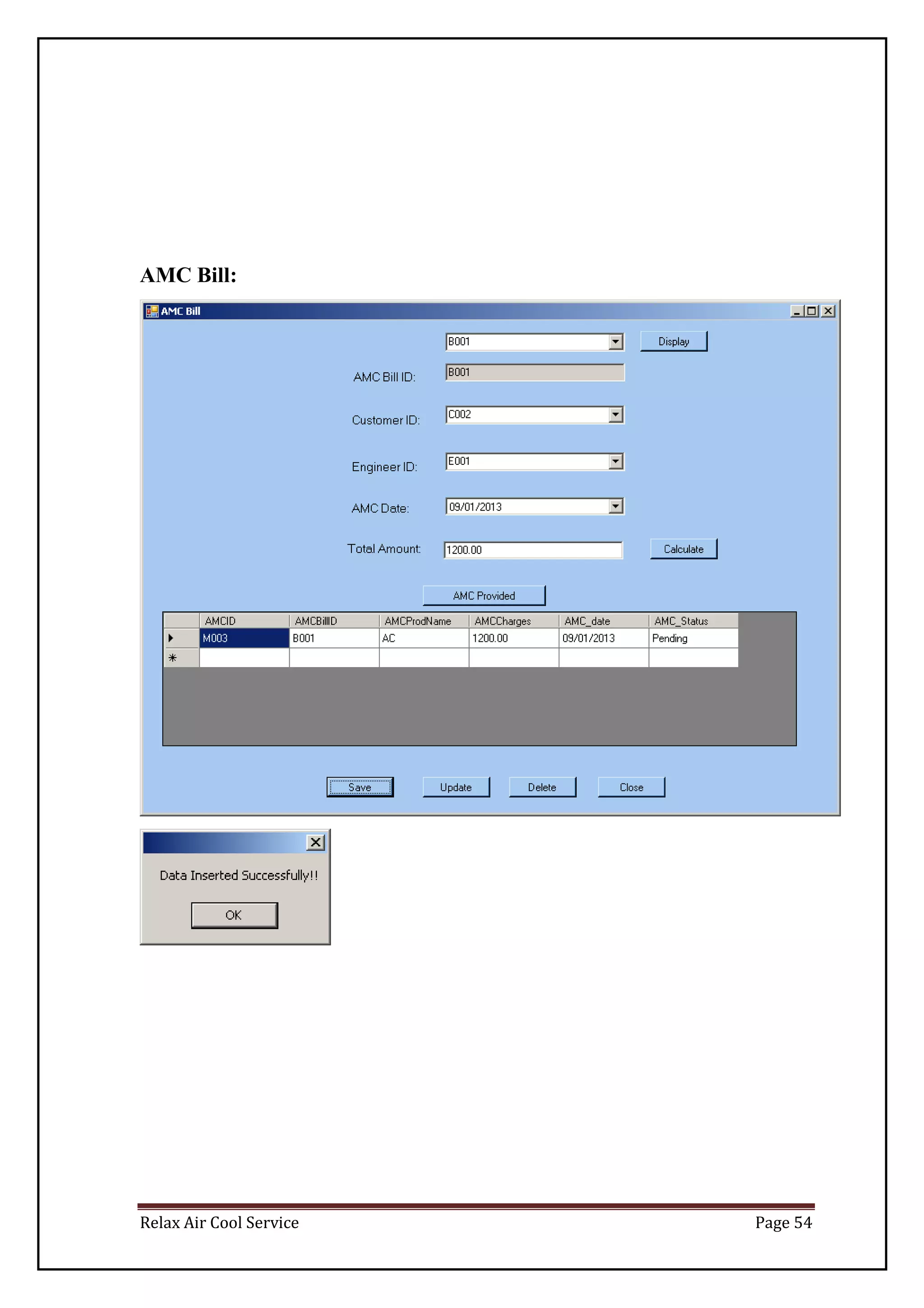
AMC Bill:
Relax Air Cool Service Page 55
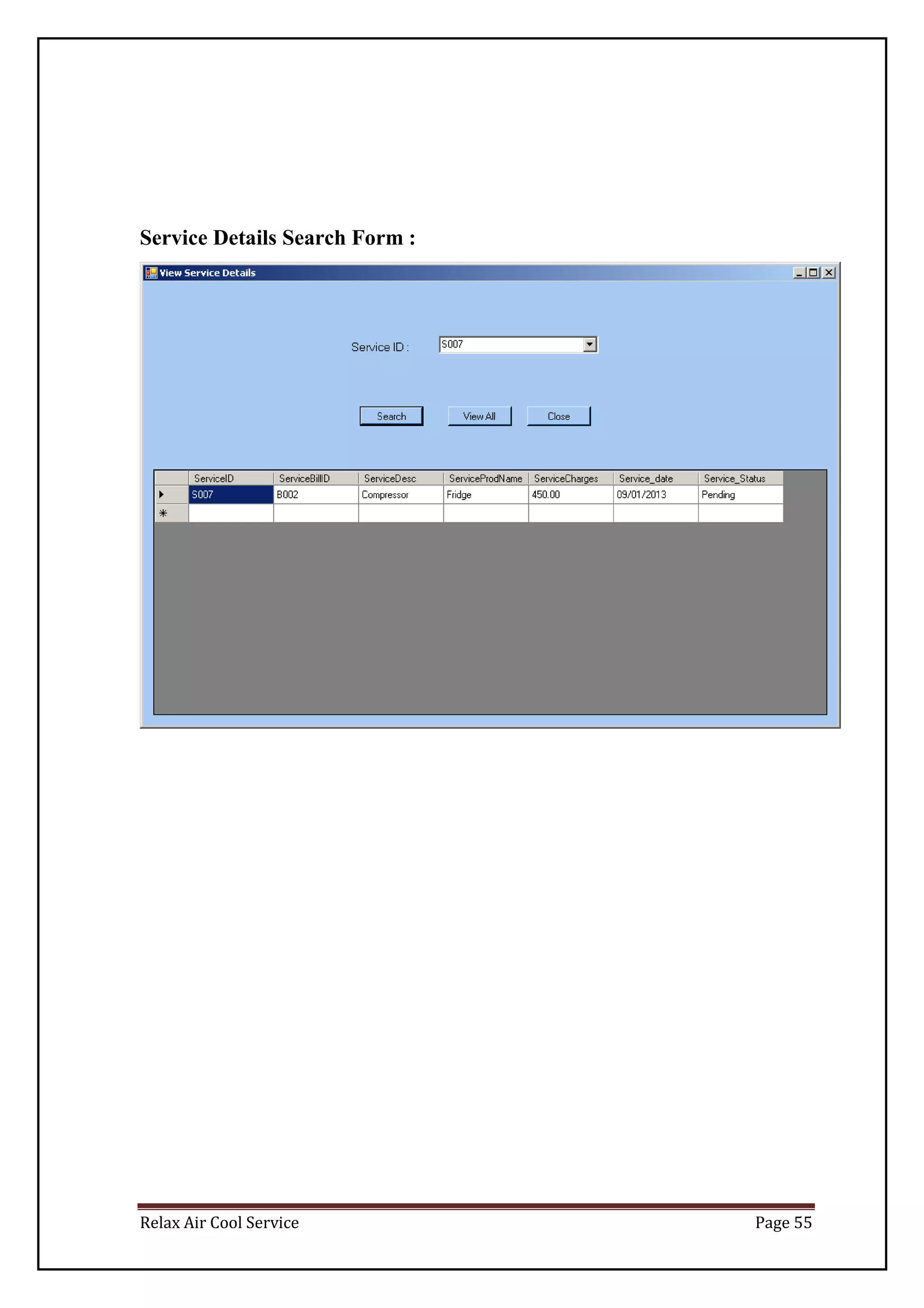
Service Details Search Form :
Relax Air Cool Service Page 56
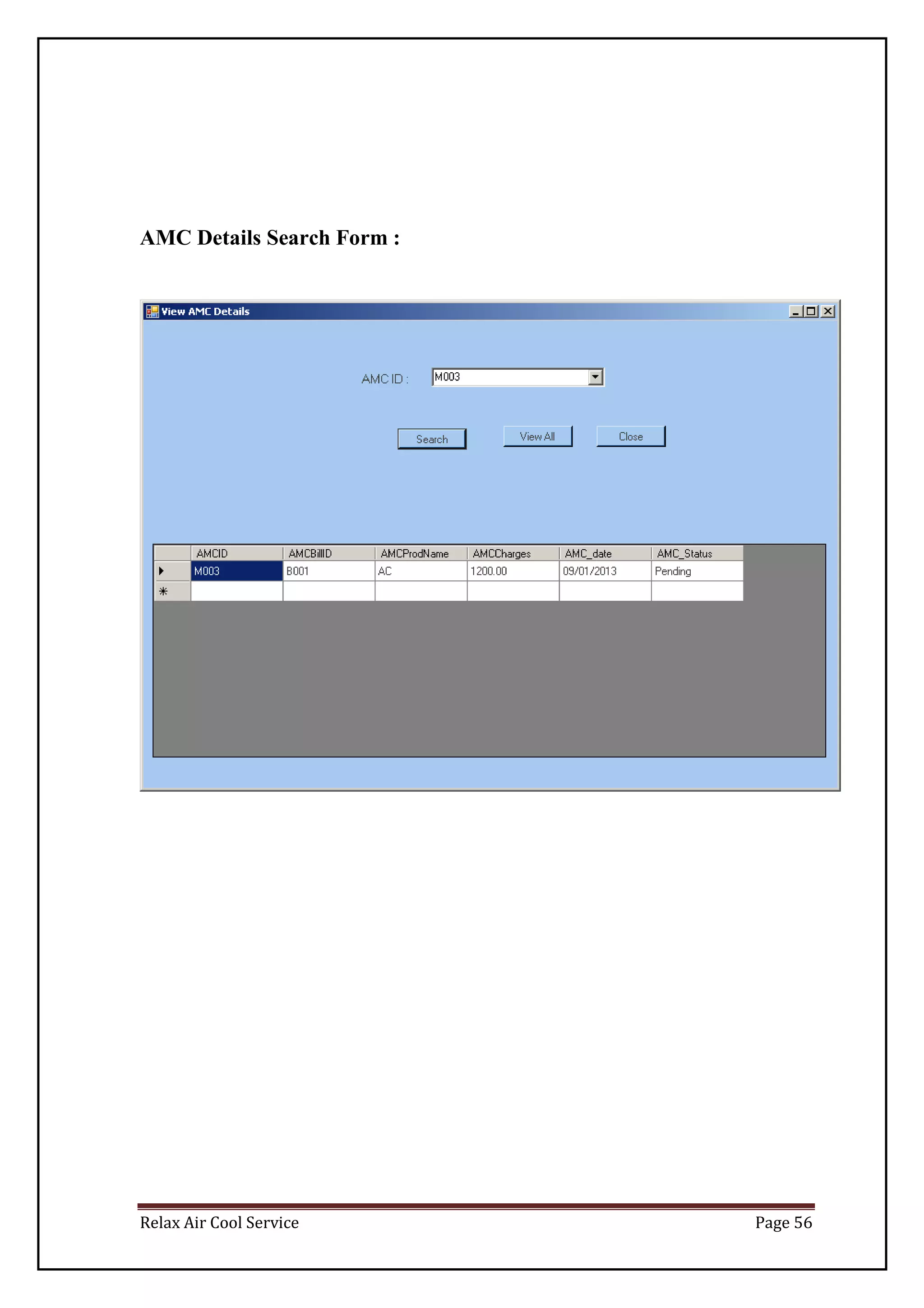
AMC Details Search Form :
Relax Air Cool Service Page 57
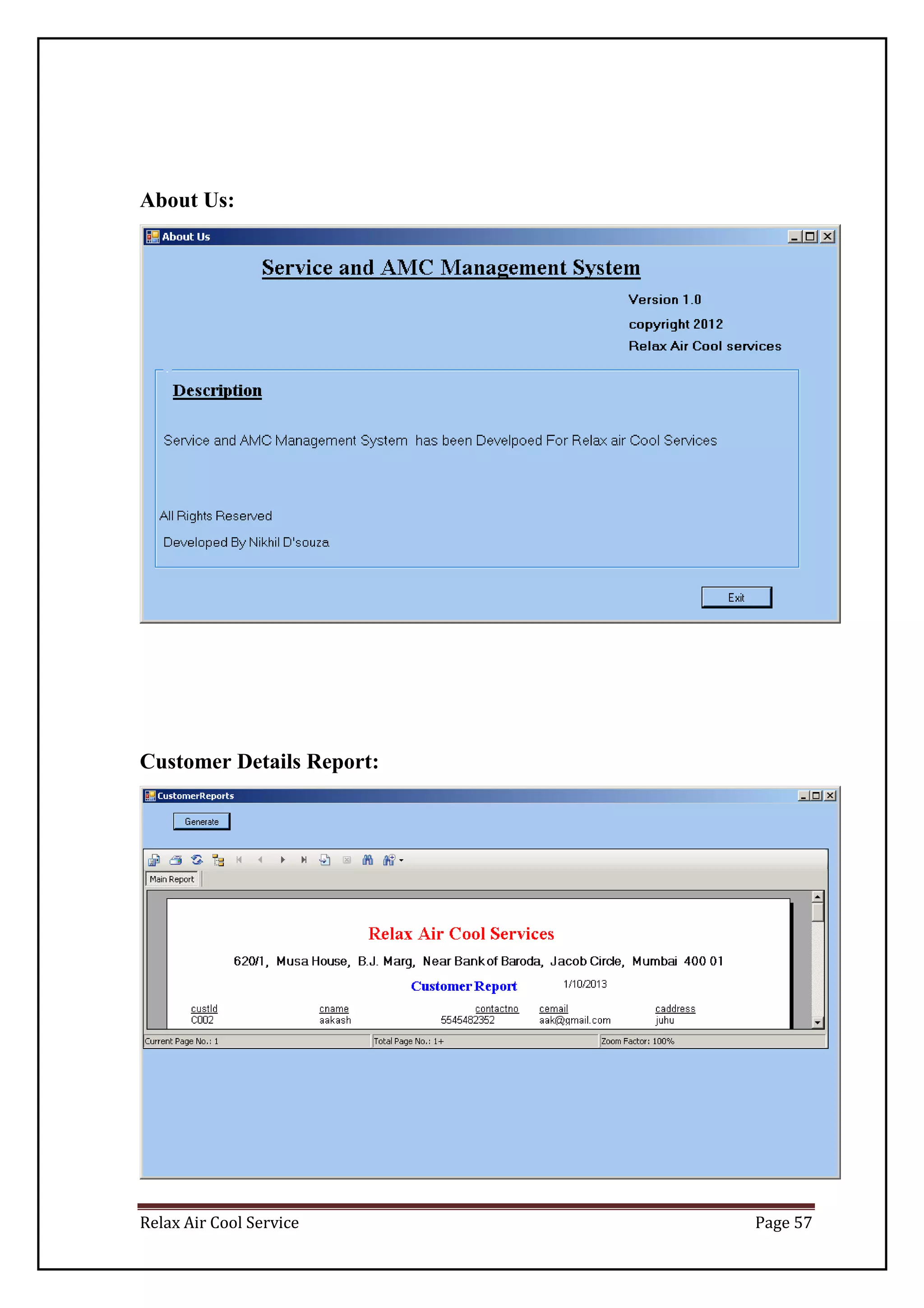
About Us:
Customer Details Report:
Relax Air Cool Service Page 58
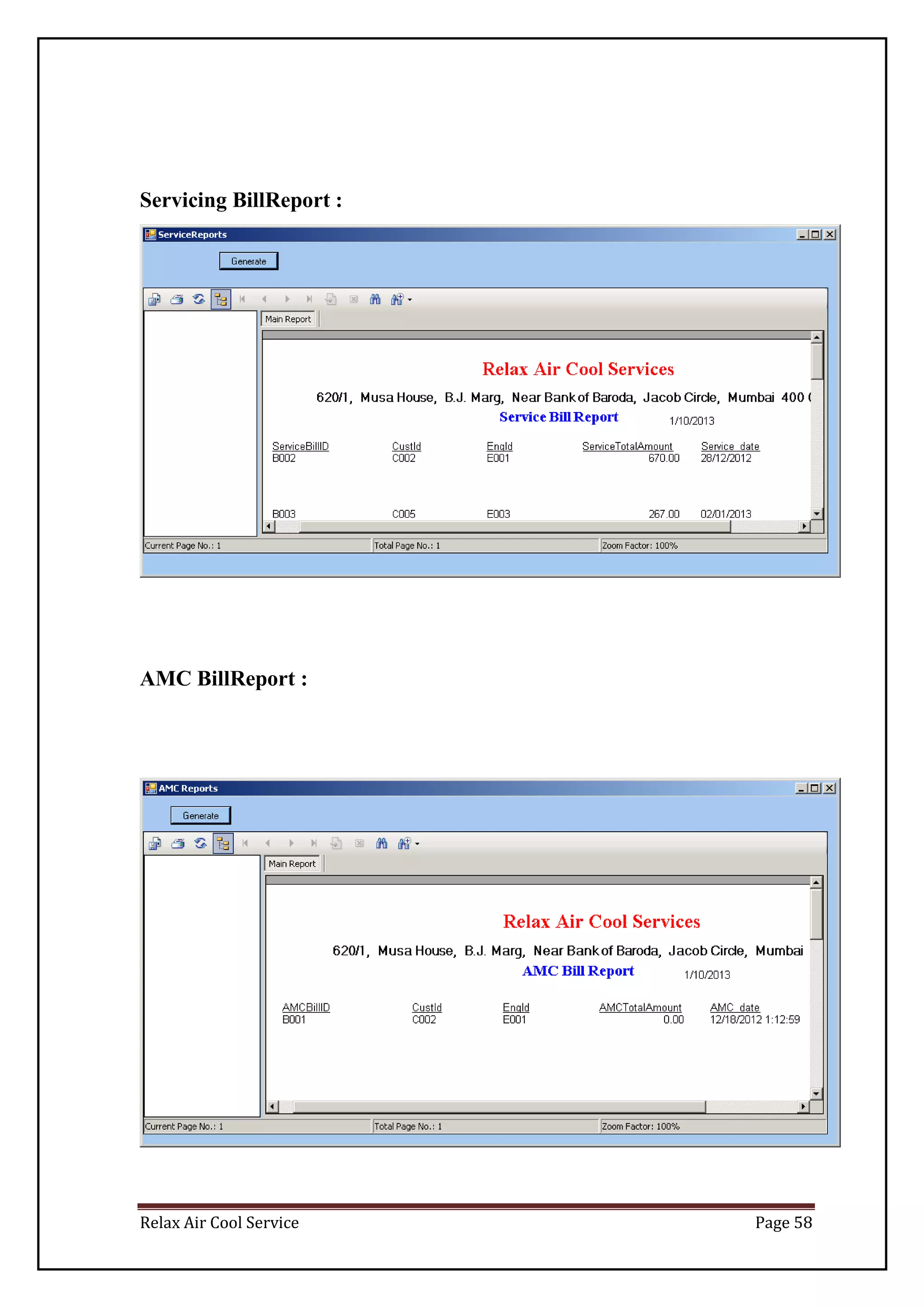
Servicing BillReport :
AMC BillReport :
Relax Air Cool Service Page 59
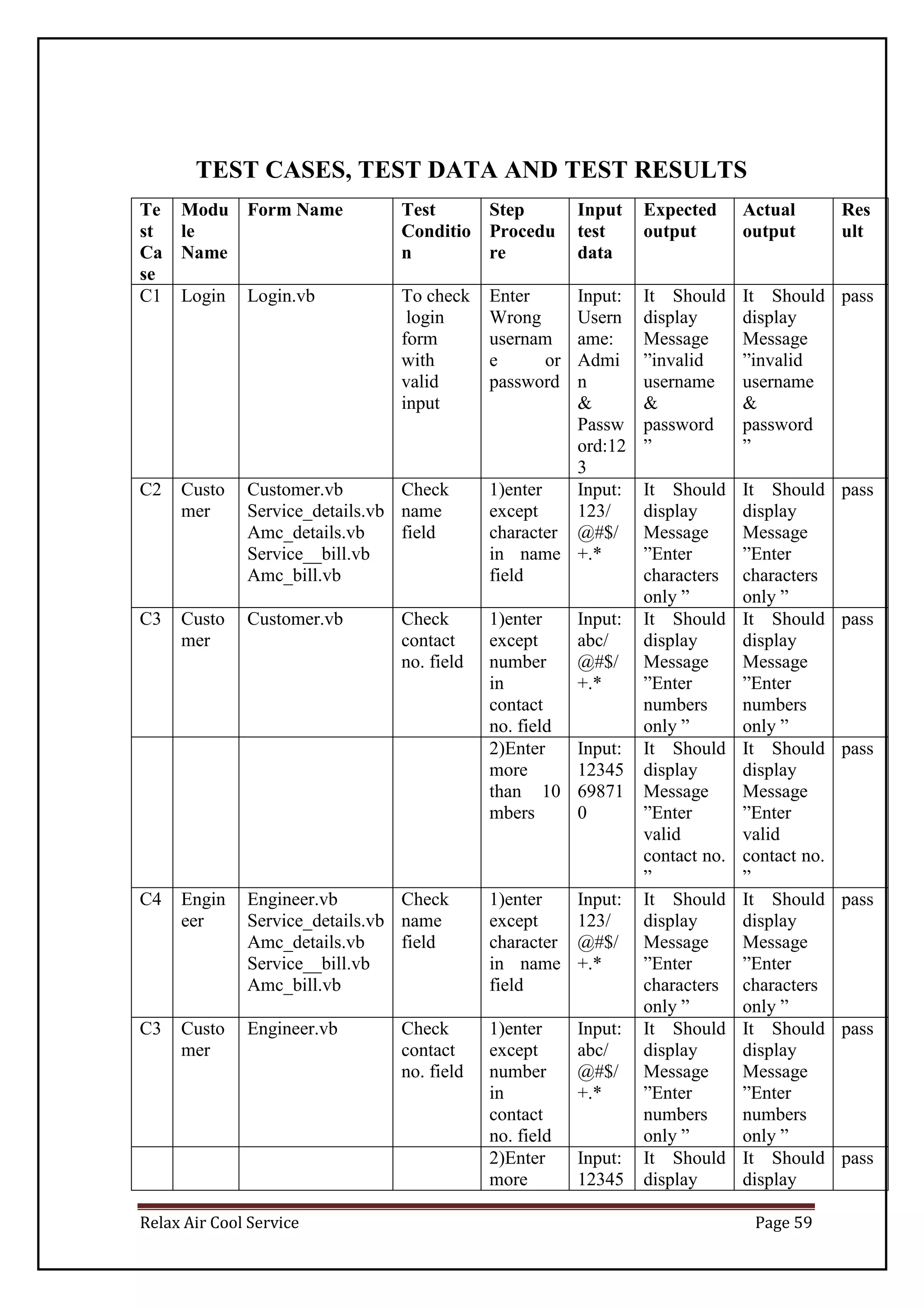
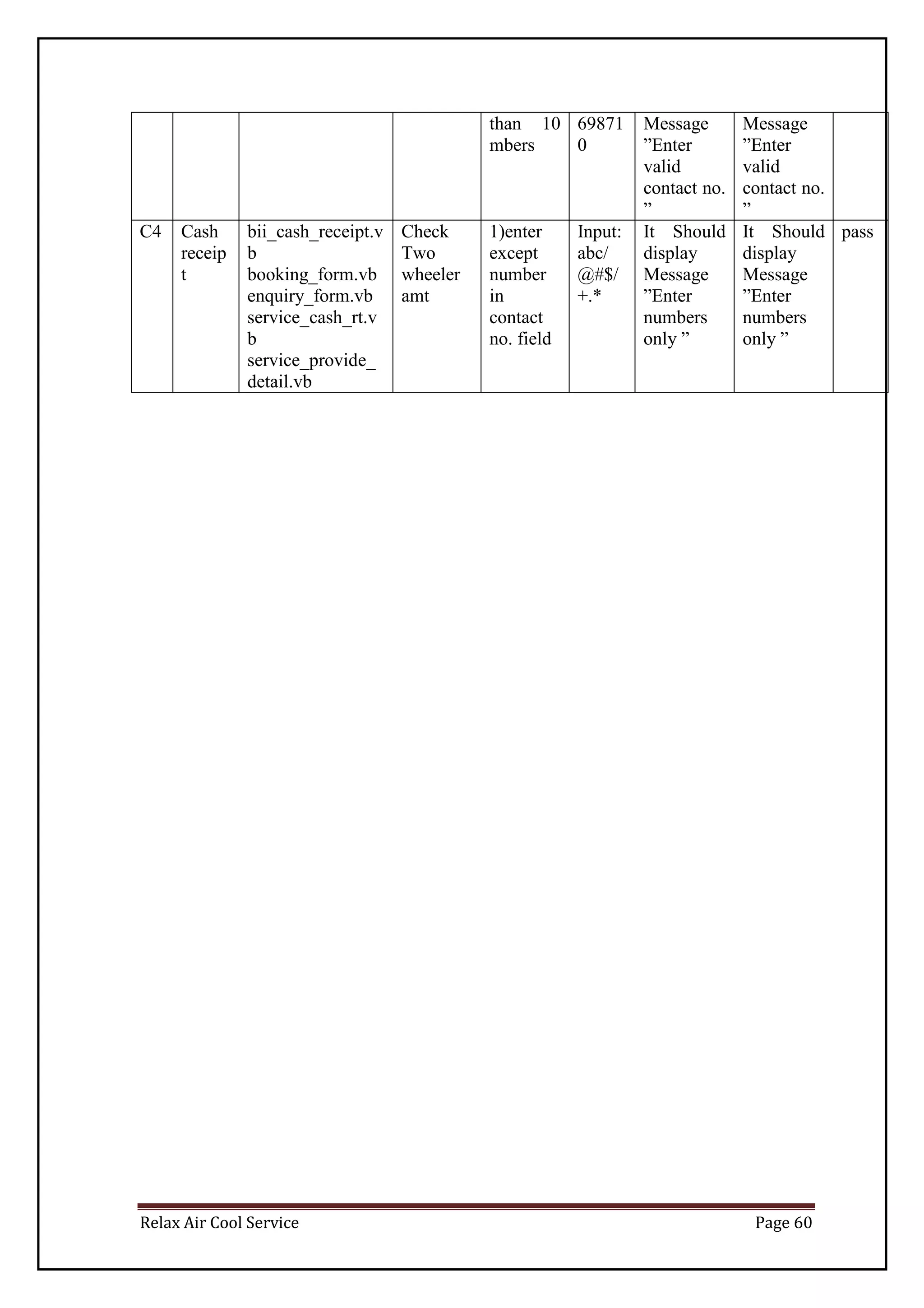
TEST CASES, TEST DATA AND TEST RESULTS
Te
st
Ca
se
Modu
le
Name
Form Name Test
Conditio
n
Step
Procedu
re
Input
test
data
Expected
output
Actual
output
Res
ult
C1 Login Login.vb To check
login
form
with
valid
input
Enter
Wrong
usernam
e or
password
Input:
Usern
ame:
Admi
n
&
Passw
ord:12
3
It Should
display
Message
”invalid
username
&
password
”
It Should
display
Message
”invalid
username
&
password
”
pass
C2 Custo
mer
Customer.vb
Service_details.vb
Amc_details.vb
Service__bill.vb
Amc_bill.vb
Check
name
field
1)enter
except
character
in name
field
Input:
123/
@#$/
+.*
It Should
display
Message
”Enter
characters
only ”
It Should
display
Message
”Enter
characters
only ”
pass
C3 Custo
mer
Customer.vb Check
contact
no. field
1)enter
except
number
in
contact
no. field
Input:
abc/
@#$/
+.*
It Should
display
Message
”Enter
numbers
only ”
It Should
display
Message
”Enter
numbers
only ”
pass
2)Enter
more
than 10
mbers
Input:
12345
69871
0
It Should
display
Message
”Enter
valid
contact no.
”
It Should
display
Message
”Enter
valid
contact no.
”
pass
C4 Engin
eer
Engineer.vb
Service_details.vb
Amc_details.vb
Service__bill.vb
Amc_bill.vb
Check
name
field
1)enter
except
character
in name
field
Input:
123/
@#$/
+.*
It Should
display
Message
”Enter
characters
only ”
It Should
display
Message
”Enter
characters
only ”
pass
C3 Custo
mer
Engineer.vb Check
contact
no. field
1)enter
except
number
in
contact
no. field
Input:
abc/
@#$/
+.*
It Should
display
Message
”Enter
numbers
only ”
It Should
display
Message
”Enter
numbers
only ”
pass
2)Enter
more
Input:
12345
It Should
display
It Should
display
pass
Relax Air Cool Service Page 60
than 10
mbers
69871
0
Message
”Enter
valid
contact no.
”
Message
”Enter
valid
contact no.
”
C4 Cash
receip
t
bii_cash_receipt.v
b
booking_form.vb
enquiry_form.vb
service_cash_rt.v
b
service_provide_
detail.vb
Check
Two
wheeler
amt
1)enter
except
number
in
contact
no. field
Input:
abc/
@#$/
+.*
It Should
display
Message
”Enter
numbers
only ”
It Should
display
Message
”Enter
numbers
only ”
pass
Relax Air Cool Service Page 61
SYSTEM IMPLEMENTATION
Relax Air Cool Service Page 62
SOFTWARE SPECIFICATIONS
SOFTWARE REQUIREMENTS:-
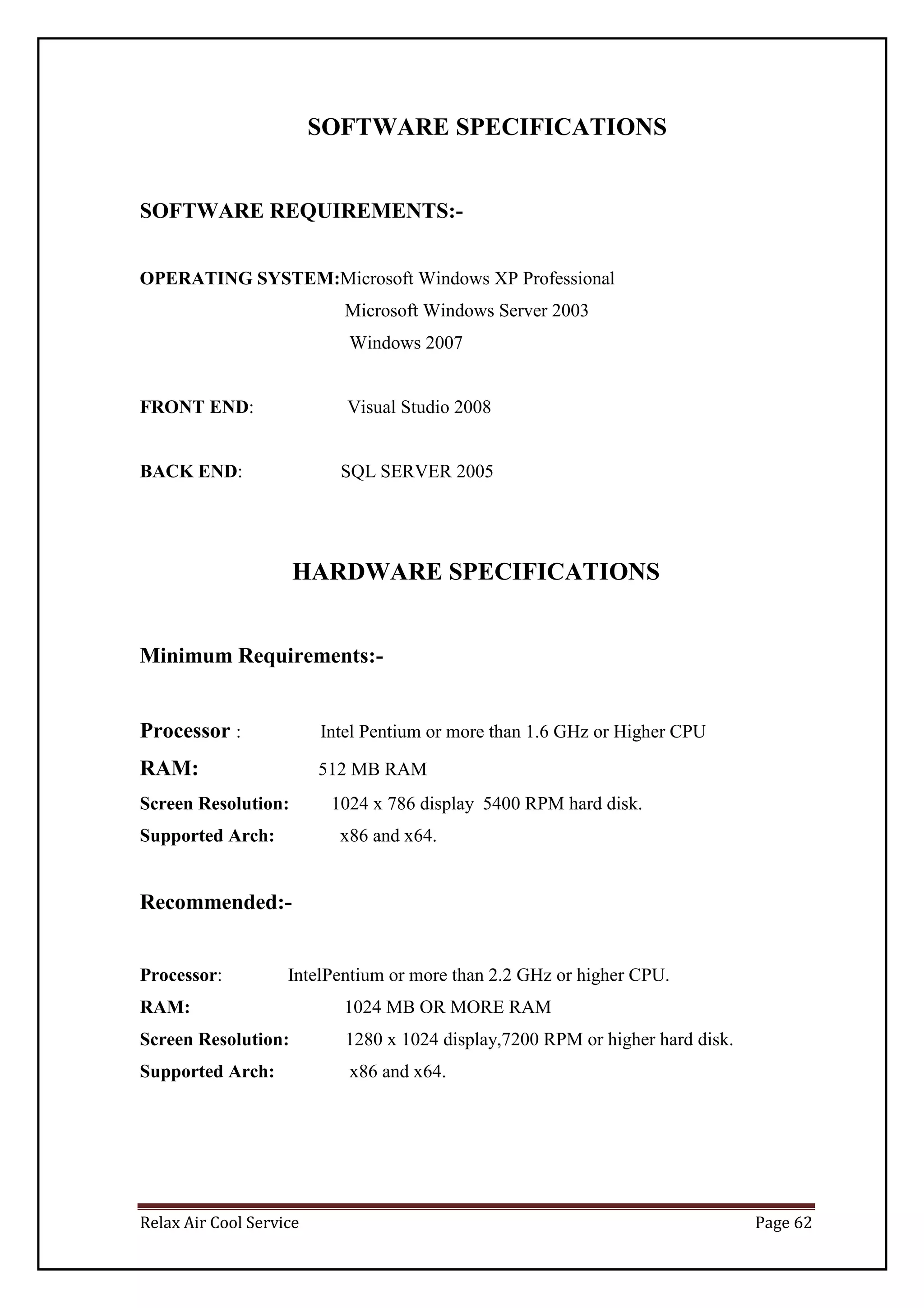
OPERATING SYSTEM:Microsoft Windows XP Professional
Microsoft Windows Server 2003
Windows 2007
FRONT END: Visual Studio 2008
BACK END: SQL SERVER 2005
HARDWARE SPECIFICATIONS
Minimum Requirements:-
Processor : Intel Pentium or more than 1.6 GHz or Higher CPU
RAM: 512 MB RAM
Screen Resolution: 1024 x 786 display 5400 RPM hard disk.
Supported Arch: x86 and x64.
Recommended:-
Processor: IntelPentium or more than 2.2 GHz or higher CPU.
RAM: 1024 MB OR MORE RAM
Screen Resolution: 1280 x 1024 display,7200 RPM or higher hard disk.
Supported Arch: x86 and x64.
Relax Air Cool Service Page 63
SYSTEM IMPLEMENTATION
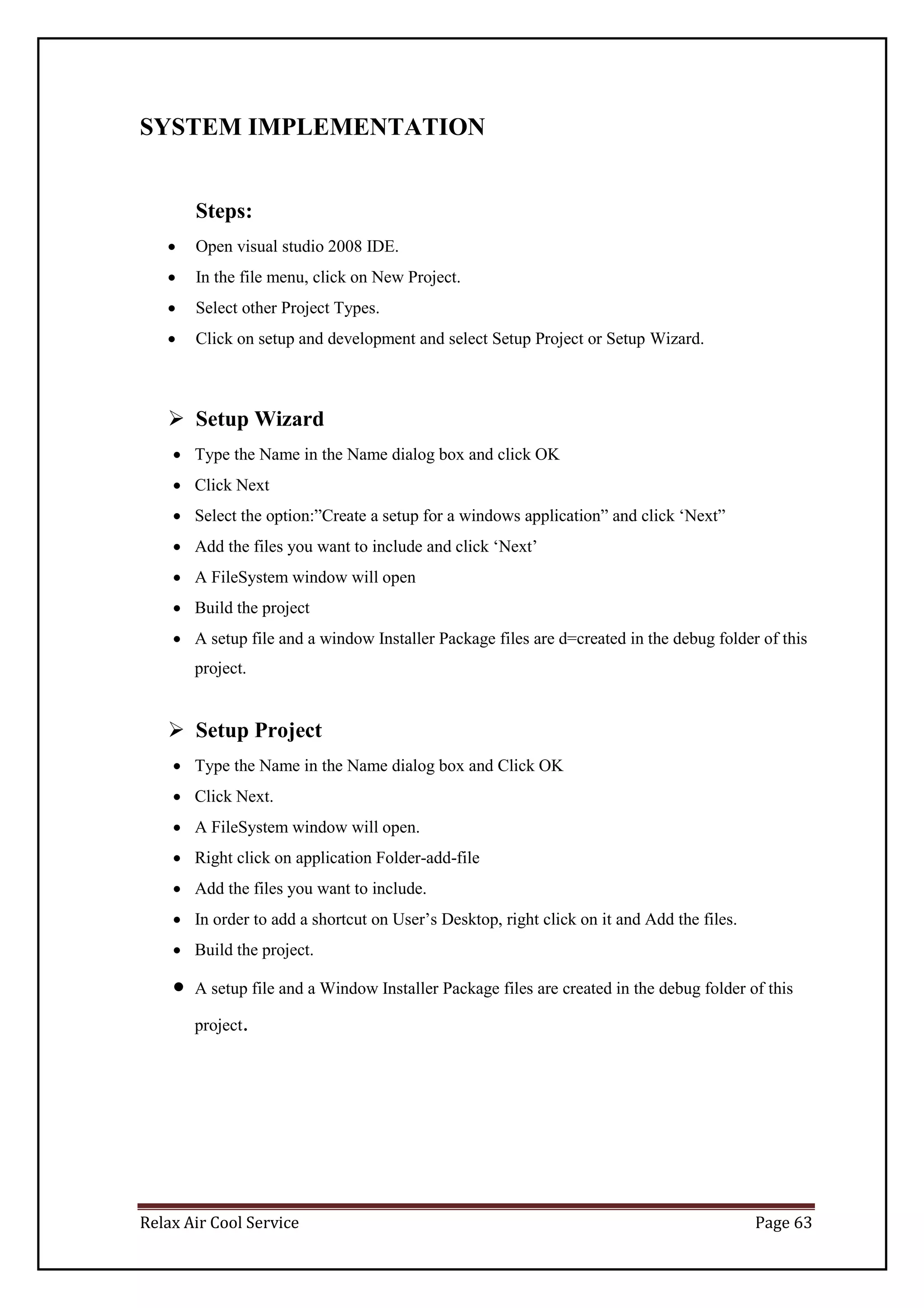
Steps:
 Open visual studio 2008 IDE.
 In the file menu, click on New Project.
 Select other Project Types.
 Click on setup and development and select Setup Project or Setup Wizard.
 Setup Wizard
 Type the Name in the Name dialog box and click OK
 Click Next
 Select the option:”Create a setup for a windows application” and click ‘Next”
 Add the files you want to include and click ‘Next’
 A FileSystem window will open
 Build the project
 A setup file and a window Installer Package files are d=created in the debug folder of this
project.
 Setup Project
 Type the Name in the Name dialog box and Click OK
 Click Next.
 A FileSystem window will open.
 Right click on application Folder-add-file
 Add the files you want to include.
 In order to add a shortcut on User’s Desktop, right click on it and Add the files.
 Build the project.
 A setup file and a Window Installer Package files are created in the debug folder of this
project.
Relax Air Cool Service Page 64
FUTURE ENHANCEMENTS
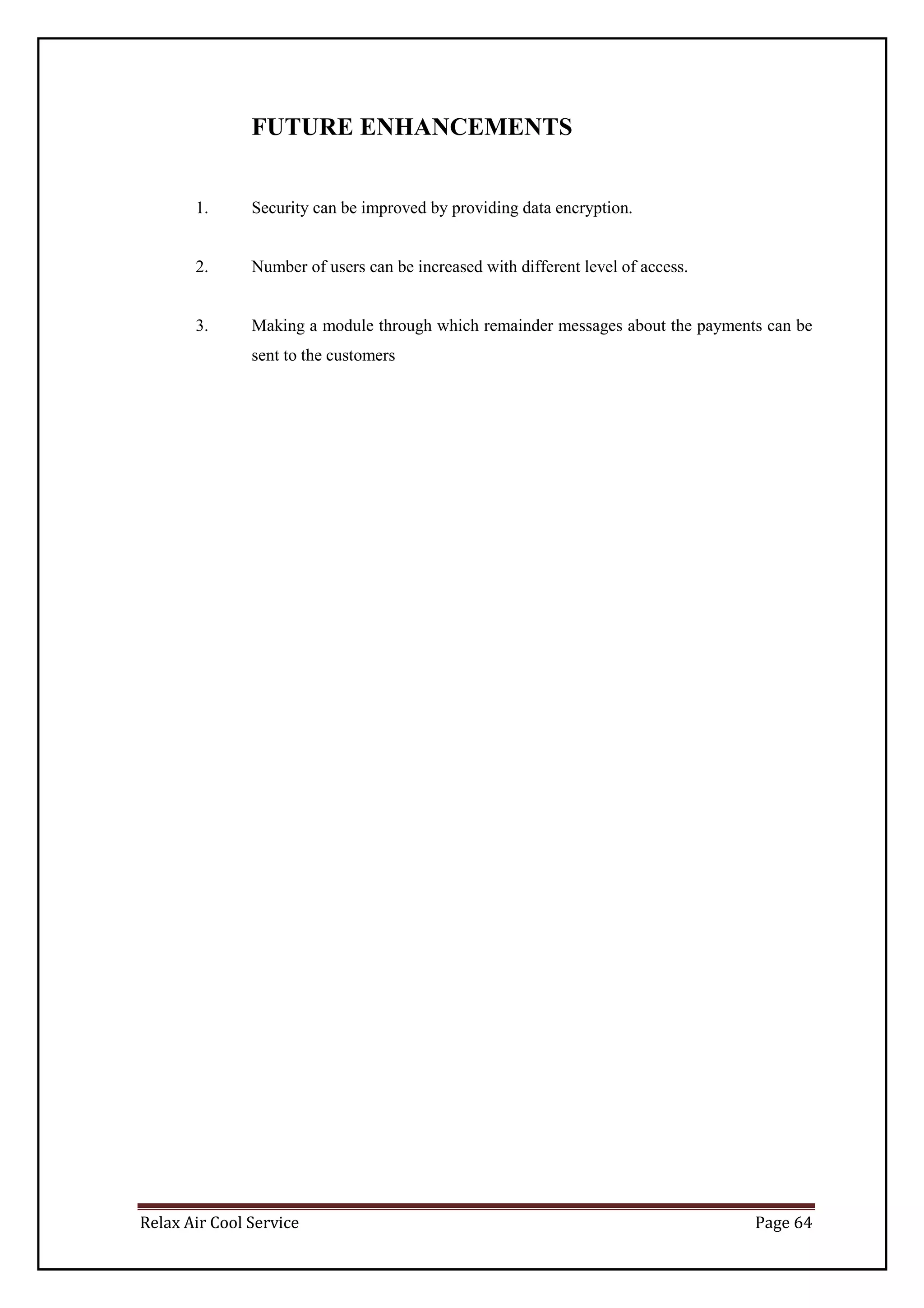
1. Security can be improved by providing data encryption.
2. Number of users can be increased with different level of access.
3. Making a module through which remainder messages about the payments can be
sent to the customers
Relax Air Cool Service Page 65
BIBLIOGRAPHY
 Books Referred :
 Murach –AnneyBohem
 Mastering in Visual Basics.
 System Analysis And Design, Satzinger, Jackson, Burd, Cengage Learning, India Edition.
 Integrated Approach To Software Engineering- PankajJalote (Narosa), 3rd
Edition.
 vb.net complete tutorials.
 Websites Referred :
 http://www.learning.net
 www.wikipedia.com
 www.google.com

merged_document_3

  • 1.
    Project Report On Servicingand Maintenance System Submitted by Nikhil D’souza Seat No. Under The Guidance Of Mrs.Deepthi Konduri Submitted In Partial Fulfilment Of The Requirement For Qualifying T.Y.Bsc. Computer Science Examination March, 2012 Department Of Computer Science KishinchandChellaram College Churchgate, Mumbai-20
  • 2.
    ACKNOWLEDGEMENT The success ofthis project depends largely on the encouragementand guidelines of many others. I take this opportunity to express my gratitude to the people who have been instrumental in the successful completion of this project . I would like to show my greatest appreciation to Faculty Mrs Deepthi Konduri. I can’t say thank you enough for her tremendous support and help. I feel motivated and encouraged every time I attend her meeting. Without her encouragement and guidance this project would not have materialized. I express my thanks to Vice Principal and H.O.D, Mrs Hemlata Bagla, for extending her support. My deep sense of gratitude to Proprietor, Relax Air Cool Services,for their support and guidance. Thanks and Appreciation to the helpful people at Relax Air Cool Services , for their support. I would also thank my Institution and my Faculty member without whom this project would have been a distant reality.
  • 3.
    INDEX Sr.No Topic NamePage No I Preliminary Investigation 1 1 Organizational Overview 2 2 Description Of System 3-4 3 Limitation Of Present System 5 4 Proposed System and its Advantages 6 5 Feasibility Study 7-8 6 Stakeholder 9 7 Gantt Chart 10-11 II System Analysis 12 1 Fact Finding Techniques 13 2 Event Table 14-16 3 Use Case Diagram, Scenario and Use Case Description 17-22 4 Entity Relationship Diagram(ERD) 23 5 Activity Diagram 24 6 Class Diagram 25 7 Object Diagram 26-27 8 Sequence Diagram 28
  • 4.
    9 State Diagram29 Sr.No Topic Name Page No III System Design 30 1 Converting ERD to Tables 31-32 2 Design Class Diagram 33-34 3 Component Diagram 35 4 Package Diagram 36 5 Deployment Diagram 37 IV System Coding 38 1 Menu Tree 39-40 2 List Of Tables with Attributes and Constraints 41-42 3 Program Description 43-44 4 Validation 45 5 Screen Layout and Report Layout 46-59 6 Test Cases, Test Data And Test Results 60-61 V System Implementation/Uploading 62 VI Future Enhancements 63-64 VII Reference and Bibliography 65
  • 5.
    Relax Air CoolService Page 1 PRELIMINARY INVESTIGATION
  • 6.
    Relax Air CoolService Page 2 ORGANISATIONAL OVERVIEW Name of the Organization:Relax Air Cool Services Address: Relax Air Cool Services Director, Mohandas Nair 620/1, Musa House Near Bank of Baroda Haines Road, Jacob Circle, Mahalaxmi, Mumbai - 400011, Maharashtra, India. Contact No: 7208182316 Function: It is one of the recognised professional company providing services for cooling equipment repairs and maintenance. They adhere to highest quality standards and cater to almost all major brands in the industry. Relax Air Cool Services is an established company in the field of cooling equipment repairs catering to almost every brand in the industry. Started by young and dynamic technocrats, the firm has grown over the years and now has many renowned clients to its list. Timely and quality delivery has made them the best choice for their customers. Their motto is complete customer satisfaction and their expert advice pertaining to cooling equipment repair services has earned as many laurels which is regarded by them as one of their major achievements They service all major brands and models. They help keep existing cooling equipment systems running effectively and efficiently. They are economical and cost effective and our honest .Their skilled technicians help in successful cooling equipment repair and maintenance. Their honest evaluation and advice helps customers avoid major expenses.
  • 7.
    Relax Air CoolService Page 3 They service all major brands and models. They also offer expert cooling equipment options for every need. Making your home cool and comfortable is what they do. Their quality cooling equipment repair services are performed by professionally qualified technicians. Service Experts is fully licensed and insured in cooling equipment repair, sales, installation and air conditioning maintenance for all brands. Repairs  All types of repairs whether on site or in workshop undertaken.  Imported vacuum pumps and tools are available for repairs and evaluations.  Spares procurement for different products and models at reasonable charges.  Services .also provided for refrigerators & deep freezers.  Estimates for repairs provided.  Product upgradations suggested and provided after technical study. Annual Maintenance Contracts  They provide all types of contracts labour, semicomprehensive and comprehensive for full range of cooling equipment.
  • 8.
    Relax Air CoolService Page 4 DESCRIPTION OF SYSTEM Relax air cool services started with a small servicing store with a handful of engineers .Their current business was running through word of mouth. Slowly and gradually their business started expanding & started dealing with renowned list of clients. As observed, it was seen that the clients had to wait for their turn to give their servicing details as the work was being carried out manually. The details of the services or the annual maintenance were written down on cards & a copy of the same card was given to the clients. This was quite a lengthy & time consuming process. The cards would contain all the basic information about the clients along with the services to be carried out. The cards were later kept in registers so as to maintain the records. Whenever an engineer is free he would check for the cards and accordingly would do the job assigned. After the service is done the manager would call the concerned client on the number specified on the cards given by the client himself. The client would check is the work has been carried out satisfactorily and would in turn give his comments.
  • 9.
    Relax Air CoolService Page 5 LIMITATIONSOF THE SYSTEM  The work used to be done manually by keeping clients records in registers.  It was difficult to search regarding the clients information & services provided to them  Requires much time & manpower to search for the records  The bill was written manually  It is a costly affair in terms of manpower and spare parts sourcing
  • 10.
    Relax Air CoolService Page 6 PROPOSED SYSTEM AND ITS ADVANTAGES The proposed system is entirely an automated system.It will put the current Working system to an ease an efficient task management. The system will be operated by only one user i.e. Administrator. Here the creation and updation of the customer engineers request becomes easy due to a controlled method of data input.Also due to user interface an data security there would no trouble of data loss as everything will be maintained regularly and the backup will also be taken.. The admin can appoint the engineer as per the prior request assigned and the area alloted to the authorised service provider for the work order closure. The timely based report generation would be possible due to order and controlled data storage.The administrator can view the status report and the feedback given by the customer for the betterment of the organisation and to recognized the current eminence of the firm. The system will also provide file maintenance and the user want to add a new piece of detail in the form of product details employee and call category and the backup and restore service for database maintenance
  • 11.
    Relax Air CoolService Page 7 FEASIBILITY STUDY This project on serviceand AMC management system is highly feasible. It accomplishes the entire feasibility requirement to develop a good application. 1) Technical Feasibility: An important issue for the development of a project is the selection of a suitable front-end and back – end.when I decided to develop a project, I went through an extensive study to determine the most suitable platform that suits the needs of the organization as well as help in development of the project .The aspect of my study includes the following factors Front-End Selection  It must have a GUI that assists employees that are not from IT background.  Must provide excellent reporting feature with good printing support According to the above stated features, I selectedVB.NETas the Front-End for developing my project. Back-End Selection  Efficient data handling.  Operating System Compatible.  Easy To Install.  Efficient data Retrieval and Maintenance. According to the above stated features, I selected SQL SERVER 2005 to be the Back-End for developing My Project. 2) Economic Feasibility:  It does not require much development cost.  As it is not a large scale project it is not expensive.  The management doesn’t require any licence to use the application and so it is economical.  It can be easily operated by one operator,so there is not more expense of salary or wages for employee
  • 12.
    Relax Air CoolService Page 8 3) Resource Feasibility:  Being an individual development project it does not require resources like user or employee  As the system is easy to operate even if the employee is being transferred or quitting the job, the system can be operated by a new employee 4) Organizational and cultural Feasibility:  As the system is quite user friendly and the GUI is fairly simple, the users should find it easy to handle the system, there will be any resistance in adapting the new system.  A perceived loss of control by user or management is also minimal due to less work involved.
  • 13.
    Relax Air CoolService Page 9 STAKE HOLDERS  Manager  Staff/Engineer  Customers/Clients  Manager: The head of the firm. He is responsible to check that all the services & carried out well. He will assign the jobs to the particular engineers so that they work effectively. He is the one to deal with the clients and to receive their feedback as well.  Staff /Engineer: The ones who are actually involved in the servicing or handling the contracts assigned to them by the manager.  Customers/Clients: The ones who will be requiring the service.
  • 14.
    Relax Air CoolService Page 10 GANTT CHART Topic Proposed Dates Actual Dates I. Preliminary Investigation 31st July 31st July (i) Organizational Overview 26th July 25th July (ii) Description of System 26th July 25th July (iii) Limitations of present system 26th July 25th July (iv) Proposed system and its Advantages 26th July 25th July (v) Feasibility Study 30th July 30st July (vi) Stakeholders 30th July 30st July (vi) Gantt Chart - II. System Analysis 1st September 1st September (i) Fact Finding Techniques 10th August 11th August (ii) Event Table 10th August 11th August (iii) Use Case Diagram, Scenarios & Use Case Description 10th August 11th August (iv) ERD 22nd August 22nd August (v) Activity Diagram 30th August 22nd August (vi) Class Diagram 22nd August 22nd August (vii)Object Diagram 25th August 25th August (viii)Sequence Diagram 29th August 30th August (ix) State Diagram 30th August 30th August
  • 15.
    Relax Air CoolService Page 11 Topic Proposed Dates III. System Design 14th December 14th December (i) Converting ERD to Tables 6th September 6th September (ii) Design Class Diagram 20th September 21st September (iii) Component Diagram 14th December 14th December (iv) Package Diagram 14th December 14th December (v)Deployment Diagram 14th December 14th December IV. System Coding 15th December 15th December (i) Menu Tree / Sitemap 5th December 5th December (ii) List of tables with attributes and constraints 22nd November 23rd November (iii) Program Description with Naming Conventions 12th December 12th December (iv) Validations 12th December 12th December (v) Test Cases, Test Data and Test Results 12th December 12th December (vi) Screen Layouts & Report Layouts 12th December 12th December (vii) Program Listing 15th December 14th December V. System Implementation / Uploading 5th January 4th January VI. Future Enhancements 5th January 4th January
  • 16.
    Relax Air CoolService Page 12 SYSTEM ANALYSIS
  • 17.
    Relax Air CoolService Page 13 FACT FINDING TECHNIQUES Questionnaires:  Do you have an existing system?  What type of existing system do you have?  How many Technicians do you have in your service centre?  What service area region is allocated to your service centre?  Who maintains and updates the current system?  Is the engineer assigned a complaint only for a specific zone?  Are the service charges been taken for product under warranty?  Who supplies the spare sparts to the service centre?  For how many products does your service centre gives services?  Do you replace the product if found with the major defect?  Is any time assigned for a particular complaint to be completed?  What service remarks are undertaken if the complaint just had a logical error which has some user misunderstanding or less resource knowledge?  Does the engineer update the details of the complaint done,if yes then how?
  • 18.
    Relax Air CoolService Page 14 EVENT LIST Customer  Looks up for the cool services service/ maintenance details.  Registers the service or maintenance if required.  Customer updates/cancels the service or maintenance of the cool service if necessary.  Customer pays the bill amount after the necessary service/maintenance has been done. Engineer  Engineer enquires about the service/maintenance details.  Engineer provides solution/maintenance sheet. Manager  Manager provides cool services maintenance/solution details.  Manager provides with engineer details.  Manager provides with Customer details.  Manager updates customer details.  Manager Updates engineer details.  Manager updates with service/maintenance provided details.  Manager updates with service/ maintenance bill. Reports  Time to produce Customer details report.  Time to produce Servicing Bill Receipt details report.  Time to produce Maintenance Bill Receipt details report.
  • 19.
    Relax Air CoolService Page 15 EVENT TABLE No . Event Trigger Source Activity Response Destination 1 Looks for cooling Equipments Maintenance/ Servicing details Cooling equipments maintenance /servicing Customer Enquires about cooling equipments maintenanc e/ servicing Cooling equipments servicing/ maintenance Customer 2 Registers the service or maintenance if required. New service/ Maintenance Customer Creates new service/ maintenanc e i)service/ maintenance required. ii)service / maintenance details i)Customer ii)Management 3 Customer updates/ Cancels the service/maintenanc e Updates / cancel service/ maintenance Customer Updates / cancel service/ maintenanc e i) updates /cancel details. ii) updates confirmation i)management ii)customer 4 Customer pays the bill New payment Customer Record payment details & generate bill i) payment details ii)bill i)management ii)customer 5 Engineer enquires about the service/maintenance details. Enquires problem details Engineer Looks for service/ Maintenanc e details service/ maintenance availability details Engineer 6 Engineer provides service/ maintenance sheet. New service /maintenance sheet Engineer Creates service / Maintenanc e sheet Service/ Maintenance sheet Manager 7 Manager provides coolservices maintenance/ solution details. Cool services service/maint enance Details Management Record cool services service/mai ntenance Cool services solution/mai ntenance details Manangement 8 Manager provides with customer details Customer details Management Record customer details Customer details Management 9 Manager provides with engineer details Engineer details Management Record engineer details Engineer details Management 10 Manager updates customer details Updates / cancel customer Management Updates / cancel customer updates /cancel customer Management
  • 20.
    Relax Air CoolService Page 16 details details details. & updates confirmation 11 Manager updates engineer details Updates / cancel customer details Management Updates / cancel engineer details updates /cancel customer details. & updates confirmation Management 12 Manager updates with service /maintenance provided details. Updates / cancel service/ maintenance details Management Updates / cancel service/ maintenanc e details updates /cancel service/ maintenance details. & updates confirmation Management 13 Manager updates with service/ maintenancebill detail. Updates / cancel service/ maintenance bill details Management Updates / cancel service/ maintenanc e bill details updates /cancel service/ maintenance bill details. & updates confirmation Management 14 Time to produce Customer details report. Daily/weekly /mothly Management produce Customer details report. Customer details report created Management 15 Time to produce Servicing Bill Receipt details report. Daily/weekly /mothly Management Produce registered Servicing Bill Receipt Details summary report. registered Servicing Bill Receipt details report Management 16 Time to produce Maintenance Bill Receipt details Report Daily/weekly /mothly Management Produce registered Maintenance Bill Receipt details summary report registered Maintenance Bill Receipt details report Management
  • 21.
    Relax Air CoolService Page 17 USE CASE DIAGRAM, SCENARIO AND USE CASE DESCRIPTION USE CASE DIAGRAM Customer: Enquires about cooling equipments maintenance/service Create new service/maintenance Updates / cancels service/ maintenance Record payment details & generate bill
  • 22.
    Relax Air CoolService Page 18 Engineer Looks for service/ Maintenance details Creates solution/maintenance sheet
  • 23.
    Relax Air CoolService Page 19 Manager: Record cool services service/maintenance Registred servicing Bill receipt report created Customer details report created Updates/cancels service/maintenance bill details Updates/cancels service/maintenance details cancel Updates /cancels Engineer details Updates /cancels customer details Register Student Details Record Engineer details Record customer details Registered maintenance bill receipt report created
  • 24.
    Relax Air CoolService Page 20 USE CASE SCENARIO 1. Scenario of customer : Step 1: Customer calls or visits the service centre to enquire about the service/maintenance. Step 2: Management provides the customer with service/maintenance details. Step 3: Customer requests for service/maintenance. Step 4: Management verifies customer information. If customer is existing customer then go to step5; else go to step 6 Step 5: If a customer is new then,invoke New customer details usecase to add new customer Step 6: Management initiates creation of new service/maintenance registration. Step 7: Customer requests change in service/maintenance registration. Step 8: Customer’s service/maintenance Cash Receipt is generated. Step 9: Customer pays service/maintenance payment Bill. 2. Scenario of Engineer : Step 1: Engineer receives the product given by the management from the customer Step 2: Engineer provides the solution sheet of the service/maintenance . Step 3: Engineer starts working on the service/maintenance. Step 4: After the particular service/maintenance has been done its been given to the management who then gives it back to the customer 3. Scenario of Managements working Step 1: Management Updates with Customer detail. Step 2:Management Updates with Engineer detail. Step 3: Management provides service/maintenance details. Step 4: Management generates service/maintenance Cash Receipt. Step 5: Management Updates with service/maintenance detail. Step 6: Management updates service/maintenance payment Cash Receipt.
  • 25.
    Relax Air CoolService Page 21 Use Case Description When Customer comes to enquire about service/maintenance details Management provides with service/maintenance details. Then if customer is regular customer he records sservice/maintenance details and updates. Bill is generated after the customer has has given the particular product to be repaired or serviced.
  • 26.
    Relax Air CoolService Page 22 Entity Relationship Diagram (ERD) EngineerCustomer AMCBill AMCDetails ServiceBill ServiceDetails EngId ename econtactno eemail eaddress custId cname contactno cemail caddress AMCBillID CustId EngId AMCTotalAmount AMC_date AMCID AMCBillID AMCProdName AMCCharges AMC_date ServiceBillID CustId EngId ServiceTotalAmount Service_date ServiceID ServiceBillID ServiceDesc ServiceProdName ServiceCharges
  • 27.
    Relax Air CoolService Page 23 ACTIVITY DIAGRAM
  • 28.
    Relax Air CoolService Page 24 Class Diagram Add(),update() delete(),view(), total amount(), add(),update(), delete(),view(), total amount() Engineer Customer AMCBill AMCDetails ServiceBill ServiceDetails EngId ename econtactno eemail eaddress add( ), update( ), view( ) custId cname contactno cemail caddress add( ), update( ), view( ) AMCBillID CustId EngId AMCTotalAmount 1 1…* AMC_date 1…* 1 1…* 1 1…* 1 1 …* 1 AMCID AMCBillID AMCProdName AMCCharges AMC_date AMC_Status Add(),update(), Delete(),view(), ServiceBillID 1 1…* CustId EngId ServiceTotalAmount Service_date ServiceID ServiceBillID ServiceDesc ServiceProdName ServiceCharges Service_date Service_status add( ), update( ), delete( ), view( ), amount( )
  • 29.
    Relax Air CoolService Page 25 OBJECT DIAGRAM Customer: 1 1..M 1 1..M Engineer: 1 1..M C:customer CustomerId=C001 Service Bill ServiceBillId=B001 ! Service Bill ServiceBillId=B002 Service Bill ServiceBillId=B003 1 C:customer CustomerId=C001 AMC Bill AMCBillId =B001 AMC Bill AMCBillId =B002 AMC Bill AMCBillId =B003 E:Engineer EngineerId=E001 CustomerId=C001 Service Bill ServiceBillId=B001 1! Service Bill ServiceBillId=B002 ! Service Bill ServiceBillId=B003 !
  • 30.
    Relax Air CoolService Page 26 1 1..M Service Bill : 1 1..M AMC Bill : 1 1..M AMC Bill AMCBillId =B001 AMC Bill AMCBillId =B002 AMC Bill AMCBillId =B003 B:Service Bill Service Bill=B001 Service details Serv_details=S001 =P001 Service details Serv_details=S002 Service details Serv_details=S003 E:Engineer EngineerId=E001 CustomerId=C001 B:AMC Bill AMC Bill=B001 AMC details amc_details=M001 =P001 AMC details amc_details=M002 AMC details amc_details=M003 1
  • 31.
    Relax Air CoolService Page 27 Sequence Diagram N ew C ustom er
  • 32.
    Relax Air CoolService Page 28 State Chart Diagram
  • 33.
    Relax Air CoolService Page 29 SYSTEM DESIGN
  • 34.
    Relax Air CoolService Page 30 CONVERTING ERD TO TABLES 1) customer Attribute Data Type custId nvarchar(50) Cname char(20) Contactno nchar(18) Cemail nvarchar(50) Caddress nvarchar(MAX) 2) Engineer Attribute Data Type EngId nvarchar(50) Ename char(20) Econtactno numeric(18,0) Eemail nvarchar(50) Eaddress nvarchar(MAX) 3) ServiceDetails Attribute Data Type ServiceID nvarchar(50) ServiceBillID nvarchar(50) ServiceDesc nvarchar(50) ServiceProdName numeric(18,2) ServiceCharges nvarchar(50) Service_date nvarchar(50) Service_status nvarchar(50) 4) AMCDetails Attribute Data Type AMCID nvarchar(50) AMCBillID nvarchar(50) AMCProdName nvarchar(50) AMCCharges numeric(18,2) AMC_date nvarchar(50) AMC_status nvarchar(50)
  • 35.
    Relax Air CoolService Page 31 5) ServiceBill Attribute Data Type ServiceBillID nvarchar(50) CustId nvarchar(50) EngId nvarchar(50) ServiceTotalAmount numeric(10,2) Service_date nvarchar(50) 6) AMCBill Attribute Data Type AMCBillID nvarchar(50) CustId nvarchar(50) EngId nvarchar(50) AMCTotalAmount numeric(10,2) AMC_date nvarchar(50)
  • 36.
    Relax Air CoolService Page 32 DESIGN CLASS DIAGRAM : Master : MDI : Customer Details : Service Details : AMC Details : Servicing Bill-Cash Receipt Details: Transaction : AMC Bill Cash Receipt A : Search : CustomerSearch : EngineerSearch : ServiceSearch : AMCSearch Add, Update Customer details Add, Update Engineer details Add, Update Service Details Add, Update AMC details Add, Update Servicing Cash Bill Receipt details Add,Update Maintenance Bill Receipt details View customer details View engineer details View service details View AMC details Engineer Details
  • 37.
    Relax Air CoolService Page 33 : Report : Customer Details Report : Servicing bill Report : AMC bill Report A : Utilities : Calculator : PasswordSetting :Notepad : Exit Exit Application Add/update password setting details View Calculator View Notepad Registered Customers daily report Registered Servicing Bill Report Registered Servicing Bill Report
  • 38.
    Relax Air CoolService Page 34 COMPONENT DIAGRAM Relax Air Cool Service VB.NET <<GUI>> Relax Air Cool Service Database
  • 39.
    Relax Air CoolService Page 35 PACKAGE DIAGRAM
  • 40.
    Relax Air CoolService Page 36 DEPLOYMENT DIAGRAM DATABASE Relax Air Cool services SQL SERVER 2005
  • 41.
    Relax Air CoolService Page 37 SYSTEM CODING
  • 42.
    Relax Air CoolService Page 38 MENU TREE Master Login Form MDI MAIN Customer Form Engineer Form Service Details Maintenance Details Service Bill Cash Receipt Transaction AMC BillCash Receipt A Search CustomerSearch EngineerSearch SevicesProvidedDetailSearch AMC ProvidedDetailSearch
  • 43.
    Relax Air CoolService Page 39 Report Customer Details Report Servicing Bill Details Report AMC Bill Details Report A Utilities Calculator PasswordSetting Notepad Exit
  • 44.
    Relax Air CoolService Page 40 LIST OF TABLES WITH ATTRIBUTES AND CONSTRAINTS 1) dbo.Customer Column Name Datatype Width Constraint Description custId nvarchar 50 Primary Key Unique ID for each Customer Cname char 20 Customer Name Contactno Nchar 18 Customer’s ContactNo. Cemail nvarchar 50 Customer’s Email Caddress nvarchar MAX Customer’s Address 2) dbo.Engineer Column Name Datatype Width Constraint Description EngId Nvarchar 50 Primary Key Unique ID for each Engineer Ename Char 20 Engineer Name Contactno Numeric (18,2) Engineer’s ContactNo. Eemail Nvarchar 50 Engineer’s Email Eaddress Nvarchar MAX Engineer’s Address 3) dbo.ServiceDetails Column Name DataType Width Constraint Description ServiceID Nvarchar 50 Primary Key Unique ID for each Service ServiceBillID Nvarchar 50 Foreign key Unique ID for each Bill ServiceDesc Nvarchar 50 Service Description ServiceProdName Numeric 18,2 Service Product Name ServiceCharges Nvarchar 50 Service Charges Service_date Nvarchar 50 Service Date Service_status Nvarchar 50 Service status
  • 45.
    Relax Air CoolService Page 41 4) dbo.AMCDetails Column Name DataType Width Constraint Description AMCID Nvarchar 50 Primary Key Unique ID for each AMC AMCBillID Nvarchar 50 Foreign key Unique ID for each Bill AMCProdName Numeric 18,2 AMC Product Name AMCCharges Nvarchar 50 AMC Charges AMC_date Nvarchar 50 AMC Date AMC_status Nvarchar 50 AMC status 5) dbo.ServiceBill Column Name DataType Width Constraint Description ServiceBillID Nvarchar 50 Primary Key Unique ID for each BillCash CustId Nvarchar 50 Foreign Key Unique ID for each customer EngId Nvarchar 50 Foreign Key Unique ID for each engineer ServiceTotalAmount Numeric 10,2 Servicing total amount Service_date Nvarchar 50 Servicing Date 6)dbo.AMCBill Column Name DataType Width Constraint Description AMCBillID Nvarchar 50 Primary Key Unique ID for each BillCash CustId Nvarchar 50 Foreign Key Unique ID for each customer EngId Nvarchar 50 Foreign Key Unique ID for each engineer AMCTotalAmount Numeric 10,2 AMC total amount AMC_date Nvarchar 50 AMC Date
  • 46.
    Relax Air CoolService Page 42 PROGRAM DESCRIPTION AND NAMING CONVENTION NAMINGCONVENTION: SR.NO CONTROL CONVENTION 1. Lbl Label 2. Txt TextBox 3. Cb ComboBox 4. Btn Button 5. Rb RadioButton 6. Dtp DateTimePicker 7. Dgv DataGridView 8. Crep CrystalReport
  • 47.
    Relax Air CoolService Page 43 PROGRAM DESCRIPTION: Sr.No. PROGRAM DESCRIPTION 1. customer_form Add/update all the personal details of Customer 2. engineer_form Add/update all the enquiry details of Two wheeler 3. booking_form Add/update all the booking details of Two wheeler 4. service__details Add/update all the cooling equipments services details 5. Amc_details Add/update all the cooling equipmentsmaintenancedetails 6. service_bill Add/update & calculate all the Servicing bill Cash Receipt details 7. amc_bill Add/update & calculate all the maintenance bill Cash Receipt details 8. frm_view_cust It help to view the Complete Detail of All or particular the Customers 9. frm_view_eng It help to view the Complete Detail of All or particular the Engineer 10. frm_view_service It help to view the Complete Detail of All or particular service 11. frm_view_amc_ It help to view the Complete Detail of All or particular maintenance 12. Reports It help to view the Complete Detail of All the Customers and Also provide Printing Facility for it 13. CustomerReport It help to view the Complete Detail of All the Customers and Also provide Printing Facility for it 14. ServiceBillReport It help to view the Complete Detail of All the ServiceBill and Also provide Printing Facility for
  • 48.
    Relax Air CoolService Page 44 it 15. AMCBillReport It help to view the Complete Detail of All the AMC Bill and Also provide Printing Facility for it 16. Calculator It help in calculation 17. Notepad It display Notepad 18. passwordSetting To set the password VALIDATIONS System.Text.RegularExpressions Namespace is Imported for performing validations.  ^[a-zA-Z ]*$:- is used for validating Name TextBox.  ^[0-9]*$ :-is used for validating Contact No Text Box and Pincode TextBox.
  • 49.
    Relax Air CoolService Page 45 SCREEN LAYOUTS AND REPORTS LAYOUTS Splash Screen : Login Form :
  • 50.
    Relax Air CoolService Page 46 MDI Form
  • 51.
    Relax Air CoolService Page 47 Customer Form :
  • 52.
    Relax Air CoolService Page 48 EngineerForm :
  • 53.
    Relax Air CoolService Page 49 Customer Search Form :
  • 54.
    Relax Air CoolService Page 50 Engineer Search Form :
  • 55.
    Relax Air CoolService Page 51 Service Provided :
  • 56.
    Relax Air CoolService Page 52 Service Bill:
  • 57.
    Relax Air CoolService Page 53 AMC Provided:
  • 58.
    Relax Air CoolService Page 54 AMC Bill:
  • 59.
    Relax Air CoolService Page 55 Service Details Search Form :
  • 60.
    Relax Air CoolService Page 56 AMC Details Search Form :
  • 61.
    Relax Air CoolService Page 57 About Us: Customer Details Report:
  • 62.
    Relax Air CoolService Page 58 Servicing BillReport : AMC BillReport :
  • 63.
    Relax Air CoolService Page 59 TEST CASES, TEST DATA AND TEST RESULTS Te st Ca se Modu le Name Form Name Test Conditio n Step Procedu re Input test data Expected output Actual output Res ult C1 Login Login.vb To check login form with valid input Enter Wrong usernam e or password Input: Usern ame: Admi n & Passw ord:12 3 It Should display Message ”invalid username & password ” It Should display Message ”invalid username & password ” pass C2 Custo mer Customer.vb Service_details.vb Amc_details.vb Service__bill.vb Amc_bill.vb Check name field 1)enter except character in name field Input: 123/ @#$/ +.* It Should display Message ”Enter characters only ” It Should display Message ”Enter characters only ” pass C3 Custo mer Customer.vb Check contact no. field 1)enter except number in contact no. field Input: abc/ @#$/ +.* It Should display Message ”Enter numbers only ” It Should display Message ”Enter numbers only ” pass 2)Enter more than 10 mbers Input: 12345 69871 0 It Should display Message ”Enter valid contact no. ” It Should display Message ”Enter valid contact no. ” pass C4 Engin eer Engineer.vb Service_details.vb Amc_details.vb Service__bill.vb Amc_bill.vb Check name field 1)enter except character in name field Input: 123/ @#$/ +.* It Should display Message ”Enter characters only ” It Should display Message ”Enter characters only ” pass C3 Custo mer Engineer.vb Check contact no. field 1)enter except number in contact no. field Input: abc/ @#$/ +.* It Should display Message ”Enter numbers only ” It Should display Message ”Enter numbers only ” pass 2)Enter more Input: 12345 It Should display It Should display pass
  • 64.
    Relax Air CoolService Page 60 than 10 mbers 69871 0 Message ”Enter valid contact no. ” Message ”Enter valid contact no. ” C4 Cash receip t bii_cash_receipt.v b booking_form.vb enquiry_form.vb service_cash_rt.v b service_provide_ detail.vb Check Two wheeler amt 1)enter except number in contact no. field Input: abc/ @#$/ +.* It Should display Message ”Enter numbers only ” It Should display Message ”Enter numbers only ” pass
  • 65.
    Relax Air CoolService Page 61 SYSTEM IMPLEMENTATION
  • 66.
    Relax Air CoolService Page 62 SOFTWARE SPECIFICATIONS SOFTWARE REQUIREMENTS:- OPERATING SYSTEM:Microsoft Windows XP Professional Microsoft Windows Server 2003 Windows 2007 FRONT END: Visual Studio 2008 BACK END: SQL SERVER 2005 HARDWARE SPECIFICATIONS Minimum Requirements:- Processor : Intel Pentium or more than 1.6 GHz or Higher CPU RAM: 512 MB RAM Screen Resolution: 1024 x 786 display 5400 RPM hard disk. Supported Arch: x86 and x64. Recommended:- Processor: IntelPentium or more than 2.2 GHz or higher CPU. RAM: 1024 MB OR MORE RAM Screen Resolution: 1280 x 1024 display,7200 RPM or higher hard disk. Supported Arch: x86 and x64.
  • 67.
    Relax Air CoolService Page 63 SYSTEM IMPLEMENTATION Steps:  Open visual studio 2008 IDE.  In the file menu, click on New Project.  Select other Project Types.  Click on setup and development and select Setup Project or Setup Wizard.  Setup Wizard  Type the Name in the Name dialog box and click OK  Click Next  Select the option:”Create a setup for a windows application” and click ‘Next”  Add the files you want to include and click ‘Next’  A FileSystem window will open  Build the project  A setup file and a window Installer Package files are d=created in the debug folder of this project.  Setup Project  Type the Name in the Name dialog box and Click OK  Click Next.  A FileSystem window will open.  Right click on application Folder-add-file  Add the files you want to include.  In order to add a shortcut on User’s Desktop, right click on it and Add the files.  Build the project.  A setup file and a Window Installer Package files are created in the debug folder of this project.
  • 68.
    Relax Air CoolService Page 64 FUTURE ENHANCEMENTS 1. Security can be improved by providing data encryption. 2. Number of users can be increased with different level of access. 3. Making a module through which remainder messages about the payments can be sent to the customers
  • 69.
    Relax Air CoolService Page 65 BIBLIOGRAPHY  Books Referred :  Murach –AnneyBohem  Mastering in Visual Basics.  System Analysis And Design, Satzinger, Jackson, Burd, Cengage Learning, India Edition.  Integrated Approach To Software Engineering- PankajJalote (Narosa), 3rd Edition.  vb.net complete tutorials.  Websites Referred :  http://www.learning.net  www.wikipedia.com  www.google.com