Mastering JavaScript
Piyumi Niwanthika Herath
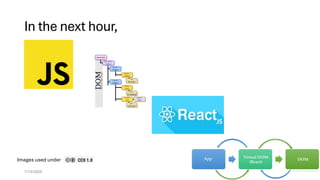
In the next hour,
1/12/2025 2
Images used under
JS, a popular choice
• JavaScript has been the most popular programming language in Stack
Overflow surveys, EVERY YEAR
https://survey.stackoverflow.co/2024/technology#most-popular-technologies-language
1/12/2025 3
Why?
• The most widely used language for web development.
• High demand in the job market.
Versatility:
• Frontend (React, Vue.js, Angular)
• Backend (Node.js, Express.js)
• Mobile (React Native, Ionic)
1/12/2025 4
What exactly is JavaScript?
• 1995
• Client side
• Running on user’s web browser
1/12/2025 5
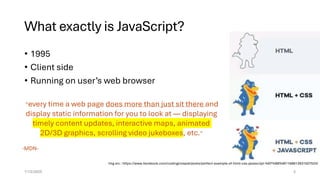
”every time a web page does more than just sit there and
display static information for you to look at — displaying
timely content updates, interactive maps, animated
2D/3D graphics, scrolling video jukeboxes, etc.“
-MDN-
Img src : https://www.facebook.com/codinginnepal/posts/perfect-example-of-html-css-javascript-%EF%B8%8F/168613931507533/
We use JS for
1/12/2025 6
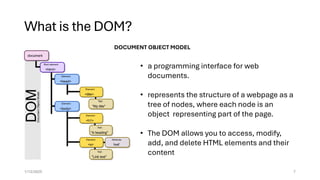
What is the DOM?
1/12/2025 7
• a programming interface for web
documents.
• represents the structure of a webpage as a
tree of nodes, where each node is an
object representing part of the page.
• The DOM allows you to access, modify,
add, and delete HTML elements and their
content
DOCUMENT OBJECT MODEL
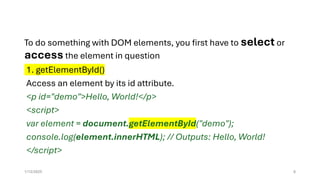
To do something with DOM elements, you first have to select or
access the element in question
1. getElementById()
Access an element by its id attribute.
<p id="demo">Hello, World!</p>
<script>
var element = document.getElementById("demo");
console.log(element.innerHTML); // Outputs: Hello, World!
</script>
1/12/2025 8
2. getElementsByClassName()
Access all elements with a specific class name.
<div class="box">Box 1</div>
<div class="box">Box 2</div>
<script>
var boxes = document.getElementsByClassName("box");
document.write(boxes[0].innerHTML); // Outputs: Box 1
</script>
1/12/2025 9
3. getElementsByTagName()
Access all elements with a specific tag name.
<div>First</div>
<div>Second</div>
<script>
var divs = document.getElementsByTagName("div");
console.log(divs[1].innerHTML); // Outputs: Second
</script>
1/12/2025 10
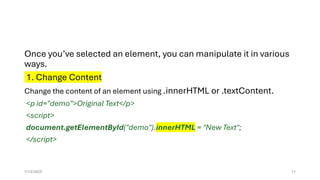
Once you’ve selected an element, you can manipulate it in various
ways.
1. Change Content
Change the content of an element using .innerHTML or .textContent.
<p id="demo">Original Text</p>
<script>
document.getElementById("demo").innerHTML = "New Text";
</script>
1/12/2025 11
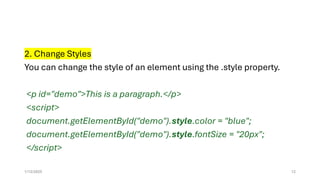
2. Change Styles
You can change the style of an element using the .style property.
<p id="demo">This is a paragraph.</p>
<script>
document.getElementById("demo").style.color = "blue";
document.getElementById("demo").style.fontSize = "20px";
</script>
1/12/2025 12
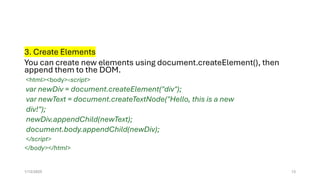
3. Create Elements
You can create new elements using document.createElement(), then
append them to the DOM.
<html><body><script>
var newDiv = document.createElement("div");
var newText = document.createTextNode("Hello, this is a new
div!");
newDiv.appendChild(newText);
document.body.appendChild(newDiv);
</script>
</body></html>
1/12/2025 13
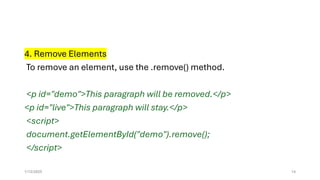
4. Remove Elements
To remove an element, use the .remove() method.
<p id="demo">This paragraph will be removed.</p>
<p id="live">This paragraph will stay.</p>
<script>
document.getElementById("demo").remove();
</script>
1/12/2025 14
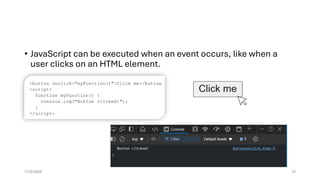
• JavaScript can be executed when an event occurs, like when a
user clicks on an HTML element.
1/12/2025 15
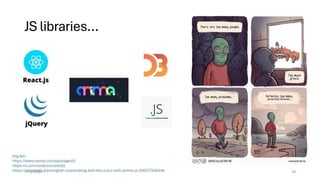
JS libraries…
1/12/2025 16
Img Src:
https://www.npmjs.com/package/d3
https://x.com/underscoredotjs
https://javascript.plainenglish.io/animating-text-like-a-pro-with-anime-js-326377b4824e
If Vanilla JS is
the
foundation,
why climb
higher with
React?
• We can manipulate DOM with plain JS with
no 3rd party tools.
But as our applications grow, working with
DOM can be quite complex and difficult to
manage.
• This is where React JS come into play!
REACT enable you to break UI into reusable
self-contained components.
1/12/2025 17
React JS
18
The Birth
• React is a JavaScript library for
building Dynamic and
interactive user interfaces
• It was created at Facebook in
2013 by Jorden Walke
• The most widely used JavaScript
library for front-end
development
1/12/2025 19
Img src : https://thediffpodcast.com/docs/episode-3/
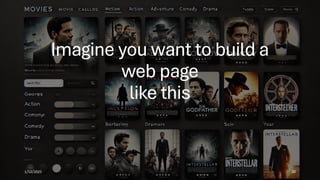
Imagine you want to build a
web page
like this
1/12/2025 20
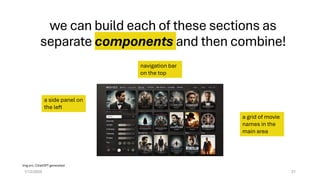
we can build each of these sections as
separate components and then combine!
1/12/2025 21
navigation bar
on the top
a side panel on
the left
a grid of movie
names in the
main area
Img src: ChatGPT generated
First,
Gearing Up
1.Node.js
React requires Node.js for running the
development server and using tools like npm to
install dependencies.
•Download Node.js:
•Visit Node.js official website.
•Download the LTS version
•Install Node.js
•Verify Installation:
Open a terminal or command prompt and run:
node -v
npm -v
1/12/2025 22
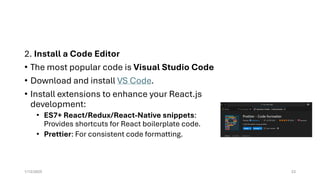
2. Install a Code Editor
• The most popular code is Visual Studio Code
• Download and install VS Code.
• Install extensions to enhance your React.js
development:
• ES7+ React/Redux/React-Native snippets:
Provides shortcuts for React boilerplate code.
• Prettier: For consistent code formatting.
1/12/2025 23
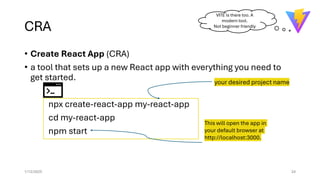
CRA
• Create React App (CRA)
• a tool that sets up a new React app with everything you need to
get started.
npx create-react-app my-react-app
cd my-react-app
npm start
1/12/2025 24
your desired project name
This will open the app in
your default browser at
http://localhost:3000.
VITE is there too. A
modern tool.
Not beginner friendly
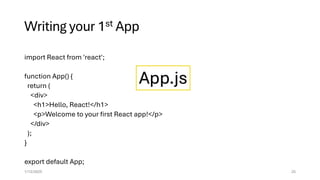
Writing your 1st App
import React from 'react';
function App() {
return (
<div>
<h1>Hello, React!</h1>
<p>Welcome to your first React app!</p>
</div>
);
}
export default App;
1/12/2025 25
App.js
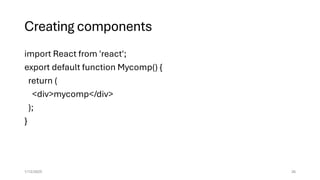
Creating components
import React from 'react';
export default function Mycomp() {
return (
<div>mycomp</div>
);
}
1/12/2025 26
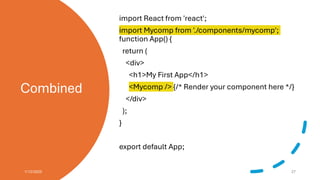
Combined
import React from 'react';
import Mycomp from './components/mycomp';
function App() {
return (
<div>
<h1>My First App</h1>
<Mycomp /> {/* Render your component here */}
</div>
);
}
export default App;
1/12/2025 27
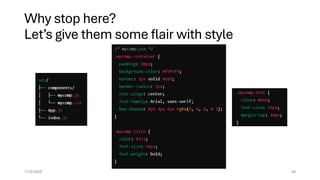
Why stop here?
Let’s give them some flair with style
1/12/2025 28
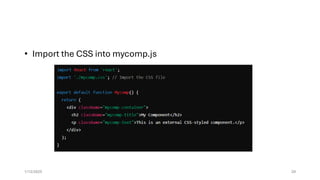
• Import the CSS into mycomp.js
1/12/2025 29
Single Page Applications (SPA)
• React is well-suited for SPAs, where only parts of the page are
updated dynamically without reloading the entire page.
• React efficiently manages UI changes in the browser, providing a
seamless user experience.
1/12/2025 30
Why React is faster?
• It uses Virtual DOM
• When your app renders for the first time, React creates a Virtual
DOM representation of your webpage.
• When something in your app changes, React updates the Virtual
DOM first.
• Then compares new Virtual DOM with previous Virtual DOM to see
exactly what changed.
• Updates only the necessary parts of the real DOM, making the
process faster and smoother.
1/12/2025 31
Go on , build your
first React app!
You might need something to refer to.
MDN documentation and W3 Schools tutorials.
1/12/2025 32

Mastering JavaScript and DOM: A Gateway to Web Development

  • 1.
  • 2.
    In the nexthour, 1/12/2025 2 Images used under
  • 3.
    JS, a popularchoice • JavaScript has been the most popular programming language in Stack Overflow surveys, EVERY YEAR https://survey.stackoverflow.co/2024/technology#most-popular-technologies-language 1/12/2025 3
  • 4.
    Why? • The mostwidely used language for web development. • High demand in the job market. Versatility: • Frontend (React, Vue.js, Angular) • Backend (Node.js, Express.js) • Mobile (React Native, Ionic) 1/12/2025 4
  • 5.
    What exactly isJavaScript? • 1995 • Client side • Running on user’s web browser 1/12/2025 5 ”every time a web page does more than just sit there and display static information for you to look at — displaying timely content updates, interactive maps, animated 2D/3D graphics, scrolling video jukeboxes, etc.“ -MDN- Img src : https://www.facebook.com/codinginnepal/posts/perfect-example-of-html-css-javascript-%EF%B8%8F/168613931507533/
  • 6.
    We use JSfor 1/12/2025 6
  • 7.
    What is theDOM? 1/12/2025 7 • a programming interface for web documents. • represents the structure of a webpage as a tree of nodes, where each node is an object representing part of the page. • The DOM allows you to access, modify, add, and delete HTML elements and their content DOCUMENT OBJECT MODEL
  • 8.
    To do somethingwith DOM elements, you first have to select or access the element in question 1. getElementById() Access an element by its id attribute. <p id="demo">Hello, World!</p> <script> var element = document.getElementById("demo"); console.log(element.innerHTML); // Outputs: Hello, World! </script> 1/12/2025 8
  • 9.
    2. getElementsByClassName() Access allelements with a specific class name. <div class="box">Box 1</div> <div class="box">Box 2</div> <script> var boxes = document.getElementsByClassName("box"); document.write(boxes[0].innerHTML); // Outputs: Box 1 </script> 1/12/2025 9
  • 10.
    3. getElementsByTagName() Access allelements with a specific tag name. <div>First</div> <div>Second</div> <script> var divs = document.getElementsByTagName("div"); console.log(divs[1].innerHTML); // Outputs: Second </script> 1/12/2025 10
  • 11.
    Once you’ve selectedan element, you can manipulate it in various ways. 1. Change Content Change the content of an element using .innerHTML or .textContent. <p id="demo">Original Text</p> <script> document.getElementById("demo").innerHTML = "New Text"; </script> 1/12/2025 11
  • 12.
    2. Change Styles Youcan change the style of an element using the .style property. <p id="demo">This is a paragraph.</p> <script> document.getElementById("demo").style.color = "blue"; document.getElementById("demo").style.fontSize = "20px"; </script> 1/12/2025 12
  • 13.
    3. Create Elements Youcan create new elements using document.createElement(), then append them to the DOM. <html><body><script> var newDiv = document.createElement("div"); var newText = document.createTextNode("Hello, this is a new div!"); newDiv.appendChild(newText); document.body.appendChild(newDiv); </script> </body></html> 1/12/2025 13
  • 14.
    4. Remove Elements Toremove an element, use the .remove() method. <p id="demo">This paragraph will be removed.</p> <p id="live">This paragraph will stay.</p> <script> document.getElementById("demo").remove(); </script> 1/12/2025 14
  • 15.
    • JavaScript canbe executed when an event occurs, like when a user clicks on an HTML element. 1/12/2025 15
  • 16.
    JS libraries… 1/12/2025 16 ImgSrc: https://www.npmjs.com/package/d3 https://x.com/underscoredotjs https://javascript.plainenglish.io/animating-text-like-a-pro-with-anime-js-326377b4824e
  • 17.
    If Vanilla JSis the foundation, why climb higher with React? • We can manipulate DOM with plain JS with no 3rd party tools. But as our applications grow, working with DOM can be quite complex and difficult to manage. • This is where React JS come into play! REACT enable you to break UI into reusable self-contained components. 1/12/2025 17
  • 18.
  • 19.
    The Birth • Reactis a JavaScript library for building Dynamic and interactive user interfaces • It was created at Facebook in 2013 by Jorden Walke • The most widely used JavaScript library for front-end development 1/12/2025 19 Img src : https://thediffpodcast.com/docs/episode-3/
  • 20.
    Imagine you wantto build a web page like this 1/12/2025 20
  • 21.
    we can buildeach of these sections as separate components and then combine! 1/12/2025 21 navigation bar on the top a side panel on the left a grid of movie names in the main area Img src: ChatGPT generated
  • 22.
    First, Gearing Up 1.Node.js React requiresNode.js for running the development server and using tools like npm to install dependencies. •Download Node.js: •Visit Node.js official website. •Download the LTS version •Install Node.js •Verify Installation: Open a terminal or command prompt and run: node -v npm -v 1/12/2025 22
  • 23.
    2. Install aCode Editor • The most popular code is Visual Studio Code • Download and install VS Code. • Install extensions to enhance your React.js development: • ES7+ React/Redux/React-Native snippets: Provides shortcuts for React boilerplate code. • Prettier: For consistent code formatting. 1/12/2025 23
  • 24.
    CRA • Create ReactApp (CRA) • a tool that sets up a new React app with everything you need to get started. npx create-react-app my-react-app cd my-react-app npm start 1/12/2025 24 your desired project name This will open the app in your default browser at http://localhost:3000. VITE is there too. A modern tool. Not beginner friendly
  • 25.
    Writing your 1stApp import React from 'react'; function App() { return ( <div> <h1>Hello, React!</h1> <p>Welcome to your first React app!</p> </div> ); } export default App; 1/12/2025 25 App.js
  • 26.
    Creating components import Reactfrom 'react'; export default function Mycomp() { return ( <div>mycomp</div> ); } 1/12/2025 26
  • 27.
    Combined import React from'react'; import Mycomp from './components/mycomp'; function App() { return ( <div> <h1>My First App</h1> <Mycomp /> {/* Render your component here */} </div> ); } export default App; 1/12/2025 27
  • 28.
    Why stop here? Let’sgive them some flair with style 1/12/2025 28
  • 29.
    • Import theCSS into mycomp.js 1/12/2025 29
  • 30.
    Single Page Applications(SPA) • React is well-suited for SPAs, where only parts of the page are updated dynamically without reloading the entire page. • React efficiently manages UI changes in the browser, providing a seamless user experience. 1/12/2025 30
  • 31.
    Why React isfaster? • It uses Virtual DOM • When your app renders for the first time, React creates a Virtual DOM representation of your webpage. • When something in your app changes, React updates the Virtual DOM first. • Then compares new Virtual DOM with previous Virtual DOM to see exactly what changed. • Updates only the necessary parts of the real DOM, making the process faster and smoother. 1/12/2025 31
  • 32.
    Go on ,build your first React app! You might need something to refer to. MDN documentation and W3 Schools tutorials. 1/12/2025 32