MARIO 
chenzongzhi@360.cn 
https://github.com/baotiao/Mario
• Overview 
• Implement 
• Todo
OVERVIEW 
• A Library that make the write from synchronous 
to asynchronous. 
• It is thread safe and easily used.
EXAMPLE 
/** 
* 
@brief 
The 
handler 
inherit 
from 
the 
Consumer::Handler 
* 
The 
processMsg 
is 
pure 
virtual 
function, 
so 
you 
need 
implementation 
your 
own 
* 
version 
*/ 
class 
FileHandler 
: 
public 
mario::Consumer::Handler 
{ 
public: 
FileHandler() 
{}; 
virtual 
void 
processMsg(const 
std::string 
&item) 
{ 
log_info("consume 
data 
%s", 
item.data()); 
} 
};
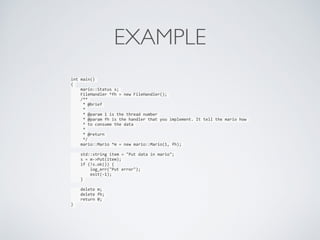
EXAMPLE 
int 
main() 
{ 
mario::Status 
s; 
FileHandler 
*fh 
= 
new 
FileHandler(); 
/** 
* 
@brief 
* 
* 
@param 
1 
is 
the 
thread 
number 
* 
@param 
fh 
is 
the 
handler 
that 
you 
implement. 
It 
tell 
the 
mario 
how 
* 
to 
consume 
the 
data 
* 
* 
@return 
*/ 
mario::Mario 
*m 
= 
new 
mario::Mario(1, 
fh); 
std::string 
item 
= 
"Put 
data 
in 
mario"; 
s 
= 
m-­‐>Put(item); 
if 
(!s.ok()) 
{ 
log_err("Put 
error"); 
exit(-­‐1); 
} 
delete 
m; 
delete 
fh; 
return 
0; 
}
EXAMPLE 
└─[$] ./mario 
[INFO] (demo.cc:22) consume data Put data in mario
IMPLEMENT 
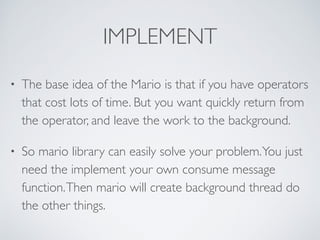
• The base idea of the Mario is that if you have operators 
that cost lots of time. But you want quickly return from 
the operator, and leave the work to the background. 
• So mario library can easily solve your problem. You just 
need the implement your own consume message 
function. Then mario will create background thread do 
the other things.
ENGINE 
• Memory 
• make ENGINE=memory 
• File 
• make ENGINE=file 
• write2file 
• manifest
USAGE 
• make ENGINE=memory 
• ls output 
• include/ lib/
IMPLEMENT 
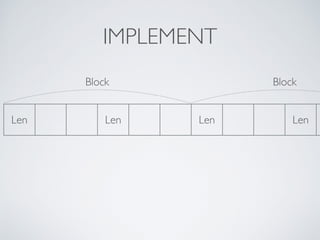
Block 
Len Len 
Block 
Len Len
IMPLEMENT 
• Why Block? 
• Handle error 
• Batch read
TODO 
• The benchmark 
• Batch read
Mario

Mario

  • 1.
  • 2.
    • Overview •Implement • Todo
  • 3.
    OVERVIEW • ALibrary that make the write from synchronous to asynchronous. • It is thread safe and easily used.
  • 4.
    EXAMPLE /** * @brief The handler inherit from the Consumer::Handler * The processMsg is pure virtual function, so you need implementation your own * version */ class FileHandler : public mario::Consumer::Handler { public: FileHandler() {}; virtual void processMsg(const std::string &item) { log_info("consume data %s", item.data()); } };
  • 5.
    EXAMPLE int main() { mario::Status s; FileHandler *fh = new FileHandler(); /** * @brief * * @param 1 is the thread number * @param fh is the handler that you implement. It tell the mario how * to consume the data * * @return */ mario::Mario *m = new mario::Mario(1, fh); std::string item = "Put data in mario"; s = m-­‐>Put(item); if (!s.ok()) { log_err("Put error"); exit(-­‐1); } delete m; delete fh; return 0; }
  • 6.
    EXAMPLE └─[$] ./mario [INFO] (demo.cc:22) consume data Put data in mario
  • 7.
    IMPLEMENT • Thebase idea of the Mario is that if you have operators that cost lots of time. But you want quickly return from the operator, and leave the work to the background. • So mario library can easily solve your problem. You just need the implement your own consume message function. Then mario will create background thread do the other things.
  • 8.
    ENGINE • Memory • make ENGINE=memory • File • make ENGINE=file • write2file • manifest
  • 9.
    USAGE • makeENGINE=memory • ls output • include/ lib/
  • 10.
    IMPLEMENT Block LenLen Block Len Len
  • 11.
    IMPLEMENT • WhyBlock? • Handle error • Batch read
  • 12.
    TODO • Thebenchmark • Batch read