Mule ESB has the ability to store data into variables.
Fortunately Mule offers 2 types of variables 1) Flow variables that has scope limited
to a flow and subflow and 2) Session variables that has scope and can be accessed
from entire application.
Now, one interesting facts I come across several Mule users is how to define a List
or a Map with a variable in Mule in the same way as Java.
Let me tell you, this is absolutely possible with Mule.
We can define List or a Map in Mule with Mule variables.
We can define a List with a Mule variable in following ways :-
<set-variable variableName="test" value="#[{1000,100,14,1}]" doc:name="Variable"/>
Or
<set-variable variableName="test" value="#[[1000,100,14,1]]" doc:name="Variable"/>
Here you can see we define a variable named as test which is defined as a List
Now, we can get the values from the List as follow :-
<logger level="INFO" message="#[flowVars['test'][0]]" doc:name="Logger"/>
<logger level="INFO" message="#[flowVars['test'][1]]" doc:name="Logger"/>
<logger level="INFO" message="#[flowVars['test'][2]]" doc:name="Logger"/>
<logger level="INFO" message="#[flowVars['test'][3]]" doc:name="Logger"/>
As you can see we are retrieving the values from the List with the index
Now, we can define a Map in the same way as follow :-
<set-variable variableName="customMap" value="#[{'k2':'new', 'k3':'v3'}]" />
Or
<set-variable variableName="customMap" value="#[['k2':'new', 'k3':'v3‘]]" />
Here you can see we define a variable named as customMap which is defined as a
Map
Now, we can get the values from the Map as follow :-
<logger message="#[flowVars['customMap']['k2']] " level="INFO"
doc:name="Logger"/>
<logger message="#[flowVars['customMap']['k3']] " level="INFO"
doc:name="Logger"/>
As you can see we are retrieving the values from the Map with the key
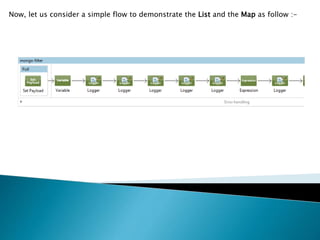
Now, let us consider a simple flow to demonstrate the List and the Map as follow :-
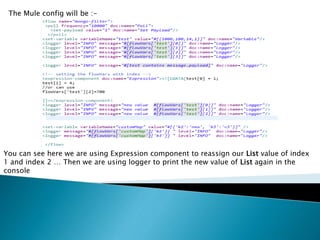
The Mule config will be :-
You can see here we are using Expression component to reassign our List value of index
1 and index 2 … Then we are using logger to print the new value of List again in the
console
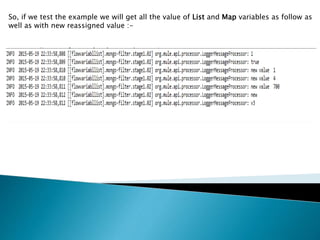
So, if we test the example we will get all the value of List and Map variables as follow as
well as with new reassigned value :-
So, here you can see how to use a List and Map with Mule variable… Hope I was
clear enough to give an Idea of it’s implementation ….
In my next slide I will bring some other techniques in Mule implementation .
Hope you have enjoyed this simpler version.
Keep sharing your knowledge and let our Mule community grow 
Mapping and listing with mule

Mapping and listing with mule

  • 2.
    Mule ESB hasthe ability to store data into variables. Fortunately Mule offers 2 types of variables 1) Flow variables that has scope limited to a flow and subflow and 2) Session variables that has scope and can be accessed from entire application. Now, one interesting facts I come across several Mule users is how to define a List or a Map with a variable in Mule in the same way as Java. Let me tell you, this is absolutely possible with Mule. We can define List or a Map in Mule with Mule variables.
  • 4.
    We can definea List with a Mule variable in following ways :- <set-variable variableName="test" value="#[{1000,100,14,1}]" doc:name="Variable"/> Or <set-variable variableName="test" value="#[[1000,100,14,1]]" doc:name="Variable"/> Here you can see we define a variable named as test which is defined as a List
  • 5.
    Now, we canget the values from the List as follow :- <logger level="INFO" message="#[flowVars['test'][0]]" doc:name="Logger"/> <logger level="INFO" message="#[flowVars['test'][1]]" doc:name="Logger"/> <logger level="INFO" message="#[flowVars['test'][2]]" doc:name="Logger"/> <logger level="INFO" message="#[flowVars['test'][3]]" doc:name="Logger"/> As you can see we are retrieving the values from the List with the index
  • 6.
    Now, we candefine a Map in the same way as follow :- <set-variable variableName="customMap" value="#[{'k2':'new', 'k3':'v3'}]" /> Or <set-variable variableName="customMap" value="#[['k2':'new', 'k3':'v3‘]]" /> Here you can see we define a variable named as customMap which is defined as a Map
  • 7.
    Now, we canget the values from the Map as follow :- <logger message="#[flowVars['customMap']['k2']] " level="INFO" doc:name="Logger"/> <logger message="#[flowVars['customMap']['k3']] " level="INFO" doc:name="Logger"/> As you can see we are retrieving the values from the Map with the key
  • 8.
    Now, let usconsider a simple flow to demonstrate the List and the Map as follow :-
  • 9.
    The Mule configwill be :- You can see here we are using Expression component to reassign our List value of index 1 and index 2 … Then we are using logger to print the new value of List again in the console
  • 10.
    So, if wetest the example we will get all the value of List and Map variables as follow as well as with new reassigned value :-
  • 11.
    So, here youcan see how to use a List and Map with Mule variable… Hope I was clear enough to give an Idea of it’s implementation ….
  • 12.
    In my nextslide I will bring some other techniques in Mule implementation . Hope you have enjoyed this simpler version. Keep sharing your knowledge and let our Mule community grow 