Manufacturing Order Scrap Report
●
Manufacturing Order Scrap Report will collect scrap
order data group by manufacturing order and
generate scrap report with total number of product qty
scrapped and total cost of those products. so we can
figure out total loss caused during manufacuring
process.
●
It allows to print scrap report either Duration wise with
Start date + End date OR Manufacturing Order wise.
Available Key Features
●
Scrap Report by Duration.
●
Scrap Report by Manufacturing Order(s).
Screenshots
●
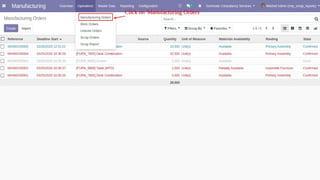
Step 1. Click on 'Manufacturing Orders'.
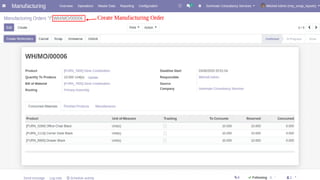
●
Step 2. Create 'Manufacturing Order'.
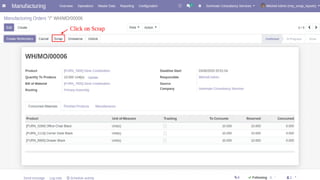
●
Step 3. Click on 'Scrap'.
●
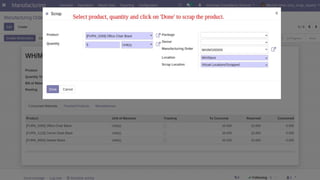
Step 4. Select product, quantity and click on
'Done' to scrap the product.
●
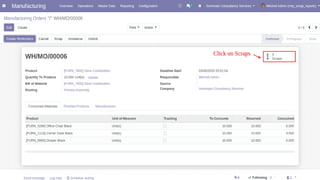
Step 5. Click on 'Scraps'.
●
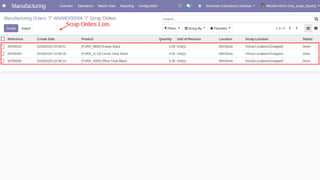
Step 6. Scrap Orders Lists.
●
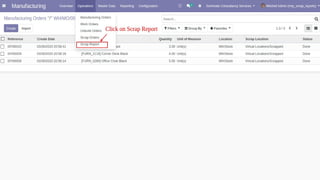
Step 7. Click on 'Scrap Report'.
●
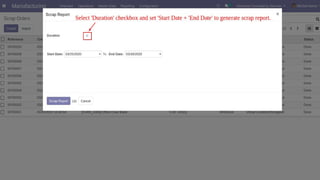
Step 8. Select 'Duration' checkbox and set
'Start Date' + 'End Date' to generate scrap
report.
●
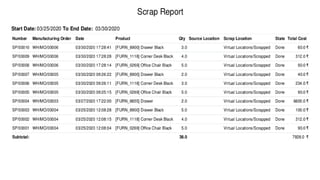
Step 9. Scrap Report by Duration.
●
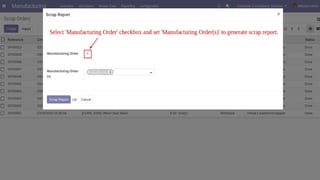
Step 10. Select 'Manufacturing Order' checkbox
and set 'Manufacturing Order(s)' to generate
scrap report.
●
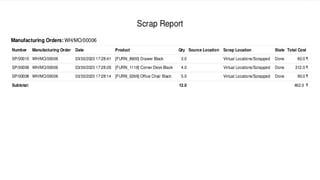
Step 11. Scrap Report by Manufacturing
Order(s).
Find more Apps from Geminate
Our Services
Odoo Customization Odoo Implementation Odoo Integration Odoo Support
Complimentary Support
You will get 90 days free support for any doubt,
queries, and bug fixing (excluding data recovery)
or any type of issue related to this module.
Contact / Support
Need assistance?
Website Send Email Services
Manufacturing Order Scrap Report

Manufacturing Order Scrap Report