MAN IN THE MIDDLE
DEFINATION
 In cryptography and computer security, a man-in-the-middle
attack (MITM) is an attack where the attacker secretly relays and
possibly alters the communications between two parties who
believe they are directly communicating with each other. One
example of a MITM attack is active eavesdropping, in which the
attacker makes independent connections with the victims and
relays messages between them to make them believe they are
talking directly to each other over a private connection, when in
fact the entire conversation is controlled by the attacker.
MITM ATTACKS: CLOSE TO YOU OR WITH MALWARE
 Man-in-the-middle attacks come in two forms, one that involves physical proximity to the
intended target, and another that involves malicious software, or malware. This second form,
like our fake bank example above, is also called a man-in-the-browser attack.
 With a traditional MITM attack, the cybercriminal needs to gain access to an unsecured or
poorly secured Wi-Fi router. These types of connections are generally found in public areas
with free Wi-Fi hotspots, and even in some people’s homes, if they haven’t protected their
network. Attackers can scan the router looking for specific vulnerabilities such as a weak
password.
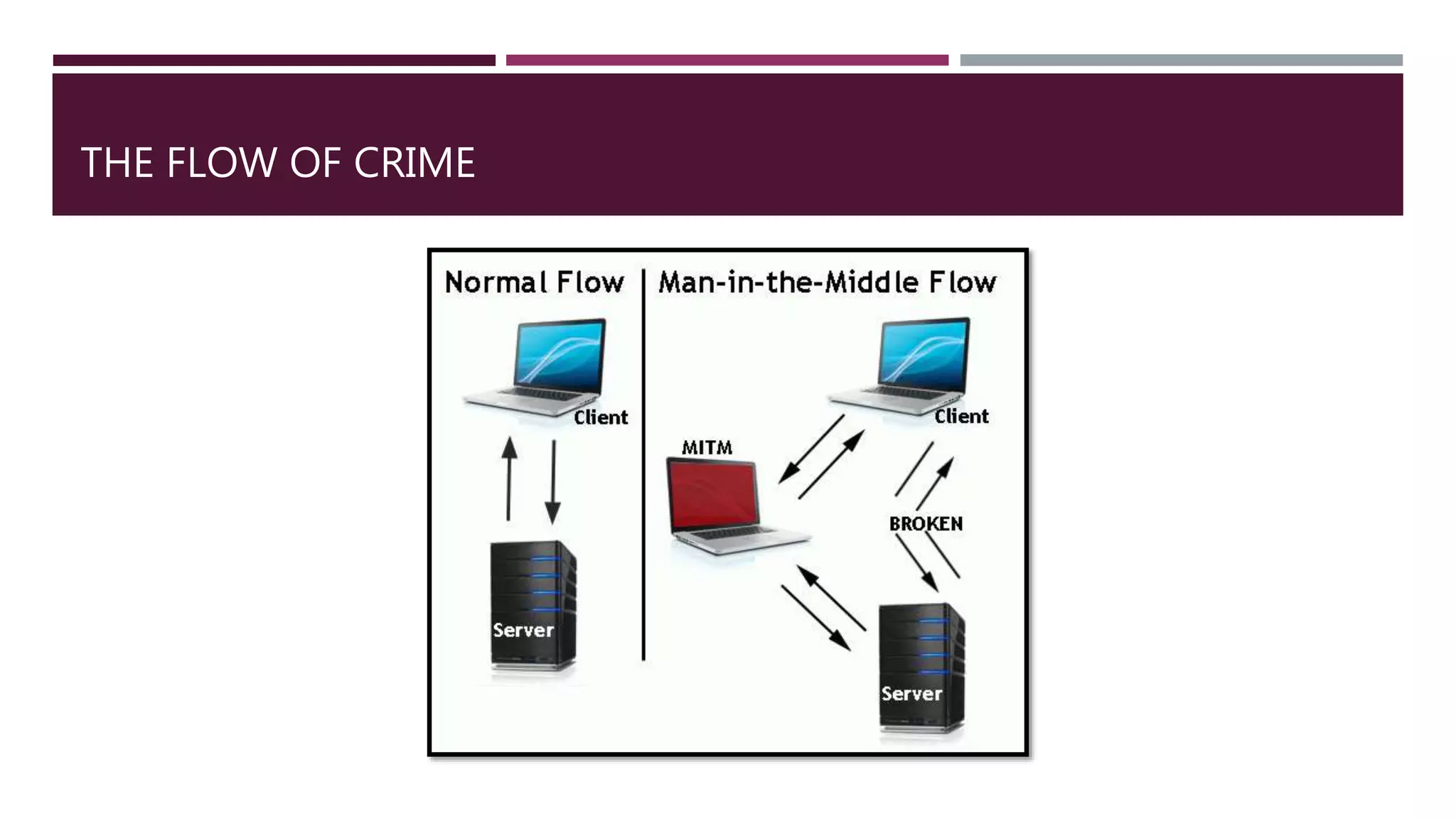
THE FLOW OF CRIME
6 TYPES OF MAN-IN-THE-MIDDLE ATTACKS
1. IP spoofing
Every device capable of connecting to the internet has an internet protocol (IP) address, which is similar
to the street address for your home. By spoofing an IP address, an attacker can trick you into thinking
you’re interacting with a website or someone you’re not, perhaps giving the attacker access to
information you’d otherwise not share.
2. DNS spoofing
Domain Name Server, or DNS, spoofing is a technique that forces a user to a fake website rather than
the real one the user intends to visit. If you are a victim of DNS spoofing, you may think you’re visiting a
safe, trusted website when you’re actually interacting with a fraudster. The perpetrator’s goal is to divert
traffic from the real site or capture user login credentials.
3. HTTPS spoofing
When doing business on the internet, seeing “HTTPS” in the URL, rather than “HTTP” is a sign that the
website is secure and can be trusted. In fact, the “S” stands for “secure.” An attacker can fool your browser
into believing it’s visiting a trusted website when it’s not. By redirecting your browser to an unsecure
website, the attacker can monitor your interactions with that website and possibly steal personal
information you’re sharing.
4. SSL hijacking
When your device connects to an unsecure server — indicated by “HTTP” — the server can often
automatically redirect you to the secure version of the server, indicated by “HTTPS.” A connection to a
secure server means standard security protocols are in place, protecting the data you share with that
server. SSL stands for Secure Sockets Layer, a protocol that establishes encrypted links between your
browser and the web server.
5. Email hijacking
Cybercriminals sometimes target email accounts of banks and other financial institutions. Once they
gain access, they can monitor transactions between the institution and its customers. The attackers can
then spoof the bank’s email address and send their own instructions to customers. This convinces the
customer to follow the attackers’ instructions rather than the bank’s. As a result, an unwitting customer
may end up putting money in the attackers’ hands.
6. Wi-Fi eavesdropping
Cybercriminals can set up Wi-Fi connections with very legitimate sounding names, similar to a nearby
business. Once a user connects to the fraudster’s Wi-Fi, the attacker will be able to monitor the user’s
online activity and be able to intercept login credentials, payment card information, and more. This is
just one of several risks associated with using public Wi-Fi. You can learn more about such risks here.

Man in the middle

  • 1.
    MAN IN THEMIDDLE
  • 2.
    DEFINATION  In cryptographyand computer security, a man-in-the-middle attack (MITM) is an attack where the attacker secretly relays and possibly alters the communications between two parties who believe they are directly communicating with each other. One example of a MITM attack is active eavesdropping, in which the attacker makes independent connections with the victims and relays messages between them to make them believe they are talking directly to each other over a private connection, when in fact the entire conversation is controlled by the attacker.
  • 3.
    MITM ATTACKS: CLOSETO YOU OR WITH MALWARE  Man-in-the-middle attacks come in two forms, one that involves physical proximity to the intended target, and another that involves malicious software, or malware. This second form, like our fake bank example above, is also called a man-in-the-browser attack.  With a traditional MITM attack, the cybercriminal needs to gain access to an unsecured or poorly secured Wi-Fi router. These types of connections are generally found in public areas with free Wi-Fi hotspots, and even in some people’s homes, if they haven’t protected their network. Attackers can scan the router looking for specific vulnerabilities such as a weak password.
  • 4.
  • 5.
    6 TYPES OFMAN-IN-THE-MIDDLE ATTACKS 1. IP spoofing Every device capable of connecting to the internet has an internet protocol (IP) address, which is similar to the street address for your home. By spoofing an IP address, an attacker can trick you into thinking you’re interacting with a website or someone you’re not, perhaps giving the attacker access to information you’d otherwise not share. 2. DNS spoofing Domain Name Server, or DNS, spoofing is a technique that forces a user to a fake website rather than the real one the user intends to visit. If you are a victim of DNS spoofing, you may think you’re visiting a safe, trusted website when you’re actually interacting with a fraudster. The perpetrator’s goal is to divert traffic from the real site or capture user login credentials.
  • 6.
    3. HTTPS spoofing Whendoing business on the internet, seeing “HTTPS” in the URL, rather than “HTTP” is a sign that the website is secure and can be trusted. In fact, the “S” stands for “secure.” An attacker can fool your browser into believing it’s visiting a trusted website when it’s not. By redirecting your browser to an unsecure website, the attacker can monitor your interactions with that website and possibly steal personal information you’re sharing. 4. SSL hijacking When your device connects to an unsecure server — indicated by “HTTP” — the server can often automatically redirect you to the secure version of the server, indicated by “HTTPS.” A connection to a secure server means standard security protocols are in place, protecting the data you share with that server. SSL stands for Secure Sockets Layer, a protocol that establishes encrypted links between your browser and the web server.
  • 7.
    5. Email hijacking Cybercriminalssometimes target email accounts of banks and other financial institutions. Once they gain access, they can monitor transactions between the institution and its customers. The attackers can then spoof the bank’s email address and send their own instructions to customers. This convinces the customer to follow the attackers’ instructions rather than the bank’s. As a result, an unwitting customer may end up putting money in the attackers’ hands. 6. Wi-Fi eavesdropping Cybercriminals can set up Wi-Fi connections with very legitimate sounding names, similar to a nearby business. Once a user connects to the fraudster’s Wi-Fi, the attacker will be able to monitor the user’s online activity and be able to intercept login credentials, payment card information, and more. This is just one of several risks associated with using public Wi-Fi. You can learn more about such risks here.