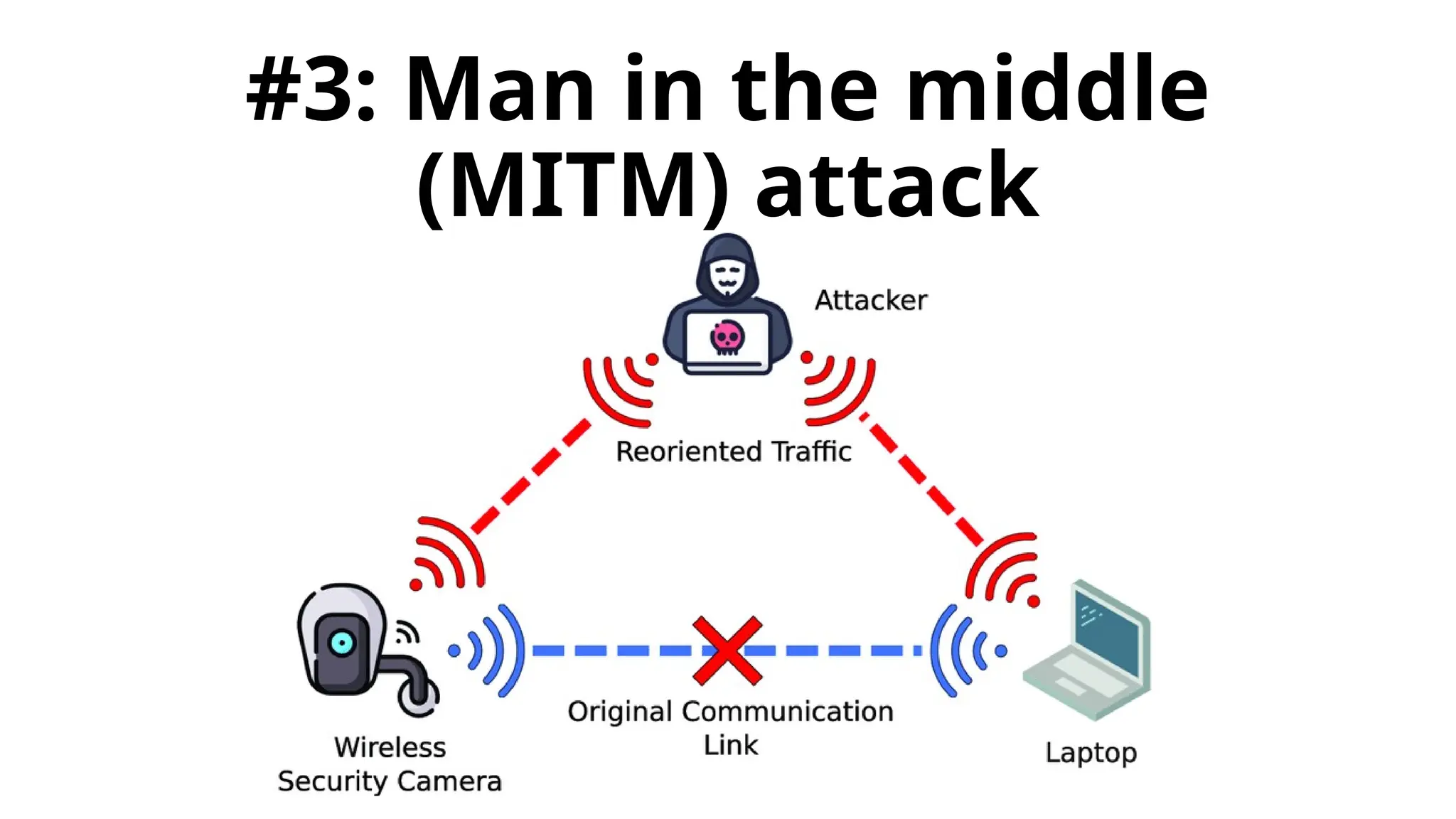
#3: Man in the middle
(MITM) attack
What is MITM attack
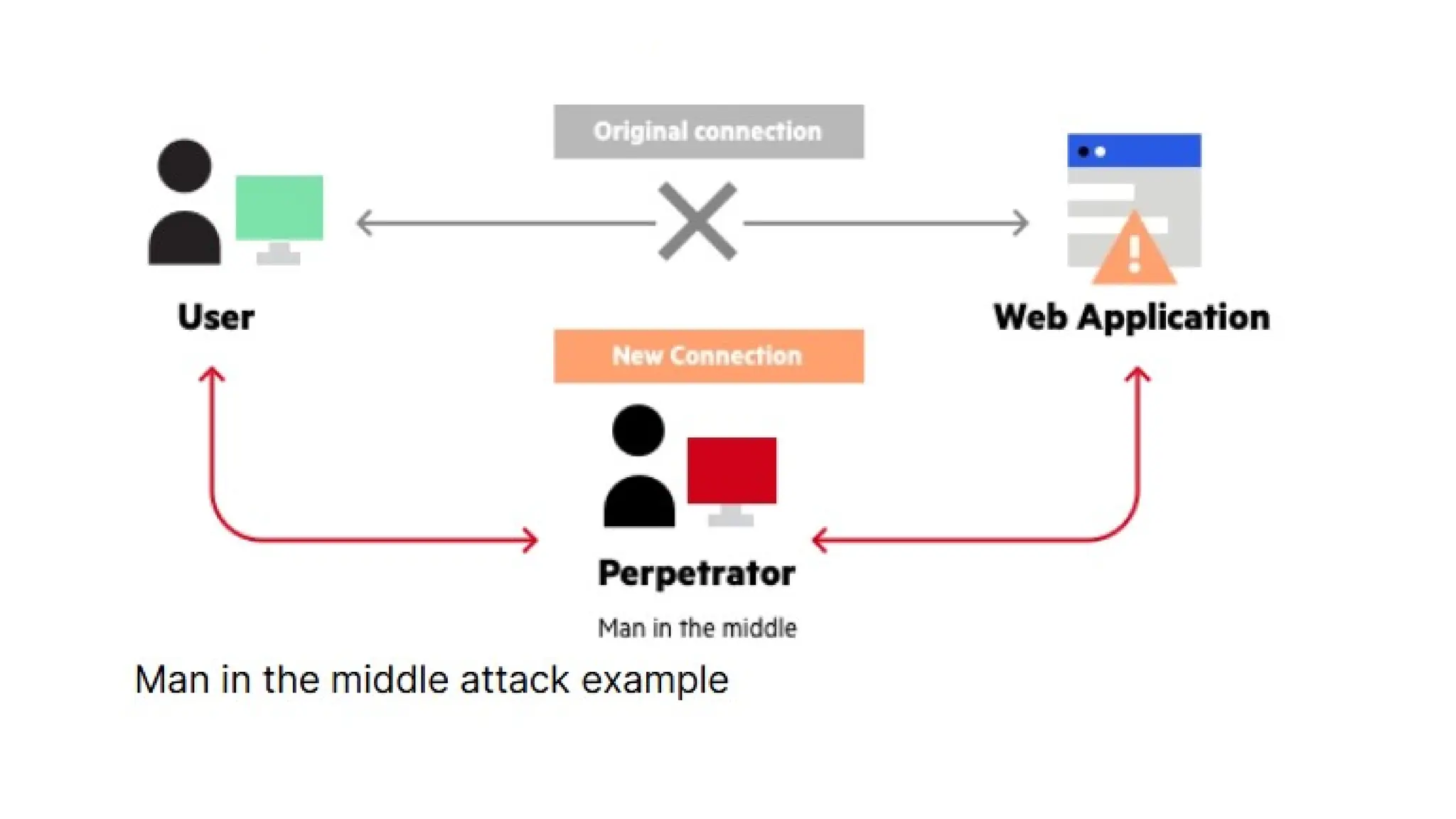
• A man in the middle (MITM) attack is a general term
for when a perpetrator positions himself in a
conversation between a user and an application—
either to eavesdrop or to impersonate one of the
parties, making it appear as if a normal exchange of
information is underway.
• The goal of an attack is to steal personal information,
such as login credentials, account details and credit
card numbers. Targets are typically the users of
financial applications, SaaS businesses, e-commerce
sites and other websites where logging in is required.
Common Targets of MitM Attacks
• - Financial institutions (banks, payment platforms)
• - Healthcare systems (stealing patient data)
• - Industrial networks & IoT devices (hijacking control)
• - Individual users (social engineering, phishing attacks)
Types of Man-in-the-Middle Attacks
• - Email Hijacking
• - Wi-Fi Eavesdropping
• - DNS Spoofing & IP Spoofing
• - Session Hijacking & SSL Hijacking
Email Hijacking
•- Attackers gain access to email accounts.
•- They monitor transactions and send
fraudulent messages.
•- Example: Fake bank emails requesting
credentials.
Wi-Fi Eavesdropping
•- Attackers set up fake Wi-Fi networks to
intercept data.
•- Users unknowingly connect and expose
sensitive data.
•- Prevention: Avoid public Wi-Fi or use
VPNs.
DNS Spoofing & IP Spoofing
•- Redirects users to fake websites.
•- Users unknowingly enter credentials into
fraudulent sites.
•- Prevention: Check for HTTPS, use secure
DNS services.
Session Hijacking & SSL Hijacking
•- Attackers steal session cookies or break SSL
encryption.
•- Allows them to impersonate legitimate
users.
•- Prevention: Use strong encryption, multi-
factor authentication (MFA).
Real-Life MitM Attacks
•- 2013 NSA Google SSL Spoofing
•- Comcast Code Injection
•- 2017 Equifax Data Breach
•- HSBC & NatWest Banking App
Vulnerabilities
Detecting MitM Attacks
• - Unexpected disconnections from services.
• - Strange or mismatched URLs.
• - Unsecured or suspicious public Wi-Fi networks.
• - Unexpected SSL/TLS certificate warnings.
MITM attack progression
Interception
• The first step intercepts user traffic through the
attacker’s network before it reaches its intended
destination.
• The most common (and simplest) way of doing this is a
passive attack in which an attacker makes free,
malicious WiFi hotspots available to the public. Typically
named in a way that corresponds to their location, they
aren’t password protected. Once a victim connects to
such a hotspot, the attacker gains full visibility to any
online data exchange.
Attackers wishing to take a more active
approach to interception may launch one of the
following attacks:
• IP spoofing involves an attacker disguising himself as an
application by altering packet headers in an IP address. As a
result, users attempting to access a URL connected to the
application are sent to the attacker’s website.
• ARP spoofing is the process of linking an attacker’s MAC
address with the IP address of a legitimate user on a local area
network using fake ARP messages. As a result, data sent by the
user to the host IP address is instead transmitted to the
attacker.
• DNS spoofing, also known as DNS cache poisoning, involves
infiltrating a DNS server and altering a website’s address record.
As a result, users attempting to access the site are sent by the
altered DNS record to the attacker’s site.
Decryption
• HTTPS spoofing sends a phony certificate to the victim’s
browser once the initial connection request to a secure site
is made. It holds a digital thumbprint associated with the
compromised application, which the browser verifies
according to an existing list of trusted sites.
• SSL BEAST (browser exploit against SSL/TLS) targets a TLS
version 1.0 vulnerability in SSL. Here, the victim’s computer
is infected with malicious JavaScript that intercepts
encrypted cookies sent by a web application. Then the app’s
cipher block chaining (CBC) is compromised so as to decrypt
its cookies and authentication tokens.
Decryption
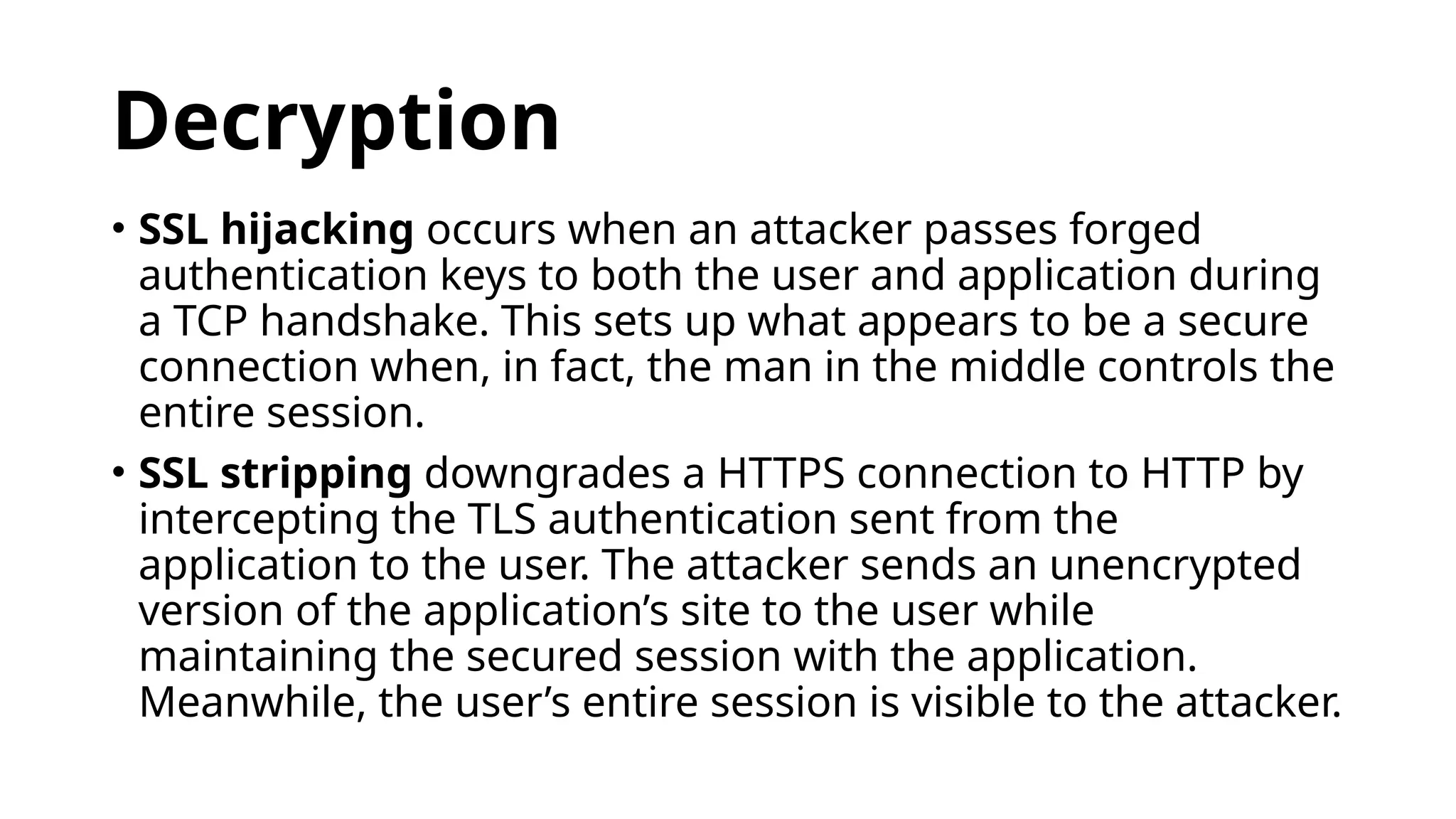
• SSL hijacking occurs when an attacker passes forged
authentication keys to both the user and application during
a TCP handshake. This sets up what appears to be a secure
connection when, in fact, the man in the middle controls the
entire session.
• SSL stripping downgrades a HTTPS connection to HTTP by
intercepting the TLS authentication sent from the
application to the user. The attacker sends an unencrypted
version of the application’s site to the user while
maintaining the secured session with the application.
Meanwhile, the user’s entire session is visible to the attacker.
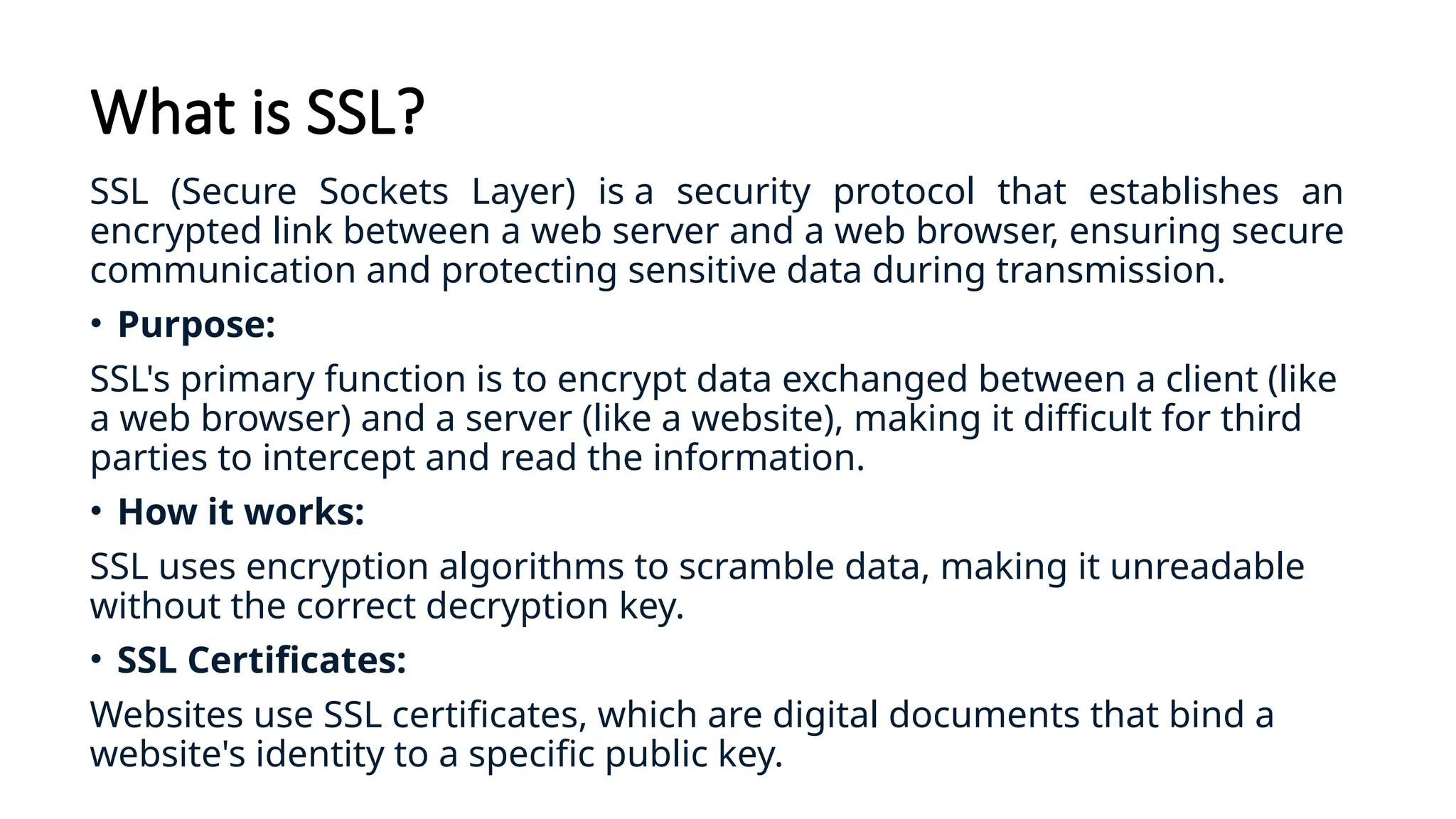
What is SSL?
SSL (Secure Sockets Layer) is a security protocol that establishes an
encrypted link between a web server and a web browser, ensuring secure
communication and protecting sensitive data during transmission.
• Purpose:
SSL's primary function is to encrypt data exchanged between a client (like
a web browser) and a server (like a website), making it difficult for third
parties to intercept and read the information.
• How it works:
SSL uses encryption algorithms to scramble data, making it unreadable
without the correct decryption key.
• SSL Certificates:
Websites use SSL certificates, which are digital documents that bind a
website's identity to a specific public key.
What is SSL?
HTTPS:
• When a website uses SSL, its URL starts with "https://" instead
of "http://", and a padlock icon usually appears in the browser
address bar, indicating a secure connection.
TLS (Transport Layer Security):
• While "SSL" is a commonly used term, it's important to note
that SSL is an older protocol that has been largely replaced by
TLS, which is a more secure and updated version.
Why it's important:
• SSL/TLS is crucial for protecting sensitive data like usernames,
passwords, credit card information, and other personal details
exchanged online.
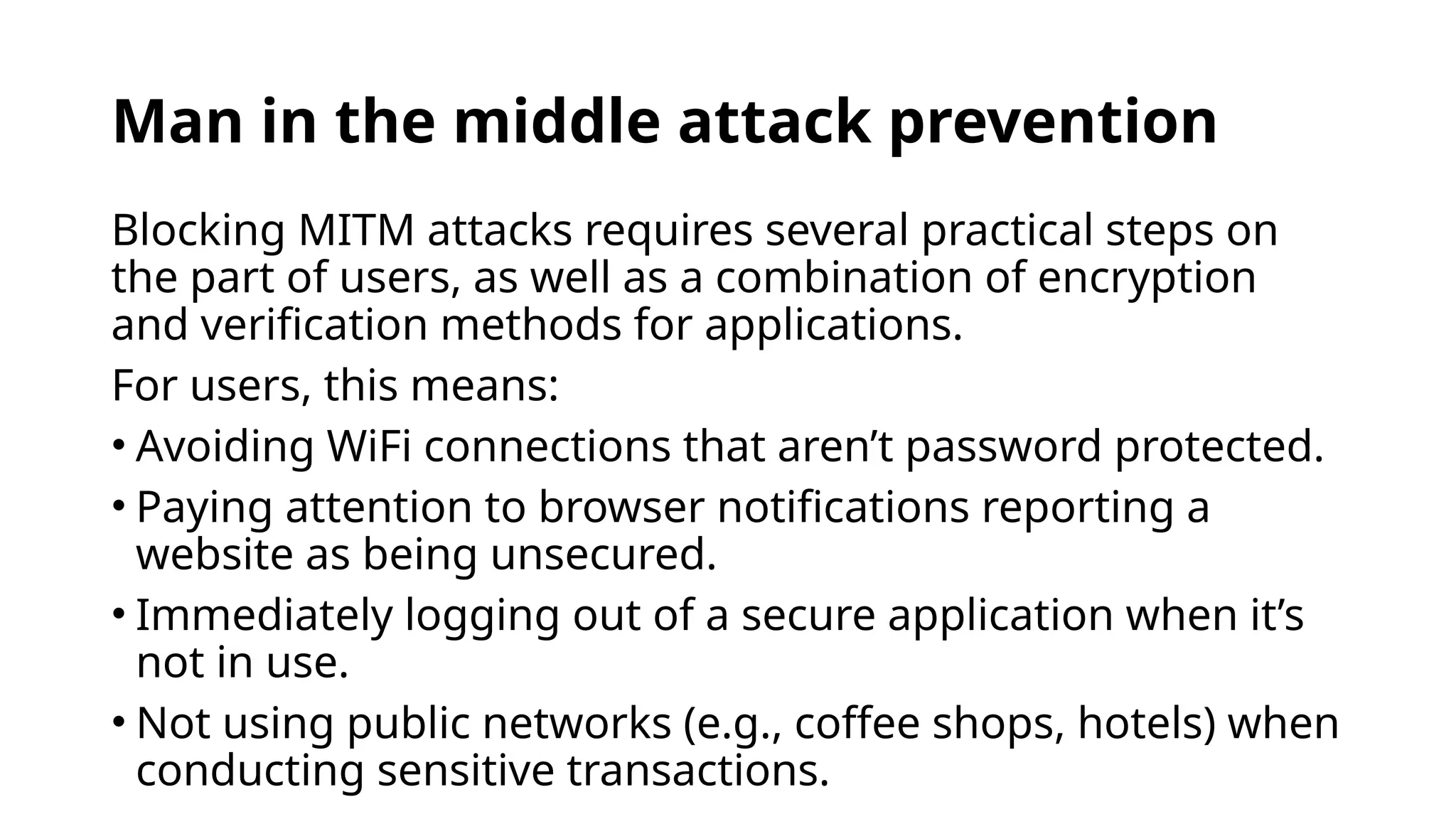
Man in the middle attack prevention
Blocking MITM attacks requires several practical steps on
the part of users, as well as a combination of encryption
and verification methods for applications.
For users, this means:
• Avoiding WiFi connections that aren’t password protected.
• Paying attention to browser notifications reporting a
website as being unsecured.
• Immediately logging out of a secure application when it’s
not in use.
• Not using public networks (e.g., coffee shops, hotels) when
conducting sensitive transactions.
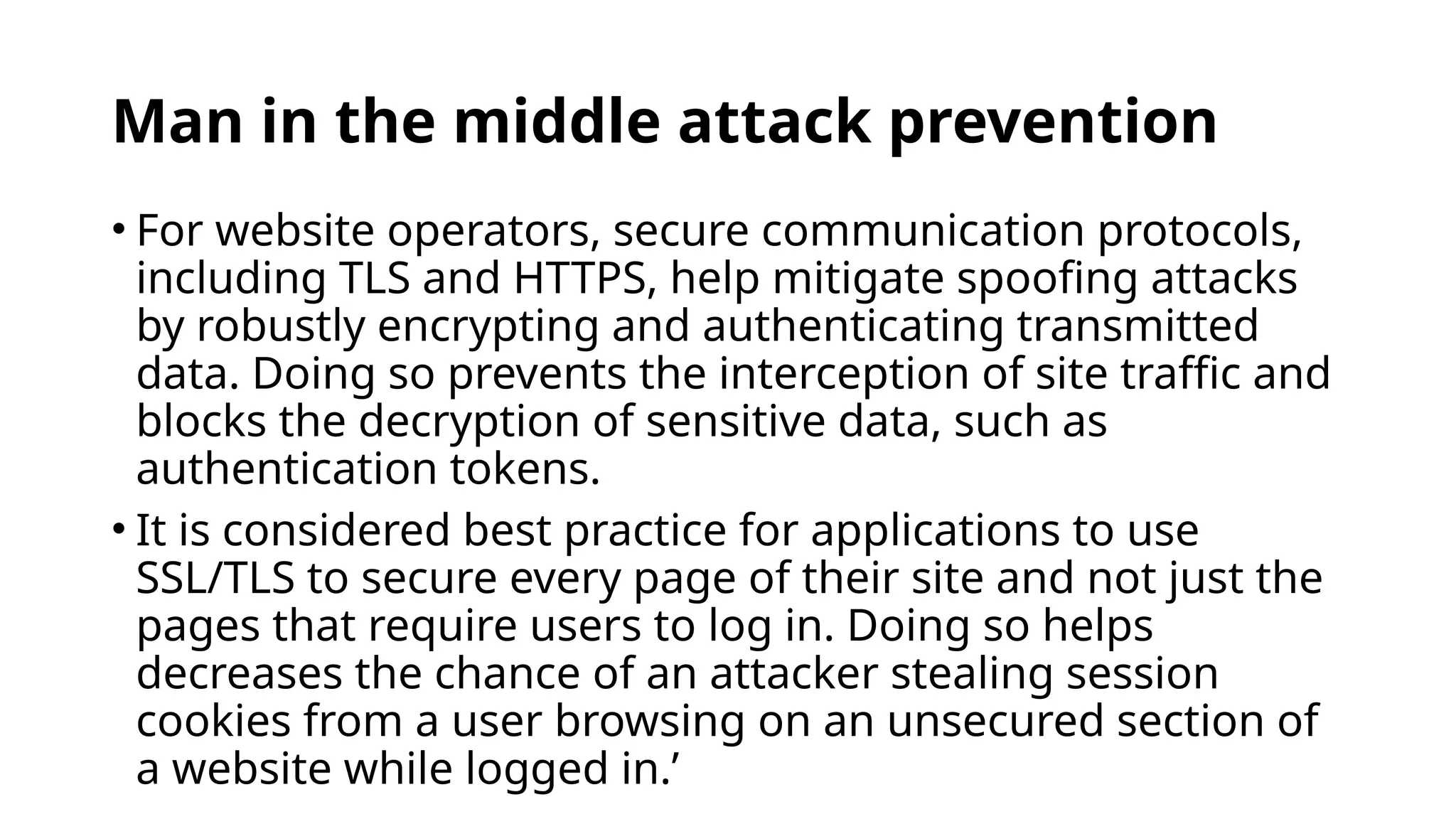
Man in the middle attack prevention
• For website operators, secure communication protocols,
including TLS and HTTPS, help mitigate spoofing attacks
by robustly encrypting and authenticating transmitted
data. Doing so prevents the interception of site traffic and
blocks the decryption of sensitive data, such as
authentication tokens.
• It is considered best practice for applications to use
SSL/TLS to secure every page of their site and not just the
pages that require users to log in. Doing so helps
decreases the chance of an attacker stealing session
cookies from a user browsing on an unsecured section of
a website while logged in.’
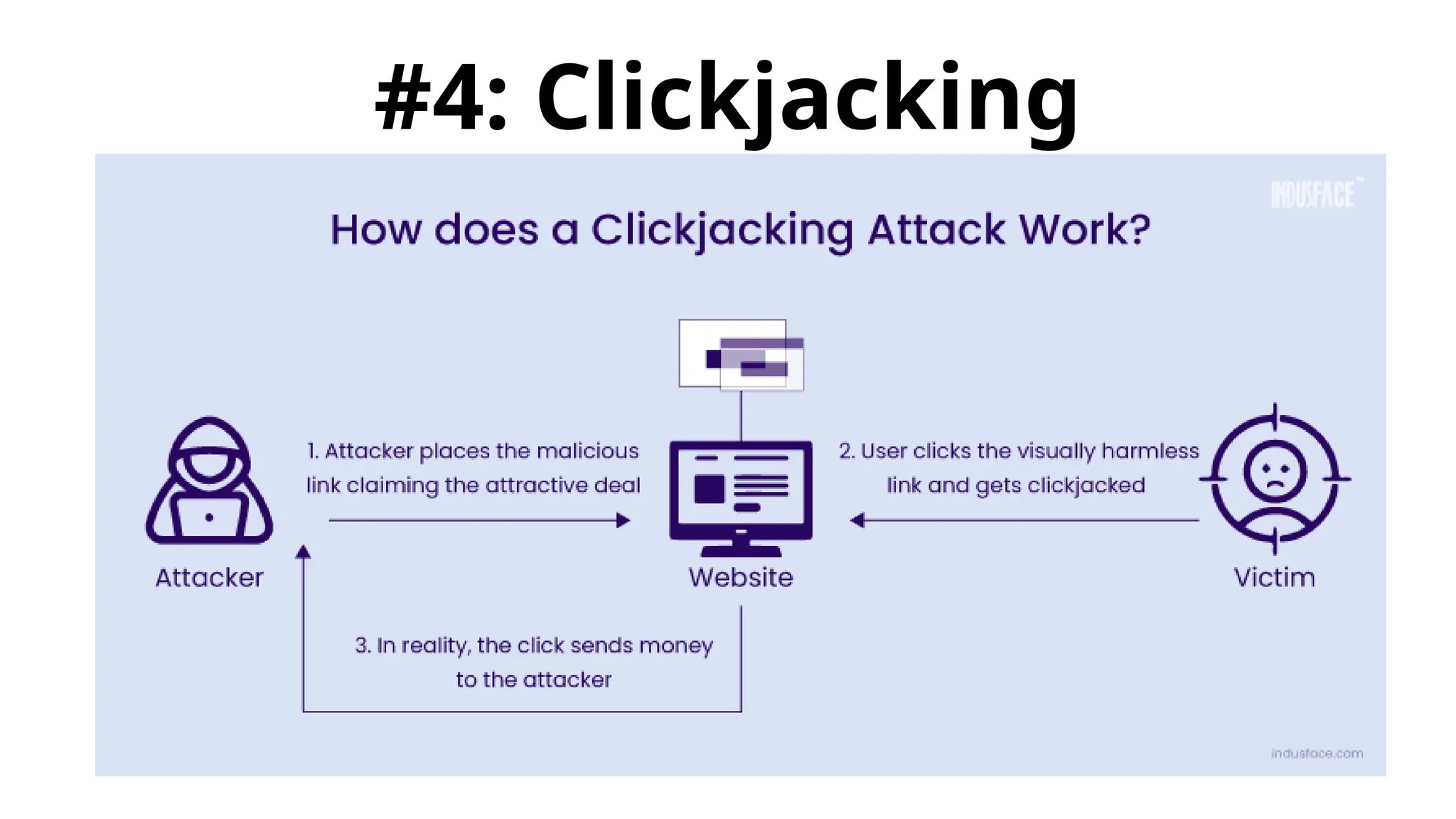
#4: Clickjacking
What is clickjacking
• Clickjacking is an attack that tricks a user into clicking a
webpage element which is invisible or disguised as another
element. This can cause users to unwittingly download malware,
visit malicious web pages, provide credentials or sensitive
information, transfer money, or purchase products online.
• Typically, clickjacking is performed by displaying an invisible
page or HTML element, inside an iframe, on top of the page the
user sees. The user believes they are clicking the visible page
but in fact they are clicking an invisible element in the additional
page transposed on top of it.
• The invisible page could be a malicious page, or a legitimate
page the user did not intend to visit – for example, a page on
the user’s banking site that authorizes the transfer of money.
There are several variations of the clickjacking
attack, such as:
•Likejacking – a technique in which the
Facebook “Like” button is manipulated,
causing users to “like” a page they actually
did not intend to like.
•Cursorjacking – a UI redressing technique
that changes the cursor for the position the
user perceives to another position.
Cursorjacking relies on vulnerabilities in Flash
and the Firefox browser, which have now
been fixed.
Clickjacking attack example
1.The attacker creates an attractive page which promises to give the
user a free trip to Tahiti.
2.In the background the attacker checks if the user is logged into his
banking site and if so, loads the screen that enables transfer of
funds, using query parameters to insert the attacker’s bank details
into the form.
3.The bank transfer page is displayed in an invisible iframe above the
free gift page, with the “Confirm Transfer” button exactly aligned
over the “Receive Gift” button visible to the user.
4.The user visits the page and clicks the “Book My Free Trip” button.
5.In reality the user is clicking on the invisible iframe, and has clicked
the “Confirm Transfer” button. Funds are transferred to the attacker.
6.The user is redirected to a page with information about the free gift
(not knowing what happened in the background).
Clickjacking mitigation
There are two general ways to defend against
clickjacking:
•Client-side methods – the most common is
called Frame Busting. Client-side methods can be
effective in some cases, but are considered not to
be a best practice, because they can be easily
bypassed.
•Server-side methods – the most common is X-
Frame-Options. Server-side methods are
recommended by security experts as an effective
way to defend against clickjacking.
Clickjacking test – Is your site
vulnerable?
•A basic way to test if your site is vulnerable
to clickjacking is to create an HTML page
and attempt to include a sensitive page
from your website in an iframe. It is
important to execute the test code on
another web server, because this is the
typical behavior in a clickjacking attack.
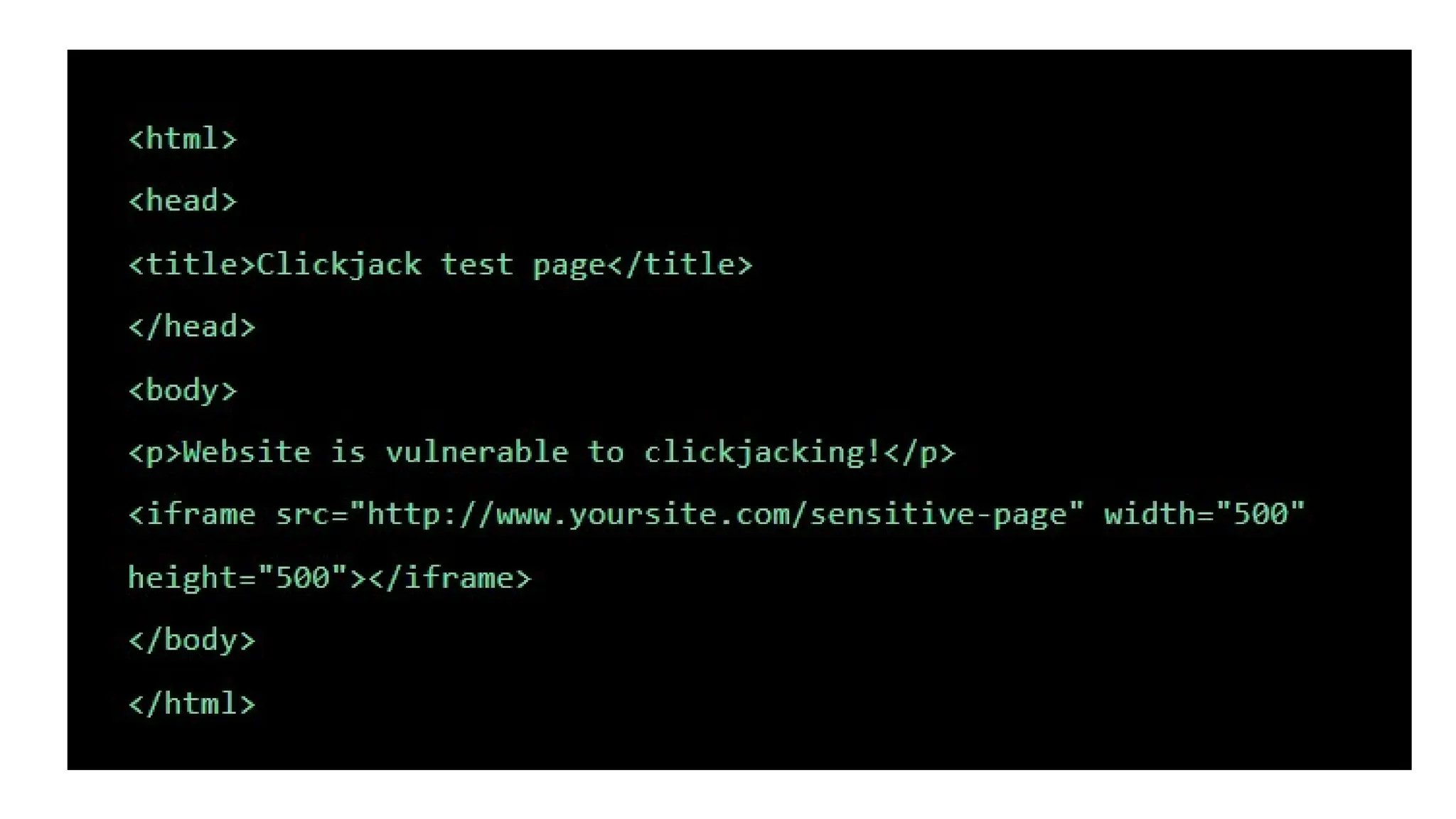
•Use code like the following, provided as
part of the OWASP Testing Guide:
• View the HTML page in a browser and evaluate the
page as follows:
• If the text “Website is vulnerable to clickjacking”
appears and below it you see the content of your
sensitive page, the page is vulnerable to
clickjacking.
• If only the text “Website is vulnerable to clickjacking”
appears, and you do not see the content of your
sensitive page, the page is not vulnerable to the
simplest form of clickjacking.
• However, additional testing is needed to see which
anti-clickjacking methods are used on the page, and
whether they can be bypassed by attackers.
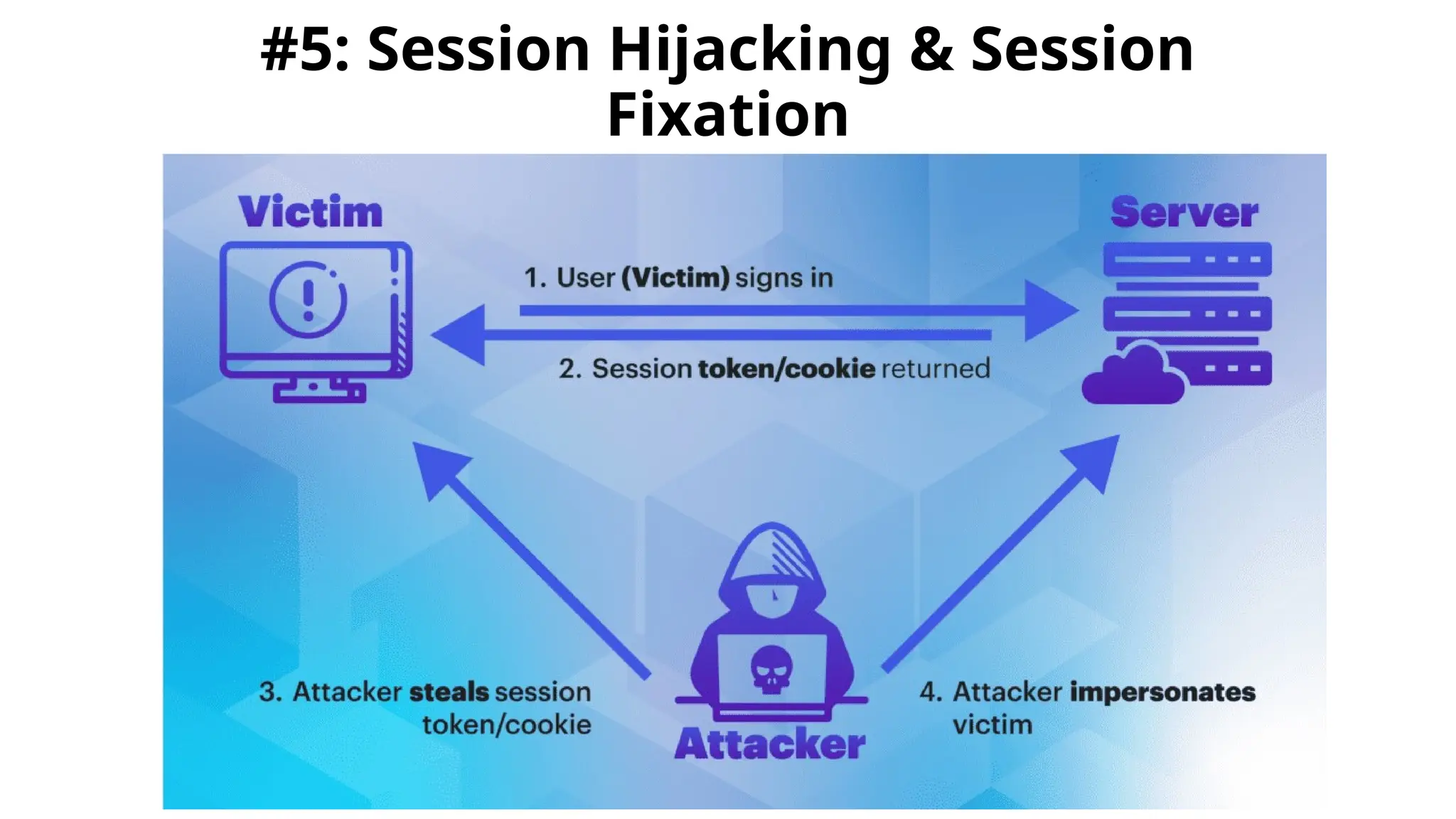
#5: Session Hijacking & Session
Fixation
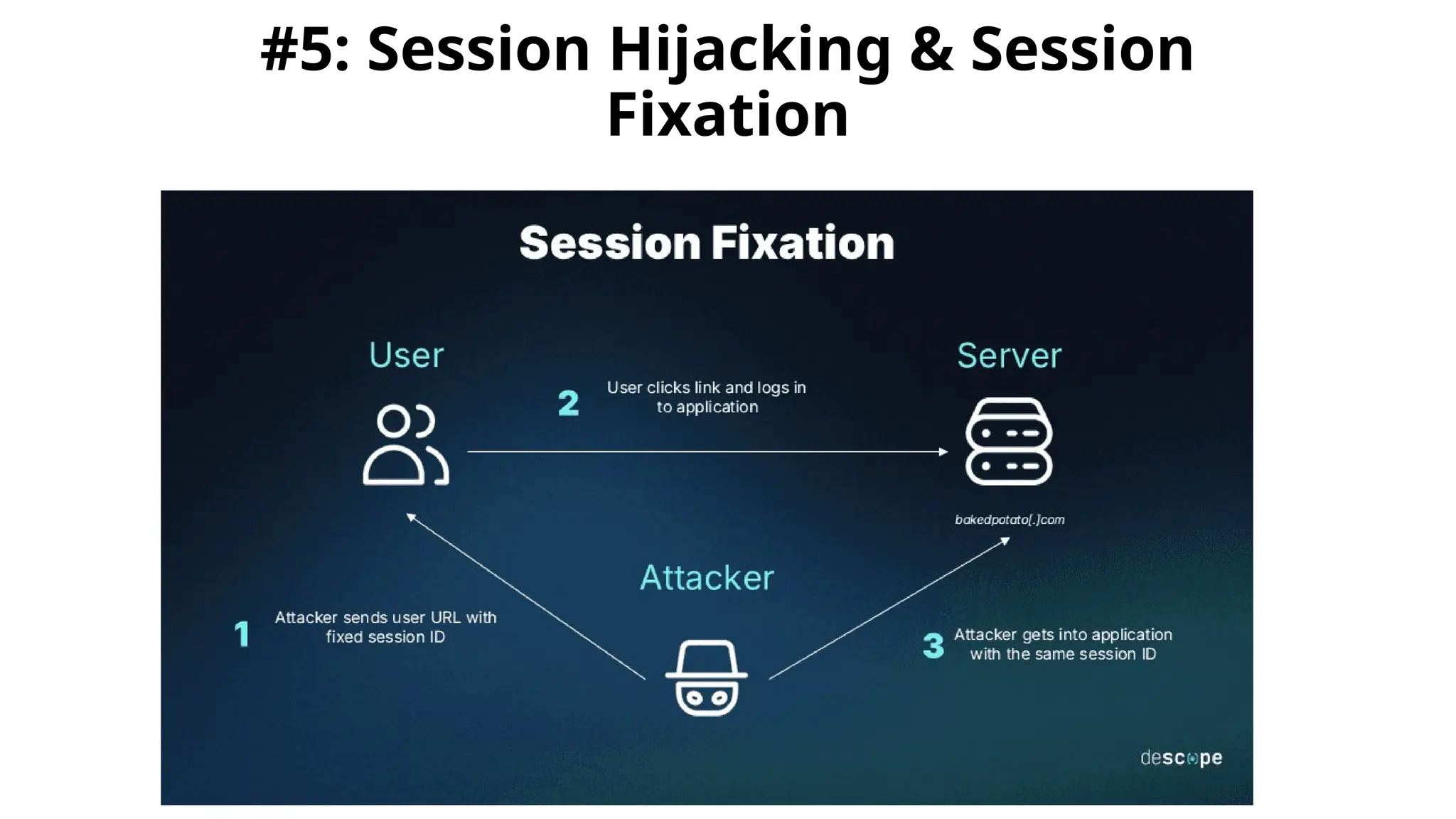
#5: Session Hijacking & Session
Fixation
What is Session Hijacking?
• Session hijacking refers to the malicious act of
taking control of a user’s web session. A session, in
the context of web browsing, is a series of
interactions between two communication endpoints,
sharing a unique session token to ensure continuity
and security.
• It’s a form of attack where a bad actor steals or
manipulates the session token to gain unauthorized
access to information or services. The hijacking
process typically begins when an attacker intercepts
this token, which can be likened to a secret
handshake between the user and the website.
Three primary techniques for hijacking
sessions:
• Brute Force – the attacker tries multiple IDs
until successful.
• Calculate – in many cases, IDs are generated in
a non-random manner and can be calculated.
• Steal – using different types of techniques, the
attacker can acquire the Session ID.
Common Techniques Used by
Hijackers
Among the arsenal of techniques at a hijacker’s disposal, certain methods
stand out due to their prevalence and effectiveness.
 Session sniffing: This technique involves monitoring network traffic to
capture valid session tokens.
 Cross-site scripting (XSS): Attackers inject malicious scripts into web
pages, which then allow them to steal session cookies from unsuspecting
users.
 Session fixation: Here, an attacker forces a user to use a specific
session ID, which the attacker has already obtained, to compromise the
session.
Each technique requires a tailored approach to mitigation, highlighting the
need for a multi-layered security strategy.
The Mechanics Behind Session
Hijacking
• Session tokens serve as identifiers that maintain the state
and continuity of user interactions with web services. When a
user logs into a website, a unique session token is generated
and stored in the user’s browser cookies, allowing seamless
navigation through the site without repeated logins.
• However, the existence of these tokens presents an
opportunity for exploitation. Vulnerabilities can be introduced
through inadequate session management practices, such as
weak token generation algorithms or insecure token storage,
making it easier for attackers to hijack sessions.
Session fixation vs. session hijacking
•Both session fixation and session
hijacking take advantage of
improper session management
and have a similar goal, which is to
gain access to a session ID.
However, they differ in the way that
attackers achieve this end goal.
Session fixation vs. session hijacking
• Session hijacking is when attackers steal an existing
valid session ID by obtaining or guessing the session
ID after the user has logged in. Usually, the attacker
intercepts the session ID as it travels through insecure
network, like unencrypted public Wi-Fi.
• Session fixation, on the other hand, is a subset of
hijacking where a predefined session ID is planted
into a victim’s web browser, and once the user logs in
to the web application, they’ll be using the same
session ID the attacker already knows. The attacker
can then replicate it to gain access at the same time
or maintain access after the legitimate access ends.
How session fixation works:
Attackers can fixate a user’s session ID using a few
different techniques depending on the application. This
includes MITM attacks, cross-site scripting (XSS), cross-
site request forgery (CSRF), and even physical attacks.
•CSRF attacks: Cross-site request forgery forces a user
to take actions on a web application in which they are
authenticated, like changing their personal
information, transferring funds, etc.
•Physical attacks: A person who has physical access to
a web browser can set specific cookies in a website
before another user logs in to that same device.
Here’s a step-by-step overview of how a
session fixation attack works:
1.Identifying a vulnerable application: The attacker identifies a target
web application that is vulnerable to session fixation.
2.Obtaining or generating a session ID: The attacker either generates
a new session ID by initiating a session with the target web application
or uses a predetermined session ID that the application accepts.
3.Fixating the victim's session ID: The attacker tricks the victim into
using the fixated session ID using one of the methods explained above.
4.Victim authentication: The victim logs in to the web application,
unknowingly using the session ID chosen by the attacker.
5.Session hijacking: Since the attacker already knows the session ID,
and now that it's been validated and associated with an authenticated
session (i.e., the victim's logged-in session), the attacker can use the
same session ID to access the web application as the victim.
How to prevent session fixation:
There are several preventative measures and security best practices
developers can undertake to mitigate the risk of these vulnerabilities and
help avoid session fixation, including secure session management. Session
management bridges the gap between web application interactions and the
stateless nature of HTTP. It involves creating, maintaining, and terminating
sessions to ensure the security of exchanged data during a session. Best
practices for secure session management include:
• Using secure, random session identifiers and assigning them long enough
numerical values to prevent guessing the ID via compute.
• Implementing HTTPS for every session to encrypt the data during transit.
• Automatically checking for expired, invalid, or red-flag session IDs.
• Enforcing session expiration to minimize the risk of an attacker exploiting
an active session.
• Regenerating session IDs after login to prevent session fixation attacks.
• Implementing refresh token rotation and reuse detection.
Advance Web Vulnerabilities Chapter 3 to 5

  • 1.
    #3: Man inthe middle (MITM) attack
  • 2.
    What is MITMattack • A man in the middle (MITM) attack is a general term for when a perpetrator positions himself in a conversation between a user and an application— either to eavesdrop or to impersonate one of the parties, making it appear as if a normal exchange of information is underway. • The goal of an attack is to steal personal information, such as login credentials, account details and credit card numbers. Targets are typically the users of financial applications, SaaS businesses, e-commerce sites and other websites where logging in is required.
  • 4.
    Common Targets ofMitM Attacks • - Financial institutions (banks, payment platforms) • - Healthcare systems (stealing patient data) • - Industrial networks & IoT devices (hijacking control) • - Individual users (social engineering, phishing attacks)
  • 5.
    Types of Man-in-the-MiddleAttacks • - Email Hijacking • - Wi-Fi Eavesdropping • - DNS Spoofing & IP Spoofing • - Session Hijacking & SSL Hijacking
  • 6.
    Email Hijacking •- Attackersgain access to email accounts. •- They monitor transactions and send fraudulent messages. •- Example: Fake bank emails requesting credentials.
  • 7.
    Wi-Fi Eavesdropping •- Attackersset up fake Wi-Fi networks to intercept data. •- Users unknowingly connect and expose sensitive data. •- Prevention: Avoid public Wi-Fi or use VPNs.
  • 8.
    DNS Spoofing &IP Spoofing •- Redirects users to fake websites. •- Users unknowingly enter credentials into fraudulent sites. •- Prevention: Check for HTTPS, use secure DNS services.
  • 9.
    Session Hijacking &SSL Hijacking •- Attackers steal session cookies or break SSL encryption. •- Allows them to impersonate legitimate users. •- Prevention: Use strong encryption, multi- factor authentication (MFA).
  • 10.
    Real-Life MitM Attacks •-2013 NSA Google SSL Spoofing •- Comcast Code Injection •- 2017 Equifax Data Breach •- HSBC & NatWest Banking App Vulnerabilities
  • 11.
    Detecting MitM Attacks •- Unexpected disconnections from services. • - Strange or mismatched URLs. • - Unsecured or suspicious public Wi-Fi networks. • - Unexpected SSL/TLS certificate warnings.
  • 12.
    MITM attack progression Interception •The first step intercepts user traffic through the attacker’s network before it reaches its intended destination. • The most common (and simplest) way of doing this is a passive attack in which an attacker makes free, malicious WiFi hotspots available to the public. Typically named in a way that corresponds to their location, they aren’t password protected. Once a victim connects to such a hotspot, the attacker gains full visibility to any online data exchange.
  • 13.
    Attackers wishing totake a more active approach to interception may launch one of the following attacks: • IP spoofing involves an attacker disguising himself as an application by altering packet headers in an IP address. As a result, users attempting to access a URL connected to the application are sent to the attacker’s website. • ARP spoofing is the process of linking an attacker’s MAC address with the IP address of a legitimate user on a local area network using fake ARP messages. As a result, data sent by the user to the host IP address is instead transmitted to the attacker. • DNS spoofing, also known as DNS cache poisoning, involves infiltrating a DNS server and altering a website’s address record. As a result, users attempting to access the site are sent by the altered DNS record to the attacker’s site.
  • 14.
    Decryption • HTTPS spoofingsends a phony certificate to the victim’s browser once the initial connection request to a secure site is made. It holds a digital thumbprint associated with the compromised application, which the browser verifies according to an existing list of trusted sites. • SSL BEAST (browser exploit against SSL/TLS) targets a TLS version 1.0 vulnerability in SSL. Here, the victim’s computer is infected with malicious JavaScript that intercepts encrypted cookies sent by a web application. Then the app’s cipher block chaining (CBC) is compromised so as to decrypt its cookies and authentication tokens.
  • 15.
    Decryption • SSL hijackingoccurs when an attacker passes forged authentication keys to both the user and application during a TCP handshake. This sets up what appears to be a secure connection when, in fact, the man in the middle controls the entire session. • SSL stripping downgrades a HTTPS connection to HTTP by intercepting the TLS authentication sent from the application to the user. The attacker sends an unencrypted version of the application’s site to the user while maintaining the secured session with the application. Meanwhile, the user’s entire session is visible to the attacker.
  • 16.
    What is SSL? SSL(Secure Sockets Layer) is a security protocol that establishes an encrypted link between a web server and a web browser, ensuring secure communication and protecting sensitive data during transmission. • Purpose: SSL's primary function is to encrypt data exchanged between a client (like a web browser) and a server (like a website), making it difficult for third parties to intercept and read the information. • How it works: SSL uses encryption algorithms to scramble data, making it unreadable without the correct decryption key. • SSL Certificates: Websites use SSL certificates, which are digital documents that bind a website's identity to a specific public key.
  • 17.
    What is SSL? HTTPS: •When a website uses SSL, its URL starts with "https://" instead of "http://", and a padlock icon usually appears in the browser address bar, indicating a secure connection. TLS (Transport Layer Security): • While "SSL" is a commonly used term, it's important to note that SSL is an older protocol that has been largely replaced by TLS, which is a more secure and updated version. Why it's important: • SSL/TLS is crucial for protecting sensitive data like usernames, passwords, credit card information, and other personal details exchanged online.
  • 18.
    Man in themiddle attack prevention Blocking MITM attacks requires several practical steps on the part of users, as well as a combination of encryption and verification methods for applications. For users, this means: • Avoiding WiFi connections that aren’t password protected. • Paying attention to browser notifications reporting a website as being unsecured. • Immediately logging out of a secure application when it’s not in use. • Not using public networks (e.g., coffee shops, hotels) when conducting sensitive transactions.
  • 19.
    Man in themiddle attack prevention • For website operators, secure communication protocols, including TLS and HTTPS, help mitigate spoofing attacks by robustly encrypting and authenticating transmitted data. Doing so prevents the interception of site traffic and blocks the decryption of sensitive data, such as authentication tokens. • It is considered best practice for applications to use SSL/TLS to secure every page of their site and not just the pages that require users to log in. Doing so helps decreases the chance of an attacker stealing session cookies from a user browsing on an unsecured section of a website while logged in.’
  • 20.
  • 21.
    What is clickjacking •Clickjacking is an attack that tricks a user into clicking a webpage element which is invisible or disguised as another element. This can cause users to unwittingly download malware, visit malicious web pages, provide credentials or sensitive information, transfer money, or purchase products online. • Typically, clickjacking is performed by displaying an invisible page or HTML element, inside an iframe, on top of the page the user sees. The user believes they are clicking the visible page but in fact they are clicking an invisible element in the additional page transposed on top of it. • The invisible page could be a malicious page, or a legitimate page the user did not intend to visit – for example, a page on the user’s banking site that authorizes the transfer of money.
  • 22.
    There are severalvariations of the clickjacking attack, such as: •Likejacking – a technique in which the Facebook “Like” button is manipulated, causing users to “like” a page they actually did not intend to like. •Cursorjacking – a UI redressing technique that changes the cursor for the position the user perceives to another position. Cursorjacking relies on vulnerabilities in Flash and the Firefox browser, which have now been fixed.
  • 23.
    Clickjacking attack example 1.Theattacker creates an attractive page which promises to give the user a free trip to Tahiti. 2.In the background the attacker checks if the user is logged into his banking site and if so, loads the screen that enables transfer of funds, using query parameters to insert the attacker’s bank details into the form. 3.The bank transfer page is displayed in an invisible iframe above the free gift page, with the “Confirm Transfer” button exactly aligned over the “Receive Gift” button visible to the user. 4.The user visits the page and clicks the “Book My Free Trip” button. 5.In reality the user is clicking on the invisible iframe, and has clicked the “Confirm Transfer” button. Funds are transferred to the attacker. 6.The user is redirected to a page with information about the free gift (not knowing what happened in the background).
  • 24.
    Clickjacking mitigation There aretwo general ways to defend against clickjacking: •Client-side methods – the most common is called Frame Busting. Client-side methods can be effective in some cases, but are considered not to be a best practice, because they can be easily bypassed. •Server-side methods – the most common is X- Frame-Options. Server-side methods are recommended by security experts as an effective way to defend against clickjacking.
  • 25.
    Clickjacking test –Is your site vulnerable? •A basic way to test if your site is vulnerable to clickjacking is to create an HTML page and attempt to include a sensitive page from your website in an iframe. It is important to execute the test code on another web server, because this is the typical behavior in a clickjacking attack. •Use code like the following, provided as part of the OWASP Testing Guide:
  • 27.
    • View theHTML page in a browser and evaluate the page as follows: • If the text “Website is vulnerable to clickjacking” appears and below it you see the content of your sensitive page, the page is vulnerable to clickjacking. • If only the text “Website is vulnerable to clickjacking” appears, and you do not see the content of your sensitive page, the page is not vulnerable to the simplest form of clickjacking. • However, additional testing is needed to see which anti-clickjacking methods are used on the page, and whether they can be bypassed by attackers.
  • 28.
    #5: Session Hijacking& Session Fixation
  • 29.
    #5: Session Hijacking& Session Fixation
  • 30.
    What is SessionHijacking? • Session hijacking refers to the malicious act of taking control of a user’s web session. A session, in the context of web browsing, is a series of interactions between two communication endpoints, sharing a unique session token to ensure continuity and security. • It’s a form of attack where a bad actor steals or manipulates the session token to gain unauthorized access to information or services. The hijacking process typically begins when an attacker intercepts this token, which can be likened to a secret handshake between the user and the website.
  • 31.
    Three primary techniquesfor hijacking sessions: • Brute Force – the attacker tries multiple IDs until successful. • Calculate – in many cases, IDs are generated in a non-random manner and can be calculated. • Steal – using different types of techniques, the attacker can acquire the Session ID.
  • 32.
    Common Techniques Usedby Hijackers Among the arsenal of techniques at a hijacker’s disposal, certain methods stand out due to their prevalence and effectiveness.  Session sniffing: This technique involves monitoring network traffic to capture valid session tokens.  Cross-site scripting (XSS): Attackers inject malicious scripts into web pages, which then allow them to steal session cookies from unsuspecting users.  Session fixation: Here, an attacker forces a user to use a specific session ID, which the attacker has already obtained, to compromise the session. Each technique requires a tailored approach to mitigation, highlighting the need for a multi-layered security strategy.
  • 33.
    The Mechanics BehindSession Hijacking • Session tokens serve as identifiers that maintain the state and continuity of user interactions with web services. When a user logs into a website, a unique session token is generated and stored in the user’s browser cookies, allowing seamless navigation through the site without repeated logins. • However, the existence of these tokens presents an opportunity for exploitation. Vulnerabilities can be introduced through inadequate session management practices, such as weak token generation algorithms or insecure token storage, making it easier for attackers to hijack sessions.
  • 34.
    Session fixation vs.session hijacking •Both session fixation and session hijacking take advantage of improper session management and have a similar goal, which is to gain access to a session ID. However, they differ in the way that attackers achieve this end goal.
  • 35.
    Session fixation vs.session hijacking • Session hijacking is when attackers steal an existing valid session ID by obtaining or guessing the session ID after the user has logged in. Usually, the attacker intercepts the session ID as it travels through insecure network, like unencrypted public Wi-Fi. • Session fixation, on the other hand, is a subset of hijacking where a predefined session ID is planted into a victim’s web browser, and once the user logs in to the web application, they’ll be using the same session ID the attacker already knows. The attacker can then replicate it to gain access at the same time or maintain access after the legitimate access ends.
  • 36.
    How session fixationworks: Attackers can fixate a user’s session ID using a few different techniques depending on the application. This includes MITM attacks, cross-site scripting (XSS), cross- site request forgery (CSRF), and even physical attacks. •CSRF attacks: Cross-site request forgery forces a user to take actions on a web application in which they are authenticated, like changing their personal information, transferring funds, etc. •Physical attacks: A person who has physical access to a web browser can set specific cookies in a website before another user logs in to that same device.
  • 37.
    Here’s a step-by-stepoverview of how a session fixation attack works: 1.Identifying a vulnerable application: The attacker identifies a target web application that is vulnerable to session fixation. 2.Obtaining or generating a session ID: The attacker either generates a new session ID by initiating a session with the target web application or uses a predetermined session ID that the application accepts. 3.Fixating the victim's session ID: The attacker tricks the victim into using the fixated session ID using one of the methods explained above. 4.Victim authentication: The victim logs in to the web application, unknowingly using the session ID chosen by the attacker. 5.Session hijacking: Since the attacker already knows the session ID, and now that it's been validated and associated with an authenticated session (i.e., the victim's logged-in session), the attacker can use the same session ID to access the web application as the victim.
  • 38.
    How to preventsession fixation: There are several preventative measures and security best practices developers can undertake to mitigate the risk of these vulnerabilities and help avoid session fixation, including secure session management. Session management bridges the gap between web application interactions and the stateless nature of HTTP. It involves creating, maintaining, and terminating sessions to ensure the security of exchanged data during a session. Best practices for secure session management include: • Using secure, random session identifiers and assigning them long enough numerical values to prevent guessing the ID via compute. • Implementing HTTPS for every session to encrypt the data during transit. • Automatically checking for expired, invalid, or red-flag session IDs. • Enforcing session expiration to minimize the risk of an attacker exploiting an active session. • Regenerating session IDs after login to prevent session fixation attacks. • Implementing refresh token rotation and reuse detection.