Presentation :’Firewalls’Presenters :-Gagandeep SinghKarandeepVohraPuneetpal Singh1
Table of Contents2IntroductionHOW FIREWALL WORKSTypes of Firewalls MAKING THE FIREWALL FITTESTING A FIREWALL CONFIGURATIONCONCLUSIONREFERENCES
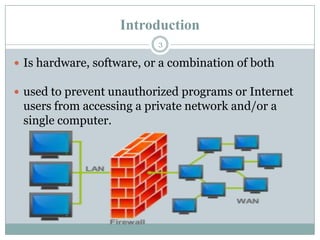
IntroductionIs hardware, software, or a combination of bothused to prevent unauthorized programs or Internet users from accessing a private network and/or a single computer.3
Hardware vs. Software Firewalls4Hardware FirewallsProtect an entire networkImplemented on the router levelUsually more expensive, harder to configureSoftware FirewallsProtect a single computerUsually less expensive, easier to configure
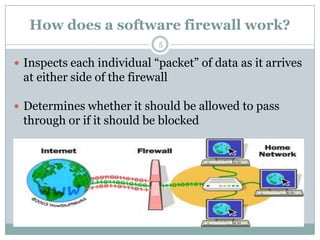
How does a software firewall work?5Inspects each individual “packet” of data as it arrives at either side of the firewallDetermines whether it should be allowed to pass through or if it should be blocked
Firewall Rules6Allow – traffic that flows automatically because it has been deemedBlock – traffic that is blocked because it has been deemed dangerous to your computerAsk – asks the user whether or not the traffic is allowed to pass through
What Can a Firewall Do?Focus for security decisionsStop hackers from accessing your computerCan enforce security policyProtects your personal informationLimits your exposureBlocks “pop up” ads and certain cookiesCan log Internet activity efficientlyDetermines which programs can access the Internet7
What Can't a Firewall Do?Can't protect you against malicious insidersCan't protect you against connections that don't go through itCan't protect against completely new threatsCan't protect against viruses8
Types of Firewalls Packet Filtering FirewallApplication level GatewayCircuit level gateway9
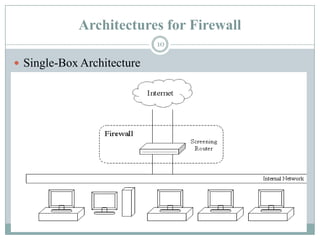
Architectures for Firewall Single-Box Architecture10
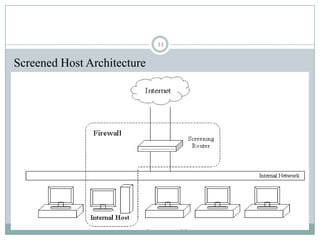
Screened Host Architecture11
Making The Firewall FitIP addressDomain namesProtocolsPorts12
What It Protects You FromRemote login SMTP session hijacking Operating system bugs SpamE-mail bombs Source routing 13
Security Strategies implemented Default DenyProhibit all communication that is not expressly permittedDefault PermitPermit all communication that is not explicitly prohibitedLeast Privilegereduces the authorization level at which various actions are performedDefense in Depthsecurity approach whereby each system on the network is secured to the greatest possible degreeChoke Pointforces  attackers to use a narrow channel to bypass the network14
Testing a Firewall Configuration15A faster and easier method is available with the Linux firewall     implementation Allows you to manually generate tests
 Suppose our local network is 172.16.1.0
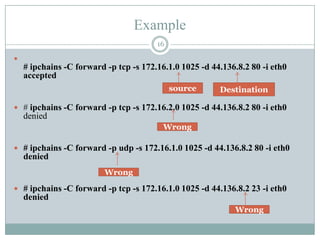
 And we allow only TCP connections Example16# ipchains -C forward -p tcp -s 172.16.1.0 1025 -d 44.136.8.2 80 -i eth0accepted# ipchains -C forward -p tcp -s 172.16.2.0 1025 -d 44.136.8.2 80 -i eth0denied# ipchains -C forward -p udp -s 172.16.1.0 1025 -d 44.136.8.2 80 -i eth0denied# ipchains -C forward -p tcp -s 172.16.1.0 1025 -d 44.136.8.2 23 -i eth0denied                                       sourceDestinationWrongWrongWrong
REFRENCES17www.howstuffworks.com www.securityfocus.com www.firewall.com
18Conclusion

Firewall presentation

  • 1.
    Presentation :’Firewalls’Presenters :-GagandeepSinghKarandeepVohraPuneetpal Singh1
  • 2.
    Table of Contents2IntroductionHOWFIREWALL WORKSTypes of Firewalls MAKING THE FIREWALL FITTESTING A FIREWALL CONFIGURATIONCONCLUSIONREFERENCES
  • 3.
    IntroductionIs hardware, software,or a combination of bothused to prevent unauthorized programs or Internet users from accessing a private network and/or a single computer.3
  • 4.
    Hardware vs. SoftwareFirewalls4Hardware FirewallsProtect an entire networkImplemented on the router levelUsually more expensive, harder to configureSoftware FirewallsProtect a single computerUsually less expensive, easier to configure
  • 5.
    How does asoftware firewall work?5Inspects each individual “packet” of data as it arrives at either side of the firewallDetermines whether it should be allowed to pass through or if it should be blocked
  • 6.
    Firewall Rules6Allow –traffic that flows automatically because it has been deemedBlock – traffic that is blocked because it has been deemed dangerous to your computerAsk – asks the user whether or not the traffic is allowed to pass through
  • 7.
    What Can aFirewall Do?Focus for security decisionsStop hackers from accessing your computerCan enforce security policyProtects your personal informationLimits your exposureBlocks “pop up” ads and certain cookiesCan log Internet activity efficientlyDetermines which programs can access the Internet7
  • 8.
    What Can't aFirewall Do?Can't protect you against malicious insidersCan't protect you against connections that don't go through itCan't protect against completely new threatsCan't protect against viruses8
  • 9.
    Types of FirewallsPacket Filtering FirewallApplication level GatewayCircuit level gateway9
  • 10.
    Architectures for FirewallSingle-Box Architecture10
  • 11.
  • 12.
    Making The FirewallFitIP addressDomain namesProtocolsPorts12
  • 13.
    What It ProtectsYou FromRemote login SMTP session hijacking Operating system bugs SpamE-mail bombs Source routing 13
  • 14.
    Security Strategies implementedDefault DenyProhibit all communication that is not expressly permittedDefault PermitPermit all communication that is not explicitly prohibitedLeast Privilegereduces the authorization level at which various actions are performedDefense in Depthsecurity approach whereby each system on the network is secured to the greatest possible degreeChoke Pointforces attackers to use a narrow channel to bypass the network14
  • 15.
    Testing a FirewallConfiguration15A faster and easier method is available with the Linux firewall implementation Allows you to manually generate tests
  • 16.
    Suppose ourlocal network is 172.16.1.0
  • 17.
    And weallow only TCP connections Example16# ipchains -C forward -p tcp -s 172.16.1.0 1025 -d 44.136.8.2 80 -i eth0accepted# ipchains -C forward -p tcp -s 172.16.2.0 1025 -d 44.136.8.2 80 -i eth0denied# ipchains -C forward -p udp -s 172.16.1.0 1025 -d 44.136.8.2 80 -i eth0denied# ipchains -C forward -p tcp -s 172.16.1.0 1025 -d 44.136.8.2 23 -i eth0denied sourceDestinationWrongWrongWrong
  • 18.
  • 19.