Logitech Tap
TAP INTO
BETTER MEETINGS.
user interface to simplify workflows and
automate tasks.
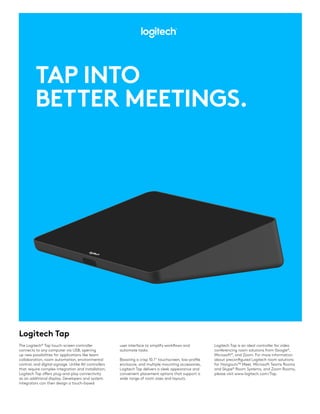
Boasting a crisp 10.1” touchscreen, low-profile
enclosure, and multiple mounting accessories,
Logitech Tap delivers a sleek appearance and
convenient placement options that support a
wide range of room sizes and layouts.
The Logitech®
Tap touch-screen controller
connects to any computer via USB, opening
up new possibilities for applications like team
collaboration, room automation, environmental
control, and digital signage. Unlike AV controllers
that require complex integration and installation,
Logitech Tap offers plug-and-play connectivity
as an additional display. Developers and system
integrators can then design a touch-based
Logitech Tap is an ideal controller for video
conferencing room solutions from Google®
,
Microsoft®
, and Zoom. For more information
about preconfigured Logitech room solutions
for Hangouts™ Meet, Microsoft Teams Rooms
and Skype®
Room Systems, and Zoom Rooms,
please visit www.logitech.com/Tap.
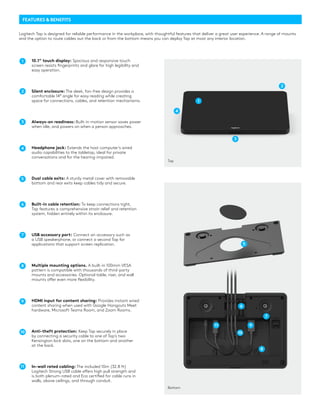
FEATURES & BENEFITS
10.1” touch display: Spacious and responsive touch
screen resists fingerprints and glare for high legibility and
easy operation.
Silent enclosure: The sleek, fan-free design provides a
comfortable 14° angle for easy reading while creating
space for connections, cables, and retention mechanisms.
Always-on readiness: Built-in motion sensor saves power
when idle, and powers on when a person approaches.
Headphone jack: Extends the host computer’s wired
audio capabilities to the tabletop, ideal for private
conversations and for the hearing-impaired.
Dual cable exits: A sturdy metal cover with removable
bottom and rear exits keep cables tidy and secure.
Built-in cable retention: To keep connections tight,
Tap features a comprehensive strain relief and retention
system, hidden entirely within its enclosure.
USB accessory port: Connect an accessory such as
a USB speakerphone, or connect a second Tap for
applications that support screen replication.
Multiple mounting options. A built-in 100mm VESA
pattern is compatible with thousands of third-party
mounts and accessories. Optional table, riser, and wall
mounts offer even more flexibility.
HDMI input for content sharing: Provides instant wired
content sharing when used with Google Hangouts Meet
hardware, Microsoft Teams Room, and Zoom Rooms.
Anti-theft protection: Keep Tap securely in place
by connecting a security cable to one of Tap’s two
Kensington lock slots, one on the bottom and another
at the back.
In-wall rated cabling: The included 10m (32.8 ft)
Logitech Strong USB cable offers high pull strength and
is both plenum-rated and Eca certified for cable runs in
walls, above ceilings, and through conduit.
1
2
4
3
3
4
2
5
5
6
6
7
7
8
9
9
8
10 10
11
11
1
Logitech Tap is designed for reliable performance in the workplace, with thoughtful features that deliver a great user experience. A range of mounts
and the option to route cables out the back or from the bottom means you can deploy Tap at most any interior location.
Bottom
Top
RISER MOUNTTABLE MOUNT
WALL MOUNT 100mm VESA
MOUNTING OPTIONS
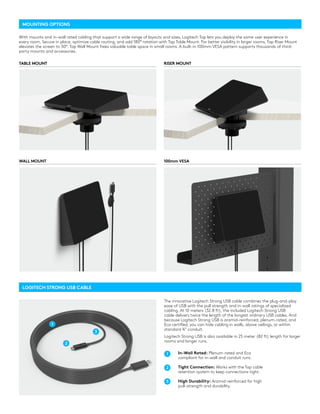
With mounts and in-wall rated cabling that support a wide range of layouts and sizes, Logitech Tap lets you deploy the same user experience in
every room. Secure in place, optimize cable routing, and add 180° rotation with Tap Table Mount. For better visibility in larger rooms, Tap Riser Mount
elevates the screen to 30°. Tap Wall Mount frees valuable table space in small rooms. A built-in 100mm VESA pattern supports thousands of third-
party mounts and accessories.
LOGITECH STRONG USB CABLE
The innovative Logitech Strong USB cable combines the plug-and-play
ease of USB with the pull strength and in-wall ratings of specialized
cabling. At 10 meters (32.8 ft), the included Logitech Strong USB
cable delivers twice the length of the longest ordinary USB cables. And
because Logitech Strong USB is aramid-reinforced, plenum-rated, and
Eca certified, you can hide cabling in walls, above ceilings, or within
standard ¾” conduit.
Logitech Strong USB is also available in 25 meter (82 ft) length for larger
rooms and longer runs.
In-Wall Rated: Plenum-rated and Eca
compliant for in-wall and conduit runs.
Tight Connection: Works with the Tap cable
retention system to keep connections tight.
High Durability: Aramid-reinforced for high
pull-strength and durability.
1
1
2
2
3
3
© 2019 Logitech. Logitech, the Logitech logo and other Logitech marks are owned by Logitech and may be
registered. All other trademarks are the properties of their respective owners. Logitech assumes no responsibility for
any errors that may appear in this publication. Product, pricing and feature information contained herein is subject
to change without notice.
Total Height x Width x Depth:
58 x 244 x 179 mm
2.3 x 9.6 x 7.0 in
1.25 kg (2.75 lbs)
10.1” diagonal screen with 14° display angle
Oleophobic and anti-glare coating
1280 x 800 resolution
USB 2.0/3.0/3.1 Type C (to PC)
USB 2.0/3.0/3.1 Type A (for accessory
connection)
HDMI input (for content sharing)
3.5mm/1/8 “ 4 pole Headset Jack
Integrated ultrasonic speaker
Integrated PIR Motion Sensor
100mm x 100mm VESA FDMI (Flat Display
Mounting Interface)
Kensington Lock Slots (2)
Logitech Tap is certified as a touch controller for
video conferencing room solutions:
Google Hangouts Meet
Microsoft Teams Rooms and Skype Room
Systems (SRS)
Zoom Rooms
DisplayLink®
Plug and Display™: Tap connects
via USB as an additional display for supported
operating systems, including Windows 10 and
Chrome OS
Table Mount
Riser Mount
Wall Mount
PC Mount
Logitech Strong USB cable:10m cable included,
25m optional
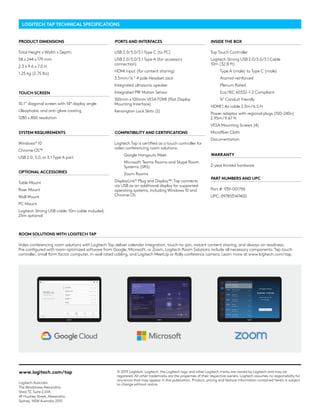
Video conferencing room solutions with Logitech Tap deliver calendar integration, touch-to-join, instant content sharing, and always-on readiness.
Pre-configured with room-optimized software from Google, Microsoft, or Zoom, Logitech Room Solutions include all necessary components: Tap touch
controller, small form factor computer, in-wall rated cabling, and Logitech MeetUp or Rally conference camera. Learn more at www.logitech.com/tap.
Tap Touch Controller
Logitech Strong USB 2.0/3.0/3.1 Cable
10m (32.8 ft)
Type A (male) to Type C (male)
Aramid-reinforced
Plenum Rated
Eca/IEC 60332-1-2 Compliant
¾” Conduit friendly
HDMI 1.4a cable 2.0m/6.5 ft
Power adaptor with regional plugs (100-240v)
2.95m/9.67 ft
VESA Mounting Screws (4)
Microfiber Cloth
Documentation
2-year limited hardware
Part #: 939-001796
UPC: 097855147400
Windows®
10
Chrome OS™
USB 2.0, 3.0, or 3.1 Type A port
LOGITECH TAP TECHNICAL SPECIFICATIONS
PRODUCT DIMENSIONS
TOUCH SCREEN
PORTS AND INTERFACES
COMPATIBILITY AND CERTIFICATIONS
OPTIONAL ACCESSORIES
ROOM SOLUTIONS WITH LOGITECH TAP
INSIDE THE BOX
WARRANTY
PART NUMBERS AND UPC
SYSTEM REQUIREMENTS
www.logitech.com/tap
Logitech Australia
The Woolstores Alexandria,
Shed 72, Suite 2.01A,
4F Huntley Street, Alexandria,
Sydney, NSW Australia 2015

Logitech Tap - Tap Into Better Meetings

  • 1.
    Logitech Tap TAP INTO BETTERMEETINGS. user interface to simplify workflows and automate tasks. Boasting a crisp 10.1” touchscreen, low-profile enclosure, and multiple mounting accessories, Logitech Tap delivers a sleek appearance and convenient placement options that support a wide range of room sizes and layouts. The Logitech® Tap touch-screen controller connects to any computer via USB, opening up new possibilities for applications like team collaboration, room automation, environmental control, and digital signage. Unlike AV controllers that require complex integration and installation, Logitech Tap offers plug-and-play connectivity as an additional display. Developers and system integrators can then design a touch-based Logitech Tap is an ideal controller for video conferencing room solutions from Google® , Microsoft® , and Zoom. For more information about preconfigured Logitech room solutions for Hangouts™ Meet, Microsoft Teams Rooms and Skype® Room Systems, and Zoom Rooms, please visit www.logitech.com/Tap.
  • 2.
    FEATURES & BENEFITS 10.1”touch display: Spacious and responsive touch screen resists fingerprints and glare for high legibility and easy operation. Silent enclosure: The sleek, fan-free design provides a comfortable 14° angle for easy reading while creating space for connections, cables, and retention mechanisms. Always-on readiness: Built-in motion sensor saves power when idle, and powers on when a person approaches. Headphone jack: Extends the host computer’s wired audio capabilities to the tabletop, ideal for private conversations and for the hearing-impaired. Dual cable exits: A sturdy metal cover with removable bottom and rear exits keep cables tidy and secure. Built-in cable retention: To keep connections tight, Tap features a comprehensive strain relief and retention system, hidden entirely within its enclosure. USB accessory port: Connect an accessory such as a USB speakerphone, or connect a second Tap for applications that support screen replication. Multiple mounting options. A built-in 100mm VESA pattern is compatible with thousands of third-party mounts and accessories. Optional table, riser, and wall mounts offer even more flexibility. HDMI input for content sharing: Provides instant wired content sharing when used with Google Hangouts Meet hardware, Microsoft Teams Room, and Zoom Rooms. Anti-theft protection: Keep Tap securely in place by connecting a security cable to one of Tap’s two Kensington lock slots, one on the bottom and another at the back. In-wall rated cabling: The included 10m (32.8 ft) Logitech Strong USB cable offers high pull strength and is both plenum-rated and Eca certified for cable runs in walls, above ceilings, and through conduit. 1 2 4 3 3 4 2 5 5 6 6 7 7 8 9 9 8 10 10 11 11 1 Logitech Tap is designed for reliable performance in the workplace, with thoughtful features that deliver a great user experience. A range of mounts and the option to route cables out the back or from the bottom means you can deploy Tap at most any interior location. Bottom Top
  • 3.
    RISER MOUNTTABLE MOUNT WALLMOUNT 100mm VESA MOUNTING OPTIONS With mounts and in-wall rated cabling that support a wide range of layouts and sizes, Logitech Tap lets you deploy the same user experience in every room. Secure in place, optimize cable routing, and add 180° rotation with Tap Table Mount. For better visibility in larger rooms, Tap Riser Mount elevates the screen to 30°. Tap Wall Mount frees valuable table space in small rooms. A built-in 100mm VESA pattern supports thousands of third- party mounts and accessories. LOGITECH STRONG USB CABLE The innovative Logitech Strong USB cable combines the plug-and-play ease of USB with the pull strength and in-wall ratings of specialized cabling. At 10 meters (32.8 ft), the included Logitech Strong USB cable delivers twice the length of the longest ordinary USB cables. And because Logitech Strong USB is aramid-reinforced, plenum-rated, and Eca certified, you can hide cabling in walls, above ceilings, or within standard ¾” conduit. Logitech Strong USB is also available in 25 meter (82 ft) length for larger rooms and longer runs. In-Wall Rated: Plenum-rated and Eca compliant for in-wall and conduit runs. Tight Connection: Works with the Tap cable retention system to keep connections tight. High Durability: Aramid-reinforced for high pull-strength and durability. 1 1 2 2 3 3
  • 4.
    © 2019 Logitech.Logitech, the Logitech logo and other Logitech marks are owned by Logitech and may be registered. All other trademarks are the properties of their respective owners. Logitech assumes no responsibility for any errors that may appear in this publication. Product, pricing and feature information contained herein is subject to change without notice. Total Height x Width x Depth: 58 x 244 x 179 mm 2.3 x 9.6 x 7.0 in 1.25 kg (2.75 lbs) 10.1” diagonal screen with 14° display angle Oleophobic and anti-glare coating 1280 x 800 resolution USB 2.0/3.0/3.1 Type C (to PC) USB 2.0/3.0/3.1 Type A (for accessory connection) HDMI input (for content sharing) 3.5mm/1/8 “ 4 pole Headset Jack Integrated ultrasonic speaker Integrated PIR Motion Sensor 100mm x 100mm VESA FDMI (Flat Display Mounting Interface) Kensington Lock Slots (2) Logitech Tap is certified as a touch controller for video conferencing room solutions: Google Hangouts Meet Microsoft Teams Rooms and Skype Room Systems (SRS) Zoom Rooms DisplayLink® Plug and Display™: Tap connects via USB as an additional display for supported operating systems, including Windows 10 and Chrome OS Table Mount Riser Mount Wall Mount PC Mount Logitech Strong USB cable:10m cable included, 25m optional Video conferencing room solutions with Logitech Tap deliver calendar integration, touch-to-join, instant content sharing, and always-on readiness. Pre-configured with room-optimized software from Google, Microsoft, or Zoom, Logitech Room Solutions include all necessary components: Tap touch controller, small form factor computer, in-wall rated cabling, and Logitech MeetUp or Rally conference camera. Learn more at www.logitech.com/tap. Tap Touch Controller Logitech Strong USB 2.0/3.0/3.1 Cable 10m (32.8 ft) Type A (male) to Type C (male) Aramid-reinforced Plenum Rated Eca/IEC 60332-1-2 Compliant ¾” Conduit friendly HDMI 1.4a cable 2.0m/6.5 ft Power adaptor with regional plugs (100-240v) 2.95m/9.67 ft VESA Mounting Screws (4) Microfiber Cloth Documentation 2-year limited hardware Part #: 939-001796 UPC: 097855147400 Windows® 10 Chrome OS™ USB 2.0, 3.0, or 3.1 Type A port LOGITECH TAP TECHNICAL SPECIFICATIONS PRODUCT DIMENSIONS TOUCH SCREEN PORTS AND INTERFACES COMPATIBILITY AND CERTIFICATIONS OPTIONAL ACCESSORIES ROOM SOLUTIONS WITH LOGITECH TAP INSIDE THE BOX WARRANTY PART NUMBERS AND UPC SYSTEM REQUIREMENTS www.logitech.com/tap Logitech Australia The Woolstores Alexandria, Shed 72, Suite 2.01A, 4F Huntley Street, Alexandria, Sydney, NSW Australia 2015