HPE Security ArcSight Logger
Forwarding Connector for HP NNMi
Software Version: 7.1.7.7609.0
Release Notes
February 15, 2016
Legal Notices
Warranty
The only warranties for Hewlett Packard Enterprise products and services are set forth in the express warranty statements
accompanying such products and services. Nothing herein should be construed as constituting an additional warranty.
Hewlett Packard Enterprise shall not be liable for technical or editorial errors or omissions contained herein.
The information contained herein is subject to change without notice.
The network information used in the examples in this document (including IP addresses and hostnames) is for illustration
purposes only.
HPE Security ArcSight products are highly flexible and function as you configure them. The accessibility, integrity, and
confidentiality of your data is your responsibility. Implement a comprehensive security strategy and follow good security
practices.
This document is confidential.
Restricted Rights Legend
Confidential computer software. Valid license from Hewlett Packard Enterprise required for possession, use or copying.
Consistent with FAR 12.211 and 12.212, Commercial Computer Software, Computer Software Documentation, and Technical
Data for Commercial Items are licensed to the U.S. Government under vendor's standard commercial license.
Copyright Notice
© Copyright 2016 Hewlett Packard Enterprise Development, LP
Follow this link to see a complete statement of copyrights and acknowledgements:
https://www.protect724.hpe.com/docs/DOC-13026
Support
Phone A list of phone numbers is available on the HPE Security ArcSight Technical
Support Page: https://softwaresupport.hp.com/documents/10180/14684/esp-
support-contact-list
Support Web Site https://softwaresupport.hp.com
Protect 724 Community https://www.protect724.hpe.com
Contact Information
Release Notes
HPE Logger Forwarding Connector for HP NNMi 7.1.7.7609.0 Page 2 of 7
Contents
ArcSight Logger Forwarding Connector for HP NNMi Release Notes 4
Supported Versions of HP NNMi 4
What's New in the ArcSight Logger Forwarding Connector for HP NNMi 4
Verifying Your Upgrade Files 5
To Apply This Release 5
Enhancements 5
Send Documentation Feedback 7
HPE Logger Forwarding Connector for HP NNMi 7.1.7.7609.0 Page 3 of 7
ArcSight Logger Forwarding Connector for HP
NNMi Release Notes
These release notes provide information for the current release of the ArcSight Logger Forwarding
Connector for HP Network Node Manager i (NNMi). The ArcSight Logger Forwarding Connector for
HP NNMi can receive events from a source logger and send them to HP Network Node Manager i.
Supported Versions of HP NNMi
The supported version of HP NNMi is NNMi 10.0.
Note the following:
l You must upgrade to HP NNMi 9.20, patch 1 or later to be able to use the current Logger Forwarding
Connector for HP NNMi. If you have a previous version of HP NNMi installed, the current Logger
Forwarding Connector for HP NNMi will not function.
l Use the latest version of the ArcSight SmartConnector with the current Logger Forwarding
Connector for NNMi. If you plan to process events from HP ProCurve devices, you must also install
the latest ArcSight SmartConnector build.
Note: The following changes start with the next release:
l Windows and Linux 64-bit operating systems will be supported.
l Solaris operating system will no longer be supported.
What's New in the ArcSight Logger Forwarding
Connector for HP NNMi
l Support for Windows 2012 R2.
l Support for HP NNMi version 10.0.
l Support for Red Hat Enterprise Linux (RHEL) 7.1.
l Support for Logger 6.0.
l Support for Windows, Solaris, and Linux on 32-bit and Windows and Linux on 64-bit installations.
l This release contains important security updates.
HPE Logger Forwarding Connector for HP NNMi 7.1.7.7609.0 Page 4 of 7
Verifying Your Upgrade Files
HP provides a digital public key to enable you to verify that the signed software you received is indeed
from HP and has not been manipulated in any way by a third party.Visit the following site for
information and instructions:
https://h20392.www2.hpe.com/portal/swdepot/displayProductInfo.do?productNumber=HPLinuxCod
eSigning
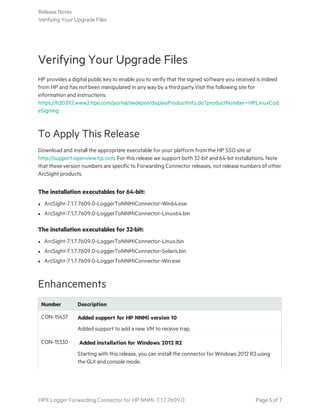
To Apply This Release
Download and install the appropriate executable for your platform from the HP SSO site at
http://support.openview.hp.com. For this release we support both 32-bit and 64-bit installations. Note
that these version numbers are specific to Forwarding Connector releases, not release numbers of other
ArcSight products.
The installation executables for 64-bit:
l ArcSight-7.1.7.7609.0-LoggerToNNMiConnector-Win64.exe
l ArcSight-7.1.7.7609.0-LoggerToNNMiConnector-Linux64.bin
The installation executables for 32-bit:
l ArcSight-7.1.7.7609.0-LoggerToNNMiConnector-Linux.bin
l ArcSight-7.1.7.7609.0-LoggerToNNMiConnector-Solaris.bin
l ArcSight-7.1.7.7609.0-LoggerToNNMiConnector-Win.exe
Enhancements
Number Description
CON-15437 Added support for HP NNMi version 10
Added support to add a new VM to receive trap.
CON-15330 Added installation for Windows 2012 R2
Starting with this release, you can install the connector for Windows 2012 R2 using
the GUI and console mode.
Release Notes
Verifying Your Upgrade Files
HPE Logger Forwarding Connector for HP NNMi 7.1.7.7609.0 Page 5 of 7
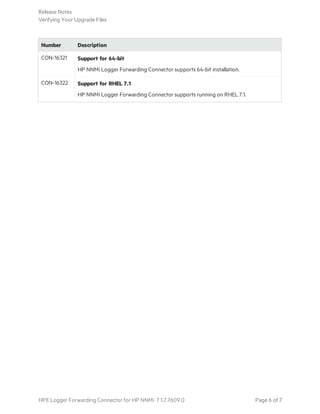
Number Description
CON-16321 Support for 64-bit
HP NNMi Logger Forwarding Connector supports 64-bit installation.
CON-16322 Support for RHEL 7.1
HP NNMi Logger Forwarding Connector supports running on RHEL 7.1.
Release Notes
Verifying Your Upgrade Files
HPE Logger Forwarding Connector for HP NNMi 7.1.7.7609.0 Page 6 of 7
Send Documentation Feedback
If you have comments about this document, you can contact the documentation team by email. If an
email client is configured on this system, click the link above and an email window opens with the
following information in the subject line:
Feedback on Release Notes (Logger Forwarding Connector for HP NNMi 7.1.7.7609.0)
Just add your feedback to the email and click send.
If no email client is available, copy the information above to a new message in a web mail client, and send
your feedback to arc-doc@hpe.com.
We appreciate your feedback!
HPE Logger Forwarding Connector for HP NNMi 7.1.7.7609.0 Page 7 of 7

Logger Forwarding Connector for HPE NNMi Release Notes 7.1.7.7609.0

  • 1.
    HPE Security ArcSight Logger Forwarding Connectorfor HP NNMi Software Version: 7.1.7.7609.0 Release Notes February 15, 2016
  • 2.
    Legal Notices Warranty The onlywarranties for Hewlett Packard Enterprise products and services are set forth in the express warranty statements accompanying such products and services. Nothing herein should be construed as constituting an additional warranty. Hewlett Packard Enterprise shall not be liable for technical or editorial errors or omissions contained herein. The information contained herein is subject to change without notice. The network information used in the examples in this document (including IP addresses and hostnames) is for illustration purposes only. HPE Security ArcSight products are highly flexible and function as you configure them. The accessibility, integrity, and confidentiality of your data is your responsibility. Implement a comprehensive security strategy and follow good security practices. This document is confidential. Restricted Rights Legend Confidential computer software. Valid license from Hewlett Packard Enterprise required for possession, use or copying. Consistent with FAR 12.211 and 12.212, Commercial Computer Software, Computer Software Documentation, and Technical Data for Commercial Items are licensed to the U.S. Government under vendor's standard commercial license. Copyright Notice © Copyright 2016 Hewlett Packard Enterprise Development, LP Follow this link to see a complete statement of copyrights and acknowledgements: https://www.protect724.hpe.com/docs/DOC-13026 Support Phone A list of phone numbers is available on the HPE Security ArcSight Technical Support Page: https://softwaresupport.hp.com/documents/10180/14684/esp- support-contact-list Support Web Site https://softwaresupport.hp.com Protect 724 Community https://www.protect724.hpe.com Contact Information Release Notes HPE Logger Forwarding Connector for HP NNMi 7.1.7.7609.0 Page 2 of 7
  • 3.
    Contents ArcSight Logger ForwardingConnector for HP NNMi Release Notes 4 Supported Versions of HP NNMi 4 What's New in the ArcSight Logger Forwarding Connector for HP NNMi 4 Verifying Your Upgrade Files 5 To Apply This Release 5 Enhancements 5 Send Documentation Feedback 7 HPE Logger Forwarding Connector for HP NNMi 7.1.7.7609.0 Page 3 of 7
  • 4.
    ArcSight Logger ForwardingConnector for HP NNMi Release Notes These release notes provide information for the current release of the ArcSight Logger Forwarding Connector for HP Network Node Manager i (NNMi). The ArcSight Logger Forwarding Connector for HP NNMi can receive events from a source logger and send them to HP Network Node Manager i. Supported Versions of HP NNMi The supported version of HP NNMi is NNMi 10.0. Note the following: l You must upgrade to HP NNMi 9.20, patch 1 or later to be able to use the current Logger Forwarding Connector for HP NNMi. If you have a previous version of HP NNMi installed, the current Logger Forwarding Connector for HP NNMi will not function. l Use the latest version of the ArcSight SmartConnector with the current Logger Forwarding Connector for NNMi. If you plan to process events from HP ProCurve devices, you must also install the latest ArcSight SmartConnector build. Note: The following changes start with the next release: l Windows and Linux 64-bit operating systems will be supported. l Solaris operating system will no longer be supported. What's New in the ArcSight Logger Forwarding Connector for HP NNMi l Support for Windows 2012 R2. l Support for HP NNMi version 10.0. l Support for Red Hat Enterprise Linux (RHEL) 7.1. l Support for Logger 6.0. l Support for Windows, Solaris, and Linux on 32-bit and Windows and Linux on 64-bit installations. l This release contains important security updates. HPE Logger Forwarding Connector for HP NNMi 7.1.7.7609.0 Page 4 of 7
  • 5.
    Verifying Your UpgradeFiles HP provides a digital public key to enable you to verify that the signed software you received is indeed from HP and has not been manipulated in any way by a third party.Visit the following site for information and instructions: https://h20392.www2.hpe.com/portal/swdepot/displayProductInfo.do?productNumber=HPLinuxCod eSigning To Apply This Release Download and install the appropriate executable for your platform from the HP SSO site at http://support.openview.hp.com. For this release we support both 32-bit and 64-bit installations. Note that these version numbers are specific to Forwarding Connector releases, not release numbers of other ArcSight products. The installation executables for 64-bit: l ArcSight-7.1.7.7609.0-LoggerToNNMiConnector-Win64.exe l ArcSight-7.1.7.7609.0-LoggerToNNMiConnector-Linux64.bin The installation executables for 32-bit: l ArcSight-7.1.7.7609.0-LoggerToNNMiConnector-Linux.bin l ArcSight-7.1.7.7609.0-LoggerToNNMiConnector-Solaris.bin l ArcSight-7.1.7.7609.0-LoggerToNNMiConnector-Win.exe Enhancements Number Description CON-15437 Added support for HP NNMi version 10 Added support to add a new VM to receive trap. CON-15330 Added installation for Windows 2012 R2 Starting with this release, you can install the connector for Windows 2012 R2 using the GUI and console mode. Release Notes Verifying Your Upgrade Files HPE Logger Forwarding Connector for HP NNMi 7.1.7.7609.0 Page 5 of 7
  • 6.
    Number Description CON-16321 Supportfor 64-bit HP NNMi Logger Forwarding Connector supports 64-bit installation. CON-16322 Support for RHEL 7.1 HP NNMi Logger Forwarding Connector supports running on RHEL 7.1. Release Notes Verifying Your Upgrade Files HPE Logger Forwarding Connector for HP NNMi 7.1.7.7609.0 Page 6 of 7
  • 7.
    Send Documentation Feedback Ifyou have comments about this document, you can contact the documentation team by email. If an email client is configured on this system, click the link above and an email window opens with the following information in the subject line: Feedback on Release Notes (Logger Forwarding Connector for HP NNMi 7.1.7.7609.0) Just add your feedback to the email and click send. If no email client is available, copy the information above to a new message in a web mail client, and send your feedback to arc-doc@hpe.com. We appreciate your feedback! HPE Logger Forwarding Connector for HP NNMi 7.1.7.7609.0 Page 7 of 7