0
N T I
Prepared by: Eng. Anwar Fouad
Linux Fundamentals
1
N T I
Prepared by: Eng. Anwar Fouad
What is Linux?
A fully-networked 32/64-Bit Unix-like Operating System
 Unix Tools Like sed, awk , find, and grep (explained later)
 Compilers Like C, C++, Fortran, …etc.
 Network Tools Like telnet, ftp, ping, traceroute
Multi-user, Multitasking, Multiprocessor
Has the X Windows GUI
Coexists with other Operating Systems
Runs on multiple hardware platforms
Includes the Source Code
2
N T I
Prepared by: Eng. Anwar Fouad
How do you get it?
Download it from the Internet
From a “Distribution” (e.g. Red Hat)
 Linux kernel
 X Windows system and GUI
 Web, e-mail, FTP servers
 Installation & configuration support
 3rd party apps
 Hardware support
3
N T I
Prepared by: Eng. Anwar Fouad
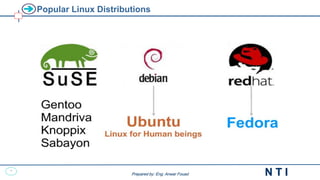
Popular Linux Distributions
4
N T I
Prepared by: Eng. Anwar Fouad
Why is it significant?
Growing popularity
Powerful
 Runs on multiple hardware platforms
 Users like its speed and stability
 No requirement for latest hardware
It’s “free”
 Licensed under GPL
 Vendors are distributors who package Linux
5
N T I
Prepared by: Eng. Anwar Fouad
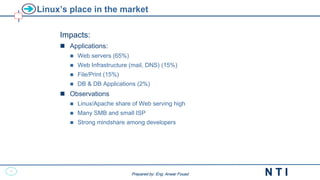
Linux’s place in the market
Impacts:
 Applications:
 Web servers (65%)
 Web Infrastructure (mail, DNS) (15%)
 File/Print (15%)
 DB & DB Applications (2%)
 Observations
 Linux/Apache share of Web serving high
 Many SMB and small ISP
 Strong mindshare among developers
N T I
Linux Fundamentals
Using the system
N T I
Linux Fundamentals
Linux Command Basics
Working with files and directories
8
N T I
Prepared by: Eng. Anwar Fouad
Syntax Of Basic Commands
<command name> [<options>] [<arg1> <arg2> ... <arg n>]
Expressions between brackets [ ] are optional.
<options>: sequence of letters preceded by ‘-’ character.
each letter represents one option.
the order of the options has no importance.
<arg i>: string of characters
its meaning depends on the current command
(usually, they are file pathnames)
<command name>: command name
usually an executable filename.
Different command elements are delimited by at least one space
character.
Linux/Unix is case-sensitive.
9
N T I
Prepared by: Eng. Anwar Fouad
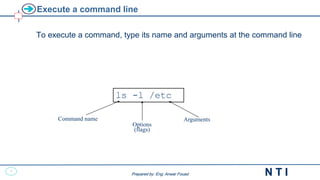
Execute a command line
To execute a command, type its name and arguments at the command line
ls -l /etc
Command name
Options
(flags)
Arguments
10
N T I
Prepared by: Eng. Anwar Fouad
File System Finding
11
N T I
Prepared by: Eng. Anwar Fouad
Finding and Processing Files
● Use locate
● Use find
12
N T I
Prepared by: Eng. Anwar Fouad
locate
● Queries a pre-built database of paths to files on the system
 Database must be updated by administrator
 Full path is searched, not just filename
● May only search directories where the user has read and execute
permission
13
N T I
Prepared by: Eng. Anwar Fouad
locate Examples
● locate file1
 Search for files with “file1" in the name or path
● Useful options
 -i performs a case-insensitive search
 -n X lists only the first X matches
14
N T I
Prepared by: Eng. Anwar Fouad
find
● find [directory...] [criteria...]
● Searches directory trees in real-time
 Slower but more accurate than locate
 CWD is used if no starting directory given
 All files are matched if no criteria given
● May only search directories where the user has read and execute
permission
15
N T I
Prepared by: Eng. Anwar Fouad
Basic find Examples
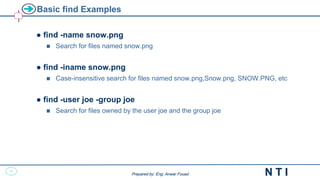
● find -name snow.png
 Search for files named snow.png
● find -iname snow.png
 Case-insensitive search for files named snow.png,Snow.png, SNOW.PNG, etc
● find -user joe -group joe
 Search for files owned by the user joe and the group joe
16
N T I
Prepared by: Eng. Anwar Fouad
find and Logical Operators
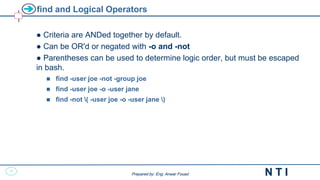
● Criteria are ANDed together by default.
● Can be OR'd or negated with -o and -not
● Parentheses can be used to determine logic order, but must be escaped
in bash.
 find -user joe -not -group joe
 find -user joe -o -user jane
 find -not ( -user joe -o -user jane )
17
N T I
Prepared by: Eng. Anwar Fouad
find and Numeric Criteria
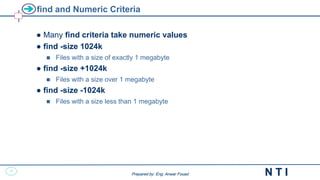
● Many find criteria take numeric values
● find -size 1024k
 Files with a size of exactly 1 megabyte
● find -size +1024k
 Files with a size over 1 megabyte
● find -size -1024k
 Files with a size less than 1 megabyte
18
N T I
Prepared by: Eng. Anwar Fouad
find and Access Times
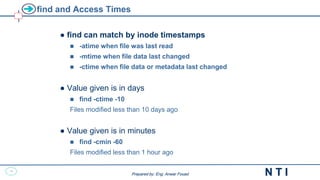
● find can match by inode timestamps
 -atime when file was last read
 -mtime when file data last changed
 -ctime when file data or metadata last changed
● Value given is in days
 find -ctime -10
Files modified less than 10 days ago
● Value given is in minutes
 find -cmin -60
Files modified less than 1 hour ago
19
N T I
Prepared by: Eng. Anwar Fouad
Storage Management
20
N T I
Prepared by: Eng. Anwar Fouad
What is Software RAID?
● Multiple disks grouped together into "arrays” to provide better
performance, redundancy or both.
● mdadm - provides the administration interface to software RAID.
● Many "RAID Levels" supported, including RAID O, 1 and 5.
● Spare disks add extra redundancy
● RAID devices are named, /dev/md0, /dev/md1, /dev/md2, /dev/md3 and
so on.
21
N T I
Prepared by: Eng. Anwar Fouad
Software RAID Configuration
● Create and define RAID devices using mdadm
mdadm -C /dev/md0 -l 1 -n 2 -x 1 /dev/sda1 /dev/sdb1 /dev/sdc1
● Format each RAID device with a filesystem
mke2fs -j /dev/md0
● Test the RAID devices
● mdadm allows you to check the status of your RAID devices
mdadm --detail /dev/md0
22
N T I
Prepared by: Eng. Anwar Fouad
Software RAID Testing and Recovery
● Simulating disk failures
mdadm /dev/md0 -f /dev/sda1
● Recovering from a software RAID disk failure
 replace the failed hard drive and power on
 reconstruct partitions on the replacement drive
 mdadm /dev/md0 -a /dev/sda1
● mdadm, /proc/mdstat, and syslog messages
23
N T I
Prepared by: Eng. Anwar Fouad
What is Logical Volume Manager (LVM)?
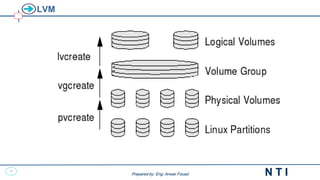
● A layer of abstraction that allows easy manipulation of
volumes. Including resizing of filesystems
● Allows reorganization of filesystems across multiple
physical devices
24
N T I
Prepared by: Eng. Anwar Fouad
LVM
25
N T I
Prepared by: Eng. Anwar Fouad
Creating Logical Volumes
● Create physical volumes
pvcreate /dev/hda3
● Assign physical volumes to volume groups
vgcreate vg0 /dev/hda3
● Create logical volumes from volume groups
lvcreate -L 256M -n data vg0
mke2fs -j /dev/vg0/data
26
N T I
Prepared by: Eng. Anwar Fouad
Resizing Logical Volumes
Growing Volumes
 lvextend can grow logical volumes
 vgextend adds new physical volumes to an existing volume group.
● Shrinking volumes
 lvreduce can then reduce the volume.
 Volume Groups can be reduced with:
pvmove /dev/hda3
vgreduce vg0 /dev/hda3
27
N T I
Prepared by: Eng. Anwar Fouad
Logical Volume Manager Snapshots
● Snapshots are special Logical Volumes that are an exact copy of an
existing Logical Volume at the time the snapshot is created
● Snapshots are perfect for backups and other operations
where a temporary copy of an existing dataset is needed
● Snapshots only consume space where they are
different from the original Logical Volume
28
N T I
Prepared by: Eng. Anwar Fouad
Using LVM Snapshots
● Create Snapshot of existing Logical Volume
# lvcreate -l 64 -s -n databackup /dev/vg0/data
● Mount Snapshot
# mkdir -p /mnt/databackup
# mount -o ro /dev/vg0/databackup /mnt/databackup
● Remove Snapshot
# umount /mnt/databackup
# lvremove /dev/vg0/databackup
N T I
Linux Fundamentals
Backup and restore
30
N T I
Prepared by: Eng. Anwar Fouad
Importance of Regular File System Backups
Backing up file systems is one of the most crucial system
administration functions.
Backups should be performed on a regularly scheduled basis to
prevent loss of data due to:
• Accidental deletion of files
• Hardware failures
• Problems when reinstalling or upgrading a system
• System crashes
• System break-in by an unauthorized user compromising data integrity
• Natural disasters
31
N T I
Prepared by: Eng. Anwar Fouad
Overview of Backup Methods
 The backup process involves copying data from one
computer to some other reliable storage medium for
safekeeping.
 Once the data has been archived, the system administrator
can then restore data to the system from any previously
recorded backup.
 Considerations that are relevant for storage devices:
 Cost
 Size
 Manageability
 Reliability
32
N T I
Prepared by: Eng. Anwar Fouad
Overview of Backup Methods
There are many types of backup procedures that define how the
backup will take place:
 Full - will backup everything on the hard drive at the scheduled point in
the day
 Partial - backs up selected files
 Incremental - only the files that have changed since the last backup
33
N T I
Prepared by: Eng. Anwar Fouad
Archiving Tools: tar
● tar can backup to a file or tape device
● supports GZIP and BZIP2 compression
● can preserve file permissions, ownership and timestamps
● supports extended attributes
● uses rmt to write to a remote tape device
34
N T I
Prepared by: Eng. Anwar Fouad
Archiving Tools: dump/restore
● Back up and restore ext2/3/4 filesystems
 Does not work with other filesystems
 dump should only be used on unmounted filesystems or filesystems
that are read-only.
● Can do full or incremental backups
● Examples:
dump -0uf /dev/nst0 /dev/hda2
restore -rf /dev/nst0
35
N T I
Prepared by: Eng. Anwar Fouad
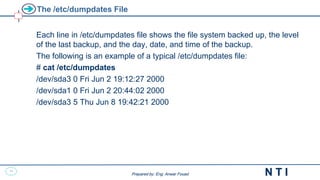
The /etc/dumpdates File
Each line in /etc/dumpdates file shows the file system backed up, the level
of the last backup, and the day, date, and time of the backup.
The following is an example of a typical /etc/dumpdates file:
# cat /etc/dumpdates
/dev/sda3 0 Fri Jun 2 19:12:27 2000
/dev/sda1 0 Fri Jun 2 20:44:02 2000
/dev/sda3 5 Thu Jun 8 19:42:21 2000
36
N T I
Prepared by: Eng. Anwar Fouad
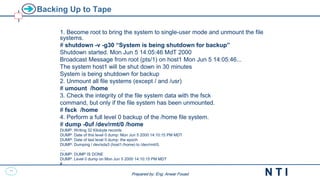
Backing Up to Tape
1. Become root to bring the system to single-user mode and unmount the file
systems.
# shutdown -v -g30 “System is being shutdown for backup”
Shutdown started. Mon Jun 5 14:05:46 MdT 2000
Broadcast Message from root (pts/1) on host1 Mon Jun 5 14:05:46...
The system host1 will be shut down in 30 minutes
System is being shutdown for backup
2. Unmount all file systems (except / and /usr)
# umount /home
3. Check the integrity of the file system data with the fsck
command, but only if the file system has been unmounted.
# fsck /home
4. Perform a full level 0 backup of the /home file system.
# dump -0uf /dev/rmt/0 /home
DUMP: Writing 32 Kilobyte records
DUMP: Date of this level 0 dump: Mon Jun 5 2000 14:10:15 PM MDT
DUMP: Date of last level 0 dump: the epoch
DUMP: Dumping / dev/sda3 (host1:/home) to /dev/rmt/0.
….
DUMP: DUMP IS DONE
DUMP: Level 0 dump on Mon Jun 5 2000 14:10:15 PM MDT
#
37
N T I
Prepared by: Eng. Anwar Fouad
Restoring File Systems
Command Format
restore options [ arguments ] [ filesystem ]
restore options [ arguments ] [ filenames . . . ]
Common Options
The following describes the some options for the restore command:
• t – Lists the table of contents of the backup media.
• r – Restores the entire file system from the backup media.
• x – Restores only the files named on the command line.
• i – Invokes an interactive restore.
• v – Specifies Verbose mode. Displays pathnames to the terminal
screen as each file is being restored.
• f – Specifies the tape device name.
38
N T I
Prepared by: Eng. Anwar Fouad
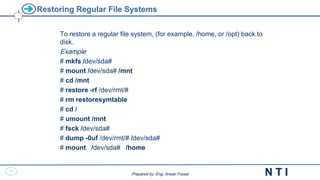
Restoring Regular File Systems
To restore a regular file system, (for example, /home, or /opt) back to
disk.
Example
# mkfs /dev/sda#
# mount /dev/sda# /mnt
# cd /mnt
# restore -rf /dev/rmt/#
# rm restoresymtable
# cd /
# umount /mnt
# fsck /dev/sda#
# dump -0uf /dev/rmt/# /dev/sda#
# mount /dev/sda# /home
39
N T I
Prepared by: Eng. Anwar Fouad
Command: at
at -f script [m] <arg_hour> [<arg_date>] [+arg_increment>]
 Executes a command file at a given date
<arg_temps> : hh:mm | now | noon | midnight
<arg_date> : <month> <day> or today | tomorrow
<arg_increment> : <number> minutes | hours | days | weeks | months
$ at -f myscript.sh 17:30 mar 22 2014 +2 hours
job 24 at 2014-03-22 19:30
at –l / atq : list the number of registered commands
at -d / atrm : cancels a registered command
Authorized users (respectively non-authorized users ) to use
this command are declared in a system file at.allow
(respectively at.deny).
40
N T I
Prepared by: Eng. Anwar Fouad
Disk Quota
41
N T I
Prepared by: Eng. Anwar Fouad
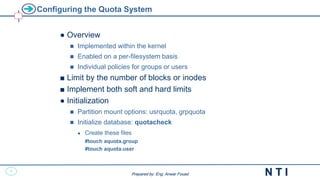
Configuring the Quota System
● Overview
 Implemented within the kernel
 Enabled on a per-filesystem basis
 Individual policies for groups or users
■ Limit by the number of blocks or inodes
■ Implement both soft and hard limits
● Initialization
 Partition mount options: usrquota, grpquota
 Initialize database: quotacheck
 Create these files
#touch aquota.group
#touch aquota.user
42
N T I
Prepared by: Eng. Anwar Fouad
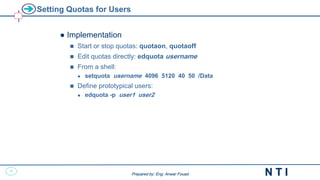
Setting Quotas for Users
● Implementation
 Start or stop quotas: quotaon, quotaoff
 Edit quotas directly: edquota username
 From a shell:
 setquota username 4096 5120 40 50 /Data
 Define prototypical users:
 edquota -p user1 user2
43
N T I
Prepared by: Eng. Anwar Fouad
Reporting Quota Status
● Reporting
 User inspection: quota
 Quota overviews: repquota
N T I
Linux Fundamentals
Network File Sharing Services
45
N T I
Prepared by: Eng. Anwar Fouad
File Transfer Protocol(FTP)
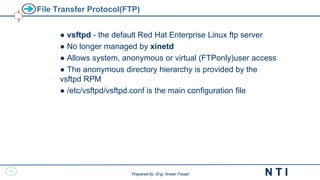
● vsftpd - the default Red Hat Enterprise Linux ftp server
● No longer managed by xinetd
● Allows system, anonymous or virtual (FTPonly)user access
● The anonymous directory hierarchy is provided by the
vsftpd RPM
● /etc/vsftpd/vsftpd.conf is the main configuration file
46
N T I
Prepared by: Eng. Anwar Fouad
Service Profile: FTP
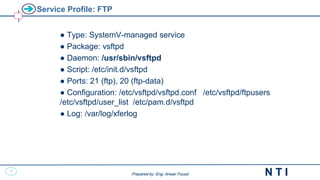
● Type: SystemV-managed service
● Package: vsftpd
● Daemon: /usr/sbin/vsftpd
● Script: /etc/init.d/vsftpd
● Ports: 21 (ftp), 20 (ftp-data)
● Configuration: /etc/vsftpd/vsftpd.conf /etc/vsftpd/ftpusers
/etc/vsftpd/user_list /etc/pam.d/vsftpd
● Log: /var/log/xferlog
47
N T I
Prepared by: Eng. Anwar Fouad
Network File Service (NFS)
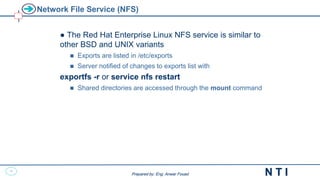
● The Red Hat Enterprise Linux NFS service is similar to
other BSD and UNIX variants
 Exports are listed in /etc/exports
 Server notified of changes to exports list with
exportfs -r or service nfs restart
 Shared directories are accessed through the mount command
48
N T I
Prepared by: Eng. Anwar Fouad
Service Profile: NFS
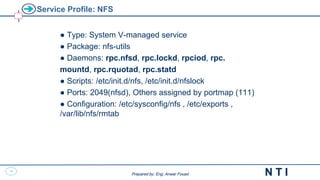
● Type: System V-managed service
● Package: nfs-utils
● Daemons: rpc.nfsd, rpc.lockd, rpciod, rpc.
mountd, rpc.rquotad, rpc.statd
● Scripts: /etc/init.d/nfs, /etc/init.d/nfslock
● Ports: 2049(nfsd), Others assigned by portmap (111)
● Configuration: /etc/sysconfig/nfs , /etc/exports ,
/var/lib/nfs/rmtab
49
N T I
Prepared by: Eng. Anwar Fouad
NFS Server
● Exported directories are defined in /etc/exports
NFS utilities
● exportfs –v from server-side
● showmount -e hostname from client-side

Linux Fundamentals - Extra.pdf

  • 1.
    0 N T I Preparedby: Eng. Anwar Fouad Linux Fundamentals
  • 2.
    1 N T I Preparedby: Eng. Anwar Fouad Prepared by: Eng. Anwar Fouad What is Linux? A fully-networked 32/64-Bit Unix-like Operating System  Unix Tools Like sed, awk , find, and grep (explained later)  Compilers Like C, C++, Fortran, …etc.  Network Tools Like telnet, ftp, ping, traceroute Multi-user, Multitasking, Multiprocessor Has the X Windows GUI Coexists with other Operating Systems Runs on multiple hardware platforms Includes the Source Code
  • 3.
    2 N T I Preparedby: Eng. Anwar Fouad Prepared by: Eng. Anwar Fouad How do you get it? Download it from the Internet From a “Distribution” (e.g. Red Hat)  Linux kernel  X Windows system and GUI  Web, e-mail, FTP servers  Installation & configuration support  3rd party apps  Hardware support
  • 4.
    3 N T I Preparedby: Eng. Anwar Fouad Prepared by: Eng. Anwar Fouad Popular Linux Distributions
  • 5.
    4 N T I Preparedby: Eng. Anwar Fouad Prepared by: Eng. Anwar Fouad Why is it significant? Growing popularity Powerful  Runs on multiple hardware platforms  Users like its speed and stability  No requirement for latest hardware It’s “free”  Licensed under GPL  Vendors are distributors who package Linux
  • 6.
    5 N T I Preparedby: Eng. Anwar Fouad Prepared by: Eng. Anwar Fouad Linux’s place in the market Impacts:  Applications:  Web servers (65%)  Web Infrastructure (mail, DNS) (15%)  File/Print (15%)  DB & DB Applications (2%)  Observations  Linux/Apache share of Web serving high  Many SMB and small ISP  Strong mindshare among developers
  • 7.
    N T I LinuxFundamentals Using the system
  • 8.
    N T I LinuxFundamentals Linux Command Basics Working with files and directories
  • 9.
    8 N T I Preparedby: Eng. Anwar Fouad Prepared by: Eng. Anwar Fouad Syntax Of Basic Commands <command name> [<options>] [<arg1> <arg2> ... <arg n>] Expressions between brackets [ ] are optional. <options>: sequence of letters preceded by ‘-’ character. each letter represents one option. the order of the options has no importance. <arg i>: string of characters its meaning depends on the current command (usually, they are file pathnames) <command name>: command name usually an executable filename. Different command elements are delimited by at least one space character. Linux/Unix is case-sensitive.
  • 10.
    9 N T I Preparedby: Eng. Anwar Fouad Prepared by: Eng. Anwar Fouad Execute a command line To execute a command, type its name and arguments at the command line ls -l /etc Command name Options (flags) Arguments
  • 11.
    10 N T I Preparedby: Eng. Anwar Fouad File System Finding
  • 12.
    11 N T I Preparedby: Eng. Anwar Fouad Prepared by: Eng. Anwar Fouad Finding and Processing Files ● Use locate ● Use find
  • 13.
    12 N T I Preparedby: Eng. Anwar Fouad Prepared by: Eng. Anwar Fouad locate ● Queries a pre-built database of paths to files on the system  Database must be updated by administrator  Full path is searched, not just filename ● May only search directories where the user has read and execute permission
  • 14.
    13 N T I Preparedby: Eng. Anwar Fouad Prepared by: Eng. Anwar Fouad locate Examples ● locate file1  Search for files with “file1" in the name or path ● Useful options  -i performs a case-insensitive search  -n X lists only the first X matches
  • 15.
    14 N T I Preparedby: Eng. Anwar Fouad Prepared by: Eng. Anwar Fouad find ● find [directory...] [criteria...] ● Searches directory trees in real-time  Slower but more accurate than locate  CWD is used if no starting directory given  All files are matched if no criteria given ● May only search directories where the user has read and execute permission
  • 16.
    15 N T I Preparedby: Eng. Anwar Fouad Prepared by: Eng. Anwar Fouad Basic find Examples ● find -name snow.png  Search for files named snow.png ● find -iname snow.png  Case-insensitive search for files named snow.png,Snow.png, SNOW.PNG, etc ● find -user joe -group joe  Search for files owned by the user joe and the group joe
  • 17.
    16 N T I Preparedby: Eng. Anwar Fouad Prepared by: Eng. Anwar Fouad find and Logical Operators ● Criteria are ANDed together by default. ● Can be OR'd or negated with -o and -not ● Parentheses can be used to determine logic order, but must be escaped in bash.  find -user joe -not -group joe  find -user joe -o -user jane  find -not ( -user joe -o -user jane )
  • 18.
    17 N T I Preparedby: Eng. Anwar Fouad Prepared by: Eng. Anwar Fouad find and Numeric Criteria ● Many find criteria take numeric values ● find -size 1024k  Files with a size of exactly 1 megabyte ● find -size +1024k  Files with a size over 1 megabyte ● find -size -1024k  Files with a size less than 1 megabyte
  • 19.
    18 N T I Preparedby: Eng. Anwar Fouad Prepared by: Eng. Anwar Fouad find and Access Times ● find can match by inode timestamps  -atime when file was last read  -mtime when file data last changed  -ctime when file data or metadata last changed ● Value given is in days  find -ctime -10 Files modified less than 10 days ago ● Value given is in minutes  find -cmin -60 Files modified less than 1 hour ago
  • 20.
    19 N T I Preparedby: Eng. Anwar Fouad Storage Management
  • 21.
    20 N T I Preparedby: Eng. Anwar Fouad Prepared by: Eng. Anwar Fouad What is Software RAID? ● Multiple disks grouped together into "arrays” to provide better performance, redundancy or both. ● mdadm - provides the administration interface to software RAID. ● Many "RAID Levels" supported, including RAID O, 1 and 5. ● Spare disks add extra redundancy ● RAID devices are named, /dev/md0, /dev/md1, /dev/md2, /dev/md3 and so on.
  • 22.
    21 N T I Preparedby: Eng. Anwar Fouad Prepared by: Eng. Anwar Fouad Software RAID Configuration ● Create and define RAID devices using mdadm mdadm -C /dev/md0 -l 1 -n 2 -x 1 /dev/sda1 /dev/sdb1 /dev/sdc1 ● Format each RAID device with a filesystem mke2fs -j /dev/md0 ● Test the RAID devices ● mdadm allows you to check the status of your RAID devices mdadm --detail /dev/md0
  • 23.
    22 N T I Preparedby: Eng. Anwar Fouad Prepared by: Eng. Anwar Fouad Software RAID Testing and Recovery ● Simulating disk failures mdadm /dev/md0 -f /dev/sda1 ● Recovering from a software RAID disk failure  replace the failed hard drive and power on  reconstruct partitions on the replacement drive  mdadm /dev/md0 -a /dev/sda1 ● mdadm, /proc/mdstat, and syslog messages
  • 24.
    23 N T I Preparedby: Eng. Anwar Fouad Prepared by: Eng. Anwar Fouad What is Logical Volume Manager (LVM)? ● A layer of abstraction that allows easy manipulation of volumes. Including resizing of filesystems ● Allows reorganization of filesystems across multiple physical devices
  • 25.
    24 N T I Preparedby: Eng. Anwar Fouad Prepared by: Eng. Anwar Fouad LVM
  • 26.
    25 N T I Preparedby: Eng. Anwar Fouad Prepared by: Eng. Anwar Fouad Creating Logical Volumes ● Create physical volumes pvcreate /dev/hda3 ● Assign physical volumes to volume groups vgcreate vg0 /dev/hda3 ● Create logical volumes from volume groups lvcreate -L 256M -n data vg0 mke2fs -j /dev/vg0/data
  • 27.
    26 N T I Preparedby: Eng. Anwar Fouad Prepared by: Eng. Anwar Fouad Resizing Logical Volumes Growing Volumes  lvextend can grow logical volumes  vgextend adds new physical volumes to an existing volume group. ● Shrinking volumes  lvreduce can then reduce the volume.  Volume Groups can be reduced with: pvmove /dev/hda3 vgreduce vg0 /dev/hda3
  • 28.
    27 N T I Preparedby: Eng. Anwar Fouad Prepared by: Eng. Anwar Fouad Logical Volume Manager Snapshots ● Snapshots are special Logical Volumes that are an exact copy of an existing Logical Volume at the time the snapshot is created ● Snapshots are perfect for backups and other operations where a temporary copy of an existing dataset is needed ● Snapshots only consume space where they are different from the original Logical Volume
  • 29.
    28 N T I Preparedby: Eng. Anwar Fouad Prepared by: Eng. Anwar Fouad Using LVM Snapshots ● Create Snapshot of existing Logical Volume # lvcreate -l 64 -s -n databackup /dev/vg0/data ● Mount Snapshot # mkdir -p /mnt/databackup # mount -o ro /dev/vg0/databackup /mnt/databackup ● Remove Snapshot # umount /mnt/databackup # lvremove /dev/vg0/databackup
  • 30.
    N T I LinuxFundamentals Backup and restore
  • 31.
    30 N T I Preparedby: Eng. Anwar Fouad Prepared by: Eng. Anwar Fouad Importance of Regular File System Backups Backing up file systems is one of the most crucial system administration functions. Backups should be performed on a regularly scheduled basis to prevent loss of data due to: • Accidental deletion of files • Hardware failures • Problems when reinstalling or upgrading a system • System crashes • System break-in by an unauthorized user compromising data integrity • Natural disasters
  • 32.
    31 N T I Preparedby: Eng. Anwar Fouad Prepared by: Eng. Anwar Fouad Overview of Backup Methods  The backup process involves copying data from one computer to some other reliable storage medium for safekeeping.  Once the data has been archived, the system administrator can then restore data to the system from any previously recorded backup.  Considerations that are relevant for storage devices:  Cost  Size  Manageability  Reliability
  • 33.
    32 N T I Preparedby: Eng. Anwar Fouad Prepared by: Eng. Anwar Fouad Overview of Backup Methods There are many types of backup procedures that define how the backup will take place:  Full - will backup everything on the hard drive at the scheduled point in the day  Partial - backs up selected files  Incremental - only the files that have changed since the last backup
  • 34.
    33 N T I Preparedby: Eng. Anwar Fouad Prepared by: Eng. Anwar Fouad Archiving Tools: tar ● tar can backup to a file or tape device ● supports GZIP and BZIP2 compression ● can preserve file permissions, ownership and timestamps ● supports extended attributes ● uses rmt to write to a remote tape device
  • 35.
    34 N T I Preparedby: Eng. Anwar Fouad Prepared by: Eng. Anwar Fouad Archiving Tools: dump/restore ● Back up and restore ext2/3/4 filesystems  Does not work with other filesystems  dump should only be used on unmounted filesystems or filesystems that are read-only. ● Can do full or incremental backups ● Examples: dump -0uf /dev/nst0 /dev/hda2 restore -rf /dev/nst0
  • 36.
    35 N T I Preparedby: Eng. Anwar Fouad Prepared by: Eng. Anwar Fouad The /etc/dumpdates File Each line in /etc/dumpdates file shows the file system backed up, the level of the last backup, and the day, date, and time of the backup. The following is an example of a typical /etc/dumpdates file: # cat /etc/dumpdates /dev/sda3 0 Fri Jun 2 19:12:27 2000 /dev/sda1 0 Fri Jun 2 20:44:02 2000 /dev/sda3 5 Thu Jun 8 19:42:21 2000
  • 37.
    36 N T I Preparedby: Eng. Anwar Fouad Prepared by: Eng. Anwar Fouad Backing Up to Tape 1. Become root to bring the system to single-user mode and unmount the file systems. # shutdown -v -g30 “System is being shutdown for backup” Shutdown started. Mon Jun 5 14:05:46 MdT 2000 Broadcast Message from root (pts/1) on host1 Mon Jun 5 14:05:46... The system host1 will be shut down in 30 minutes System is being shutdown for backup 2. Unmount all file systems (except / and /usr) # umount /home 3. Check the integrity of the file system data with the fsck command, but only if the file system has been unmounted. # fsck /home 4. Perform a full level 0 backup of the /home file system. # dump -0uf /dev/rmt/0 /home DUMP: Writing 32 Kilobyte records DUMP: Date of this level 0 dump: Mon Jun 5 2000 14:10:15 PM MDT DUMP: Date of last level 0 dump: the epoch DUMP: Dumping / dev/sda3 (host1:/home) to /dev/rmt/0. …. DUMP: DUMP IS DONE DUMP: Level 0 dump on Mon Jun 5 2000 14:10:15 PM MDT #
  • 38.
    37 N T I Preparedby: Eng. Anwar Fouad Prepared by: Eng. Anwar Fouad Restoring File Systems Command Format restore options [ arguments ] [ filesystem ] restore options [ arguments ] [ filenames . . . ] Common Options The following describes the some options for the restore command: • t – Lists the table of contents of the backup media. • r – Restores the entire file system from the backup media. • x – Restores only the files named on the command line. • i – Invokes an interactive restore. • v – Specifies Verbose mode. Displays pathnames to the terminal screen as each file is being restored. • f – Specifies the tape device name.
  • 39.
    38 N T I Preparedby: Eng. Anwar Fouad Prepared by: Eng. Anwar Fouad Restoring Regular File Systems To restore a regular file system, (for example, /home, or /opt) back to disk. Example # mkfs /dev/sda# # mount /dev/sda# /mnt # cd /mnt # restore -rf /dev/rmt/# # rm restoresymtable # cd / # umount /mnt # fsck /dev/sda# # dump -0uf /dev/rmt/# /dev/sda# # mount /dev/sda# /home
  • 40.
    39 N T I Preparedby: Eng. Anwar Fouad Prepared by: Eng. Anwar Fouad Command: at at -f script [m] <arg_hour> [<arg_date>] [+arg_increment>]  Executes a command file at a given date <arg_temps> : hh:mm | now | noon | midnight <arg_date> : <month> <day> or today | tomorrow <arg_increment> : <number> minutes | hours | days | weeks | months $ at -f myscript.sh 17:30 mar 22 2014 +2 hours job 24 at 2014-03-22 19:30 at –l / atq : list the number of registered commands at -d / atrm : cancels a registered command Authorized users (respectively non-authorized users ) to use this command are declared in a system file at.allow (respectively at.deny).
  • 41.
    40 N T I Preparedby: Eng. Anwar Fouad Disk Quota
  • 42.
    41 N T I Preparedby: Eng. Anwar Fouad Prepared by: Eng. Anwar Fouad Configuring the Quota System ● Overview  Implemented within the kernel  Enabled on a per-filesystem basis  Individual policies for groups or users ■ Limit by the number of blocks or inodes ■ Implement both soft and hard limits ● Initialization  Partition mount options: usrquota, grpquota  Initialize database: quotacheck  Create these files #touch aquota.group #touch aquota.user
  • 43.
    42 N T I Preparedby: Eng. Anwar Fouad Prepared by: Eng. Anwar Fouad Setting Quotas for Users ● Implementation  Start or stop quotas: quotaon, quotaoff  Edit quotas directly: edquota username  From a shell:  setquota username 4096 5120 40 50 /Data  Define prototypical users:  edquota -p user1 user2
  • 44.
    43 N T I Preparedby: Eng. Anwar Fouad Prepared by: Eng. Anwar Fouad Reporting Quota Status ● Reporting  User inspection: quota  Quota overviews: repquota
  • 45.
    N T I LinuxFundamentals Network File Sharing Services
  • 46.
    45 N T I Preparedby: Eng. Anwar Fouad Prepared by: Eng. Anwar Fouad File Transfer Protocol(FTP) ● vsftpd - the default Red Hat Enterprise Linux ftp server ● No longer managed by xinetd ● Allows system, anonymous or virtual (FTPonly)user access ● The anonymous directory hierarchy is provided by the vsftpd RPM ● /etc/vsftpd/vsftpd.conf is the main configuration file
  • 47.
    46 N T I Preparedby: Eng. Anwar Fouad Prepared by: Eng. Anwar Fouad Service Profile: FTP ● Type: SystemV-managed service ● Package: vsftpd ● Daemon: /usr/sbin/vsftpd ● Script: /etc/init.d/vsftpd ● Ports: 21 (ftp), 20 (ftp-data) ● Configuration: /etc/vsftpd/vsftpd.conf /etc/vsftpd/ftpusers /etc/vsftpd/user_list /etc/pam.d/vsftpd ● Log: /var/log/xferlog
  • 48.
    47 N T I Preparedby: Eng. Anwar Fouad Prepared by: Eng. Anwar Fouad Network File Service (NFS) ● The Red Hat Enterprise Linux NFS service is similar to other BSD and UNIX variants  Exports are listed in /etc/exports  Server notified of changes to exports list with exportfs -r or service nfs restart  Shared directories are accessed through the mount command
  • 49.
    48 N T I Preparedby: Eng. Anwar Fouad Prepared by: Eng. Anwar Fouad Service Profile: NFS ● Type: System V-managed service ● Package: nfs-utils ● Daemons: rpc.nfsd, rpc.lockd, rpciod, rpc. mountd, rpc.rquotad, rpc.statd ● Scripts: /etc/init.d/nfs, /etc/init.d/nfslock ● Ports: 2049(nfsd), Others assigned by portmap (111) ● Configuration: /etc/sysconfig/nfs , /etc/exports , /var/lib/nfs/rmtab
  • 50.
    49 N T I Preparedby: Eng. Anwar Fouad Prepared by: Eng. Anwar Fouad NFS Server ● Exported directories are defined in /etc/exports NFS utilities ● exportfs –v from server-side ● showmount -e hostname from client-side