Liang, Introduction to Java Programming, Tenth Edition, (c) 2015 Pearson Education, Inc. All
rights reserved.
1
Chapter 4: Mathematical
Functions, Characters, and Strings
CS1: Java Programming
Colorado State University
Original slides by Daniel Liang
Modified slides by Chris Wilcox
Liang, Introduction to Java Programming, Tenth Edition, (c) 2015 Pearson Education, Inc. All
rights reserved.
2
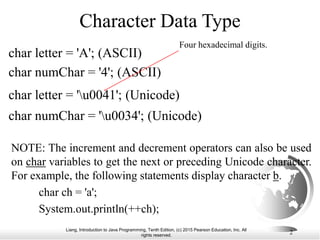
Character Data Type
char letter = 'A'; (ASCII)
char numChar = '4'; (ASCII)
char letter = 'u0041'; (Unicode)
char numChar = 'u0034'; (Unicode)
Four hexadecimal digits.
NOTE: The increment and decrement operators can also be used
on char variables to get the next or preceding Unicode character.
For example, the following statements display character b.
char ch = 'a';
System.out.println(++ch);
Liang, Introduction to Java Programming, Tenth Edition, (c) 2015 Pearson Education, Inc. All
rights reserved.
3
Unicode Format
Java characters use Unicode, a 16-bit encoding scheme
established by the Unicode Consortium to support the
interchange, processing, and display of written texts in the
world’s diverse languages. Unicode takes two bytes,
preceded by u, expressed in four hexadecimal numbers
that run from 'u0000' to 'uFFFF'. So, Unicode can
represent 65535 + 1 characters.
Unicode u03b1 u03b2 u03b3 for three Greek
letters
Liang, Introduction to Java Programming, Tenth Edition, (c) 2015 Pearson Education, Inc. All
rights reserved.
4
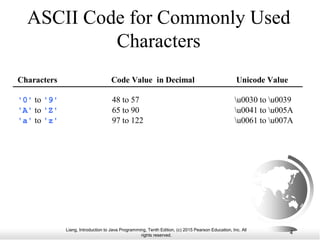
ASCII Code for Commonly Used
Characters
Characters Code Value in Decimal Unicode Value
'0' to '9' 48 to 57 u0030 to u0039
'A' to 'Z' 65 to 90 u0041 to u005A
'a' to 'z' 97 to 122 u0061 to u007A
Liang, Introduction to Java Programming, Tenth Edition, (c) 2015 Pearson Education, Inc. All
rights reserved.
5
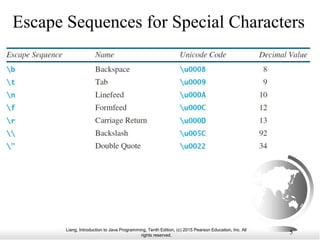
Escape Sequences for Special Characters
Liang, Introduction to Java Programming, Tenth Edition, (c) 2015 Pearson Education, Inc. All
rights reserved.
6
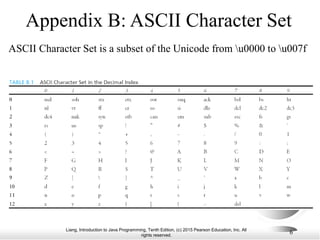
Appendix B: ASCII Character Set
ASCII Character Set is a subset of the Unicode from u0000 to u007f
Liang, Introduction to Java Programming, Tenth Edition, (c) 2015 Pearson Education, Inc. All
rights reserved.
7
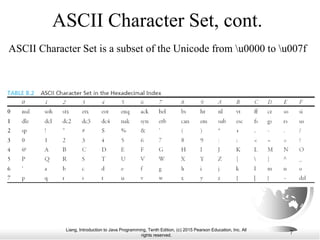
ASCII Character Set, cont.
ASCII Character Set is a subset of the Unicode from u0000 to u007f
Liang, Introduction to Java Programming, Tenth Edition, (c) 2015 Pearson Education, Inc. All
rights reserved.
8
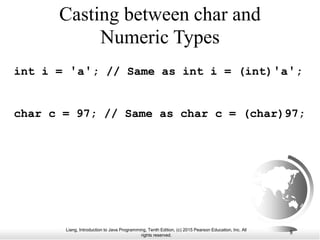
Casting between char and
Numeric Types
int i = 'a'; // Same as int i = (int)'a';
char c = 97; // Same as char c = (char)97;
Liang, Introduction to Java Programming, Tenth Edition, (c) 2015 Pearson Education, Inc. All
rights reserved.
9
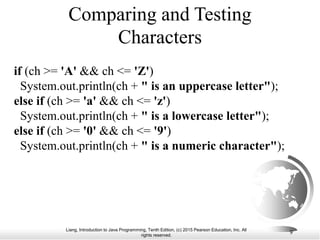
Comparing and Testing
Characters
if (ch >= 'A' && ch <= 'Z')
System.out.println(ch + " is an uppercase letter");
else if (ch >= 'a' && ch <= 'z')
System.out.println(ch + " is a lowercase letter");
else if (ch >= '0' && ch <= '9')
System.out.println(ch + " is a numeric character");
Liang, Introduction to Java Programming, Tenth Edition, (c) 2015 Pearson Education, Inc. All
rights reserved.
10
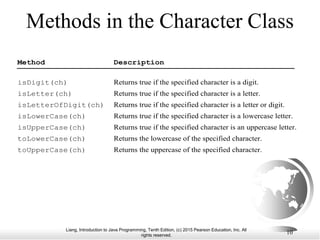
Methods in the Character Class
Method Description
isDigit(ch) Returns true if the specified character is a digit.
isLetter(ch) Returns true if the specified character is a letter.
isLetterOfDigit(ch) Returns true if the specified character is a letter or digit.
isLowerCase(ch) Returns true if the specified character is a lowercase letter.
isUpperCase(ch) Returns true if the specified character is an uppercase letter.
toLowerCase(ch) Returns the lowercase of the specified character.
toUpperCase(ch) Returns the uppercase of the specified character.
Liang, Introduction to Java Programming, Tenth Edition, (c) 2015 Pearson Education, Inc. All
rights reserved.
11
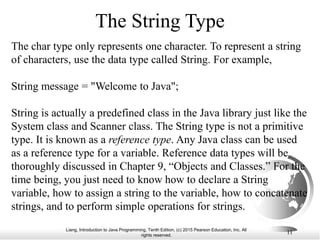
The String Type
The char type only represents one character. To represent a string
of characters, use the data type called String. For example,
String message = "Welcome to Java";
String is actually a predefined class in the Java library just like the
System class and Scanner class. The String type is not a primitive
type. It is known as a reference type. Any Java class can be used
as a reference type for a variable. Reference data types will be
thoroughly discussed in Chapter 9, “Objects and Classes.” For the
time being, you just need to know how to declare a String
variable, how to assign a string to the variable, how to concatenate
strings, and to perform simple operations for strings.
Liang, Introduction to Java Programming, Tenth Edition, (c) 2015 Pearson Education, Inc. All
rights reserved.
12
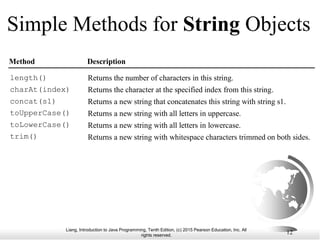
Simple Methods for String Objects
Method Description
Returns the number of characters in this string.
Returns the character at the specified index from this string.
Returns a new string that concatenates this string with string s1.
Returns a new string with all letters in uppercase.
Returns a new string with all letters in lowercase.
Returns a new string with whitespace characters trimmed on both sides.
length()
charAt(index)
concat(s1)
toUpperCase()
toLowerCase()
trim()
Liang, Introduction to Java Programming, Tenth Edition, (c) 2015 Pearson Education, Inc. All
rights reserved.
13
Simple Methods for String Objects
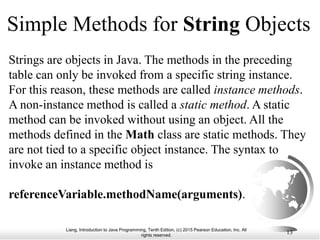
Strings are objects in Java. The methods in the preceding
table can only be invoked from a specific string instance.
For this reason, these methods are called instance methods.
A non-instance method is called a static method. A static
method can be invoked without using an object. All the
methods defined in the Math class are static methods. They
are not tied to a specific object instance. The syntax to
invoke an instance method is
referenceVariable.methodName(arguments).
Liang, Introduction to Java Programming, Tenth Edition, (c) 2015 Pearson Education, Inc. All
rights reserved.
14
Getting String Length
String message = "Welcome to Java";
System.out.println("The length of " + message + " is "
+ message.length());
Liang, Introduction to Java Programming, Tenth Edition, (c) 2015 Pearson Education, Inc. All
rights reserved.
15
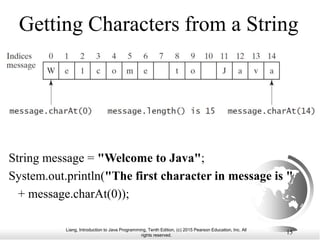
Getting Characters from a String
String message = "Welcome to Java";
System.out.println("The first character in message is "
+ message.charAt(0));
Liang, Introduction to Java Programming, Tenth Edition, (c) 2015 Pearson Education, Inc. All
rights reserved.
16
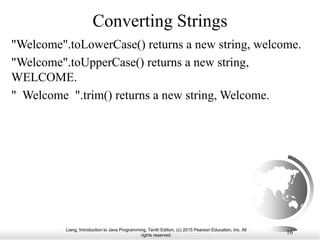
Converting Strings
"Welcome".toLowerCase() returns a new string, welcome.
"Welcome".toUpperCase() returns a new string,
WELCOME.
" Welcome ".trim() returns a new string, Welcome.
Liang, Introduction to Java Programming, Tenth Edition, (c) 2015 Pearson Education, Inc. All
rights reserved.
17
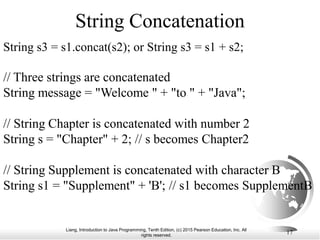
String Concatenation
String s3 = s1.concat(s2); or String s3 = s1 + s2;
// Three strings are concatenated
String message = "Welcome " + "to " + "Java";
// String Chapter is concatenated with number 2
String s = "Chapter" + 2; // s becomes Chapter2
// String Supplement is concatenated with character B
String s1 = "Supplement" + 'B'; // s1 becomes SupplementB
Liang, Introduction to Java Programming, Tenth Edition, (c) 2015 Pearson Education, Inc. All
rights reserved.
18
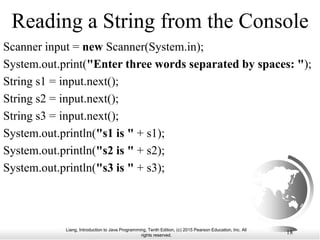
Reading a String from the Console
Scanner input = new Scanner(System.in);
System.out.print("Enter three words separated by spaces: ");
String s1 = input.next();
String s2 = input.next();
String s3 = input.next();
System.out.println("s1 is " + s1);
System.out.println("s2 is " + s2);
System.out.println("s3 is " + s3);
Liang, Introduction to Java Programming, Tenth Edition, (c) 2015 Pearson Education, Inc. All
rights reserved.
19
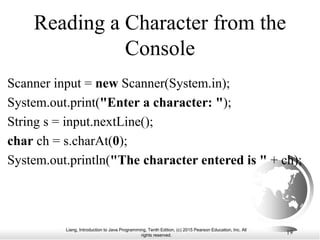
Reading a Character from the
Console
Scanner input = new Scanner(System.in);
System.out.print("Enter a character: ");
String s = input.nextLine();
char ch = s.charAt(0);
System.out.println("The character entered is " + ch);
Liang, Introduction to Java Programming, Tenth Edition, (c) 2015 Pearson Education, Inc. All
rights reserved.
20
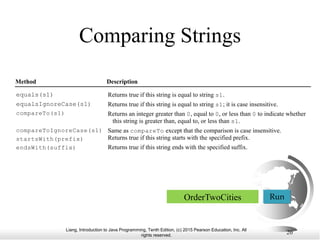
Comparing Strings
Method Description
Returns true if this string is equal to string s1.
Returns true if this string is equal to string s1; it is case insensitive.
Returns an integer greater than 0, equal to 0, or less than 0 to indicate whether
this string is greater than, equal to, or less than s1.
Same as compareTo except that the comparison is case insensitive.
Returns true if this string starts with the specified prefix.
Returns true if this string ends with the specified suffix.
equals(s1)
equalsIgnoreCase(s1)
compareTo(s1)
compareToIgnoreCase(s1)
startsWith(prefix)
endsWith(suffix)
OrderTwoCities Run
Liang, Introduction to Java Programming, Tenth Edition, (c) 2015 Pearson Education, Inc. All
rights reserved.
21
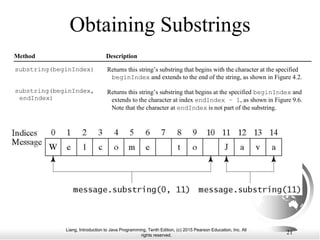
Obtaining Substrings
Method Description
Returns this string’s substring that begins with the character at the specified
beginIndex and extends to the end of the string, as shown in Figure 4.2.
Returns this string’s substring that begins at the specified beginIndex and
extends to the character at index endIndex – 1, as shown in Figure 9.6.
Note that the character at endIndex is not part of the substring.
substring(beginIndex)
substring(beginIndex,
endIndex)
Liang, Introduction to Java Programming, Tenth Edition, (c) 2015 Pearson Education, Inc. All
rights reserved.
22
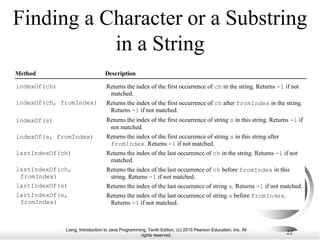
Finding a Character or a Substring
in a String
Method Description
Returns the index of the first occurrence of ch in the string. Returns -1 if not
matched.
Returns the index of the first occurrence of ch after fromIndex in the string.
Returns -1 if not matched.
Returns the index of the first occurrence of string s in this string. Returns -1 if
not matched.
Returns the index of the first occurrence of string s in this string after
fromIndex. Returns -1 if not matched.
Returns the index of the last occurrence of ch in the string. Returns -1 if not
matched.
Returns the index of the last occurrence of ch before fromIndex in this
string. Returns -1 if not matched.
Returns the index of the last occurrence of string s. Returns -1 if not matched.
Returns the index of the last occurrence of string s before fromIndex.
Returns -1 if not matched.
indexOf(ch)
indexOf(ch, fromIndex)
indexOf(s)
indexOf(s, fromIndex)
lastIndexOf(ch)
lastIndexOf(ch,
fromIndex)
lastIndexOf(s)
lastIndexOf(s,
fromIndex)
Liang, Introduction to Java Programming, Tenth Edition, (c) 2015 Pearson Education, Inc. All
rights reserved.
23
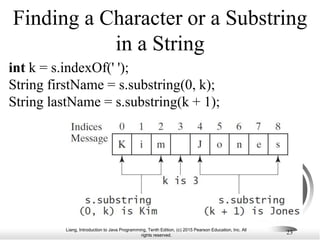
Finding a Character or a Substring
in a String
int k = s.indexOf(' ');
String firstName = s.substring(0, k);
String lastName = s.substring(k + 1);
Liang, Introduction to Java Programming, Tenth Edition, (c) 2015 Pearson Education, Inc. All
rights reserved.
24
Mathematical Functions
Java provides many useful methods in the Math
class for performing common mathematical
functions.
Liang, Introduction to Java Programming, Tenth Edition, (c) 2015 Pearson Education, Inc. All
rights reserved.
25
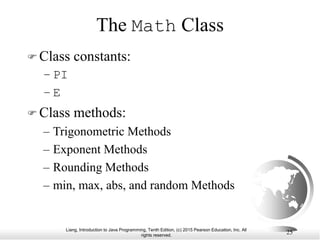
The Math Class
 Class constants:
– PI
– E
 Class methods:
– Trigonometric Methods
– Exponent Methods
– Rounding Methods
– min, max, abs, and random Methods
Liang, Introduction to Java Programming, Tenth Edition, (c) 2015 Pearson Education, Inc. All
rights reserved.
26
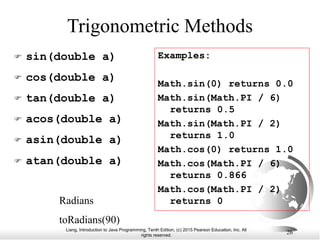
Trigonometric Methods
 sin(double a)
 cos(double a)
 tan(double a)
 acos(double a)
 asin(double a)
 atan(double a)
Radians
toRadians(90)
Examples:
Math.sin(0) returns 0.0
Math.sin(Math.PI / 6)
returns 0.5
Math.sin(Math.PI / 2)
returns 1.0
Math.cos(0) returns 1.0
Math.cos(Math.PI / 6)
returns 0.866
Math.cos(Math.PI / 2)
returns 0
Liang, Introduction to Java Programming, Tenth Edition, (c) 2015 Pearson Education, Inc. All
rights reserved.
27
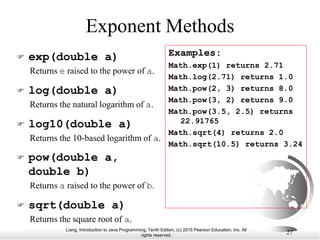
Exponent Methods
 exp(double a)
Returns e raised to the power of a.
 log(double a)
Returns the natural logarithm of a.
 log10(double a)
Returns the 10-based logarithm of a.
 pow(double a,
double b)
Returns a raised to the power of b.
 sqrt(double a)
Returns the square root of a.
Examples:
Math.exp(1) returns 2.71
Math.log(2.71) returns 1.0
Math.pow(2, 3) returns 8.0
Math.pow(3, 2) returns 9.0
Math.pow(3.5, 2.5) returns
22.91765
Math.sqrt(4) returns 2.0
Math.sqrt(10.5) returns 3.24
Liang, Introduction to Java Programming, Tenth Edition, (c) 2015 Pearson Education, Inc. All
rights reserved.
28
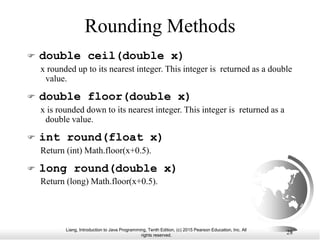
Rounding Methods
 double ceil(double x)
x rounded up to its nearest integer. This integer is returned as a double
value.
 double floor(double x)
x is rounded down to its nearest integer. This integer is returned as a
double value.
 int round(float x)
Return (int) Math.floor(x+0.5).
 long round(double x)
Return (long) Math.floor(x+0.5).
Liang, Introduction to Java Programming, Tenth Edition, (c) 2015 Pearson Education, Inc. All
rights reserved.
29
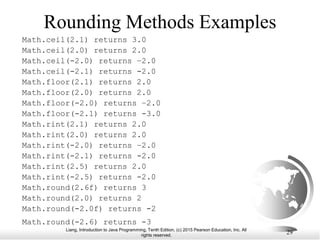
Rounding Methods Examples
Math.ceil(2.1) returns 3.0
Math.ceil(2.0) returns 2.0
Math.ceil(-2.0) returns –2.0
Math.ceil(-2.1) returns -2.0
Math.floor(2.1) returns 2.0
Math.floor(2.0) returns 2.0
Math.floor(-2.0) returns –2.0
Math.floor(-2.1) returns -3.0
Math.rint(2.1) returns 2.0
Math.rint(2.0) returns 2.0
Math.rint(-2.0) returns –2.0
Math.rint(-2.1) returns -2.0
Math.rint(2.5) returns 2.0
Math.rint(-2.5) returns -2.0
Math.round(2.6f) returns 3
Math.round(2.0) returns 2
Math.round(-2.0f) returns -2
Math.round(-2.6) returns -3
Liang, Introduction to Java Programming, Tenth Edition, (c) 2015 Pearson Education, Inc. All
rights reserved.
30
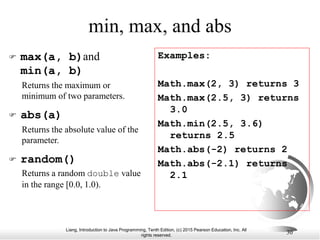
min, max, and abs
 max(a, b)and
min(a, b)
Returns the maximum or
minimum of two parameters.
 abs(a)
Returns the absolute value of the
parameter.
 random()
Returns a random double value
in the range [0.0, 1.0).
Examples:
Math.max(2, 3) returns 3
Math.max(2.5, 3) returns
3.0
Math.min(2.5, 3.6)
returns 2.5
Math.abs(-2) returns 2
Math.abs(-2.1) returns
2.1
Liang, Introduction to Java Programming, Tenth Edition, (c) 2015 Pearson Education, Inc. All
rights reserved.
31
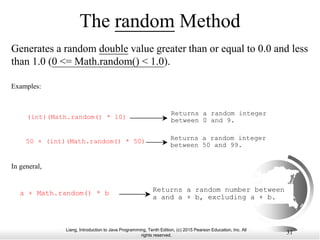
The random Method
Generates a random double value greater than or equal to 0.0 and less
than 1.0 (0 <= Math.random() < 1.0).
Examples:
(int)(Math.random() * 10)
Returns a random integer
between 0 and 9.
50 + (int)(Math.random() * 50) Returns a random integer
between 50 and 99.
In general,
a + Math.random() * b Returns a random number between
a and a + b, excluding a + b.

LiangChapter4 Unicode , ASCII Code .ppt

  • 1.
    Liang, Introduction toJava Programming, Tenth Edition, (c) 2015 Pearson Education, Inc. All rights reserved. 1 Chapter 4: Mathematical Functions, Characters, and Strings CS1: Java Programming Colorado State University Original slides by Daniel Liang Modified slides by Chris Wilcox
  • 2.
    Liang, Introduction toJava Programming, Tenth Edition, (c) 2015 Pearson Education, Inc. All rights reserved. 2 Character Data Type char letter = 'A'; (ASCII) char numChar = '4'; (ASCII) char letter = 'u0041'; (Unicode) char numChar = 'u0034'; (Unicode) Four hexadecimal digits. NOTE: The increment and decrement operators can also be used on char variables to get the next or preceding Unicode character. For example, the following statements display character b. char ch = 'a'; System.out.println(++ch);
  • 3.
    Liang, Introduction toJava Programming, Tenth Edition, (c) 2015 Pearson Education, Inc. All rights reserved. 3 Unicode Format Java characters use Unicode, a 16-bit encoding scheme established by the Unicode Consortium to support the interchange, processing, and display of written texts in the world’s diverse languages. Unicode takes two bytes, preceded by u, expressed in four hexadecimal numbers that run from 'u0000' to 'uFFFF'. So, Unicode can represent 65535 + 1 characters. Unicode u03b1 u03b2 u03b3 for three Greek letters
  • 4.
    Liang, Introduction toJava Programming, Tenth Edition, (c) 2015 Pearson Education, Inc. All rights reserved. 4 ASCII Code for Commonly Used Characters Characters Code Value in Decimal Unicode Value '0' to '9' 48 to 57 u0030 to u0039 'A' to 'Z' 65 to 90 u0041 to u005A 'a' to 'z' 97 to 122 u0061 to u007A
  • 5.
    Liang, Introduction toJava Programming, Tenth Edition, (c) 2015 Pearson Education, Inc. All rights reserved. 5 Escape Sequences for Special Characters
  • 6.
    Liang, Introduction toJava Programming, Tenth Edition, (c) 2015 Pearson Education, Inc. All rights reserved. 6 Appendix B: ASCII Character Set ASCII Character Set is a subset of the Unicode from u0000 to u007f
  • 7.
    Liang, Introduction toJava Programming, Tenth Edition, (c) 2015 Pearson Education, Inc. All rights reserved. 7 ASCII Character Set, cont. ASCII Character Set is a subset of the Unicode from u0000 to u007f
  • 8.
    Liang, Introduction toJava Programming, Tenth Edition, (c) 2015 Pearson Education, Inc. All rights reserved. 8 Casting between char and Numeric Types int i = 'a'; // Same as int i = (int)'a'; char c = 97; // Same as char c = (char)97;
  • 9.
    Liang, Introduction toJava Programming, Tenth Edition, (c) 2015 Pearson Education, Inc. All rights reserved. 9 Comparing and Testing Characters if (ch >= 'A' && ch <= 'Z') System.out.println(ch + " is an uppercase letter"); else if (ch >= 'a' && ch <= 'z') System.out.println(ch + " is a lowercase letter"); else if (ch >= '0' && ch <= '9') System.out.println(ch + " is a numeric character");
  • 10.
    Liang, Introduction toJava Programming, Tenth Edition, (c) 2015 Pearson Education, Inc. All rights reserved. 10 Methods in the Character Class Method Description isDigit(ch) Returns true if the specified character is a digit. isLetter(ch) Returns true if the specified character is a letter. isLetterOfDigit(ch) Returns true if the specified character is a letter or digit. isLowerCase(ch) Returns true if the specified character is a lowercase letter. isUpperCase(ch) Returns true if the specified character is an uppercase letter. toLowerCase(ch) Returns the lowercase of the specified character. toUpperCase(ch) Returns the uppercase of the specified character.
  • 11.
    Liang, Introduction toJava Programming, Tenth Edition, (c) 2015 Pearson Education, Inc. All rights reserved. 11 The String Type The char type only represents one character. To represent a string of characters, use the data type called String. For example, String message = "Welcome to Java"; String is actually a predefined class in the Java library just like the System class and Scanner class. The String type is not a primitive type. It is known as a reference type. Any Java class can be used as a reference type for a variable. Reference data types will be thoroughly discussed in Chapter 9, “Objects and Classes.” For the time being, you just need to know how to declare a String variable, how to assign a string to the variable, how to concatenate strings, and to perform simple operations for strings.
  • 12.
    Liang, Introduction toJava Programming, Tenth Edition, (c) 2015 Pearson Education, Inc. All rights reserved. 12 Simple Methods for String Objects Method Description Returns the number of characters in this string. Returns the character at the specified index from this string. Returns a new string that concatenates this string with string s1. Returns a new string with all letters in uppercase. Returns a new string with all letters in lowercase. Returns a new string with whitespace characters trimmed on both sides. length() charAt(index) concat(s1) toUpperCase() toLowerCase() trim()
  • 13.
    Liang, Introduction toJava Programming, Tenth Edition, (c) 2015 Pearson Education, Inc. All rights reserved. 13 Simple Methods for String Objects Strings are objects in Java. The methods in the preceding table can only be invoked from a specific string instance. For this reason, these methods are called instance methods. A non-instance method is called a static method. A static method can be invoked without using an object. All the methods defined in the Math class are static methods. They are not tied to a specific object instance. The syntax to invoke an instance method is referenceVariable.methodName(arguments).
  • 14.
    Liang, Introduction toJava Programming, Tenth Edition, (c) 2015 Pearson Education, Inc. All rights reserved. 14 Getting String Length String message = "Welcome to Java"; System.out.println("The length of " + message + " is " + message.length());
  • 15.
    Liang, Introduction toJava Programming, Tenth Edition, (c) 2015 Pearson Education, Inc. All rights reserved. 15 Getting Characters from a String String message = "Welcome to Java"; System.out.println("The first character in message is " + message.charAt(0));
  • 16.
    Liang, Introduction toJava Programming, Tenth Edition, (c) 2015 Pearson Education, Inc. All rights reserved. 16 Converting Strings "Welcome".toLowerCase() returns a new string, welcome. "Welcome".toUpperCase() returns a new string, WELCOME. " Welcome ".trim() returns a new string, Welcome.
  • 17.
    Liang, Introduction toJava Programming, Tenth Edition, (c) 2015 Pearson Education, Inc. All rights reserved. 17 String Concatenation String s3 = s1.concat(s2); or String s3 = s1 + s2; // Three strings are concatenated String message = "Welcome " + "to " + "Java"; // String Chapter is concatenated with number 2 String s = "Chapter" + 2; // s becomes Chapter2 // String Supplement is concatenated with character B String s1 = "Supplement" + 'B'; // s1 becomes SupplementB
  • 18.
    Liang, Introduction toJava Programming, Tenth Edition, (c) 2015 Pearson Education, Inc. All rights reserved. 18 Reading a String from the Console Scanner input = new Scanner(System.in); System.out.print("Enter three words separated by spaces: "); String s1 = input.next(); String s2 = input.next(); String s3 = input.next(); System.out.println("s1 is " + s1); System.out.println("s2 is " + s2); System.out.println("s3 is " + s3);
  • 19.
    Liang, Introduction toJava Programming, Tenth Edition, (c) 2015 Pearson Education, Inc. All rights reserved. 19 Reading a Character from the Console Scanner input = new Scanner(System.in); System.out.print("Enter a character: "); String s = input.nextLine(); char ch = s.charAt(0); System.out.println("The character entered is " + ch);
  • 20.
    Liang, Introduction toJava Programming, Tenth Edition, (c) 2015 Pearson Education, Inc. All rights reserved. 20 Comparing Strings Method Description Returns true if this string is equal to string s1. Returns true if this string is equal to string s1; it is case insensitive. Returns an integer greater than 0, equal to 0, or less than 0 to indicate whether this string is greater than, equal to, or less than s1. Same as compareTo except that the comparison is case insensitive. Returns true if this string starts with the specified prefix. Returns true if this string ends with the specified suffix. equals(s1) equalsIgnoreCase(s1) compareTo(s1) compareToIgnoreCase(s1) startsWith(prefix) endsWith(suffix) OrderTwoCities Run
  • 21.
    Liang, Introduction toJava Programming, Tenth Edition, (c) 2015 Pearson Education, Inc. All rights reserved. 21 Obtaining Substrings Method Description Returns this string’s substring that begins with the character at the specified beginIndex and extends to the end of the string, as shown in Figure 4.2. Returns this string’s substring that begins at the specified beginIndex and extends to the character at index endIndex – 1, as shown in Figure 9.6. Note that the character at endIndex is not part of the substring. substring(beginIndex) substring(beginIndex, endIndex)
  • 22.
    Liang, Introduction toJava Programming, Tenth Edition, (c) 2015 Pearson Education, Inc. All rights reserved. 22 Finding a Character or a Substring in a String Method Description Returns the index of the first occurrence of ch in the string. Returns -1 if not matched. Returns the index of the first occurrence of ch after fromIndex in the string. Returns -1 if not matched. Returns the index of the first occurrence of string s in this string. Returns -1 if not matched. Returns the index of the first occurrence of string s in this string after fromIndex. Returns -1 if not matched. Returns the index of the last occurrence of ch in the string. Returns -1 if not matched. Returns the index of the last occurrence of ch before fromIndex in this string. Returns -1 if not matched. Returns the index of the last occurrence of string s. Returns -1 if not matched. Returns the index of the last occurrence of string s before fromIndex. Returns -1 if not matched. indexOf(ch) indexOf(ch, fromIndex) indexOf(s) indexOf(s, fromIndex) lastIndexOf(ch) lastIndexOf(ch, fromIndex) lastIndexOf(s) lastIndexOf(s, fromIndex)
  • 23.
    Liang, Introduction toJava Programming, Tenth Edition, (c) 2015 Pearson Education, Inc. All rights reserved. 23 Finding a Character or a Substring in a String int k = s.indexOf(' '); String firstName = s.substring(0, k); String lastName = s.substring(k + 1);
  • 24.
    Liang, Introduction toJava Programming, Tenth Edition, (c) 2015 Pearson Education, Inc. All rights reserved. 24 Mathematical Functions Java provides many useful methods in the Math class for performing common mathematical functions.
  • 25.
    Liang, Introduction toJava Programming, Tenth Edition, (c) 2015 Pearson Education, Inc. All rights reserved. 25 The Math Class  Class constants: – PI – E  Class methods: – Trigonometric Methods – Exponent Methods – Rounding Methods – min, max, abs, and random Methods
  • 26.
    Liang, Introduction toJava Programming, Tenth Edition, (c) 2015 Pearson Education, Inc. All rights reserved. 26 Trigonometric Methods  sin(double a)  cos(double a)  tan(double a)  acos(double a)  asin(double a)  atan(double a) Radians toRadians(90) Examples: Math.sin(0) returns 0.0 Math.sin(Math.PI / 6) returns 0.5 Math.sin(Math.PI / 2) returns 1.0 Math.cos(0) returns 1.0 Math.cos(Math.PI / 6) returns 0.866 Math.cos(Math.PI / 2) returns 0
  • 27.
    Liang, Introduction toJava Programming, Tenth Edition, (c) 2015 Pearson Education, Inc. All rights reserved. 27 Exponent Methods  exp(double a) Returns e raised to the power of a.  log(double a) Returns the natural logarithm of a.  log10(double a) Returns the 10-based logarithm of a.  pow(double a, double b) Returns a raised to the power of b.  sqrt(double a) Returns the square root of a. Examples: Math.exp(1) returns 2.71 Math.log(2.71) returns 1.0 Math.pow(2, 3) returns 8.0 Math.pow(3, 2) returns 9.0 Math.pow(3.5, 2.5) returns 22.91765 Math.sqrt(4) returns 2.0 Math.sqrt(10.5) returns 3.24
  • 28.
    Liang, Introduction toJava Programming, Tenth Edition, (c) 2015 Pearson Education, Inc. All rights reserved. 28 Rounding Methods  double ceil(double x) x rounded up to its nearest integer. This integer is returned as a double value.  double floor(double x) x is rounded down to its nearest integer. This integer is returned as a double value.  int round(float x) Return (int) Math.floor(x+0.5).  long round(double x) Return (long) Math.floor(x+0.5).
  • 29.
    Liang, Introduction toJava Programming, Tenth Edition, (c) 2015 Pearson Education, Inc. All rights reserved. 29 Rounding Methods Examples Math.ceil(2.1) returns 3.0 Math.ceil(2.0) returns 2.0 Math.ceil(-2.0) returns –2.0 Math.ceil(-2.1) returns -2.0 Math.floor(2.1) returns 2.0 Math.floor(2.0) returns 2.0 Math.floor(-2.0) returns –2.0 Math.floor(-2.1) returns -3.0 Math.rint(2.1) returns 2.0 Math.rint(2.0) returns 2.0 Math.rint(-2.0) returns –2.0 Math.rint(-2.1) returns -2.0 Math.rint(2.5) returns 2.0 Math.rint(-2.5) returns -2.0 Math.round(2.6f) returns 3 Math.round(2.0) returns 2 Math.round(-2.0f) returns -2 Math.round(-2.6) returns -3
  • 30.
    Liang, Introduction toJava Programming, Tenth Edition, (c) 2015 Pearson Education, Inc. All rights reserved. 30 min, max, and abs  max(a, b)and min(a, b) Returns the maximum or minimum of two parameters.  abs(a) Returns the absolute value of the parameter.  random() Returns a random double value in the range [0.0, 1.0). Examples: Math.max(2, 3) returns 3 Math.max(2.5, 3) returns 3.0 Math.min(2.5, 3.6) returns 2.5 Math.abs(-2) returns 2 Math.abs(-2.1) returns 2.1
  • 31.
    Liang, Introduction toJava Programming, Tenth Edition, (c) 2015 Pearson Education, Inc. All rights reserved. 31 The random Method Generates a random double value greater than or equal to 0.0 and less than 1.0 (0 <= Math.random() < 1.0). Examples: (int)(Math.random() * 10) Returns a random integer between 0 and 9. 50 + (int)(Math.random() * 50) Returns a random integer between 50 and 99. In general, a + Math.random() * b Returns a random number between a and a + b, excluding a + b.