Go to
www.menti.com
and use the code
35180032
• Online security, safety, and ethics
• Internet threats
• Protecting reputations online
• Copyright
• Contextualized online and research skills
Rules of Netiquette
At the end of this lesson, the students should be able to:
1. consider one’s and others’ safety when sharing
information using the Internet;
2. consider one’s and others’ reputation when using the
Internet;
3. determine and avoid the dangers of the Internet;
4. be responsible in the use of social networking sites;
and
5. browse the Internet efficiently and properly through
proper referencing.
 The Internet, truly, is a powerful tool. It can be used
to promote your business, gain new friends, and stay
in touch with the old ones. It is also a source of
entertainment.
 But like most things in this world, there is always
“another side of the coin.”
Internet is one of the most dangerous place,
especially if you do not know what you are
doing.
 It refers to the online security or
safety of people and their
information when using the internet.
The do’s and don'ts of online
communication.
The Golden Rule
- treat others as you would like to
be treated.
No Flaming
FLAME – is a personal insult
communicated through the internet.
- Watch your posts or comments
Don’t type in ALL CAPS
– people may misinterpret it
Don’t Spam
SPAM – it is any unsolicited
email from unknown sources.
Don’t talk to people you do not
know
– do not arrange to met
anyone you meet online
Obey copyright laws
– do not steal someone else’s
idea, property, and rights.
Use proper grammar and spelling
– errors diminish the
credibility of the message
Be Honest/Be Yourself
– tell the truth
– do not pretend to be someone else
Follow the TOS
TOS – Terms of Service
– rules and policy of the site
Shop Secure Sites
– These are sites with
Transport Layer Security (TLS)
or Socket Layer Security (SLS)
Or Secure Socket Layer (SSL)
• Malware
• SPAM
• Phishing
1. Malware
Malware – stands for malicious software
– a malicious program designed to replicate itself
and transfer from one computer to another either
through the Internet and the local networks or
data storage like flash drives and CDs.
- a malicious program that transfers from
one computer by any type of means. Often,
it uses a computer network to spread itself.
Example: The I Love You (Love Bug Worm)
- a malicious program that is disguised as a
useful program but once downloaded or
installed, leaves your PC unprotected and
allows hackers to get your information.
- ROGUE SECURITY SOFTWARE – tricks the user into posing
that it is a security software. It ask the user to pay to improve
his/her security but in reality, they are not protected at all.
- The program that runs in a background without you
knowing it (thus called “spy”). It has the ability to monitor
what you are currently doing and typing through
keylogging.
KEYLOGGERS – used to record the keystroke done by the users.
This is done to steal their password or any other sensitive
information.
ADWARE – program designed to send you advertisements, mostly
as pop-ups.
- unwanted email mostly from bots or
advertisers. It can be used to send
malware.
(E-Mail Spam or Unsolicited Bulk E-Mail (UBE))
2. SPAM
Email spambots harvest email addresses from
material found on the Internet in order to build
mailing lists for sending unsolicited email, also
known as spam.
- Its goal is to acquire sensitive personal information
like passwords and credit card details.
PHARMING - a more complicated way of phishing
where it exploits the DNS (Domain Name Service)
system.
3. PHISHING
• In the past, doing something embarrassing was not
much a big deal. People would laugh at it, they move
on.
• Nowadays, capturing embarrassing moments is
possible in any devices. This could impact not only
your reputation but also the people around you.
• Worst, people ignore this and suffer later in their life
 Before you post something on
the web, ask these questions to
yourself:
- “Would you want your parents or
grandparents to see it?”
- “ Would you want your future boss to
see it?”
 Once you post something on the
web, you have no control of
who sees your posts.
 Your friends depend on you to protect their
reputation online. Talk to your friends about
this serious responsibility.
 Set your post to “private.” In this way, search
engines will not be able to scan that post.
 Avoid using names. Names are easy for
search engines to scan.
 If you feel that a post can affect you or
other’s reputation, ask the one who posted
it to pull it down or report it as
inappropriate.
Campaigns for Think Before You
Click
(808) Think Before You Click 1.0 - YouTube
(808) Think Before You Click! (Why are you online?) - YouTube
(808) Think before you click: Recognize a phish - YouTube
(808) Think Before You Click (Safety First) - YouTube
If you create something—an idea, an invention, a
form of literary work, or a research, you have the
right of how it should be used by others. This is
called intellectual property.
- Have you tried Google search using your own
personal name?
- What is the result?
- Is your identity shown in public?
- Is the search reliable?
- Is the search affronted your privacy?
More than just “googling”, a skill is needed to
improve or get factual information.
– content is grammatically
correct, verifiable and cited
when necessary
– defines who created the
content, the individual or
group’s credential/expertise
- this is used to further evaluate
the website
- Information is current and
updated frequently
- Programs that look for documents based from
specific keywords and return these documents
where the keyword where found
- Provide a simple way to broadly search for
scholarly literature.
- use a picture as you search to find related
images from around the web.
My computer has an
antivirus so its okay to open
email attachments like
e-cards and video files from
unknown e-mail addresses.
A virus is a malware that
multiplies and infects other
computers through flash
drives.
A worm is stand-alone and
can replicate independently
as soon as they breached
the system.
Keyloggers are sotwares
that show pop-up ads even if
you are not using your
browser.
Search engines scan
websites for search results
even if you have set your
post to “private”.
It is a simple way to broadly
search for scholarly articles
It is short for malicious
software that designed to
cause extensive damage to
data and systems or to gain
unauthorized access to a
network.
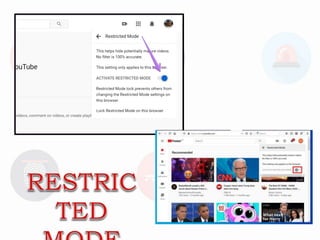
What is the browser feature
that is synonymous to
“private” browsing?
Lesson 2_Rules_of_Netiquette.pptx

Lesson 2_Rules_of_Netiquette.pptx

  • 1.
    Go to www.menti.com and usethe code 35180032
  • 2.
    • Online security,safety, and ethics • Internet threats • Protecting reputations online • Copyright • Contextualized online and research skills Rules of Netiquette
  • 3.
    At the endof this lesson, the students should be able to: 1. consider one’s and others’ safety when sharing information using the Internet; 2. consider one’s and others’ reputation when using the Internet; 3. determine and avoid the dangers of the Internet; 4. be responsible in the use of social networking sites; and 5. browse the Internet efficiently and properly through proper referencing.
  • 4.
     The Internet,truly, is a powerful tool. It can be used to promote your business, gain new friends, and stay in touch with the old ones. It is also a source of entertainment.  But like most things in this world, there is always “another side of the coin.” Internet is one of the most dangerous place, especially if you do not know what you are doing.
  • 5.
     It refersto the online security or safety of people and their information when using the internet.
  • 6.
    The do’s anddon'ts of online communication.
  • 7.
    The Golden Rule -treat others as you would like to be treated.
  • 8.
    No Flaming FLAME –is a personal insult communicated through the internet. - Watch your posts or comments
  • 9.
    Don’t type inALL CAPS – people may misinterpret it
  • 10.
    Don’t Spam SPAM –it is any unsolicited email from unknown sources.
  • 11.
    Don’t talk topeople you do not know – do not arrange to met anyone you meet online
  • 12.
    Obey copyright laws –do not steal someone else’s idea, property, and rights.
  • 13.
    Use proper grammarand spelling – errors diminish the credibility of the message
  • 14.
    Be Honest/Be Yourself –tell the truth – do not pretend to be someone else
  • 15.
    Follow the TOS TOS– Terms of Service – rules and policy of the site
  • 16.
    Shop Secure Sites –These are sites with Transport Layer Security (TLS) or Socket Layer Security (SLS) Or Secure Socket Layer (SSL)
  • 17.
  • 18.
    1. Malware Malware –stands for malicious software
  • 19.
    – a maliciousprogram designed to replicate itself and transfer from one computer to another either through the Internet and the local networks or data storage like flash drives and CDs.
  • 21.
    - a maliciousprogram that transfers from one computer by any type of means. Often, it uses a computer network to spread itself. Example: The I Love You (Love Bug Worm)
  • 22.
    - a maliciousprogram that is disguised as a useful program but once downloaded or installed, leaves your PC unprotected and allows hackers to get your information. - ROGUE SECURITY SOFTWARE – tricks the user into posing that it is a security software. It ask the user to pay to improve his/her security but in reality, they are not protected at all.
  • 23.
    - The programthat runs in a background without you knowing it (thus called “spy”). It has the ability to monitor what you are currently doing and typing through keylogging. KEYLOGGERS – used to record the keystroke done by the users. This is done to steal their password or any other sensitive information. ADWARE – program designed to send you advertisements, mostly as pop-ups.
  • 24.
    - unwanted emailmostly from bots or advertisers. It can be used to send malware. (E-Mail Spam or Unsolicited Bulk E-Mail (UBE)) 2. SPAM Email spambots harvest email addresses from material found on the Internet in order to build mailing lists for sending unsolicited email, also known as spam.
  • 25.
    - Its goalis to acquire sensitive personal information like passwords and credit card details. PHARMING - a more complicated way of phishing where it exploits the DNS (Domain Name Service) system. 3. PHISHING
  • 26.
    • In thepast, doing something embarrassing was not much a big deal. People would laugh at it, they move on. • Nowadays, capturing embarrassing moments is possible in any devices. This could impact not only your reputation but also the people around you. • Worst, people ignore this and suffer later in their life
  • 28.
     Before youpost something on the web, ask these questions to yourself: - “Would you want your parents or grandparents to see it?” - “ Would you want your future boss to see it?”  Once you post something on the web, you have no control of who sees your posts.
  • 29.
     Your friendsdepend on you to protect their reputation online. Talk to your friends about this serious responsibility.  Set your post to “private.” In this way, search engines will not be able to scan that post.
  • 30.
     Avoid usingnames. Names are easy for search engines to scan.  If you feel that a post can affect you or other’s reputation, ask the one who posted it to pull it down or report it as inappropriate.
  • 31.
    Campaigns for ThinkBefore You Click (808) Think Before You Click 1.0 - YouTube (808) Think Before You Click! (Why are you online?) - YouTube (808) Think before you click: Recognize a phish - YouTube (808) Think Before You Click (Safety First) - YouTube
  • 32.
    If you createsomething—an idea, an invention, a form of literary work, or a research, you have the right of how it should be used by others. This is called intellectual property.
  • 33.
    - Have youtried Google search using your own personal name? - What is the result? - Is your identity shown in public? - Is the search reliable? - Is the search affronted your privacy? More than just “googling”, a skill is needed to improve or get factual information.
  • 34.
    – content isgrammatically correct, verifiable and cited when necessary – defines who created the content, the individual or group’s credential/expertise - this is used to further evaluate the website - Information is current and updated frequently
  • 35.
    - Programs thatlook for documents based from specific keywords and return these documents where the keyword where found
  • 38.
    - Provide asimple way to broadly search for scholarly literature.
  • 39.
    - use apicture as you search to find related images from around the web.
  • 42.
    My computer hasan antivirus so its okay to open email attachments like e-cards and video files from unknown e-mail addresses.
  • 43.
    A virus isa malware that multiplies and infects other computers through flash drives.
  • 44.
    A worm isstand-alone and can replicate independently as soon as they breached the system.
  • 45.
    Keyloggers are sotwares thatshow pop-up ads even if you are not using your browser.
  • 46.
    Search engines scan websitesfor search results even if you have set your post to “private”.
  • 47.
    It is asimple way to broadly search for scholarly articles
  • 48.
    It is shortfor malicious software that designed to cause extensive damage to data and systems or to gain unauthorized access to a network.
  • 49.
    What is thebrowser feature that is synonymous to “private” browsing?