Computer Science
CIE-Syllabus 2210
Lesson 16
Data Storage-
Vector Images
Tutor: Suraj Motee
Learning Outcomes
By the end of this lesson, you should be able to :
(a) Differentiate between a vector and bitmap image?
What is a vector image?
• A vector image is made of geometrical objects/shapes.
• The computer stores mathematical formulas that tell it how to draw
the shapes and lines.
• It is best used for graphs and diagrams.
• Vector graphics are not a good way to store photographs.
• The file extension for vector image is .svg.
• No pixilation effect occurs with vector images.
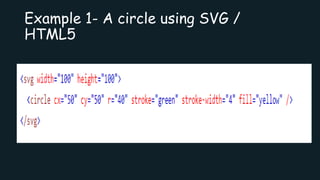
Example 1- A circle using SVG /
HTML5
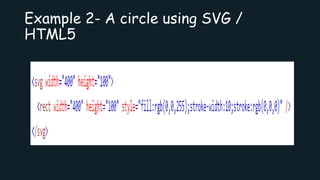
Example 2- A circle using SVG /
HTML5

Lesson 16- Vector Images

  • 1.
    Computer Science CIE-Syllabus 2210 Lesson16 Data Storage- Vector Images Tutor: Suraj Motee
  • 2.
    Learning Outcomes By theend of this lesson, you should be able to : (a) Differentiate between a vector and bitmap image?
  • 3.
    What is avector image? • A vector image is made of geometrical objects/shapes. • The computer stores mathematical formulas that tell it how to draw the shapes and lines. • It is best used for graphs and diagrams. • Vector graphics are not a good way to store photographs. • The file extension for vector image is .svg. • No pixilation effect occurs with vector images.
  • 4.
    Example 1- Acircle using SVG / HTML5
  • 5.
    Example 2- Acircle using SVG / HTML5