CME 193: Introduction to Scientific Python
Lecture 5: Numpy, Scipy, Matplotlib
Sven Schmit
stanford.edu/~schmit/cme193
5: Numpy, Scipy, Matplotlib 5-1
Contents
Second part of course
Numpy
Scipy
Matplotlib
Exercises
5: Numpy, Scipy, Matplotlib 5-2
Congrats, we are halfway!
Up to now
Covered the basics of Python
Worked on a bunch of tough exercises
From now
Cover specific topics
Less exercises
Time for project
5: Numpy, Scipy, Matplotlib 5-3
Feedback
Thanks for the great feedback, very useful
5: Numpy, Scipy, Matplotlib 5-4
Remaining topics
Numpy, Scipy, Matplotlib (today)
IPython notebooks, Pandas, Statsmodels, SKLearn
Exception handling, unit testing, recursion
Brief look at some more modules
Flask
Regex
... (suggestions welcome)
5: Numpy, Scipy, Matplotlib 5-5
Contents
Second part of course
Numpy
Scipy
Matplotlib
Exercises
5: Numpy, Scipy, Matplotlib 5-6
Numpy
Fundamental package for scientific computing with Python
N-dimensional array object
Linear algebra, Fourier transform, random number capabilities
Building block for other packages (e.g. Scipy)
Open source
5: Numpy, Scipy, Matplotlib 5-7
Numpy
Fundamental package for scientific computing with Python
N-dimensional array object
Linear algebra, Fourier transform, random number capabilities
Building block for other packages (e.g. Scipy)
Open source
5: Numpy, Scipy, Matplotlib 5-8
import numpy as np
Basics:
import numpy as np
A = np.array([[1, 2, 3], [4, 5, 6]])
print A
# [[1 2 3]
# [4 5 6]]
Af = np.array([1, 2, 3], float)
Slicing as usual.
5: Numpy, Scipy, Matplotlib 5-9
More basics
np.arange(0, 1, 0.2)
# array([ 0. , 0.2, 0.4, 0.6, 0.8])
np.linspace(0, 2*np.pi, 4)
# array([ 0.0, 2.09, 4.18, 6.28])
A = np.zeros((2,3))
# array([[ 0., 0., 0.],
# [ 0., 0., 0.]])
# np.ones, np.diag
A.shape
# (2, 3)
5: Numpy, Scipy, Matplotlib 5-10
More basics
np.random.random((2,3))
# array([[ 0.78084261, 0.64328818, 0.55380341],
# [ 0.24611092, 0.37011213, 0.83313416]])
a = np.random.normal(loc=1.0, scale=2.0, size=(2,2))
# array([[ 2.87799514, 0.6284259 ],
# [ 3.10683164, 2.05324587]])
np.savetxt("a_out.txt", a)
# save to file
b = np.loadtxt("a_out.txt")
# read from file
5: Numpy, Scipy, Matplotlib 5-11
Arrays are mutable
A = np.zeros((2, 2))
# array([[ 0., 0.],
# [ 0., 0.]])
C = A
C[0, 0] = 1
print A
# [[ 1. 0.]
# [ 0. 0.]]
5: Numpy, Scipy, Matplotlib 5-12
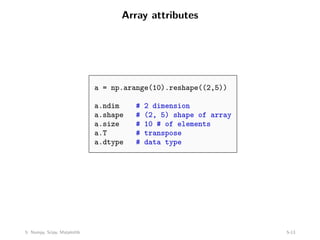
Array attributes
a = np.arange(10).reshape((2,5))
a.ndim # 2 dimension
a.shape # (2, 5) shape of array
a.size # 10 # of elements
a.T # transpose
a.dtype # data type
5: Numpy, Scipy, Matplotlib 5-13
Basic operations
Arithmetic operators: elementwise application
a = np.arange(4)
# array([0, 1, 2, 3])
b = np.array([2, 3, 2, 4])
a * b # array([ 0, 3, 4, 12])
b - a # array([2, 2, 0, 1])
c = [2, 3, 4, 5]
a * c # array([ 0, 3, 8, 15])
Also, we can use += and *=.
5: Numpy, Scipy, Matplotlib 5-14
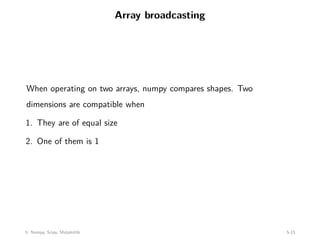
Array broadcasting
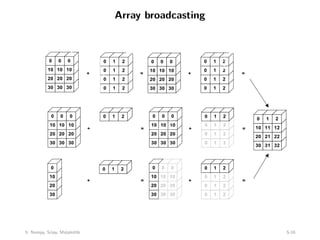
When operating on two arrays, numpy compares shapes. Two
dimensions are compatible when
1. They are of equal size
2. One of them is 1
5: Numpy, Scipy, Matplotlib 5-15
Array broadcasting
5: Numpy, Scipy, Matplotlib 5-16
Array broadcasting with scalars
This also allows us to add a constant to a matrix or multiply a matrix by
a constant
A = np.ones((3,3))
print 3 * A - 1
# [[ 2. 2. 2.]
# [ 2. 2. 2.]
# [ 2. 2. 2.]]
5: Numpy, Scipy, Matplotlib 5-17
Vector operations
inner product
outer product
dot product (matrix multiplication)
# note: numpy automatically converts lists
u = [1, 2, 3]
v = [1, 1, 1]
np.inner(u, v)
# 6
np.outer(u, v)
# array([[1, 1, 1],
# [2, 2, 2],
# [3, 3, 3]])
np.dot(u, v)
# 6
5: Numpy, Scipy, Matplotlib 5-18
Matrix operations
First, define some matrices:
A = np.ones((3, 2))
# array([[ 1., 1.],
# [ 1., 1.],
# [ 1., 1.]])
A.T
# array([[ 1., 1., 1.],
# [ 1., 1., 1.]])
B = np.ones((2, 3))
# array([[ 1., 1., 1.],
# [ 1., 1., 1.]])
5: Numpy, Scipy, Matplotlib 5-19
Matrix operations
np.dot(A, B)
# array([[ 2., 2., 2.],
# [ 2., 2., 2.],
# [ 2., 2., 2.]])
np.dot(B, A)
# array([[ 3., 3.],
# [ 3., 3.]])
np.dot(B.T, A.T)
# array([[ 2., 2., 2.],
# [ 2., 2., 2.],
# [ 2., 2., 2.]])
np.dot(A, B.T)
# Traceback (most recent call last):
# File "<stdin>", line 1, in <module>
# ValueError: shapes (3,2) and (3,2) not aligned: ...
# ... 2 (dim 1) != 3 (dim 0)
5: Numpy, Scipy, Matplotlib 5-20
Operations along axes
a = np.random.random((2,3))
# array([[ 0.9190687 , 0.36497813, 0.75644216],
# [ 0.91938241, 0.08599547, 0.49544003]])
a.sum()
# 3.5413068994445549
a.sum(axis=0) # column sum
# array([ 1.83845111, 0.4509736 , 1.25188219])
a.cumsum()
# array([ 0.9190687 , 1.28404683, 2.04048899, 2.9598714 ,
# 3.04586687, 3.5413069 ])
a.cumsum(axis=1) # cumulative row sum
# array([[ 0.9190687 , 1.28404683, 2.04048899],
# [ 0.91938241, 1.00537788, 1.50081791]])
a.min()
# 0.0859954690403677
a.max(axis=0)
# array([ 0.91938241, 0.36497813, 0.75644216])
5: Numpy, Scipy, Matplotlib 5-21
Slicing arrays
More advanced slicing
a = np.random.random((4,5))
a[2, :]
# third row, all columns
a[1:3]
# 2nd, 3rd row, all columns
a[:, 2:4]
# all rows, columns 3 and 4
5: Numpy, Scipy, Matplotlib 5-22
Iterating over arrays
Iterating over multidimensional arrays is done with respect to the first
axis: for row in A
Looping over all elements: for element in A.flat
5: Numpy, Scipy, Matplotlib 5-23
Reshaping
Reshape using reshape. Total size must remain the same.
Resize using resize, always works: chopping or appending zeros
First dimension has ‘priority’, so beware of unexpected results
Try it!
5: Numpy, Scipy, Matplotlib 5-24
Reshaping
Reshape using reshape. Total size must remain the same.
Resize using resize, always works: chopping or appending zeros
First dimension has ‘priority’, so beware of unexpected results
Try it!
5: Numpy, Scipy, Matplotlib 5-25
Reshaping
Reshape using reshape. Total size must remain the same.
Resize using resize, always works: chopping or appending zeros
First dimension has ‘priority’, so beware of unexpected results
Try it!
5: Numpy, Scipy, Matplotlib 5-26
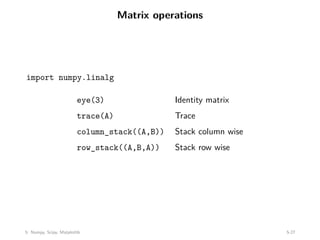
Matrix operations
import numpy.linalg
eye(3) Identity matrix
trace(A) Trace
column_stack((A,B)) Stack column wise
row_stack((A,B,A)) Stack row wise
5: Numpy, Scipy, Matplotlib 5-27
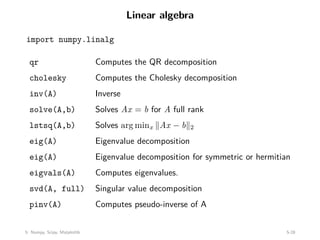
Linear algebra
import numpy.linalg
qr Computes the QR decomposition
cholesky Computes the Cholesky decomposition
inv(A) Inverse
solve(A,b) Solves Ax = b for A full rank
lstsq(A,b) Solves arg minx kAx − bk2
eig(A) Eigenvalue decomposition
eig(A) Eigenvalue decomposition for symmetric or hermitian
eigvals(A) Computes eigenvalues.
svd(A, full) Singular value decomposition
pinv(A) Computes pseudo-inverse of A
5: Numpy, Scipy, Matplotlib 5-28
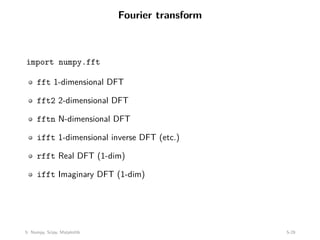
Fourier transform
import numpy.fft
fft 1-dimensional DFT
fft2 2-dimensional DFT
fftn N-dimensional DFT
ifft 1-dimensional inverse DFT (etc.)
rfft Real DFT (1-dim)
ifft Imaginary DFT (1-dim)
5: Numpy, Scipy, Matplotlib 5-29
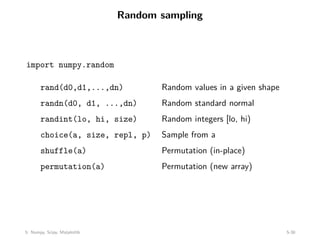
Random sampling
import numpy.random
rand(d0,d1,...,dn) Random values in a given shape
randn(d0, d1, ...,dn) Random standard normal
randint(lo, hi, size) Random integers [lo, hi)
choice(a, size, repl, p) Sample from a
shuffle(a) Permutation (in-place)
permutation(a) Permutation (new array)
5: Numpy, Scipy, Matplotlib 5-30
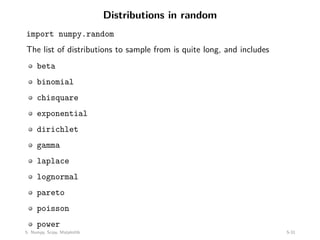
Distributions in random
import numpy.random
The list of distributions to sample from is quite long, and includes
beta
binomial
chisquare
exponential
dirichlet
gamma
laplace
lognormal
pareto
poisson
power
5: Numpy, Scipy, Matplotlib 5-31
Contents
Second part of course
Numpy
Scipy
Matplotlib
Exercises
5: Numpy, Scipy, Matplotlib 5-32
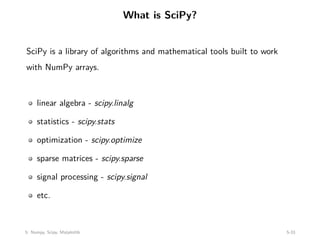
What is SciPy?
SciPy is a library of algorithms and mathematical tools built to work
with NumPy arrays.
linear algebra - scipy.linalg
statistics - scipy.stats
optimization - scipy.optimize
sparse matrices - scipy.sparse
signal processing - scipy.signal
etc.
5: Numpy, Scipy, Matplotlib 5-33
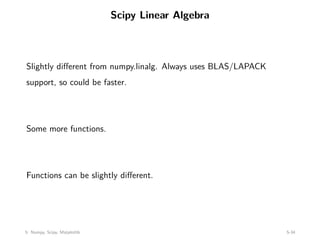
Scipy Linear Algebra
Slightly different from numpy.linalg. Always uses BLAS/LAPACK
support, so could be faster.
Some more functions.
Functions can be slightly different.
5: Numpy, Scipy, Matplotlib 5-34
Scipy Optimization
General purpose minimization: CG, BFGS, least-squares
Constrainted minimization; non-negative least-squares
Minimize using simulated annealing
Scalar function minimization
Root finding
Check gradient function
Line search
5: Numpy, Scipy, Matplotlib 5-35
Scipy Statistics
Mean, median, mode, variance, kurtosis
Pearson correlation coefficient
Hypothesis tests (ttest, Wilcoxon signed-rank test,
Kolmogorov-Smirnov)
Gaussian kernel density estimation
See also SciKits (or scikit-learn).
5: Numpy, Scipy, Matplotlib 5-36
Scipy sparse
Sparse matrix classes: CSC, CSR, etc.
Functions to build sparse matrices
sparse.linalg module for sparse linear algebra
sparse.csgraph for sparse graph routines
5: Numpy, Scipy, Matplotlib 5-37
Scipy signal
Convolutions
B-splines
Filtering
Continuous-time linear system
Wavelets
Peak finding
5: Numpy, Scipy, Matplotlib 5-38
Scipy IO
Methods for loading and saving data
Matlab files
Matrix Market files (sparse matrices)
Wav files
5: Numpy, Scipy, Matplotlib 5-39
Contents
Second part of course
Numpy
Scipy
Matplotlib
Exercises
5: Numpy, Scipy, Matplotlib 5-40
What is Matplotlib?
Plotting library for Python
Works well with Numpy
Syntax similar to Matlab
5: Numpy, Scipy, Matplotlib 5-41
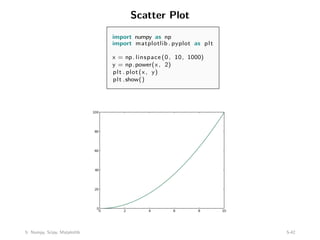
Scatter Plot
import numpy as np
import matplotlib . pyplot as plt
x = np. linspace (0, 10, 1000)
y = np.power(x, 2)
plt . plot(x, y)
plt .show()
5: Numpy, Scipy, Matplotlib 5-42
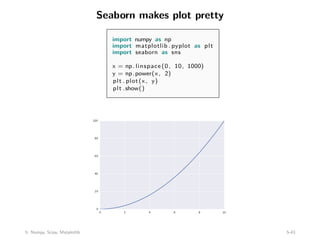
Seaborn makes plot pretty
import numpy as np
import matplotlib . pyplot as plt
import seaborn as sns
x = np. linspace (0, 10, 1000)
y = np.power(x, 2)
plt . plot(x, y)
plt .show()
5: Numpy, Scipy, Matplotlib 5-43
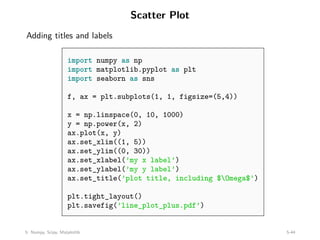
Scatter Plot
Adding titles and labels
import numpy as np
import matplotlib.pyplot as plt
import seaborn as sns
f, ax = plt.subplots(1, 1, figsize=(5,4))
x = np.linspace(0, 10, 1000)
y = np.power(x, 2)
ax.plot(x, y)
ax.set_xlim((1, 5))
ax.set_ylim((0, 30))
ax.set_xlabel(’my x label’)
ax.set_ylabel(’my y label’)
ax.set_title(’plot title, including $Omega$’)
plt.tight_layout()
plt.savefig(’line_plot_plus.pdf’)
5: Numpy, Scipy, Matplotlib 5-44
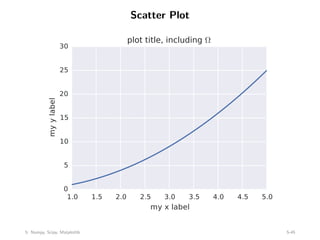
Scatter Plot
1.0 1.5 2.0 2.5 3.0 3.5 4.0 4.5 5.0
my x label
0
5
10
15
20
25
30
my
y
label
plot title, including ­
5: Numpy, Scipy, Matplotlib 5-45
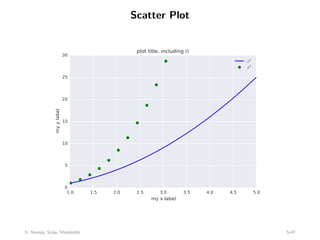
Scatter Plot
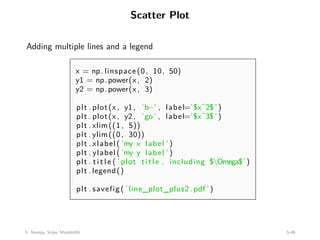
Adding multiple lines and a legend
x = np. linspace (0, 10, 50)
y1 = np.power(x, 2)
y2 = np.power(x, 3)
plt . plot(x, y1, ’b−’ , label=’$x^2$ ’)
plt . plot(x, y2, ’go ’ , label=’$x^3$ ’)
plt . xlim((1 , 5))
plt . ylim((0 , 30))
plt . xlabel( ’my x label ’)
plt . ylabel( ’my y label ’)
plt . title ( ’ plot title , including $Omega$’)
plt . legend()
plt . savefig( ’line_plot_plus2 . pdf ’)
5: Numpy, Scipy, Matplotlib 5-46
Scatter Plot
1.0 1.5 2.0 2.5 3.0 3.5 4.0 4.5 5.0
my x label
0
5
10
15
20
25
30
my
y
label
plot title, including ­
x2
x3
5: Numpy, Scipy, Matplotlib 5-47
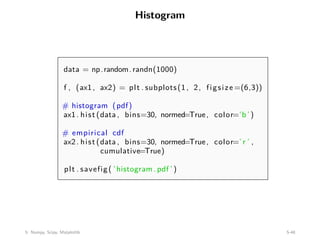
Histogram
data = np.random.randn(1000)
f , (ax1, ax2) = plt . subplots(1, 2, figsize =(6,3))
# histogram (pdf)
ax1. hist (data , bins=30, normed=True, color=’b’)
# empirical cdf
ax2. hist (data , bins=30, normed=True, color=’ r ’ ,
cumulative=True)
plt . savefig( ’histogram . pdf ’)
5: Numpy, Scipy, Matplotlib 5-48
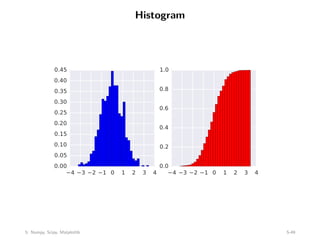
Histogram
−4 −3 −2 −1 0 1 2 3 4
0.00
0.05
0.10
0.15
0.20
0.25
0.30
0.35
0.40
0.45
−4 −3 −2 −1 0 1 2 3 4
0.0
0.2
0.4
0.6
0.8
1.0
5: Numpy, Scipy, Matplotlib 5-49
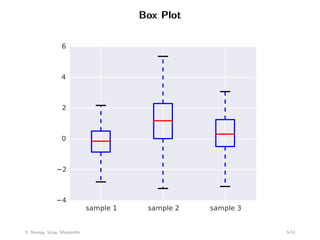
Box Plot
samp1 = np.random.normal(loc=0., scale=1., size=100)
samp2 = np.random.normal(loc=1., scale=2., size=100)
samp3 = np.random.normal(loc=0.3, scale=1.2, size=100)
f, ax = plt.subplots(1, 1, figsize=(5,4))
ax.boxplot((samp1, samp2, samp3))
ax.set_xticklabels([’sample 1’, ’sample 2’, ’sample 3’])
plt.savefig(’boxplot.pdf’)
5: Numpy, Scipy, Matplotlib 5-50
Box Plot
sample 1 sample 2 sample 3
−4
−2
0
2
4
6
5: Numpy, Scipy, Matplotlib 5-51
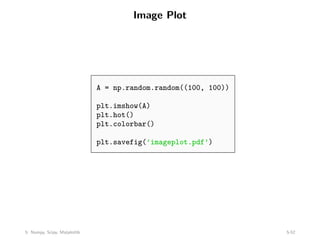
Image Plot
A = np.random.random((100, 100))
plt.imshow(A)
plt.hot()
plt.colorbar()
plt.savefig(’imageplot.pdf’)
5: Numpy, Scipy, Matplotlib 5-52
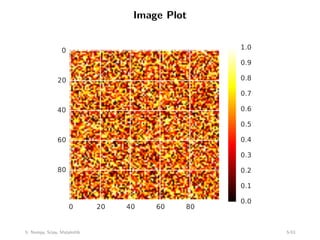
Image Plot
0 20 40 60 80
0
20
40
60
80
0.0
0.1
0.2
0.3
0.4
0.5
0.6
0.7
0.8
0.9
1.0
5: Numpy, Scipy, Matplotlib 5-53
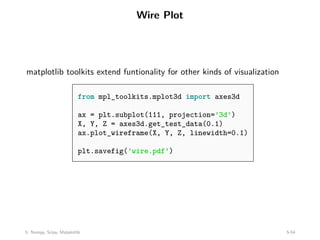
Wire Plot
matplotlib toolkits extend funtionality for other kinds of visualization
from mpl_toolkits.mplot3d import axes3d
ax = plt.subplot(111, projection=’3d’)
X, Y, Z = axes3d.get_test_data(0.1)
ax.plot_wireframe(X, Y, Z, linewidth=0.1)
plt.savefig(’wire.pdf’)
5: Numpy, Scipy, Matplotlib 5-54
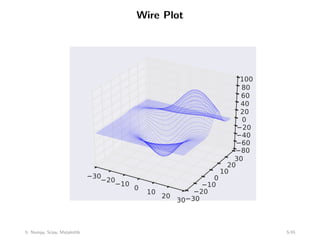
Wire Plot
−30
−20
−10
0
10
20
30−30
−20
−10
0
10
20
30
−80
−60
−40
−20
0
20
40
60
80
100
5: Numpy, Scipy, Matplotlib 5-55
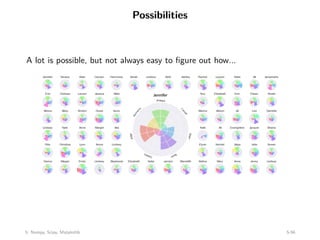
Possibilities
A lot is possible, but not always easy to figure out how...
5: Numpy, Scipy, Matplotlib 5-56
Contents
Second part of course
Numpy
Scipy
Matplotlib
Exercises
5: Numpy, Scipy, Matplotlib 5-57
Exercises
See course website for exercises for this week.
Get to know the person next to you and do them in pairs!
Let me know if you have any question
Class ends at 5:35pm.
5: Numpy, Scipy, Matplotlib 5-58

Lecture 5 of Stanford university about python librarys

  • 1.
    CME 193: Introductionto Scientific Python Lecture 5: Numpy, Scipy, Matplotlib Sven Schmit stanford.edu/~schmit/cme193 5: Numpy, Scipy, Matplotlib 5-1
  • 2.
    Contents Second part ofcourse Numpy Scipy Matplotlib Exercises 5: Numpy, Scipy, Matplotlib 5-2
  • 3.
    Congrats, we arehalfway! Up to now Covered the basics of Python Worked on a bunch of tough exercises From now Cover specific topics Less exercises Time for project 5: Numpy, Scipy, Matplotlib 5-3
  • 4.
    Feedback Thanks for thegreat feedback, very useful 5: Numpy, Scipy, Matplotlib 5-4
  • 5.
    Remaining topics Numpy, Scipy,Matplotlib (today) IPython notebooks, Pandas, Statsmodels, SKLearn Exception handling, unit testing, recursion Brief look at some more modules Flask Regex ... (suggestions welcome) 5: Numpy, Scipy, Matplotlib 5-5
  • 6.
    Contents Second part ofcourse Numpy Scipy Matplotlib Exercises 5: Numpy, Scipy, Matplotlib 5-6
  • 7.
    Numpy Fundamental package forscientific computing with Python N-dimensional array object Linear algebra, Fourier transform, random number capabilities Building block for other packages (e.g. Scipy) Open source 5: Numpy, Scipy, Matplotlib 5-7
  • 8.
    Numpy Fundamental package forscientific computing with Python N-dimensional array object Linear algebra, Fourier transform, random number capabilities Building block for other packages (e.g. Scipy) Open source 5: Numpy, Scipy, Matplotlib 5-8
  • 9.
    import numpy asnp Basics: import numpy as np A = np.array([[1, 2, 3], [4, 5, 6]]) print A # [[1 2 3] # [4 5 6]] Af = np.array([1, 2, 3], float) Slicing as usual. 5: Numpy, Scipy, Matplotlib 5-9
  • 10.
    More basics np.arange(0, 1,0.2) # array([ 0. , 0.2, 0.4, 0.6, 0.8]) np.linspace(0, 2*np.pi, 4) # array([ 0.0, 2.09, 4.18, 6.28]) A = np.zeros((2,3)) # array([[ 0., 0., 0.], # [ 0., 0., 0.]]) # np.ones, np.diag A.shape # (2, 3) 5: Numpy, Scipy, Matplotlib 5-10
  • 11.
    More basics np.random.random((2,3)) # array([[0.78084261, 0.64328818, 0.55380341], # [ 0.24611092, 0.37011213, 0.83313416]]) a = np.random.normal(loc=1.0, scale=2.0, size=(2,2)) # array([[ 2.87799514, 0.6284259 ], # [ 3.10683164, 2.05324587]]) np.savetxt("a_out.txt", a) # save to file b = np.loadtxt("a_out.txt") # read from file 5: Numpy, Scipy, Matplotlib 5-11
  • 12.
    Arrays are mutable A= np.zeros((2, 2)) # array([[ 0., 0.], # [ 0., 0.]]) C = A C[0, 0] = 1 print A # [[ 1. 0.] # [ 0. 0.]] 5: Numpy, Scipy, Matplotlib 5-12
  • 13.
    Array attributes a =np.arange(10).reshape((2,5)) a.ndim # 2 dimension a.shape # (2, 5) shape of array a.size # 10 # of elements a.T # transpose a.dtype # data type 5: Numpy, Scipy, Matplotlib 5-13
  • 14.
    Basic operations Arithmetic operators:elementwise application a = np.arange(4) # array([0, 1, 2, 3]) b = np.array([2, 3, 2, 4]) a * b # array([ 0, 3, 4, 12]) b - a # array([2, 2, 0, 1]) c = [2, 3, 4, 5] a * c # array([ 0, 3, 8, 15]) Also, we can use += and *=. 5: Numpy, Scipy, Matplotlib 5-14
  • 15.
    Array broadcasting When operatingon two arrays, numpy compares shapes. Two dimensions are compatible when 1. They are of equal size 2. One of them is 1 5: Numpy, Scipy, Matplotlib 5-15
  • 16.
    Array broadcasting 5: Numpy,Scipy, Matplotlib 5-16
  • 17.
    Array broadcasting withscalars This also allows us to add a constant to a matrix or multiply a matrix by a constant A = np.ones((3,3)) print 3 * A - 1 # [[ 2. 2. 2.] # [ 2. 2. 2.] # [ 2. 2. 2.]] 5: Numpy, Scipy, Matplotlib 5-17
  • 18.
    Vector operations inner product outerproduct dot product (matrix multiplication) # note: numpy automatically converts lists u = [1, 2, 3] v = [1, 1, 1] np.inner(u, v) # 6 np.outer(u, v) # array([[1, 1, 1], # [2, 2, 2], # [3, 3, 3]]) np.dot(u, v) # 6 5: Numpy, Scipy, Matplotlib 5-18
  • 19.
    Matrix operations First, definesome matrices: A = np.ones((3, 2)) # array([[ 1., 1.], # [ 1., 1.], # [ 1., 1.]]) A.T # array([[ 1., 1., 1.], # [ 1., 1., 1.]]) B = np.ones((2, 3)) # array([[ 1., 1., 1.], # [ 1., 1., 1.]]) 5: Numpy, Scipy, Matplotlib 5-19
  • 20.
    Matrix operations np.dot(A, B) #array([[ 2., 2., 2.], # [ 2., 2., 2.], # [ 2., 2., 2.]]) np.dot(B, A) # array([[ 3., 3.], # [ 3., 3.]]) np.dot(B.T, A.T) # array([[ 2., 2., 2.], # [ 2., 2., 2.], # [ 2., 2., 2.]]) np.dot(A, B.T) # Traceback (most recent call last): # File "<stdin>", line 1, in <module> # ValueError: shapes (3,2) and (3,2) not aligned: ... # ... 2 (dim 1) != 3 (dim 0) 5: Numpy, Scipy, Matplotlib 5-20
  • 21.
    Operations along axes a= np.random.random((2,3)) # array([[ 0.9190687 , 0.36497813, 0.75644216], # [ 0.91938241, 0.08599547, 0.49544003]]) a.sum() # 3.5413068994445549 a.sum(axis=0) # column sum # array([ 1.83845111, 0.4509736 , 1.25188219]) a.cumsum() # array([ 0.9190687 , 1.28404683, 2.04048899, 2.9598714 , # 3.04586687, 3.5413069 ]) a.cumsum(axis=1) # cumulative row sum # array([[ 0.9190687 , 1.28404683, 2.04048899], # [ 0.91938241, 1.00537788, 1.50081791]]) a.min() # 0.0859954690403677 a.max(axis=0) # array([ 0.91938241, 0.36497813, 0.75644216]) 5: Numpy, Scipy, Matplotlib 5-21
  • 22.
    Slicing arrays More advancedslicing a = np.random.random((4,5)) a[2, :] # third row, all columns a[1:3] # 2nd, 3rd row, all columns a[:, 2:4] # all rows, columns 3 and 4 5: Numpy, Scipy, Matplotlib 5-22
  • 23.
    Iterating over arrays Iteratingover multidimensional arrays is done with respect to the first axis: for row in A Looping over all elements: for element in A.flat 5: Numpy, Scipy, Matplotlib 5-23
  • 24.
    Reshaping Reshape using reshape.Total size must remain the same. Resize using resize, always works: chopping or appending zeros First dimension has ‘priority’, so beware of unexpected results Try it! 5: Numpy, Scipy, Matplotlib 5-24
  • 25.
    Reshaping Reshape using reshape.Total size must remain the same. Resize using resize, always works: chopping or appending zeros First dimension has ‘priority’, so beware of unexpected results Try it! 5: Numpy, Scipy, Matplotlib 5-25
  • 26.
    Reshaping Reshape using reshape.Total size must remain the same. Resize using resize, always works: chopping or appending zeros First dimension has ‘priority’, so beware of unexpected results Try it! 5: Numpy, Scipy, Matplotlib 5-26
  • 27.
    Matrix operations import numpy.linalg eye(3)Identity matrix trace(A) Trace column_stack((A,B)) Stack column wise row_stack((A,B,A)) Stack row wise 5: Numpy, Scipy, Matplotlib 5-27
  • 28.
    Linear algebra import numpy.linalg qrComputes the QR decomposition cholesky Computes the Cholesky decomposition inv(A) Inverse solve(A,b) Solves Ax = b for A full rank lstsq(A,b) Solves arg minx kAx − bk2 eig(A) Eigenvalue decomposition eig(A) Eigenvalue decomposition for symmetric or hermitian eigvals(A) Computes eigenvalues. svd(A, full) Singular value decomposition pinv(A) Computes pseudo-inverse of A 5: Numpy, Scipy, Matplotlib 5-28
  • 29.
    Fourier transform import numpy.fft fft1-dimensional DFT fft2 2-dimensional DFT fftn N-dimensional DFT ifft 1-dimensional inverse DFT (etc.) rfft Real DFT (1-dim) ifft Imaginary DFT (1-dim) 5: Numpy, Scipy, Matplotlib 5-29
  • 30.
    Random sampling import numpy.random rand(d0,d1,...,dn)Random values in a given shape randn(d0, d1, ...,dn) Random standard normal randint(lo, hi, size) Random integers [lo, hi) choice(a, size, repl, p) Sample from a shuffle(a) Permutation (in-place) permutation(a) Permutation (new array) 5: Numpy, Scipy, Matplotlib 5-30
  • 31.
    Distributions in random importnumpy.random The list of distributions to sample from is quite long, and includes beta binomial chisquare exponential dirichlet gamma laplace lognormal pareto poisson power 5: Numpy, Scipy, Matplotlib 5-31
  • 32.
    Contents Second part ofcourse Numpy Scipy Matplotlib Exercises 5: Numpy, Scipy, Matplotlib 5-32
  • 33.
    What is SciPy? SciPyis a library of algorithms and mathematical tools built to work with NumPy arrays. linear algebra - scipy.linalg statistics - scipy.stats optimization - scipy.optimize sparse matrices - scipy.sparse signal processing - scipy.signal etc. 5: Numpy, Scipy, Matplotlib 5-33
  • 34.
    Scipy Linear Algebra Slightlydifferent from numpy.linalg. Always uses BLAS/LAPACK support, so could be faster. Some more functions. Functions can be slightly different. 5: Numpy, Scipy, Matplotlib 5-34
  • 35.
    Scipy Optimization General purposeminimization: CG, BFGS, least-squares Constrainted minimization; non-negative least-squares Minimize using simulated annealing Scalar function minimization Root finding Check gradient function Line search 5: Numpy, Scipy, Matplotlib 5-35
  • 36.
    Scipy Statistics Mean, median,mode, variance, kurtosis Pearson correlation coefficient Hypothesis tests (ttest, Wilcoxon signed-rank test, Kolmogorov-Smirnov) Gaussian kernel density estimation See also SciKits (or scikit-learn). 5: Numpy, Scipy, Matplotlib 5-36
  • 37.
    Scipy sparse Sparse matrixclasses: CSC, CSR, etc. Functions to build sparse matrices sparse.linalg module for sparse linear algebra sparse.csgraph for sparse graph routines 5: Numpy, Scipy, Matplotlib 5-37
  • 38.
    Scipy signal Convolutions B-splines Filtering Continuous-time linearsystem Wavelets Peak finding 5: Numpy, Scipy, Matplotlib 5-38
  • 39.
    Scipy IO Methods forloading and saving data Matlab files Matrix Market files (sparse matrices) Wav files 5: Numpy, Scipy, Matplotlib 5-39
  • 40.
    Contents Second part ofcourse Numpy Scipy Matplotlib Exercises 5: Numpy, Scipy, Matplotlib 5-40
  • 41.
    What is Matplotlib? Plottinglibrary for Python Works well with Numpy Syntax similar to Matlab 5: Numpy, Scipy, Matplotlib 5-41
  • 42.
    Scatter Plot import numpyas np import matplotlib . pyplot as plt x = np. linspace (0, 10, 1000) y = np.power(x, 2) plt . plot(x, y) plt .show() 5: Numpy, Scipy, Matplotlib 5-42
  • 43.
    Seaborn makes plotpretty import numpy as np import matplotlib . pyplot as plt import seaborn as sns x = np. linspace (0, 10, 1000) y = np.power(x, 2) plt . plot(x, y) plt .show() 5: Numpy, Scipy, Matplotlib 5-43
  • 44.
    Scatter Plot Adding titlesand labels import numpy as np import matplotlib.pyplot as plt import seaborn as sns f, ax = plt.subplots(1, 1, figsize=(5,4)) x = np.linspace(0, 10, 1000) y = np.power(x, 2) ax.plot(x, y) ax.set_xlim((1, 5)) ax.set_ylim((0, 30)) ax.set_xlabel(’my x label’) ax.set_ylabel(’my y label’) ax.set_title(’plot title, including $Omega$’) plt.tight_layout() plt.savefig(’line_plot_plus.pdf’) 5: Numpy, Scipy, Matplotlib 5-44
  • 45.
    Scatter Plot 1.0 1.52.0 2.5 3.0 3.5 4.0 4.5 5.0 my x label 0 5 10 15 20 25 30 my y label plot title, including ­ 5: Numpy, Scipy, Matplotlib 5-45
  • 46.
    Scatter Plot Adding multiplelines and a legend x = np. linspace (0, 10, 50) y1 = np.power(x, 2) y2 = np.power(x, 3) plt . plot(x, y1, ’b−’ , label=’$x^2$ ’) plt . plot(x, y2, ’go ’ , label=’$x^3$ ’) plt . xlim((1 , 5)) plt . ylim((0 , 30)) plt . xlabel( ’my x label ’) plt . ylabel( ’my y label ’) plt . title ( ’ plot title , including $Omega$’) plt . legend() plt . savefig( ’line_plot_plus2 . pdf ’) 5: Numpy, Scipy, Matplotlib 5-46
  • 47.
    Scatter Plot 1.0 1.52.0 2.5 3.0 3.5 4.0 4.5 5.0 my x label 0 5 10 15 20 25 30 my y label plot title, including ­ x2 x3 5: Numpy, Scipy, Matplotlib 5-47
  • 48.
    Histogram data = np.random.randn(1000) f, (ax1, ax2) = plt . subplots(1, 2, figsize =(6,3)) # histogram (pdf) ax1. hist (data , bins=30, normed=True, color=’b’) # empirical cdf ax2. hist (data , bins=30, normed=True, color=’ r ’ , cumulative=True) plt . savefig( ’histogram . pdf ’) 5: Numpy, Scipy, Matplotlib 5-48
  • 49.
    Histogram −4 −3 −2−1 0 1 2 3 4 0.00 0.05 0.10 0.15 0.20 0.25 0.30 0.35 0.40 0.45 −4 −3 −2 −1 0 1 2 3 4 0.0 0.2 0.4 0.6 0.8 1.0 5: Numpy, Scipy, Matplotlib 5-49
  • 50.
    Box Plot samp1 =np.random.normal(loc=0., scale=1., size=100) samp2 = np.random.normal(loc=1., scale=2., size=100) samp3 = np.random.normal(loc=0.3, scale=1.2, size=100) f, ax = plt.subplots(1, 1, figsize=(5,4)) ax.boxplot((samp1, samp2, samp3)) ax.set_xticklabels([’sample 1’, ’sample 2’, ’sample 3’]) plt.savefig(’boxplot.pdf’) 5: Numpy, Scipy, Matplotlib 5-50
  • 51.
    Box Plot sample 1sample 2 sample 3 −4 −2 0 2 4 6 5: Numpy, Scipy, Matplotlib 5-51
  • 52.
    Image Plot A =np.random.random((100, 100)) plt.imshow(A) plt.hot() plt.colorbar() plt.savefig(’imageplot.pdf’) 5: Numpy, Scipy, Matplotlib 5-52
  • 53.
    Image Plot 0 2040 60 80 0 20 40 60 80 0.0 0.1 0.2 0.3 0.4 0.5 0.6 0.7 0.8 0.9 1.0 5: Numpy, Scipy, Matplotlib 5-53
  • 54.
    Wire Plot matplotlib toolkitsextend funtionality for other kinds of visualization from mpl_toolkits.mplot3d import axes3d ax = plt.subplot(111, projection=’3d’) X, Y, Z = axes3d.get_test_data(0.1) ax.plot_wireframe(X, Y, Z, linewidth=0.1) plt.savefig(’wire.pdf’) 5: Numpy, Scipy, Matplotlib 5-54
  • 55.
  • 56.
    Possibilities A lot ispossible, but not always easy to figure out how... 5: Numpy, Scipy, Matplotlib 5-56
  • 57.
    Contents Second part ofcourse Numpy Scipy Matplotlib Exercises 5: Numpy, Scipy, Matplotlib 5-57
  • 58.
    Exercises See course websitefor exercises for this week. Get to know the person next to you and do them in pairs! Let me know if you have any question Class ends at 5:35pm. 5: Numpy, Scipy, Matplotlib 5-58