Software
Engineering
WEEK 03 LECTURE 02
STORY BOARDING
STORY BOARDING
In software development,
storyboards are sequential,
visual representations of an
interaction with the software
product.
TWO TYPES OF STORYBOARDING
High level of User Experience
Low level of User Interaction with
the System.
HIGH LEVEL USER STORY
Look like a comic strip
 each action is illustrated in the sequence or
flow of using a product.
 includes the decision to use the product.
 outcomes at the end of an interaction.
If multiple features are offered in
the product, then each should get a
storyboard.
HIGH LEVEL USER STORY:A CASE STUDY
Vision of a Restaurant Owner is
“Order yourself”.
People can order from the Tablets
present on the tables.
HIGH LEVEL USER STORY:A CASE STUDY
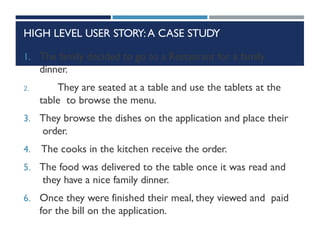
1. The family decided to go to a Restaurant for a family
dinner.
2. They are seated at a table and use the tablets at the
table to browse the menu.
3. They browse the dishes on the application and place their
order.
4. The cooks in the kitchen receive the order.
5. The food was delivered to the table once it was read and
they have a nice family dinner.
6. Once they were finished their meal, they viewed and paid
for the bill on the application.
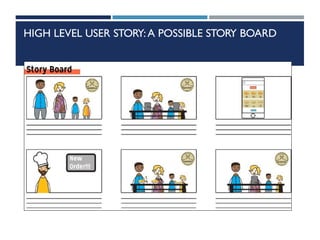
HIGH LEVEL USER STORY:A POSSIBLE STORY BOARD
HIGH LEVEL USER STORY
This type of story board give you
idea about the personas of you
application.
Here we have two personas
 A Mother (HouseWife) or Father
 A Cook
HIGH LEVEL USER STORY
Personas provide more elaborate
back stories to the participating
actors, including details such as age,
ethnicity, income level, job,
personality, etc. Providing high-level
details helps the storyboard address
specific issues.
HIGH LEVEL USER STORY
The users of first type storyboard
 Ensuring the entire development team is
on the same page
 Enhancing the possibility of
identifying features to improve or
create in the software product
 Ensuring the vision of the product remains
clear in its use.
 Use in marketing or demos
LOW LEVEL USER STORY
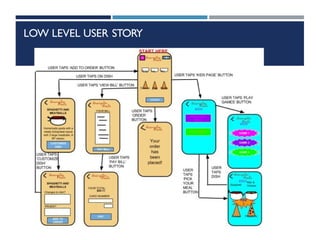
The second type of storyboard
combines wireframes and basic flow
from use cases in order to show
how the end-user interacts with the
user interface of the product in
detail.
LOW LEVEL USER STORY
It also shows all the sequences of
user interaction with the product,
and the outcomes of those
interactions. Each state of the
product during interaction is
illustrated with a wireframe.
LOW LEVEL USER STORY
The user interface element needed
to get to the next state is also
illustrated.Transitions between
states are generally depicted with an
arrowed line.
LOW LEVEL USER STORY

Lecture 05 StoryBoarding In Software Engineering.pptx

  • 1.
  • 2.
  • 3.
    STORY BOARDING In softwaredevelopment, storyboards are sequential, visual representations of an interaction with the software product.
  • 4.
    TWO TYPES OFSTORYBOARDING High level of User Experience Low level of User Interaction with the System.
  • 5.
    HIGH LEVEL USERSTORY Look like a comic strip  each action is illustrated in the sequence or flow of using a product.  includes the decision to use the product.  outcomes at the end of an interaction. If multiple features are offered in the product, then each should get a storyboard.
  • 6.
    HIGH LEVEL USERSTORY:A CASE STUDY Vision of a Restaurant Owner is “Order yourself”. People can order from the Tablets present on the tables.
  • 7.
    HIGH LEVEL USERSTORY:A CASE STUDY 1. The family decided to go to a Restaurant for a family dinner. 2. They are seated at a table and use the tablets at the table to browse the menu. 3. They browse the dishes on the application and place their order. 4. The cooks in the kitchen receive the order. 5. The food was delivered to the table once it was read and they have a nice family dinner. 6. Once they were finished their meal, they viewed and paid for the bill on the application.
  • 8.
    HIGH LEVEL USERSTORY:A POSSIBLE STORY BOARD
  • 9.
    HIGH LEVEL USERSTORY This type of story board give you idea about the personas of you application. Here we have two personas  A Mother (HouseWife) or Father  A Cook
  • 10.
    HIGH LEVEL USERSTORY Personas provide more elaborate back stories to the participating actors, including details such as age, ethnicity, income level, job, personality, etc. Providing high-level details helps the storyboard address specific issues.
  • 11.
    HIGH LEVEL USERSTORY The users of first type storyboard  Ensuring the entire development team is on the same page  Enhancing the possibility of identifying features to improve or create in the software product  Ensuring the vision of the product remains clear in its use.  Use in marketing or demos
  • 12.
    LOW LEVEL USERSTORY The second type of storyboard combines wireframes and basic flow from use cases in order to show how the end-user interacts with the user interface of the product in detail.
  • 13.
    LOW LEVEL USERSTORY It also shows all the sequences of user interaction with the product, and the outcomes of those interactions. Each state of the product during interaction is illustrated with a wireframe.
  • 14.
    LOW LEVEL USERSTORY The user interface element needed to get to the next state is also illustrated.Transitions between states are generally depicted with an arrowed line.
  • 15.