2
Contents
• Passing Arrayto a Function
• Methods of Passing arguments to a Function
• Call by Value
• Call by Reference
• Function Overloading
3.
3
Passing Array toa Function
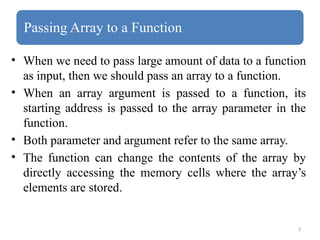
• When we need to pass large amount of data to a function
as input, then we should pass an array to a function.
• When an array argument is passed to a function, its
starting address is passed to the array parameter in the
function.
• Both parameter and argument refer to the same array.
• The function can change the contents of the array by
directly accessing the memory cells where the array’s
elements are stored.
4.
4
Declaration of Functionwith Array parameters
• When an array argument is used as an argument of a
function, it is specified in the function declaration.
• Examples:
void add ( int [] );
It is a function with name add, return type of void and
parameter of int array type.
void add (int [][], float [][]);
This function have two parameters .
First parameter is of int two dimensional array type and
second parameter is of float two dimensional array type.
5.
5
Function Definition withArray parameters
• The type and name of the array parameter is specified in the
header of the function definition.
• The type of array in the header must match with the
parameter type in the function declaration.
Example:
void add(int a[])
{
}
6.
6
Calling Function withArray arguments
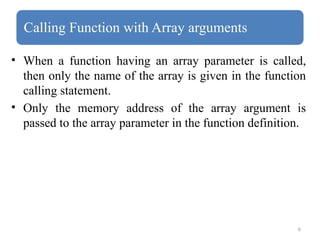
• When a function having an array parameter is called,
then only the name of the array is given in the function
calling statement.
• Only the memory address of the array argument is
passed to the array parameter in the function definition.
8
void print_arr(int [],int);// Function Declaration
void main() // Calling Function
{
int arr[5] = {10,15,20,25,30};
print_arr(arr,5);
getch();
}
void print_arr(int a[],int size ) // Called Function
a = 100 , size = 5
{
cout<<"Printing elements of arrayn";
for(int i= 0 ;i<size;i++)
{
cout<a[i]<<"t";
}
}
9.
9
Methods of Passingarguments to a Function
• Arguments can be passed to a function in two ways:
1. Call by Value
2. Call by Reference
10.
10
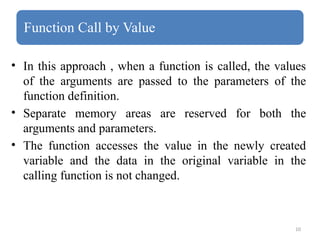
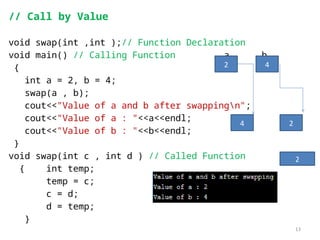
Function Call byValue
• In this approach , when a function is called, the values
of the arguments are passed to the parameters of the
function definition.
• Separate memory areas are reserved for both the
arguments and parameters.
• The function accesses the value in the newly created
variable and the data in the original variable in the
calling function is not changed.
11.
11
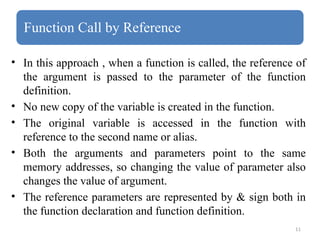
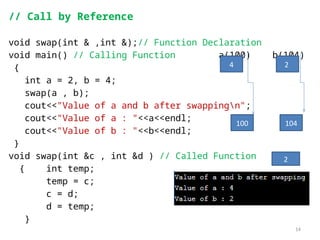
Function Call byReference
• In this approach , when a function is called, the reference of
the argument is passed to the parameter of the function
definition.
• No new copy of the variable is created in the function.
• The original variable is accessed in the function with
reference to the second name or alias.
• Both the arguments and parameters point to the same
memory addresses, so changing the value of parameter also
changes the value of argument.
• The reference parameters are represented by & sign both in
the function declaration and function definition.
13
// Call byValue
void swap(int ,int );// Function Declaration
void main() // Calling Function a b
{
int a = 2, b = 4;
swap(a , b);
cout<<"Value of a and b after swappingn";
cout<<"Value of a : "<<a<<endl; c d
cout<<"Value of b : "<<b<<endl;
}
void swap(int c , int d ) // Called Function temp
{ int temp;
temp = c;
c = d;
d = temp;
}
2
2
4
4
2
14.
14
// Call byReference
void swap(int & ,int &);// Function Declaration
void main() // Calling Function a(100) b(104)
{
int a = 2, b = 4;
swap(a , b);
cout<<"Value of a and b after swappingn";
cout<<"Value of a : "<<a<<endl; c d
cout<<"Value of b : "<<b<<endl;
}
void swap(int &c , int &d ) // Called Function temp
{ int temp;
temp = c;
c = d;
d = temp;
}
4
104
100
2
2
15.
15
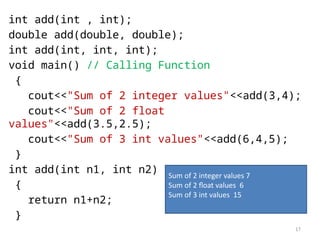
Function Overloading
• Definingtwo or more functions with the same name but
with different parameter list is known as function
overloading.
• It is used in those situations, where a function needs to
operate on different types of data.
• For example, if we want to add data of different types
such as int, float , double etc.
17
int add(int ,int);
double add(double, double);
int add(int, int, int);
void main() // Calling Function
{
cout<<"Sum of 2 integer values"<<add(3,4);
cout<<"Sum of 2 float
values"<<add(3.5,2.5);
cout<<"Sum of 3 int values"<<add(6,4,5);
}
int add(int n1, int n2)
{
return n1+n2;
}
Sum of 2 integer values 7
Sum of 2 float values 6
Sum of 3 int values 15
18.
18
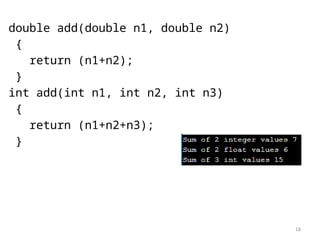
double add(double n1,double n2)
{
return (n1+n2);
}
int add(int n1, int n2, int n3)
{
return (n1+n2+n3);
}
![4
Declaration of Function with Array parameters
• When an array argument is used as an argument of a
function, it is specified in the function declaration.
• Examples:
void add ( int [] );
It is a function with name add, return type of void and
parameter of int array type.
void add (int [][], float [][]);
This function have two parameters .
First parameter is of int two dimensional array type and
second parameter is of float two dimensional array type.](https://image.slidesharecdn.com/lec2-oop-251203132028-31d29751/85/Lec-2-OOP-4-320.jpg)
![5
Function Definition with Array parameters
• The type and name of the array parameter is specified in the
header of the function definition.
• The type of array in the header must match with the
parameter type in the function declaration.
Example:
void add(int a[])
{
}](https://image.slidesharecdn.com/lec2-oop-251203132028-31d29751/85/Lec-2-OOP-5-320.jpg)
![8
void print_arr(int [],int );// Function Declaration
void main() // Calling Function
{
int arr[5] = {10,15,20,25,30};
print_arr(arr,5);
getch();
}
void print_arr(int a[],int size ) // Called Function
a = 100 , size = 5
{
cout<<"Printing elements of arrayn";
for(int i= 0 ;i<size;i++)
{
cout<a[i]<<"t";
}
}](https://image.slidesharecdn.com/lec2-oop-251203132028-31d29751/85/Lec-2-OOP-8-320.jpg)