Layout design is the process of
arranging visual elements—like text,
images, and shapes—on a given page.
Layout design is important for any
project that conveys a message through
eye-catching visuals, like magazine
layouts, website design, and
advertisements.
5 Elements
of
Layout Design
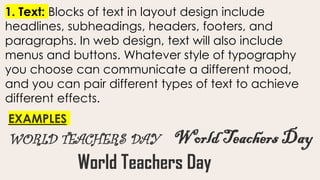
1. Text: Blocks of text in layout design include
headlines, subheadings, headers, footers, and
paragraphs. In web design, text will also include
menus and buttons. Whatever style of typography
you choose can communicate a different mood,
and you can pair different types of text to achieve
different effects.
WORLD TEACHERS DAY
EXAMPLES
World Teachers Day
World Teachers Day
2. Image: Images in your graphic design can
include photographs, illustrations, and
infographics that become a part of your layout.
Large images can grab the attention of your
audience and communicate messages without
text.
3. Line: Line refers to the way that two points in space
are connected. Whether they’re horizontal lines,
diagonal lines, or vertical lines, lines can help direct
the eye toward a certain point in your composition.
They can also draw boundaries between sections or
visual elements of your layout.
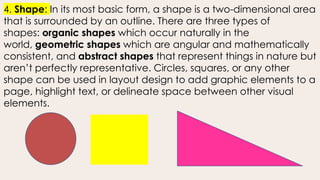
4. Shape: In its most basic form, a shape is a two-dimensional area
that is surrounded by an outline. There are three types of
shapes: organic shapes which occur naturally in the
world, geometric shapes which are angular and mathematically
consistent, and abstract shapes that represent things in nature but
aren’t perfectly representative. Circles, squares, or any other
shape can be used in layout design to add graphic elements to a
page, highlight text, or delineate space between other visual
elements.
5. WHITE SPACE: The blank space between elements
in layout design can be as important as the visual
elements themselves. The spacing around an
element can draw attention to it and make it stand
out.
Aa
Principles
of
Layout Design
EMPHASIS
Good layout design visually organizes a
hierarchy of information that places the
highest emphasis on the most important focal
point in the image. Hierarchy can sequentially
guide your user through the intended journey
of your image. You can use size, color,
contrast, or position to highlight the hierarchy
of important elements within your layout.
Design thinking is immersive.
It brings together observation, analysis, and research to make design work for people.
CONTRAST
used in tandem with alignment and
balance to help your design look unique
and eye-catching. Pairing contrasting
design elements like colors or different
types of typography helps fuse different
styles and moods to make an original,
distinctive product.
WHITE SPACE
BLANK SPACE
Design thinking is immersive.
It brings together observation, analysis, and research to make design work for people.
MOVEMENT
REPETITION
Design thinking is
immersive.
It brings together observation, analysis,
and research to make design work for
people.
Design thinking is
immersive.
It brings together observation, analysis,
and research to make design work for
people.
PROPORTION
Design
thinking is
immersive.
It brings together observation, analysis, and research to
make design work for people.
ALIGNMENT
refers to the way that a designer arranges the
different elements of their design in relation to
one another. You can repeat design elements
in your image to establish consistency in your
image, making it easier on the reader’s eye.
Design
thinking is
immersive.
It brings together observation, analysis,
and research to make design work for
people.
DESIGN THINKING
IS IMMERSIVE.
It brings together observation, analysis, and research to make design work for people.
ROME
FIRE
MICROSOFT
WORD PICTURE
LAYOUT
MS WORD SHAPE PICTURE
MS WORD COLLAGE
MS WORD PICTURE OUTLINE
MS WORD REMOVE
BACKGROUND
DIGITAL EMPOWERMENT:
UNLEASHING THE POWER
OF ICT IN TEACHING AND
INSTRUCTIONS ASSESSMENT
FOR LEARNING
INFORMATION AND COMMUNICATION
TECHNOLOGY (ICT)= tools and
resources to enhance teaching
and learning in schools. It involves
incorporating technology into the
curriculum to improve student
engagement, collaboration and
learning outcomes.
DIGITAL LITERACY= is an individual’s
ability to find, evaluate and
communicate information using typing
or digital media platforms. It is a
combination of both technical and
cognitive abilities in using information
and communication technologies to
create, evaluate and share.
BENEFITS OF ICT IN TEACHING
and Learning
1.Education For Everyone- it helps break
down geographical barriers, providing
access to quality education for students
regardless of their location, while all
resources are available in the classroom or
even outside.
BENEFITS OF ICT IN TEACHING
and Learning
2.Personalized Learning- One-size-fits-all
approaches are no longer that effective in
education. ICT (Information
Communication Technology) enables
personalized learning experiences to
adapt to individual needs, preferences
and pace of learning.
BENEFITS OF ICT IN TEACHING
and Learning
3. Higher Knowledge Retention-visual
leaning is seen to be more effective for
students. It is because our brains process
and retain images and videos faster as
compared to texts. ICT teaching is more
immersive and memorable which leads to
long term retention of information.
BENEFITS OF ICT IN TEACHING
and Learning
4.Lerner-Centered Approach-encourages
collaboration, participation and critical
thinking empowering students to take
ownership of their learning journey. More
engaging experiences.
BENEFITS OF ICT IN TEACHING and
Learning
5.Time Efficiency- quick access to a vast
array of resources, reducing time spent on
manual activities.
6.Preparation for the Digital –learners will
learn how to adapt to and thrive in ever-
evolving technological learning, not only
on how to use tools.
1.BRIGHTFUL
2.Prezi
3.Canva
4.iPrep
Interactive website for teaching-
learning/Digital Tools for Teaching:
Insert your
paragraph
text here
Insert your
paragraph
text here

LAYOUT_Graphic--Design-Presentation.pptx

  • 2.
    Layout design isthe process of arranging visual elements—like text, images, and shapes—on a given page. Layout design is important for any project that conveys a message through eye-catching visuals, like magazine layouts, website design, and advertisements.
  • 3.
  • 4.
    1. Text: Blocksof text in layout design include headlines, subheadings, headers, footers, and paragraphs. In web design, text will also include menus and buttons. Whatever style of typography you choose can communicate a different mood, and you can pair different types of text to achieve different effects. WORLD TEACHERS DAY EXAMPLES World Teachers Day World Teachers Day
  • 5.
    2. Image: Imagesin your graphic design can include photographs, illustrations, and infographics that become a part of your layout. Large images can grab the attention of your audience and communicate messages without text.
  • 6.
    3. Line: Linerefers to the way that two points in space are connected. Whether they’re horizontal lines, diagonal lines, or vertical lines, lines can help direct the eye toward a certain point in your composition. They can also draw boundaries between sections or visual elements of your layout.
  • 7.
    4. Shape: Inits most basic form, a shape is a two-dimensional area that is surrounded by an outline. There are three types of shapes: organic shapes which occur naturally in the world, geometric shapes which are angular and mathematically consistent, and abstract shapes that represent things in nature but aren’t perfectly representative. Circles, squares, or any other shape can be used in layout design to add graphic elements to a page, highlight text, or delineate space between other visual elements.
  • 8.
    5. WHITE SPACE:The blank space between elements in layout design can be as important as the visual elements themselves. The spacing around an element can draw attention to it and make it stand out.
  • 9.
  • 11.
  • 12.
    EMPHASIS Good layout designvisually organizes a hierarchy of information that places the highest emphasis on the most important focal point in the image. Hierarchy can sequentially guide your user through the intended journey of your image. You can use size, color, contrast, or position to highlight the hierarchy of important elements within your layout.
  • 13.
    Design thinking isimmersive. It brings together observation, analysis, and research to make design work for people.
  • 14.
    CONTRAST used in tandemwith alignment and balance to help your design look unique and eye-catching. Pairing contrasting design elements like colors or different types of typography helps fuse different styles and moods to make an original, distinctive product.
  • 17.
  • 18.
    Design thinking isimmersive. It brings together observation, analysis, and research to make design work for people.
  • 19.
  • 21.
  • 22.
    Design thinking is immersive. Itbrings together observation, analysis, and research to make design work for people.
  • 23.
    Design thinking is immersive. Itbrings together observation, analysis, and research to make design work for people.
  • 24.
  • 25.
    Design thinking is immersive. It bringstogether observation, analysis, and research to make design work for people.
  • 26.
    ALIGNMENT refers to theway that a designer arranges the different elements of their design in relation to one another. You can repeat design elements in your image to establish consistency in your image, making it easier on the reader’s eye.
  • 27.
    Design thinking is immersive. It bringstogether observation, analysis, and research to make design work for people.
  • 28.
    DESIGN THINKING IS IMMERSIVE. Itbrings together observation, analysis, and research to make design work for people.
  • 31.
  • 34.
  • 37.
  • 38.
    MS WORD SHAPEPICTURE MS WORD COLLAGE MS WORD PICTURE OUTLINE MS WORD REMOVE BACKGROUND
  • 39.
    DIGITAL EMPOWERMENT: UNLEASHING THEPOWER OF ICT IN TEACHING AND INSTRUCTIONS ASSESSMENT FOR LEARNING
  • 40.
    INFORMATION AND COMMUNICATION TECHNOLOGY(ICT)= tools and resources to enhance teaching and learning in schools. It involves incorporating technology into the curriculum to improve student engagement, collaboration and learning outcomes.
  • 41.
    DIGITAL LITERACY= isan individual’s ability to find, evaluate and communicate information using typing or digital media platforms. It is a combination of both technical and cognitive abilities in using information and communication technologies to create, evaluate and share.
  • 42.
    BENEFITS OF ICTIN TEACHING and Learning 1.Education For Everyone- it helps break down geographical barriers, providing access to quality education for students regardless of their location, while all resources are available in the classroom or even outside.
  • 43.
    BENEFITS OF ICTIN TEACHING and Learning 2.Personalized Learning- One-size-fits-all approaches are no longer that effective in education. ICT (Information Communication Technology) enables personalized learning experiences to adapt to individual needs, preferences and pace of learning.
  • 44.
    BENEFITS OF ICTIN TEACHING and Learning 3. Higher Knowledge Retention-visual leaning is seen to be more effective for students. It is because our brains process and retain images and videos faster as compared to texts. ICT teaching is more immersive and memorable which leads to long term retention of information.
  • 45.
    BENEFITS OF ICTIN TEACHING and Learning 4.Lerner-Centered Approach-encourages collaboration, participation and critical thinking empowering students to take ownership of their learning journey. More engaging experiences.
  • 46.
    BENEFITS OF ICTIN TEACHING and Learning 5.Time Efficiency- quick access to a vast array of resources, reducing time spent on manual activities. 6.Preparation for the Digital –learners will learn how to adapt to and thrive in ever- evolving technological learning, not only on how to use tools.
  • 47.
    1.BRIGHTFUL 2.Prezi 3.Canva 4.iPrep Interactive website forteaching- learning/Digital Tools for Teaching:
  • 53.
  • 54.

Editor's Notes