CMSC 104, Version 9/01 1
Variables in C
Topics
• Naming Variables
• Declaring Variables
• Using Variables
• The Assignment Statement
Reading
• Sections 2.3 - 2.4
CMSC 104, Version 9/01 2
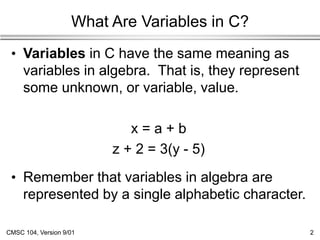
What Are Variables in C?
• Variables in C have the same meaning as
variables in algebra. That is, they represent
some unknown, or variable, value.
x = a + b
z + 2 = 3(y - 5)
• Remember that variables in algebra are
represented by a single alphabetic character.
CMSC 104, Version 9/01 3
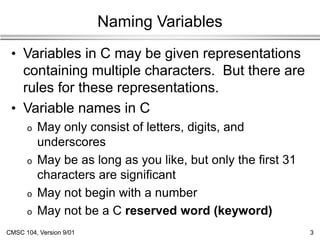
Naming Variables
• Variables in C may be given representations
containing multiple characters. But there are
rules for these representations.
• Variable names in C
o May only consist of letters, digits, and
underscores
o May be as long as you like, but only the first 31
characters are significant
o May not begin with a number
o May not be a C reserved word (keyword)
CMSC 104, Version 9/01 4
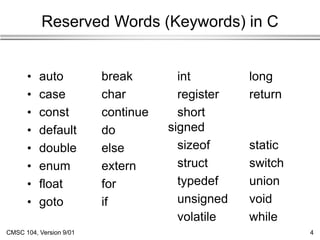
Reserved Words (Keywords) in C
• auto break
• case char
• const continue
• default do
• double else
• enum extern
• float for
• goto if
int long
register return
short
signed
sizeof static
struct switch
typedef union
unsigned void
volatile while
CMSC 104, Version 9/01 5
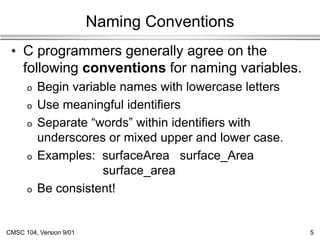
Naming Conventions
• C programmers generally agree on the
following conventions for naming variables.
o Begin variable names with lowercase letters
o Use meaningful identifiers
o Separate “words” within identifiers with
underscores or mixed upper and lower case.
o Examples: surfaceArea surface_Area
surface_area
o Be consistent!
CMSC 104, Version 9/01 6
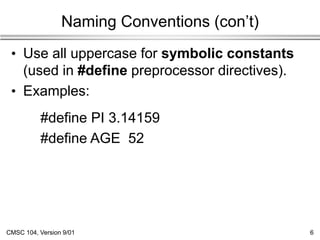
Naming Conventions (con’t)
• Use all uppercase for symbolic constants
(used in #define preprocessor directives).
• Examples:
#define PI 3.14159
#define AGE 52
CMSC 104, Version 9/01 7
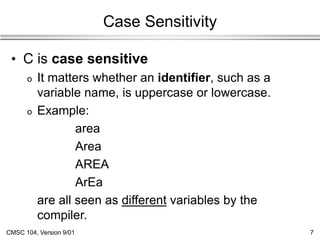
Case Sensitivity
• C is case sensitive
o It matters whether an identifier, such as a
variable name, is uppercase or lowercase.
o Example:
area
Area
AREA
ArEa
are all seen as different variables by the
compiler.
CMSC 104, Version 9/01 8
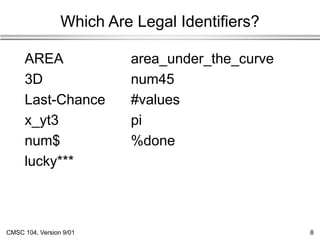
Which Are Legal Identifiers?
AREA area_under_the_curve
3D num45
Last-Chance #values
x_yt3 pi
num$ %done
lucky***
CMSC 104, Version 9/01 9
Declaring Variables
• Before using a variable, you must give the
compiler some information about the
variable; i.e., you must declare it.
• The declaration statement includes the
data type of the variable.
• Examples of variable declarations:
int meatballs ;
float area ;
CMSC 104, Version 9/01 10
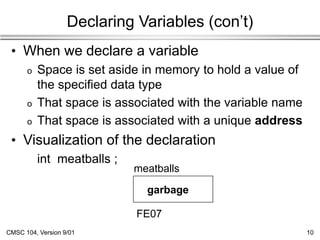
Declaring Variables (con’t)
• When we declare a variable
o Space is set aside in memory to hold a value of
the specified data type
o That space is associated with the variable name
o That space is associated with a unique address
• Visualization of the declaration
int meatballs ;
meatballs
FE07
garbage
CMSC 104, Version 9/01 11
More About Variables
C has three basic predefined data types:
• Integers (whole numbers)
o int, long int, short int, unsigned int
• Floating point (real numbers)
o float, double
• Characters
o char
• At this point, you need only be concerned
with the data types that are bolded.
CMSC 104, Version 9/01 12
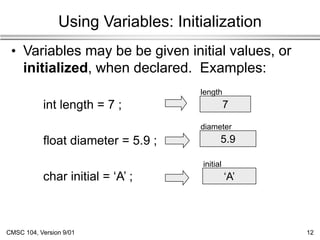
Using Variables: Initialization
• Variables may be be given initial values, or
initialized, when declared. Examples:
int length = 7 ;
float diameter = 5.9 ;
char initial = ‘A’ ;
7
5.9
‘A’
length
diameter
initial
CMSC 104, Version 9/01 13
Using Variables: Initialization (con’t)
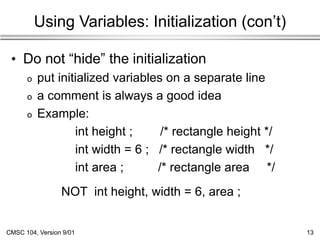
• Do not “hide” the initialization
o put initialized variables on a separate line
o a comment is always a good idea
o Example:
int height ; /* rectangle height */
int width = 6 ; /* rectangle width */
int area ; /* rectangle area */
NOT int height, width = 6, area ;
CMSC 104, Version 9/01 14
Using Variables: Assignment
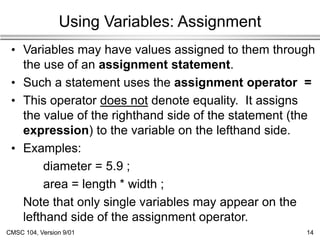
• Variables may have values assigned to them through
the use of an assignment statement.
• Such a statement uses the assignment operator =
• This operator does not denote equality. It assigns
the value of the righthand side of the statement (the
expression) to the variable on the lefthand side.
• Examples:
diameter = 5.9 ;
area = length * width ;
Note that only single variables may appear on the
lefthand side of the assignment operator.
CMSC 104, Version 9/01 15
Example: Declarations and Assignments
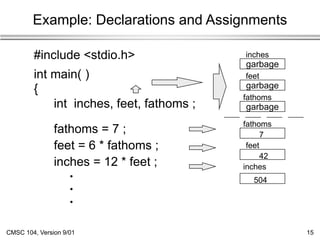
#include <stdio.h>
int main( )
{
int inches, feet, fathoms ;
fathoms = 7 ;
feet = 6 * fathoms ;
inches = 12 * feet ;
•
•
•
inches
feet
fathoms
garbage
fathoms
7
garbage
feet
42
garbage
504
inches
CMSC 104, Version 9/01 16
Example: Declarations and Assignments (cont’d)
•
•
•
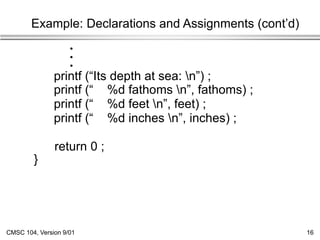
printf (“Its depth at sea: n”) ;
printf (“ %d fathoms n”, fathoms) ;
printf (“ %d feet n”, feet) ;
printf (“ %d inches n”, inches) ;
return 0 ;
}
CMSC 104, Version 9/01 17
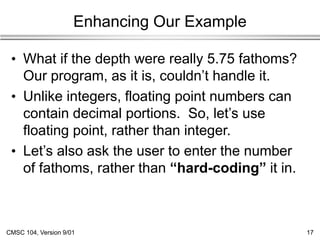
Enhancing Our Example
• What if the depth were really 5.75 fathoms?
Our program, as it is, couldn’t handle it.
• Unlike integers, floating point numbers can
contain decimal portions. So, let’s use
floating point, rather than integer.
• Let’s also ask the user to enter the number
of fathoms, rather than “hard-coding” it in.
CMSC 104, Version 9/01 18
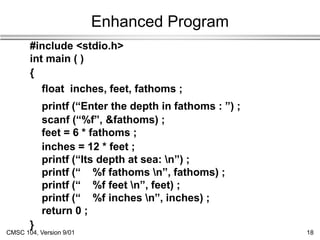
Enhanced Program
#include <stdio.h>
int main ( )
{
float inches, feet, fathoms ;
printf (“Enter the depth in fathoms : ”) ;
scanf (“%f”, &fathoms) ;
feet = 6 * fathoms ;
inches = 12 * feet ;
printf (“Its depth at sea: n”) ;
printf (“ %f fathoms n”, fathoms) ;
printf (“ %f feet n”, feet) ;
printf (“ %f inches n”, inches) ;
return 0 ;
}
CMSC 104, Version 9/01 19
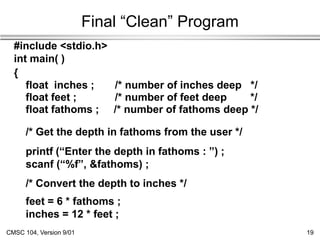
Final “Clean” Program
#include <stdio.h>
int main( )
{
float inches ; /* number of inches deep */
float feet ; /* number of feet deep */
float fathoms ; /* number of fathoms deep */
/* Get the depth in fathoms from the user */
printf (“Enter the depth in fathoms : ”) ;
scanf (“%f”, &fathoms) ;
/* Convert the depth to inches */
feet = 6 * fathoms ;
inches = 12 * feet ;
CMSC 104, Version 9/01 20
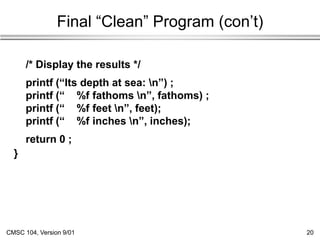
Final “Clean” Program (con’t)
/* Display the results */
printf (“Its depth at sea: n”) ;
printf (“ %f fathoms n”, fathoms) ;
printf (“ %f feet n”, feet);
printf (“ %f inches n”, inches);
return 0 ;
}
CMSC 104, Version 9/01 21
Good Programming Practices
• Place each variable declaration on its own
line with a descriptive comment.
• Place a comment before each logical
“chunk” of code describing what it does.
• Do not place a comment on the same line as
code (with the exception of variable
declarations).
• Use spaces around all arithmetic and
assignment operators.
• Use blank lines to enhance readability.
CMSC 104, Version 9/01 22
Good Programming Practices (con’t)
• Place a blank line between the last variable
declaration and the first executable
statement of the program.
• Indent the body of the program 3 to 4 tab
stops -- be consistent!

L08VariablesInC.ppt

  • 1.
    CMSC 104, Version9/01 1 Variables in C Topics • Naming Variables • Declaring Variables • Using Variables • The Assignment Statement Reading • Sections 2.3 - 2.4
  • 2.
    CMSC 104, Version9/01 2 What Are Variables in C? • Variables in C have the same meaning as variables in algebra. That is, they represent some unknown, or variable, value. x = a + b z + 2 = 3(y - 5) • Remember that variables in algebra are represented by a single alphabetic character.
  • 3.
    CMSC 104, Version9/01 3 Naming Variables • Variables in C may be given representations containing multiple characters. But there are rules for these representations. • Variable names in C o May only consist of letters, digits, and underscores o May be as long as you like, but only the first 31 characters are significant o May not begin with a number o May not be a C reserved word (keyword)
  • 4.
    CMSC 104, Version9/01 4 Reserved Words (Keywords) in C • auto break • case char • const continue • default do • double else • enum extern • float for • goto if int long register return short signed sizeof static struct switch typedef union unsigned void volatile while
  • 5.
    CMSC 104, Version9/01 5 Naming Conventions • C programmers generally agree on the following conventions for naming variables. o Begin variable names with lowercase letters o Use meaningful identifiers o Separate “words” within identifiers with underscores or mixed upper and lower case. o Examples: surfaceArea surface_Area surface_area o Be consistent!
  • 6.
    CMSC 104, Version9/01 6 Naming Conventions (con’t) • Use all uppercase for symbolic constants (used in #define preprocessor directives). • Examples: #define PI 3.14159 #define AGE 52
  • 7.
    CMSC 104, Version9/01 7 Case Sensitivity • C is case sensitive o It matters whether an identifier, such as a variable name, is uppercase or lowercase. o Example: area Area AREA ArEa are all seen as different variables by the compiler.
  • 8.
    CMSC 104, Version9/01 8 Which Are Legal Identifiers? AREA area_under_the_curve 3D num45 Last-Chance #values x_yt3 pi num$ %done lucky***
  • 9.
    CMSC 104, Version9/01 9 Declaring Variables • Before using a variable, you must give the compiler some information about the variable; i.e., you must declare it. • The declaration statement includes the data type of the variable. • Examples of variable declarations: int meatballs ; float area ;
  • 10.
    CMSC 104, Version9/01 10 Declaring Variables (con’t) • When we declare a variable o Space is set aside in memory to hold a value of the specified data type o That space is associated with the variable name o That space is associated with a unique address • Visualization of the declaration int meatballs ; meatballs FE07 garbage
  • 11.
    CMSC 104, Version9/01 11 More About Variables C has three basic predefined data types: • Integers (whole numbers) o int, long int, short int, unsigned int • Floating point (real numbers) o float, double • Characters o char • At this point, you need only be concerned with the data types that are bolded.
  • 12.
    CMSC 104, Version9/01 12 Using Variables: Initialization • Variables may be be given initial values, or initialized, when declared. Examples: int length = 7 ; float diameter = 5.9 ; char initial = ‘A’ ; 7 5.9 ‘A’ length diameter initial
  • 13.
    CMSC 104, Version9/01 13 Using Variables: Initialization (con’t) • Do not “hide” the initialization o put initialized variables on a separate line o a comment is always a good idea o Example: int height ; /* rectangle height */ int width = 6 ; /* rectangle width */ int area ; /* rectangle area */ NOT int height, width = 6, area ;
  • 14.
    CMSC 104, Version9/01 14 Using Variables: Assignment • Variables may have values assigned to them through the use of an assignment statement. • Such a statement uses the assignment operator = • This operator does not denote equality. It assigns the value of the righthand side of the statement (the expression) to the variable on the lefthand side. • Examples: diameter = 5.9 ; area = length * width ; Note that only single variables may appear on the lefthand side of the assignment operator.
  • 15.
    CMSC 104, Version9/01 15 Example: Declarations and Assignments #include <stdio.h> int main( ) { int inches, feet, fathoms ; fathoms = 7 ; feet = 6 * fathoms ; inches = 12 * feet ; • • • inches feet fathoms garbage fathoms 7 garbage feet 42 garbage 504 inches
  • 16.
    CMSC 104, Version9/01 16 Example: Declarations and Assignments (cont’d) • • • printf (“Its depth at sea: n”) ; printf (“ %d fathoms n”, fathoms) ; printf (“ %d feet n”, feet) ; printf (“ %d inches n”, inches) ; return 0 ; }
  • 17.
    CMSC 104, Version9/01 17 Enhancing Our Example • What if the depth were really 5.75 fathoms? Our program, as it is, couldn’t handle it. • Unlike integers, floating point numbers can contain decimal portions. So, let’s use floating point, rather than integer. • Let’s also ask the user to enter the number of fathoms, rather than “hard-coding” it in.
  • 18.
    CMSC 104, Version9/01 18 Enhanced Program #include <stdio.h> int main ( ) { float inches, feet, fathoms ; printf (“Enter the depth in fathoms : ”) ; scanf (“%f”, &fathoms) ; feet = 6 * fathoms ; inches = 12 * feet ; printf (“Its depth at sea: n”) ; printf (“ %f fathoms n”, fathoms) ; printf (“ %f feet n”, feet) ; printf (“ %f inches n”, inches) ; return 0 ; }
  • 19.
    CMSC 104, Version9/01 19 Final “Clean” Program #include <stdio.h> int main( ) { float inches ; /* number of inches deep */ float feet ; /* number of feet deep */ float fathoms ; /* number of fathoms deep */ /* Get the depth in fathoms from the user */ printf (“Enter the depth in fathoms : ”) ; scanf (“%f”, &fathoms) ; /* Convert the depth to inches */ feet = 6 * fathoms ; inches = 12 * feet ;
  • 20.
    CMSC 104, Version9/01 20 Final “Clean” Program (con’t) /* Display the results */ printf (“Its depth at sea: n”) ; printf (“ %f fathoms n”, fathoms) ; printf (“ %f feet n”, feet); printf (“ %f inches n”, inches); return 0 ; }
  • 21.
    CMSC 104, Version9/01 21 Good Programming Practices • Place each variable declaration on its own line with a descriptive comment. • Place a comment before each logical “chunk” of code describing what it does. • Do not place a comment on the same line as code (with the exception of variable declarations). • Use spaces around all arithmetic and assignment operators. • Use blank lines to enhance readability.
  • 22.
    CMSC 104, Version9/01 22 Good Programming Practices (con’t) • Place a blank line between the last variable declaration and the first executable statement of the program. • Indent the body of the program 3 to 4 tab stops -- be consistent!