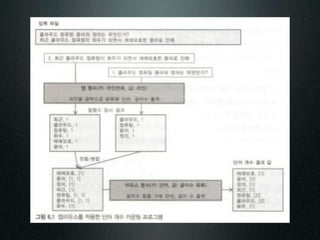
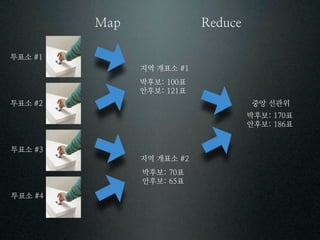
투표소
지역 개표소
박후보 표
안후보 표
투표소 중앙 선관위
박후보 표
안후보 표
투표소
지역 개표소
박후보 표
안후보 표
투표소
28.
package hadoopwordcount;
import java.io.IOException;
importjava.util.StringTokenizer;
import org.apache.hadoop.conf.Configuration;
import org.apache.hadoop.fs.Path;
import org.apache.hadoop.io.IntWritable;
import org.apache.hadoop.io.Text;
import org.apache.hadoop.mapreduce.Job;
import org.apache.hadoop.mapreduce.Mapper;
import org.apache.hadoop.mapreduce.Reducer;
import org.apache.hadoop.mapreduce.lib.input.FileInputFormat;
import org.apache.hadoop.mapreduce.lib.output.FileOutputFormat;
import org.apache.hadoop.util.GenericOptionsParser;
public class WordCount {
public static class WordTokenizerMapper
extends Mapper<Object, Text, Text, IntWritable>
{
private final static IntWritable one = new IntWritable(1);
private Text word = new Text();
/**
* map() gets a key, value, and context (which we'll ignore for the moment).
* key - seems to be "bytes from the beginning of the file"
* value - the current line; we are being fed one line at a time from the
* input file
*
* here's what the key and value look like if i print them out with the first
* println statement below:
*
* [map] key: (0), value: ([Weekly Compilation of Presidential Documents])
* [map] key: (47), value: (From the 2002 Presidential Documents Online via GPO Access [frwais.access.gpo.gov])
* [map] key: (130), value: ([DOCID:pd04fe02_txt-11] )
* [map] key: (179), value: ()
* [map] key: (180), value: ([Page 133-139])
*
* in the tokenizer loop, each token is a "word" from the current line, so the first token from
* the first line is "Weekly", then "Compilation", and so on. as a result, the output from the loop
* over the first line looks like this:
*
* [map] key: (0), value: ([Weekly Compilation of Presidential Documents])
* [map, in loop] token: ([Weekly)
* [map, in loop] token: (Compilation)
* [map, in loop] token: (of)
* [map, in loop] token: (Presidential)
* [map, in loop] token: (Documents])
*
*/
public void map(Object key,
! ! Text value,
! ! Context context)
throws IOException, InterruptedException
{
//System.err.println(String.format("[map] key: (%s), value: (%s)", key, value));
// break each sentence into words, using the punctuation characters shown
StringTokenizer tokenizer = new StringTokenizer(value.toString(), " tnrf,.:;?![]'");
while (tokenizer.hasMoreTokens())
{
// make the words lowercase so words like "an" and "An" are counted as one word
String s = tokenizer.nextToken().toLowerCase().trim();
System.err.println(String.format("[map, in loop] token: (%s)", s));
29.
word.set(s);
context.write(word, one);
}
}
}
/**
* this is the reducer class.
* some magic happens before the data gets to us. the key and values data looks like this:
*
* [reduce] key: (Afghan), value: (1)
* [reduce] key: (Afghanistan), value: (1, 1, 1, 1, 1, 1, 1)
* [reduce] key: (Afghanistan,), value: (1, 1, 1)
* [reduce] key: (Africa), value: (1, 1)
* [reduce] key: (Al), value: (1)
*
* there are also many '0' values in the data:
*
* [reduce] key: (while), value: (0)
* [reduce] key: (who), value: (0)
* ...
*
* note that the input to this function is sorted, so it begins with numbers,
* like "000", then starts with "a", "about", and so on, after the numbers are printed.
*
*/
public static class WordOccurrenceReducer
extends Reducer<Text, IntWritable, Text, IntWritable>
{
private IntWritable occurrencesOfWord = new IntWritable();
public void reduce(Text key,
! ! Iterable<IntWritable> values,
Context context)
throws IOException, InterruptedException
{
// debug output
//printKeyAndValues(key, values);
// the actual reducer work
int sum = 0;
for (IntWritable val : values) {
sum += val.get();
}
occurrencesOfWord.set(sum);
// this writes the word and the count, like this: ("Africa", 2)
context.write(key, occurrencesOfWord);
// my debug output
System.err.println(String.format("[reduce] word: (%s), count: (%d)", key, occurrencesOfWord.get()));
}
// a little method to print debug output
private void printKeyAndValues(Text key, Iterable<IntWritable> values)
{
StringBuilder sb = new StringBuilder();
for (IntWritable val : values)
{
sb.append(val.get() + ", ");
}
System.err.println(String.format("[reduce] key: (%s), value: (%s)", key, sb.toString()));
}
}
/**
* the "driver" class. it sets everything up, then gets it started.
*/
30.
public static voidmain(String[] args)
throws Exception
{
Configuration conf = new Configuration();
String[] otherArgs = new GenericOptionsParser(conf, args).getRemainingArgs();
if (otherArgs.length != 2)
{
System.err.println("Usage: wordcount <inputFile> <outputDir>");
System.exit(2);
}
Job job = new Job(conf, "word count");
job.setJarByClass(WordCount.class);
job.setMapperClass(WordTokenizerMapper.class);
job.setCombinerClass(WordOccurrenceReducer.class);
job.setReducerClass(WordOccurrenceReducer.class);
job.setOutputKeyClass(Text.class);
job.setOutputValueClass(IntWritable.class);
FileInputFormat.addInputPath(job, new Path(otherArgs[0]));
FileOutputFormat.setOutputPath(job, new Path(otherArgs[1]));
System.exit(job.waitForCompletion(true) ? 0 : 1);
}
}
31.
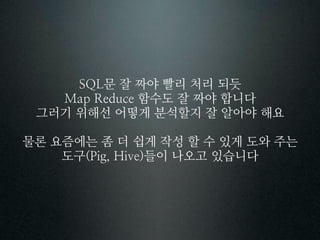
문 잘 짜야빨리 처리 되듯
함수도 잘 짜야 합니다
그러기 위해선 어떻게 분석할지 잘 알아야 해요
물론 요즘에는 좀 더 쉽게 작성 할 수 있게 도와 주는
도구 들이 나오고 있습니다
꽃
김 춘수
내가 그의 이름을 불러 주기 전에는
그는 다만 하나의 몸짓에 지나지 않았다
내가 그의 이름을 불렀을 때
그는 나에게로 와서 꽃이 되었다
내가 그의 이름을 불러준 것처럼
나의 이 빛깔과 향기에 알맞는
누가 나의 이름을 불러다오
그에게로 가서 나도
그의 꽃이 되고 싶다
우리들은 모두 무엇이 되고 싶다
너는 나에게 나는 너에게
잊혀지지 않는 하나의 눈짓이 되고 싶다



















![package hadoopwordcount;
import java.io.IOException;
import java.util.StringTokenizer;
import org.apache.hadoop.conf.Configuration;
import org.apache.hadoop.fs.Path;
import org.apache.hadoop.io.IntWritable;
import org.apache.hadoop.io.Text;
import org.apache.hadoop.mapreduce.Job;
import org.apache.hadoop.mapreduce.Mapper;
import org.apache.hadoop.mapreduce.Reducer;
import org.apache.hadoop.mapreduce.lib.input.FileInputFormat;
import org.apache.hadoop.mapreduce.lib.output.FileOutputFormat;
import org.apache.hadoop.util.GenericOptionsParser;
public class WordCount {
public static class WordTokenizerMapper
extends Mapper<Object, Text, Text, IntWritable>
{
private final static IntWritable one = new IntWritable(1);
private Text word = new Text();
/**
* map() gets a key, value, and context (which we'll ignore for the moment).
* key - seems to be "bytes from the beginning of the file"
* value - the current line; we are being fed one line at a time from the
* input file
*
* here's what the key and value look like if i print them out with the first
* println statement below:
*
* [map] key: (0), value: ([Weekly Compilation of Presidential Documents])
* [map] key: (47), value: (From the 2002 Presidential Documents Online via GPO Access [frwais.access.gpo.gov])
* [map] key: (130), value: ([DOCID:pd04fe02_txt-11] )
* [map] key: (179), value: ()
* [map] key: (180), value: ([Page 133-139])
*
* in the tokenizer loop, each token is a "word" from the current line, so the first token from
* the first line is "Weekly", then "Compilation", and so on. as a result, the output from the loop
* over the first line looks like this:
*
* [map] key: (0), value: ([Weekly Compilation of Presidential Documents])
* [map, in loop] token: ([Weekly)
* [map, in loop] token: (Compilation)
* [map, in loop] token: (of)
* [map, in loop] token: (Presidential)
* [map, in loop] token: (Documents])
*
*/
public void map(Object key,
! ! Text value,
! ! Context context)
throws IOException, InterruptedException
{
//System.err.println(String.format("[map] key: (%s), value: (%s)", key, value));
// break each sentence into words, using the punctuation characters shown
StringTokenizer tokenizer = new StringTokenizer(value.toString(), " tnrf,.:;?![]'");
while (tokenizer.hasMoreTokens())
{
// make the words lowercase so words like "an" and "An" are counted as one word
String s = tokenizer.nextToken().toLowerCase().trim();
System.err.println(String.format("[map, in loop] token: (%s)", s));](https://image.slidesharecdn.com/520120613-120731012930-phpapp02/85/KTH_Detail-day_-_5-_-_-_20120613-28-320.jpg)
![word.set(s);
context.write(word, one);
}
}
}
/**
* this is the reducer class.
* some magic happens before the data gets to us. the key and values data looks like this:
*
* [reduce] key: (Afghan), value: (1)
* [reduce] key: (Afghanistan), value: (1, 1, 1, 1, 1, 1, 1)
* [reduce] key: (Afghanistan,), value: (1, 1, 1)
* [reduce] key: (Africa), value: (1, 1)
* [reduce] key: (Al), value: (1)
*
* there are also many '0' values in the data:
*
* [reduce] key: (while), value: (0)
* [reduce] key: (who), value: (0)
* ...
*
* note that the input to this function is sorted, so it begins with numbers,
* like "000", then starts with "a", "about", and so on, after the numbers are printed.
*
*/
public static class WordOccurrenceReducer
extends Reducer<Text, IntWritable, Text, IntWritable>
{
private IntWritable occurrencesOfWord = new IntWritable();
public void reduce(Text key,
! ! Iterable<IntWritable> values,
Context context)
throws IOException, InterruptedException
{
// debug output
//printKeyAndValues(key, values);
// the actual reducer work
int sum = 0;
for (IntWritable val : values) {
sum += val.get();
}
occurrencesOfWord.set(sum);
// this writes the word and the count, like this: ("Africa", 2)
context.write(key, occurrencesOfWord);
// my debug output
System.err.println(String.format("[reduce] word: (%s), count: (%d)", key, occurrencesOfWord.get()));
}
// a little method to print debug output
private void printKeyAndValues(Text key, Iterable<IntWritable> values)
{
StringBuilder sb = new StringBuilder();
for (IntWritable val : values)
{
sb.append(val.get() + ", ");
}
System.err.println(String.format("[reduce] key: (%s), value: (%s)", key, sb.toString()));
}
}
/**
* the "driver" class. it sets everything up, then gets it started.
*/](https://image.slidesharecdn.com/520120613-120731012930-phpapp02/85/KTH_Detail-day_-_5-_-_-_20120613-29-320.jpg)
![public static void main(String[] args)
throws Exception
{
Configuration conf = new Configuration();
String[] otherArgs = new GenericOptionsParser(conf, args).getRemainingArgs();
if (otherArgs.length != 2)
{
System.err.println("Usage: wordcount <inputFile> <outputDir>");
System.exit(2);
}
Job job = new Job(conf, "word count");
job.setJarByClass(WordCount.class);
job.setMapperClass(WordTokenizerMapper.class);
job.setCombinerClass(WordOccurrenceReducer.class);
job.setReducerClass(WordOccurrenceReducer.class);
job.setOutputKeyClass(Text.class);
job.setOutputValueClass(IntWritable.class);
FileInputFormat.addInputPath(job, new Path(otherArgs[0]));
FileOutputFormat.setOutputPath(job, new Path(otherArgs[1]));
System.exit(job.waitForCompletion(true) ? 0 : 1);
}
}](https://image.slidesharecdn.com/520120613-120731012930-phpapp02/85/KTH_Detail-day_-_5-_-_-_20120613-30-320.jpg)







![[Pgday.Seoul 2021] 1. 예제로 살펴보는 포스트그레스큐엘의 독특한 SQL](https://cdn.slidesharecdn.com/ss_thumbnails/sql-211217063145-thumbnail.jpg?width=640&height=640&fit=bounds)


![[발표자료]안드로메다에서 온 디자이너이야기 5차 next_web_지훈_20130221](https://cdn.slidesharecdn.com/ss_thumbnails/5nextweb20130221-130303211405-phpapp01-thumbnail.jpg?width=640&height=640&fit=bounds)


![[H3 2012] 내컴에선 잘되던데? - vagrant로 서버와 동일한 개발환경 꾸미기](https://cdn.slidesharecdn.com/ss_thumbnails/c6-vagrantshare-121107074434-phpapp01-thumbnail.jpg?width=640&height=640&fit=bounds)
![[H3 2012] Open API 와 Ruby on Rails 에 대한 이야기](https://cdn.slidesharecdn.com/ss_thumbnails/d6-openapiror-121106201436-phpapp01-thumbnail.jpg?width=640&height=640&fit=bounds)
![[H3 2012] UX, 애자일하고 싶어요](https://cdn.slidesharecdn.com/ss_thumbnails/c2ux-121106200852-phpapp01-thumbnail.jpg?width=640&height=640&fit=bounds)
![[H3 2012] Instant Prototyping with ROR](https://cdn.slidesharecdn.com/ss_thumbnails/d5-instant-prototyping-with-ror-pdf-121105220413-phpapp01-thumbnail.jpg?width=640&height=640&fit=bounds)
![[H3 2012] Bridge over troubled water : make plug-in for Appspresso](https://cdn.slidesharecdn.com/ss_thumbnails/d4-bridgeovertroubledwaternomovie-121105220008-phpapp02-thumbnail.jpg?width=640&height=640&fit=bounds)
![[H3 2012] 스마트모바일 환경에서의 App.품질관리전략](https://cdn.slidesharecdn.com/ss_thumbnails/d3-121105220000-phpapp02-thumbnail.jpg?width=640&height=640&fit=bounds)
![[H3 2012] 스타트업 개발사의 생존필수 아이템, BaaS 모바일 고객센터](https://cdn.slidesharecdn.com/ss_thumbnails/d2-baaspdf-121105215952-phpapp01-thumbnail.jpg?width=640&height=640&fit=bounds)
![[H3 2012] Local based SNS를 이용한 타겟 마케팅](https://cdn.slidesharecdn.com/ss_thumbnails/d1-localbasedsnsdata-121105215925-phpapp02-thumbnail.jpg?width=640&height=640&fit=bounds)
![[H3 2012] 오픈소스로 개발 실력 쌓기](https://cdn.slidesharecdn.com/ss_thumbnails/a6-121105215831-phpapp01-thumbnail.jpg?width=640&height=640&fit=bounds)
![[H3 2012] 앱(APP) 중심으로 생각하기 - DevOps와 자동화](https://cdn.slidesharecdn.com/ss_thumbnails/c4-devops2012102902pdf-121105214403-phpapp01-thumbnail.jpg?width=640&height=640&fit=bounds)
![[H3 2012] 하이브리드앱 제작 사례 공유 - 푸딩얼굴인식 3.0](https://cdn.slidesharecdn.com/ss_thumbnails/c3-121105214358-phpapp02-thumbnail.jpg?width=640&height=640&fit=bounds)
![[H3 2012] Cloud Database Service - Hulahoop를 소개합니다.](https://cdn.slidesharecdn.com/ss_thumbnails/c1-hulahoop-121105214317-phpapp01-thumbnail.jpg?width=640&height=640&fit=bounds)
![[H3 2012] 기획/디자인/개발자 모두 알아야 하는 '대박앱의 비밀'](https://cdn.slidesharecdn.com/ss_thumbnails/b6-slideshare-121105214055-phpapp01-thumbnail.jpg?width=640&height=640&fit=bounds)
![[H3 2012] OAuth2 - API 인증을위한 만능 도구상자](https://cdn.slidesharecdn.com/ss_thumbnails/b5-oauth2api-121105213616-phpapp02-thumbnail.jpg?width=640&height=640&fit=bounds)
![[H3 2012] 오픈 소스로 구현하는 실시간 데이터 처리를 위한 CEP](https://cdn.slidesharecdn.com/ss_thumbnails/b2-real-timecepv2-6-121105213524-phpapp01-thumbnail.jpg?width=640&height=640&fit=bounds)