PREPARING FOR MOBILE DATA
COLLECTION
KOBO BRIEFING
MOBILE DATA COLLECTION
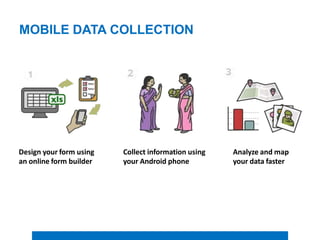
Design your form using
an online form builder
Collect information using
your Android phone
Analyze and map
your data faster
MOBILE DATA COLLECTION
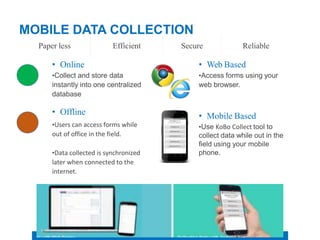
Paper less Efficient
• Online
•Collect and store data
instantly into one centralized
database
• Offline
•Users can access forms while
out of office in the field.
•Data collected is synchronized
later when connected to the
internet.
Secure Reliable
• Web Based
•Access forms using your
web browser.
• Mobile Based
•Use KoBo Collect tool to
collect data while out in the
field using your mobile
phone.
ADVANTAGES
• Predefined fields • Validation Rules
• Centralized data storage • Offline & on the go
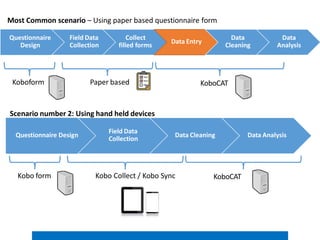
Questionnaire
Design
Field Data
Collection
Collect
filled forms
Data Entry
Data
Cleaning
Data
Analysis
Paper based KoboCAT
Koboform
Most Common scenario – Using paper based questionnaire form
Questionnaire Design
Field Data
Collection
Data Cleaning Data Analysis
Kobo Collect / Kobo Sync
Kobo form
Scenario number 2: Using hand held devices
KoboCAT
WHY KOBO TOOLBOX
• It is much faster.
• It is much more accurate.
• It is optimized for humanitarian work.
• It is based on OpenDataKit (ODK).
• It is fully supported.
• It is free.
SECTOR SEVERITY SCALE AND PIN 01
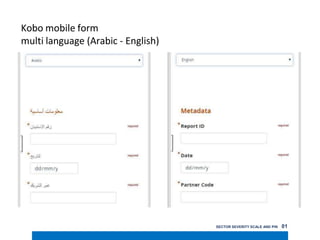
Kobo mobile form
multi language (Arabic - English)
MOBILE DATA COLLECTION
KOBO SETUP
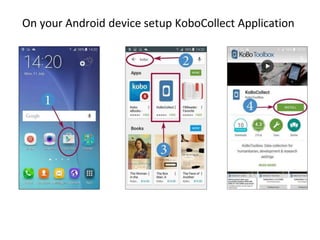
On your Android device setup KoboCollect Application
Open KoboCollect Application
Create user account to use for data entry
https://kobo.humanitarianresponse.info
KoBo Setup
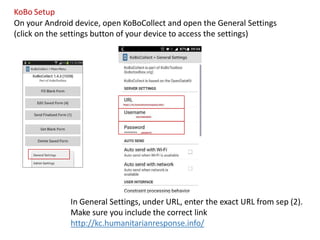
On your Android device, open KoBoCollect and open the General Settings
(click on the settings button of your device to access the settings)
In General Settings, under URL, enter the exact URL from sep (2).
Make sure you include the correct link
http://kc.humanitarianresponse.info/
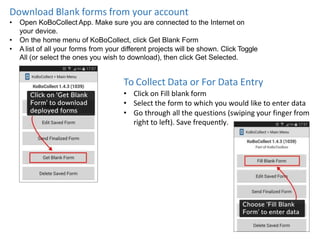
Download Blank forms from your account
• Open KoBoCollect App. Make sure you are connected to the Internet on
your device.
• On the home menu of KoBoCollect, click Get Blank Form
• A list of all your forms from your different projects will be shown. Click Toggle
All (or select the ones you wish to download), then click Get Selected.
To Collect Data or For Data Entry
• Click on Fill blank form
• Select the form to which you would like to enter data
• Go through all the questions (swiping your finger from
right to left). Save frequently.
At the end click on Save Form and Exit (making sure the form is
marked as 'finalized'). Before saving change form name to
“yourenumeratorcode_subdistrict_community”
Uploading finalized data
From the home screen, click
on Send Finalized Form.
Collecting Data with Web Forms
Visit:
https://kc.humanitarianresponse.info/
Team leaders can view and edit
submitted data by singing into the
KoBo Humanitarian Response
homepage. Sign in with your user
name and password.
You can also share the link of the
form for data entry.
Sign in with your user name and
password is required for data
entry.

kobo_briefing.pptx

  • 1.
    PREPARING FOR MOBILEDATA COLLECTION KOBO BRIEFING
  • 2.
    MOBILE DATA COLLECTION Designyour form using an online form builder Collect information using your Android phone Analyze and map your data faster
  • 3.
    MOBILE DATA COLLECTION Paperless Efficient • Online •Collect and store data instantly into one centralized database • Offline •Users can access forms while out of office in the field. •Data collected is synchronized later when connected to the internet. Secure Reliable • Web Based •Access forms using your web browser. • Mobile Based •Use KoBo Collect tool to collect data while out in the field using your mobile phone.
  • 4.
    ADVANTAGES • Predefined fields• Validation Rules • Centralized data storage • Offline & on the go
  • 5.
    Questionnaire Design Field Data Collection Collect filled forms DataEntry Data Cleaning Data Analysis Paper based KoboCAT Koboform Most Common scenario – Using paper based questionnaire form Questionnaire Design Field Data Collection Data Cleaning Data Analysis Kobo Collect / Kobo Sync Kobo form Scenario number 2: Using hand held devices KoboCAT
  • 6.
    WHY KOBO TOOLBOX •It is much faster. • It is much more accurate. • It is optimized for humanitarian work. • It is based on OpenDataKit (ODK). • It is fully supported. • It is free.
  • 7.
    SECTOR SEVERITY SCALEAND PIN 01 Kobo mobile form multi language (Arabic - English)
  • 8.
  • 9.
    On your Androiddevice setup KoboCollect Application
  • 10.
  • 11.
    Create user accountto use for data entry https://kobo.humanitarianresponse.info
  • 12.
    KoBo Setup On yourAndroid device, open KoBoCollect and open the General Settings (click on the settings button of your device to access the settings) In General Settings, under URL, enter the exact URL from sep (2). Make sure you include the correct link http://kc.humanitarianresponse.info/
  • 13.
    Download Blank formsfrom your account • Open KoBoCollect App. Make sure you are connected to the Internet on your device. • On the home menu of KoBoCollect, click Get Blank Form • A list of all your forms from your different projects will be shown. Click Toggle All (or select the ones you wish to download), then click Get Selected. To Collect Data or For Data Entry • Click on Fill blank form • Select the form to which you would like to enter data • Go through all the questions (swiping your finger from right to left). Save frequently.
  • 14.
    At the endclick on Save Form and Exit (making sure the form is marked as 'finalized'). Before saving change form name to “yourenumeratorcode_subdistrict_community” Uploading finalized data From the home screen, click on Send Finalized Form.
  • 15.
    Collecting Data withWeb Forms Visit: https://kc.humanitarianresponse.info/ Team leaders can view and edit submitted data by singing into the KoBo Humanitarian Response homepage. Sign in with your user name and password. You can also share the link of the form for data entry. Sign in with your user name and password is required for data entry.