Oscar Ferreiro.InformationTechnologyAssociate II(Thisguide canbe transferred orshownto
everybody,isforhumanityimprovement)
Keyboard Shortcuts Guide
HelloEverybody!
Do youwant people lookatyou like you know what are you doing?
Do youwant to act like a pro InformationTechnologyAssociate IV?
Do youwant to impressyourfriendsfrom the office?
Do youwant to looklike the hackersfromthe moviesthatare just typing ina keyboardand somehow
zoomin a photoand “Enhance it” with like 3 key strokes?
All thatmightbe impossible withenoughimaginationandthisguide!
Before we begin,here are the thingstoknow:
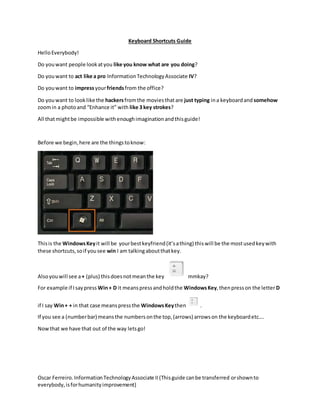
Thisis the WindowsKeyit will be yourbestkeyfriend(it’sathing) thiswill be the mostusedkeywith
these shortcuts,soif yousee win I am talkingaboutthatkey.
Alsoyouwill see a+ (plus) thisdoesnotmeanthe key mmkay?
For example if Isaypress Win+ D it meanspressandholdthe WindowsKey,thenpresson the letterD
if I say Win+ + in that case meanspressthe WindowsKeythen .
If you see a (numberbar) meansthe numbersonthe top,(arrows) arrowson the keyboardetc….
Nowthat we have that out of the way letsgo!
Oscar Ferreiro.InformationTechnologyAssociate II(Thisguide canbe transferred orshownto
everybody,isforhumanityimprovement)
I’ll startwiththe universal commandseverybodyshouldknow (itwill increase yourproductivityby
approximated34.23%witha 95% Confidence interval)
Ctrl+C: Copya selecteditem
Ctrl+X: Cut a selecteditem
Ctrl+V: Paste a selecteditem
Ctrl+Z: Undo an action
Ctrl+Y: Redothat thingI justundid
Ctrl+A: Selecteverything
Ctrl+P: Print
Buckle up,there issome more
Windows7: Most of you have windows7(Desktop,andLaptops) andWindows8(Surface)
There isno Order,isthe orderI use or rememberthings.
Win+ D: One of my favorites(minimizeseverything)(prettymuchshowsyourdesktop)If youpressit
once it minimizeseverything.If youpressitagainitmaximizes(bringsbackastheywere) everything.
Alt + Tab: Switchbetweenapplications,(holdalt,presstab(donotrelease alt) presstabto switch
betweensoftware.Releaseandenjoy)
Win+ E: Openthe file explorer(thatlittleyellow folderthatisinthe taskbar)(contains,documents,This
Pc, I-Drive,Etc…)
This is for the double monitor people (alsoworks with single monitor)
Win+ (leftor right arrow keys):if youhave a software openlike word,andpress Win+ the software
will go50% of the screento the left(aslongas the software isselected) Win+(rightarrow) 50% to the
right.You see howitworks?
Win+ (Upor Down arrow keys):Win+ (UP arrow): Thiswill maximize(make full screen) the current
software youare one. Win+ (UParrow): this will minimizethe currentsoftware youhave.
Win+ Shift+ (leftor right arrow): This will switchthe wholesoftware windowtoanotherscreen
(multiplemonitorsonly)
Win+ P: thiswill switchbetweenscreenmodes(ExtendisforDual) (notthatimportantforyou)
Ctrl + (Scroll Wheel):ZoomZoom!Youcan zoomin or out!Hold Ctrl and scroll withyourmouse upor
downTry it!
Oscar Ferreiro.InformationTechnologyAssociate II(Thisguide canbe transferred orshownto
everybody,isforhumanityimprovement)
Win+ Shift+ (Clickany item ofthe taskbar): Thiswill openanew page/document.Etc…tryit. Clickon
thisworddocumentwhile holding Win+Shift.You justopenedanew word.Skill?Idon’tthinkso,
Magic? Exactly
Win+ (numberbar) allowme to elaborate:
For example:if youdo Win+ 2: whatdo youopen?
A. Firefox!
B. Google Chrome (the colorful circle witha huge red NUMBER 2 on top)
C. My house?
D. All of the above
Yes!It is B, nice job!
Win+ L: Goingto a meeting?Goingtothe restroom?Goingto say hellotothe neighbor?Pressthat,it
will lockyourdevice (youwillneedtounlockitwithyourpassword) we needtobe secure inthe office
so do it!
I have some more that I thinktheyare not relevantforyou.Ihope thishelps,if itdoesn’thelpyoucall
me,email me,knockonmy door(youknow the drill) andIwill helpyoumake thishelpguide helpyou.
If you knowanothercommandthat mightbe useful andIdidnot listithere,goodfor you. Senditto me
to my Po.Box.Justkiddingsenditto me,I probablyknow italready(Iamthe knowledge)
I will doan Excel withthe shortcutsforeasyaccess.
Thank you.

Keyboard Shortcuts Guide

  • 1.
    Oscar Ferreiro.InformationTechnologyAssociate II(Thisguidecanbe transferred orshownto everybody,isforhumanityimprovement) Keyboard Shortcuts Guide HelloEverybody! Do youwant people lookatyou like you know what are you doing? Do youwant to act like a pro InformationTechnologyAssociate IV? Do youwant to impressyourfriendsfrom the office? Do youwant to looklike the hackersfromthe moviesthatare just typing ina keyboardand somehow zoomin a photoand “Enhance it” with like 3 key strokes? All thatmightbe impossible withenoughimaginationandthisguide! Before we begin,here are the thingstoknow: Thisis the WindowsKeyit will be yourbestkeyfriend(it’sathing) thiswill be the mostusedkeywith these shortcuts,soif yousee win I am talkingaboutthatkey. Alsoyouwill see a+ (plus) thisdoesnotmeanthe key mmkay? For example if Isaypress Win+ D it meanspressandholdthe WindowsKey,thenpresson the letterD if I say Win+ + in that case meanspressthe WindowsKeythen . If you see a (numberbar) meansthe numbersonthe top,(arrows) arrowson the keyboardetc…. Nowthat we have that out of the way letsgo!
  • 2.
    Oscar Ferreiro.InformationTechnologyAssociate II(Thisguidecanbe transferred orshownto everybody,isforhumanityimprovement) I’ll startwiththe universal commandseverybodyshouldknow (itwill increase yourproductivityby approximated34.23%witha 95% Confidence interval) Ctrl+C: Copya selecteditem Ctrl+X: Cut a selecteditem Ctrl+V: Paste a selecteditem Ctrl+Z: Undo an action Ctrl+Y: Redothat thingI justundid Ctrl+A: Selecteverything Ctrl+P: Print Buckle up,there issome more Windows7: Most of you have windows7(Desktop,andLaptops) andWindows8(Surface) There isno Order,isthe orderI use or rememberthings. Win+ D: One of my favorites(minimizeseverything)(prettymuchshowsyourdesktop)If youpressit once it minimizeseverything.If youpressitagainitmaximizes(bringsbackastheywere) everything. Alt + Tab: Switchbetweenapplications,(holdalt,presstab(donotrelease alt) presstabto switch betweensoftware.Releaseandenjoy) Win+ E: Openthe file explorer(thatlittleyellow folderthatisinthe taskbar)(contains,documents,This Pc, I-Drive,Etc…) This is for the double monitor people (alsoworks with single monitor) Win+ (leftor right arrow keys):if youhave a software openlike word,andpress Win+ the software will go50% of the screento the left(aslongas the software isselected) Win+(rightarrow) 50% to the right.You see howitworks? Win+ (Upor Down arrow keys):Win+ (UP arrow): Thiswill maximize(make full screen) the current software youare one. Win+ (UParrow): this will minimizethe currentsoftware youhave. Win+ Shift+ (leftor right arrow): This will switchthe wholesoftware windowtoanotherscreen (multiplemonitorsonly) Win+ P: thiswill switchbetweenscreenmodes(ExtendisforDual) (notthatimportantforyou) Ctrl + (Scroll Wheel):ZoomZoom!Youcan zoomin or out!Hold Ctrl and scroll withyourmouse upor downTry it!
  • 3.
    Oscar Ferreiro.InformationTechnologyAssociate II(Thisguidecanbe transferred orshownto everybody,isforhumanityimprovement) Win+ Shift+ (Clickany item ofthe taskbar): Thiswill openanew page/document.Etc…tryit. Clickon thisworddocumentwhile holding Win+Shift.You justopenedanew word.Skill?Idon’tthinkso, Magic? Exactly Win+ (numberbar) allowme to elaborate: For example:if youdo Win+ 2: whatdo youopen? A. Firefox! B. Google Chrome (the colorful circle witha huge red NUMBER 2 on top) C. My house? D. All of the above Yes!It is B, nice job! Win+ L: Goingto a meeting?Goingtothe restroom?Goingto say hellotothe neighbor?Pressthat,it will lockyourdevice (youwillneedtounlockitwithyourpassword) we needtobe secure inthe office so do it! I have some more that I thinktheyare not relevantforyou.Ihope thishelps,if itdoesn’thelpyoucall me,email me,knockonmy door(youknow the drill) andIwill helpyoumake thishelpguide helpyou. If you knowanothercommandthat mightbe useful andIdidnot listithere,goodfor you. Senditto me to my Po.Box.Justkiddingsenditto me,I probablyknow italready(Iamthe knowledge) I will doan Excel withthe shortcutsforeasyaccess. Thank you.