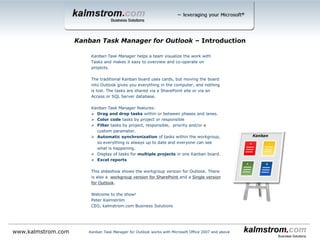
Kanban Task Manager helps a team visualize the work with Tasks and makes it easy to overview and co-operate on projects.
The traditional kanban board uses cards, but moving the board into Outlook gives you everything in the computer, and nothing is
lost. The tasks are shared via a SharePoint site or via an Access or SQL Server database.
Kanban Task Manager features:
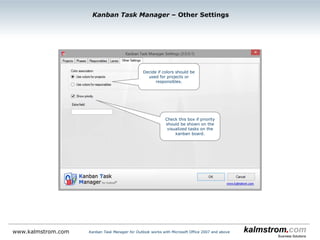
 Drag and drop tasks within or between phases and lanes.
 Color code tasks by project or responsible.
 Filter tasks by one or multiple projects, responsibles and/or priorities and also by a custom value if it is used.
 Automatic synchronization of tasks within the workgroup, so everything is always up to date and everyone can see what is
happening.
 Display of tasks for multiple projects in one kanban board.
 A reading pane gives detailed info about the task.
 Possibility to create swim lanes.
 Convert e-mails in to tasks.
 Set WIP limits for phases and lanes.
 Support for inline images and bold and italic formatting in the task body.
 Excel reports.
 The responsible person’s initials on the task
 Various views in addition to the kanban view.
 % complete bar that shows task progress.
 Priority icons.
 Task overdue indicators.
 Set number of columns per phase.
This slideshow shows the workgroup edition for Outlook. There are also two different Workgroup editions for SharePoint and a Single
edition for Outlook.
Welcome to the show!
Peter Kalmström
CEO, kalmstrom.com Business Solutions
Kanban Task Manager for Outlook ‒ Introduction
Kanban Task Manager for Outlook works with Microsoft Office 2007 and abovewww.kalmstrom.com
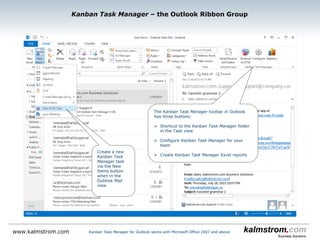
The Kanban Task Manager ribbon group has two buttons:
 Shortcut to the Kanban Task Manager folder in the Task view
 Convert an e-mail into a task on the kanban board
Kanban Task Manager for Outlook works with Microsoft Office 2007 and abovewww.kalmstrom.com
Kanban Task Manager ‒ Outlook Mail View
Create a new Kanban
Task Manager task
Kanban Task Manager for Outlook works with Microsoft Office 2007 and abovewww.kalmstrom.com
Kanban Task Manager ‒ Kanban View
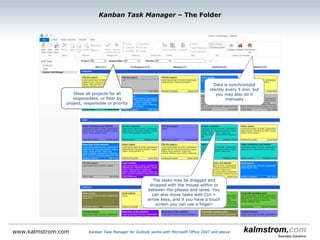
Data is synchronized
silently every 5 min, but
you may also do it
manually
This task is overdue, which is indicated by
the red border and the red Due date
The tasks may be dragged and
dropped with the mouse within
or between the phases and
lanes. The Kanban Task Manager
example data is used in this
slideshow
Kanban Task Manager for Outlook works with Microsoft Office 2007 and abovewww.kalmstrom.com
Kanban Task Manager ‒ Filter and Search
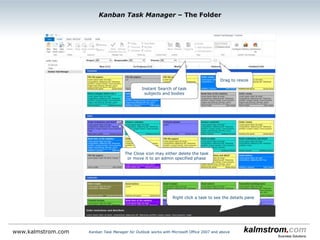
Click to open the filter
pane
Search and filter tasks in the left pane
Kanban Task Manager for Outlook works with Microsoft Office 2007 and abovewww.kalmstrom.com
Kanban Task Manager ‒ Details pane
Right click to open the
task in a Details pane
The task description
Change completed and
responsible without
opening the task
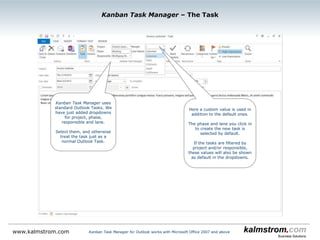
Kanban Task Manager uses
standard Outlook tasks, but
we have added dropdowns for
project and responsible.
Kanban Task Manager ‒ Task with the minimum 2 dropdowns
Kanban Task Manager for Outlook works with Microsoft Office 2007 and abovewww.kalmstrom.com
The Status value = the phase
When Completed
percentage is filled out, it
is shown on the task card.
Kanban Task Manager ‒ Task with the maximum 4 dropdowns
Kanban Task Manager for Outlook works with Microsoft Office 2007 and abovewww.kalmstrom.com
Here lanes and a custom field have been added
by the administrator.
The phase (and lane) you click in to create the
new task is selected by default.
If the tasks are filtered by project and/or
responsible, these values will also be shown as
default in the dropdowns.
High and low priority is
shown on the task cards.
www.kalmstrom.com Kanban Task Manager for Outlook works with Microsoft Office 2007 and above
Kanban Task Manager ‒ WIP Limits
This phase has too many
tasks
This lane has too many
tasks The “Work in Progress”
limit can be set for each
phase and lane
So far you have seen the most
important features of Kanban Task
Manager.
The Kanban Task Manager
configuration is reached from the
kanban board.
Let’s continue!
Kanban Task Manager ‒ Configuration
Kanban Task Manager for Outlook works with Microsoft Office 2007 and abovewww.kalmstrom.com
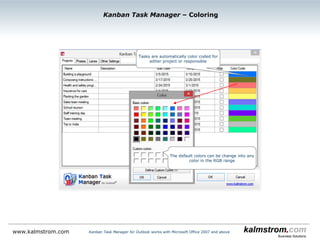
By default, the tasks are
color coded by project
Click on a color to change it
Kanban Task Manager ‒ Coloring
Kanban Task Manager for Outlook works with Microsoft Office 2007 and abovewww.kalmstrom.com
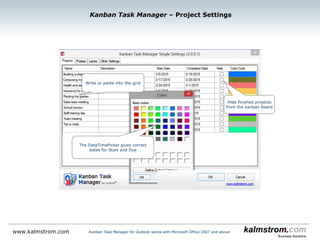
Write or paste into the grid
Kanban Task Manager ‒ Project Settings
Kanban Task Manager for Outlook works with Microsoft Office 2007 and abovewww.kalmstrom.com
Hide finished projects
from the kanban board
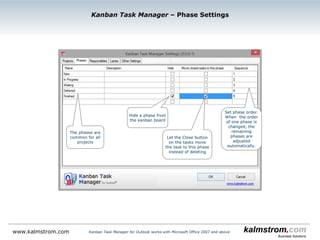
Kanban Task Manager ‒ Phase Settings
Kanban Task Manager for Outlook works with Microsoft Office 2007 and abovewww.kalmstrom.com
Set the number
of task columns
in the phase
Hide a phase from
the kanban board
Three columns of
task cards in the In
Progress phase.
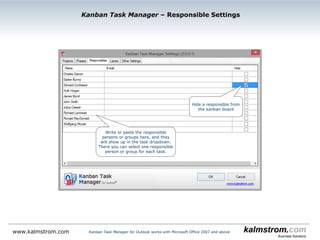
Kanban Task Manager ‒ Responsible Settings
Kanban Task Manager for Outlook works with Microsoft Office 2007 and abovewww.kalmstrom.com
If you select an Access or SQL Server database, write
or paste the responsible persons or groups here, and
they will show up in the task dropdown. There you can
select one responsible person or group for each task.
When SharePoint is used as sharing medium, the
responsible persons are taken from the SharePoint
user accounts.
The responsible
person’s initials are
shown on the task
card
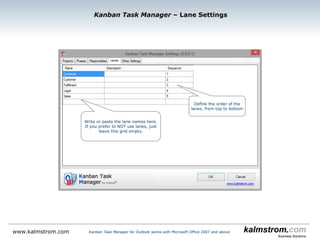
Write or paste the lane names here.
If you prefer to NOT use lanes, just
leave this grid empty.
Kanban Task Manager ‒ Lane Settings
Kanban Task Manager for Outlook works with Microsoft Office 2007 and abovewww.kalmstrom.com
Define the order of the
lanes, from top to bottomSet limits for number
of tasks per lane
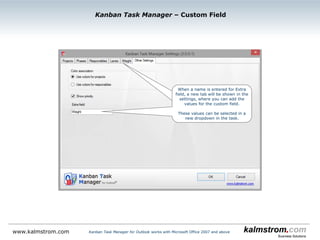
Kanban Task Manager ‒ Custom Field
Kanban Task Manager for Outlook works with Microsoft Office 2007 and abovewww.kalmstrom.com
When a name is entered for Extra field,
a new tab will be shown, where you can
add the values for the custom field.
These values can be selected in a new
dropdown in the task.
www.kalmstrom.com
Kanban Task Manager ‒ Month View
Select another
month
Kanban Task Manager is available in 2 SharePoint editions: add-in and sandboxed solution
www.kalmstrom.com
Kanban Task Manager ‒ Year View
Highlighted
dates have tasks
Kanban Task Manager is available in 2 SharePoint editions: add-in and sandboxed solution
www.kalmstrom.com
Kanban Task Manager Timeline grouped by Responsible
Drag to change
responsible person
Kanban Task Manager is available in 2 SharePoint editions: add-in and sandboxed solution
www.kalmstrom.com
Drag to change
start or due time
Kanban Task Manager is available in 2 SharePoint editions: add-in and sandboxed solution
Kanban Task Manager Timeline grouped by Projects
www.kalmstrom.com
Kanban Task Manager ‒ Project View
Each project is
visualized as a pie
chart
This phase has 3
tasks
Kanban Task Manager is available in 2 SharePoint editions: add-in and sandboxed solution
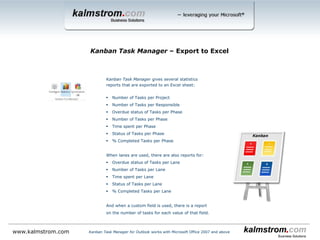
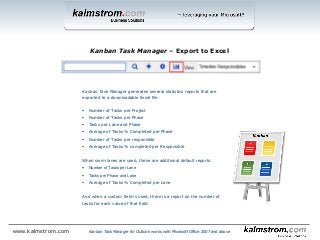
Kanban Task Manager generates several statistics reports that are
exported to a downloadable Excel file:
 Number of Tasks per Project
 Number of Tasks per Phase
 Tasks per Lane and Phase
 Average of Tasks % Completed per Phase
 Number of Tasks per responsible
 Average of Tasks % completed per Responsible
When swim lanes are used, these are additional default reports:
 Number of Tasks per Lane
 Tasks per Phase and Lane
 Average of Tasks % Completed per Lane
And when a custom field is used, there is a report on the number of
tasks for each value of that field.
Kanban Task Manager ‒ Export to Excel
Kanban Task Manager for Outlook works with Microsoft Office 2007 and abovewww.kalmstrom.com
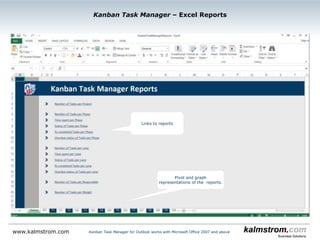
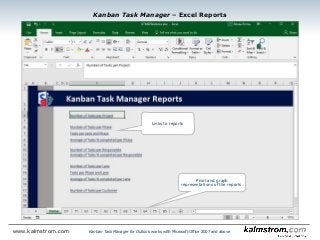
Pivot and graph
representations of the reports.
Links to reports
Kanban Task Manager ‒ Excel Reports
Kanban Task Manager for Outlook works with Microsoft Office 2007 and abovewww.kalmstrom.com
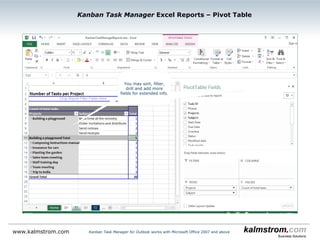
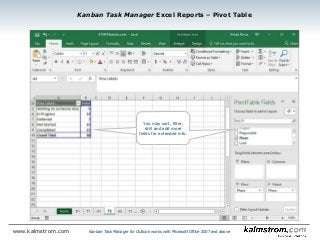
You may sort, filter,
drill and add more
fields for extended info.
Kanban Task Manager Excel Reports ‒ Pivot Table
Kanban Task Manager for Outlook works with Microsoft Office 2007 and abovewww.kalmstrom.com
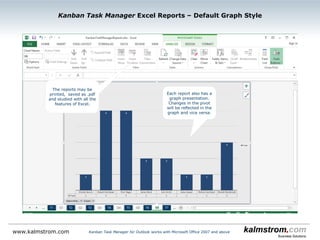
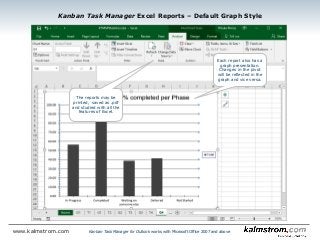
Each report also has a
graph presentation.
Changes in the pivot
will be reflected in the
graph and vice versa.
Kanban Task Manager Excel Reports ‒ Default Graph Style
Kanban Task Manager for Outlook works with Microsoft Office 2007 and abovewww.kalmstrom.com
The reports may be
printed, saved as .pdf
and studied with all the
features of Excel.
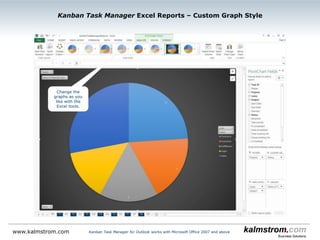
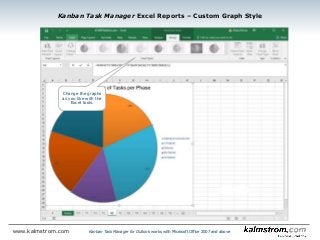
Kanban Task Manager Excel Reports ‒ Custom Graph Style
Kanban Task Manager for Outlook works with Microsoft Office 2007 and abovewww.kalmstrom.com
Change the graphs
as you like with the
Excel tools.
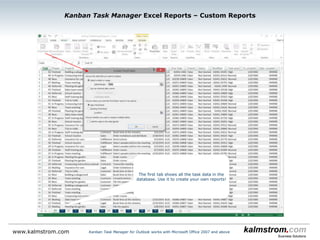
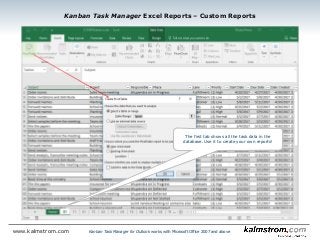
Kanban Task Manager Excel Reports ‒ Custom Reports
Kanban Task Manager for Outlook works with Microsoft Office 2007 and abovewww.kalmstrom.com
The first tab shows all the task data in the
database. Use it to create your own reports!
Thank you for watching this slide show!
You will find more information about Kanban Task
Manager for Outlook on the kalmstrom.com
website.
There you may download the full version of the
software and evaluate it for 30 days before you
decide if you want to use it.
We recommend you to also download the manual,
which has detailed information about settings,
configuration and usage and a full description of
how to install and upgrade Kanban Task Manager.
On the kalmstrom.com website you will also find
video demonstrations on Kanban Task Manager,
as ell as information about the kalmstrom.com
Subscriptions.
Kanban Task Manager ‒ More info
www.kalmstrom.com Kanban Task Manager for Outlook works with Microsoft Office 2007 and above

KanbanTask Manager for Outlook

  • 1.
    Kanban Task Managerhelps a team visualize the work with Tasks and makes it easy to overview and co-operate on projects. The traditional kanban board uses cards, but moving the board into Outlook gives you everything in the computer, and nothing is lost. The tasks are shared via a SharePoint site or via an Access or SQL Server database. Kanban Task Manager features:  Drag and drop tasks within or between phases and lanes.  Color code tasks by project or responsible.  Filter tasks by one or multiple projects, responsibles and/or priorities and also by a custom value if it is used.  Automatic synchronization of tasks within the workgroup, so everything is always up to date and everyone can see what is happening.  Display of tasks for multiple projects in one kanban board.  A reading pane gives detailed info about the task.  Possibility to create swim lanes.  Convert e-mails in to tasks.  Set WIP limits for phases and lanes.  Support for inline images and bold and italic formatting in the task body.  Excel reports.  The responsible person’s initials on the task  Various views in addition to the kanban view.  % complete bar that shows task progress.  Priority icons.  Task overdue indicators.  Set number of columns per phase. This slideshow shows the workgroup edition for Outlook. There are also two different Workgroup editions for SharePoint and a Single edition for Outlook. Welcome to the show! Peter Kalmström CEO, kalmstrom.com Business Solutions Kanban Task Manager for Outlook ‒ Introduction Kanban Task Manager for Outlook works with Microsoft Office 2007 and abovewww.kalmstrom.com
  • 2.
    The Kanban TaskManager ribbon group has two buttons:  Shortcut to the Kanban Task Manager folder in the Task view  Convert an e-mail into a task on the kanban board Kanban Task Manager for Outlook works with Microsoft Office 2007 and abovewww.kalmstrom.com Kanban Task Manager ‒ Outlook Mail View Create a new Kanban Task Manager task
  • 3.
    Kanban Task Managerfor Outlook works with Microsoft Office 2007 and abovewww.kalmstrom.com Kanban Task Manager ‒ Kanban View Data is synchronized silently every 5 min, but you may also do it manually This task is overdue, which is indicated by the red border and the red Due date The tasks may be dragged and dropped with the mouse within or between the phases and lanes. The Kanban Task Manager example data is used in this slideshow
  • 4.
    Kanban Task Managerfor Outlook works with Microsoft Office 2007 and abovewww.kalmstrom.com Kanban Task Manager ‒ Filter and Search Click to open the filter pane Search and filter tasks in the left pane
  • 5.
    Kanban Task Managerfor Outlook works with Microsoft Office 2007 and abovewww.kalmstrom.com Kanban Task Manager ‒ Details pane Right click to open the task in a Details pane The task description Change completed and responsible without opening the task
  • 6.
    Kanban Task Manageruses standard Outlook tasks, but we have added dropdowns for project and responsible. Kanban Task Manager ‒ Task with the minimum 2 dropdowns Kanban Task Manager for Outlook works with Microsoft Office 2007 and abovewww.kalmstrom.com The Status value = the phase When Completed percentage is filled out, it is shown on the task card.
  • 7.
    Kanban Task Manager‒ Task with the maximum 4 dropdowns Kanban Task Manager for Outlook works with Microsoft Office 2007 and abovewww.kalmstrom.com Here lanes and a custom field have been added by the administrator. The phase (and lane) you click in to create the new task is selected by default. If the tasks are filtered by project and/or responsible, these values will also be shown as default in the dropdowns. High and low priority is shown on the task cards.
  • 8.
    www.kalmstrom.com Kanban TaskManager for Outlook works with Microsoft Office 2007 and above Kanban Task Manager ‒ WIP Limits This phase has too many tasks This lane has too many tasks The “Work in Progress” limit can be set for each phase and lane
  • 9.
    So far youhave seen the most important features of Kanban Task Manager. The Kanban Task Manager configuration is reached from the kanban board. Let’s continue! Kanban Task Manager ‒ Configuration Kanban Task Manager for Outlook works with Microsoft Office 2007 and abovewww.kalmstrom.com
  • 10.
    By default, thetasks are color coded by project Click on a color to change it Kanban Task Manager ‒ Coloring Kanban Task Manager for Outlook works with Microsoft Office 2007 and abovewww.kalmstrom.com
  • 11.
    Write or pasteinto the grid Kanban Task Manager ‒ Project Settings Kanban Task Manager for Outlook works with Microsoft Office 2007 and abovewww.kalmstrom.com Hide finished projects from the kanban board
  • 12.
    Kanban Task Manager‒ Phase Settings Kanban Task Manager for Outlook works with Microsoft Office 2007 and abovewww.kalmstrom.com Set the number of task columns in the phase Hide a phase from the kanban board Three columns of task cards in the In Progress phase.
  • 13.
    Kanban Task Manager‒ Responsible Settings Kanban Task Manager for Outlook works with Microsoft Office 2007 and abovewww.kalmstrom.com If you select an Access or SQL Server database, write or paste the responsible persons or groups here, and they will show up in the task dropdown. There you can select one responsible person or group for each task. When SharePoint is used as sharing medium, the responsible persons are taken from the SharePoint user accounts. The responsible person’s initials are shown on the task card
  • 14.
    Write or pastethe lane names here. If you prefer to NOT use lanes, just leave this grid empty. Kanban Task Manager ‒ Lane Settings Kanban Task Manager for Outlook works with Microsoft Office 2007 and abovewww.kalmstrom.com Define the order of the lanes, from top to bottomSet limits for number of tasks per lane
  • 15.
    Kanban Task Manager‒ Custom Field Kanban Task Manager for Outlook works with Microsoft Office 2007 and abovewww.kalmstrom.com When a name is entered for Extra field, a new tab will be shown, where you can add the values for the custom field. These values can be selected in a new dropdown in the task.
  • 16.
    www.kalmstrom.com Kanban Task Manager‒ Month View Select another month Kanban Task Manager is available in 2 SharePoint editions: add-in and sandboxed solution
  • 17.
    www.kalmstrom.com Kanban Task Manager‒ Year View Highlighted dates have tasks Kanban Task Manager is available in 2 SharePoint editions: add-in and sandboxed solution
  • 18.
    www.kalmstrom.com Kanban Task ManagerTimeline grouped by Responsible Drag to change responsible person Kanban Task Manager is available in 2 SharePoint editions: add-in and sandboxed solution
  • 19.
    www.kalmstrom.com Drag to change startor due time Kanban Task Manager is available in 2 SharePoint editions: add-in and sandboxed solution Kanban Task Manager Timeline grouped by Projects
  • 20.
    www.kalmstrom.com Kanban Task Manager‒ Project View Each project is visualized as a pie chart This phase has 3 tasks Kanban Task Manager is available in 2 SharePoint editions: add-in and sandboxed solution
  • 21.
    Kanban Task Managergenerates several statistics reports that are exported to a downloadable Excel file:  Number of Tasks per Project  Number of Tasks per Phase  Tasks per Lane and Phase  Average of Tasks % Completed per Phase  Number of Tasks per responsible  Average of Tasks % completed per Responsible When swim lanes are used, these are additional default reports:  Number of Tasks per Lane  Tasks per Phase and Lane  Average of Tasks % Completed per Lane And when a custom field is used, there is a report on the number of tasks for each value of that field. Kanban Task Manager ‒ Export to Excel Kanban Task Manager for Outlook works with Microsoft Office 2007 and abovewww.kalmstrom.com
  • 22.
    Pivot and graph representationsof the reports. Links to reports Kanban Task Manager ‒ Excel Reports Kanban Task Manager for Outlook works with Microsoft Office 2007 and abovewww.kalmstrom.com
  • 23.
    You may sort,filter, drill and add more fields for extended info. Kanban Task Manager Excel Reports ‒ Pivot Table Kanban Task Manager for Outlook works with Microsoft Office 2007 and abovewww.kalmstrom.com
  • 24.
    Each report alsohas a graph presentation. Changes in the pivot will be reflected in the graph and vice versa. Kanban Task Manager Excel Reports ‒ Default Graph Style Kanban Task Manager for Outlook works with Microsoft Office 2007 and abovewww.kalmstrom.com The reports may be printed, saved as .pdf and studied with all the features of Excel.
  • 25.
    Kanban Task ManagerExcel Reports ‒ Custom Graph Style Kanban Task Manager for Outlook works with Microsoft Office 2007 and abovewww.kalmstrom.com Change the graphs as you like with the Excel tools.
  • 26.
    Kanban Task ManagerExcel Reports ‒ Custom Reports Kanban Task Manager for Outlook works with Microsoft Office 2007 and abovewww.kalmstrom.com The first tab shows all the task data in the database. Use it to create your own reports!
  • 27.
    Thank you forwatching this slide show! You will find more information about Kanban Task Manager for Outlook on the kalmstrom.com website. There you may download the full version of the software and evaluate it for 30 days before you decide if you want to use it. We recommend you to also download the manual, which has detailed information about settings, configuration and usage and a full description of how to install and upgrade Kanban Task Manager. On the kalmstrom.com website you will also find video demonstrations on Kanban Task Manager, as ell as information about the kalmstrom.com Subscriptions. Kanban Task Manager ‒ More info www.kalmstrom.com Kanban Task Manager for Outlook works with Microsoft Office 2007 and above