DEPARTMENT OF COMPUTERENGINEERING
LABORATORY MANUAL
Object-Oriented Programming in Java
Laboratory
Shri Vile Parle Kelavani Mandal's
INSTITUTE OF TECHNOLOGY DHULE (M.S.)
2.
DEPARTMENT OF COMPUTERENGINEERING
SVKM’s INSTITUTE OF TECHNOLOGY DHULE 1 | P a g e
DEPARTMENT OF COMPUTER ENGINEERING
Vision of Institute
1
Mission of Institute
To prepare the students ready with socially sensitive
Engineers of Excellence who will grow with the Institute and
add value to the nation.
Strive to become one of the institute to be globally
recognized as a Resource of Excellence focusing on
nurturing and developing the Society
DEPARTMENT OF COMPUTERENGINEERING
SVKM’s INSTITUTE OF TECHNOLOGY DHULE
3 | P a g e
Vision of Department
Mission of Department
Program Educational Objectives (PEOs) of Department
PEO I: Graduate shall have successful professional careers, lead
and manage teams.
PEO II: Graduate shall exhibit functional and disciplinary skills
to resolve real life problems.
PEO III: Graduate shall evolve as a professional or researcher
and continue to learn and adapt emerging technology.
To create quality computer professional through excellent
academic environment.
1. To empower students with fundamental of Computer
Engineering to be successful professional.
2. To impart quality education to enable the students for higher
studies, research and entrepreneurship.
3. To cater for the service to society.
5.
DEPARTMENT OF COMPUTERENGINEERING
COMPUTER ENGINEERING DEPARTMENT
SVKM’s INSTITUTE OF TECHNOLOGY DHULE 4 | P a g e
Program Outcomes
Engineering Graduates will be able to:
1. Engineering knowledge: Apply the knowledge of mathematics, science, engineering
fundamentals, and an engineering specialization to the solution of complex engineering problems.
2. Problem analysis: Identify, formulate, review research literature, and analyze complex engineering
problems reaching substantiated conclusions using first principles of mathematics, natural sciences,
and engineering sciences.
3. Design/development of solutions: Design solutions for complex engineering problems and design
system components or processes that meet the specified needs with appropriate consideration for the
public health and safety, and the cultural, societal, and environmental considerations.
4. Conduct investigations of complex problems: Use research-based knowledge and research
methods including design of experiments, analysis and interpretation of data, and synthesis of the
information to provide valid conclusions.
5. Modern tool usage: Create, select, and apply appropriate techniques, resources, and modern
engineering and IT tools including prediction and modeling to complex engineering activities with an
understanding of the limitations.
6. The engineer and society: Apply reasoning informed by the contextual knowledge to assess
societal, health, safety, legal and cultural issues and the consequent responsibilities relevant to the
professional engineering practice.
7. Environment and sustainability: Understand the impact of the professional engineering solutions
in societal and environmental contexts, and demonstrate the knowledge of, and need for sustainable
development.
8. Ethics: Apply ethical principles and commit to professional ethics and responsibilities and norms
of the engineering practice.
9. Individual and team work: Function effectively as an individual, and as a member or leader in
diverse teams, and in multidisciplinary settings.
10. Communication: Communicate effectively on complex engineering activities with the
engineering community and with society at large, such as, being able to comprehend and write
effective reports and design documentation, make effective presentations, and give and receive clear
instructions.
11. Project management and finance: Demonstrate knowledge and understanding of the engineering
and management principles and apply these to one’s own work, as a member and leader in a team, to
manage projects and in multidisciplinary environments.
12. Life-long learning: Recognize the need for, and have the preparation and ability to engage in
independent and life-long learning in the broadest context of technological change.
6.
DEPARTMENT OF COMPUTERENGINEERING
COMPUTER ENGINEERING DEPARTMENT
SVKM’s INSTITUTE OF TECHNOLOGY DHULE 5 | P a g e
Program Specific Outcomes (PSO) addressed by the Course:
A graduate of the Computer Engineering Program will demonstrate-
PSO1: Professional Skills-The ability to understand, analyze and develop computer programs in the
areas related to algorithms, system software, multimedia, web design, data science, and networking
for efficient design of computer-based systems.
PSO2: Problem-Solving Skills- The ability to apply standard practices and strategies in software
project development using open-ended programming environments to deliver advanced computing
systems.
PSO3: Professional Career and Entrepreneurship- The ability to employ modern computer
languages, environments, and platforms in creating innovative career paths to be an entrepreneur, and
a zest for higher studies and research.
7.
DEPARTMENT OF COMPUTERENGINEERING
SVKM’s INSTITUTE OF TECHNOLOGY DHULE 6 | P a g e
Dr. Babasaheb Ambedkar Technological
University
Syllabus & Scheme
Course Code Course Title Weekly
Teaching
Hrs.
Evaluation
Scheme
Credit
CA MSE ESE
24AF1245PCL311
Object-Oriented
Programming in
Java Laboratory
2 hrs 60 - 40
8.
DEPARTMENT OF COMPUTERENGINEERING
SVKM’s INSTITUTE OF TECHNOLOGY DHULE 7 | P a g e
Master List of Practical
Shri Vile Parle Kelavani Mandal’s
Institute of Technology, Dhule.
www.svkm-iot.ac.in
Survey No. 499, Plot No.2, Behind Gurudwara, Mumbai-Agra Road, Dhule (M.S.)
DEPARMENT OF COMPUTER ENGINEERING
LABORATORY: OOP Programming Laboratory SEMESTER: IIIrd
Semester
SR.
NO. PRACTICAL DESCRIPTION
1 Programs on Operators like Arithmetic, Logical, increment, decrement.
2 Programs on Method calling
3 Program to demonstrate Function overloading.
4 Program to demonstrate Constructors of all types and default parameter.
5 Programs on dealing Single dimensional and two-dimensional arrays.
6 Programs on Classes: String and Math
7
Programs that illustrate the following
a) Creation of a simple package.
b) Accessing a package.
8
Programs on Inheritance and Polymorphism.
9
Programs on Interfaces, block initializers, final Modifier, as well as static and dynamic
binding.
10
Programs on Exception Handling
11
Read and write text files using FileReader, FileWriter, and BufferedReader. Count the
number of lines, words, and characters in a file.
Subject In-charge: APPROVED BY:
Dr. Makarand Shahade
HOD, Department of Computer Engineering
9.
DEPARTMENT OF COMPUTERENGINEERING
SVKM’s INSTITUTE OF TECHNOLOGY DHULE 8 | P a g e
Rubrics for Assessment
Assignment/Experiment:
Date of Performance: Date of submission:
Marks Split Up to Maximum Marks Marks Obtained
Performance/ conduction 3
Report Writing 3
Attendance 2
Viva/Oral 2
Total Marks 10
Signature of Subject Teacher
10.
DEPARTMENT OF COMPUTERENGINEERING
SVKM’s INSTITUTE OF TECHNOLOGY DHULE 9 | P a g e
COURSE OBJECTIVES:
1. To understand the concept of OOP as well as the purpose and usage principles of inheritance,
polymorphism, encapsulation and method overloading.
2. To understand fundamentals of programming such as variables, conditional and iterative execution,
methods, etc.
3. To identify classes, objects, members of a class and the relationships among them needed for a
specific problem.
4. To understand fundamentals of object-oriented programming in Java, including defining classes,
invoking methods, using class libraries, etc.
5. To create Java application programs using sound OOP practices (e.g., interfaces and APIs) and
proper program structuring (e.g., by using access control identifies, automatic documentation through
comments, error exception handling)
6. To have the ability to write a computer program to solve specified problems.
COURSE OUTCOMES:
At the end of this course Students will be able to:
CO1: To Illustrate the concept of basics of Java programming.
CO2: To Implement Java programs on Arithmetic Promotion
CO3: To Implement java program using different java class.
CO4: To Use the different java principles like inheritance, polymorphism, packaging and
interface.
11.
DEPARTMENT OF COMPUTERENGINEERING
SVKM’s INSTITUTE OF TECHNOLOGY DHULE 10 | P a g e
GUIDELINES FOR STUDENT'S LAB JOURNAL
1. The laboratory assignments are to be submitted by student in the form of journal.
2. The Journal consists of prologue, Certificate, table of contents, and handwritten write-up of
each assignment (Title, Objectives, Problem Statement, Outcomes, software & Hardware
requirements, Date of Completion, Assessment grade/marks and assessor's sign, Theory-
Concept, circuit diagram, pin configuration, conclusion/analysis), printouts of the code written
using coding standards, sample test cases etc.
3. Practical Examination will be based on the term work submitted by the student in the form of
Journal
4. Candidate is expected to know the theory involved in the experiment
5. The practical examination should be conducted if the journal of the candidate is completed in
all respects and certified by concerned faculty and head of the department
6. All the assignment mentioned in the syllabus must be conducted.
12.
DEPARTMENT OF COMPUTERENGINEERING
SVKM’s INSTITUTE OF TECHNOLOGY DHULE 11 | P a g e
Experiment No. : 01
Title : Write a Java program based on Operators like Arithmetic, Logical, increment,
decrement etc.
Aim : To understand the usage of operators like Arithmetic, Logical, increment and decrement etc.
Softwa
re
Requir
ed:
JDK 1.8 and above, JRE (Java Run-time Environment
Theory
:
Java is a high-level programming language originally developed by Sun Microsystems and
released in 1995. Java runs on a variety of platforms, such as Windows, Mac OS, and the
various versions of UNIX.
JDK
The Java Development Kit (JDK) is an implementation of either one of the Java SE, Java
EE or Java ME platforms. The JDK includes a private JVM and a few other resources to
finish the development of a Java Application.
A First Simple Program
class Example
{
public static void main(String args[])
{
System.out.println("This is a simple Java program.");
}
}
For most computer languages, the name of the file that holds the source code to a program is
arbitrary. However, this is not the case with Java. The first thing that you must learn about Java
is that the name you give to a source file is very important. For this example, the name of the
source file should be Example.java.
Compiling the Program
To compile the Example program, execute the compiler, javac, specifying the name of the
source file on the command line, as shown here:
C:>javac Example.java
The javac compiler creates a file called Example.class that contains the bytecode
version of the program. As discussed earlier, the Java bytecode is the intermediate
representation of your program that contains instructions the Java interpreter will execute.
Thus, the output of javac is not code that can be directly executed. To actually run the
program, you must use the Java interpreter, called java. To do so, pass the class name Example
as a command-line argument, as shown here:
C:>java Example
When the program is run, the following output is displayed:
This is a simple Java program.
Although Example.java is quite short, it includes several key features which are common to all
Java programs. Let’s closely examine each part of the program.
The program begins with the following lines:
13.
DEPARTMENT OF COMPUTERENGINEERING
SVKM’s INSTITUTE OF TECHNOLOGY DHULE 12 | P a g e
class Example
{
This line uses the keyword class to declare that a new class is being defined. Example is an
identifier that is the name of the class.
The next line of code is shown here:
public static void main (String args[]) {
This line begins the main () method. As the comment preceding it suggests, this is the line at
which the program will begin executing. All Java applications begin execution by calling
main(). (This is just like C/C++.)
The public keyword is an access specifier, which allows the programmer to control the
visibility of class members. When a class member is preceded by public, then that member
may be accessed by code outside the class in which it is declared.
In this case, main () must be declared as public, since it must be called by code outside of its
class when the program is started.
The keyword static allows main () to be called without having to instantiate a particular
instance of the class. This is necessary since main () is called by the Java interpreter before any
objects are made. The keyword void simply tells the compiler that main () does not return a
value.
In main (), there is only one parameter. String args [ ] declares a parameter named args, which
is an array of instances of the class String. (Arrays are collections of similar objects.) Objects
of type String store character strings. In this case, args receives any command-line arguments
present when the program is executed.
The next line of code is shown here. Notice that it occurs inside main ().
System.out.println("This is a simple Java program.");
This line outputs the string “This is a simple Java program.” followed by a new line on the
screen. System is a predefined class that provides access to the system, and out is the output
stream that is connected to the console.
OPERATORS
1. Arithmetic Operators: Arithmetic operators are used in mathematical expressions
in the same way that they are used in algebra. The following table lists the arithmetic
operators:
Operators Meaning
+ Addition
- Subtraction
* Multiplication
/ Division
% Modulus Division
++ Increment
-- Decrement
= Assignment
2. Relational Operators: Java Relational Operators are a bunch of binary operators used
to check for relations between two operands, including equality, greater than, less than, etc.
They return a boolean result after the comparison and are extensively used in looping
14.
DEPARTMENT OF COMPUTERENGINEERING
SVKM’s INSTITUTE OF TECHNOLOGY DHULE 13 | P a g e
statements as well as conditional if-else statements and so on.
Operators Meaning
< Less than
<= Less than equal to
> Greater than
>= Greater than equal to
== Equal to
!= Not equal to
3. Logical Operators: Logical operators in Java are used to combine or modify
boolean expressions, resulting in a single boolean value (true or false). There are three
primary logical operators:
Logical AND (&&):
o This operator returns true only if both operands are true.
o If the first operand evaluates to false, the second operand is not evaluated due
to short-circuiting.
o Example: (age > 18 && hasLicense) evaluates to true only if age is
greater than 18 AND hasLicense is true.
Logical OR (||):
o This operator returns true if at least one of the operands is true.
o If the first operand evaluates to true, the second operand is not evaluated due
to short-circuiting.
o Example: (isStudent || isTeacher) evaluates to true if
isStudent is true OR isTeacher is true.
Logical NOT (!):
o This operator inverts the boolean value of its single operand. If the operand is
true, it returns false, and vice-versa.
o Example: !isActive evaluates to true if isActive is false, and
false if isActive is true.
These operators are fundamental for creating complex conditional statements and
controlling program flow in Java.
4. Increment and Decrement Operators (Unary Operators):
a) Increment Operators:
Increment operators are used in programming languages to increase the value of a
variable by one. There are two types of increment operators: the prefix increment
operator (++x) and the postfix increment operator (x++).
Prefix Increment Operator (++x):
The prefix increment operator increases the value of the variable by 1 before
the value is used in the expression.
Syntax: ++x;
Example:
If x is initially 5, ++x will increment x to 6 and return the new value (6).
Postfix Increment Operator (x++):
The postfix increment operator increases the value of the variable by 1 after the
value is used in the expression.
Syntax: x++;
Example: If x is initially 5, x++ will return the current value of x (5) and then
increment x to 6.
15.
DEPARTMENT OF COMPUTERENGINEERING
SVKM’s INSTITUTE OF TECHNOLOGY DHULE 14 | P a g e
b) Decrement Operators:
Decrement operators are used in programming languages to decrease the value of a
variable by one. Similar to increment operators, there are two types of decrement
operators: the prefix decrement operator (--x) and the postfix decrement operator
(x--).
Prefix Decrement Operator (--x):
The prefix decrement operator decreases the value of the variable by 1 before
the value is used in the expression.
Syntax: --x;
Example: If x is initially 5, --x will decrement x to 4 and return the new value
(4).
Postfix Decrement Operator (x--):
The postfix decrement operator decreases the value of the variable by 1 after
the value is used in the expression.
Syntax: x--;
Example: If x is initially 5, x-- will return the current value of x (5) and then
decrement x to 4.
5. Ternary Operators:
A ternary operator evaluates the test condition and executes a block of code
based on the result of the condition.
Its syntax is:
condition ? expression1 : expression2;
Here, condition is evaluated and
if condition is true, expression1 is executed.
And, if condition is false, expression2 is executed.
The ternary operator takes 3 operands (condition, expression1,
and expression2). Hence, the name ternary operator.
Code:
import java.util.Scanner;
class Main {
public static void main(String[] args) {
// take input from users
Scanner input = new Scanner(System.in);
System.out.println("Enter your marks: ");
double marks = input.nextDouble();
// ternary operator checks if
// marks is greater than 40
String result = (marks > 40) ? "pass" : "fail";
System.out.println("You " + result + " the exam.");
input.close();
}
}
Output:
16.
DEPARTMENT OF COMPUTERENGINEERING
SVKM’s INSTITUTE OF TECHNOLOGY DHULE 15 | P a g e
Enter your marks:
75
You pass the exam.
Suppose the user enters 75. Then, the condition marks > 40 evaluates
to true. Hence, the first expression "pass" is assigned to result.
6. Assignment Operators
Assignment operators are used in Java to assign values to variables. For
example,
int age;
age = 5;
Here, = is the assignment operator. It assigns the value on its right to the
variable on its left. That is, 5 is assigned to the variable age.
Let's see some more assignment operators available in Java.
Operator Example Equivalent to
= a = b; a = b;
+= a += b; a = a + b;
-= a -= b; a = a - b;
*= a *= b; a = a * b;
/= a /= b; a = a / b;
%= a %= b; a = a % b;
Code: 1. Program to demonstrate Arithmetic, Relational, Logical operators.
class ArithmeticOperations
{
public static void main (String args[])
{
Scanner sc=new Scanner (Ssytem.in)
int a, b, add, sub, mul, div, mod;
System.out.println(“Enter the value of a:”);
a=nextInt();
System.out.println(“Enter the value of b:”);
b=nextInt();
add=a+b;
System.out.println(“ADDITION=” +add);
sub=a-b;
17.
DEPARTMENT OF COMPUTERENGINEERING
SVKM’s INSTITUTE OF TECHNOLOGY DHULE 16 | P a g e
System.out.println(“SUBTRACTION=” +sub);
mul=a*b;
System.out.println(“MULTIPLICATION=” +mul);
div=a/b;
System.out.println(“DIVISION=” +div);
mod=a%b;
System.out.println(“REMAINDER=” +mod);
}
}
2. Program to demonstrate relational operators
class RelationalOperations
{
public static void main (String args [])
{
Scanner sc=new Scanner (Ssytem.in)
int a, b;
System.out.println(“Enter the value of a:”);
a=nextInt ();
System.out.println(“Enter the value of b:”);
b=nextInt ();
if(a>b)
{
System.out.println(“Greatest no=” +a);
}
else
{
System.out.println(“Greatest no=” +b);
}
if(a<b)
{
System.out.println(“Smallest no=” +a);
}
else
{
System.out.println(“Smallest no=” +b);
}
if(a==b)
{
System.out.println(“Both numbers are equal”);
}
if (a! =b)
{
System.out.println(“Both numbers are not equal”);
}
}
}
3. Program to demonstrate logical operators
class LogicalOperations
18.
DEPARTMENT OF COMPUTERENGINEERING
SVKM’s INSTITUTE OF TECHNOLOGY DHULE 17 | P a g e
{
public static void main (String args [])
{
Scanner sc=new Scanner (Ssytem.in)
boolean a=true;
boolean b=false;
System.out.println(“Logical AND:”,(a&&b));
System.out.println(“Logical OR:”,(a||b));
System.out.println(“Logical NOT:”,!a);
System.out.println(“Logical NOT:”,!b);
}
}
4. Program to demonstrate increment and decrement operators
class IncrementDecrement
{
public static void main (String args [])
{
int x=10;
System.out.println(x++); //10 (11)
System.out.println(++x); //12
System.out.println(x--); //10
System.out.println(--x); //8
}
}
19.
DEPARTMENT OF COMPUTERENGINEERING
SVKM’s INSTITUTE OF TECHNOLOGY DHULE 18 | P a g e
Experiment No. : 02
Title : Write a Java program to demonstrate method calling
Aim : To understand the concepts of method calling using objects of a class.
Software
Required: JDK 1.8 and above, JRE (Java Run-time Environment
Theory: Methods in Java
A method is a block of code or a collection of statements or a set of code grouped to perform a
certain task or operation. It is used to achieve the reusability of code. We write a method once
and use it many times. We do not need to write code again and again. It also provides easy
modification and readability of code, just by adding or removing a chunk of code. The method
is executed only when we call or invoke it.
The most important method in Java is the main() method. If you want to read more about the
main() method, refer to the link Java Main Method.
Naming a Method
While defining a method, remember that the method name must be a verb and start with a
lowercase letter. If the method name has more than two words, the first name must be a verb
followed by an adjective or noun. In the multi-word method name, the first letter of each word
must be in uppercase except the first word. For example:
Single-Word Method Name: sum(), area()
Multi-Word Method Name: areaOfCircle(), stringComparision()
It is also possible that a method has the same name as another method in the same class; it is
known as method overloading.
It should start with lowercase letter.
It should be a verb such as main(), print(), println().
If the name contains multiple words, start it with a lowercase letter followed by an uppercase
letter such as actionPerformed().
Method Declaration
The method declaration provides information about method attributes, such as visibility, return
type, name, and arguments. It has six components that are known as method header, as we
have shown in the following figure.
20.
DEPARTMENT OF COMPUTERENGINEERING
SVKM’s INSTITUTE OF TECHNOLOGY DHULE 19 | P a g e
Method Signature: Every method has a method signature. It is a part of the method
declaration. It includes the method name and parameter list.
Access Specifier: Access specifier or modifier is the access type of the method. It specifies the
visibility of the method. Java provides four types of access specifiers:
o public: The method is accessible to all classes when we use the public specifier in our
application.
o private: When we use a private access specifier, the method is accessible only in the
classes in which it is defined.
o protected: When we use a protected access specifier, the method is accessible within
the same package or subclasses in a different package.
o default: When we do not use any access specifier in the method declaration, Java uses
the default access specifier by default. It is visible only from the same package.
Return Type: Return type is a data type that the method returns. It may have a primitive data
type, object, collection, void, etc. If the method does not return anything, we use the void
keyword.
Method Name: It is a unique name that is used to define the name of a method. It must
correspond to the functionality of the method. Suppose, if we are creating a method for
subtraction of two numbers, the method name must be subtraction(). A method is invoked by
its name.
Parameter List: It is the list of parameters separated by a comma and enclosed in a pair of
parentheses. It contains the data type and variable name. If the method has no parameter, leave
the parentheses blank.
Method Body: It is a part of the method declaration. It contains all the actions to be
performed. It is enclosed within a pair of curly braces.
The method body is enclosed in curly braces {} and contains the statements that define the
functionality or working of the method. For example, consider the following code snippet.
public class Example
{
// Method definition
public int add(int a, int b)
{
int sum = a + b; // Method body
return sum; // Return statement
21.
DEPARTMENT OF COMPUTERENGINEERING
SVKM’s INSTITUTE OF TECHNOLOGY DHULE 20 | P a g e
}
}
Types of Methods
There are two types of methods in Java:
o Predefined Method
o User-defined Method
To read more Types of Methods in Java
Predefined Method
The methods that are already defined in the Java class libraries are known as predefined
methods. It is also known as the standard library method or built-in method. We can
directly use these methods just by calling them in the program at any point.
For example, String.length(), String.equals(), String.compareTo(), Math.sqrt(),
Math.pow(), etc, are predefined methods.
When we call any of the predefined methods in our program, a series of code related to the
corresponding method runs in the background.
User-Defined Method
The method written by the user or programmer is known as a user-defined method. These
methods can be modified or customized according to the requirements.
How to Call or Invoke a User-defined Method?
In Java, calling or invoking a method depends on whether the method is static or non-static.
If the method is static, we can call it directly using the class name or from within the same
class.
static void display() {
// code
}
Empolyee.display(); // no need to create an object
If the method is non-static, we must create an object of the class and use it to
call the method.
Empolyee emp = new Empolyee();
emp.display(); // method called using object reference
Code: 1. Program to Demonstrate Method calling
import java.io. *;
import java.util.*;
class Student
{
int id;
String name;
int marks;
// Added method to initialize data members
void getdata(int r, String n,int m)
{
22.
DEPARTMENT OF COMPUTERENGINEERING
SVKM’s INSTITUTE OF TECHNOLOGY DHULE 21 | P a g e
rollno=r;
name=n;
marks=m;
}
void display ()
{
System.out.println(“ROLL NO.:” +rollno);
System.out.println(“NAME:” +name);
System.out.println(“MARKS:” +marks);
}
public static void main (String args [])
{
int r,m;
String n;
Scanner sc= new Scanner(System.in);
// Creating Student object using the new constructor
Student s1 = new Student ();
// Enter values of data members from user
System.out.println(“ENTER ROLL NO.:”);
r=sc.nextInt();
System.out.println(“ENTER NAME:”);
n=sc.next();
System.out.println(“ENTER ROLL NO.:”);
m=sc.nextInt();
//calling method
s1. getdata(r,n,m);
s1. display();
}
}
OUTPUT:
ENTER ROLL NO.:1
ENTER NAME:ABC
ENTER MARKS:56
ROLL NO.:1
NAME:ABC
MARKS:56
2. Program to demonstrate static method
import java.io.*;
import java.util.*;
class Student
{
int id;
String name;
int marks;
// Added static method to initialize data members
static void getdata (int r, String n, int m)
{
rollno=r;
name=n;
marks=m;
}
void display ()
{
23.
DEPARTMENT OF COMPUTERENGINEERING
SVKM’s INSTITUTE OF TECHNOLOGY DHULE 22 | P a g e
System.out.println(“ROLL NO.:” +rollno);
System.out.println(“NAME:” +name);
System.out.println(“MARKS:” +marks);
}
public static void main (String args [])
{
int r, m;
String n;
Scanner sc= new Scanner(System.in);
// Creating Student object using the new constructor
Student s1 = new Student ();
// Enter values of data members from user
System.out.println(“ENTER ROLL NO.:”);
r=sc.nextInt();
System.out.println(“ENTER NAME:”);
n=sc.next();
System.out.println(“ENTER ROLL NO.:”);
m=sc.nextInt();
Student. getdata(r,n,m); //calling static method
s1. display(); //calling non static method
}
}
OUTPUT:
ENTER ROLL NO.:1
ENTER NAME:ABC
ENTER MARKS:56
ROLL NO.:1
NAME:ABC
MARKS:56
24.
DEPARTMENT OF COMPUTERENGINEERING
SVKM’s INSTITUTE OF TECHNOLOGY DHULE 23 | P a g e
Experiment No. : 03
Title : Write a Java program to demonstrate Method overloading
Aim : To understand and use the concepts of method overloading.
Software
Required: JDK 1.8 and above, JRE (Java Run-time Environment)
Theory: Method Overloading in Java
Method overloading in Java is the feature that enables defining several methods in a class
having the same name but with different parameters lists. These algorithms may vary with
regard to the number or type of parameters. When a method is called, Java decides which
version of it to execute depending on the arguments given. If we have to perform only one
operation, having the same name of the methods increases the readability of the program.
Suppose you have to perform the addition of the given numbers, but there can be any number
of arguments if you write the method such as a(n,int) for two parameters, and
b(int,int,int) for three parameters then it may be difficult for you as well as other
programmers to understand the behaviour of the method because its name differs.
Different ways to overload a method in Java
There are two ways to overload the method in java
1. By changing number of arguments
2. By changing the data type
In Java, Method Overloading is not possible by changing the return type of the method
only.
1) Method Overloading: By changing no. of arguments
Method overloading in Java allows defining multiple methods with the same name but
different parameter lists. One common form of overloading is changing the number of
arguments in the method signature. In this example, we have created two methods, the first
add() method performs addition of two numbers, and the second add method performs
addition of three numbers.
2) Method Overloading: By changing data type of arguments
Method overloading in Java also allows changing the data type of arguments in the method
signature. Here's an example demonstrating method overloading based on the data type of
arguments: In this example, we have created two methods that differs in data type. The first
add method receives two integer arguments and second add method receives two double
arguments.
25.
DEPARTMENT OF COMPUTERENGINEERING
SVKM’s INSTITUTE OF TECHNOLOGY DHULE 24 | P a g e
Why Method Overloading is not possible by changing the return type of method only?
Method overloading in Java is based on the method signature, which includes the method
name and parameter list. The return type alone is not sufficient to distinguish between
overloaded methods because Java does not consider the return type when resolving method
calls. If two methods have the same name and parameter list but different return types, the
compiler cannot determine which method to call based solely on the return type.
Can we overload Java main() method?
Yes, technically, it is possible to overload the main() method in Java, but it won't be
considered as the entry point for the Java Virtual Machine (JVM) to start the execution of the
program. While overloading the main() method is syntactically valid, it doesn't serve the
purpose of being the entry point for program execution. The JVM expects the standard
signature public static void main(String[] args) for the entry point. Any other overloaded
main() method will be treated as a
regular method and won't be invoked by the JVM to start the program. Therefore, although
overloading main () is possible, it's not practically useful for program execution.
Code: // Java program to find the area of the rectangle using Method Overloading by changing
the datatype of parameters
import java.io.*;
class Rectangle
{
// Overloaded Area() function to calculate the area of the
rectangle It takes two double parameters
void Area(double S, double T)
{
System.out.println("Area of the rectangle: "
+ S * T);
}
// Overloaded Area() function to calculate the area of the
rectangle. It takes two float parameters
void Area(int S, int T)
{
System.out.println("Area of the rectangle: "
+ S * T);
}
}
class GFG
{
// Driver code
public static void main(String[] args)
{
// Creating object of Rectangle class
Rectangle obj = new Rectangle();
// Calling function
obj.Area(20, 10);
obj.Area(10.5, 5.5);
}
}
OUTPUT:
Area of the rectangle: 200
Area of the rectangle: 57.75
26.
DEPARTMENT OF COMPUTERENGINEERING
SVKM’s INSTITUTE OF TECHNOLOGY DHULE 25 | P a g e
// Java program to find the area of the rectangle using Method Overloading by changing
the datatype of parameters
import java.io.*;
class Rectangle
{
// Overloaded Area() function to calculate the area of the
rectangle It takes two double parameters
void Area(double S, double T)
{
System.out.println("Area of the rectangle:"+ S * T);
}
// Overloaded Area() function to calculate the area of the
rectangle. It takes two float parameters
void Area(int S, int T)
{
System.out.println("Area of the rectangle:"+S*T);
}
}
class GFG
{
public static void main(String[] args)
{
// Creating object of Rectangle class
Rectangle obj = new Rectangle();
// Calling function
obj.Area(20, 10);
obj.Area(10.5, 5.5);
}
}
OUTPUT:
Area of the rectangle: 200
Area of the rectangle: 57.75
// Java program to demonstrate working of method overloading in Java by changing the
number of parameters
class Sum
{
// Overloaded sum()
// This sum takes two int parameters
int sum(int x, int y)
{
return (x + y);
}
// Overloaded sum()
// This sum takes three int parameters
int sum(int x, int y, int z)
{
return (x + y + z);
}
// Overloaded sum()
// This sum takes two double parameters
double sum(double x, double y)
27.
DEPARTMENT OF COMPUTERENGINEERING
SVKM’s INSTITUTE OF TECHNOLOGY DHULE 26 | P a g e
{
return (x + y);
}
// Driver code
public static void main(String args[])
{
Sum s = new Sum();
System.out.println(s.sum(10, 20));
System.out.println(s.sum(10, 20, 30));
System.out.println(s.sum(10.5, 20.5));
}
}
OUTPUT:
30
60
31.0
28.
DEPARTMENT OF COMPUTERENGINEERING
SVKM’s INSTITUTE OF TECHNOLOGY DHULE 27 | P a g e
Experiment No. : 04
Title : Write a Java program to demonstrate the constructors of all types and default parameters
Aim : To understand the concepts of the constructors of all types and default parameters.
Software
Required: JDK 1.8 and above, JRE (Java Run-time Environment)
Theory: A Constructor in Java is a block of codes like the method. It is called when an instance of the
class is created. At the time of calling constructor, memory for the object is allocated in the
memory. It is a special type of method which is used to initialize the object.
Every time when we create an object by using the new keyword, it calls a default constructor.
If there is no constructor available in the class. In such case, Java compiler provides a default
constructor by default.
There are two types of constructors in Java: no-arg constructor, and parameterized
constructor.
It is called constructor because it constructs the values at the time of object creation. It is not
necessary to write a constructor for a class. Because Java compiler creates a default constructor
if your class does not have any.
Rules for Creating Java Constructor
There are the following rules for defining a constructor:
1. Constructor name must be the same as its class name.
2. A Constructor must have no explicit return type.
3. A Java constructor cannot be abstract, static, final, and synchronized.
We can use access modifiers while declaring a constructor. It controls the object creation. A
constructor may be private, protected, public or default.
Types of Java Constructors
There are two types of constructors in Java:
1. Default Constructor (No-arg constructor)
2. Parameterized Constructor
1) Java Default Constructor
When a constructor does not have any parameter, is known as default constructor.
Syntax:
29.
DEPARTMENT OF COMPUTERENGINEERING
SVKM’s INSTITUTE OF TECHNOLOGY DHULE 28 | P a g e
class_name () {}
If there is no constructor in a class, compiler automatically creates a default constructor.
Purpose of a default constructor
The default constructor is used to provide the default values to the object like 0, null, etc.,
depending on the type.
2) Java Parameterized Constructor
A constructor that has a specific number of parameters is called a parameterized constructor.
Why use the parameterized constructor?
The parameterized constructor is used to provide different values to distinct objects. However,
you can provide the same values also.
3) Java Copy Constructor
Java does not support the copy constructor. However, we can copy the values from one object
to another, like a copy constructor in C++.
There are the following three ways to copy the values of one object into another:
o By Using a Constructor
o By Assigning the Values of One Object to Another
o By Using the clone() Method of the Object Class
We can copy the values of one object into another using a Java constructor.
Constructor Overloading in Java
In Java, a constructor is just like a method but without return type. It can also be overloaded
like Java methods.
Constructor overloading in Java is a technique of having more than one constructor with
different parameter lists. They are arranged in a way that each constructor performs a different
task. They are differentiated by the compiler on the basis of the number of parameters in the
list and their types.
Code: Program to demonstrate the default constructor
class Student
{
int id;
String name;
//method to display the value of id and name
void display()
{
System.out.println(id+" "+name);
}
}
//Main class to create objects and calling methods
public class Main
{
public static void main(String args[])
{
//creating objects
30.
DEPARTMENT OF COMPUTERENGINEERING
SVKM’s INSTITUTE OF TECHNOLOGY DHULE 29 | P a g e
Student s1=new Student();
Student s2=new Student();
//displaying values of the object
s1.display();
s2.display();
}
}
Output:
0 null
0 null
Program to demonstrate the parameterized constructor
class Student
{
int id;
String name;
//creating a parameterized constructor
Student(int i, String n)
{
id = i;
name = n;
}
//method to display the values
void display()
{
System.out.println(id+" "+name);
}
}
//Main class to create objects and class methods
public class Main
{
public static void main(String args[]){
//creating objects and passing values
Student s1 = new Student(111,"Joseph");
Student s2 = new Student(222,"Sonoo");
//calling method to display the values of object
s1.display();
s2.display();
}
}
Program to initialize the values from one object to another object.
class Student
{
int id;
String name;
//constructor to initialize integer and string
Student(int i, String n)
{
id = i;
name = n;
}
//constructor to initialize another object
31.
DEPARTMENT OF COMPUTERENGINEERING
SVKM’s INSTITUTE OF TECHNOLOGY DHULE 30 | P a g e
Student(Student s)
{
id = s.id;
name =s.name;
}
void display()
{
System.out.println(id+" "+name);
}
}
public class Main
{
public static void main(String args[])
{
Student s1 = new Student(111,"Karan");
Student s2 = new Student(s1);
s1.display();
s2.display();
}
}
Program to demonstrate constructors overloading
class Student
{
int id;
String name;
int age;
Student()
{
System.out.println(“Default constructor is invoked”);
}
//creating two arg constructor
Student(int i, String n)
{
id = i;
name = n;
}
//creating three arg constructor
Student(int i,String n,int a)
{
id = i;
name = n;
age=a;
}
Student(Student s)
{
id = s.id;
name =s.name;
}
//creating method to display values
void display()
{
System.out.println(id+" "+name+" "+age);
}
32.
DEPARTMENT OF COMPUTERENGINEERING
SVKM’s INSTITUTE OF TECHNOLOGY DHULE 31 | P a g e
}
//creating a Main class to create instance and call methods
public class Main
{
public static void main(String args[])
{
Student s = new Student();
Student s1 = new Student(111,"Karan");
Student s2 = new Student(222,"Aryan",25);
Student s3 = new Student(s1);
s1.display();
s2.display();
s3.display();
}
}
33.
DEPARTMENT OF COMPUTERENGINEERING
SVKM’s INSTITUTE OF TECHNOLOGY DHULE 32 | P a g e
Experiment No. : 05
Title : Write a Java program to demonstrate programs on dealing with Single-dimensional array and two
dimensional array
Aim : To understand the concepts of Single-dimensional array and two dimensional array.
Software
Required: JDK 1.8 and above, JRE (Java Run-time Environment)
Theory: An array is typically a grouping of elements of the same kind that are stored in a single,
contiguous block of memory.
Java array is an object which contains elements of a similar data type. Additionally, the
elements of an array are stored in a contiguous memory location. It is a data structure where
we store similar elements. We can store only a fixed set of elements in a Java array.
Array in Java is index-based, the first element of the array is stored at the 0th index, 2nd
element is stored on 1st index and so on.
In contrast to C/C++, the length member allows us to obtain the array's length. We must utilise
the sizeof operator in C/C++.
An object of a dynamically formed class is called an array in Java. Java arrays implement the
Serializable and Cloneable interfaces and derive from the Object class. In Java, an array can
hold objects or primitive values. Java allows us to create single- or multi-dimensional arrays,
just like C/C++ does.
Additionally, C/C++ does not support the anonymous array functionality that Java does.
Types of Array in java
There are two types of array.
o Single Dimensional Array
o Multidimensional Array
Single-Dimensional Array in Java
A single-dimensional array in Java is a linear collection of elements of the same data type. It is
declared and instantiated using the following syntax:
dataType[] arrayname; (or)
dataType []arrayname; (or)
dataType arrayname[];
Instantiation of an Array in Java
arrayRefVar=new datatype[size];
In Java, you can declare, instantiate, and initialize an array in a single line, as demonstrated
34.
DEPARTMENT OF COMPUTERENGINEERING
SVKM’s INSTITUTE OF TECHNOLOGY DHULE 33 | P a g e
below:
int a[]={33,3,4,5};//declaration, instantiation and initializa
tion
Declaration, Instantiation and Initialization of Java Array
In Java, you can declare, instantiate, and initialize an array in a single line, as demonstrated
below:
int a[]={33,3,4,5};//declaration, instantiation and initiali
zation
Or
//declaration and instantiation of a single dimensional array
int a[]=new int[5];
a[0]=10;//initialization
a[1]=20;
a[2]=70;
a[3]=40;
a[4]=50;
Multidimensional Array in Java
A multidimensional array in Java is an array of arrays where each element can be an array
itself. It is useful for storing data in row and column format.
Syntax to Declare Multidimensional Array in Java
dataType[][] arrayname; (or)
dataType [][]arrayanme; (or)
dataType arrayname[][]; (or)
dataType []arrayname[];
Example to instantiate Multidimensional Array in Java
int[][] arr=new int[3][3];//3 row and 3 column
Example to initialize Multidimensional Array in Java
arr[0][0]=1;
arr[0][1]=2;
arr[0][2]=3;
arr[1][0]=4;
arr[1][1]=5;
arr[1][2]=6;
arr[2][0]=7;
arr[2][1]=8;
arr[2][2]=9;
This Java program initializes and prints a 2D array, representing a 3x3 matrix. Initially, a 2D
array named arr is declared and initialized with values using array initializer syntax. The
array consists of three rows, each containing three columns. The program then iterates through
each row and column of the array using nested loops. Within the loops, it prints the value of
each element, separated by a space. After printing all the elements of a row, a newline
character is printed to move to the next line. This process continues until all elements of the
array are printed. As a result, the program outputs the 3x3 matrix with each element displayed
in its respective row and column.
Array length:
Arrays in java has the size, we can retrieve the length of array using arrayname.length
int [ ] a = new int [7];
System.out.println(a.length);
35.
DEPARTMENT OF COMPUTERENGINEERING
SVKM’s INSTITUTE OF TECHNOLOGY DHULE 34 | P a g e
Code: 1. Program to enter and display the array elements
public class Array
{
public static void main(String[] args)
{
int[] arr = { -7, -5, 5, 10, 0, 3, 20, 25, 12 };
System.out.print("Elements of given array are: ");
for (int i = 0; i < arr.length; i++)
{
System.out.print(arr[i] + " ");
}
}
}
2. Program to enter and display the array elements in reverse
order
public class ReverseArray
{
public static void main(String[] args)
{
int[] arr = { -7, -5, 5, 10, 0, 3, 20, 25, 12 };
System.out.print("Elements in reverse order are: ");
for (int i = arr.length-1; i>=0; i--)
{
System.out.print(arr[i] + " ");
}
}
}
3. Program to calculate sum and average of array elements
public class SumAverage
{
public static void main(String[] args)
{
int[] numbers = { -7, -5, 5, 10, 0, 3, 20, 25, 12 };
int sum=0;
double avg;
for (int number:numbers)
{
sum=sum+number;
}
System.out.println(“SUM:”+sum);
int len=numbers.length;
avg=((double)sum/(double)len);
System.out.println(“AVERAGE:”+avg);
}
}
4. //Program to display the matrix elements
public class MatrixDisplay
{
public static void main(String[] args)
{
int[][] matrix = {{1, 2, 3},{4, 5, 6},{7, 8, 9}};
System.out.println("The matrix is:");
36.
DEPARTMENT OF COMPUTERENGINEERING
SVKM’s INSTITUTE OF TECHNOLOGY DHULE 35 | P a g e
for (int i = 0; i < matrix.length; i++)
{
for (int j = 0; j < matrix[i].length; j++)
{
System.out.print(matrix[i][j] + " ");
}
System.out.println();
}
}
}
5. Program to add two matrices in java
class AddMatrices
{
public static void main(String[] args)
{
// Input matrices
int A[][] = { { 1, 2 }, { 3, 4 } };
int B[][] = { { 1, 1 }, { 1, 1 } };
// Dimensions of the matrix
int rows = A.length;
int cols = A[0].length;
// Resultant matrix to store the sum
int sum[][] = new int[rows][cols];
// Adding two matrices
for (int i = 0; i < rows; i++)
{
for (int j = 0; j < cols; j++)
{
sum[i][j] = A[i][j] + B[i][j];
}
}
// Printing the resultant matrix
System.out.println("Resultant Matrix:");
for (int i = 0; i < rows; i++)
{
for (int j = 0; j < cols; j++)
{
// Print elements on the same line
System.out.print(sum[i][j] + " ");
}
// Move to the next line after printing each row
System.out.println();
}
}
37.
DEPARTMENT OF COMPUTERENGINEERING
SVKM’s INSTITUTE OF TECHNOLOGY DHULE 36 | P a g e
Experiment No. : 06
Title : Write a Java program to demonstrate: String and Math
Aim : To understand the use of String and Math classes in java
Software
Required
:
JDK 1.8 and above, JRE (Java Run-time Environment)
Theory: In Java, string is basically an object that represents sequence of char values. An array of
characters works as a string in Java. For example:
char[] ch={‘j’,’a’,’v’,’a’};
String s=new String(ch);
is same as:
String s= ”java”;
Java String class provides a lot of methods to perform operations on strings such as
compare(), concat(), equals(), split(), length(), replace(), compareTo(), intern(), substring()
etc.
The java.lang.String class
implements Serializable, Comparable and CharSequence interfaces.
CharSequence Interface
The CharSequence interface is used to represent the sequence of characters.
String, StringBuffer and StringBuilder classes implement it. It means, we can create strings
in Java by using these three classes.
The Java String is immutable which means it cannot be changed. Whenever we change any
string, a new instance is created. For mutable strings, you can use StringBuffer and
StringBuilder classes.
Let’s understand what String in Java is and how to create the String object.
What is String in Java?
38.
DEPARTMENT OF COMPUTERENGINEERING
SVKM’s INSTITUTE OF TECHNOLOGY DHULE 37 | P a g e
Generally, String is a sequence of characters. But in Java, string is an object that represents a
sequence of characters. The java. lang. String class is used to create a string object.
How to create a string object?
There are two ways to create String object:
1. By string literal
2. By new keyword
1) String Literal
Java String literal is created by using double quotes. For Example:
String s="welcome";
Each time you create a string literal, the JVM checks the "string constant pool" first. If the
string already exists in the pool, a reference to the pooled instance is returned. If the string
doesn't exist in the pool, a new string instance is created and placed in the pool.
For example:
String s1="Welcome";
String s2="Welcome";//It doesn't create a new instance
In the above example, only one object will be created. Firstly, JVM will not find any string
object with the value "Welcome" in string constant pool that is why it will create a new
object. After that it will find the string with the value "Welcome" in the pool, it will not
create a new object but will return the reference to the same instance.
Note: String objects are stored in a special memory area known as the "string constant
pool".
Why Java uses the concept of String literal?
To make Java more memory efficient (because no new objects are created if it exists already
in the string constant pool).
2) By new keyword
String s=new String("Welcome");
//creates two objects and one reference variable
In such case, JVM will create a new string object in normal (non-pool) heap memory, and
the literal "Welcome" will be placed in the string constant pool. The variables will refer to
the object in a heap (non-pool).
String
In Java, the String class encapsulates a series of characters. Once instantiated, a String
object's content is fixed and cannot be modified, attributing to its immutable nature. This
immutability ensures that String objects are safe for concurrent use across threads and are
optimally performant in situations where the textual content remains constant. To enhance
memory efficiency, Java employs a technique called string interning. This approach
optimizes the storage and access of commonly utilized string literals.
Syntax:
Direct assignment using string literals:
String str = "Hello, World!";
Using the String constructor:
String str = new String("Hello, World!");
39.
DEPARTMENT OF COMPUTERENGINEERING
SVKM’s INSTITUTE OF TECHNOLOGY DHULE 38 | P a g e
Immutable String in Java
In Java, strings are immutable. It means that its value cannot be changed once a String object
is created. If any operation appears to modify a String, what happens is the creation of a new
String object. The original string remains unchanged. This immutable characteristic of
strings in Java has several implications for performance, security, and functionality.
Memory Allotment of String
Memory allotment for strings in Java is interesting due to Java's handling of string
immutability and the string pool mechanism. Understanding how strings are stored can help
optimize memory usage in Java applications, especially those that heavily use string
manipulations.
1. String Literal Storage: When you create a string using string literals, Java checks
the string pool first. The new variable points to the existing string if it already exists.
If it doesn't exist, the new string is added to the Pool, and the variable points to this
new string.
Syntax:
//String literal
String s1 = "Hello";
//Points to the same "Hello" in the Pool as s1
String s2 = "Hello";
2. new Keyword and String Pool: Strings created with the new operator do not use the
Pool by default. They are stored in the heap memory outside the Pool, which means
each new operation results in a new object, even if it contains the same string data.
Syntax:
// A new string object is created in the heap
String s3 = new String("Hello");
String Methods
Sr.
No.
Method Name Description
1 int length() It returns string length
2 String concat(String str)
It concatenates the specified
string.
3 boolean equals(Object another)
It checks the equality of
string with the given object.
4 static String equalsIgnoreCase(String another)
It compares another string. It
doesn't check case.
5 char charAt(int index)
It returns char value for the
particular index
6 compareTo()
This method is used to
compare two Strings
7 boolean contains(CharSequence s)
It returns true or false after
matching the sequence of
char value.
8 String[] split(String regex)
It returns a split string-
matching regex.
9 String[] split(String regex, int limit)
It returns a split string-
matching regex and limit.
10
String reverse()
to reverse the input characters
of the String
11 String replace(char old, char new)
It replaces all occurrences of
the specified char value.
12
String replace(CharSequence old,
CharSequence new)
It replaces all occurrences of
the specified CharSequence.
40.
DEPARTMENT OF COMPUTERENGINEERING
SVKM’s INSTITUTE OF TECHNOLOGY DHULE 39 | P a g e
13 String substring(int beginIndex)
It returns substring for given
begin index.
14 String substring(int beginIndex, int endIndex)
It returns substring for given
begin index and end index.
15 int indexOf(int ch)
It returns the specified char
value index.
16 int indexOf(int ch, int fromIndex)
It returns the specified char
value index starting with
given index.
17 int indexOf(String substring)
It returns the specified
substring index.
18 int indexOf(String substring, int fromIndex)
It returns the specified
substring index starting with
given index.
19 String toLowerCase()
It returns a string in
lowercase.
20 String toUpperCase()
It returns a string in
uppercase.
Math Class in Java
A list of all Math methods can be found in the table below:
Sr.
No
Method Description Example Output
1 Math.abs(x) Returns the absolute
(positive) value
Math.abs(-10) 10
2 Math.max(a,b
)
Returns the larger of two
values
Math.max(8,12) 12
3 Math.min(a,b) Returns the smaller of two
values
Math.min(8,12) 8
4 Math.sqrt(x) Returns square root of x Math.sqrt(25) 5
5 Math.pow(a,b
)
Returns a raised to the
power b
Math.pow(2,3) 8.0
6 Math.round(x
)
Rounds the nearest integer Math.max(4.6) 5
7 Math.ceil(x) Rounds the nearest integer Math.ceil(4.2) 5.0
8 Math.floor(x) Rounds down to the
nearest integer
Math.floor(4.8) 4.0
9 Math.random Returns random number
between 0.0 and 1.0
Math.random() 0.12345….
10 Math.sin(x) Returns the sine of an
angle (radians)
Math.sin(Math.PI/2) 1.0
41.
DEPARTMENT OF COMPUTERENGINEERING
SVKM’s INSTITUTE OF TECHNOLOGY DHULE 40 | P a g e
11 Math.cos(x) Returns the cosine of an
angle (radians)
Math.cos(0) 1.0
12 Math.tan(x) Returns the tangent of an
angle (radians)
Math.tan(Math.PI/
4)
1.0
13 Math.log(x) Returns the natural log
(base)
Math.log (2.71828) 1.0
14 Math.exp(x) Returns e raised to the
power x
Math.exp(1) 2.718281828…
Note: All Math methods are static.
Code: // program to deomonstrate String class method
public class StringMethod
{
public static void main(String args[])
{
String s1 = "Java";
System.out.println("The length of String is : " +
s1.length());
//String Concatenation
String str1 = "Green";
String str2 = "Tea";
//Method 1 : Using concat
String str3 = str1.concat(str2);
System.out.println(str3);
//Method 2 : Using "+" operator
String str4 = str1 + str2;
System.out.println(str4);
// To check whether string is equal or not using equals
method
String str5 = "Learn Python";
String str6 = "Learn Java";
// if str1 and str2 are equal, the result is true
if (str5.equals(str6))
{
System.out.println("str5 and str6 are equal");
}
else
{
System.out.println("str5 and str6 are not equal");
}
// To check whether string is equal or not using
EqualsIgnoreCase Method
String str7 = "LEARN JAVA";
String str8 = "Learn Java";
// if str7 and str8 are equal (ignoring case differences),
// the result is true
if (str7.equalsIgnoreCase(str8))
{
System.out.println("str7 and str8 are equal");
42.
DEPARTMENT OF COMPUTERENGINEERING
SVKM’s INSTITUTE OF TECHNOLOGY DHULE 41 | P a g e
}
else
{
System.out.println("str7 and str8 are not equal");
}
// charAt() method
String str = "java string API";
System.out.println(str.charAt(0));
System.out.println(str.charAt(1));
System.out.println(str.charAt(2));
System.out.println(str.charAt(3));
System.out.println(str.charAt(6));
//compareTo()
String str9 = "Zeus";
String str10 = "Chinese";
String str11 = "American";
String str12 = "Indian";
System.out.println(str9.compareTo(str10));
//C comes 23 positions before Z, so it will give you 23
System.out.println(str11.compareTo(str12));
// I comes 8 positions after A, so it will give you -8
//contains()
String str11 = "Softwaretestinghelp";
String str12 = "testing";
String str13 = "blog";
System.out.println("testing is a part of
Softwaretestinghelp: " + str11.contains(str12);
System.out.println("blog is a part of Softwaretestinghelp: "
+ str11.contains(str13));
//Split()
String str14 = "Thexyzwebsitexyzisxyzsoftwaretestingxyzhelp";
String[] split = str14.split("xyz");
for (String obj: split)
{
System.out.println(obj);
}
//indexOf()
String str15 = "Saket Saurav " + "performing a search";
System.out.println(str15);
System.out.println("index of 'p' is " + str15.indexOf('p'));
System.out.println("index of 'u' is " + str15.indexOf('u'));
System.out.println("last index of 'S' is " +
str15.lastIndexOf('S'));
System.out.println("last index of 's' is " +
str15.lastIndexOf('s'));
// toLowerCase() to toUpperCase()
System.out.println(str15.toLowerCase());
System.out.println(str15.toUpperCase());
//subString()
String str16 = "Softwaretestinghelp";
System.out.println(str.substring(8,12));
43.
DEPARTMENT OF COMPUTERENGINEERING
SVKM’s INSTITUTE OF TECHNOLOGY DHULE 42 | P a g e
//It will start from 8th character and extract the substring
till 12th character
System.out.println(str.substring(15,19));
}
}
// Program to deomstrate math class method
public class MathExample
{
public static void main(String[] args)
{
double a = 25;
double b = 3;
System.out.println("Square root of " + a + “:"+
Math.sqrt(a));
System.out.println(a + " raised to the power " + b + ": " +
Math.pow(a, b));
System.out.println("Maximum of " + a + " and " + b + ": " +
Math.max(a, b));
System.out.println("Random number between 0 and 1: " +
Math.random());
System.out.println("Ceil of 4.3: " + Math.ceil(4.3));
System.out.println("Floor of 4.7: " + Math.floor(4.7));
System.out.println("Absolute value of -9: " + Math.abs(-9));
}
}
OUTPUT:
Square root of 25.0: 5.0
25.0 raised to the power 3.0: 15625.0
Maximum of 25.0 and 3.0: 25.0
Random number between 0 and 1: 0.682739287429
Ceil of 4.3: 5.0
Floor of 4.7: 4.0
Absolute value of -9: 9
Experiment No. : 07
Title : Write a Java program to demonstrate programs that illustrate the following
a) Creation of a simple package b) Accessing a package.
Aim : To understand the concept of creating and accessing user defined packages
Software
Required: JDK 1.8 and above, JRE (Java Run-time Environment)
Theory: What are Packages in Java?
A package in Java is a mechanism for organizing related classes, interfaces, and resources into
a single unit. It provides a hierarchical structure to the codebase, which aids in better code
management and avoids naming conflicts. Packages are represented by directories in the file
system, where each directory corresponds to a package name.
44.
DEPARTMENT OF COMPUTERENGINEERING
SVKM’s INSTITUTE OF TECHNOLOGY DHULE 43 | P a g e
Why to use Java Packages
• Preventing naming conflicts. For example there can be two classes with name
Employee in two packages, college.staff.cse.Employee and college.staff.ee.Employee
• Making searching/locating and usage of classes, interfaces, enumerations and
annotations easier
• Organize Classes: For organizing the class, interfaces and other components, packages
are used.
• Think of a library. There are different shelves for the various kinds of books. Maths
books are stored in one place. Science books are stored in another place, etc. Similarly,
we can also group similar types of classes in one place. Packages help in doing so.
In Java, built-in classes are also organized using packages. Observe the following
diagram.
• Control Access: It is the package that controls the access of the protected and default
members. Think what would be the use of default and protected access specifiers if
packages were absent?
• Reusability: Java enhances the reusability management of code and does the
promotion of data encapsulation with the help of packages.
Working of Java Packages
• Naming Conventions: Java packages should be in lowercase, and the dot should
separate the components (.). If the component is a class, then the first letter of the class
name should be capitalized.
• Structure of Directory: The names of the directories and the package names are
closely related.
• For example, if the package name is company.hr.Employee, then the company is the
directory, and inside it, there is another directory called hr, and inside it, there is a class
called Employee. Notice that E is in capital, indicating that it is a class name.
Example: import java.lang.*;
Here, lang is a subpackage inside the package java.
Accessing Classes
Importing a Specific Class
We can access classes of a package using the import keyword. For example, if we want to
access a specific class of the java. util package, then use the following statement:
import java.util.ArrayList;
Here, we are accessing a specific class called ArrayList of the package java.util. Similarly,
if we want to include another class of the different package, we can write
import java.math.BigInteger;
Here, we have imported BigInteger class of the java.math package.
Importing All Classes
If we want to use a class without using the import statement, then we have to write the
following. import java.math.*;
Uses of Packages in Java :
45.
DEPARTMENT OF COMPUTERENGINEERING
SVKM’s INSTITUTE OF TECHNOLOGY DHULE 44 | P a g e
Types of Packages
There are two types of packages in Java.
1. Built-in Packages
2. User-defined Packages
Built-in Packages
Some of the commonly used built-in packages are:
1. java.lang: Contains language support classes(e.g classes which defines primitive data
types, math operations). This package is automatically imported.
2. java.io: Contains classes for supporting input / output operations.
3. java.util: Contains utility classes which implement data structures like Linked List,
Dictionary and support ; for Date / Time operations.
4. java.applet: Contains classes for creating Applets.
5. java.awt: Contain classes for implementing the components for graphical user
interfaces (like button , ;menus etc).
6. java.net: Contain classes for supporting networking operations.
User-defined Packages
To create a package, use the package keyword
package packagename;
Before creating your own package, you need to keep in mind that all the classes should be
public so that you can access them outside the package.
A package within another package is a sub-package
Package packagename.subpackagename;
To access a package, use the import keyword:
46.
DEPARTMENT OF COMPUTERENGINEERING
SVKM’s INSTITUTE OF TECHNOLOGY DHULE 45 | P a g e
• Create two Java files in two different packages (or folders).
• We will also create three files. One file each for both the folders, and the last file is of
the main class.
• Observe the following. The two folders, mypackage1 and mypackage2, have been
created.
Inside mypackage1, create a file Class1.java.
Similarly, create Class2.java file inside mypackage2
Now, outside of both packages, create the Main.java file.
Code: //The following code is written for the Class1.java file.
//Note that Class1 is the part of the package mypackage1.
//Therefore, package
//mypackage1; statement is written.
package mypackage1;
public class Class1
{
public void get1()
{
System.out.println("Inside the package 1.");
}
}
47.
DEPARTMENT OF COMPUTERENGINEERING
SVKM’s INSTITUTE OF TECHNOLOGY DHULE 46 | P a g e
//The following code is written for the Class2.java file.
// Note that Class2 is the part of the package mypackage2.
//Therefore, package mypackage2; statement is written.
package mypackage2;
public class Class2
{
public void get2()
{
System.out.println("Inside the package 2.");
}
}
//The following code is written for the Main.java file.
// importing both the classes
import mypackage1.Class1;
import mypackage2.Class2;
public class Main
{
// main method
public static void main (String args[])
{
// instantiating both the classes Class1 and Class
2
Class1 obj1 = new Class1();
Class2 obj2 = new Class2();
obj1.get1();
obj2.get2();
}
}
OUTPUT:
Inside the package 1.
Inside the package 2.
Let's say we want to create a package named "com.example" and include a class called
"Calculator" within it. Create a new directory structure for your package. In your project
folder, create a folder named "com" and within it, create another folder named "example".
Create the "Calculator.java" file and place it inside the "com/example" folder.
com/example/Calculator.java
package com.example;
public class Calculator
{
public int add(int a, int b)
{
return a + b;
}
public int subtract(int a, int b)
{
return a - b;
}
public int multiply(int a, int b)
{
return a * b;
48.
DEPARTMENT OF COMPUTERENGINEERING
SVKM’s INSTITUTE OF TECHNOLOGY DHULE 47 | P a g e
}
public int divide(int a, int b)
{
if (b != 0)
{
return a / b;
}
else
{
throw new ArithmeticException("Cannot divide by
zero!");
}
}
}
Now, create another file outside the "com" folder to access the Calculator class from the user-
defined package.
PackageExample.java
import com.example.Calculator;
public class PackageExample
{
public static void main(String[] args)
{
Calculator calculator = new Calculator();
int result = calculator.add(5, 3);
System.out.println("Addition: " + result);
result = calculator.subtract(5, 3);
System.out.println("Subtraction: " + result);
result = calculator.multiply(5, 3);
System.out.println("Multiplication: " + result);
result = calculator.divide(10, 2);
System.out.println("Division: " + result);
}
}
Output:
Addition: 8
Subtraction: 2
Multiplication: 15
Division: 5
Experiment No. : 08
Title : Write a Java program to demonstrate Inheritance and polymorphism
Aim : To study and implement the concepts of Inheritance and Polymorphism in Java for achieving
code reusability and dynamic method execution.
Software
Required: JDK 1.8 and above, JRE (Java Run-time Environment)
Theory: Inheritance:
Inheritance is one of the fundamental principles of Object-Oriented Programming
49.
DEPARTMENT OF COMPUTERENGINEERING
SVKM’s INSTITUTE OF TECHNOLOGY DHULE 48 | P a g e
(OOP).
It allows one class to acquire the properties and behaviors (fields and methods) of
another class.
It promotes code reusability and helps in maintaining hierarchical relationships
between classes.
Types of Inheritance in Java:
1. Single Inheritance
2. Multilevel Inheritance
3. Hierarchical Inheritance
(Note: Java does not support multiple inheritance with classes to avoid ambiguity.)
1. Single Inheritance
In single inheritance, one subclass inherits from a single superclass.
It is the simplest and most commonly used form of inheritance.
Animal
Dog
Explanation:
Here, the class Dog inherits from the class Animal.
All properties and methods of Animal become available to Dog, except for private members.
Single inheritance ensures a clear and simple parent–child relationship.
2. Multilevel Inheritance
In multilevel inheritance, a class is derived from another derived class, forming a chain of
inheritance.
It represents a “grandparent → parent → child” relationship.
Animal
Mammal
Dog
Explanation:
Here, the class Mammal inherits from Animal, and the class Dog inherits from Mammal.
Thus, the Dog class indirectly inherits the features of Animal.
Multilevel inheritance establishes a layered class hierarchy where the derived class inherits all
traits of its ancestors.
3. Hierarchical Inheritance
In hierarchical inheritance, multiple classes inherit from the same parent class.
It is useful when several subclasses share common behavior but have their own specialized
features.
Animal
Dog Cat
Explanation:
Both Dog and Cat inherit from Animal.
They share the common method sound() but can override it to provide their specific
implementations.
50.
DEPARTMENT OF COMPUTERENGINEERING
SVKM’s INSTITUTE OF TECHNOLOGY DHULE 49 | P a g e
Hierarchical inheritance helps define multiple subclasses that share the same parent and
override its behavior as needed.
4. Multiple Inheritance (Through Interfaces)
Java does not support multiple inheritance with classes to prevent ambiguity (the “diamond
problem”), where the compiler cannot determine which parent’s method to inherit.
However, Java provides multiple inheritance through interfaces.
Interface A Interface B
Class C
5. Hybrid Inheritance (Conceptual)
Hybrid inheritance is a combination of two or more types of inheritance, such as multilevel
and hierarchical.
Java does not directly support hybrid inheritance using classes because it can lead to
ambiguity, but it can be simulated using interfaces.
Hybrid inheritance combines multiple and hierarchical inheritance through interfaces,
maintaining clarity and flexibility.
Polymorphism:
Definition:
The term Polymorphism is derived from two Greek words:
Poly meaning “many”
Morphism meaning “forms”
Thus, Polymorphism means “many forms.”
In object-oriented programming (OOP), polymorphism refers to the ability of an object to take
on multiple forms.
It allows a single interface (or method name) to represent different underlying implementations
depending on the context.
In simpler terms, the same function name can behave differently for different objects.
Types of Polymorphism in Java:
Java supports two main types of polymorphism:
1. Compile-Time Polymorphism (Static Binding or Early Binding):
This type of polymorphism is resolved at compile time.
It is implemented through method overloading or operator overloading (Java supports only
method overloading, not operator overloading like C++).
Method Overloading:
Method overloading occurs when multiple methods in the same class have:
The same name, but
Different parameter lists (different number or types of parameters).
Key Characteristics:
Achieved through method overloading.
Resolved at compile time.
Also known as early binding.
Improves code readability and reusability.
2. Runtime Polymorphism (Dynamic Binding or Late Binding):
Runtime polymorphism is achieved when a call to an overridden method is resolved at
runtime rather than compile time.
It is implemented through method overriding and dynamic method dispatch.
51.
DEPARTMENT OF COMPUTERENGINEERING
SVKM’s INSTITUTE OF TECHNOLOGY DHULE 50 | P a g e
Method Overriding:
When a subclass provides its own implementation of a method that already exists in the
superclass, it is known as method overriding.
Rules for Method Overriding:
The method in the subclass must have the same name, return type, and parameters
as in the parent class.
There must be an inheritance relationship between classes.
The overridden method cannot have a lower access modifier than the parent method.
The @Override annotation is often used to indicate overriding explicitly.
Dynamic Method Dispatch:
Dynamic Method Dispatch is the mechanism by which a call to an overridden method is
resolved at runtime.
It allows a superclass reference variable to refer to objects of subclass types, enabling
flexibility and scalability in code.
Example of Dynamic Dispatch:
Animal a = new Dog(); // reference of Animal, object of Dog
a.sound(); // Executes Dog's overridden method
Advantages of Polymorphism:
1. Code Reusability:
The same interface or method can be reused across multiple classes.
2. Flexibility and Extensibility:
New classes can easily be added without changing existing code.
3. Dynamic Behavior:
The behavior of the program can change at runtime depending on the object type.
4. Maintainability:
Changes made in the parent class automatically propagate to child classes through
overriding.
5. Improved Readability:
Code becomes cleaner, organized, and closer to real-world modeling.
Real-life Example:
Consider a payment system with a method processPayment().
Each payment type — CreditCardPayment, UPIPayment, and NetBankingPayment — can
have its own implementation of this method.
Interpretation:
The same processPayment() method behaves differently depending on the actual payment
type, illustrating runtime polymorphism.
Code: 1. Program to demonstrate Single Inheritance
// Program to demonstrate Single Inheritance in Java
// Superclass (Parent Class)
class Person
{
String name;
int age;
void getdata (String n, int a)
{
name = n;
age = a;
}
Person Student
52.
DEPARTMENT OF COMPUTERENGINEERING
SVKM’s INSTITUTE OF TECHNOLOGY DHULE 51 | P a g e
void display ()
{
System.out.println("Name: " + name);
System.out.println("Age: " + age);
}
}
// Subclass (Child Class)
class Student extends Person
{
String course;
void get (String n, int a, String c)
{
getdata (n, a); // calling parent class method
course = c;
}
void displayStudent ()
{
display (); // calling parent class method
System.out.println("Course: " + course);
}
}
// Main Class
public class SingleInheritance
{
public static void main (String[] args)
{
// Create object of subclass
Student s = new Student();
// Initialize and display student details
s. get ("Rahul Sharma", 20, "Computer Engineering");
s. displayStudent();
}
}
2. Program to demonstrate Multilevel Inheritance
// Program to demonstrate Multilevel Inheritance
// Base class
class Employee
{
String name;
int id;
void setEmployee (String n, int i)
{
name = n;
id = i;
}
void displayEmployee()
{
System.out.println("Employee Name: " + name);
System.out.println("Employee ID: " + id);
}
}
// Derived class 1 (Developer)
class Developer extends Employee
{
String pLanguage;
53.
DEPARTMENT OF COMPUTERENGINEERING
SVKM’s INSTITUTE OF TECHNOLOGY DHULE 52 | P a g e
void setDeveloper (String n, int i, String lang)
{
setEmployee (n, i);
pLanguage = lang;
}
void displayDeveloper ()
{
displayEmployee();
System.out.println("Programming Language:"+pLanguage);
}
}
// Derived class 2 (SeniorDeveloper)
class SeniorDeveloper extends Developer
{
int experience; // in years
void setSeniorDeveloper(String n, int i, String lang, int exp)
{
setDeveloper(n, i, lang);
experience = exp;
}
void displaySeniorDeveloper()
{
displayDeveloper();
System.out.println("Experience: " + experience + "
years");
}
}
// Main class
public class MultilevelInheritance
{
public static void main(String[] args)
{
// Create object of the most derived class
SeniorDeveloper sd = new SeniorDeveloper();
// Initialize and display details
sd.setSeniorDeveloper("Amit Sharma", 101, "Java", 5);
sd.displaySeniorDeveloper();
}
}
3. Program to demonstrate Hierarchical Inheritance
// Program to demonstrate Hierarchical Inheritance
// Parent class
class Employee
{
String name;
int id;
void setEmployee(String n, int i)
{
name = n;
id = i;
}
54.
DEPARTMENT OF COMPUTERENGINEERING
SVKM’s INSTITUTE OF TECHNOLOGY DHULE 53 | P a g e
void displayEmployee)
{
System.out.println("Employee Name: " + name);
System.out.println("Employee ID: " + id);
}
}
// Child class 1
class Manager extends Employee
{
String department;
void setManager(String n, int i, String dept)
{
SetEmployee(n, i); // call parent method
department = dept;
}
void displayManager()
{
displayEmployee();
System.out.println("Department: " + department);
}
}
// Child class 2
class Developer extends Employee
{
String pLanguage;
void setDeveloper (String n, int i, String lang)
{
setEmployee(n, i); // call parent method
pLanguage = lang;
}
void displayDeveloper()
{
displayEmployee();
System.out.println("ProgrammingLanguage:"+programmingLanguage);
}
}
// Main class
public class HierarchicalInheritance
{
public static void main(String[] args)
{
// Object of Manager
Manager m = new Manager();
m.setManager("Rohit Sharma", 101, "Sales");
m.displayManager();
System.out.println();
// Object of Developer
Developer d = new Developer();
d.setDeveloper("Priya Patil", 102, "Java");
55.
DEPARTMENT OF COMPUTERENGINEERING
SVKM’s INSTITUTE OF TECHNOLOGY DHULE 54 | P a g e
d.displayDeveloper();
}
}
4. Prgram to demonstrate Runtime polymorphism i.e. Method Overriding
//Parent class
class Shape
{
void draw()
{
System.out.println("Drawing a shape");
}
}
//Child class 1
class Circle extends Shape
{
void draw ()
{
System.out.println("Drawing a circle");
}
}
// Child class 2
class Rectangle extends Shape
{
void draw()
{
System.out.println("Drawing a rectangle");
}
}
// Main class
public class ShapeDemo
{
public static void main(String[] args)
{
Shape s; //Parent class reference
// Circle object assigned to parent reference
s = new Circle();
s.draw(); //calls Circle's overridden draw() method
// Rectangle object assigned to parent reference
s = new Rectangle();
s.draw();//calls Rectangle's overridden draw() method
}
}
Experiment No. : 09
Title : Write a Java program to demonstrate Interfaces, block initializers, final Modifier, as well as static
and dynamic binding.
Aim : To understand and implement
Interfaces in Java.
To demonstrate
static and instance (block) initializers.
To use the
final modifier for variables, methods, and classes.
To illustrate
static binding (compile-time polymorphism) and dynamic binding (runtime
polymorphism).
Software JDK 1.8 and above, JRE (Java Run-time Environment)
56.
DEPARTMENT OF COMPUTERENGINEERING
SVKM’s INSTITUTE OF TECHNOLOGY DHULE 55 | P a g e
Required:
Theory: Interface in Java
An interface in Java is a blueprint of a class. It has static constants and abstract methods.
The interface in Java is a mechanism to achieve abstraction. There can be only abstract
methods in the Java interface, not a method body. It is used to achieve abstraction and
multiple inheritance in Java.
In other words, we can say that interfaces can have abstract methods and variables. It cannot
have a method body.
o Java Interface also represents the IS-A relationship.
o It cannot be instantiated just like the abstract class.
o Since Java 8, we can have default and static methods in an interface.
o Since Java 9, we can have private methods in an interface.
Why use a Java interface?
There are mainly three reasons to use an interface. They are given below.
o It is used to achieve abstraction.
o By interface, we can support the functionality of multiple inheritance.
o It is used to achieve loose coupling.
How to declare an interface?
An interface is declared by using the interface keyword. It provides total abstraction; it means
all the methods in an interface are declared with an empty body, and all the fields are public,
static and final by default. A class that implements an interface must implement all the
methods declared in the interface.
Syntax:
interface <interface_name>
{
// declare constant fields
// declare methods that abstract
// by default.
}
Declaring Interface
interface Animal
{
void eat();
void sleep();
}
In this example, the Animal interface declares two method signatures: eat() and sleep(). Any
class implementing the Animal interface must provide concrete implementations for these
methods.
The Java compiler adds the public and abstract keywords before the interface method.
Moreover, it adds public, static and final keywords before data members.
In other words, Interface fields are public, static and final by default, and the methods are
public and abstract.
57.
DEPARTMENT OF COMPUTERENGINEERING
SVKM’s INSTITUTE OF TECHNOLOGY DHULE 56 | P a g e
Relationship Between Classes and Interfaces
As shown in the following figure, a class extends another class, an interface extends another
interface, but a class implements an interface.
Multiple Inheritance in Java by Interface
If a class implements multiple interfaces, or an interface extends multiple interfaces, it is
known as multiple inheritance.
Q) Multiple inheritance is not supported through classes in Java, but it is possible
through an interface. Why?
As we have explained in the inheritance chapter, multiple inheritance is not supported in the
case of a class because of ambiguity. However, it is supported in the case of an interface
because there is no ambiguity. Because the implementation class provides its implementation.
Final Keyword:
In Java, the final keyword is used to declare constants, prevent method overriding, and
prevent inheritance.
It can be applied to variables, methods, and classes.
a) final Variable:
A variable declared as final cannot be reassigned after initialization. It acts as a constant.
final int MAX = 100;
Blank final variable
A blank final variable is a final variable that is declared but not initialized at the time of
58.
DEPARTMENT OF COMPUTERENGINEERING
SVKM’s INSTITUTE OF TECHNOLOGY DHULE 57 | P a g e
declaration. It must be initialized in the constructor of the class.
b) final Method:
A method declared as final cannot be overridden by subclasses.
final void display()
{
System.out.println("This is a final method");
}
c) final Class:
A class declared as final cannot be inherited.
final class Base
{
void show()
{
System.out.println("This is a final class");
}
}
Static block
In Java, a static block (also called a static initializer block) is a block of code inside a class
that is executed automatically when the class is loaded into memory, even before any object
of that class is created.
Syntax:
static
{
// statements
}
Points to remember:
1. Static blocks are used to initialize static variables.
2. A class can have multiple static blocks — they execute in the order of appearance.
3. Static blocks are executed only once, when the class is first loaded by the JVM.
4. They execute before the main() method and before any constructor.
Code:
1. To demonstrate multiple inheritance using interface
// Interface 1: Shape
interface Shape
{
void draw(); // abstract method
void area(); // abstract method
}
// Interface 2: Colorable
interface Colorable
{
void setColor(String color); // abstract method
}
// Class implementing both interfaces
class Circle implements Shape, Colorable
{
double radius;
String color;
Circle(double radius)
{
this.radius = radius;
}
59.
DEPARTMENT OF COMPUTERENGINEERING
SVKM’s INSTITUTE OF TECHNOLOGY DHULE 58 | P a g e
// Implement Shape interface
public void draw()
{
System.out.println("Drawing a Circle");
}
public void area()
{
double area = 3.1416 * radius * radius;
System.out.println("Circle area: " + area);
}
// Implement Colorable interface
public void setColor(String color)
{
this.color = color;
System.out.println("Circle color set to " + color);
}
}
// Class implementing both interfaces
class Rectangle implements Shape, Colorable
{
double length, width;
String color;
Rectangle(double length, double width)
{
this.length = length;
this.width = width;
}
// Implement Shape interface
public void draw()
{
System.out.println("Drawing a Rectangle");
}
public void area()
{
double area = length * width;
System.out.println("Rectangle area: " + area);
}
// Implement Colorable interface
public void setColor(String color)
{
this.color = color;
System.out.println("Rectangle color set to " + color);
}
}
// Main class
public class ShapeInterfaceDemo
{
public static void main(String[] args)
{
// Circle object
Circle c = new Circle(5);
c.draw();
c.area();
60.
DEPARTMENT OF COMPUTERENGINEERING
SVKM’s INSTITUTE OF TECHNOLOGY DHULE 59 | P a g e
c.setColor("Red");
System.out.println();
// Rectangle object
Rectangle r = new Rectangle(4, 6);
r.draw();
r.area();
r.setColor("Blue");
}
}
OUTPUT:
Drawing a Circle
Circle area: 78.54
Circle color set to Red
Drawing a Rectangle
Rectangle area: 24.0
Rectangle color set to Blue
2. Program to demonstrate the final variable, final method and final class
final class Vehicle
{
// Final variable - cannot be changed once initialized
final int speedLimit = 80;
// Final method - cannot be overridden by subclasses
final void displaySpeed()
{
System.out.println("Speed limit is: " + speedLimit + "
km/hr");
}
}
// Attempting to inherit Vehicle class will cause an error
// class Car extends Vehicle{} // ❌ Error: cannot subclass
final class Vehicle
public class FinalKeywordDemo
{
public static void main(String[] args)
{
Vehicle v = new Vehicle();
v.displaySpeed();
//Uncommenting the line below will cause compile-time error
//v.speedLimit = 100; // ❌ Error: cannot assign a value to
final variable
}
}
3. Program to demonstrate Static Block Initializer
public class StaticBlockDemo
{
// Static variable
static int count;
// Static block - executes before main()
static
61.
DEPARTMENT OF COMPUTERENGINEERING
SVKM’s INSTITUTE OF TECHNOLOGY DHULE 60 | P a g e
{
System.out.println("Inside static block...");
count = 10;
System.out.println("Static variable initialized
to:" + count);
}
// Constructor
StaticBlockDemo()
{
System.out.println("Constructor called creating
object...");
}
public static void main(String[] args)
{
System.out.println("Inside main method...");
// Access static variable without creating object
System.out.println("Value of count: " + count);
// Create object
StaticBlockDemo obj = new StaticBlockDemo();
}
}
OUTPUT:
Inside static block...
Static variable initialized to: 10
Inside main method...
Value of count: 10
Constructor called - creating object...
Experiment No. : 10
Title : Write a java Programs on Exception Handling
Aim : To write a Java program that demonstrates exception handling using the try, catch, finally,
throw, and throws keywords.
Software
Required: JDK 1.8 and above, JRE (Java Run-time Environment)
Theory: What Is an Exception in Java?
An exception (or exceptional event) is a problem that arises during the execution of a program.
62.
DEPARTMENT OF COMPUTERENGINEERING
SVKM’s INSTITUTE OF TECHNOLOGY DHULE 61 | P a g e
When an Exception occurs the normal flow of the program is disrupted and the
program/Application terminates abnormally, which is not recommended, therefore, these
exceptions are to be handled.
Why Exception Occurs?
An exception can occur for many different reasons. Following are some scenarios where an
exception occurs.
A user has entered an invalid data.
A file that needs to be opened cannot be found.
A network connection has been lost in the middle of communications or the JVM has
run out of memory.
Some of these exceptions are caused by user error, others by programmer error, and others by
physical resources that have failed in some manner.
Java Exception Categories
Based on these, we have the following categories of Exceptions. You need to understand them
to know how exception handling works in Java.
Checked exceptions
Unchecked exceptions
Errors
1. Java Checked Exceptions
A checked exception is an exception that is checked (notified) by the compiler at compilation-
time, these are also called as compile time exceptions. These exceptions cannot simply be
ignored, the programmer should take care of (handle) these exceptions.
Example: Checked Exceptions in Java
For example, if you use FileReader class in your program to read data from a file, if the file
specified in its constructor doesn't exist, then a FileNotFoundException occurs, and the
compiler prompts the programmer to handle the exception.
Note − Since the methods read() and close() of FileReader class throws IOException, you can
observe that the compiler notifies to handle IOException, along with FileNotFoundException.
import java.io.File;
import java.io.FileReader;
public class FilenotFound_Demo
{
public static void main(String args[])
{
File file = new File("E://file.txt");
FileReader fr = new FileReader(file);
}
}
2. Java Unchecked Exceptions
An unchecked exception is an exception that occurs at the time of execution. These are also
called as Runtime Exceptions. These include programming bugs, such as logic errors or
improper use of an API. Runtime exceptions are ignored at the time of compilation.
Example: Unchecked Exceptions in Java
For example, if you have declared an array of size 5 in your program, and trying to call the 6th
element of the array then an ArrayIndexOutOfBoundsException exception occurs.
public class Unchecked_Demo
{
public static void main(String args[])
{
int num[] = {1, 2, 3, 4};
System.out.println(num[5]);
}
}
3. Java Errors
These are not exceptions at all, but problems that arise beyond the control of the user or the
63.
DEPARTMENT OF COMPUTERENGINEERING
SVKM’s INSTITUTE OF TECHNOLOGY DHULE 62 | P a g e
programmer. Errors are typically ignored in your code because you can rarely do anything
about an error. For example, if a stack overflow occurs, an error will arise. They are also
ignored at the time of compilation.
Java Exception Hierarchy
All exception classes are subtypes of the java.lang.Exception class. The exception class is a
subclass of the Throwable class. Other than the exception class there is another subclass called
Error which is derived from the Throwable class.
Errors are abnormal conditions that happen in case of severe failures, these are not handled by
the Java programs. Errors are generated to indicate errors generated by the runtime
environment.
Example: JVM is out of memory.
Normally, programs cannot recover from errors.
The Exception class has two main subclasses: IOException class and RuntimeException Class.
Types of Java Exceptions
Java defines several types of exceptions that relate to its various class libraries. Java also
allows users to define their it's exceptions.
Catching Exceptions: Exception Handling in Java
A method catches an exception using a combination of the try and catch keywords. A try/catch
block is placed around the code that might generate an exception. Code within a try/catch
block is referred to as protected code, and the syntax for using try/catch looks like the
following –
Syntax
try
{
// Protected code
}
catch (ExceptionName e1)
{
64.
DEPARTMENT OF COMPUTERENGINEERING
SVKM’s INSTITUTE OF TECHNOLOGY DHULE 63 | P a g e
// Catch block
}
The code which is prone to exceptions is placed in the try block. When an exception occurs,
that exception occurred is handled by catch block associated with it. Every try block should be
immediately followed either by a catch block or finally block.
A catch statement involves declaring the type of exception you are trying to catch. If an
exception occurs in protected code, the catch block (or blocks) that follows the try is checked.
If the type of exception that occurred is listed in a catch block, the exception is passed to the
catch block much as an argument is passed into a method parameter.
Multiple Catch Blocks
A try block can be followed by multiple catch blocks. The syntax for multiple catch blocks
looks like the following −
Syntax
try
{
// Protected code
}
catch (ExceptionType1 e1)
{
// Catch block
}
catch (ExceptionType2 e2)
{
// Catch block
}
catch (ExceptionType3 e3)
{
// Catch block
}
The previous statements demonstrate three catch blocks, but you can have any number of them
after a single try. If an exception occurs in the protected code, the exception is thrown to the
first catch block in the list. If the data type of the exception thrown matches ExceptionType1,
it gets caught there. If not, the exception passes down to the second catch statement. This
continues until the exception either is caught or falls through all catches, in which case the
current method stops execution and the exception is thrown down to the previous method on
the call stack.
The Throws/Throw Keywords
If a method does not handle a checked exception, the method must declare it using the throws
keyword. The throws keyword appears at the end of a method's signature.
You can throw an exception, either a newly instantiated one or an exception that you just
caught, by using the throw keyword.
Try to understand the difference between throws and throw keywords, throws is used to
postpone the handling of a checked exception and throw is used to invoke an exception
explicitly.
The Finally Block
The finally block follows a try block or a catch block. A finally block of code always executes,
irrespective of occurrence of an Exception.
Using a finally block allows you to run any clean up-type statements that you want to execute,
no matter what happens in the protected code.
65.
DEPARTMENT OF COMPUTERENGINEERING
SVKM’s INSTITUTE OF TECHNOLOGY DHULE 64 | P a g e
A finally block appears at the end of the catch blocks and has the following syntax −
Syntax
try
{
// Protected code
}
catch (ExceptionType1 e1)
{
// Catch block
}
catch (ExceptionType2 e2)
{
// Catch block
}
catch (ExceptionType3 e3)
{
// Catch block
}
finally
{
// The finally block always executes.
}
Note the following −
A catch clause cannot exist without a try statement.
It is not compulsory to have finally clauses whenever a try/catch block is present.
The try block cannot be present without either catch clause or finally clause.
Any code cannot be present in between the try, catch, finally blocks.
User-defined Exceptions in Java
You can create your own exceptions in Java. Keep the following points in mind when writing
your own exception classes −
All exceptions must be a child of Throwable.
If you want to write a checked exception that is automatically enforced by the Handle or
Declare Rule, you need to extend the Exception class.
If you want to write a runtime exception, you need to extend the RuntimeException class.
Syntax
We can define our own Exception class as below –
class MyException extends Exception
{
}
You just need to extend the predefined Exception class to create your own Exception. These
are considered to be checked exceptions. The following InsufficientFundsException class is a
user-defined exception that extends the Exception class, making it a checked exception. An
exception class is like any other class, containing useful fields and methods.
Code:
// File Name : ExcepTest.java
import java.io.*;
public class ExcepTest
{
public static void main(String args[])
{
try
{
int a[] = new int[2];
System.out.println("Access element three :" + a[3]);
}
66.
DEPARTMENT OF COMPUTERENGINEERING
SVKM’s INSTITUTE OF TECHNOLOGY DHULE 65 | P a g e
catch (ArrayIndexOutOfBoundsException e)
{
System.out.println("Exception thrown:" + e);
}
System.out.println("Out of the block");
}
}
OUTPUT:
Exception thrown: java.lang.ArrayIndexOutOfBoundsException: 3
Out of the block
// Program to demonstrate multiple catch blocks
public class MultipleCatchDemo
{
public static void main(String[] args)
{
try
{
int[] numbers = new int[3];
// This will cause ArrayIndexOutOfBoundsException
numbers[4] = 25;
// This will cause ArithmeticException
int result = 10 / 0;
}
catch (ArithmeticException e)
{
System.out.println("Arithmetic Exception caught: "
+
e.getMessage());
}
catch (ArrayIndexOutOfBoundsException e)
{
System.out.println("Array Index Out of Bounds
Exception caught: " + e.getMessage());
}
catch (Exception e)
{
System.out.println("General Exception caught: " +
e.getMessage());
}
finally
{
System.out.println("Finally block executed.");
}
System.out.println("Program continues after exception
handling.");
}
}
Output:
Array Index Out of Bounds Exception caught: Index 4 out of
bounds for length 3
Finally block executed.
Program continues after exception handling.
67.
DEPARTMENT OF COMPUTERENGINEERING
SVKM’s INSTITUTE OF TECHNOLOGY DHULE 66 | P a g e
// program to demonstrate throws keyword and finally block
import java.util.Scanner;
public class ThrowsDemo2
{
// Method declares that it may throw ArithmeticException
static int divide(int a, int b) throws ArithmeticException
{
return a / b; // May throw ArithmeticException
}
public static void main(String[] args)
{
Scanner sc = new Scanner(System.in);
try
{
System.out.println("Enter numerator: ");
int num = sc.nextInt();
System.out.println("Enter denominator: ");
int den = sc.nextInt();
// Call method that may throw exception
int result = divide(num, den);
System.out.println("Result: " + result);
}
catch (ArithmeticException e)
{
System.out.println("Exception caught: Division by zero is
not allowed!");
}
finally
{
System.out.println("Finally block executed.");
sc.close();
}
System.out.println("Program continues after exception
handling.");
}
}
Sample Output 1 (Normal Division):
Enter numerator: 20
Enter denominator: 5
Result: 4
Finally block executed.
Program continues after exception handling.
Sample Output 2 (Division by Zero):
Enter numerator: 20
Enter denominator: 0
Exception caught: Division by zero is not allowed!
Finally block executed.
Program continues after exception handling.
Experiment No. : 11
Title : Write a java Programs on Read and write text files using FileReader, FileWriter, and
BufferedReader. Count the number of lines, words, and characters in a file
Aim : To write a Java program that demonstrates reading and writing text files using FileReader,
FileWriter, and BufferedReader, and counts the number of lines, words, and characters in a
file.
Software
Required: JDK 1.8 and above, JRE (Java Run-time Environment)
68.
DEPARTMENT OF COMPUTERENGINEERING
SVKM’s INSTITUTE OF TECHNOLOGY DHULE 67 | P a g e
Theory: Java FileReader Class
Java FileReader class is used to read data from the file. It returns data in byte format
like FileInputStream class. It is character-oriented class which is used for file handling in java.
Java FileReader class declaration
Let's see the declaration for Java.io.FileReader class:
public class FileReader extends InputStreamReader
Constructors of FileReader class
Constructor Description
FileReader(String file) It gets filename in string. It opens the given file in read mode.
If file doesn't exist, it throws FileNotFoundException.
FileReader(File file) It gets filename in file instance. It opens the given file in read
mode. If file doesn't exist, it throws FileNotFoundException.
Methods of FileReader class
Method Description
int read() It is used to return a character in ASCII form. It returns -1
at the end of file.
void close() It is used to close the FileReader class.
Java FileWriter Class
Java FileWriter class is used to write character-oriented data to a file. It is character-oriented
class which is used for file handling in java.
Unlike FileOutputStream class, you don't need to convert string into byte array because it
provides method to write string directly.
Java FileWriter class declaration
Let's see the declaration for Java.io.FileWriter class:
1. public class FileWriter extends OutputStreamWriter
Constructors of FileWriter class
Constructor Description
FileWriter(String file) Creates a new file. It gets file name in string.
FileWriter(File file) Creates a new file. It gets file name in File object.
69.
DEPARTMENT OF COMPUTERENGINEERING
SVKM’s INSTITUTE OF TECHNOLOGY DHULE 68 | P a g e
Methods of FileWriter class
Method Description
void write(String text) It is used to write the string into FileWriter.
void write(char c) It is used to write the char into FileWriter.
void write(char[] c) It is used to write char array into FileWriter.
void flush() It is used to flushes the data of FileWriter.
void close() It is used to close the FileWriter.
Java BufferedReader Class
Among the many tools available within Java's extensive standard library, the BufferedReader
class stands out as a versatile and efficient means of reading character input from various
sources. Java BufferedReader class is used to read the text from a character-based input
stream. It can be used to read data line by line by readLine() method. It makes the performance
fast. It inherits the Reader class.
Java BufferedReader Class Declaration
The BufferedReader class, part of Java's java.io package, provides a convenient way to read
text from an input stream. It extends the abstract class Reader and offers additional
functionality for buffering input, making it particularly suitable for scenarios where reading
character data is required, such as parsing text files or processing network communication.
Let's see the declaration for Java.io.BufferedReader class:
1. public class BufferedReader extends Reader
Java BufferedReader Class Constructors
Constructor Description
BufferedReader(Reader rd) It is used to create a buffered character input stream
that uses the default size for an input buffer.
BufferedReader(Reader rd, int size) It is used to create a buffered character input stream
that uses the specified size for an input buffer.
Java BufferedReader Class Methods
Method Description
int read() It is used for reading a single character.
70.
DEPARTMENT OF COMPUTERENGINEERING
SVKM’s INSTITUTE OF TECHNOLOGY DHULE 69 | P a g e
int read(char[] cbuf, int off, int len) It is used for reading characters into a portion of an array
boolean markSupported() It is used to test the input stream support for the mark and
reset method.
String readLine() It is used for reading a line of text.
boolean ready() It is used to test whether the input stream is ready to be read.
long skip(long n) It is used for skipping the characters.
void reset() It repositions the stream at a position the mark method was
last called on this input stream.
void mark(int readAheadLimit) It is used for marking the present position in a stream.
void close() It closes the input stream and releases any of the system
resources associated with the stream.
Closing the BufferedReader
It is important to note that when finished using a BufferedReader, it should be closed to release
any system resources associated with it, such as file handles or network connections. In the
above example, we use a try-with-resources statement to ensure that the BufferedReader is
automatically closed when no longer needed.
Code:
//Program to demonstrate FileReader
import java.io.FileReader;
public class FileReaderExample {
public static void main(String args[])throws Exception{
FileReader fr=new FileReader("D:testout.txt");
int i;
while((i=fr.read())!=-1)
System.out.print((char)i);
fr.close();
}
}
Here, we are assuming that you have following data in "testout.txt" file:
Welcome to java.
OUTPUT:
Welcome to java.
71.
DEPARTMENT OF COMPUTERENGINEERING
SVKM’s INSTITUTE OF TECHNOLOGY DHULE 70 | P a g e
//Program to demonstrate FileWriter
import java.io.FileWriter;
public class FileWriterExample {
public static void main(String args[]){
try{
FileWriter fw=new FileWriter("D:testout.txt");
fw.write("Welcome to java.");
fw.close();
}catch(Exception e){System.out.println(e);}
System.out.println("Success...");
}
}
Output:
Success...
testout.txt:
Welcome to java.
package com.javatpoint;
import java.io.*;
public class BufferedReaderExample {
public static void main(String args[])throws
Exception{
FileReader fr=new FileReader("D:
testout.txt");
BufferedReader br=new BufferedReader(fr);
int i;
while((i=br.read())!=-1){
System.out.print((char)i);
}
br.close();
fr.close();
}
}
Here, we are assuming that we have following data in "testout.txt" file:
Output:
Welcome to java.
// Program to count the no. line, words and characters using FileReader and File Writer
class
import java.io.*;
public class FileReadWriteCount
{
public static void main(String[] args)
{
String outputFile = "output.txt";
try
{
//Writing content to the file
FileWriter fw = new FileWriter(outputFile);
fw.write("This is a sample text file.n");
72.
DEPARTMENT OF COMPUTERENGINEERING
SVKM’s INSTITUTE OF TECHNOLOGY DHULE 71 | P a g e
fw.write("It contains multiple lines of text.n");
fw.write("We will count lines, words, and
characters.n");
fw.close();
System.out.println("Content written to " + outputFile);
//Reading content from the file
FileReader fr = new FileReader(outputFile);
BufferedReader br = new BufferedReader(fr);
String line;
int lineCount = 0, wordCount = 0, charCount = 0;
while ((line = br.readLine()) != null)
{
lineCount++;
String[] words = line.split("s+");
wordCount += words.length;
charCount += line.length();
}
br.close();
// Display counts
System.out.println("Number of lines:"+lineCount);
System.out.println("Number of words:"+wordCount);
System.out.println("Number of characters:"+charCount);
}
catch (IOException e)
{
System.out.println("An error occurred:"+e.getMessage());
}
}
}
OUTPUT:
Content written to output.txt
Number of lines: 3
Number of words: 16
Number of characters: 87





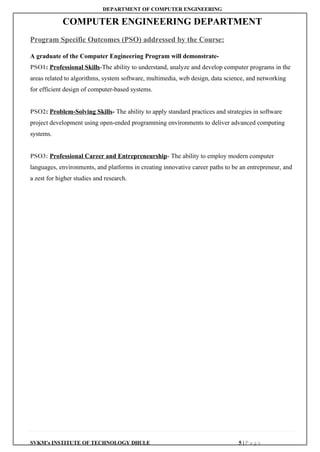

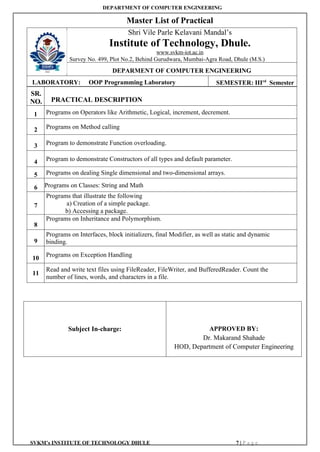
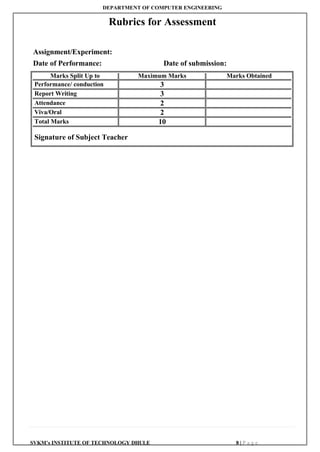
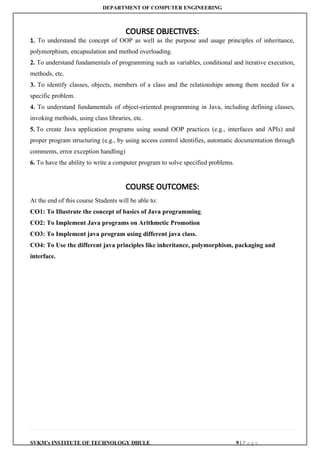
![DEPARTMENT OF COMPUTER ENGINEERING
SVKM’s INSTITUTE OF TECHNOLOGY DHULE 11 | P a g e
Experiment No. : 01
Title : Write a Java program based on Operators like Arithmetic, Logical, increment,
decrement etc.
Aim : To understand the usage of operators like Arithmetic, Logical, increment and decrement etc.
Softwa
re
Requir
ed:
JDK 1.8 and above, JRE (Java Run-time Environment
Theory
:
Java is a high-level programming language originally developed by Sun Microsystems and
released in 1995. Java runs on a variety of platforms, such as Windows, Mac OS, and the
various versions of UNIX.
JDK
The Java Development Kit (JDK) is an implementation of either one of the Java SE, Java
EE or Java ME platforms. The JDK includes a private JVM and a few other resources to
finish the development of a Java Application.
A First Simple Program
class Example
{
public static void main(String args[])
{
System.out.println("This is a simple Java program.");
}
}
For most computer languages, the name of the file that holds the source code to a program is
arbitrary. However, this is not the case with Java. The first thing that you must learn about Java
is that the name you give to a source file is very important. For this example, the name of the
source file should be Example.java.
Compiling the Program
To compile the Example program, execute the compiler, javac, specifying the name of the
source file on the command line, as shown here:
C:>javac Example.java
The javac compiler creates a file called Example.class that contains the bytecode
version of the program. As discussed earlier, the Java bytecode is the intermediate
representation of your program that contains instructions the Java interpreter will execute.
Thus, the output of javac is not code that can be directly executed. To actually run the
program, you must use the Java interpreter, called java. To do so, pass the class name Example
as a command-line argument, as shown here:
C:>java Example
When the program is run, the following output is displayed:
This is a simple Java program.
Although Example.java is quite short, it includes several key features which are common to all
Java programs. Let’s closely examine each part of the program.
The program begins with the following lines:](https://image.slidesharecdn.com/exp1to11-251114152633-c3c58960/85/Kabirpawarpptof-java-practicalexp1-to-11-docx-12-320.jpg)
![DEPARTMENT OF COMPUTER ENGINEERING
SVKM’s INSTITUTE OF TECHNOLOGY DHULE 12 | P a g e
class Example
{
This line uses the keyword class to declare that a new class is being defined. Example is an
identifier that is the name of the class.
The next line of code is shown here:
public static void main (String args[]) {
This line begins the main () method. As the comment preceding it suggests, this is the line at
which the program will begin executing. All Java applications begin execution by calling
main(). (This is just like C/C++.)
The public keyword is an access specifier, which allows the programmer to control the
visibility of class members. When a class member is preceded by public, then that member
may be accessed by code outside the class in which it is declared.
In this case, main () must be declared as public, since it must be called by code outside of its
class when the program is started.
The keyword static allows main () to be called without having to instantiate a particular
instance of the class. This is necessary since main () is called by the Java interpreter before any
objects are made. The keyword void simply tells the compiler that main () does not return a
value.
In main (), there is only one parameter. String args [ ] declares a parameter named args, which
is an array of instances of the class String. (Arrays are collections of similar objects.) Objects
of type String store character strings. In this case, args receives any command-line arguments
present when the program is executed.
The next line of code is shown here. Notice that it occurs inside main ().
System.out.println("This is a simple Java program.");
This line outputs the string “This is a simple Java program.” followed by a new line on the
screen. System is a predefined class that provides access to the system, and out is the output
stream that is connected to the console.
OPERATORS
1. Arithmetic Operators: Arithmetic operators are used in mathematical expressions
in the same way that they are used in algebra. The following table lists the arithmetic
operators:
Operators Meaning
+ Addition
- Subtraction
* Multiplication
/ Division
% Modulus Division
++ Increment
-- Decrement
= Assignment
2. Relational Operators: Java Relational Operators are a bunch of binary operators used
to check for relations between two operands, including equality, greater than, less than, etc.
They return a boolean result after the comparison and are extensively used in looping](https://image.slidesharecdn.com/exp1to11-251114152633-c3c58960/85/Kabirpawarpptof-java-practicalexp1-to-11-docx-13-320.jpg)

![DEPARTMENT OF COMPUTER ENGINEERING
SVKM’s INSTITUTE OF TECHNOLOGY DHULE 14 | P a g e
b) Decrement Operators:
Decrement operators are used in programming languages to decrease the value of a
variable by one. Similar to increment operators, there are two types of decrement
operators: the prefix decrement operator (--x) and the postfix decrement operator
(x--).
Prefix Decrement Operator (--x):
The prefix decrement operator decreases the value of the variable by 1 before
the value is used in the expression.
Syntax: --x;
Example: If x is initially 5, --x will decrement x to 4 and return the new value
(4).
Postfix Decrement Operator (x--):
The postfix decrement operator decreases the value of the variable by 1 after
the value is used in the expression.
Syntax: x--;
Example: If x is initially 5, x-- will return the current value of x (5) and then
decrement x to 4.
5. Ternary Operators:
A ternary operator evaluates the test condition and executes a block of code
based on the result of the condition.
Its syntax is:
condition ? expression1 : expression2;
Here, condition is evaluated and
if condition is true, expression1 is executed.
And, if condition is false, expression2 is executed.
The ternary operator takes 3 operands (condition, expression1,
and expression2). Hence, the name ternary operator.
Code:
import java.util.Scanner;
class Main {
public static void main(String[] args) {
// take input from users
Scanner input = new Scanner(System.in);
System.out.println("Enter your marks: ");
double marks = input.nextDouble();
// ternary operator checks if
// marks is greater than 40
String result = (marks > 40) ? "pass" : "fail";
System.out.println("You " + result + " the exam.");
input.close();
}
}
Output:](https://image.slidesharecdn.com/exp1to11-251114152633-c3c58960/85/Kabirpawarpptof-java-practicalexp1-to-11-docx-15-320.jpg)
![DEPARTMENT OF COMPUTER ENGINEERING
SVKM’s INSTITUTE OF TECHNOLOGY DHULE 15 | P a g e
Enter your marks:
75
You pass the exam.
Suppose the user enters 75. Then, the condition marks > 40 evaluates
to true. Hence, the first expression "pass" is assigned to result.
6. Assignment Operators
Assignment operators are used in Java to assign values to variables. For
example,
int age;
age = 5;
Here, = is the assignment operator. It assigns the value on its right to the
variable on its left. That is, 5 is assigned to the variable age.
Let's see some more assignment operators available in Java.
Operator Example Equivalent to
= a = b; a = b;
+= a += b; a = a + b;
-= a -= b; a = a - b;
*= a *= b; a = a * b;
/= a /= b; a = a / b;
%= a %= b; a = a % b;
Code: 1. Program to demonstrate Arithmetic, Relational, Logical operators.
class ArithmeticOperations
{
public static void main (String args[])
{
Scanner sc=new Scanner (Ssytem.in)
int a, b, add, sub, mul, div, mod;
System.out.println(“Enter the value of a:”);
a=nextInt();
System.out.println(“Enter the value of b:”);
b=nextInt();
add=a+b;
System.out.println(“ADDITION=” +add);
sub=a-b;](https://image.slidesharecdn.com/exp1to11-251114152633-c3c58960/85/Kabirpawarpptof-java-practicalexp1-to-11-docx-16-320.jpg)
![DEPARTMENT OF COMPUTER ENGINEERING
SVKM’s INSTITUTE OF TECHNOLOGY DHULE 16 | P a g e
System.out.println(“SUBTRACTION=” +sub);
mul=a*b;
System.out.println(“MULTIPLICATION=” +mul);
div=a/b;
System.out.println(“DIVISION=” +div);
mod=a%b;
System.out.println(“REMAINDER=” +mod);
}
}
2. Program to demonstrate relational operators
class RelationalOperations
{
public static void main (String args [])
{
Scanner sc=new Scanner (Ssytem.in)
int a, b;
System.out.println(“Enter the value of a:”);
a=nextInt ();
System.out.println(“Enter the value of b:”);
b=nextInt ();
if(a>b)
{
System.out.println(“Greatest no=” +a);
}
else
{
System.out.println(“Greatest no=” +b);
}
if(a<b)
{
System.out.println(“Smallest no=” +a);
}
else
{
System.out.println(“Smallest no=” +b);
}
if(a==b)
{
System.out.println(“Both numbers are equal”);
}
if (a! =b)
{
System.out.println(“Both numbers are not equal”);
}
}
}
3. Program to demonstrate logical operators
class LogicalOperations](https://image.slidesharecdn.com/exp1to11-251114152633-c3c58960/85/Kabirpawarpptof-java-practicalexp1-to-11-docx-17-320.jpg)
![DEPARTMENT OF COMPUTER ENGINEERING
SVKM’s INSTITUTE OF TECHNOLOGY DHULE 17 | P a g e
{
public static void main (String args [])
{
Scanner sc=new Scanner (Ssytem.in)
boolean a=true;
boolean b=false;
System.out.println(“Logical AND:”,(a&&b));
System.out.println(“Logical OR:”,(a||b));
System.out.println(“Logical NOT:”,!a);
System.out.println(“Logical NOT:”,!b);
}
}
4. Program to demonstrate increment and decrement operators
class IncrementDecrement
{
public static void main (String args [])
{
int x=10;
System.out.println(x++); //10 (11)
System.out.println(++x); //12
System.out.println(x--); //10
System.out.println(--x); //8
}
}](https://image.slidesharecdn.com/exp1to11-251114152633-c3c58960/85/Kabirpawarpptof-java-practicalexp1-to-11-docx-18-320.jpg)
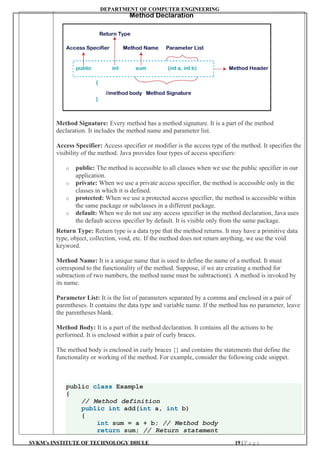
![DEPARTMENT OF COMPUTER ENGINEERING
SVKM’s INSTITUTE OF TECHNOLOGY DHULE 21 | P a g e
rollno=r;
name=n;
marks=m;
}
void display ()
{
System.out.println(“ROLL NO.:” +rollno);
System.out.println(“NAME:” +name);
System.out.println(“MARKS:” +marks);
}
public static void main (String args [])
{
int r,m;
String n;
Scanner sc= new Scanner(System.in);
// Creating Student object using the new constructor
Student s1 = new Student ();
// Enter values of data members from user
System.out.println(“ENTER ROLL NO.:”);
r=sc.nextInt();
System.out.println(“ENTER NAME:”);
n=sc.next();
System.out.println(“ENTER ROLL NO.:”);
m=sc.nextInt();
//calling method
s1. getdata(r,n,m);
s1. display();
}
}
OUTPUT:
ENTER ROLL NO.:1
ENTER NAME:ABC
ENTER MARKS:56
ROLL NO.:1
NAME:ABC
MARKS:56
2. Program to demonstrate static method
import java.io.*;
import java.util.*;
class Student
{
int id;
String name;
int marks;
// Added static method to initialize data members
static void getdata (int r, String n, int m)
{
rollno=r;
name=n;
marks=m;
}
void display ()
{](https://image.slidesharecdn.com/exp1to11-251114152633-c3c58960/85/Kabirpawarpptof-java-practicalexp1-to-11-docx-22-320.jpg)
![DEPARTMENT OF COMPUTER ENGINEERING
SVKM’s INSTITUTE OF TECHNOLOGY DHULE 22 | P a g e
System.out.println(“ROLL NO.:” +rollno);
System.out.println(“NAME:” +name);
System.out.println(“MARKS:” +marks);
}
public static void main (String args [])
{
int r, m;
String n;
Scanner sc= new Scanner(System.in);
// Creating Student object using the new constructor
Student s1 = new Student ();
// Enter values of data members from user
System.out.println(“ENTER ROLL NO.:”);
r=sc.nextInt();
System.out.println(“ENTER NAME:”);
n=sc.next();
System.out.println(“ENTER ROLL NO.:”);
m=sc.nextInt();
Student. getdata(r,n,m); //calling static method
s1. display(); //calling non static method
}
}
OUTPUT:
ENTER ROLL NO.:1
ENTER NAME:ABC
ENTER MARKS:56
ROLL NO.:1
NAME:ABC
MARKS:56](https://image.slidesharecdn.com/exp1to11-251114152633-c3c58960/85/Kabirpawarpptof-java-practicalexp1-to-11-docx-23-320.jpg)
![DEPARTMENT OF COMPUTER ENGINEERING
SVKM’s INSTITUTE OF TECHNOLOGY DHULE 24 | P a g e
Why Method Overloading is not possible by changing the return type of method only?
Method overloading in Java is based on the method signature, which includes the method
name and parameter list. The return type alone is not sufficient to distinguish between
overloaded methods because Java does not consider the return type when resolving method
calls. If two methods have the same name and parameter list but different return types, the
compiler cannot determine which method to call based solely on the return type.
Can we overload Java main() method?
Yes, technically, it is possible to overload the main() method in Java, but it won't be
considered as the entry point for the Java Virtual Machine (JVM) to start the execution of the
program. While overloading the main() method is syntactically valid, it doesn't serve the
purpose of being the entry point for program execution. The JVM expects the standard
signature public static void main(String[] args) for the entry point. Any other overloaded
main() method will be treated as a
regular method and won't be invoked by the JVM to start the program. Therefore, although
overloading main () is possible, it's not practically useful for program execution.
Code: // Java program to find the area of the rectangle using Method Overloading by changing
the datatype of parameters
import java.io.*;
class Rectangle
{
// Overloaded Area() function to calculate the area of the
rectangle It takes two double parameters
void Area(double S, double T)
{
System.out.println("Area of the rectangle: "
+ S * T);
}
// Overloaded Area() function to calculate the area of the
rectangle. It takes two float parameters
void Area(int S, int T)
{
System.out.println("Area of the rectangle: "
+ S * T);
}
}
class GFG
{
// Driver code
public static void main(String[] args)
{
// Creating object of Rectangle class
Rectangle obj = new Rectangle();
// Calling function
obj.Area(20, 10);
obj.Area(10.5, 5.5);
}
}
OUTPUT:
Area of the rectangle: 200
Area of the rectangle: 57.75](https://image.slidesharecdn.com/exp1to11-251114152633-c3c58960/85/Kabirpawarpptof-java-practicalexp1-to-11-docx-25-320.jpg)
![DEPARTMENT OF COMPUTER ENGINEERING
SVKM’s INSTITUTE OF TECHNOLOGY DHULE 25 | P a g e
// Java program to find the area of the rectangle using Method Overloading by changing
the datatype of parameters
import java.io.*;
class Rectangle
{
// Overloaded Area() function to calculate the area of the
rectangle It takes two double parameters
void Area(double S, double T)
{
System.out.println("Area of the rectangle:"+ S * T);
}
// Overloaded Area() function to calculate the area of the
rectangle. It takes two float parameters
void Area(int S, int T)
{
System.out.println("Area of the rectangle:"+S*T);
}
}
class GFG
{
public static void main(String[] args)
{
// Creating object of Rectangle class
Rectangle obj = new Rectangle();
// Calling function
obj.Area(20, 10);
obj.Area(10.5, 5.5);
}
}
OUTPUT:
Area of the rectangle: 200
Area of the rectangle: 57.75
// Java program to demonstrate working of method overloading in Java by changing the
number of parameters
class Sum
{
// Overloaded sum()
// This sum takes two int parameters
int sum(int x, int y)
{
return (x + y);
}
// Overloaded sum()
// This sum takes three int parameters
int sum(int x, int y, int z)
{
return (x + y + z);
}
// Overloaded sum()
// This sum takes two double parameters
double sum(double x, double y)](https://image.slidesharecdn.com/exp1to11-251114152633-c3c58960/85/Kabirpawarpptof-java-practicalexp1-to-11-docx-26-320.jpg)
![DEPARTMENT OF COMPUTER ENGINEERING
SVKM’s INSTITUTE OF TECHNOLOGY DHULE 26 | P a g e
{
return (x + y);
}
// Driver code
public static void main(String args[])
{
Sum s = new Sum();
System.out.println(s.sum(10, 20));
System.out.println(s.sum(10, 20, 30));
System.out.println(s.sum(10.5, 20.5));
}
}
OUTPUT:
30
60
31.0](https://image.slidesharecdn.com/exp1to11-251114152633-c3c58960/85/Kabirpawarpptof-java-practicalexp1-to-11-docx-27-320.jpg)
![DEPARTMENT OF COMPUTER ENGINEERING
SVKM’s INSTITUTE OF TECHNOLOGY DHULE 28 | P a g e
class_name () {}
If there is no constructor in a class, compiler automatically creates a default constructor.
Purpose of a default constructor
The default constructor is used to provide the default values to the object like 0, null, etc.,
depending on the type.
2) Java Parameterized Constructor
A constructor that has a specific number of parameters is called a parameterized constructor.
Why use the parameterized constructor?
The parameterized constructor is used to provide different values to distinct objects. However,
you can provide the same values also.
3) Java Copy Constructor
Java does not support the copy constructor. However, we can copy the values from one object
to another, like a copy constructor in C++.
There are the following three ways to copy the values of one object into another:
o By Using a Constructor
o By Assigning the Values of One Object to Another
o By Using the clone() Method of the Object Class
We can copy the values of one object into another using a Java constructor.
Constructor Overloading in Java
In Java, a constructor is just like a method but without return type. It can also be overloaded
like Java methods.
Constructor overloading in Java is a technique of having more than one constructor with
different parameter lists. They are arranged in a way that each constructor performs a different
task. They are differentiated by the compiler on the basis of the number of parameters in the
list and their types.
Code: Program to demonstrate the default constructor
class Student
{
int id;
String name;
//method to display the value of id and name
void display()
{
System.out.println(id+" "+name);
}
}
//Main class to create objects and calling methods
public class Main
{
public static void main(String args[])
{
//creating objects](https://image.slidesharecdn.com/exp1to11-251114152633-c3c58960/85/Kabirpawarpptof-java-practicalexp1-to-11-docx-29-320.jpg)
![DEPARTMENT OF COMPUTER ENGINEERING
SVKM’s INSTITUTE OF TECHNOLOGY DHULE 29 | P a g e
Student s1=new Student();
Student s2=new Student();
//displaying values of the object
s1.display();
s2.display();
}
}
Output:
0 null
0 null
Program to demonstrate the parameterized constructor
class Student
{
int id;
String name;
//creating a parameterized constructor
Student(int i, String n)
{
id = i;
name = n;
}
//method to display the values
void display()
{
System.out.println(id+" "+name);
}
}
//Main class to create objects and class methods
public class Main
{
public static void main(String args[]){
//creating objects and passing values
Student s1 = new Student(111,"Joseph");
Student s2 = new Student(222,"Sonoo");
//calling method to display the values of object
s1.display();
s2.display();
}
}
Program to initialize the values from one object to another object.
class Student
{
int id;
String name;
//constructor to initialize integer and string
Student(int i, String n)
{
id = i;
name = n;
}
//constructor to initialize another object](https://image.slidesharecdn.com/exp1to11-251114152633-c3c58960/85/Kabirpawarpptof-java-practicalexp1-to-11-docx-30-320.jpg)
![DEPARTMENT OF COMPUTER ENGINEERING
SVKM’s INSTITUTE OF TECHNOLOGY DHULE 30 | P a g e
Student(Student s)
{
id = s.id;
name =s.name;
}
void display()
{
System.out.println(id+" "+name);
}
}
public class Main
{
public static void main(String args[])
{
Student s1 = new Student(111,"Karan");
Student s2 = new Student(s1);
s1.display();
s2.display();
}
}
Program to demonstrate constructors overloading
class Student
{
int id;
String name;
int age;
Student()
{
System.out.println(“Default constructor is invoked”);
}
//creating two arg constructor
Student(int i, String n)
{
id = i;
name = n;
}
//creating three arg constructor
Student(int i,String n,int a)
{
id = i;
name = n;
age=a;
}
Student(Student s)
{
id = s.id;
name =s.name;
}
//creating method to display values
void display()
{
System.out.println(id+" "+name+" "+age);
}](https://image.slidesharecdn.com/exp1to11-251114152633-c3c58960/85/Kabirpawarpptof-java-practicalexp1-to-11-docx-31-320.jpg)
![DEPARTMENT OF COMPUTER ENGINEERING
SVKM’s INSTITUTE OF TECHNOLOGY DHULE 31 | P a g e
}
//creating a Main class to create instance and call methods
public class Main
{
public static void main(String args[])
{
Student s = new Student();
Student s1 = new Student(111,"Karan");
Student s2 = new Student(222,"Aryan",25);
Student s3 = new Student(s1);
s1.display();
s2.display();
s3.display();
}
}](https://image.slidesharecdn.com/exp1to11-251114152633-c3c58960/85/Kabirpawarpptof-java-practicalexp1-to-11-docx-32-320.jpg)
![DEPARTMENT OF COMPUTER ENGINEERING
SVKM’s INSTITUTE OF TECHNOLOGY DHULE 32 | P a g e
Experiment No. : 05
Title : Write a Java program to demonstrate programs on dealing with Single-dimensional array and two
dimensional array
Aim : To understand the concepts of Single-dimensional array and two dimensional array.
Software
Required: JDK 1.8 and above, JRE (Java Run-time Environment)
Theory: An array is typically a grouping of elements of the same kind that are stored in a single,
contiguous block of memory.
Java array is an object which contains elements of a similar data type. Additionally, the
elements of an array are stored in a contiguous memory location. It is a data structure where
we store similar elements. We can store only a fixed set of elements in a Java array.
Array in Java is index-based, the first element of the array is stored at the 0th index, 2nd
element is stored on 1st index and so on.
In contrast to C/C++, the length member allows us to obtain the array's length. We must utilise
the sizeof operator in C/C++.
An object of a dynamically formed class is called an array in Java. Java arrays implement the
Serializable and Cloneable interfaces and derive from the Object class. In Java, an array can
hold objects or primitive values. Java allows us to create single- or multi-dimensional arrays,
just like C/C++ does.
Additionally, C/C++ does not support the anonymous array functionality that Java does.
Types of Array in java
There are two types of array.
o Single Dimensional Array
o Multidimensional Array
Single-Dimensional Array in Java
A single-dimensional array in Java is a linear collection of elements of the same data type. It is
declared and instantiated using the following syntax:
dataType[] arrayname; (or)
dataType []arrayname; (or)
dataType arrayname[];
Instantiation of an Array in Java
arrayRefVar=new datatype[size];
In Java, you can declare, instantiate, and initialize an array in a single line, as demonstrated](https://image.slidesharecdn.com/exp1to11-251114152633-c3c58960/85/Kabirpawarpptof-java-practicalexp1-to-11-docx-33-320.jpg)
![DEPARTMENT OF COMPUTER ENGINEERING
SVKM’s INSTITUTE OF TECHNOLOGY DHULE 33 | P a g e
below:
int a[]={33,3,4,5};//declaration, instantiation and initializa
tion
Declaration, Instantiation and Initialization of Java Array
In Java, you can declare, instantiate, and initialize an array in a single line, as demonstrated
below:
int a[]={33,3,4,5};//declaration, instantiation and initiali
zation
Or
//declaration and instantiation of a single dimensional array
int a[]=new int[5];
a[0]=10;//initialization
a[1]=20;
a[2]=70;
a[3]=40;
a[4]=50;
Multidimensional Array in Java
A multidimensional array in Java is an array of arrays where each element can be an array
itself. It is useful for storing data in row and column format.
Syntax to Declare Multidimensional Array in Java
dataType[][] arrayname; (or)
dataType [][]arrayanme; (or)
dataType arrayname[][]; (or)
dataType []arrayname[];
Example to instantiate Multidimensional Array in Java
int[][] arr=new int[3][3];//3 row and 3 column
Example to initialize Multidimensional Array in Java
arr[0][0]=1;
arr[0][1]=2;
arr[0][2]=3;
arr[1][0]=4;
arr[1][1]=5;
arr[1][2]=6;
arr[2][0]=7;
arr[2][1]=8;
arr[2][2]=9;
This Java program initializes and prints a 2D array, representing a 3x3 matrix. Initially, a 2D
array named arr is declared and initialized with values using array initializer syntax. The
array consists of three rows, each containing three columns. The program then iterates through
each row and column of the array using nested loops. Within the loops, it prints the value of
each element, separated by a space. After printing all the elements of a row, a newline
character is printed to move to the next line. This process continues until all elements of the
array are printed. As a result, the program outputs the 3x3 matrix with each element displayed
in its respective row and column.
Array length:
Arrays in java has the size, we can retrieve the length of array using arrayname.length
int [ ] a = new int [7];
System.out.println(a.length);](https://image.slidesharecdn.com/exp1to11-251114152633-c3c58960/85/Kabirpawarpptof-java-practicalexp1-to-11-docx-34-320.jpg)
![DEPARTMENT OF COMPUTER ENGINEERING
SVKM’s INSTITUTE OF TECHNOLOGY DHULE 34 | P a g e
Code: 1. Program to enter and display the array elements
public class Array
{
public static void main(String[] args)
{
int[] arr = { -7, -5, 5, 10, 0, 3, 20, 25, 12 };
System.out.print("Elements of given array are: ");
for (int i = 0; i < arr.length; i++)
{
System.out.print(arr[i] + " ");
}
}
}
2. Program to enter and display the array elements in reverse
order
public class ReverseArray
{
public static void main(String[] args)
{
int[] arr = { -7, -5, 5, 10, 0, 3, 20, 25, 12 };
System.out.print("Elements in reverse order are: ");
for (int i = arr.length-1; i>=0; i--)
{
System.out.print(arr[i] + " ");
}
}
}
3. Program to calculate sum and average of array elements
public class SumAverage
{
public static void main(String[] args)
{
int[] numbers = { -7, -5, 5, 10, 0, 3, 20, 25, 12 };
int sum=0;
double avg;
for (int number:numbers)
{
sum=sum+number;
}
System.out.println(“SUM:”+sum);
int len=numbers.length;
avg=((double)sum/(double)len);
System.out.println(“AVERAGE:”+avg);
}
}
4. //Program to display the matrix elements
public class MatrixDisplay
{
public static void main(String[] args)
{
int[][] matrix = {{1, 2, 3},{4, 5, 6},{7, 8, 9}};
System.out.println("The matrix is:");](https://image.slidesharecdn.com/exp1to11-251114152633-c3c58960/85/Kabirpawarpptof-java-practicalexp1-to-11-docx-35-320.jpg)
![DEPARTMENT OF COMPUTER ENGINEERING
SVKM’s INSTITUTE OF TECHNOLOGY DHULE 35 | P a g e
for (int i = 0; i < matrix.length; i++)
{
for (int j = 0; j < matrix[i].length; j++)
{
System.out.print(matrix[i][j] + " ");
}
System.out.println();
}
}
}
5. Program to add two matrices in java
class AddMatrices
{
public static void main(String[] args)
{
// Input matrices
int A[][] = { { 1, 2 }, { 3, 4 } };
int B[][] = { { 1, 1 }, { 1, 1 } };
// Dimensions of the matrix
int rows = A.length;
int cols = A[0].length;
// Resultant matrix to store the sum
int sum[][] = new int[rows][cols];
// Adding two matrices
for (int i = 0; i < rows; i++)
{
for (int j = 0; j < cols; j++)
{
sum[i][j] = A[i][j] + B[i][j];
}
}
// Printing the resultant matrix
System.out.println("Resultant Matrix:");
for (int i = 0; i < rows; i++)
{
for (int j = 0; j < cols; j++)
{
// Print elements on the same line
System.out.print(sum[i][j] + " ");
}
// Move to the next line after printing each row
System.out.println();
}
}](https://image.slidesharecdn.com/exp1to11-251114152633-c3c58960/85/Kabirpawarpptof-java-practicalexp1-to-11-docx-36-320.jpg)
![DEPARTMENT OF COMPUTER ENGINEERING
SVKM’s INSTITUTE OF TECHNOLOGY DHULE 36 | P a g e
Experiment No. : 06
Title : Write a Java program to demonstrate: String and Math
Aim : To understand the use of String and Math classes in java
Software
Required
:
JDK 1.8 and above, JRE (Java Run-time Environment)
Theory: In Java, string is basically an object that represents sequence of char values. An array of
characters works as a string in Java. For example:
char[] ch={‘j’,’a’,’v’,’a’};
String s=new String(ch);
is same as:
String s= ”java”;
Java String class provides a lot of methods to perform operations on strings such as
compare(), concat(), equals(), split(), length(), replace(), compareTo(), intern(), substring()
etc.
The java.lang.String class
implements Serializable, Comparable and CharSequence interfaces.
CharSequence Interface
The CharSequence interface is used to represent the sequence of characters.
String, StringBuffer and StringBuilder classes implement it. It means, we can create strings
in Java by using these three classes.
The Java String is immutable which means it cannot be changed. Whenever we change any
string, a new instance is created. For mutable strings, you can use StringBuffer and
StringBuilder classes.
Let’s understand what String in Java is and how to create the String object.
What is String in Java?](https://image.slidesharecdn.com/exp1to11-251114152633-c3c58960/85/Kabirpawarpptof-java-practicalexp1-to-11-docx-37-320.jpg)
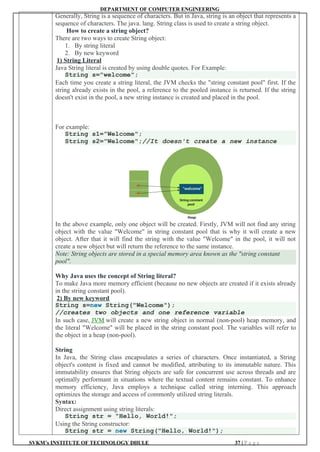
![DEPARTMENT OF COMPUTER ENGINEERING
SVKM’s INSTITUTE OF TECHNOLOGY DHULE 38 | P a g e
Immutable String in Java
In Java, strings are immutable. It means that its value cannot be changed once a String object
is created. If any operation appears to modify a String, what happens is the creation of a new
String object. The original string remains unchanged. This immutable characteristic of
strings in Java has several implications for performance, security, and functionality.
Memory Allotment of String
Memory allotment for strings in Java is interesting due to Java's handling of string
immutability and the string pool mechanism. Understanding how strings are stored can help
optimize memory usage in Java applications, especially those that heavily use string
manipulations.
1. String Literal Storage: When you create a string using string literals, Java checks
the string pool first. The new variable points to the existing string if it already exists.
If it doesn't exist, the new string is added to the Pool, and the variable points to this
new string.
Syntax:
//String literal
String s1 = "Hello";
//Points to the same "Hello" in the Pool as s1
String s2 = "Hello";
2. new Keyword and String Pool: Strings created with the new operator do not use the
Pool by default. They are stored in the heap memory outside the Pool, which means
each new operation results in a new object, even if it contains the same string data.
Syntax:
// A new string object is created in the heap
String s3 = new String("Hello");
String Methods
Sr.
No.
Method Name Description
1 int length() It returns string length
2 String concat(String str)
It concatenates the specified
string.
3 boolean equals(Object another)
It checks the equality of
string with the given object.
4 static String equalsIgnoreCase(String another)
It compares another string. It
doesn't check case.
5 char charAt(int index)
It returns char value for the
particular index
6 compareTo()
This method is used to
compare two Strings
7 boolean contains(CharSequence s)
It returns true or false after
matching the sequence of
char value.
8 String[] split(String regex)
It returns a split string-
matching regex.
9 String[] split(String regex, int limit)
It returns a split string-
matching regex and limit.
10
String reverse()
to reverse the input characters
of the String
11 String replace(char old, char new)
It replaces all occurrences of
the specified char value.
12
String replace(CharSequence old,
CharSequence new)
It replaces all occurrences of
the specified CharSequence.](https://image.slidesharecdn.com/exp1to11-251114152633-c3c58960/85/Kabirpawarpptof-java-practicalexp1-to-11-docx-39-320.jpg)
![DEPARTMENT OF COMPUTER ENGINEERING
SVKM’s INSTITUTE OF TECHNOLOGY DHULE 40 | P a g e
11 Math.cos(x) Returns the cosine of an
angle (radians)
Math.cos(0) 1.0
12 Math.tan(x) Returns the tangent of an
angle (radians)
Math.tan(Math.PI/
4)
1.0
13 Math.log(x) Returns the natural log
(base)
Math.log (2.71828) 1.0
14 Math.exp(x) Returns e raised to the
power x
Math.exp(1) 2.718281828…
Note: All Math methods are static.
Code: // program to deomonstrate String class method
public class StringMethod
{
public static void main(String args[])
{
String s1 = "Java";
System.out.println("The length of String is : " +
s1.length());
//String Concatenation
String str1 = "Green";
String str2 = "Tea";
//Method 1 : Using concat
String str3 = str1.concat(str2);
System.out.println(str3);
//Method 2 : Using "+" operator
String str4 = str1 + str2;
System.out.println(str4);
// To check whether string is equal or not using equals
method
String str5 = "Learn Python";
String str6 = "Learn Java";
// if str1 and str2 are equal, the result is true
if (str5.equals(str6))
{
System.out.println("str5 and str6 are equal");
}
else
{
System.out.println("str5 and str6 are not equal");
}
// To check whether string is equal or not using
EqualsIgnoreCase Method
String str7 = "LEARN JAVA";
String str8 = "Learn Java";
// if str7 and str8 are equal (ignoring case differences),
// the result is true
if (str7.equalsIgnoreCase(str8))
{
System.out.println("str7 and str8 are equal");](https://image.slidesharecdn.com/exp1to11-251114152633-c3c58960/85/Kabirpawarpptof-java-practicalexp1-to-11-docx-41-320.jpg)
![DEPARTMENT OF COMPUTER ENGINEERING
SVKM’s INSTITUTE OF TECHNOLOGY DHULE 41 | P a g e
}
else
{
System.out.println("str7 and str8 are not equal");
}
// charAt() method
String str = "java string API";
System.out.println(str.charAt(0));
System.out.println(str.charAt(1));
System.out.println(str.charAt(2));
System.out.println(str.charAt(3));
System.out.println(str.charAt(6));
//compareTo()
String str9 = "Zeus";
String str10 = "Chinese";
String str11 = "American";
String str12 = "Indian";
System.out.println(str9.compareTo(str10));
//C comes 23 positions before Z, so it will give you 23
System.out.println(str11.compareTo(str12));
// I comes 8 positions after A, so it will give you -8
//contains()
String str11 = "Softwaretestinghelp";
String str12 = "testing";
String str13 = "blog";
System.out.println("testing is a part of
Softwaretestinghelp: " + str11.contains(str12);
System.out.println("blog is a part of Softwaretestinghelp: "
+ str11.contains(str13));
//Split()
String str14 = "Thexyzwebsitexyzisxyzsoftwaretestingxyzhelp";
String[] split = str14.split("xyz");
for (String obj: split)
{
System.out.println(obj);
}
//indexOf()
String str15 = "Saket Saurav " + "performing a search";
System.out.println(str15);
System.out.println("index of 'p' is " + str15.indexOf('p'));
System.out.println("index of 'u' is " + str15.indexOf('u'));
System.out.println("last index of 'S' is " +
str15.lastIndexOf('S'));
System.out.println("last index of 's' is " +
str15.lastIndexOf('s'));
// toLowerCase() to toUpperCase()
System.out.println(str15.toLowerCase());
System.out.println(str15.toUpperCase());
//subString()
String str16 = "Softwaretestinghelp";
System.out.println(str.substring(8,12));](https://image.slidesharecdn.com/exp1to11-251114152633-c3c58960/85/Kabirpawarpptof-java-practicalexp1-to-11-docx-42-320.jpg)
![DEPARTMENT OF COMPUTER ENGINEERING
SVKM’s INSTITUTE OF TECHNOLOGY DHULE 42 | P a g e
//It will start from 8th character and extract the substring
till 12th character
System.out.println(str.substring(15,19));
}
}
// Program to deomstrate math class method
public class MathExample
{
public static void main(String[] args)
{
double a = 25;
double b = 3;
System.out.println("Square root of " + a + “:"+
Math.sqrt(a));
System.out.println(a + " raised to the power " + b + ": " +
Math.pow(a, b));
System.out.println("Maximum of " + a + " and " + b + ": " +
Math.max(a, b));
System.out.println("Random number between 0 and 1: " +
Math.random());
System.out.println("Ceil of 4.3: " + Math.ceil(4.3));
System.out.println("Floor of 4.7: " + Math.floor(4.7));
System.out.println("Absolute value of -9: " + Math.abs(-9));
}
}
OUTPUT:
Square root of 25.0: 5.0
25.0 raised to the power 3.0: 15625.0
Maximum of 25.0 and 3.0: 25.0
Random number between 0 and 1: 0.682739287429
Ceil of 4.3: 5.0
Floor of 4.7: 4.0
Absolute value of -9: 9
Experiment No. : 07
Title : Write a Java program to demonstrate programs that illustrate the following
a) Creation of a simple package b) Accessing a package.
Aim : To understand the concept of creating and accessing user defined packages
Software
Required: JDK 1.8 and above, JRE (Java Run-time Environment)
Theory: What are Packages in Java?
A package in Java is a mechanism for organizing related classes, interfaces, and resources into
a single unit. It provides a hierarchical structure to the codebase, which aids in better code
management and avoids naming conflicts. Packages are represented by directories in the file
system, where each directory corresponds to a package name.](https://image.slidesharecdn.com/exp1to11-251114152633-c3c58960/85/Kabirpawarpptof-java-practicalexp1-to-11-docx-43-320.jpg)


![DEPARTMENT OF COMPUTER ENGINEERING
SVKM’s INSTITUTE OF TECHNOLOGY DHULE 46 | P a g e
//The following code is written for the Class2.java file.
// Note that Class2 is the part of the package mypackage2.
//Therefore, package mypackage2; statement is written.
package mypackage2;
public class Class2
{
public void get2()
{
System.out.println("Inside the package 2.");
}
}
//The following code is written for the Main.java file.
// importing both the classes
import mypackage1.Class1;
import mypackage2.Class2;
public class Main
{
// main method
public static void main (String args[])
{
// instantiating both the classes Class1 and Class
2
Class1 obj1 = new Class1();
Class2 obj2 = new Class2();
obj1.get1();
obj2.get2();
}
}
OUTPUT:
Inside the package 1.
Inside the package 2.
Let's say we want to create a package named "com.example" and include a class called
"Calculator" within it. Create a new directory structure for your package. In your project
folder, create a folder named "com" and within it, create another folder named "example".
Create the "Calculator.java" file and place it inside the "com/example" folder.
com/example/Calculator.java
package com.example;
public class Calculator
{
public int add(int a, int b)
{
return a + b;
}
public int subtract(int a, int b)
{
return a - b;
}
public int multiply(int a, int b)
{
return a * b;](https://image.slidesharecdn.com/exp1to11-251114152633-c3c58960/85/Kabirpawarpptof-java-practicalexp1-to-11-docx-47-320.jpg)
![DEPARTMENT OF COMPUTER ENGINEERING
SVKM’s INSTITUTE OF TECHNOLOGY DHULE 47 | P a g e
}
public int divide(int a, int b)
{
if (b != 0)
{
return a / b;
}
else
{
throw new ArithmeticException("Cannot divide by
zero!");
}
}
}
Now, create another file outside the "com" folder to access the Calculator class from the user-
defined package.
PackageExample.java
import com.example.Calculator;
public class PackageExample
{
public static void main(String[] args)
{
Calculator calculator = new Calculator();
int result = calculator.add(5, 3);
System.out.println("Addition: " + result);
result = calculator.subtract(5, 3);
System.out.println("Subtraction: " + result);
result = calculator.multiply(5, 3);
System.out.println("Multiplication: " + result);
result = calculator.divide(10, 2);
System.out.println("Division: " + result);
}
}
Output:
Addition: 8
Subtraction: 2
Multiplication: 15
Division: 5
Experiment No. : 08
Title : Write a Java program to demonstrate Inheritance and polymorphism
Aim : To study and implement the concepts of Inheritance and Polymorphism in Java for achieving
code reusability and dynamic method execution.
Software
Required: JDK 1.8 and above, JRE (Java Run-time Environment)
Theory: Inheritance:
Inheritance is one of the fundamental principles of Object-Oriented Programming](https://image.slidesharecdn.com/exp1to11-251114152633-c3c58960/85/Kabirpawarpptof-java-practicalexp1-to-11-docx-48-320.jpg)
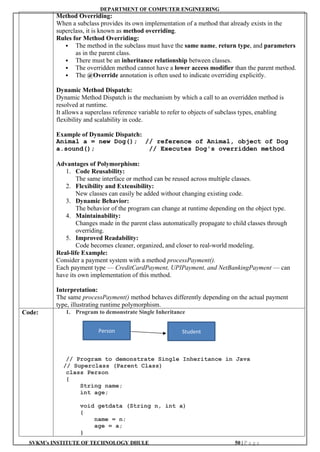
![DEPARTMENT OF COMPUTER ENGINEERING
SVKM’s INSTITUTE OF TECHNOLOGY DHULE 51 | P a g e
void display ()
{
System.out.println("Name: " + name);
System.out.println("Age: " + age);
}
}
// Subclass (Child Class)
class Student extends Person
{
String course;
void get (String n, int a, String c)
{
getdata (n, a); // calling parent class method
course = c;
}
void displayStudent ()
{
display (); // calling parent class method
System.out.println("Course: " + course);
}
}
// Main Class
public class SingleInheritance
{
public static void main (String[] args)
{
// Create object of subclass
Student s = new Student();
// Initialize and display student details
s. get ("Rahul Sharma", 20, "Computer Engineering");
s. displayStudent();
}
}
2. Program to demonstrate Multilevel Inheritance
// Program to demonstrate Multilevel Inheritance
// Base class
class Employee
{
String name;
int id;
void setEmployee (String n, int i)
{
name = n;
id = i;
}
void displayEmployee()
{
System.out.println("Employee Name: " + name);
System.out.println("Employee ID: " + id);
}
}
// Derived class 1 (Developer)
class Developer extends Employee
{
String pLanguage;](https://image.slidesharecdn.com/exp1to11-251114152633-c3c58960/85/Kabirpawarpptof-java-practicalexp1-to-11-docx-52-320.jpg)
![DEPARTMENT OF COMPUTER ENGINEERING
SVKM’s INSTITUTE OF TECHNOLOGY DHULE 52 | P a g e
void setDeveloper (String n, int i, String lang)
{
setEmployee (n, i);
pLanguage = lang;
}
void displayDeveloper ()
{
displayEmployee();
System.out.println("Programming Language:"+pLanguage);
}
}
// Derived class 2 (SeniorDeveloper)
class SeniorDeveloper extends Developer
{
int experience; // in years
void setSeniorDeveloper(String n, int i, String lang, int exp)
{
setDeveloper(n, i, lang);
experience = exp;
}
void displaySeniorDeveloper()
{
displayDeveloper();
System.out.println("Experience: " + experience + "
years");
}
}
// Main class
public class MultilevelInheritance
{
public static void main(String[] args)
{
// Create object of the most derived class
SeniorDeveloper sd = new SeniorDeveloper();
// Initialize and display details
sd.setSeniorDeveloper("Amit Sharma", 101, "Java", 5);
sd.displaySeniorDeveloper();
}
}
3. Program to demonstrate Hierarchical Inheritance
// Program to demonstrate Hierarchical Inheritance
// Parent class
class Employee
{
String name;
int id;
void setEmployee(String n, int i)
{
name = n;
id = i;
}](https://image.slidesharecdn.com/exp1to11-251114152633-c3c58960/85/Kabirpawarpptof-java-practicalexp1-to-11-docx-53-320.jpg)
![DEPARTMENT OF COMPUTER ENGINEERING
SVKM’s INSTITUTE OF TECHNOLOGY DHULE 53 | P a g e
void displayEmployee)
{
System.out.println("Employee Name: " + name);
System.out.println("Employee ID: " + id);
}
}
// Child class 1
class Manager extends Employee
{
String department;
void setManager(String n, int i, String dept)
{
SetEmployee(n, i); // call parent method
department = dept;
}
void displayManager()
{
displayEmployee();
System.out.println("Department: " + department);
}
}
// Child class 2
class Developer extends Employee
{
String pLanguage;
void setDeveloper (String n, int i, String lang)
{
setEmployee(n, i); // call parent method
pLanguage = lang;
}
void displayDeveloper()
{
displayEmployee();
System.out.println("ProgrammingLanguage:"+programmingLanguage);
}
}
// Main class
public class HierarchicalInheritance
{
public static void main(String[] args)
{
// Object of Manager
Manager m = new Manager();
m.setManager("Rohit Sharma", 101, "Sales");
m.displayManager();
System.out.println();
// Object of Developer
Developer d = new Developer();
d.setDeveloper("Priya Patil", 102, "Java");](https://image.slidesharecdn.com/exp1to11-251114152633-c3c58960/85/Kabirpawarpptof-java-practicalexp1-to-11-docx-54-320.jpg)
![DEPARTMENT OF COMPUTER ENGINEERING
SVKM’s INSTITUTE OF TECHNOLOGY DHULE 54 | P a g e
d.displayDeveloper();
}
}
4. Prgram to demonstrate Runtime polymorphism i.e. Method Overriding
//Parent class
class Shape
{
void draw()
{
System.out.println("Drawing a shape");
}
}
//Child class 1
class Circle extends Shape
{
void draw ()
{
System.out.println("Drawing a circle");
}
}
// Child class 2
class Rectangle extends Shape
{
void draw()
{
System.out.println("Drawing a rectangle");
}
}
// Main class
public class ShapeDemo
{
public static void main(String[] args)
{
Shape s; //Parent class reference
// Circle object assigned to parent reference
s = new Circle();
s.draw(); //calls Circle's overridden draw() method
// Rectangle object assigned to parent reference
s = new Rectangle();
s.draw();//calls Rectangle's overridden draw() method
}
}
Experiment No. : 09
Title : Write a Java program to demonstrate Interfaces, block initializers, final Modifier, as well as static
and dynamic binding.
Aim : To understand and implement
Interfaces in Java.
To demonstrate
static and instance (block) initializers.
To use the
final modifier for variables, methods, and classes.
To illustrate
static binding (compile-time polymorphism) and dynamic binding (runtime
polymorphism).
Software JDK 1.8 and above, JRE (Java Run-time Environment)](https://image.slidesharecdn.com/exp1to11-251114152633-c3c58960/85/Kabirpawarpptof-java-practicalexp1-to-11-docx-55-320.jpg)
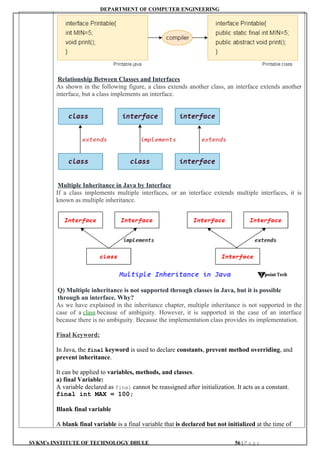

![DEPARTMENT OF COMPUTER ENGINEERING
SVKM’s INSTITUTE OF TECHNOLOGY DHULE 58 | P a g e
// Implement Shape interface
public void draw()
{
System.out.println("Drawing a Circle");
}
public void area()
{
double area = 3.1416 * radius * radius;
System.out.println("Circle area: " + area);
}
// Implement Colorable interface
public void setColor(String color)
{
this.color = color;
System.out.println("Circle color set to " + color);
}
}
// Class implementing both interfaces
class Rectangle implements Shape, Colorable
{
double length, width;
String color;
Rectangle(double length, double width)
{
this.length = length;
this.width = width;
}
// Implement Shape interface
public void draw()
{
System.out.println("Drawing a Rectangle");
}
public void area()
{
double area = length * width;
System.out.println("Rectangle area: " + area);
}
// Implement Colorable interface
public void setColor(String color)
{
this.color = color;
System.out.println("Rectangle color set to " + color);
}
}
// Main class
public class ShapeInterfaceDemo
{
public static void main(String[] args)
{
// Circle object
Circle c = new Circle(5);
c.draw();
c.area();](https://image.slidesharecdn.com/exp1to11-251114152633-c3c58960/85/Kabirpawarpptof-java-practicalexp1-to-11-docx-59-320.jpg)
![DEPARTMENT OF COMPUTER ENGINEERING
SVKM’s INSTITUTE OF TECHNOLOGY DHULE 59 | P a g e
c.setColor("Red");
System.out.println();
// Rectangle object
Rectangle r = new Rectangle(4, 6);
r.draw();
r.area();
r.setColor("Blue");
}
}
OUTPUT:
Drawing a Circle
Circle area: 78.54
Circle color set to Red
Drawing a Rectangle
Rectangle area: 24.0
Rectangle color set to Blue
2. Program to demonstrate the final variable, final method and final class
final class Vehicle
{
// Final variable - cannot be changed once initialized
final int speedLimit = 80;
// Final method - cannot be overridden by subclasses
final void displaySpeed()
{
System.out.println("Speed limit is: " + speedLimit + "
km/hr");
}
}
// Attempting to inherit Vehicle class will cause an error
// class Car extends Vehicle{} // ❌ Error: cannot subclass
final class Vehicle
public class FinalKeywordDemo
{
public static void main(String[] args)
{
Vehicle v = new Vehicle();
v.displaySpeed();
//Uncommenting the line below will cause compile-time error
//v.speedLimit = 100; // ❌ Error: cannot assign a value to
final variable
}
}
3. Program to demonstrate Static Block Initializer
public class StaticBlockDemo
{
// Static variable
static int count;
// Static block - executes before main()
static](https://image.slidesharecdn.com/exp1to11-251114152633-c3c58960/85/Kabirpawarpptof-java-practicalexp1-to-11-docx-60-320.jpg)
![DEPARTMENT OF COMPUTER ENGINEERING
SVKM’s INSTITUTE OF TECHNOLOGY DHULE 60 | P a g e
{
System.out.println("Inside static block...");
count = 10;
System.out.println("Static variable initialized
to:" + count);
}
// Constructor
StaticBlockDemo()
{
System.out.println("Constructor called creating
object...");
}
public static void main(String[] args)
{
System.out.println("Inside main method...");
// Access static variable without creating object
System.out.println("Value of count: " + count);
// Create object
StaticBlockDemo obj = new StaticBlockDemo();
}
}
OUTPUT:
Inside static block...
Static variable initialized to: 10
Inside main method...
Value of count: 10
Constructor called - creating object...
Experiment No. : 10
Title : Write a java Programs on Exception Handling
Aim : To write a Java program that demonstrates exception handling using the try, catch, finally,
throw, and throws keywords.
Software
Required: JDK 1.8 and above, JRE (Java Run-time Environment)
Theory: What Is an Exception in Java?
An exception (or exceptional event) is a problem that arises during the execution of a program.](https://image.slidesharecdn.com/exp1to11-251114152633-c3c58960/85/Kabirpawarpptof-java-practicalexp1-to-11-docx-61-320.jpg)
![DEPARTMENT OF COMPUTER ENGINEERING
SVKM’s INSTITUTE OF TECHNOLOGY DHULE 61 | P a g e
When an Exception occurs the normal flow of the program is disrupted and the
program/Application terminates abnormally, which is not recommended, therefore, these
exceptions are to be handled.
Why Exception Occurs?
An exception can occur for many different reasons. Following are some scenarios where an
exception occurs.
A user has entered an invalid data.
A file that needs to be opened cannot be found.
A network connection has been lost in the middle of communications or the JVM has
run out of memory.
Some of these exceptions are caused by user error, others by programmer error, and others by
physical resources that have failed in some manner.
Java Exception Categories
Based on these, we have the following categories of Exceptions. You need to understand them
to know how exception handling works in Java.
Checked exceptions
Unchecked exceptions
Errors
1. Java Checked Exceptions
A checked exception is an exception that is checked (notified) by the compiler at compilation-
time, these are also called as compile time exceptions. These exceptions cannot simply be
ignored, the programmer should take care of (handle) these exceptions.
Example: Checked Exceptions in Java
For example, if you use FileReader class in your program to read data from a file, if the file
specified in its constructor doesn't exist, then a FileNotFoundException occurs, and the
compiler prompts the programmer to handle the exception.
Note − Since the methods read() and close() of FileReader class throws IOException, you can
observe that the compiler notifies to handle IOException, along with FileNotFoundException.
import java.io.File;
import java.io.FileReader;
public class FilenotFound_Demo
{
public static void main(String args[])
{
File file = new File("E://file.txt");
FileReader fr = new FileReader(file);
}
}
2. Java Unchecked Exceptions
An unchecked exception is an exception that occurs at the time of execution. These are also
called as Runtime Exceptions. These include programming bugs, such as logic errors or
improper use of an API. Runtime exceptions are ignored at the time of compilation.
Example: Unchecked Exceptions in Java
For example, if you have declared an array of size 5 in your program, and trying to call the 6th
element of the array then an ArrayIndexOutOfBoundsException exception occurs.
public class Unchecked_Demo
{
public static void main(String args[])
{
int num[] = {1, 2, 3, 4};
System.out.println(num[5]);
}
}
3. Java Errors
These are not exceptions at all, but problems that arise beyond the control of the user or the](https://image.slidesharecdn.com/exp1to11-251114152633-c3c58960/85/Kabirpawarpptof-java-practicalexp1-to-11-docx-62-320.jpg)


![DEPARTMENT OF COMPUTER ENGINEERING
SVKM’s INSTITUTE OF TECHNOLOGY DHULE 64 | P a g e
A finally block appears at the end of the catch blocks and has the following syntax −
Syntax
try
{
// Protected code
}
catch (ExceptionType1 e1)
{
// Catch block
}
catch (ExceptionType2 e2)
{
// Catch block
}
catch (ExceptionType3 e3)
{
// Catch block
}
finally
{
// The finally block always executes.
}
Note the following −
A catch clause cannot exist without a try statement.
It is not compulsory to have finally clauses whenever a try/catch block is present.
The try block cannot be present without either catch clause or finally clause.
Any code cannot be present in between the try, catch, finally blocks.
User-defined Exceptions in Java
You can create your own exceptions in Java. Keep the following points in mind when writing
your own exception classes −
All exceptions must be a child of Throwable.
If you want to write a checked exception that is automatically enforced by the Handle or
Declare Rule, you need to extend the Exception class.
If you want to write a runtime exception, you need to extend the RuntimeException class.
Syntax
We can define our own Exception class as below –
class MyException extends Exception
{
}
You just need to extend the predefined Exception class to create your own Exception. These
are considered to be checked exceptions. The following InsufficientFundsException class is a
user-defined exception that extends the Exception class, making it a checked exception. An
exception class is like any other class, containing useful fields and methods.
Code:
// File Name : ExcepTest.java
import java.io.*;
public class ExcepTest
{
public static void main(String args[])
{
try
{
int a[] = new int[2];
System.out.println("Access element three :" + a[3]);
}](https://image.slidesharecdn.com/exp1to11-251114152633-c3c58960/85/Kabirpawarpptof-java-practicalexp1-to-11-docx-65-320.jpg)
![DEPARTMENT OF COMPUTER ENGINEERING
SVKM’s INSTITUTE OF TECHNOLOGY DHULE 65 | P a g e
catch (ArrayIndexOutOfBoundsException e)
{
System.out.println("Exception thrown:" + e);
}
System.out.println("Out of the block");
}
}
OUTPUT:
Exception thrown: java.lang.ArrayIndexOutOfBoundsException: 3
Out of the block
// Program to demonstrate multiple catch blocks
public class MultipleCatchDemo
{
public static void main(String[] args)
{
try
{
int[] numbers = new int[3];
// This will cause ArrayIndexOutOfBoundsException
numbers[4] = 25;
// This will cause ArithmeticException
int result = 10 / 0;
}
catch (ArithmeticException e)
{
System.out.println("Arithmetic Exception caught: "
+
e.getMessage());
}
catch (ArrayIndexOutOfBoundsException e)
{
System.out.println("Array Index Out of Bounds
Exception caught: " + e.getMessage());
}
catch (Exception e)
{
System.out.println("General Exception caught: " +
e.getMessage());
}
finally
{
System.out.println("Finally block executed.");
}
System.out.println("Program continues after exception
handling.");
}
}
Output:
Array Index Out of Bounds Exception caught: Index 4 out of
bounds for length 3
Finally block executed.
Program continues after exception handling.](https://image.slidesharecdn.com/exp1to11-251114152633-c3c58960/85/Kabirpawarpptof-java-practicalexp1-to-11-docx-66-320.jpg)
![DEPARTMENT OF COMPUTER ENGINEERING
SVKM’s INSTITUTE OF TECHNOLOGY DHULE 66 | P a g e
// program to demonstrate throws keyword and finally block
import java.util.Scanner;
public class ThrowsDemo2
{
// Method declares that it may throw ArithmeticException
static int divide(int a, int b) throws ArithmeticException
{
return a / b; // May throw ArithmeticException
}
public static void main(String[] args)
{
Scanner sc = new Scanner(System.in);
try
{
System.out.println("Enter numerator: ");
int num = sc.nextInt();
System.out.println("Enter denominator: ");
int den = sc.nextInt();
// Call method that may throw exception
int result = divide(num, den);
System.out.println("Result: " + result);
}
catch (ArithmeticException e)
{
System.out.println("Exception caught: Division by zero is
not allowed!");
}
finally
{
System.out.println("Finally block executed.");
sc.close();
}
System.out.println("Program continues after exception
handling.");
}
}
Sample Output 1 (Normal Division):
Enter numerator: 20
Enter denominator: 5
Result: 4
Finally block executed.
Program continues after exception handling.
Sample Output 2 (Division by Zero):
Enter numerator: 20
Enter denominator: 0
Exception caught: Division by zero is not allowed!
Finally block executed.
Program continues after exception handling.
Experiment No. : 11
Title : Write a java Programs on Read and write text files using FileReader, FileWriter, and
BufferedReader. Count the number of lines, words, and characters in a file
Aim : To write a Java program that demonstrates reading and writing text files using FileReader,
FileWriter, and BufferedReader, and counts the number of lines, words, and characters in a
file.
Software
Required: JDK 1.8 and above, JRE (Java Run-time Environment)](https://image.slidesharecdn.com/exp1to11-251114152633-c3c58960/85/Kabirpawarpptof-java-practicalexp1-to-11-docx-67-320.jpg)

![DEPARTMENT OF COMPUTER ENGINEERING
SVKM’s INSTITUTE OF TECHNOLOGY DHULE 68 | P a g e
Methods of FileWriter class
Method Description
void write(String text) It is used to write the string into FileWriter.
void write(char c) It is used to write the char into FileWriter.
void write(char[] c) It is used to write char array into FileWriter.
void flush() It is used to flushes the data of FileWriter.
void close() It is used to close the FileWriter.
Java BufferedReader Class
Among the many tools available within Java's extensive standard library, the BufferedReader
class stands out as a versatile and efficient means of reading character input from various
sources. Java BufferedReader class is used to read the text from a character-based input
stream. It can be used to read data line by line by readLine() method. It makes the performance
fast. It inherits the Reader class.
Java BufferedReader Class Declaration
The BufferedReader class, part of Java's java.io package, provides a convenient way to read
text from an input stream. It extends the abstract class Reader and offers additional
functionality for buffering input, making it particularly suitable for scenarios where reading
character data is required, such as parsing text files or processing network communication.
Let's see the declaration for Java.io.BufferedReader class:
1. public class BufferedReader extends Reader
Java BufferedReader Class Constructors
Constructor Description
BufferedReader(Reader rd) It is used to create a buffered character input stream
that uses the default size for an input buffer.
BufferedReader(Reader rd, int size) It is used to create a buffered character input stream
that uses the specified size for an input buffer.
Java BufferedReader Class Methods
Method Description
int read() It is used for reading a single character.](https://image.slidesharecdn.com/exp1to11-251114152633-c3c58960/85/Kabirpawarpptof-java-practicalexp1-to-11-docx-69-320.jpg)
![DEPARTMENT OF COMPUTER ENGINEERING
SVKM’s INSTITUTE OF TECHNOLOGY DHULE 69 | P a g e
int read(char[] cbuf, int off, int len) It is used for reading characters into a portion of an array
boolean markSupported() It is used to test the input stream support for the mark and
reset method.
String readLine() It is used for reading a line of text.
boolean ready() It is used to test whether the input stream is ready to be read.
long skip(long n) It is used for skipping the characters.
void reset() It repositions the stream at a position the mark method was
last called on this input stream.
void mark(int readAheadLimit) It is used for marking the present position in a stream.
void close() It closes the input stream and releases any of the system
resources associated with the stream.
Closing the BufferedReader
It is important to note that when finished using a BufferedReader, it should be closed to release
any system resources associated with it, such as file handles or network connections. In the
above example, we use a try-with-resources statement to ensure that the BufferedReader is
automatically closed when no longer needed.
Code:
//Program to demonstrate FileReader
import java.io.FileReader;
public class FileReaderExample {
public static void main(String args[])throws Exception{
FileReader fr=new FileReader("D:testout.txt");
int i;
while((i=fr.read())!=-1)
System.out.print((char)i);
fr.close();
}
}
Here, we are assuming that you have following data in "testout.txt" file:
Welcome to java.
OUTPUT:
Welcome to java.](https://image.slidesharecdn.com/exp1to11-251114152633-c3c58960/85/Kabirpawarpptof-java-practicalexp1-to-11-docx-70-320.jpg)
![DEPARTMENT OF COMPUTER ENGINEERING
SVKM’s INSTITUTE OF TECHNOLOGY DHULE 70 | P a g e
//Program to demonstrate FileWriter
import java.io.FileWriter;
public class FileWriterExample {
public static void main(String args[]){
try{
FileWriter fw=new FileWriter("D:testout.txt");
fw.write("Welcome to java.");
fw.close();
}catch(Exception e){System.out.println(e);}
System.out.println("Success...");
}
}
Output:
Success...
testout.txt:
Welcome to java.
package com.javatpoint;
import java.io.*;
public class BufferedReaderExample {
public static void main(String args[])throws
Exception{
FileReader fr=new FileReader("D:
testout.txt");
BufferedReader br=new BufferedReader(fr);
int i;
while((i=br.read())!=-1){
System.out.print((char)i);
}
br.close();
fr.close();
}
}
Here, we are assuming that we have following data in "testout.txt" file:
Output:
Welcome to java.
// Program to count the no. line, words and characters using FileReader and File Writer
class
import java.io.*;
public class FileReadWriteCount
{
public static void main(String[] args)
{
String outputFile = "output.txt";
try
{
//Writing content to the file
FileWriter fw = new FileWriter(outputFile);
fw.write("This is a sample text file.n");](https://image.slidesharecdn.com/exp1to11-251114152633-c3c58960/85/Kabirpawarpptof-java-practicalexp1-to-11-docx-71-320.jpg)
![DEPARTMENT OF COMPUTER ENGINEERING
SVKM’s INSTITUTE OF TECHNOLOGY DHULE 71 | P a g e
fw.write("It contains multiple lines of text.n");
fw.write("We will count lines, words, and
characters.n");
fw.close();
System.out.println("Content written to " + outputFile);
//Reading content from the file
FileReader fr = new FileReader(outputFile);
BufferedReader br = new BufferedReader(fr);
String line;
int lineCount = 0, wordCount = 0, charCount = 0;
while ((line = br.readLine()) != null)
{
lineCount++;
String[] words = line.split("s+");
wordCount += words.length;
charCount += line.length();
}
br.close();
// Display counts
System.out.println("Number of lines:"+lineCount);
System.out.println("Number of words:"+wordCount);
System.out.println("Number of characters:"+charCount);
}
catch (IOException e)
{
System.out.println("An error occurred:"+e.getMessage());
}
}
}
OUTPUT:
Content written to output.txt
Number of lines: 3
Number of words: 16
Number of characters: 87](https://image.slidesharecdn.com/exp1to11-251114152633-c3c58960/85/Kabirpawarpptof-java-practicalexp1-to-11-docx-72-320.jpg)


![Attack surfaces and attack tress[inform]](https://cdn.slidesharecdn.com/ss_thumbnails/lecture03-260108015941-a4dee53b-thumbnail.jpg?width=640&height=640&fit=bounds)


