JAVA ROADMAP
JVM Architecture – How It Works
Introduction
Java, a widely used programming language known for its versatility and
reliability, owes much of its power to the Java Virtual Machine (JVM)
Architecture. Let’s examine the JVM’s function in executing Java programs
and how it enables the concept of “Write Once, Run Anywhere” (WORA).
Definition Of JVM
The Java Virtual Machine, commonly referred to as JVM, is a virtual computer
that runs Java code. It acts as a translator between the computer’s native
language and your Java code. Consider it as a skilled interpreter who can
translate your words so that speakers of many languages understand you.
Importance Of JVM In Running Java Applications
The JVM Architecture
plays a vital role in running Java applications, offering benefits that make Java
widely applicable. Its benefits include:
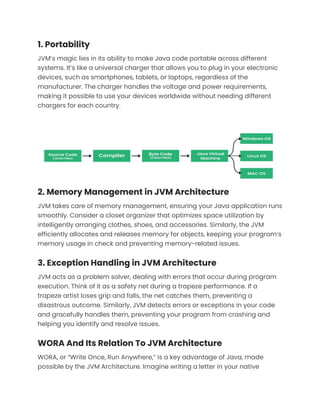
1. Portability
JVM’s magic lies in its ability to make Java code portable across different
systems. It’s like a universal charger that allows you to plug in your electronic
devices, such as smartphones, tablets, or laptops, regardless of the
manufacturer. The charger handles the voltage and power requirements,
making it possible to use your devices worldwide without needing different
chargers for each country.
2. Memory Management in JVM Architecture
JVM takes care of memory management, ensuring your Java application runs
smoothly. Consider a closet organizer that optimizes space utilization by
intelligently arranging clothes, shoes, and accessories. Similarly, the JVM
efficiently allocates and releases memory for objects, keeping your program’s
memory usage in check and preventing memory-related issues.
3. Exception Handling in JVM Architecture
JVM acts as a problem solver, dealing with errors that occur during program
execution. Think of it as a safety net during a trapeze performance. If a
trapeze artist loses grip and falls, the net catches them, preventing a
disastrous outcome. Similarly, JVM detects errors or exceptions in your code
and gracefully handles them, preventing your program from crashing and
helping you identify and resolve issues.
WORA And Its Relation To JVM Architecture
WORA, or “Write Once, Run Anywhere,” is a key advantage of Java, made
possible by the JVM Architecture. Imagine writing a letter in your native
language and being able to share it with people around the world who speak
different languages. The recipients use their respective translators to
understand your message. Similarly, the JVM serves as a translator, enabling
Java code to be written once and run on any system with a compatible JVM.
The JVM simplifies running Java programs on different systems. It’s like a
universal remote that works with any TV, saving you from having multiple
remotes for different TVs.
JVM Architecture
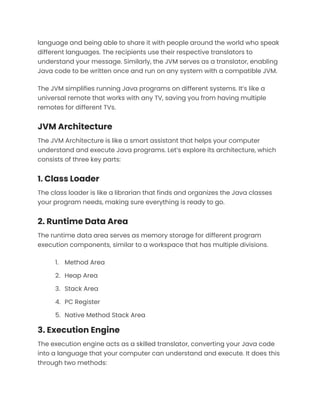
The JVM Architecture is like a smart assistant that helps your computer
understand and execute Java programs. Let’s explore its architecture, which
consists of three key parts:
1. Class Loader
The class loader is like a librarian that finds and organizes the Java classes
your program needs, making sure everything is ready to go.
2. Runtime Data Area
The runtime data area serves as memory storage for different program
execution components, similar to a workspace that has multiple divisions.
1. Method Area
2. Heap Area
3. Stack Area
4. PC Register
5. Native Method Stack Area
3. Execution Engine
The execution engine acts as a skilled translator, converting your Java code
into a language that your computer can understand and execute. It does this
through two methods:
1. Interpreter
2. JIT Compiler
Compilation of .java files and creation of .class files
When you write Java code in a .java file, it’s in a human-readable form. The
process of transforming this code into bytecode is similar to compiling a
document into a PDF format. The Java compiler (javac) compiles the .java file
and generates bytecode instructions that can be understood by the JVM.
These bytecode instructions are stored in .class files, which contain the binary
representation of your code.
Steps involved in running .class files:
When you run a Java program, the JVM takes over the execution process.
Here are the steps involved:
1. Class Loading: The JVM’s class loader locates and loads the required
.class files into memory.
2. Bytecode Verification: The bytecode verifier ensures that the
bytecode is valid and doesn’t violate any security rules. It’s like a
security checkpoint👮💼 that scans your luggage at the airport to
ensure there are no prohibited items.
3. Execution: The JVM’s execution engine interprets the bytecode
instructions or dynamically compiles them into machine code using
the JIT compiler. The bytecode instructions are executed, and the
program’s logic is carried out.
4. Memory Management: The JVM manages memory allocation and
deallocation. It automatically handles memory usage, freeing up
memory occupied by objects that are no longer needed.
5. Exception Handling: The JVM detects and handles exceptions that
occur during program execution. It ensures that your program
doesn’t crash when unexpected situations arise, just like a safety net
that catches you when you stumble.
Now let’s deep dive into the working and functioning of JVM i.e. JVM
Architecture.
ClassLoader Subsystem In JVM Architecture
1. Introduction
Have you ever wondered how Java programs easily load and run many
classes? The Class Loader Subsystem, an important component of the Java
Virtual Machine (JVM), holds the key to the answer. Let’s explore the Class
Loader Subsystem’s operations, understand its function in loading classes,
and inspect its key components.
2. Understanding the ClassLoader Subsystem
Consider the Class Loader Subsystem as your trusted friend who helps in
finding and loading the classes your Java program requires. Similar to a
diligent librarian, it finds the necessary class files and brings them into
memory so they are available for use. When your program needs the right
classes, the Class Loader Subsystem ensures that they are easily available.
3. Components of the ClassLoader Subsystem:
The Class Loader Subsystem consists of different components, each playing a
crucial role in the class loading process. Let’s explore them one by one:
1. Bootstrap Class Loader:
This is like the superhero of class loaders, responsible for loading the core
Java classes that are part of the Java Development Kit (JDK). It’s the first
class loader that comes into action when the JVM starts up. Just as a
superhero lays the foundation for a story, the Bootstrap Class Loader provides
the essential building blocks for your Java programs.
2. Extension Class Loader:
Imagine you have some additional modules or libraries that enhance the
functionality of your Java program. The Extension Class Loader helps in
loading these extra modules, extending the capabilities of the core Java
classes. It’s like a friendly assistant who fetches the special tools you need to
enhance your work.
3. System/Application Class Loader:
Now, think of the System/Application Class Loader as your personal courier
service. It delivers the classes specific to your application, including the ones
you’ve created, to the JVM. This class loader looks into the classpath of your
application and ensures that all your custom classes are loaded correctly.
VISIT
BLOG.GEEKSTER.IN
FOR THE REMAINING
QUESTIONS

JVM Architecture – How It Works.pdf

  • 1.
    JAVA ROADMAP JVM Architecture– How It Works Introduction Java, a widely used programming language known for its versatility and reliability, owes much of its power to the Java Virtual Machine (JVM) Architecture. Let’s examine the JVM’s function in executing Java programs and how it enables the concept of “Write Once, Run Anywhere” (WORA). Definition Of JVM The Java Virtual Machine, commonly referred to as JVM, is a virtual computer that runs Java code. It acts as a translator between the computer’s native language and your Java code. Consider it as a skilled interpreter who can translate your words so that speakers of many languages understand you. Importance Of JVM In Running Java Applications The JVM Architecture plays a vital role in running Java applications, offering benefits that make Java widely applicable. Its benefits include:
  • 2.
    1. Portability JVM’s magiclies in its ability to make Java code portable across different systems. It’s like a universal charger that allows you to plug in your electronic devices, such as smartphones, tablets, or laptops, regardless of the manufacturer. The charger handles the voltage and power requirements, making it possible to use your devices worldwide without needing different chargers for each country. 2. Memory Management in JVM Architecture JVM takes care of memory management, ensuring your Java application runs smoothly. Consider a closet organizer that optimizes space utilization by intelligently arranging clothes, shoes, and accessories. Similarly, the JVM efficiently allocates and releases memory for objects, keeping your program’s memory usage in check and preventing memory-related issues. 3. Exception Handling in JVM Architecture JVM acts as a problem solver, dealing with errors that occur during program execution. Think of it as a safety net during a trapeze performance. If a trapeze artist loses grip and falls, the net catches them, preventing a disastrous outcome. Similarly, JVM detects errors or exceptions in your code and gracefully handles them, preventing your program from crashing and helping you identify and resolve issues. WORA And Its Relation To JVM Architecture WORA, or “Write Once, Run Anywhere,” is a key advantage of Java, made possible by the JVM Architecture. Imagine writing a letter in your native
  • 3.
    language and beingable to share it with people around the world who speak different languages. The recipients use their respective translators to understand your message. Similarly, the JVM serves as a translator, enabling Java code to be written once and run on any system with a compatible JVM. The JVM simplifies running Java programs on different systems. It’s like a universal remote that works with any TV, saving you from having multiple remotes for different TVs. JVM Architecture The JVM Architecture is like a smart assistant that helps your computer understand and execute Java programs. Let’s explore its architecture, which consists of three key parts: 1. Class Loader The class loader is like a librarian that finds and organizes the Java classes your program needs, making sure everything is ready to go. 2. Runtime Data Area The runtime data area serves as memory storage for different program execution components, similar to a workspace that has multiple divisions. 1. Method Area 2. Heap Area 3. Stack Area 4. PC Register 5. Native Method Stack Area 3. Execution Engine The execution engine acts as a skilled translator, converting your Java code into a language that your computer can understand and execute. It does this through two methods:
  • 4.
    1. Interpreter 2. JITCompiler Compilation of .java files and creation of .class files When you write Java code in a .java file, it’s in a human-readable form. The process of transforming this code into bytecode is similar to compiling a document into a PDF format. The Java compiler (javac) compiles the .java file and generates bytecode instructions that can be understood by the JVM. These bytecode instructions are stored in .class files, which contain the binary representation of your code. Steps involved in running .class files: When you run a Java program, the JVM takes over the execution process. Here are the steps involved: 1. Class Loading: The JVM’s class loader locates and loads the required .class files into memory. 2. Bytecode Verification: The bytecode verifier ensures that the bytecode is valid and doesn’t violate any security rules. It’s like a
  • 5.
    security checkpoint👮💼 thatscans your luggage at the airport to ensure there are no prohibited items. 3. Execution: The JVM’s execution engine interprets the bytecode instructions or dynamically compiles them into machine code using the JIT compiler. The bytecode instructions are executed, and the program’s logic is carried out. 4. Memory Management: The JVM manages memory allocation and deallocation. It automatically handles memory usage, freeing up memory occupied by objects that are no longer needed. 5. Exception Handling: The JVM detects and handles exceptions that occur during program execution. It ensures that your program doesn’t crash when unexpected situations arise, just like a safety net that catches you when you stumble. Now let’s deep dive into the working and functioning of JVM i.e. JVM Architecture. ClassLoader Subsystem In JVM Architecture 1. Introduction Have you ever wondered how Java programs easily load and run many classes? The Class Loader Subsystem, an important component of the Java Virtual Machine (JVM), holds the key to the answer. Let’s explore the Class Loader Subsystem’s operations, understand its function in loading classes, and inspect its key components. 2. Understanding the ClassLoader Subsystem Consider the Class Loader Subsystem as your trusted friend who helps in finding and loading the classes your Java program requires. Similar to a diligent librarian, it finds the necessary class files and brings them into memory so they are available for use. When your program needs the right classes, the Class Loader Subsystem ensures that they are easily available.
  • 6.
    3. Components ofthe ClassLoader Subsystem: The Class Loader Subsystem consists of different components, each playing a crucial role in the class loading process. Let’s explore them one by one: 1. Bootstrap Class Loader: This is like the superhero of class loaders, responsible for loading the core Java classes that are part of the Java Development Kit (JDK). It’s the first class loader that comes into action when the JVM starts up. Just as a superhero lays the foundation for a story, the Bootstrap Class Loader provides the essential building blocks for your Java programs. 2. Extension Class Loader: Imagine you have some additional modules or libraries that enhance the functionality of your Java program. The Extension Class Loader helps in loading these extra modules, extending the capabilities of the core Java classes. It’s like a friendly assistant who fetches the special tools you need to enhance your work. 3. System/Application Class Loader: Now, think of the System/Application Class Loader as your personal courier service. It delivers the classes specific to your application, including the ones you’ve created, to the JVM. This class loader looks into the classpath of your application and ensures that all your custom classes are loaded correctly. VISIT BLOG.GEEKSTER.IN FOR THE REMAINING QUESTIONS