利用 JQUERY MOBILE 架
構產生跨平台的 APP
JQUERY MOBILE + THEMEROLLER + CODIQA +
ELECTRICPLUM + WEINRE


         divaka / 2012/05/28
專案說明
   電動車電池監控平台

   Web Based System
     需具備管理功能


   App
     監控資訊用
專案開始了..


反正網站都已
經做了, 客戶又
要求 APP, 不如
再花點時間做
給它吧 !
APP 開發環境

   開發人數:1

   開發架構:軟硬整合專案

   開發時間:未知 ~ 3個月
       專案涉及四個跨國團隊


   開發 Device:尚未採購,先用老闆的..
這…
專案 Demo
   Web
     http://124.9.6.27:8080/sbma/entrance.jsp


   APP
     http://124.9.6.27:8080/sbma/mobile/index.html
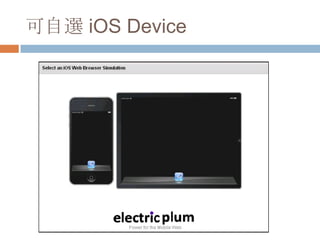
ELECTRICPLUM
HTTP://WWW.ELECTRICPLUM.COM/SIMULATOR.AS
PX


目前用起來最順手的 APP 模擬軟體
可自選 iOS Device
不過..
   跟實際 iOS Device 的設備還是不太一樣
   iOS Device
     Touch Behavior
     No Scrollbar

     Re-render Component


   所以還是搞台 iPad, iPhone 來比較實際一點..
JQUERY MOBILE
HTTP://JQUERYMOBILE.COM/


快速開發跨平台手機 APP 的工具
jQuery Mobile 簡介
   A unified, HTML5-based user interface system
    for all popular mobile device platforms, built on
    the rock-solid jQuery and jQuery UI foundation.
    Its lightweight code is built with progressive
    enhancement, and has a flexible, easily
    themeable design.
jQuery Mobile 優點
   jQuery 延伸, 學習成本較低
   免費, Open-Source, 輕量
   可與電腦共用程式碼
   不需開發者帳戶即可測試
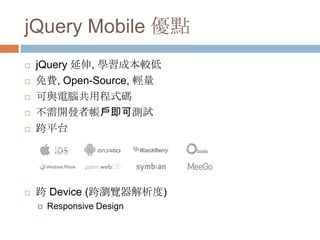
   跨平台


   跨 Device (跨瀏覽器解析度)
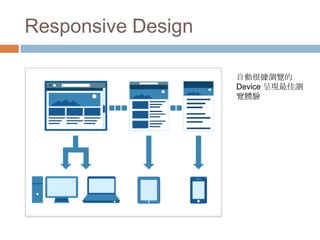
       Responsive Design
Responsive Design

                    自動根據瀏覽的
                    Device 呈現最佳瀏
                    覽體驗
jQuery Mobile 缺點
   效率較原生 Code 差
     維護與效率的   Trade-off

   無法操作手機硬體
     此部份可靠   phoneGap 等架構補強

   必須連上網路
   較難商品化
     效適用於內容型 App
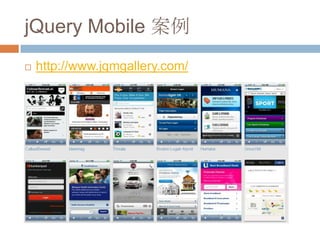
jQuery Mobile 案例
   http://www.jqmgallery.com/
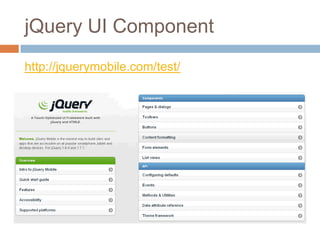
jQuery UI Component
http://jquerymobile.com/test/
jQuery Mobile 相關資源

   官方
       Forum
       Blog
       Resources

   Tutorial
       jQuery Mobile Tutorial: Creating a Restaurant Picker Web App
       http://msdn.microsoft.com/zh-tw/hh875190

   文章
       使用 jQuery Mobile 与 HTML5 开发 Web App ——开发原则

   簡報
       jQuery Mobile
       Mobile Web & HTML5 Performance Optimization
JQUERY MOBILE
LET’S DO IT
http://kuro.tw/blog/2012/02/15/hello-jquery-
mobile-jquery-mobile-2

jQuery Mobile Let’s do it

   Download jQuery Mobile Library
     http://jquerymobile.com/download/


   或引入以下程式碼 (CDN)
       <link rel="stylesheet" href="http://code.jquery.com/mobile/1.0.1/jquery.mobile-
        1.0.1.min.css" />
       <script src="http://code.jquery.com/jquery-1.6.4.min.js"></script>
       <script src="http://code.jquery.com/mobile/1.0.1/jquery.mobile-1.0.1.min.js"></script>


   Download Basic Project (dropbox)
     https://www.dropbox.com/home/front_end_study/20
        12_05_28%20(%E4%B8%80)/divaka
Step1
   產生基本架構 (List-View)
     主要是用             data-role 來定義各種樣式

    <div data-role="page" id="page-01">

      <div data-role="header">
        <h1>My Title</h1>
      </div><!-- /header -->

      <div data-role="content">
      </div><!-- /content -->

      <div data-role="footer">
        <h4>Footer content</h4>
      </div><!-- /footer -->

    </div><!-- /page -->
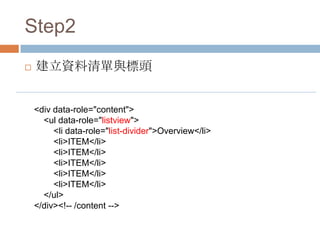
Step2
   建立資料清單與標頭


    <div data-role="content">
      <ul data-role="listview">
         <li data-role="list-divider">Overview</li>
         <li>ITEM</li>
         <li>ITEM</li>
         <li>ITEM</li>
         <li>ITEM</li>
         <li>ITEM</li>
      </ul>
    </div><!-- /content -->
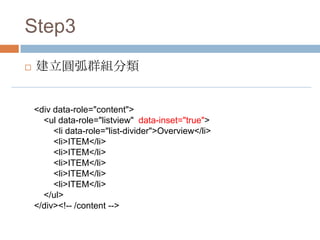
Step3
   建立圓弧群組分類


    <div data-role="content">
      <ul data-role="listview" data-inset="true">
         <li data-role="list-divider">Overview</li>
         <li>ITEM</li>
         <li>ITEM</li>
         <li>ITEM</li>
         <li>ITEM</li>
         <li>ITEM</li>
      </ul>
    </div><!-- /content -->
Step4
   多層清單 (Nested list)
     <ul>   是無序清單 , <ol> 是有序清單


     <div data-role="content">
              <ul data-role="listview" data-inset="true">
                        <li data-role="list-divider">Overview</li>
                        <li>ITEM A
                                  <ol>
                                            <li>A-1</li>
                                            <li>A-2</li>
                                            <li>A-3</li>
                                  </ol>
                        </li>
              </ul>
     </div><!-- /content -->
Step5
   加入圖片 (Thumbnails)
     在每個
        li 的一開始加上一個 <img> , jQuery Mobile
     就會自動把它放在最左邊當做縮圖。


     <li>
             <img src="icon/ADOBE - Photoshop_48x48-32.png" />
             <h1>Photoshop</h1>
             <p>Description</p>
     </li>
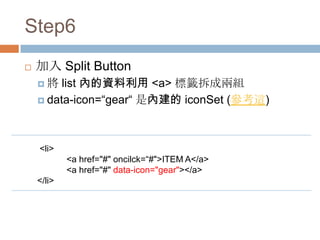
Step6
   加入 Split Button
    將   list 內的資料利用 <a> 標籤拆成兩組
     data-icon=“gear“ 是內建的 iconSet (參考這)


    <li>
            <a href="#" oncilck=“#">ITEM A</a>
            <a href="#" data-icon="gear"></a>
    </li>
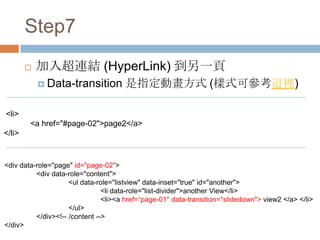
Step7
           加入超連結 (HyperLink) 到另一頁
             Data-transition         是指定動畫方式 (樣式可參考這裡)

<li>
        <a href="#page-02">page2</a>
</li>


<div data-role="page" id="page-02">
          <div data-role="content">
                     <ul data-role="listview" data-inset="true" id="another">
                                <li data-role="list-divider">another View</li>
                                <li><a href=“page-01" data-transition="slidedown"> view2 </a> </li>
                     </ul>
          </div><!-- /content -->
</div>
小技巧
   覆蓋原本的 CSS
     打開   FireFox 查看該元素的 class 直接另寫 CSS
     定義


   隱藏工具列 & 網址列
     請參見以下討論串

     http://stackoverflow.com/questions/9798158/how-
     does-jquery-mobile-hide-mobile-safaris-
     addressbar
THEMEROLLER
HTTP://JQUERYUI.COM/THEMEROLLER/


快速建立客製化 jQuery Mobile UI Theme
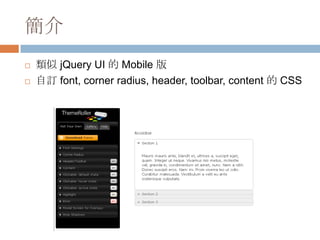
簡介
   類似 jQuery UI 的 Mobile 版
   自訂 font, corner radius, header, toolbar, content 的 CSS
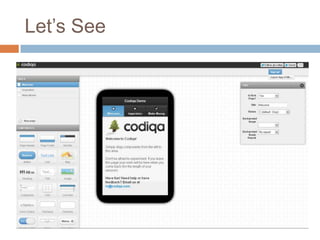
CODIQA
HTTP://WWW.CODIQA.COM/


視覺化編輯 jQuery Mobile-based APP
Let’s See
但是..
   編輯器 BUG 還很多

   自動產生的程式碼有點怪

   只用來產生最初的骨架用
     原本的   library 只有純 JS code
WEINRE
HTTP://PEOPLE.APACHE.ORG/~PMUELLR/WEINRE/


手機版瀏覽器的 FireBug (追蹤 Mobile
JavaScript)
DEMO
//下載 Library
http://nodejs.org/#download

//在目標網頁加入以下 script , 記得換 IP
<script src="http://localhost:8080/target/target-script-min.js#anonymous" ></script>


//執行 weinre server
cmd > node weinre

//開啟以下 IP,再點開要 debug 的 Browser APP
http://localhost:8080/client/#anonymous
//會看到以下畫面,代表連線成功
http://kuro.tw/sites/default/files/images/weinre-6.png
請參考以下文章
   [教學]Node.js 安裝教學. node.JS install

   使用 Weinre 遠端 Debug 你的手機版網頁
    (Mobile Web)
測試工具列表
   http://www.mobilexweb.com/emulators
FUTURE WORK
PhoneGap 使用 Web Code 操作手機底層硬
體

jQuery Mobile

  • 1.
    利用 JQUERY MOBILE架 構產生跨平台的 APP JQUERY MOBILE + THEMEROLLER + CODIQA + ELECTRICPLUM + WEINRE divaka / 2012/05/28
  • 2.
    專案說明  電動車電池監控平台  Web Based System  需具備管理功能  App  監控資訊用
  • 3.
  • 4.
    APP 開發環境  開發人數:1  開發架構:軟硬整合專案  開發時間:未知 ~ 3個月  專案涉及四個跨國團隊  開發 Device:尚未採購,先用老闆的..
  • 5.
  • 6.
    專案 Demo  Web  http://124.9.6.27:8080/sbma/entrance.jsp  APP  http://124.9.6.27:8080/sbma/mobile/index.html
  • 7.
  • 8.
  • 9.
    不過..  跟實際 iOS Device 的設備還是不太一樣  iOS Device  Touch Behavior  No Scrollbar  Re-render Component  所以還是搞台 iPad, iPhone 來比較實際一點..
  • 10.
  • 11.
    jQuery Mobile 簡介  A unified, HTML5-based user interface system for all popular mobile device platforms, built on the rock-solid jQuery and jQuery UI foundation. Its lightweight code is built with progressive enhancement, and has a flexible, easily themeable design.
  • 12.
    jQuery Mobile 優點  jQuery 延伸, 學習成本較低  免費, Open-Source, 輕量  可與電腦共用程式碼  不需開發者帳戶即可測試  跨平台  跨 Device (跨瀏覽器解析度)  Responsive Design
  • 13.
    Responsive Design 自動根據瀏覽的 Device 呈現最佳瀏 覽體驗
  • 14.
    jQuery Mobile 缺點  效率較原生 Code 差  維護與效率的 Trade-off  無法操作手機硬體  此部份可靠 phoneGap 等架構補強  必須連上網路  較難商品化  效適用於內容型 App
  • 15.
    jQuery Mobile 案例  http://www.jqmgallery.com/
  • 16.
  • 17.
    jQuery Mobile 相關資源  官方  Forum  Blog  Resources  Tutorial  jQuery Mobile Tutorial: Creating a Restaurant Picker Web App  http://msdn.microsoft.com/zh-tw/hh875190  文章  使用 jQuery Mobile 与 HTML5 开发 Web App ——开发原则  簡報  jQuery Mobile  Mobile Web & HTML5 Performance Optimization
  • 18.
    JQUERY MOBILE LET’S DOIT http://kuro.tw/blog/2012/02/15/hello-jquery- mobile-jquery-mobile-2
  • 19.
    jQuery Mobile Let’sdo it  Download jQuery Mobile Library  http://jquerymobile.com/download/  或引入以下程式碼 (CDN)  <link rel="stylesheet" href="http://code.jquery.com/mobile/1.0.1/jquery.mobile- 1.0.1.min.css" />  <script src="http://code.jquery.com/jquery-1.6.4.min.js"></script>  <script src="http://code.jquery.com/mobile/1.0.1/jquery.mobile-1.0.1.min.js"></script>  Download Basic Project (dropbox)  https://www.dropbox.com/home/front_end_study/20 12_05_28%20(%E4%B8%80)/divaka
  • 20.
    Step1  產生基本架構 (List-View)  主要是用 data-role 來定義各種樣式 <div data-role="page" id="page-01"> <div data-role="header"> <h1>My Title</h1> </div><!-- /header --> <div data-role="content"> </div><!-- /content --> <div data-role="footer"> <h4>Footer content</h4> </div><!-- /footer --> </div><!-- /page -->
  • 21.
    Step2  建立資料清單與標頭 <div data-role="content"> <ul data-role="listview"> <li data-role="list-divider">Overview</li> <li>ITEM</li> <li>ITEM</li> <li>ITEM</li> <li>ITEM</li> <li>ITEM</li> </ul> </div><!-- /content -->
  • 22.
    Step3  建立圓弧群組分類 <div data-role="content"> <ul data-role="listview" data-inset="true"> <li data-role="list-divider">Overview</li> <li>ITEM</li> <li>ITEM</li> <li>ITEM</li> <li>ITEM</li> <li>ITEM</li> </ul> </div><!-- /content -->
  • 23.
    Step4  多層清單 (Nested list)  <ul> 是無序清單 , <ol> 是有序清單 <div data-role="content"> <ul data-role="listview" data-inset="true"> <li data-role="list-divider">Overview</li> <li>ITEM A <ol> <li>A-1</li> <li>A-2</li> <li>A-3</li> </ol> </li> </ul> </div><!-- /content -->
  • 24.
    Step5  加入圖片 (Thumbnails)  在每個 li 的一開始加上一個 <img> , jQuery Mobile 就會自動把它放在最左邊當做縮圖。 <li> <img src="icon/ADOBE - Photoshop_48x48-32.png" /> <h1>Photoshop</h1> <p>Description</p> </li>
  • 25.
    Step6  加入 Split Button 將 list 內的資料利用 <a> 標籤拆成兩組  data-icon=“gear“ 是內建的 iconSet (參考這) <li> <a href="#" oncilck=“#">ITEM A</a> <a href="#" data-icon="gear"></a> </li>
  • 26.
    Step7  加入超連結 (HyperLink) 到另一頁  Data-transition 是指定動畫方式 (樣式可參考這裡) <li> <a href="#page-02">page2</a> </li> <div data-role="page" id="page-02"> <div data-role="content"> <ul data-role="listview" data-inset="true" id="another"> <li data-role="list-divider">another View</li> <li><a href=“page-01" data-transition="slidedown"> view2 </a> </li> </ul> </div><!-- /content --> </div>
  • 27.
    小技巧  覆蓋原本的 CSS  打開 FireFox 查看該元素的 class 直接另寫 CSS 定義  隱藏工具列 & 網址列  請參見以下討論串  http://stackoverflow.com/questions/9798158/how- does-jquery-mobile-hide-mobile-safaris- addressbar
  • 28.
  • 29.
    簡介  類似 jQuery UI 的 Mobile 版  自訂 font, corner radius, header, toolbar, content 的 CSS
  • 30.
  • 31.
  • 32.
    但是..  編輯器 BUG 還很多  自動產生的程式碼有點怪  只用來產生最初的骨架用  原本的 library 只有純 JS code
  • 33.
  • 34.
    DEMO //下載 Library http://nodejs.org/#download //在目標網頁加入以下 script, 記得換 IP <script src="http://localhost:8080/target/target-script-min.js#anonymous" ></script> //執行 weinre server cmd > node weinre //開啟以下 IP,再點開要 debug 的 Browser APP http://localhost:8080/client/#anonymous //會看到以下畫面,代表連線成功 http://kuro.tw/sites/default/files/images/weinre-6.png
  • 35.
    請參考以下文章  [教學]Node.js 安裝教學. node.JS install  使用 Weinre 遠端 Debug 你的手機版網頁 (Mobile Web)
  • 36.
    測試工具列表  http://www.mobilexweb.com/emulators
  • 37.
    FUTURE WORK PhoneGap 使用Web Code 操作手機底層硬 體