Dynamic Data Display With jQuery,
   DataTables and MongoDB
  June 2012 NY MongoDB User Group
            June 19, 2012
              Jim O’Hara
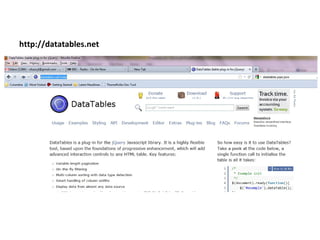
http://datatables.net
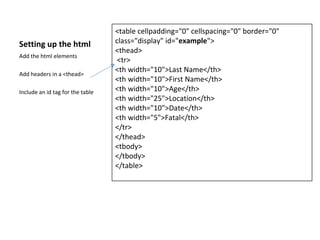
<table cellpadding="0" cellspacing="0" border="0"
Setting up the html               class="display" id="example">
                                  <thead>
Add the html elements
                                   <tr>
                                  <th width="10">Last Name</th>
Add headers in a <thead>
                                  <th width="10">First Name</th>
Include an id tag for the table   <th width="10">Age</th>
                                  <th width="25">Location</th>
                                  <th width="10">Date</th>
                                  <th width="5">Fatal</th>
                                  </tr>
                                  </thead>
                                  <tbody>
                                  </tbody>
                                  </table>
$(document).ready(function() {
                                                  var oTable = $('#example').dataTable( {
Setting up the html                               "bProcessing": true,
This script is added in a script tag              "bPaginate": true,
following references to jQuery and                "bProcessing": true,
Datables.                                         "bDeferRender":true,
                                                  "iDisplayLength":250,
These are the table cell elements                 "sAjaxSource": "MongoServlet",
                                                  "sScrollY": "400px",
Script will run on document load.                 "aoColumns": [
                                                              { "mDataProp": "lname"},
Datatables will read each value with                          { "mDataProp": "fname"},
the mDataProp, and populate the                               { "mDataProp": "age", "sClass": "center"},
JSON in a table cell.                                         { "mDataProp": "location"},
                                                              { "mDataProp": "date"},
MongoServlet is the name of the Java                          { "mDataProp": "fatal", "sClass": "center"}
class that will run.                                          ]

Servlet will reference a collection in              }
MongDB and return a JSON object.         );
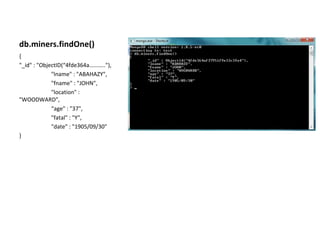
db.miners.findOne()
{
"_id" : "ObjectID(“4fde364a……….."),
             "lname" : "ABAHAZY",
             "fname" : "JOHN",
             "location" :
"WOODWARD",
             “age" : "37",
             "fatal" : "Y",
             "date" : "1905/09/30"
}
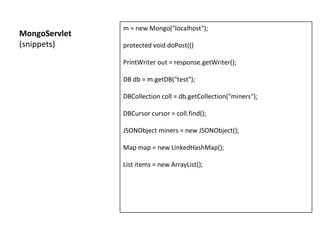
m = new Mongo("localhost");
MongoServlet
(snippets)     protected void doPost(()

               PrintWriter out = response.getWriter();

               DB db = m.getDB("test");

               DBCollection coll = db.getCollection("miners");

               DBCursor cursor = coll.find();

               JSONObject miners = new JSONObject();

               Map map = new LinkedHashMap();

               List items = new ArrayList();
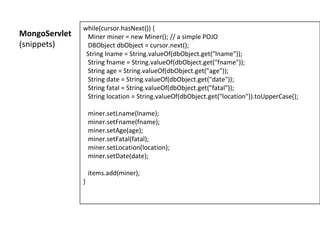
while(cursor.hasNext()) {
MongoServlet    Miner miner = new Miner(); // a simple POJO
(snippets)      DBObject dbObject = cursor.next();
                String lname = String.valueOf(dbObject.get("lname"));
                String fname = String.valueOf(dbObject.get("fname"));
                String age = String.valueOf(dbObject.get("age"));
                String date = String.valueOf(dbObject.get("date"));
                String fatal = String.valueOf(dbObject.get("fatal"));
                String location = String.valueOf(dbObject.get("location")).toUpperCase();

                   miner.setLname(lname);
                   miner.setFname(fname);
                   miner.setAge(age);
                   miner.setFatal(fatal);
                   miner.setLocation(location);
                   miner.setDate(date);

                   items.add(miner);
               }
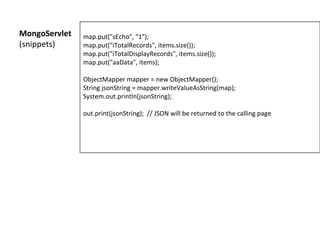
MongoServlet   map.put("sEcho", "1");
(snippets)     map.put("iTotalRecords", items.size());
               map.put("iTotalDisplayRecords", items.size());
               map.put("aaData", items);

               ObjectMapper mapper = new ObjectMapper();
               String jsonString = mapper.writeValueAsString(map);
               System.out.println(jsonString);

               out.print(jsonString); // JSON will be returned to the calling page
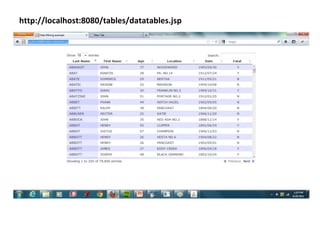
http://localhost:8080/tables/datatables.jsp

jQuery Datatables With MongDb

  • 1.
    Dynamic Data DisplayWith jQuery, DataTables and MongoDB June 2012 NY MongoDB User Group June 19, 2012 Jim O’Hara
  • 2.
  • 3.
    <table cellpadding="0" cellspacing="0"border="0" Setting up the html class="display" id="example"> <thead> Add the html elements <tr> <th width="10">Last Name</th> Add headers in a <thead> <th width="10">First Name</th> Include an id tag for the table <th width="10">Age</th> <th width="25">Location</th> <th width="10">Date</th> <th width="5">Fatal</th> </tr> </thead> <tbody> </tbody> </table>
  • 4.
    $(document).ready(function() { var oTable = $('#example').dataTable( { Setting up the html "bProcessing": true, This script is added in a script tag "bPaginate": true, following references to jQuery and "bProcessing": true, Datables. "bDeferRender":true, "iDisplayLength":250, These are the table cell elements "sAjaxSource": "MongoServlet", "sScrollY": "400px", Script will run on document load. "aoColumns": [ { "mDataProp": "lname"}, Datatables will read each value with { "mDataProp": "fname"}, the mDataProp, and populate the { "mDataProp": "age", "sClass": "center"}, JSON in a table cell. { "mDataProp": "location"}, { "mDataProp": "date"}, MongoServlet is the name of the Java { "mDataProp": "fatal", "sClass": "center"} class that will run. ] Servlet will reference a collection in } MongDB and return a JSON object. );
  • 5.
    db.miners.findOne() { "_id" : "ObjectID(“4fde364a……….."), "lname" : "ABAHAZY", "fname" : "JOHN", "location" : "WOODWARD", “age" : "37", "fatal" : "Y", "date" : "1905/09/30" }
  • 6.
    m = newMongo("localhost"); MongoServlet (snippets) protected void doPost(() PrintWriter out = response.getWriter(); DB db = m.getDB("test"); DBCollection coll = db.getCollection("miners"); DBCursor cursor = coll.find(); JSONObject miners = new JSONObject(); Map map = new LinkedHashMap(); List items = new ArrayList();
  • 7.
    while(cursor.hasNext()) { MongoServlet Miner miner = new Miner(); // a simple POJO (snippets) DBObject dbObject = cursor.next(); String lname = String.valueOf(dbObject.get("lname")); String fname = String.valueOf(dbObject.get("fname")); String age = String.valueOf(dbObject.get("age")); String date = String.valueOf(dbObject.get("date")); String fatal = String.valueOf(dbObject.get("fatal")); String location = String.valueOf(dbObject.get("location")).toUpperCase(); miner.setLname(lname); miner.setFname(fname); miner.setAge(age); miner.setFatal(fatal); miner.setLocation(location); miner.setDate(date); items.add(miner); }
  • 8.
    MongoServlet map.put("sEcho", "1"); (snippets) map.put("iTotalRecords", items.size()); map.put("iTotalDisplayRecords", items.size()); map.put("aaData", items); ObjectMapper mapper = new ObjectMapper(); String jsonString = mapper.writeValueAsString(map); System.out.println(jsonString); out.print(jsonString); // JSON will be returned to the calling page
  • 9.