Joomla! Day UK 2009
Joomla! Day UK 2009 Template Design Providing a flexible platform for digital publishing and collaboration. Chris Davenport Joomla! Core Team
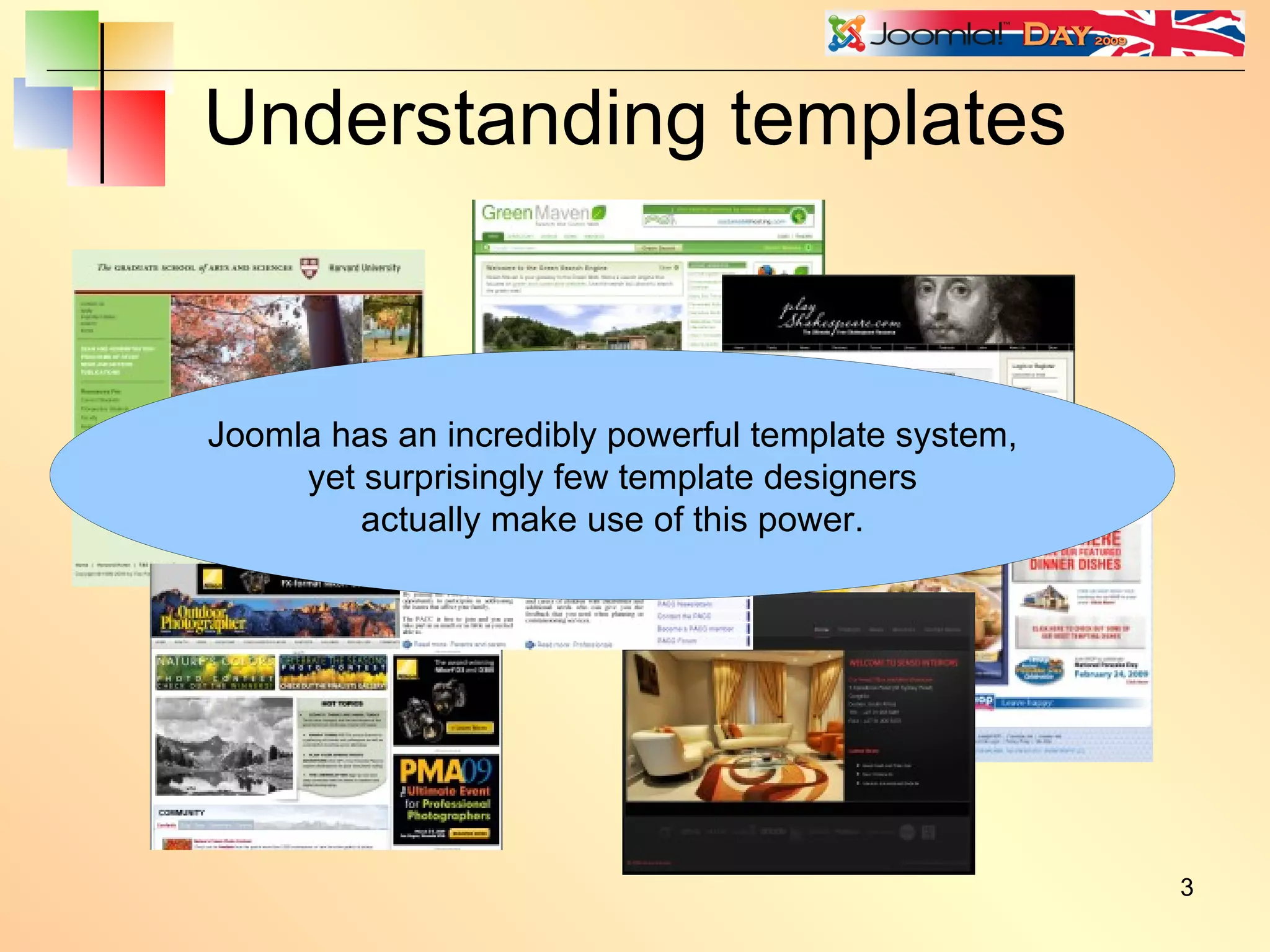
Understanding templates Joomla has an incredibly powerful template system, yet surprisingly few template designers actually make use of this power.
Use a reset script Tip: Always use a browser reset script. eg. Eric Meyer's reset.css http://meyerweb.com/eric/tools/css/reset/ You can be clever and use the Joomla API: $reset = '/templates/' . $this->template . '/css/reset.css'; $this->addStylesheet( $this->baseurl . $reset );
Or use a CSS framework Examples: http://www.blueprintcss.org http://developer.yahoo.com/yui/grids/ http://elements.projectdesigns.org/ http://www.wymstyle.org/en/ http://www.yaml.de/en/ http://code.google.com/p/css-boilerplate/
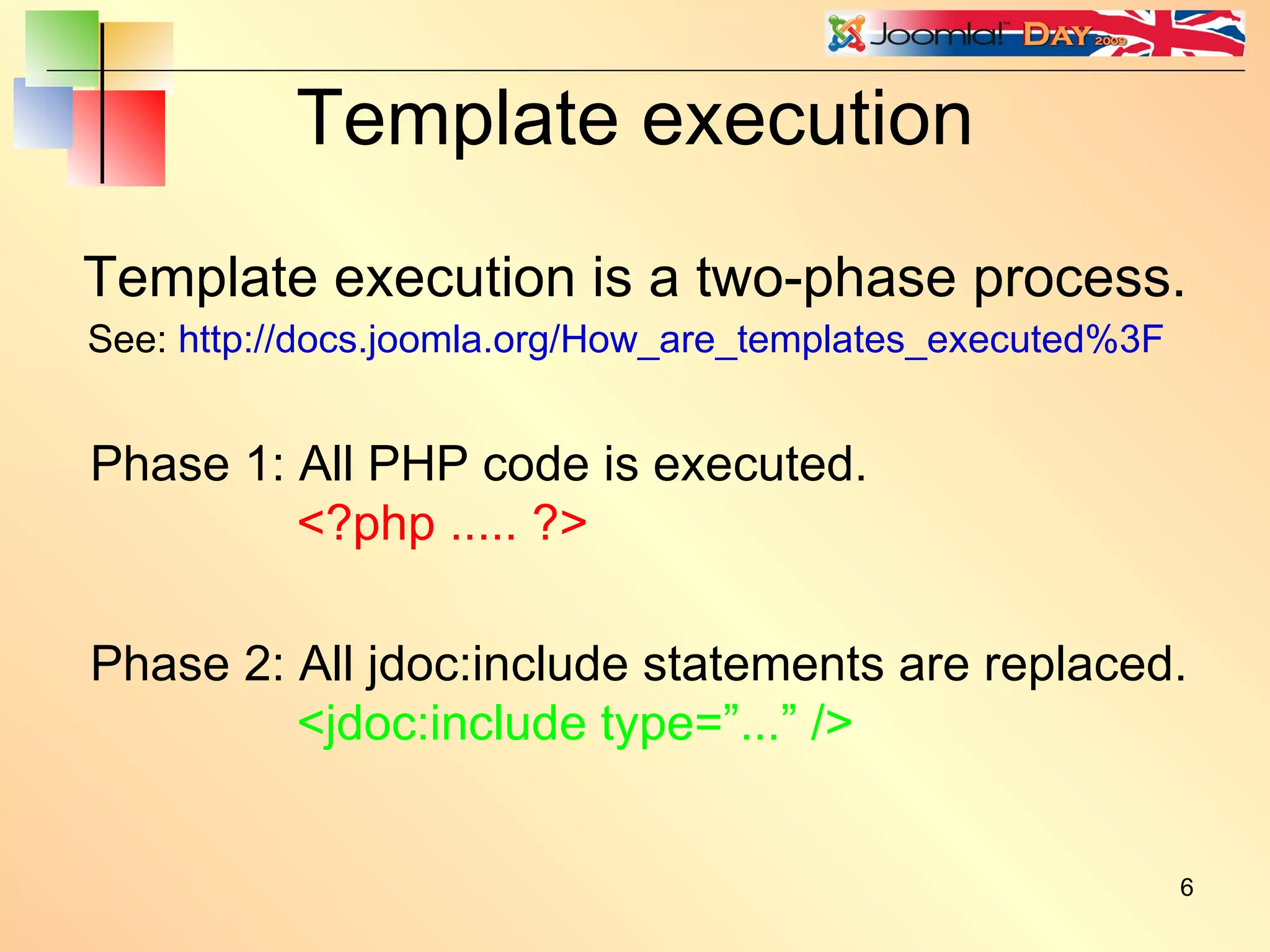
Template execution Template execution is a two-phase process. Phase 1: All PHP code is executed. <?php ..... ?> Phase 2: All jdoc:include statements are replaced. <jdoc:include type=”...” /> See:  http://docs.joomla.org/How_are_templates_executed%3F
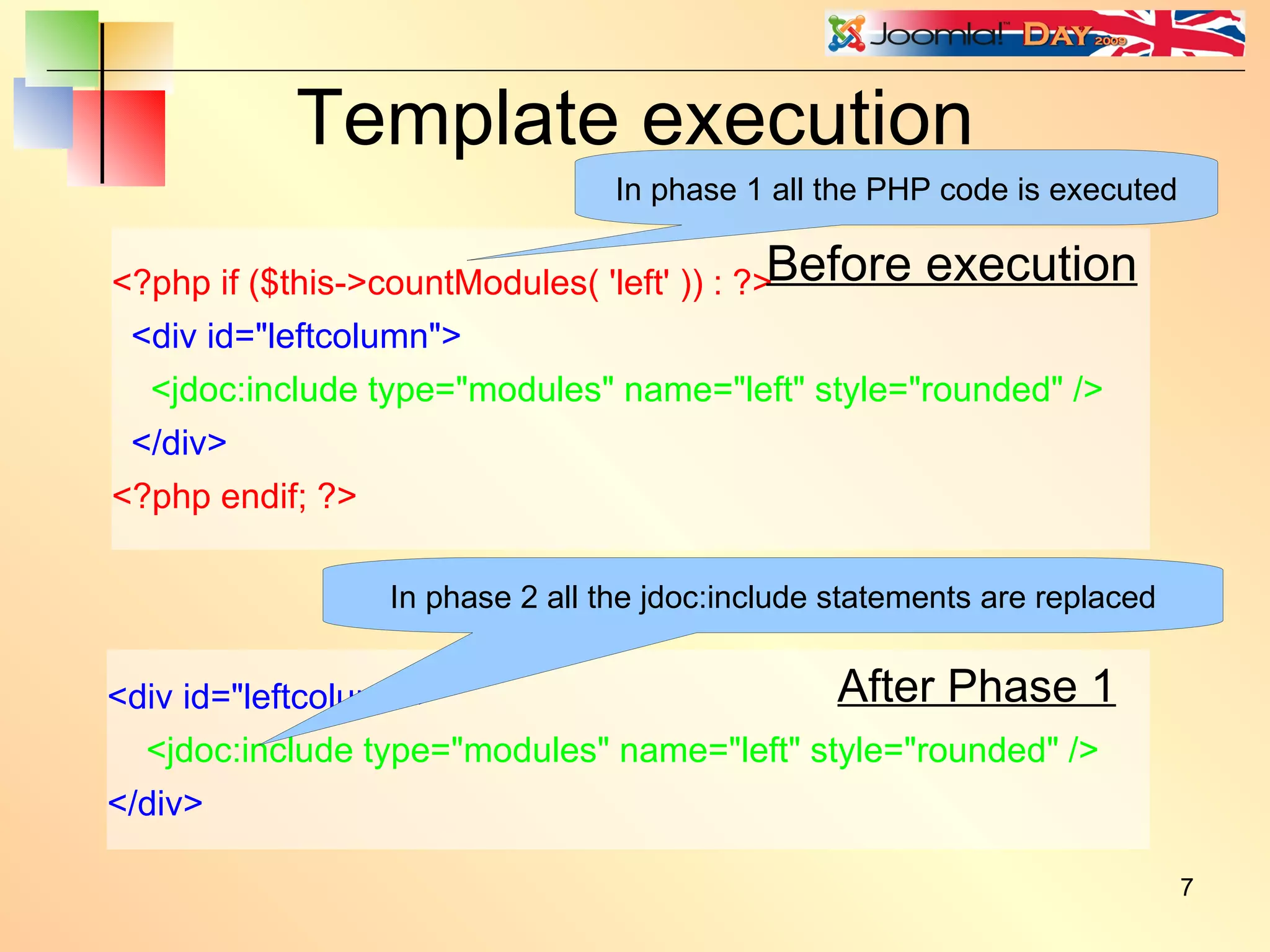
Template execution <?php if ($this->countModules( 'left' )) : ?> <div id=&quot;leftcolumn&quot;> <jdoc:include type=&quot;modules&quot; name=&quot;left&quot; style=&quot;rounded&quot; /> </div> <?php endif; ?> <div id=&quot;leftcolumn&quot;> <jdoc:include type=&quot;modules&quot; name=&quot;left&quot; style=&quot;rounded&quot; /> </div> Before execution After Phase 1 In phase 1 all the PHP code is executed In phase 2 all the jdoc:include statements are replaced
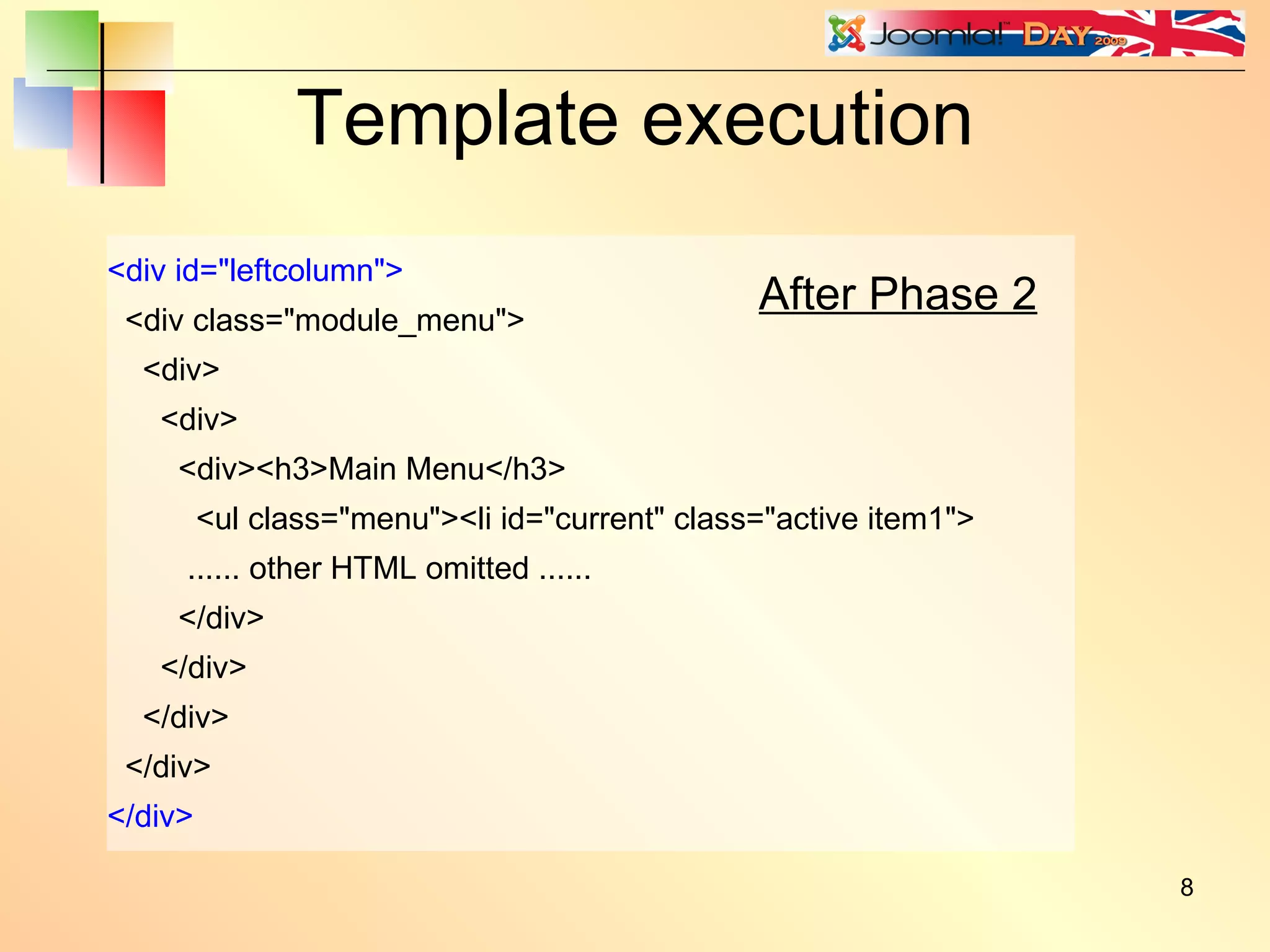
<div id=&quot;leftcolumn&quot;> <div class=&quot;module_menu&quot;> <div> <div> <div><h3>Main Menu</h3> <ul class=&quot;menu&quot;><li id=&quot;current&quot; class=&quot;active item1&quot;> ...... other HTML omitted ...... </div> </div> </div> </div> </div> Template execution After Phase 2
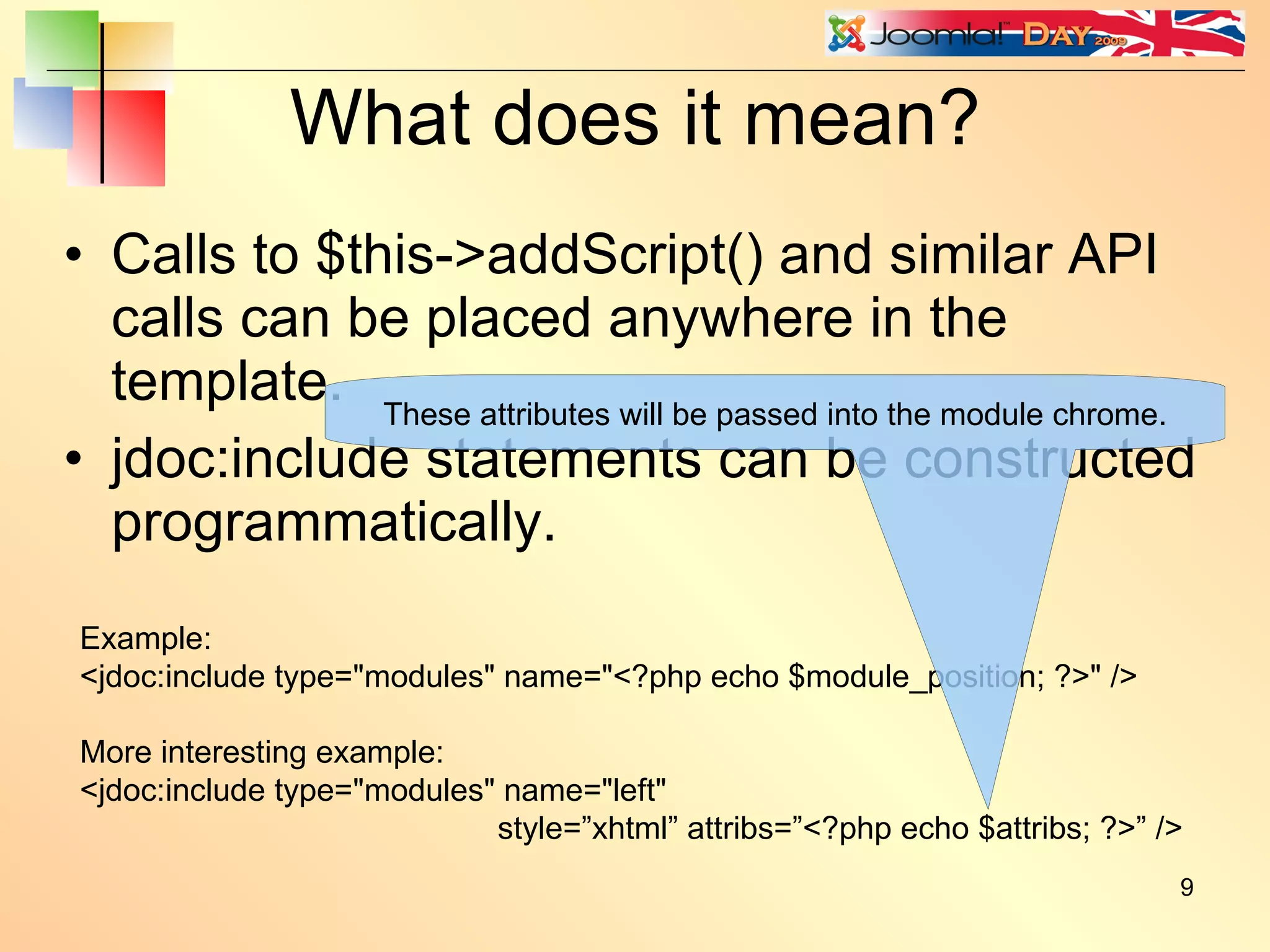
What does it mean? Calls to $this->addScript() and similar API calls can be placed anywhere in the template. jdoc:include statements can be constructed programmatically. Example: <jdoc:include type=&quot;modules&quot; name=&quot;<?php echo $module_position; ?>&quot; /> More interesting example: <jdoc:include type=&quot;modules&quot; name=&quot;left&quot; style=”xhtml” attribs=”<?php echo $attribs; ?>” /> These attributes will be passed into the module chrome.
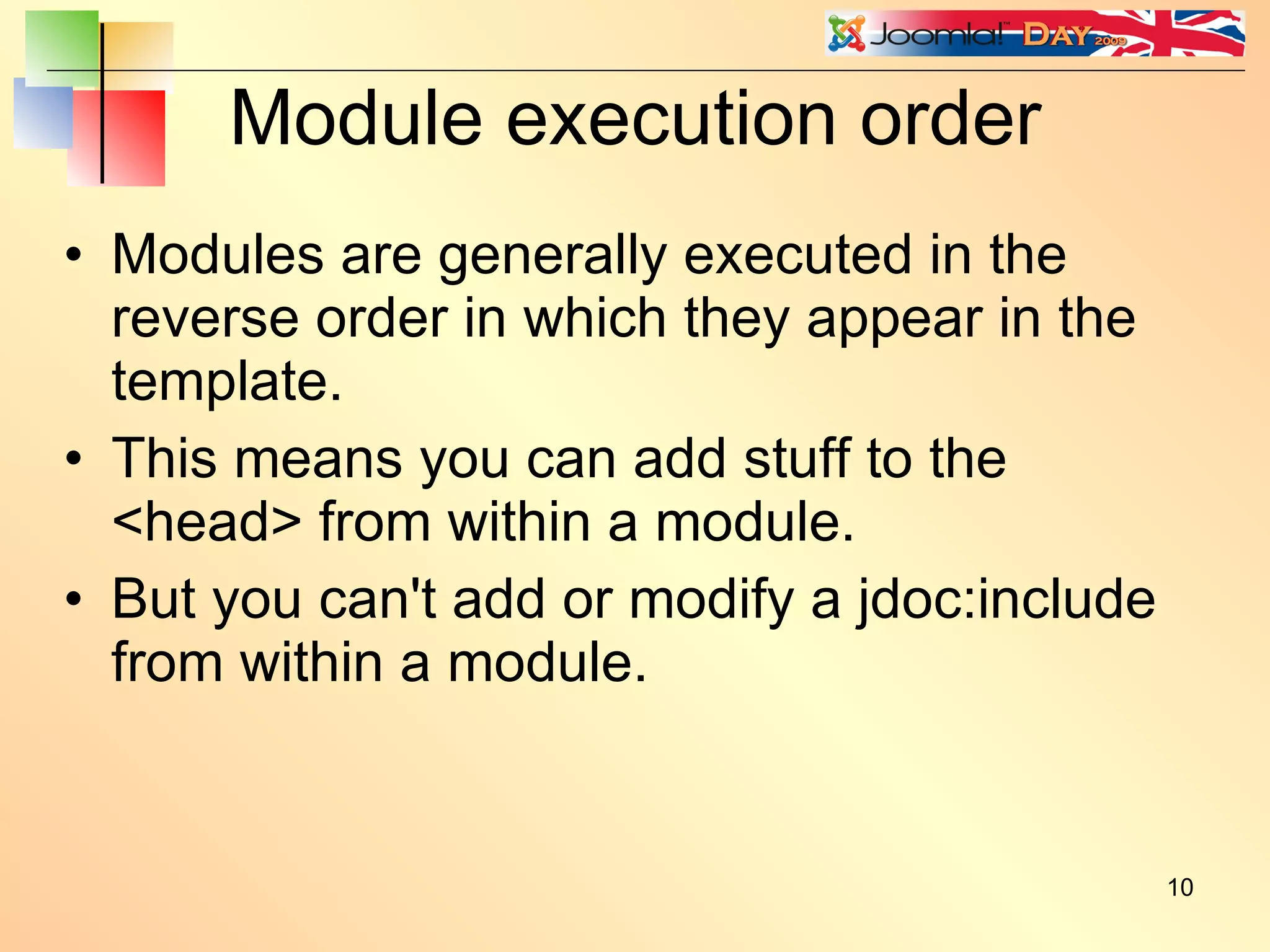
Module execution order Modules are generally executed in the reverse order in which they appear in the template. This means you can add stuff to the <head> from within a module. But you can't add or modify a jdoc:include from within a module.
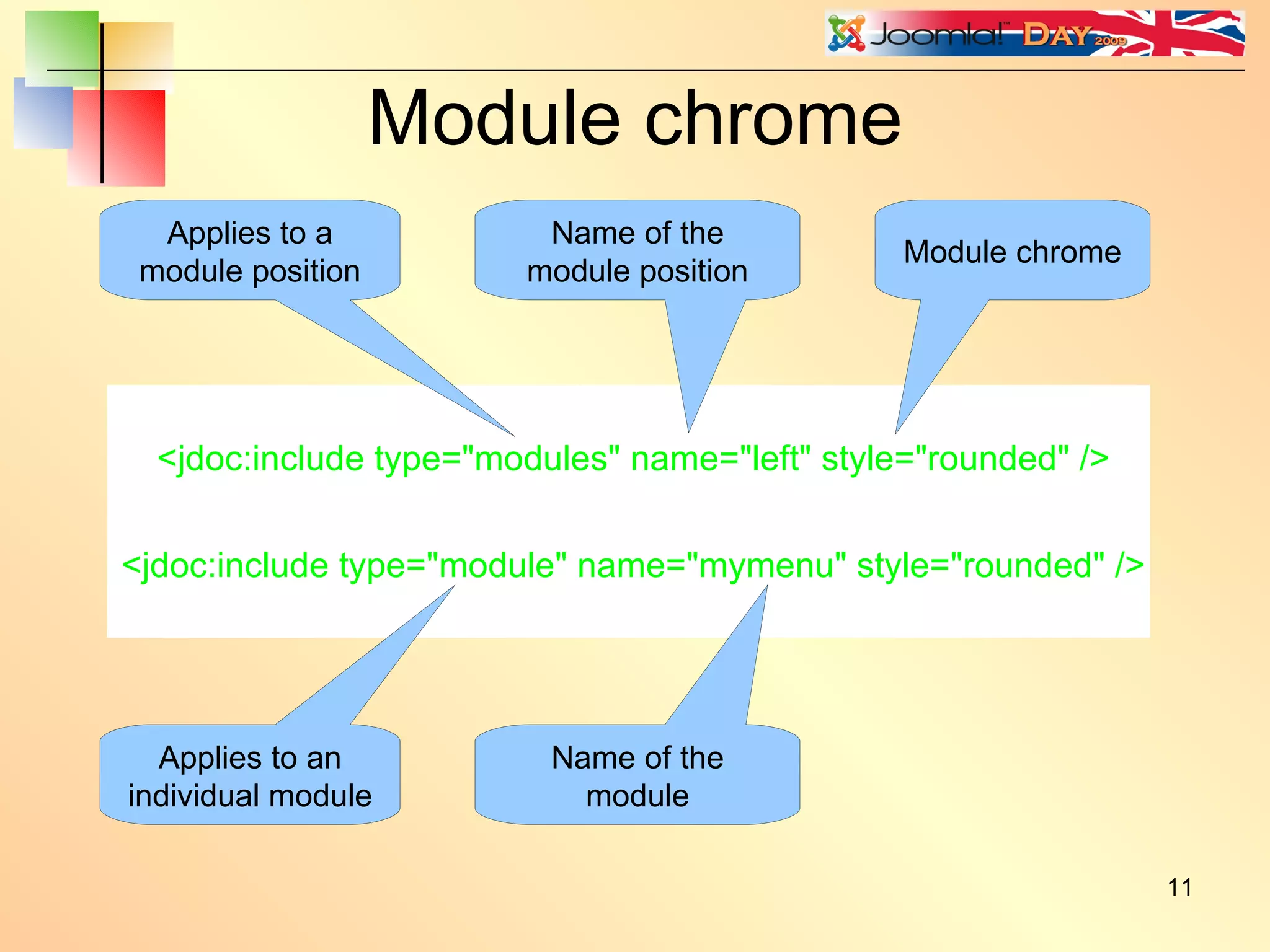
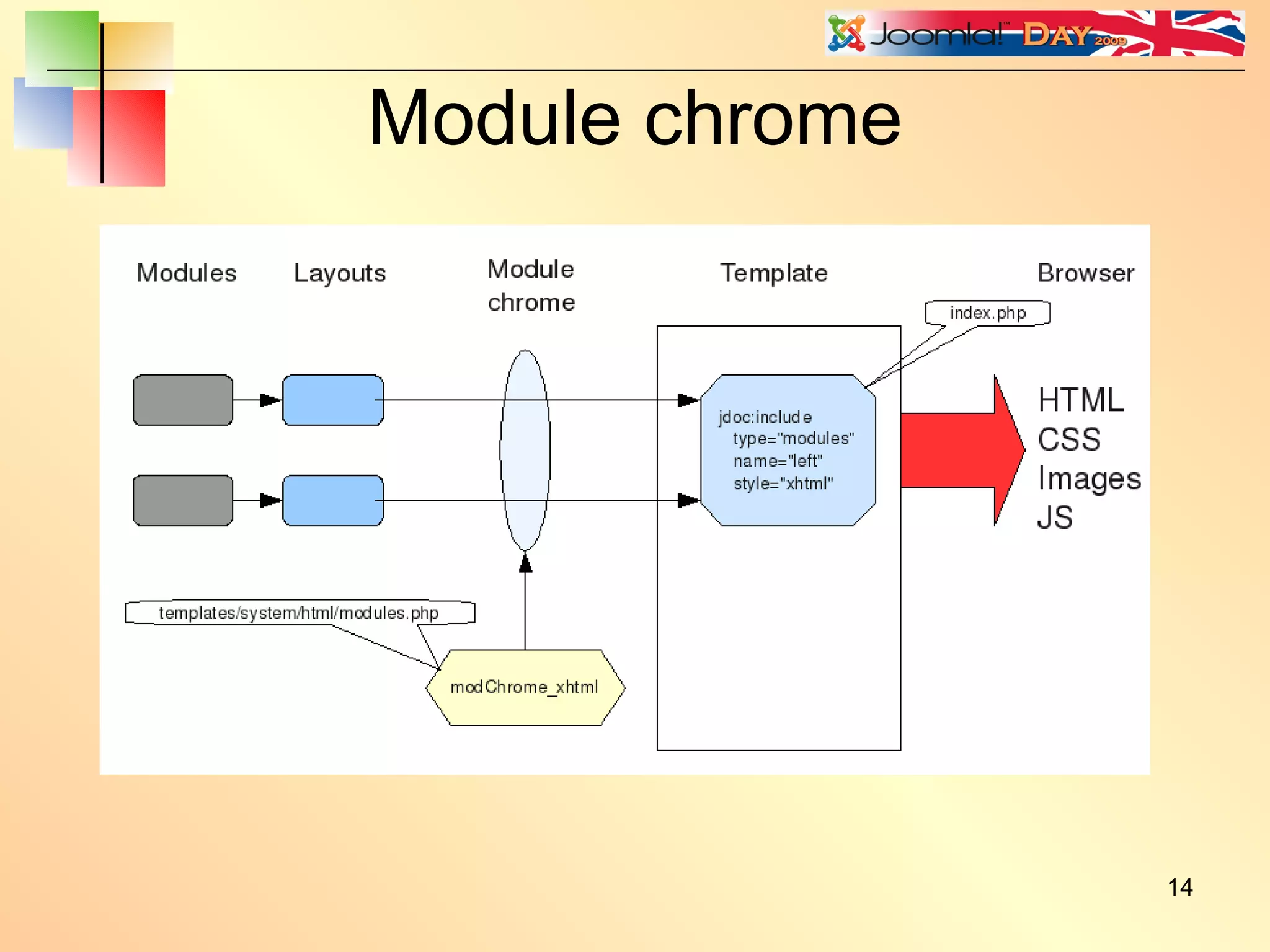
Module chrome <jdoc:include type=&quot;modules&quot; name=&quot;left&quot; style=&quot;rounded&quot; /> <jdoc:include type=&quot;module&quot; name=&quot;mymenu&quot; style=&quot;rounded&quot; /> Applies to a module position Name of the module position Module chrome Applies to an individual module  Name of the module
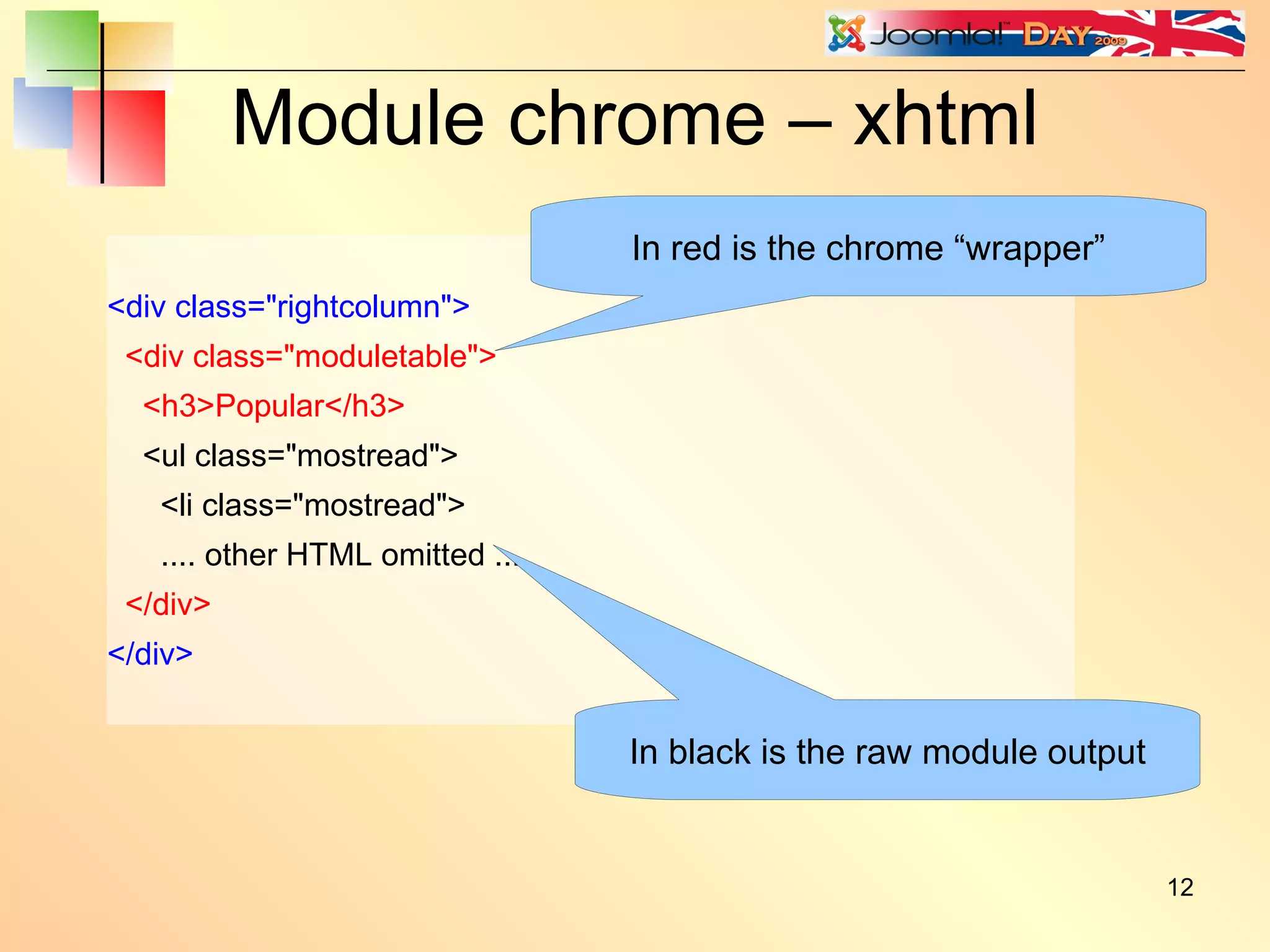
Module chrome – xhtml <div class=&quot;rightcolumn&quot;> <div class=&quot;moduletable&quot;> <h3>Popular</h3> <ul class=&quot;mostread&quot;> <li class=&quot;mostread&quot;> .... other HTML omitted .... </div> </div> In black is the raw module output In red is the chrome “wrapper”
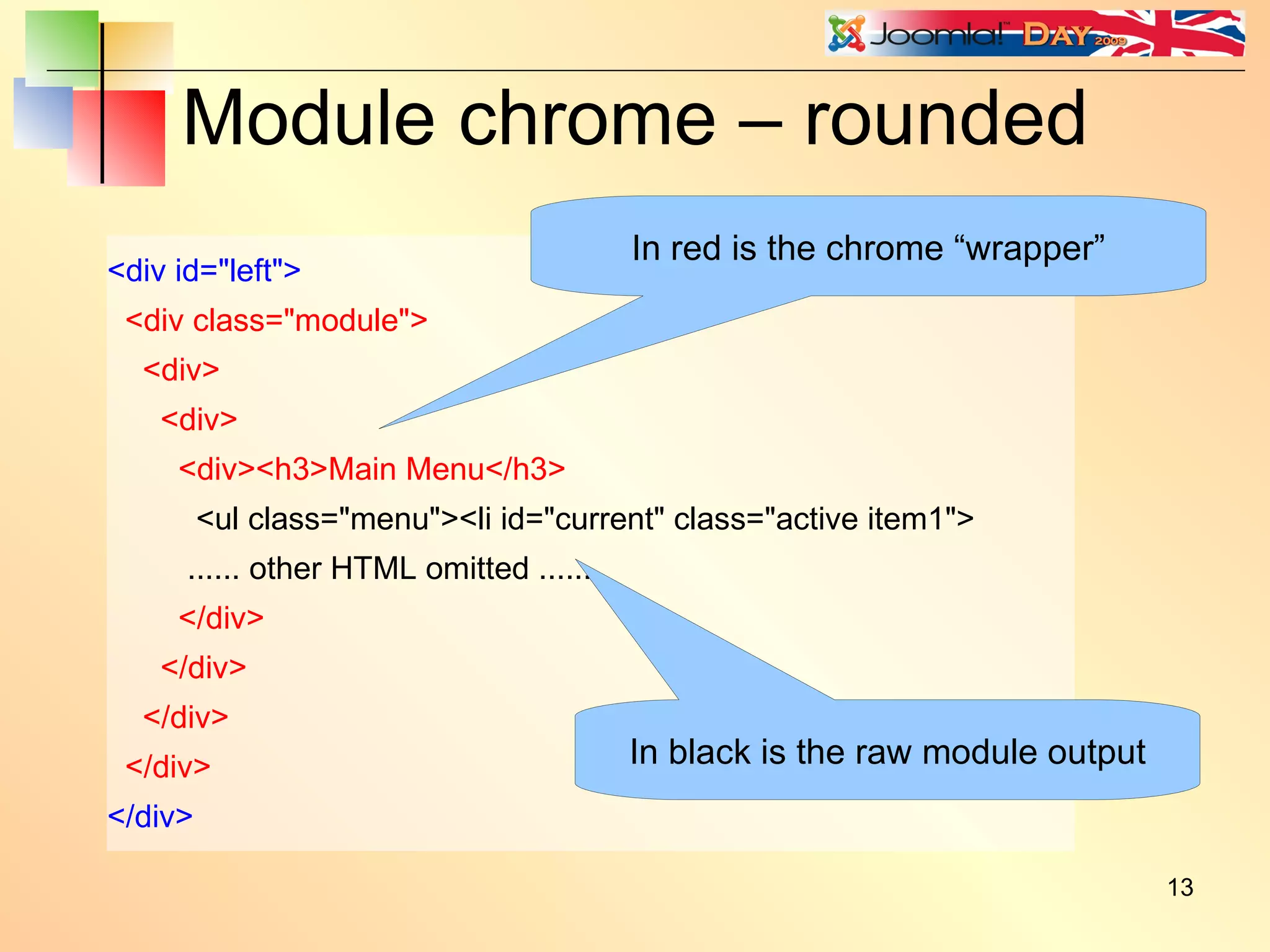
Module chrome – rounded <div id=&quot;left&quot;> <div class=&quot;module&quot;> <div> <div> <div><h3>Main Menu</h3> <ul class=&quot;menu&quot;><li id=&quot;current&quot; class=&quot;active item1&quot;> ...... other HTML omitted ...... </div> </div> </div> </div> </div> In black is the raw module output In red is the chrome “wrapper”
Module chrome
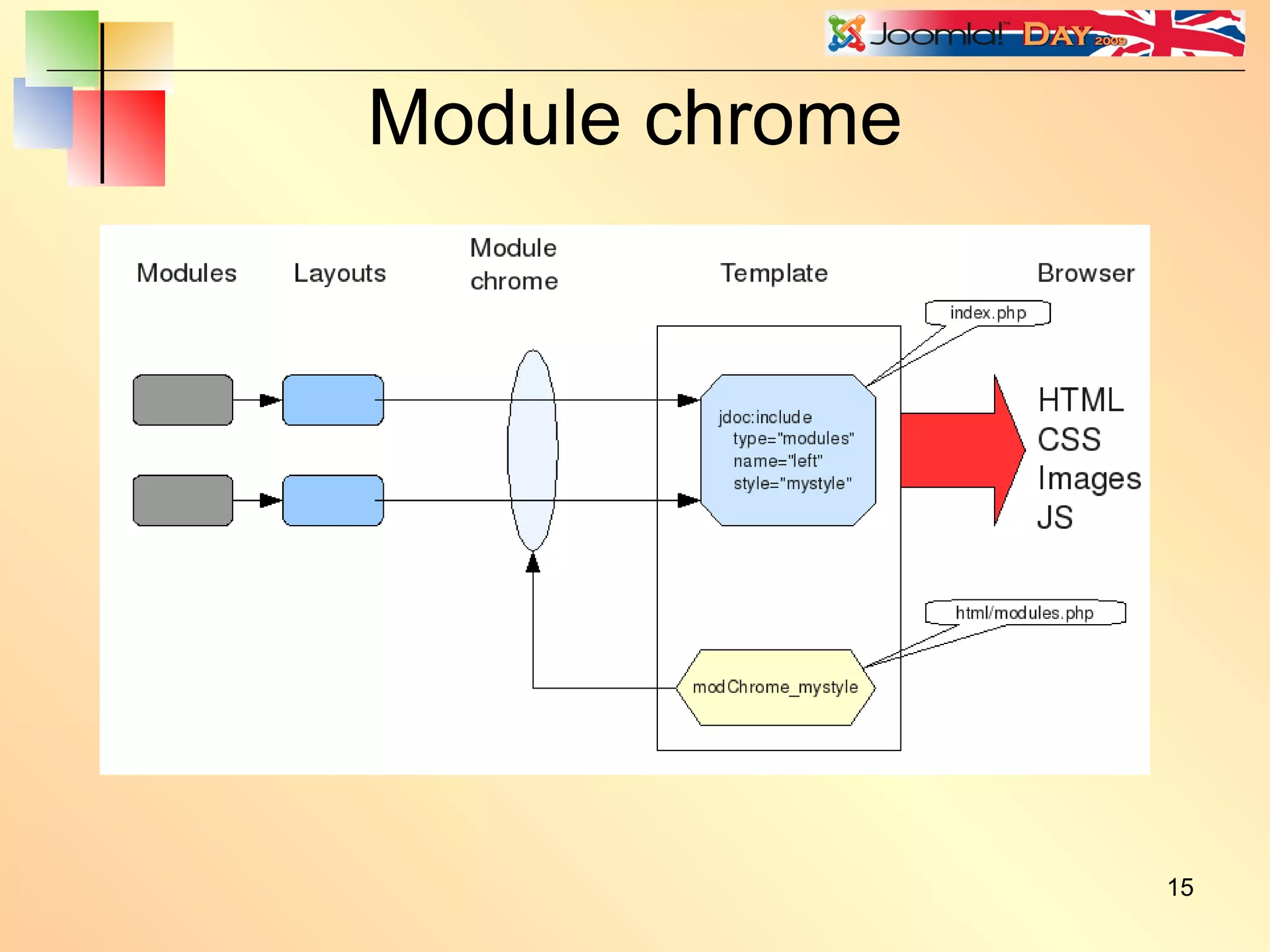
Module chrome
Module chrome / ** * Custom module chrome, echos the whole module in a <div> and the header in <h{x}>. The level of * the header can be configured through a 'headerLevel' attribute of the <jdoc:include /> tag. * Defaults to <h3> if none given */ function modChrome_beezDivision($module, &$params, &$attribs) { $headerLevel = isset($attribs['headerLevel']) ? (int) $attribs['headerLevel'] : 3; if (!empty ($module->content)) : ?> <div class=&quot;moduletable<?php echo $params->get('moduleclass_sfx'); ?>&quot;> <?php if ($module->showtitle) : ?> <h<?php echo $headerLevel; ?>><?php echo $module->title; ?></h<?php echo $headerLevel; ?>> <?php endif; ?> <?php echo $module->content; ?> </div> <?php endif; } Gets header level from headerLevel attribute Applies header level to header tag
Module chrome <jdoc:include type=”modules” name=”left” style=”beezDivision” /> In the Beez template index.php: But try: <jdoc:include type=”modules” name=”left” style=”beezDivision” headerLevel=”2” /> This will give exactly the same output as style=”xhtml” This will wrap the title in <h2> tags instead of <h3> tags. To use this in your template just copy [joomla-root]/templates/beez/html/modules.php to [joomla-root]/template/[your-template]/html/modules.php If you already have a modules.php file, then just copy-paste the modChrome_beezDivision function into it.
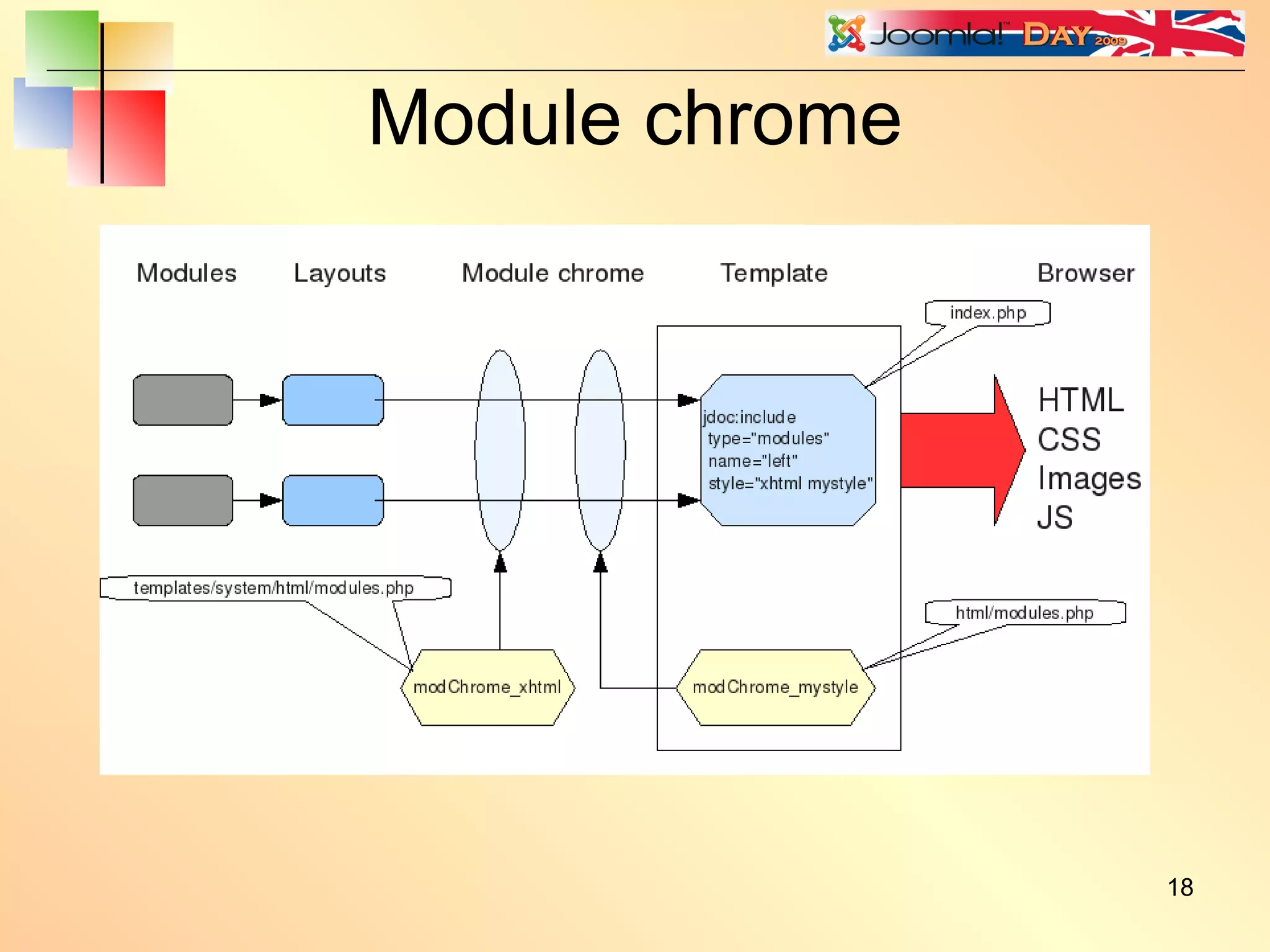
Module chrome
Cascading module chrome function modChrome_sliders( $module, &$params, &$attribs ) { jimport('joomla.html.pane'); if ($attribs['allowAllClose']  == 'false') $attribs['allowAllClose'] = false; if ($attribs['startTransition'] == 'false') $attribs['startTransition'] = false; $sliders = &JPane::getInstance( 'sliders', $attribs ); echo $sliders->startPanel( $module->title, 'module' . $module->id ); echo $module->content; echo $sliders->endPanel(); } <jdoc:include type=&quot;modules&quot; name=&quot;left&quot; style=&quot;sliders rounded&quot; /> Extra module chrome style added here
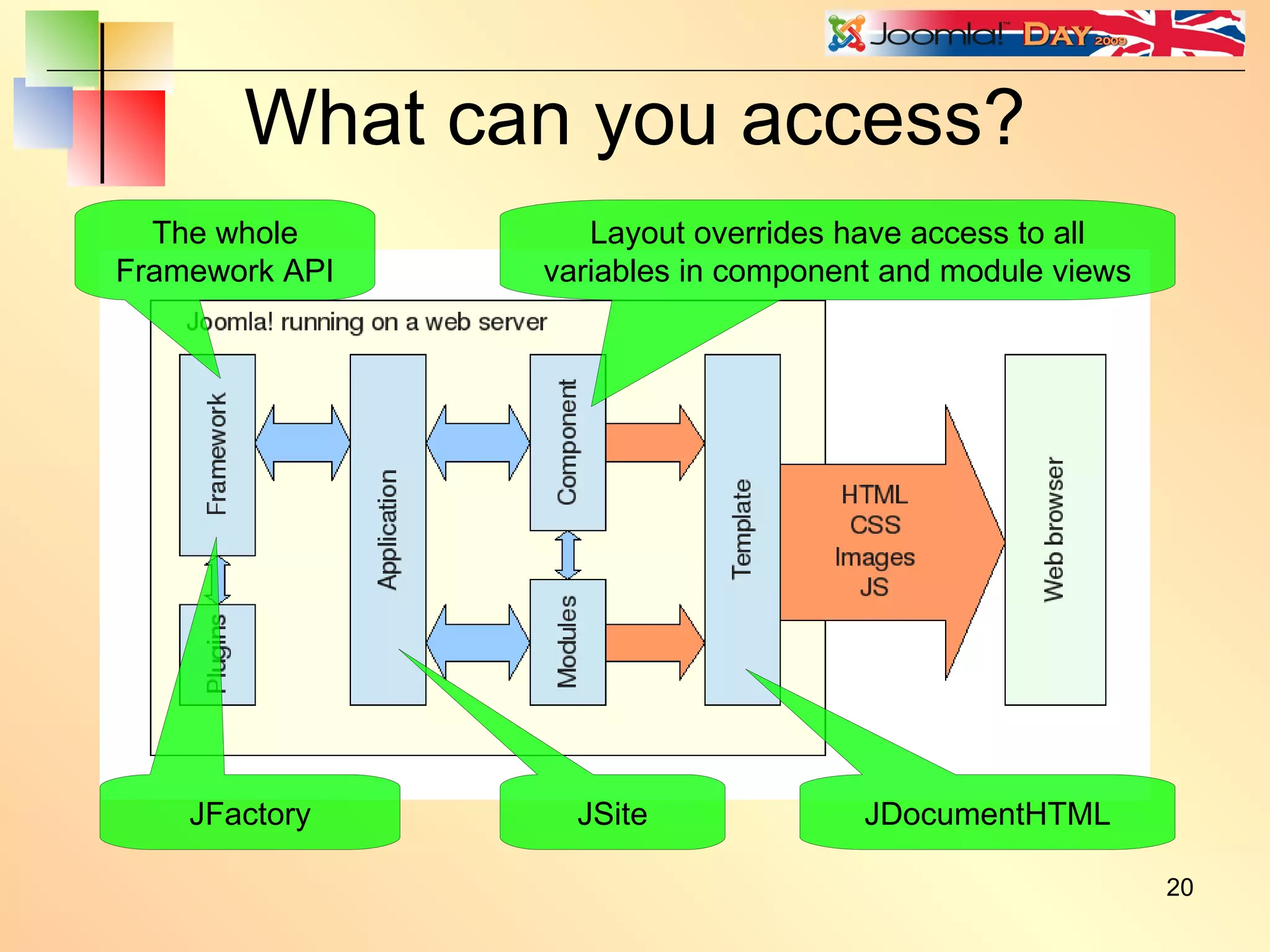
What can you access? JDocumentHTML Layout overrides have access to all variables in component and module views JSite JFactory The whole Framework API
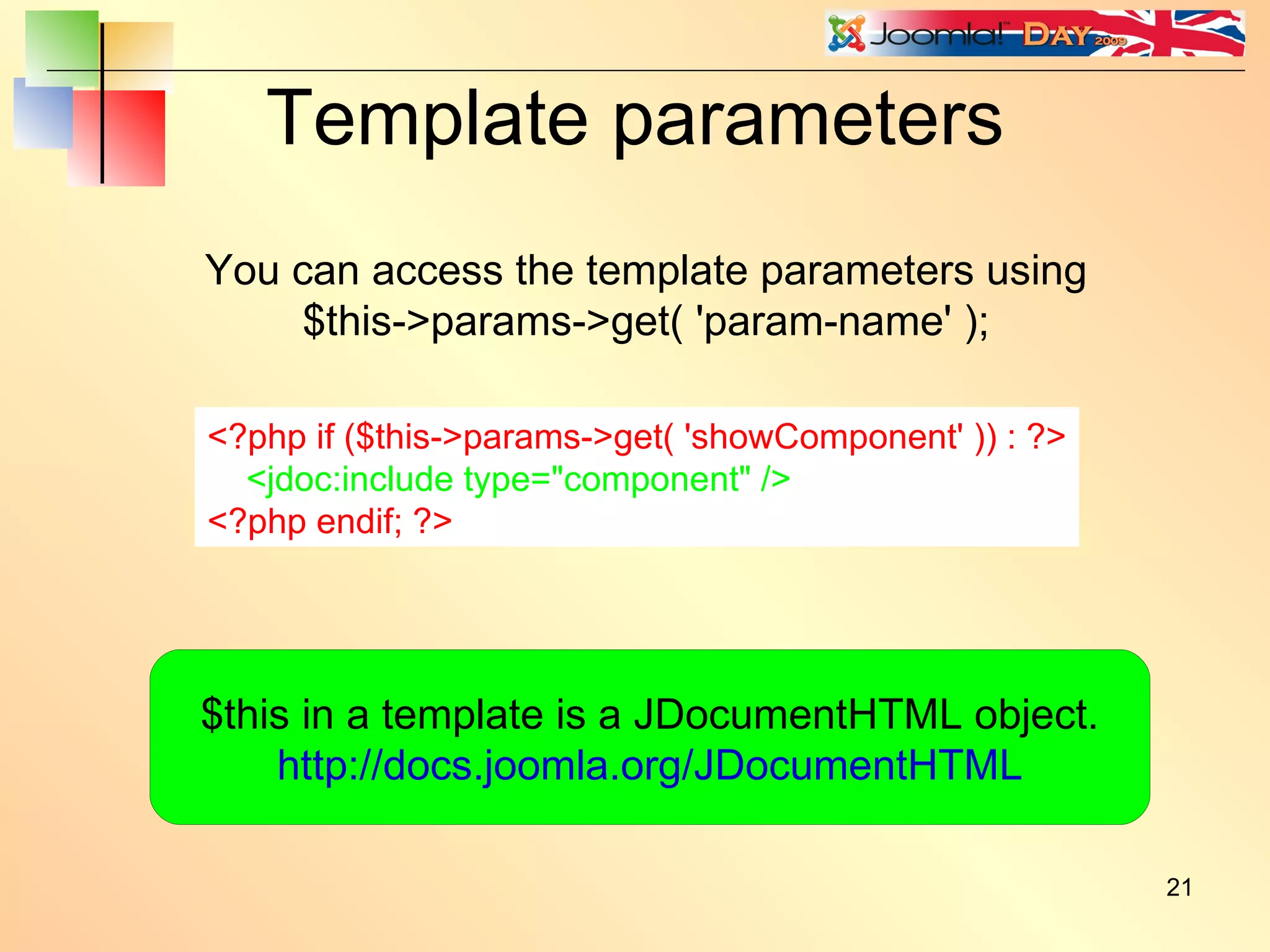
Template parameters <?php if ($this->params->get( 'showComponent' )) : ?> <jdoc:include type=&quot;component&quot; /> <?php endif; ?> You can access the template parameters using $this->params->get( 'param-name' ); $this in a template is a JDocumentHTML object. http://docs.joomla.org/JDocumentHTML
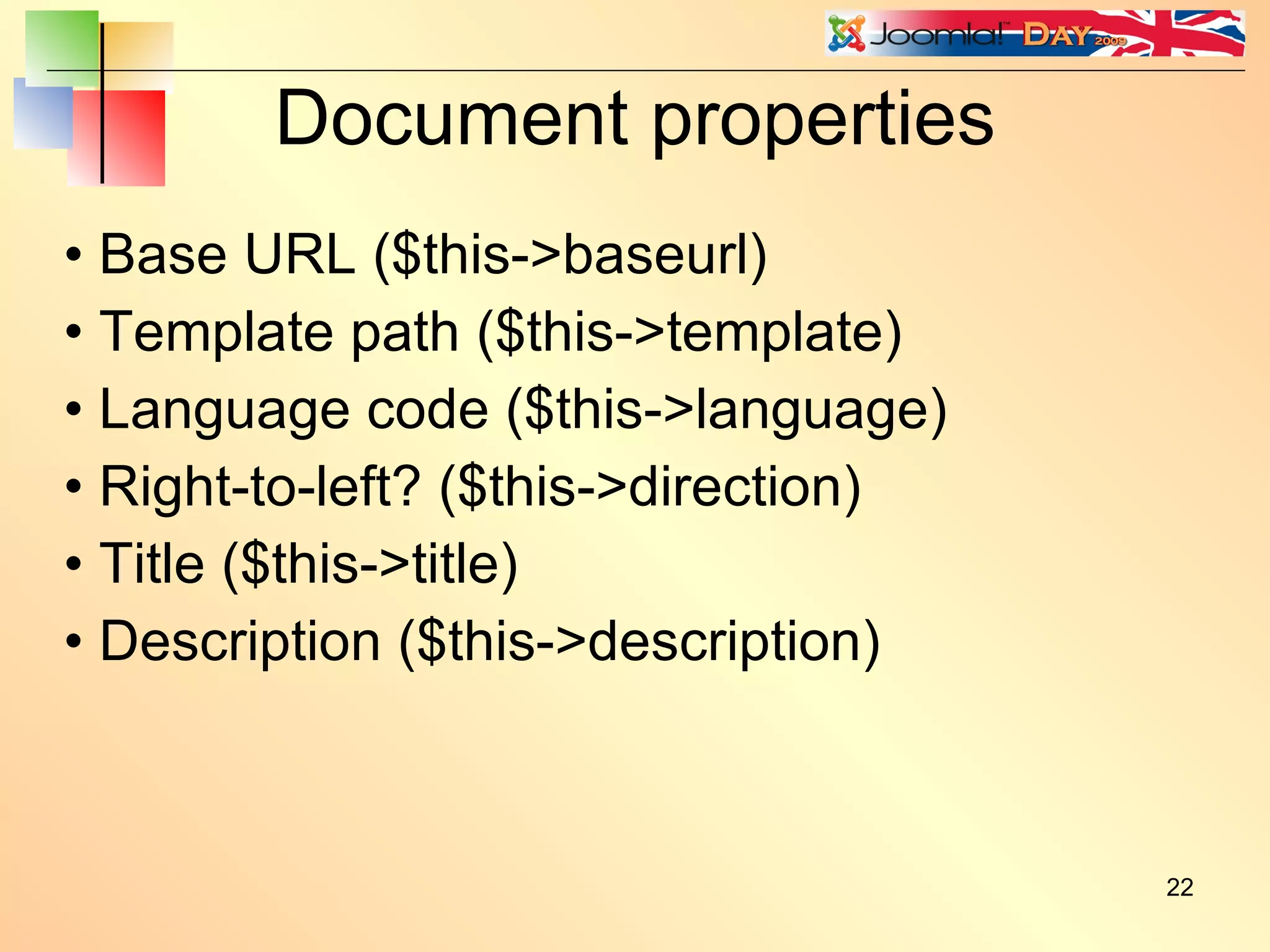
Document properties Base URL ($this->baseurl) Template path ($this->template) Language code ($this->language) Right-to-left? ($this->direction) Title ($this->title) Description ($this->description)
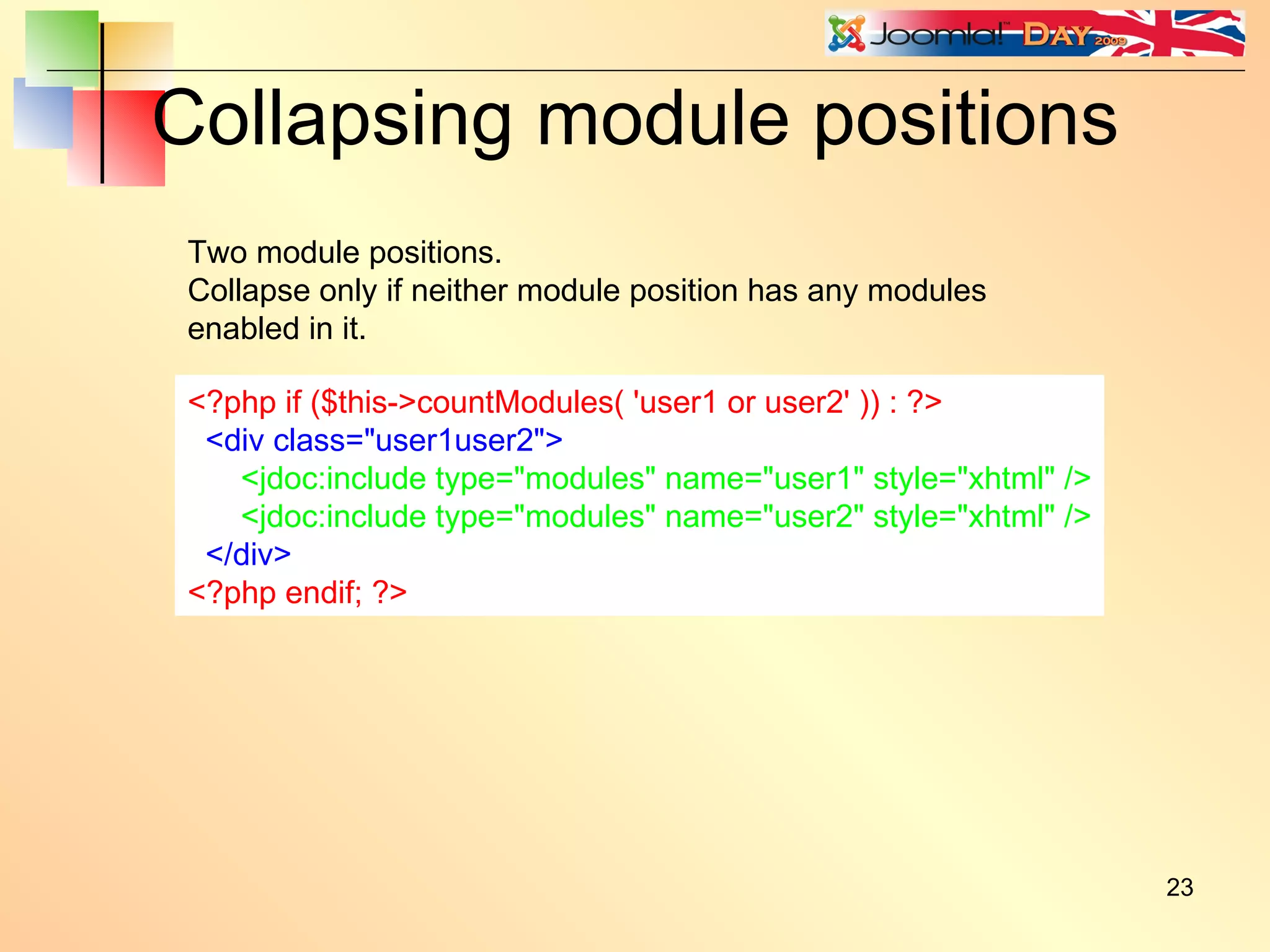
Collapsing module positions <?php if ($this->countModules( 'user1 or user2' )) : ?> <div class=&quot;user1user2&quot;> <jdoc:include type=&quot;modules&quot; name=&quot;user1&quot; style=&quot;xhtml&quot; /> <jdoc:include type=&quot;modules&quot; name=&quot;user2&quot; style=&quot;xhtml&quot; /> </div> <?php endif; ?> Two module positions. Collapse only if neither module position has any modules enabled in it.
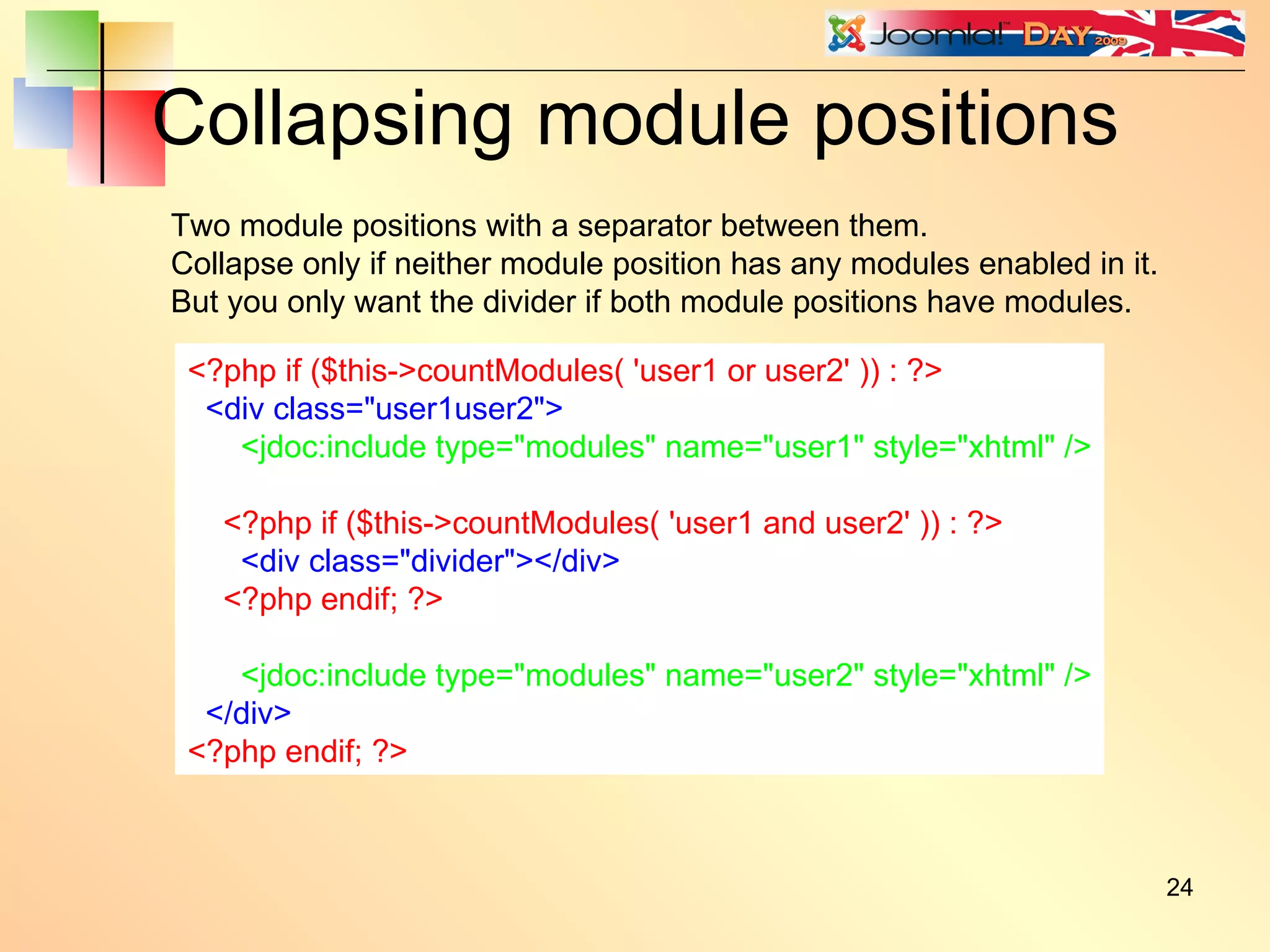
Collapsing module positions <?php if ($this->countModules( 'user1 or user2' )) : ?> <div class=&quot;user1user2&quot;> <jdoc:include type=&quot;modules&quot; name=&quot;user1&quot; style=&quot;xhtml&quot; /> <?php if ($this->countModules( 'user1 and user2' )) : ?> <div class=&quot;divider&quot;></div> <?php endif; ?> <jdoc:include type=&quot;modules&quot; name=&quot;user2&quot; style=&quot;xhtml&quot; /> </div> <?php endif; ?> Two module positions with a separator between them. Collapse only if neither module position has any modules enabled in it. But you only want the divider if both module positions have modules.
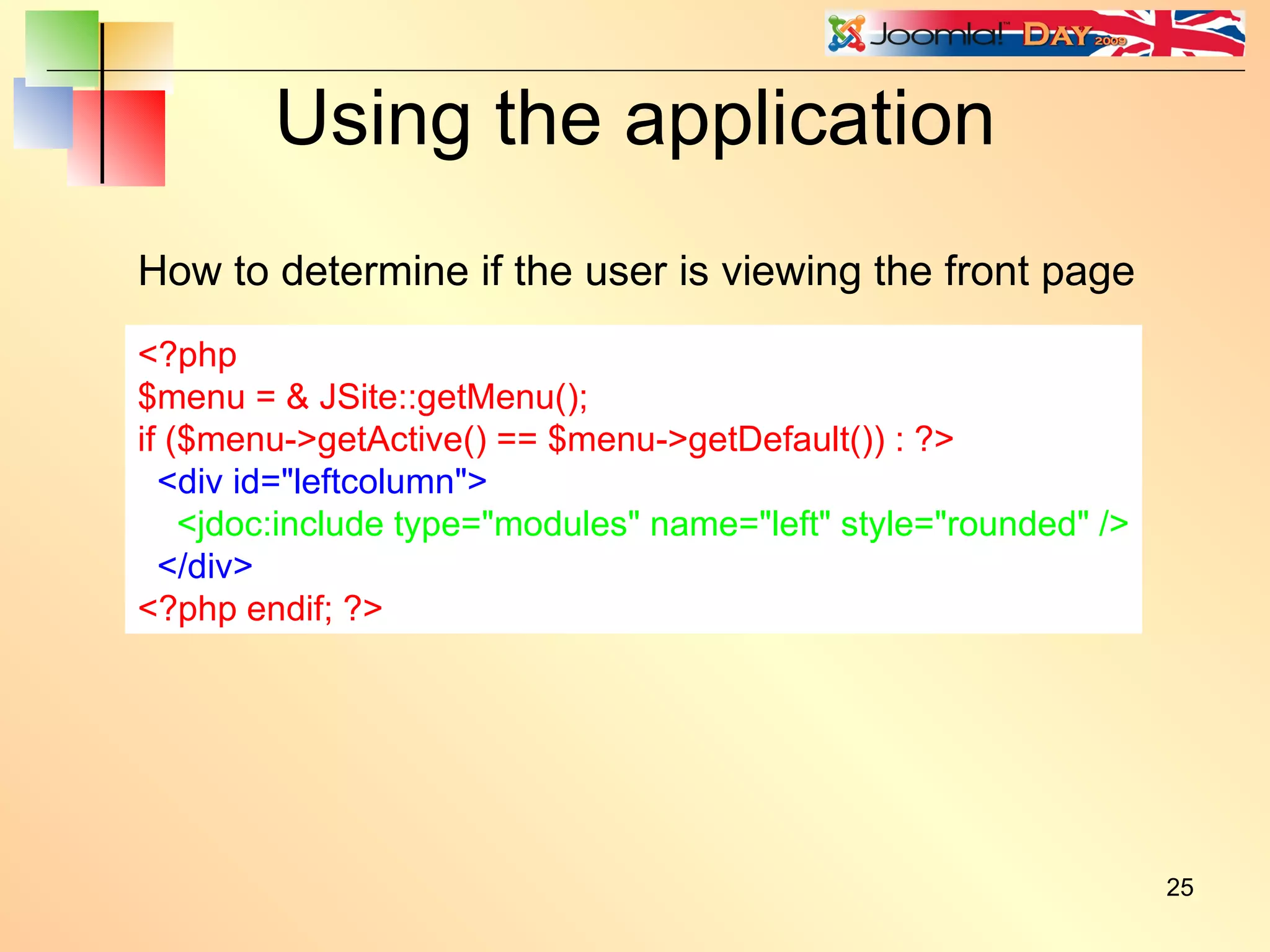
Using the application <?php $menu = & JSite::getMenu(); if ($menu->getActive() == $menu->getDefault()) { echo 'This is the front page'; } ?> How to determine if the user is viewing the front page <?php $menu = & JSite::getMenu(); if ($menu->getActive() == $menu->getDefault()) : ?> <div id=&quot;leftcolumn&quot;> <jdoc:include type=&quot;modules&quot; name=&quot;left&quot; style=&quot;rounded&quot; /> </div> <?php endif; ?>
Sections and categories $id = JRequest::getInt( 'id' ); $db =& JFactory::getDBO(); $query = 'SELECT cat.alias, sec.alias ' . 'FROM #__categories AS cat ' . 'LEFT JOIN #__content AS cont ON cat.id = cont.catid ' . 'LEFT JOIN #__sections AS sec ON sec.id = cont.sectionid ' . 'WHERE cont.id=' . (int)$id; $db->setQuery( $query ); $result = $db->loadRow(); if (is_array( $result )) { $cat = $result[0]; $sec = $result[1]; } <?php if ($sec == 'the-cms') : ?> <div id=&quot;thecms&quot;> <jdoc:include type=&quot;modules&quot; name=&quot;thecms&quot; /> </div> <?php endif; ?>
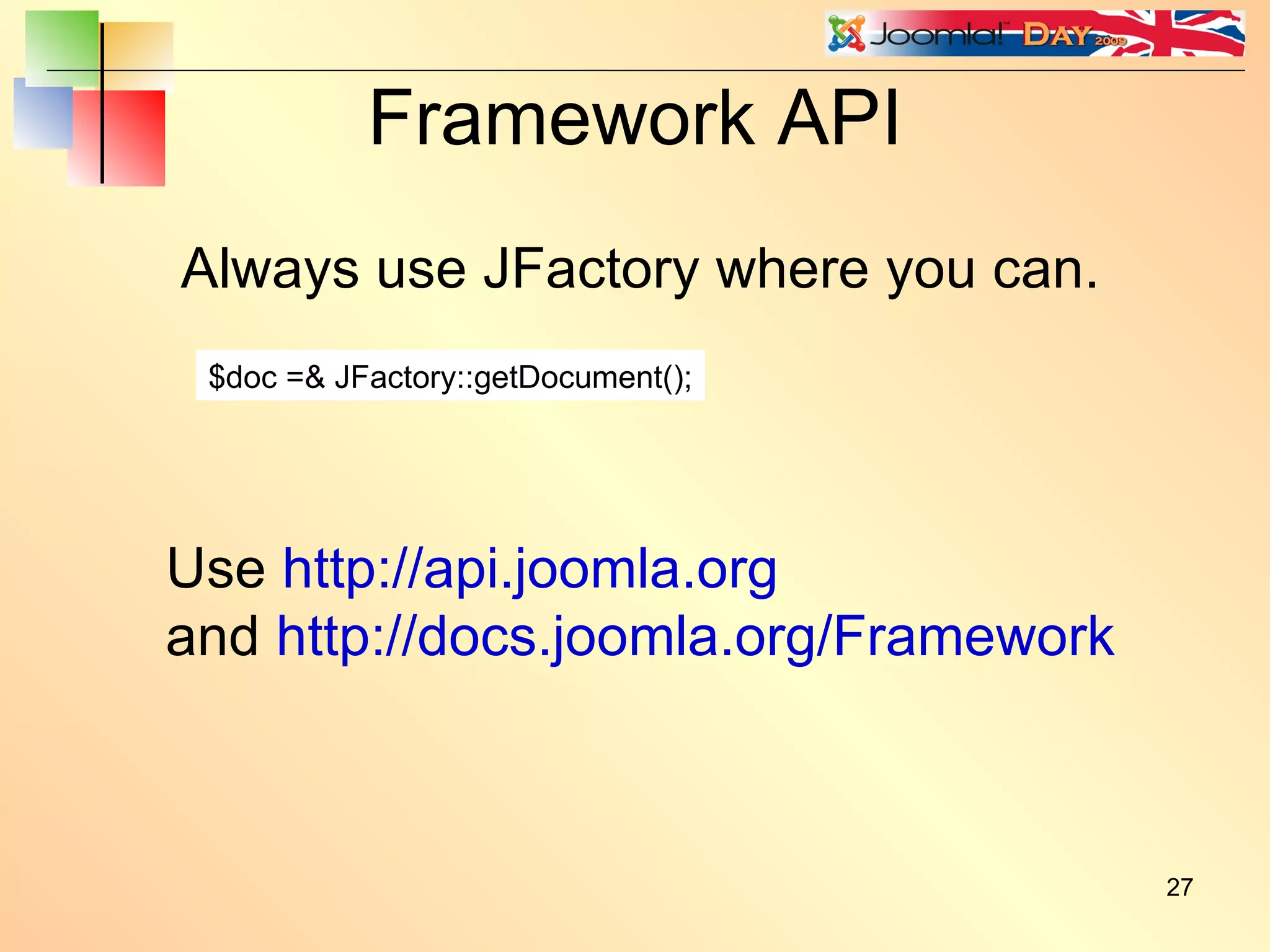
Framework API Always use JFactory where you can. $doc =& JFactory::getDocument(); Use  http://api.joomla.org and  http://docs.joomla.org/Framework
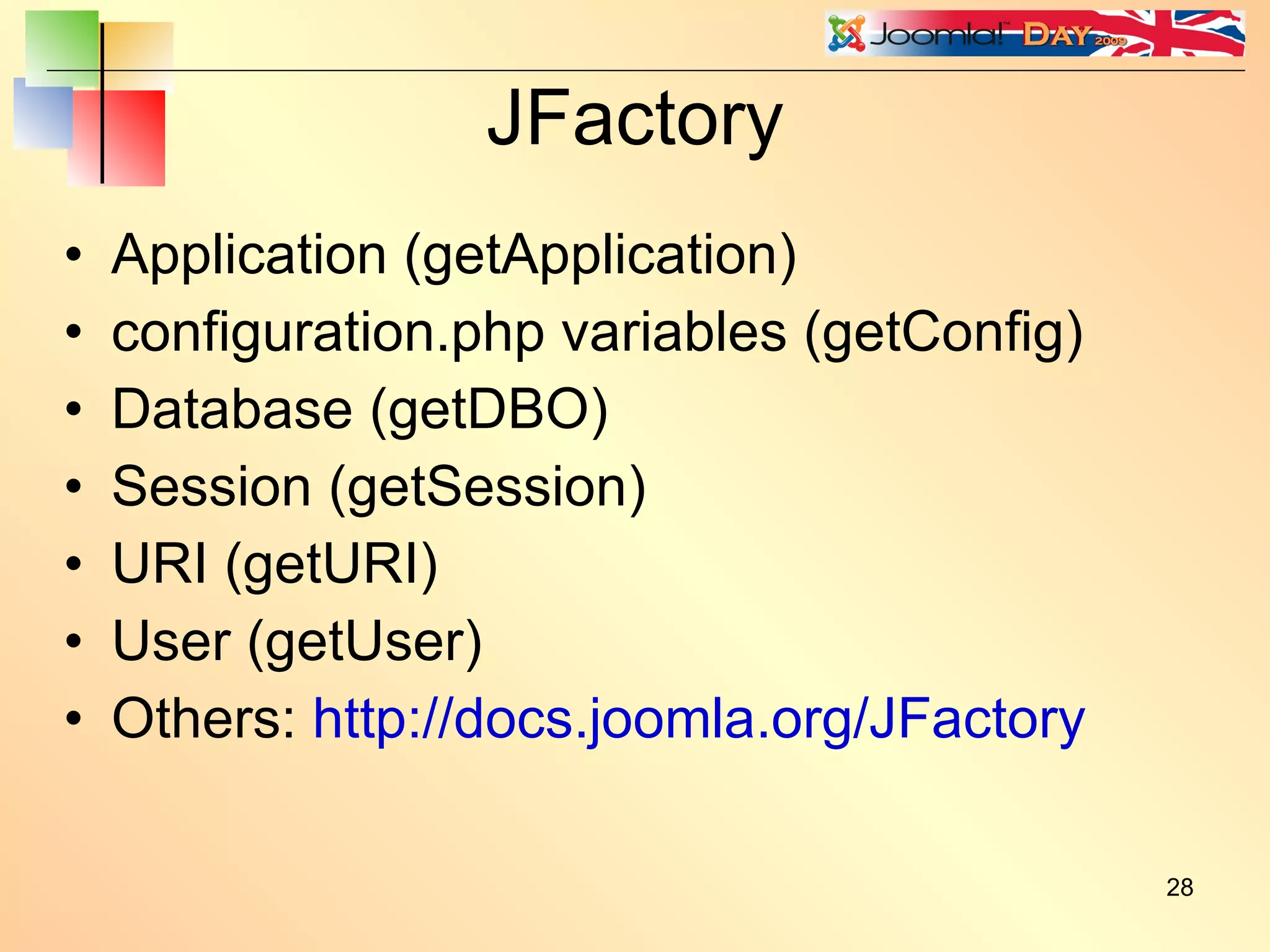
JFactory Application (getApplication) configuration.php variables (getConfig) Database (getDBO) Session (getSession) URI (getURI) User (getUser) Others:  http://docs.joomla.org/JFactory
Other useful API classes JBrowser JError JRequest JRoute JText JArrayHelper JDate JPane
Joomla template design Questions?
Copyright and Licence Copyright © 2009 Chris Davenport This presentation is available for use under the Joomla! Electronic Documentation License http://docs.joomla.org/JEDL

Joomla Day UK 2009 Template Design Presentation

  • 1.
  • 2.
    Joomla! Day UK2009 Template Design Providing a flexible platform for digital publishing and collaboration. Chris Davenport Joomla! Core Team
  • 3.
    Understanding templates Joomlahas an incredibly powerful template system, yet surprisingly few template designers actually make use of this power.
  • 4.
    Use a resetscript Tip: Always use a browser reset script. eg. Eric Meyer's reset.css http://meyerweb.com/eric/tools/css/reset/ You can be clever and use the Joomla API: $reset = '/templates/' . $this->template . '/css/reset.css'; $this->addStylesheet( $this->baseurl . $reset );
  • 5.
    Or use aCSS framework Examples: http://www.blueprintcss.org http://developer.yahoo.com/yui/grids/ http://elements.projectdesigns.org/ http://www.wymstyle.org/en/ http://www.yaml.de/en/ http://code.google.com/p/css-boilerplate/
  • 6.
    Template execution Templateexecution is a two-phase process. Phase 1: All PHP code is executed. <?php ..... ?> Phase 2: All jdoc:include statements are replaced. <jdoc:include type=”...” /> See: http://docs.joomla.org/How_are_templates_executed%3F
  • 7.
    Template execution <?phpif ($this->countModules( 'left' )) : ?> <div id=&quot;leftcolumn&quot;> <jdoc:include type=&quot;modules&quot; name=&quot;left&quot; style=&quot;rounded&quot; /> </div> <?php endif; ?> <div id=&quot;leftcolumn&quot;> <jdoc:include type=&quot;modules&quot; name=&quot;left&quot; style=&quot;rounded&quot; /> </div> Before execution After Phase 1 In phase 1 all the PHP code is executed In phase 2 all the jdoc:include statements are replaced
  • 8.
    <div id=&quot;leftcolumn&quot;> <divclass=&quot;module_menu&quot;> <div> <div> <div><h3>Main Menu</h3> <ul class=&quot;menu&quot;><li id=&quot;current&quot; class=&quot;active item1&quot;> ...... other HTML omitted ...... </div> </div> </div> </div> </div> Template execution After Phase 2
  • 9.
    What does itmean? Calls to $this->addScript() and similar API calls can be placed anywhere in the template. jdoc:include statements can be constructed programmatically. Example: <jdoc:include type=&quot;modules&quot; name=&quot;<?php echo $module_position; ?>&quot; /> More interesting example: <jdoc:include type=&quot;modules&quot; name=&quot;left&quot; style=”xhtml” attribs=”<?php echo $attribs; ?>” /> These attributes will be passed into the module chrome.
  • 10.
    Module execution orderModules are generally executed in the reverse order in which they appear in the template. This means you can add stuff to the <head> from within a module. But you can't add or modify a jdoc:include from within a module.
  • 11.
    Module chrome <jdoc:includetype=&quot;modules&quot; name=&quot;left&quot; style=&quot;rounded&quot; /> <jdoc:include type=&quot;module&quot; name=&quot;mymenu&quot; style=&quot;rounded&quot; /> Applies to a module position Name of the module position Module chrome Applies to an individual module Name of the module
  • 12.
    Module chrome –xhtml <div class=&quot;rightcolumn&quot;> <div class=&quot;moduletable&quot;> <h3>Popular</h3> <ul class=&quot;mostread&quot;> <li class=&quot;mostread&quot;> .... other HTML omitted .... </div> </div> In black is the raw module output In red is the chrome “wrapper”
  • 13.
    Module chrome –rounded <div id=&quot;left&quot;> <div class=&quot;module&quot;> <div> <div> <div><h3>Main Menu</h3> <ul class=&quot;menu&quot;><li id=&quot;current&quot; class=&quot;active item1&quot;> ...... other HTML omitted ...... </div> </div> </div> </div> </div> In black is the raw module output In red is the chrome “wrapper”
  • 14.
  • 15.
  • 16.
    Module chrome /** * Custom module chrome, echos the whole module in a <div> and the header in <h{x}>. The level of * the header can be configured through a 'headerLevel' attribute of the <jdoc:include /> tag. * Defaults to <h3> if none given */ function modChrome_beezDivision($module, &$params, &$attribs) { $headerLevel = isset($attribs['headerLevel']) ? (int) $attribs['headerLevel'] : 3; if (!empty ($module->content)) : ?> <div class=&quot;moduletable<?php echo $params->get('moduleclass_sfx'); ?>&quot;> <?php if ($module->showtitle) : ?> <h<?php echo $headerLevel; ?>><?php echo $module->title; ?></h<?php echo $headerLevel; ?>> <?php endif; ?> <?php echo $module->content; ?> </div> <?php endif; } Gets header level from headerLevel attribute Applies header level to header tag
  • 17.
    Module chrome <jdoc:includetype=”modules” name=”left” style=”beezDivision” /> In the Beez template index.php: But try: <jdoc:include type=”modules” name=”left” style=”beezDivision” headerLevel=”2” /> This will give exactly the same output as style=”xhtml” This will wrap the title in <h2> tags instead of <h3> tags. To use this in your template just copy [joomla-root]/templates/beez/html/modules.php to [joomla-root]/template/[your-template]/html/modules.php If you already have a modules.php file, then just copy-paste the modChrome_beezDivision function into it.
  • 18.
  • 19.
    Cascading module chromefunction modChrome_sliders( $module, &$params, &$attribs ) { jimport('joomla.html.pane'); if ($attribs['allowAllClose'] == 'false') $attribs['allowAllClose'] = false; if ($attribs['startTransition'] == 'false') $attribs['startTransition'] = false; $sliders = &JPane::getInstance( 'sliders', $attribs ); echo $sliders->startPanel( $module->title, 'module' . $module->id ); echo $module->content; echo $sliders->endPanel(); } <jdoc:include type=&quot;modules&quot; name=&quot;left&quot; style=&quot;sliders rounded&quot; /> Extra module chrome style added here
  • 20.
    What can youaccess? JDocumentHTML Layout overrides have access to all variables in component and module views JSite JFactory The whole Framework API
  • 21.
    Template parameters <?phpif ($this->params->get( 'showComponent' )) : ?> <jdoc:include type=&quot;component&quot; /> <?php endif; ?> You can access the template parameters using $this->params->get( 'param-name' ); $this in a template is a JDocumentHTML object. http://docs.joomla.org/JDocumentHTML
  • 22.
    Document properties BaseURL ($this->baseurl) Template path ($this->template) Language code ($this->language) Right-to-left? ($this->direction) Title ($this->title) Description ($this->description)
  • 23.
    Collapsing module positions<?php if ($this->countModules( 'user1 or user2' )) : ?> <div class=&quot;user1user2&quot;> <jdoc:include type=&quot;modules&quot; name=&quot;user1&quot; style=&quot;xhtml&quot; /> <jdoc:include type=&quot;modules&quot; name=&quot;user2&quot; style=&quot;xhtml&quot; /> </div> <?php endif; ?> Two module positions. Collapse only if neither module position has any modules enabled in it.
  • 24.
    Collapsing module positions<?php if ($this->countModules( 'user1 or user2' )) : ?> <div class=&quot;user1user2&quot;> <jdoc:include type=&quot;modules&quot; name=&quot;user1&quot; style=&quot;xhtml&quot; /> <?php if ($this->countModules( 'user1 and user2' )) : ?> <div class=&quot;divider&quot;></div> <?php endif; ?> <jdoc:include type=&quot;modules&quot; name=&quot;user2&quot; style=&quot;xhtml&quot; /> </div> <?php endif; ?> Two module positions with a separator between them. Collapse only if neither module position has any modules enabled in it. But you only want the divider if both module positions have modules.
  • 25.
    Using the application<?php $menu = & JSite::getMenu(); if ($menu->getActive() == $menu->getDefault()) { echo 'This is the front page'; } ?> How to determine if the user is viewing the front page <?php $menu = & JSite::getMenu(); if ($menu->getActive() == $menu->getDefault()) : ?> <div id=&quot;leftcolumn&quot;> <jdoc:include type=&quot;modules&quot; name=&quot;left&quot; style=&quot;rounded&quot; /> </div> <?php endif; ?>
  • 26.
    Sections and categories$id = JRequest::getInt( 'id' ); $db =& JFactory::getDBO(); $query = 'SELECT cat.alias, sec.alias ' . 'FROM #__categories AS cat ' . 'LEFT JOIN #__content AS cont ON cat.id = cont.catid ' . 'LEFT JOIN #__sections AS sec ON sec.id = cont.sectionid ' . 'WHERE cont.id=' . (int)$id; $db->setQuery( $query ); $result = $db->loadRow(); if (is_array( $result )) { $cat = $result[0]; $sec = $result[1]; } <?php if ($sec == 'the-cms') : ?> <div id=&quot;thecms&quot;> <jdoc:include type=&quot;modules&quot; name=&quot;thecms&quot; /> </div> <?php endif; ?>
  • 27.
    Framework API Alwaysuse JFactory where you can. $doc =& JFactory::getDocument(); Use http://api.joomla.org and http://docs.joomla.org/Framework
  • 28.
    JFactory Application (getApplication)configuration.php variables (getConfig) Database (getDBO) Session (getSession) URI (getURI) User (getUser) Others: http://docs.joomla.org/JFactory
  • 29.
    Other useful APIclasses JBrowser JError JRequest JRoute JText JArrayHelper JDate JPane
  • 30.
  • 31.
    Copyright and LicenceCopyright © 2009 Chris Davenport This presentation is available for use under the Joomla! Electronic Documentation License http://docs.joomla.org/JEDL