Chapter 1
Basics of programming language
Origin
• Computer language innovation and development
occurs for two fundamental reasons:
1) to adapt to changing environments and uses
2) to implement improvements in the art of
programming
• The development of Java was driven by both in equal
measures.
• Many Java features are inherited from the earlier
languages:
B → C → C++ → Java
OOP –
• methodology that helps organize complex
programs through the use of inheritance,
encapsulation and polymorphism.
• C++ extends C by adding object-oriented
features.
JAVA History
• Designed by James Gosling, Patrick Naughton, Chris Warth,
Ed Frank and Mike Sheridan at Sun Microsystems in 1991.
• The original motivation is not Internet : platform-
independent software embedded in consumer electronics
devices.
• With Internet, the urgent need appeared to break the
fortified positions of Intel, Macintosh and Unix programmer
communities.
• Java as an “Internet version of C++”? No.
• Java was not designed to replace C++, but to solve a
different set of problems. There are significant
practical/philosophical differences
• There is more to Java than the language.
• Java Technology consists of:
1) Java Programming Language
2) Java Virtual Machine (JVM)
3) Java Application Programming Interfaces
(APIs)
Java Language Features
1) simple – Java is designed to be easy for the professional
programmer to learn and use.
2) object-oriented – a clean, usable, pragmatic approach to objects,
not restricted by the need for compatibility with other languages.
3) robust – restricts the programmer to find the mistakes early,
performs compile-time (strong typing) and run-time (exception-
handling) checks, manages memory automatically.
4) multithreaded – supports multi-threaded programming for writing
program that perform concurrent computations
5) architecture-neutral – Java Virtual Machine provides a platform
independent environment for the execution of Java bytecode
6) interpreted and high-performance – Java programs are compiled
into an intermediate representation – bytecode:
a) can be later interpreted by any JVM
b) can be also translated into the native machine code for
efficiency.
7) distributed – Java handles TCP/IP protocols, accessing a resource
through its URL much like accessing a local file.
8) dynamic – substantial amounts of run-time type information to
verify and resolve access to objects at run-time.
9) secure – programs are confined to the Java execution environment
and cannot access other parts of the computer.
Execution Platform
• What is an execution platform?
1) An execution platform is the hardware or
software environment in which a program
runs, e.g. Windows 2000, Linux, Solaris or
MacOS.
2) Most platforms can be described as a
combination of the operating system and
hardware
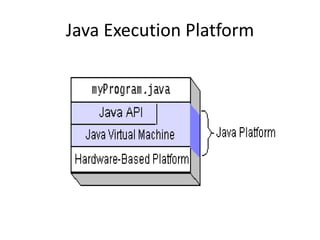
• What is Java Platform?
1) A software-only platform that runs on top of
other hardware-based platforms.
2) Java Platform has two components:
a) Java Virtual Machine (JVM) – interpretation for
the Java bytecode, ported onto various hardware-
based platforms.
b) The Java Application Programming Interface
(Java API)
Java Execution Platform
Java Platform Independence
Java Program Execution
• Java programs are both compiled and
interpreted:
Steps:
• write the Java program
• compile the program into bytecode
• execute (interpret) the bytecode on the
computer through the Java Virtual Machine
• Compilation happens once.
• Interpretation occurs each time the program is
executed.
Java Execution Process
Java API*
• What is Java API?
1) a large collection of ready-made software
components that provide many useful
capabilities, e.g. graphical user interface(GUI)
2) grouped into libraries (packages) of related
classes and interfaces,
3) together with JVM insulates Java programs
from the hardware and operating system
variations.
Java Program Types
Types of Java programs:
1) applications – standalone (desktop) Java programs, executed
from the command line, only need the Java Virtual Machine to run
2) applets – Java program that runs within a Java-enabled browser,
invoked through a “applet” reference on a web page, dynamically
downloaded to the client computer
3) servlets – Java program running on the web server, capable of
responding to HTTP requests made through the network
4) etc.
Java Environment
JAVA Environment
• JAVA technology contains:
– A Programming language
– A development environment
– An application environment
– A deployment environment
– Integration libraries
JAVA tools and editors
• Javac – java compiler
• Java – java application launcher
• Javadoc – java commenting tool
• Jdb – java debugger
• Javap – disassembling classes
• Javah – header file generator
• Jar – java archive
• Appletviewer – java applet launcher.
Simple Java Program
• A class to display a simple message:
class MyProgram {
public static void main(String[] args)
{
System.out.println(“First Java program.");
}
}
Running the Program
Type the program, save as MyProgram.java.
In the command line, type:
$ ls
MyProgram.java
$ javac MyProgram.java
$ ls
MyProgram.java, MyProgram.class
$ java MyProgram
First Java program.
Explaining the Process
1) creating a source file - a source file contains text written in the
Java programming language, created using any text editor on
any system.
2) compiling the source file - Java compiler (javac) reads the
source file and translates its text into instructions that the
Java interpreter can understand. These instructions are called
bytecode.
3) running the compiled program - Java interpreter (java)
installed takes as input the bytecode file and carries out its
instructions by translating them on the fly into instructions
that your computer can understand.
Java Program Explained
//MyProgram is the name of the class:
class MyProgram {
//main is the method with one parameter args and no results:
public static void main(String[] args) {
//println is a method in the standard System class:
System.out.println(“First Java program.");
}
}
Classes and Objects
A class is the basic building block of Java programs.
A class encapsulates:
a) data (attributes) and
b) operations on this data (methods)
and permits to create objects as its instances
Main Method
The main method must be present in every Java application:
1)public static void main(String[] args) where:
a)public means that the method can be called by any object
b)static means that the method is shared by all instances
c)void means that the method does not return any value
2) When the interpreter executes an application, it starts by
calling its main method which in turn invokes other
methods in this or other classes.
3) The main method accepts a single argument – a string
array, which holds all command-line parameters
classpath
- An environment variable whose value is list of
directories or jar files.
- Using the path the compiler searches for the
compiled class file.
- E.g.
CLASSPATH =“ $home/ty99/jvaclass”
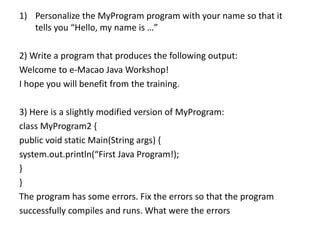
1) Personalize the MyProgram program with your name so that it
tells you “Hello, my name is …”
2) Write a program that produces the following output:
Welcome to e-Macao Java Workshop!
I hope you will benefit from the training.
3) Here is a slightly modified version of MyProgram:
class MyProgram2 {
public void static Main(String args) {
system.out.println(“First Java Program!);
}
}
The program has some errors. Fix the errors so that the program
successfully compiles and runs. What were the errors
// Compile: javac HelloYourName.java
// Execute: java HelloYourName smita
import java.io.*;
class HelloYourName
{
public static void main(String[] args)
{
System.out.println("Hello " + args[0] + "!");
System.out.println("No. of Command Line Args. = " + args.length);
}
}

j-chap1-Basics.ppt

  • 1.
    Chapter 1 Basics ofprogramming language
  • 2.
    Origin • Computer languageinnovation and development occurs for two fundamental reasons: 1) to adapt to changing environments and uses 2) to implement improvements in the art of programming • The development of Java was driven by both in equal measures. • Many Java features are inherited from the earlier languages: B → C → C++ → Java
  • 3.
    OOP – • methodologythat helps organize complex programs through the use of inheritance, encapsulation and polymorphism. • C++ extends C by adding object-oriented features.
  • 4.
    JAVA History • Designedby James Gosling, Patrick Naughton, Chris Warth, Ed Frank and Mike Sheridan at Sun Microsystems in 1991. • The original motivation is not Internet : platform- independent software embedded in consumer electronics devices. • With Internet, the urgent need appeared to break the fortified positions of Intel, Macintosh and Unix programmer communities. • Java as an “Internet version of C++”? No. • Java was not designed to replace C++, but to solve a different set of problems. There are significant practical/philosophical differences
  • 5.
    • There ismore to Java than the language. • Java Technology consists of: 1) Java Programming Language 2) Java Virtual Machine (JVM) 3) Java Application Programming Interfaces (APIs)
  • 6.
    Java Language Features 1)simple – Java is designed to be easy for the professional programmer to learn and use. 2) object-oriented – a clean, usable, pragmatic approach to objects, not restricted by the need for compatibility with other languages. 3) robust – restricts the programmer to find the mistakes early, performs compile-time (strong typing) and run-time (exception- handling) checks, manages memory automatically. 4) multithreaded – supports multi-threaded programming for writing program that perform concurrent computations 5) architecture-neutral – Java Virtual Machine provides a platform independent environment for the execution of Java bytecode
  • 7.
    6) interpreted andhigh-performance – Java programs are compiled into an intermediate representation – bytecode: a) can be later interpreted by any JVM b) can be also translated into the native machine code for efficiency. 7) distributed – Java handles TCP/IP protocols, accessing a resource through its URL much like accessing a local file. 8) dynamic – substantial amounts of run-time type information to verify and resolve access to objects at run-time. 9) secure – programs are confined to the Java execution environment and cannot access other parts of the computer.
  • 8.
    Execution Platform • Whatis an execution platform? 1) An execution platform is the hardware or software environment in which a program runs, e.g. Windows 2000, Linux, Solaris or MacOS. 2) Most platforms can be described as a combination of the operating system and hardware
  • 9.
    • What isJava Platform? 1) A software-only platform that runs on top of other hardware-based platforms. 2) Java Platform has two components: a) Java Virtual Machine (JVM) – interpretation for the Java bytecode, ported onto various hardware- based platforms. b) The Java Application Programming Interface (Java API)
  • 10.
  • 11.
  • 12.
    Java Program Execution •Java programs are both compiled and interpreted: Steps: • write the Java program • compile the program into bytecode • execute (interpret) the bytecode on the computer through the Java Virtual Machine • Compilation happens once. • Interpretation occurs each time the program is executed.
  • 13.
  • 14.
    Java API* • Whatis Java API? 1) a large collection of ready-made software components that provide many useful capabilities, e.g. graphical user interface(GUI) 2) grouped into libraries (packages) of related classes and interfaces, 3) together with JVM insulates Java programs from the hardware and operating system variations.
  • 15.
    Java Program Types Typesof Java programs: 1) applications – standalone (desktop) Java programs, executed from the command line, only need the Java Virtual Machine to run 2) applets – Java program that runs within a Java-enabled browser, invoked through a “applet” reference on a web page, dynamically downloaded to the client computer 3) servlets – Java program running on the web server, capable of responding to HTTP requests made through the network 4) etc.
  • 16.
  • 17.
    JAVA Environment • JAVAtechnology contains: – A Programming language – A development environment – An application environment – A deployment environment – Integration libraries
  • 18.
    JAVA tools andeditors • Javac – java compiler • Java – java application launcher • Javadoc – java commenting tool • Jdb – java debugger • Javap – disassembling classes • Javah – header file generator • Jar – java archive • Appletviewer – java applet launcher.
  • 19.
    Simple Java Program •A class to display a simple message: class MyProgram { public static void main(String[] args) { System.out.println(“First Java program."); } }
  • 20.
    Running the Program Typethe program, save as MyProgram.java. In the command line, type: $ ls MyProgram.java $ javac MyProgram.java $ ls MyProgram.java, MyProgram.class $ java MyProgram First Java program.
  • 21.
    Explaining the Process 1)creating a source file - a source file contains text written in the Java programming language, created using any text editor on any system. 2) compiling the source file - Java compiler (javac) reads the source file and translates its text into instructions that the Java interpreter can understand. These instructions are called bytecode. 3) running the compiled program - Java interpreter (java) installed takes as input the bytecode file and carries out its instructions by translating them on the fly into instructions that your computer can understand.
  • 22.
    Java Program Explained //MyProgramis the name of the class: class MyProgram { //main is the method with one parameter args and no results: public static void main(String[] args) { //println is a method in the standard System class: System.out.println(“First Java program."); } }
  • 23.
    Classes and Objects Aclass is the basic building block of Java programs. A class encapsulates: a) data (attributes) and b) operations on this data (methods) and permits to create objects as its instances
  • 24.
    Main Method The mainmethod must be present in every Java application: 1)public static void main(String[] args) where: a)public means that the method can be called by any object b)static means that the method is shared by all instances c)void means that the method does not return any value 2) When the interpreter executes an application, it starts by calling its main method which in turn invokes other methods in this or other classes. 3) The main method accepts a single argument – a string array, which holds all command-line parameters
  • 25.
    classpath - An environmentvariable whose value is list of directories or jar files. - Using the path the compiler searches for the compiled class file. - E.g. CLASSPATH =“ $home/ty99/jvaclass”
  • 26.
    1) Personalize theMyProgram program with your name so that it tells you “Hello, my name is …” 2) Write a program that produces the following output: Welcome to e-Macao Java Workshop! I hope you will benefit from the training. 3) Here is a slightly modified version of MyProgram: class MyProgram2 { public void static Main(String args) { system.out.println(“First Java Program!); } } The program has some errors. Fix the errors so that the program successfully compiles and runs. What were the errors
  • 27.
    // Compile: javacHelloYourName.java // Execute: java HelloYourName smita import java.io.*; class HelloYourName { public static void main(String[] args) { System.out.println("Hello " + args[0] + "!"); System.out.println("No. of Command Line Args. = " + args.length); } }