Unit 1
Introduction to Java
What is Object-Oriented Programming?
• Object-oriented programming (OOP) is a programming
standard based on the concept of “objects”.
• These objects can contain data known as attributes and code
known as methods.
• The core concept of the object-oriented approach is to break
complex problems into smaller objects.
Introduction to Java
• Java is object-oriented programming language where
programs are written using classes.
• It allows application developers to write once, and run
anywhere (WORA)
• This means that compiled Java code can run on all platforms
that support Java without the need for recompilation.
• Java is widely used for developing applications for desktop,
web, and mobile devices.
• Java is simple, robust, and secure.
Explain Java Features
1. Simple, easy and familiar :
– Java is easy to learn because its syntax is just like c++.
– It is simple because it does not use header files and does not use
pointers
2. Compiled and Interpreted :
– Java code is translated into byte code after compilation and the byte
code is interpreted by JVM (Java Virtual Machine).
3. Platform Independent :
– Compiler converts source code to bytecode and then the JVM executes
the bytecode generated by the compiler.
– This bytecode can run on any platform like Windows, Linux, or macOS
which means if we compile a program on Windows, then we can run it
on Linux and vice versa.
4. Object-Oriented :
– Java is Object oriented - which means no coding outside of class
definitions, including main().
5. Robust :
– Robust means inbuilt capabilities to handle errors/exceptions.
6. Secure :
– it enables to develop virus-free systems.
– It has strong authentication techniques .
7. Multithreaded :
– It is possible to write a single program that can perform many tasks
simultaneously.
8. Dynamic flexibility :
– Java gives us the flexibility to add classes, new methods to existing
classes, and even create new classes through sub-classes.
What is Java Architecture. Explain
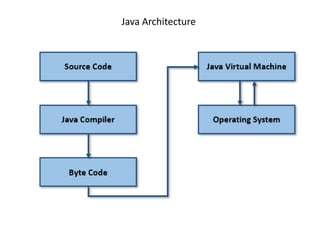
• Java Architecture is a collection of components JVM,
JRE, and JDK.
• Java Architecture explains each and every step of how a java
program is compiled and executed.
• Java Architecture can be explained by using the following
steps:
– There is a process of compilation and interpretation in Java.
– Java compiler converts the Java code into byte code.
– After that, the JVM converts the byte code into machine code.
– The machine code is then executed by the machine.
Java Architecture
Java Virtual Machine
• The main feature of Java is Write Once Run Anywhere.
• Java Virtual Machine makes it possible to write our code once
and use it on any operating system.
• JVM converts byte code into machine code.
• It loads the code into memory, verifies it and then executes
the code
Java Runtime Environment and Java Development Kit
• The JRE contains libraries and software needed by your Java
programs to run.
• JRE takes our Java code, uses the required libraries, and
then starts the JVM to execute it.
• JDK is a software development environment used in the
development of Java applications and applets.
• Java Development Kit contains JRE, a compiler, an interpreter
, and many development tools in it.
List Java Applications
• Mobile App Development :
– The Java programming language is used for building android applications .
• Eg. Spotify and Twitter
• Desktop GUI Applications :
– Java provides tools which contain pre-assembled components for developing
the GUI based desktop application.
• Web-based Applications :
– Java is used for developing the web-based application using Servlet and JSP.
• Gaming Applications :
– Java is widely used for developing gaming applications
– Eg. Minecraft, Mission Impossible III, etc.
• Cloud-based Applications :
– Java provides the environment to develop cloud-based applications
– The cloud applications are widely used to share data between companies or to
develop applications remotely.
• IoT Applications :
– IoT is found almost in all the small devices such as smartphones, wearables,
smart lighting, TVs, etc.
– For developing the IoT application Java is used, because of its security,
flexibility, and versatility.
Describe structure of Java program
A Java program involves the following sections:
• Documentation Section
• Package Statement
• Import Statements
• Interface Statement
• Class Definition
• Main Method Class
– Main Method Definition
• Documentation Section Comments can be written in this
section. They help the programmer to understand the code.
These are optional
• Package statement A package is a group of classes that are
defined by a name. If it is required to declare many classes
within one element, it can be declared within a package. It is
an optional part of the program. package keyword is used to
create a a package. Eg. package program;
• Import statement This statement is used if it is required to
use a class of another package by specifying the package
name and the class name separated with a dot operator.
Eg. import calc.add;
• Interface statement Interfaces are like a class that includes a
group of method declarations. It's an optional section and can
be used when programmers want to implement multiple
inheritances in a program.
• Class Definition A Java program may contain several class
definitions. Classes are the essential elements of any Java
program.
• Main Method Class Every Java program requires the main
method, which is the starting point of the program. There may
be many classes in a Java program, but, only one class
defines the main method. Methods contain data type
declaration and executable statements.
A Simple Java Program
//First Java program single line comment
public class Hello
{
/* Description: multi line comment
Writes the words "Hello Java" on the screen */
public static void main(String[] args)
{
System.out.println("Hello Java");
}
}
Note:
Class name : Hello
Keywords : public, static, void
Data type : String
Array name : args
Write steps for Compiling and Executing a Java program taking an
example of a simple Java program
Steps to save the file, compile, and execute the program.
• Open notepad and add the Java code.
• Save the file as: Hello.java.
• Open a command prompt window and go to the directory
where you saved the java code.
• Type javac Hello.java and press enter to compile your code.
If there are no errors in your code, the command prompt will
take you to the next line.
• Now, type java Hello to run your program.
• You will be able to see Hello Java printed on the screen.

unit1.pptx

  • 1.
  • 2.
    What is Object-OrientedProgramming? • Object-oriented programming (OOP) is a programming standard based on the concept of “objects”. • These objects can contain data known as attributes and code known as methods. • The core concept of the object-oriented approach is to break complex problems into smaller objects.
  • 3.
    Introduction to Java •Java is object-oriented programming language where programs are written using classes. • It allows application developers to write once, and run anywhere (WORA) • This means that compiled Java code can run on all platforms that support Java without the need for recompilation. • Java is widely used for developing applications for desktop, web, and mobile devices. • Java is simple, robust, and secure.
  • 4.
    Explain Java Features 1.Simple, easy and familiar : – Java is easy to learn because its syntax is just like c++. – It is simple because it does not use header files and does not use pointers 2. Compiled and Interpreted : – Java code is translated into byte code after compilation and the byte code is interpreted by JVM (Java Virtual Machine). 3. Platform Independent : – Compiler converts source code to bytecode and then the JVM executes the bytecode generated by the compiler. – This bytecode can run on any platform like Windows, Linux, or macOS which means if we compile a program on Windows, then we can run it on Linux and vice versa. 4. Object-Oriented : – Java is Object oriented - which means no coding outside of class definitions, including main(). 5. Robust : – Robust means inbuilt capabilities to handle errors/exceptions.
  • 5.
    6. Secure : –it enables to develop virus-free systems. – It has strong authentication techniques . 7. Multithreaded : – It is possible to write a single program that can perform many tasks simultaneously. 8. Dynamic flexibility : – Java gives us the flexibility to add classes, new methods to existing classes, and even create new classes through sub-classes.
  • 6.
    What is JavaArchitecture. Explain • Java Architecture is a collection of components JVM, JRE, and JDK. • Java Architecture explains each and every step of how a java program is compiled and executed. • Java Architecture can be explained by using the following steps: – There is a process of compilation and interpretation in Java. – Java compiler converts the Java code into byte code. – After that, the JVM converts the byte code into machine code. – The machine code is then executed by the machine.
  • 7.
  • 8.
    Java Virtual Machine •The main feature of Java is Write Once Run Anywhere. • Java Virtual Machine makes it possible to write our code once and use it on any operating system. • JVM converts byte code into machine code. • It loads the code into memory, verifies it and then executes the code
  • 9.
    Java Runtime Environmentand Java Development Kit • The JRE contains libraries and software needed by your Java programs to run. • JRE takes our Java code, uses the required libraries, and then starts the JVM to execute it. • JDK is a software development environment used in the development of Java applications and applets. • Java Development Kit contains JRE, a compiler, an interpreter , and many development tools in it.
  • 10.
    List Java Applications •Mobile App Development : – The Java programming language is used for building android applications . • Eg. Spotify and Twitter • Desktop GUI Applications : – Java provides tools which contain pre-assembled components for developing the GUI based desktop application. • Web-based Applications : – Java is used for developing the web-based application using Servlet and JSP. • Gaming Applications : – Java is widely used for developing gaming applications – Eg. Minecraft, Mission Impossible III, etc.
  • 11.
    • Cloud-based Applications: – Java provides the environment to develop cloud-based applications – The cloud applications are widely used to share data between companies or to develop applications remotely. • IoT Applications : – IoT is found almost in all the small devices such as smartphones, wearables, smart lighting, TVs, etc. – For developing the IoT application Java is used, because of its security, flexibility, and versatility.
  • 12.
    Describe structure ofJava program A Java program involves the following sections: • Documentation Section • Package Statement • Import Statements • Interface Statement • Class Definition • Main Method Class – Main Method Definition
  • 13.
    • Documentation SectionComments can be written in this section. They help the programmer to understand the code. These are optional • Package statement A package is a group of classes that are defined by a name. If it is required to declare many classes within one element, it can be declared within a package. It is an optional part of the program. package keyword is used to create a a package. Eg. package program; • Import statement This statement is used if it is required to use a class of another package by specifying the package name and the class name separated with a dot operator. Eg. import calc.add; • Interface statement Interfaces are like a class that includes a group of method declarations. It's an optional section and can be used when programmers want to implement multiple inheritances in a program.
  • 14.
    • Class DefinitionA Java program may contain several class definitions. Classes are the essential elements of any Java program. • Main Method Class Every Java program requires the main method, which is the starting point of the program. There may be many classes in a Java program, but, only one class defines the main method. Methods contain data type declaration and executable statements.
  • 15.
    A Simple JavaProgram //First Java program single line comment public class Hello { /* Description: multi line comment Writes the words "Hello Java" on the screen */ public static void main(String[] args) { System.out.println("Hello Java"); } } Note: Class name : Hello Keywords : public, static, void Data type : String Array name : args
  • 16.
    Write steps forCompiling and Executing a Java program taking an example of a simple Java program Steps to save the file, compile, and execute the program. • Open notepad and add the Java code. • Save the file as: Hello.java. • Open a command prompt window and go to the directory where you saved the java code. • Type javac Hello.java and press enter to compile your code. If there are no errors in your code, the command prompt will take you to the next line. • Now, type java Hello to run your program. • You will be able to see Hello Java printed on the screen.