JS Training: Day 01
Iqra Technology | www.iqratechnology.com
By: Musharrafuddin Siddqui | Skype ID: musharrafuddin.siddiqui
Iqra Technology | www.iqratechnology.com 1
In this session we will learn:
 What is JavaScript
 Why Learn JavaScript
 Applications of JS
 Why learn JS, Where JS is used
 Where JS Code Run
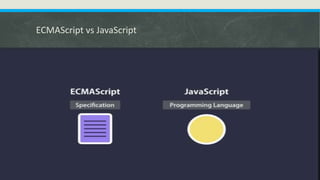
 ECMAScript vs JavaScript
 Java vs JavaScript
 Setting Up Environment
 Installing VS Code Editor
 Installing VS Code Editor Material Icon and Live Server Extention
2
Iqra Technology | www.iqratechnology.com
What is JS
3
Iqra Technology | www.iqratechnology.com
Application of JavaScript
 JavaScript is used to create interactive websites. It is mainly used for:
 Client-side validation,
 Dynamic drop-down menus/Sliders
 Displaying date and time,
 Displaying pop-up windows and dialog boxes (like an alert dialog box, confirm
dialog box and prompt dialog box),
 Displaying clocks etc.
Iqra Technology | www.iqratechnology.com 4
Commonly Asked Questions
Q. How do I get JavaScript?
Q. Where can I download JavaScript?
Q. Is JavaScript Free?
 You don't have to get or download JavaScript.
 JavaScript is already running in your browser on your computer, on your tablet,
and on your smart-phone.
 JavaScript is free to use for everyone.
Iqra Technology | www.iqratechnology.com 5
Why Learn JavaScript
Iqra Technology | www.iqratechnology.com 6
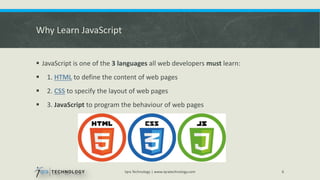
 JavaScript is one of the 3 languages all web developers must learn:
 1. HTML to define the content of web pages
 2. CSS to specify the layout of web pages
 3. JavaScript to program the behaviour of web pages
Where JS is used
 JS is used in every technology:
 Salesforce
 Microsoft Dynamic CRM
 SharePoint
 Angular
 Php
 Mobile Apps
 Web Applications
Iqra Technology | www.iqratechnology.com 7
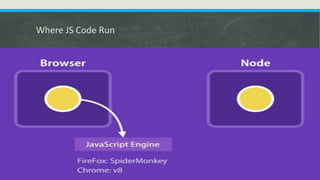
Where JS Code Run
8
Iqra Technology | www.iqratechnology.com
ECMAScript vs JavaScript
 content
9
Iqra Technology | www.iqratechnology.com
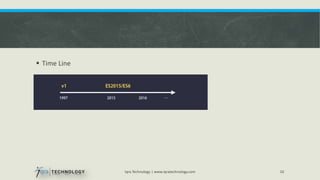
 Time Line
10
Iqra Technology | www.iqratechnology.com
Java vs JavaScript
 JavaScript and Java are completely different languages, both in concept and
design.
 Java is server side Object Oriented Programming Language.
 JavaScript is a client side scripting language. (using Node you can also run JS code
on server to make dynamic web apps).
11
Iqra Technology | www.iqratechnology.com
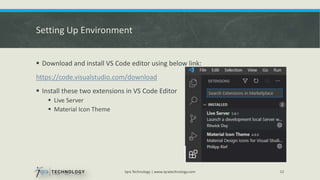
Setting Up Environment
 Download and install VS Code editor using below link:
https://code.visualstudio.com/download
 Install these two extensions in VS Code Editor
 Live Server
 Material Icon Theme
Iqra Technology | www.iqratechnology.com 12
References:
 Training Tracking Sheet:
https://docs.google.com/spreadsheets/d/1iI8T7WpGpdHzyluIQDc67BWE1N03YLH
bP4PpZq02Wwk/edit?usp=sharing
 W3Shools.com https://www.w3schools.com/js/
 Topics covered from W3Schools.com:
Iqra Technology | www.iqratechnology.com 13
JS Introduction
JS Where To
JS Output
Q&A Session
Thanks.
14
Iqra Technology | www.iqratechnology.com

JavaScript Training Day 01 Iqra Technology.pptx

  • 1.
    JS Training: Day01 Iqra Technology | www.iqratechnology.com By: Musharrafuddin Siddqui | Skype ID: musharrafuddin.siddiqui Iqra Technology | www.iqratechnology.com 1
  • 2.
    In this sessionwe will learn:  What is JavaScript  Why Learn JavaScript  Applications of JS  Why learn JS, Where JS is used  Where JS Code Run  ECMAScript vs JavaScript  Java vs JavaScript  Setting Up Environment  Installing VS Code Editor  Installing VS Code Editor Material Icon and Live Server Extention 2 Iqra Technology | www.iqratechnology.com
  • 3.
    What is JS 3 IqraTechnology | www.iqratechnology.com
  • 4.
    Application of JavaScript JavaScript is used to create interactive websites. It is mainly used for:  Client-side validation,  Dynamic drop-down menus/Sliders  Displaying date and time,  Displaying pop-up windows and dialog boxes (like an alert dialog box, confirm dialog box and prompt dialog box),  Displaying clocks etc. Iqra Technology | www.iqratechnology.com 4
  • 5.
    Commonly Asked Questions Q.How do I get JavaScript? Q. Where can I download JavaScript? Q. Is JavaScript Free?  You don't have to get or download JavaScript.  JavaScript is already running in your browser on your computer, on your tablet, and on your smart-phone.  JavaScript is free to use for everyone. Iqra Technology | www.iqratechnology.com 5
  • 6.
    Why Learn JavaScript IqraTechnology | www.iqratechnology.com 6  JavaScript is one of the 3 languages all web developers must learn:  1. HTML to define the content of web pages  2. CSS to specify the layout of web pages  3. JavaScript to program the behaviour of web pages
  • 7.
    Where JS isused  JS is used in every technology:  Salesforce  Microsoft Dynamic CRM  SharePoint  Angular  Php  Mobile Apps  Web Applications Iqra Technology | www.iqratechnology.com 7
  • 8.
    Where JS CodeRun 8 Iqra Technology | www.iqratechnology.com
  • 9.
    ECMAScript vs JavaScript content 9 Iqra Technology | www.iqratechnology.com
  • 10.
     Time Line 10 IqraTechnology | www.iqratechnology.com
  • 11.
    Java vs JavaScript JavaScript and Java are completely different languages, both in concept and design.  Java is server side Object Oriented Programming Language.  JavaScript is a client side scripting language. (using Node you can also run JS code on server to make dynamic web apps). 11 Iqra Technology | www.iqratechnology.com
  • 12.
    Setting Up Environment Download and install VS Code editor using below link: https://code.visualstudio.com/download  Install these two extensions in VS Code Editor  Live Server  Material Icon Theme Iqra Technology | www.iqratechnology.com 12
  • 13.
    References:  Training TrackingSheet: https://docs.google.com/spreadsheets/d/1iI8T7WpGpdHzyluIQDc67BWE1N03YLH bP4PpZq02Wwk/edit?usp=sharing  W3Shools.com https://www.w3schools.com/js/  Topics covered from W3Schools.com: Iqra Technology | www.iqratechnology.com 13 JS Introduction JS Where To JS Output
  • 14.