@UlrikaViberg
@SearchLDN @UlrikaViberg
Javascript SEO
- How to Test and
Common Pitfalls
Ulrika Viberg
Agency Owner and Senior SEO Consultant
@UlrikaViberg
I’m Ulrika Viberg
★ Built my first website (using notes) 1998
★ In Search since 2007
★ Mostly technical but also strategic SEO
★ Runs an SEO agency in Stockholm Sweden, focusing on user
centric SEO
★ Runs Global SEO Club together with Sara Moccand- Sayegh
★ ex-eBay, ex-Rocket Internet, ex-Edreams Odigeo
★ From the Northern Sweden
@SearchLDN
@UlrikaViberg
Technical SEO
Auditing has
become harder
@SearchLDN
@UlrikaViberg
Dealing with
new techniques
and frameworks
@SearchLDN
@UlrikaViberg
SEO has never been
straight forward
@SearchLDN
@UlrikaViberg
@SearchLDN
@UlrikaViberg
We just
work out the
workarounds
@SearchLDN
@UlrikaViberg
Companies have
websites to be
found and
interacted with
@SearchLDN
@UlrikaViberg
Someone has to
make sure it can
be indexed
properly
@SearchLDN
@UlrikaViberg
That’s where we
come in!
I do
SEO
@SearchLDN
@UlrikaViberg
My process for
auditing JavaScript sites,
both live and in
development
@SearchLDN
@UlrikaViberg
Start with
expected
behaviors and
requirements
@SearchLDN
@UlrikaViberg
Identify the
page templates
@SearchLDN
@UlrikaViberg
Use the requirements
to set up test
protocols
@SearchLDN
@UlrikaViberg
Ask for demos
where
stakeholders and
devs explain
descisions and
features
@SearchLDN
@UlrikaViberg
Ask to be a part
of the dev team
and participate
in checkins and
meetings
@SearchLDN
@UlrikaViberg
Be nice,
answer all questions
with respect
- and you will be treated with the
same kindness
(Cakes and coffees also help)
@SearchLDN
@UlrikaViberg
You cannot use
the usual tools
for testing in
development
@SearchLDN
@UlrikaViberg
Tools I use
@SearchLDN
@UlrikaViberg
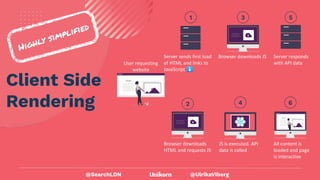
Client Side
Rendering
Highly simplified
User requesting
website
Server sends first load
of HTML and links to
JavaScript ⬇
1
Browser downloads
HTML and requests JS
2
Browser downloads JS
3
Server responds
with API data
5
All content is
loaded and page
is interactive
6
JS is executed. API
data is called
4
@SearchLDN
@UlrikaViberg
Server Side
Rendering
Highly simplified
User requesting
website
Server creates/cache
fetches “Ready to
Render” HTML files
and sends to browser
⬇
1
Browser renders
HTML
2
Browser downloads
the JavaScript
3
All content is loaded
and page is
interactive
4
@SearchLDN
@UlrikaViberg
Lets dive into
the testing
@SearchLDN
@UlrikaViberg
Content should be
available for
searchbots
Browser renders HTML
@SearchLDN
@UlrikaViberg
Requirement
All on-page elements with
content should be available in the
rendered code.
@SearchLDN
@UlrikaViberg
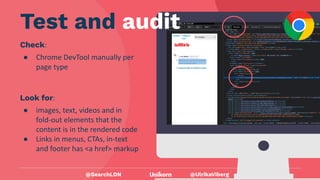
Check:
● Chrome DevTool manually per
page type
@SearchLDN
Test and audit
Look for:
● images, text, videos and in
fold-out elements that the
content is in the rendered code
● Links in menus, CTAs, in-text
and footer has <a href> markup
@UlrikaViberg
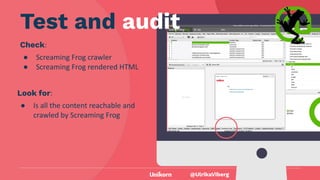
Check:
● Screaming Frog crawler
● Screaming Frog rendered HTML
@UlrikaViberg
Test and audit
Look for:
● Is all the content reachable and
crawled by Screaming Frog
@UlrikaViberg
Make sure all
JavaScript assets
can be reached
Browser downloads the
JavaScript
@UlrikaViberg
Do not block important assets
in robots.txt or behind rules in
CDNs
Requirement
@UlrikaViberg
Check:
● the robots.txt manually
● In Chrome DevTools → errors
Test and audit
@SearchLDN
Look for:
● disallowed paths that contain
JS assets in robots.txt
● errors saying failed to load
[file].js.
@UlrikaViberg
Make sure it doesn’t
take too long before
page is interactive
All content is loaded and
page is interactive
@SearchLDN
@UlrikaViberg
Time to first paint shouldn’t be
exceeded by loading large JS
resources.
Requirement
@SearchLDN
@UlrikaViberg
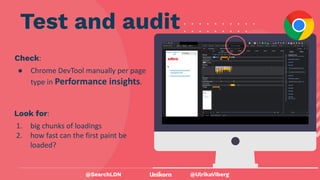
Check:
● Chrome DevTool manually per page
type in Performance insights.
Test and audit
@SearchLDN
Look for:
1. big chunks of loadings
2. how fast can the first paint be
loaded?
@UlrikaViberg
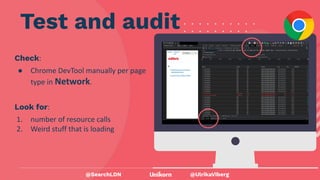
Check:
● Chrome DevTool manually per page
type in Network.
Test and audit
@SearchLDN
Look for:
1. number of resource calls
2. Weird stuff that is loading
@UlrikaViberg
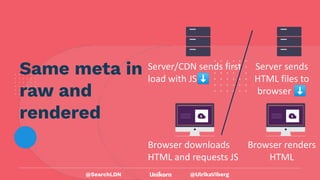
Same meta in
raw and
rendered
Server sends
HTML files to
browser ⬇
Browser renders
HTML
Server/CDN sends first
load with JS⬇
Browser downloads
HTML and requests JS
@SearchLDN
@UlrikaViberg
Requirement
The meta data in head should be
correctly set up and not changing
while rendering.
@SearchLDN
@UlrikaViberg
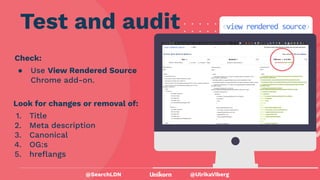
Check:
● Use View Rendered Source
Chrome add-on.
Test and audit
@SearchLDN
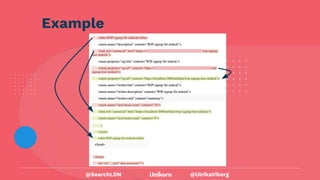
Look for changes or removal of:
1. Title
2. Meta description
3. Canonical
4. OG:s
5. hreflangs
@UlrikaViberg
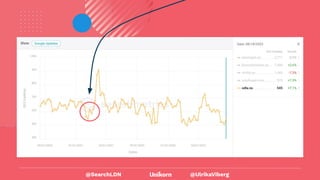
Example
@SearchLDN
@UlrikaViberg
Learnings
@SearchLDN
@UlrikaViberg
There is always something
found when auditing
JavaScript.
Make time to do it!
@SearchLDN
@UlrikaViberg
They don’t teach SEO to devs at
Uni other dev classes.
Work together!
@SearchLDN
@UlrikaViberg
Server Side Rendering is not
always the answer.
@SearchLDN
@UlrikaViberg
v
@SearchLDN
@UlrikaViberg
@SearchLDN
@UlrikaViberg
@SearchLDN
@UlrikaViberg
@SearchLDN
@UlrikaViberg
Summary
● Do test all page templates
Templates are often build separately and can have
their own unique issues
● Be early in a dev project.
Setting requirements and testing along the way
(feedback) vs auditing when everything is already
built (criticize) is less costly
● Understand the platform and framework
Ask for demos and walk-throughs
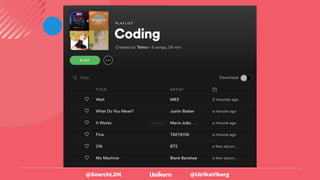
● Be nice and don’t be discouraged when
you hear the devs favorite playlist:
@SearchLDN
@UlrikaViberg
@SearchLDN
@UlrikaViberg
Thank you!
Ulrika Viberg
Agency Owner & Senior SEO Consultant
www.unikorn.se
ulrika@unikorn.se
https://www.linkedin.com/in/ulrikaviberg/
@UlrikaViberg
@SearchLDN

Javascript SEO - How to Test and Common Pitfalls (1).pdf