Unit-2
• Inheritance
• Formsof inheritance
• Super keyword
• final keyword
• Abstract classes
• Interfaces
• Object class
• Packages
• Exploring java.io. package
2.
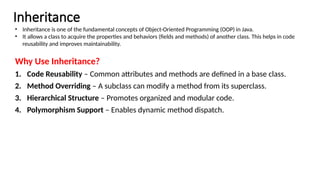
Inheritance
Why Use Inheritance?
1.Code Reusability – Common attributes and methods are defined in a base class.
2. Method Overriding – A subclass can modify a method from its superclass.
3. Hierarchical Structure – Promotes organized and modular code.
4. Polymorphism Support – Enables dynamic method dispatch.
• Inheritance is one of the fundamental concepts of Object-Oriented Programming (OOP) in Java.
• It allows a class to acquire the properties and behaviors (fields and methods) of another class. This helps in code
reusability and improves maintainability.
3.
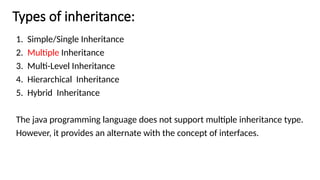
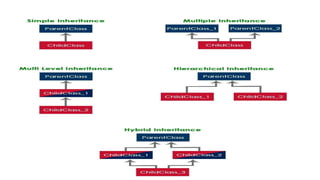
Types of inheritance:
1.Simple/Single Inheritance
2. Multiple Inheritance
3. Multi-Level Inheritance
4. Hierarchical Inheritance
5. Hybrid Inheritance
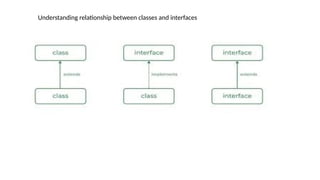
The java programming language does not support multiple inheritance type.
However, it provides an alternate with the concept of interfaces.
5.
Sample Program todemonstrate inheritance:
class Animal // Parent Class (Super Class)
{
void eat()
{
System.out.println("This animal eats food.");
}
}
class Dog extends Animal // Child Class (Sub Class)
{
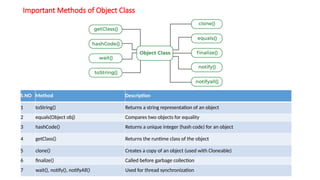
void bark()
{
System.out.println("The dog barks.");
}
}
public class InheritanceExample // Main Class
{
public static void main(String[] args)
{
Dog myDog = new Dog();
myDog.eat(); // Inherited method
myDog.bark(); // Own method
}
}
Output:
This animal eats food
The dog barks.
6.
Types of Inheritancein Java
1) Single Inheritance
One subclass inherits from a single superclass.
class Parent
{
void display()
{
System.out.println("Parent class method.");
}
}
class Child extends Parent
{
void show()
{
System.out.println("Child class method.");
}
}
public class SingleInheritance
{
public static void main(String[] args)
{
Child obj = new Child();
obj.display();
obj.show();
}
}
7.
3) Multilevel Inheritance
Aclass inherits from another derived class.
class Grandparent
{
void method1()
{
System.out.println("Grandparent class method.");
}
}
class Parent extends Grandparent
{
void method2()
{
System.out.println("Parent class method.");
}
}
class Child extends Parent
{
void method3()
{
System.out.println("Child class method.");
}
}
public class MultilevelInheritance
{
public static void main(String[] args)
{
Child obj = new Child();
obj.method1();
obj.method2();
obj.method3();
}
8.
4) Hierarchical Inheritance
Oneparent class is inherited by multiple child classes.
class Parent
{
void show()
{
System.out.println("Parent class method.");
}
}
class Child1 extends Parent
{
void display1()
{
System.out.println("Child1 class method.");
}
}
public class HierarchicalInheritance
{
public static void main(String[] args)
{
Child1 obj1 = new Child1();
obj1.show();
obj1.display1();
Child2 obj2 = new Child2();
obj2.show();
obj2.display2();
}
}
class Child2 extends Parent
{
void display2()
{
System.out.println("Child2 class method.");
}
}
9.
5. Hybrid Inheritance
•The hybrid inheritance is the combination of more than one type of inheritance.
• We may use any combination as a single with multiple inheritances, multi-level with multiple
inheritances, etc.,
10.
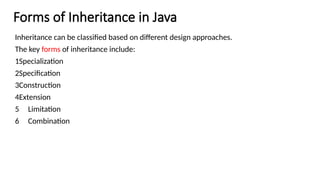
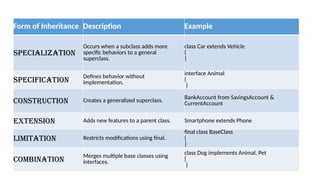
Forms of Inheritancein Java
Inheritance can be classified based on different design approaches.
The key forms of inheritance include:
1️
Specialization
2️
Specification
3️
Construction
4️
Extension
5 Limitation
6 Combination
11.
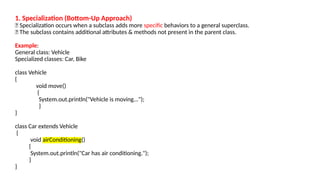
1. Specialization (Bottom-UpApproach)
🔹 Specialization occurs when a subclass adds more specific behaviors to a general superclass.
🔹 The subclass contains additional attributes & methods not present in the parent class.
Example:
General class: Vehicle
Specialized classes: Car, Bike
class Vehicle
{
void move()
{
System.out.println("Vehicle is moving...");
}
}
class Car extends Vehicle
{
void airConditioning()
{
System.out.println("Car has air conditioning.");
}
}
12.
2. Specification (AbstractClass & Interface Inheritance):
🔹 Specification defines only behavior without implementation.
🔹 Achieved using abstract classes or interfaces.
interface Animal
{
void makeSound(); // Only defined, no implementation
}
class Dog implements Animal
{
public void makeSound()
{
System.out.println("Dog barks.");
}
}
public class SpecificationExample
{
public static void main(String[] args)
{
Dog myDog = new Dog();
myDog.makeSound();
}
}
The Animal interface provides a specification without defining the behavior.
s
13.
3. Construction (Buildinga More Generalized Class)
🔹 Construction inheritance is the reverse of specialization.
🔹 It combines multiple subclasses into a general superclass.
class SavingsAccount
{
double balance;
void deposit(double amount)
{
balance += amount;
}
}
class CurrentAccount
{
double balance;
void withdraw(double amount)
{
balance -= amount;
}
}
used for code reusability & avoiding duplication.
Solution: Create a generalized class BankAccount.
BankAccount is constructed as a generalized class
class BankAccount
{
double balance;
void deposit(double amount)
{
balance += amount;
}
void withdraw(double amount)
{
balance -= amount;
}
}
}
class SavingsAccount extends BankAccount
{
}
class CurrentAccount extends BankAccount
{
}
public class Example
{
public static void main(String[] args)
{
SavingsAccount sa=new SavingsAccount();
sa.deposit(5000);
CurrentAccount ca=new CurrentAccount();
ca.withdraw(2000); }
14.
4. Extension (AddingNew Features to Parent Class)
🔹 Extends the parent class without modifying existing
methods.
🔹 New features are added to the subclass.
class Phone
{
void call()
{
System.out.println("Calling...");
}
}
class Smartphone extends Phone
{
void browseInternet()
{
System.out.println("Browsing the Internet.");
}
}
public class Example
{
public static void main(String[] args)
{
Smartphone s = new Smartphone();
s.call();
s.browseInternet();
}
}
Key Point: Smartphone extends Phone by adding
an internet-browsing feature.
15.
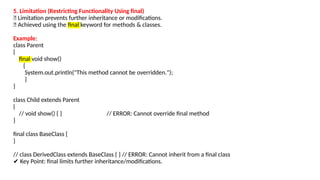
5. Limitation (RestrictingFunctionality Using final)
🔹 Limitation prevents further inheritance or modifications.
🔹 Achieved using the final keyword for methods & classes.
Example:
class Parent
{
final void show()
{
System.out.println("This method cannot be overridden.");
}
}
class Child extends Parent
{
// void show() { } // ERROR: Cannot override final method
}
final class BaseClass {
}
// class DerivedClass extends BaseClass { } // ERROR: Cannot inherit from a final class
✔ Key Point: final limits further inheritance/modifications.
16.
6. Combination (UsingMultiple Inheritance via Interfaces)
🔹 Combines multiple base classes using interfaces.
🔹 Java does not support multiple class inheritance but allows
multiple interface inheritance.
interface Animal
{
void eat();
}
interface Pet
{
void play();
}
class Dog implements Animal, Pet
{
public void eat()
{
System.out.println("The dog eats food.");
}
public void play()
{
System.out.println("The dog plays with its owner.");
}
}
public class CombinationExample
{
public static void main(String[] args)
{
Dog myDog = new Dog();
myDog.eat();
myDog.play();
}
}
Dog combines behaviors from Animal and Pet.
17.
Form of InheritanceDescription Example
Specialization
Occurs when a subclass adds more
specific behaviors to a general
superclass.
class Car extends Vehicle
{
}
Specification
Defines behavior without
implementation.
interface Animal
{
}
Construction Creates a generalized superclass. BankAccount from SavingsAccount &
CurrentAccount
Extension Adds new features to a parent class. Smartphone extends Phone
Limitation Restricts modifications using final.
final class BaseClass
{
}
Combination
Merges multiple base classes using
interfaces.
class Dog implements Animal, Pet
{
}
18.
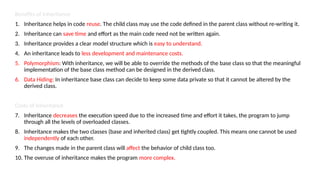
Benefits of Inheritance
1.Inheritance helps in code reuse. The child class may use the code defined in the parent class without re-writing it.
2. Inheritance can save time and effort as the main code need not be written again.
3. Inheritance provides a clear model structure which is easy to understand.
4. An inheritance leads to less development and maintenance costs.
5. Polymorphism: With inheritance, we will be able to override the methods of the base class so that the meaningful
implementation of the base class method can be designed in the derived class.
6. Data Hiding: In inheritance base class can decide to keep some data private so that it cannot be altered by the
derived class.
Costs of Inheritance
7. Inheritance decreases the execution speed due to the increased time and effort it takes, the program to jump
through all the levels of overloaded classes.
8. Inheritance makes the two classes (base and inherited class) get tightly coupled. This means one cannot be used
independently of each other.
9. The changes made in the parent class will affect the behavior of child class too.
10. The overuse of inheritance makes the program more complex.
19.
Constructors in inheritance
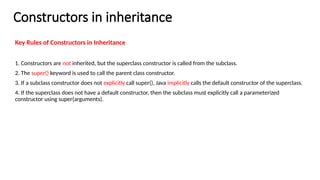
KeyRules of Constructors in Inheritance
1. Constructors are not inherited, but the superclass constructor is called from the subclass.
2. The super() keyword is used to call the parent class constructor.
3. If a subclass constructor does not explicitly call super(), Java implicitly calls the default constructor of the superclass.
4. If the superclass does not have a default constructor, then the subclass must explicitly call a parameterized
constructor using super(arguments).
20.
Constructor Execution Order
•When a subclass object is created, the parent class constructor is executed first, followed by the subclass constructor.
• This ensures that the parent’s attributes are initialized before the child’s attributes.
class Parent
{
Parent()
{
System.out.println("Parent class constructor called.");
}
}
class Child extends Parent
{
Child()
{
System.out.println("Child class constructor called.");
}
}
public class ConstructorInheritance
{
public static void main(String[] args)
{
Child obj = new Child();
}
}
OutPut:
Parent class constructor called.
Child class constructor called.
Explanation: The parent class constructor executes before the child class constructor.
21.
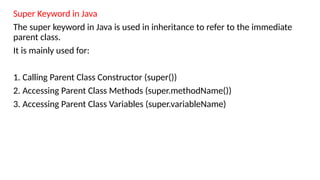
Super Keyword inJava
The super keyword in Java is used in inheritance to refer to the immediate
parent class.
It is mainly used for:
1. Calling Parent Class Constructor (super())
2. Accessing Parent Class Methods (super.methodName())
3. Accessing Parent Class Variables (super.variableName)
22.
Example: Calling ParentClass Constructor
class Parent
{
Parent()
{
System.out.println("Parent Constructor Called");
}
}
class Child extends Parent
{
Child()
{
super(); // Calling Parent Constructor
System.out.println("Child Constructor Called");
}
}
public class Example
{
public static void main(String[] args)
{
Child obj = new Child();
}
}
Output:
Parent Constructor Called
Child Constructor Called
Even if super() is not written, Java
implicitly calls the parent constructor.
1. a)Using super() to Call the Parent Class Constructor
• When a subclass object is created, the parent class constructor is executed first.
• The super() keyword is used to explicitly call a parent class constructor.
• If not used explicitly, Java automatically calls the default constructor of the parent class.
23.
1 b) Usingsuper(parameters) to Call a Parameterized Constructor
If the parent class does not have a default constructor, the subclass
must call a parameterized constructor using super(arguments).
Example:
class Parent
{
Parent(String name)
{
System.out.println("Parent Constructor: " + name);
}
}
class Child extends Parent
{
Child(String name)
{
super(name); // Calling Parent Parameterized
Constructor
System.out.println("Child Constructor: " + name);
}
}
public class Example
{
public static void main(String[] args)
{
Child obj = new Child("John");
}
}
Output:
Parent Constructor: John
Child Constructor: John
If the parent class has only parameterized
constructors, the subclass must explicitly
call one of them.
24.
Example:
class Parent
{
void show()
{
System.out.println("ParentMethod");
}
}
class Child extends Parent
{
void show()
{
super.show(); // Calling Parent Method
System.out.println("Child Method");
}
}
public class SuperMethod {
public static void main(String[] args) {
Child obj = new Child();
obj.show();
}
}
Output:
Parent Method
Child Method
Key Point: super.show() calls the parent class method before
executing the overridden method in the child class.
2. Using super.methodName() to Call Parent Class Methods
If a subclass overrides a parent class method, super.methodName() can be used to call the parent’s version of the
method.
25.
Example:
class Parent
{
String name= "Parent Variable";
}
class Child extends Parent
{
String name = "Child Variable";
void display()
{
System.out.println("Child Variable: " + name);
System.out.println("Parent Variable: " + super.name);
// Accessing Parent Variable
}
}
public class SuperVariable
{
public static void main(String[] args)
{
Child obj = new Child();
obj.display();
}
}
Output:
Child Variable: Child Variable
Parent Variable: Parent Variable
🔹 Key Point: super.name refers to the parent
class variable, avoiding conflict with the child
class variable.
3. Using super.variableName to Access Parent Class Variables
If a subclass has a variable with the same name as the parent class, the super keyword is used to access
the parent’s version.
26.
final Keyword inJava
The final keyword in Java is used to restrict modifications.
It can be applied to:
1. Final Variables → Prevents value modification
2. Final Methods → Prevents method overriding
3. Final Classes → Prevents inheritance
27.
Example: Using finalVariable
class Test
{
final int VALUE = 100; // Final variable (constant)
void display()
{
VALUE = 200;
// ❌ ERROR: Cannot modify final variable
System.out.println("Final Variable: " + VALUE);
}
}
public class FinalVariable
{
public static void main(String[] args)
{
Test obj = new Test();
obj.display();
}
}
Output:
Final Variable: 100
Key Points:
final variables must be initialized only once.
Cannot modify the final variable after assignment.
1. final Variable (Constant Values)
1. Once a final variable is assigned, its value cannot be changed.
2. final variables must be initialized at the time of declaration or in the constructor.
28.
Example: Using finalMethod
class Parent
{
final void show()
{
System.out.println("Final Method in Parent");
}
}
class Child extends Parent
{
void show()
{
// ❌ ERROR: Cannot override final method
System.out.println("Trying to override final
method");
}
}
public class FinalMethod
{
public static void main(String[] args)
{
Child obj = new Child();
obj.show(); // Calls Parent's final method
}
}
Output:
Final Method in Parent
Key Points:
final methods can be inherited but not overridden.
Trying to override a final method results in a compile-time
error.
2. final Method (Preventing Method Overriding)
A final method cannot be overridden by a subclass.
29.
Example: Using finalClass
final class Parent
{
void show()
{
System.out.println("Final Class Method");
}
}
class Child extends Parent
{
// ❌ ERROR: Cannot extend a final class //
}
public class Example
{
public static void main(String[] args)
{
Parent obj = new Parent();
obj.show();
}
}
3. final Class (Preventing Inheritance)
A final class cannot be extended (inherited).
Final Class Method
🔹 Key Points:
1.final classes cannot be extended (no child
classes).
2.Useful when you want to prevent
modification of a class.
30.
Polymorphism in Java
•Polymorphism in Java is the ability of an object to take many forms. It allows the same method to
have different implementations based on the object that is calling it.
There are two types of polymorphism in Java:
1. Compile-time Polymorphism (Method Overloading)
2. Runtime Polymorphism (Method Overriding)
31.
Abstraction:
1. Abstraction isone of the core concepts of Object-Oriented Programming (OOP) in Java.
2. It is the process of hiding the implementation details and exposing only the essential features of an object.
3. Hides Implementation Details: The user only sees what an object does, not how it does it.
4. Achieved Using Abstract Classes and Interfaces
I. Abstract Class: Can have both abstract (without implementation) and concrete (with implementation) methods.
II. Interface: Defines a contract that implementing classes must follow.
Abstract Class in Java
An abstract class in Java is a class that cannot be instantiated and is meant to be inherited.
It can have both abstract and concrete methods.
Key Features of Abstract Class
1. Can have both abstract (without body) and concrete methods.
2. Cannot be instantiated (i.e., you cannot create objects of an abstract class).
3. Must be inherited by a subclass to provide implementations for abstract methods.
4. Can have constructors, variables, and static methods.
32.
abstract class Animal
{
//Abstract method (no implementation)
abstract void makeSound();
// Concrete method (has implementation)
void sleep()
{
System.out.println("Sleeping...");
}
}
class Dog extends Animal
{
@Override
void makeSound()
{
System.out.println("Dog barks");
}
}
public class Example
{
public static void main(String[] args)
{
Dog myDog = new Dog();
myDog.makeSound(); // Calls Dog's makeSound()
myDog.sleep(); // Calls Animal's sleep()
}
}
Output:
Dog barks
Sleeping...
abstract void makeSound(); → Must be implemented by
subclasses.
void sleep() → Already implemented, can be used by all
subclasses.
I. Defining an Abstract Class
Use the abstract keyword before the class name.
Abstract methods must be implemented in the subclass.
33.
II. Interface inJava
1. An interface in Java is a blueprint for a class that contains only abstract methods.
2. It is used for achieving abstraction and multiple inheritance.
Key Features of an Interface
3. Contains only abstract methods (before Java 8).
4. Cannot have constructors (i.e., cannot be instantiated).
5. Methods are public and abstract by default.
6. Variables are public, static, and final by default.
7. A class implements an interface using the implements keyword.
8. Supports multiple inheritance (a class can implement multiple interfaces).
34.
1. Defining anInterface
Use the interface keyword.
All methods are implicitly abstract.
Variables are public, static, and final.
interface Animal
{
abstract void makeSound(); // Abstract method (no implementation)
}
class Dog implements Animal
{
@Override
public void makeSound()
{
System.out.println("Dog barks");
}
}
public class Example
{
public static void main(String[] args)
{
Dog myDog = new Dog();
myDog.makeSound();
}
}
Output:
Dog barks
35.
2. Interface withVariables
All variables in an interface are public, static, and final by default.
interface Vehicle
{
int MAX_SPEED = 120; // Public, static, and final
abstract void run();
}
class Car implements Vehicle
{
@Override
public void run()
{
System.out.println("Car is running at speed: " + MAX_SPEED);
}
}
public class InterfaceWithVariables
{
public static void main(String[] args)
{
Car c1= new Car();
c1.run();
}
}
Output:
Car is running at speed: 120
Key Points:
1. MAX_SPEED is implicitly public, static, and final.
2. Variables cannot be modified (final).
36.
3. Multiple Interfacesin Java
A class can implement multiple interfaces.
interface Printable
{
void print();
}
interface Showable
{
void show();
}
class Document implements Printable, Showable
{
@Override
public void print()
{
System.out.println("Printing document...");
}
@Override
public void show()
{
System.out.println("Showing document...");
}
}
public class Example
{
public static void main(String[] args)
{
Document doc = new Document();
doc.print();
doc.show();
}
}
Output:
jPrinting document...
Showing document...
Explanation
Document class implements both Printable and Showable
interfaces.
Achieves multiple inheritance, which is not possible with classes.
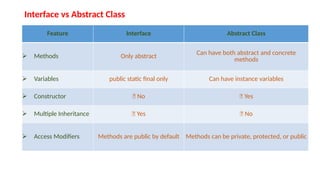
Interface vs AbstractClass
Feature Interface Abstract Class
Methods Only abstract Can have both abstract and concrete
methods
Variables public static final only Can have instance variables
Constructor ❌ No ✅ Yes
Multiple Inheritance ✅ Yes ❌ No
Access Modifiers Methods are public by default Methods can be private, protected, or public
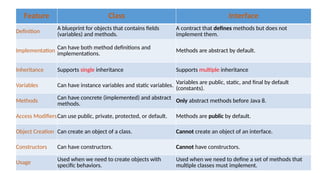
39.
Classes vs. Interfacesin Java
Feature Class Interface
Definition
A blueprint for objects that contains fields
(variables) and methods.
A contract that defines methods but does not
implement them.
Implementation
Can have both method definitions and
implementations.
Methods are abstract by default.
Inheritance Supports single inheritance Supports multiple inheritance
Variables Can have instance variables and static variables.
Variables are public, static, and final by default
(constants).
Methods
Can have concrete (implemented) and abstract
methods.
Only abstract methods before Java 8.
Access ModifiersCan use public, private, protected, or default. Methods are public by default.
Object Creation Can create an object of a class. Cannot create an object of an interface.
Constructors Can have constructors. Cannot have constructors.
Usage
Used when we need to create objects with
specific behaviors.
Used when we need to define a set of methods that
multiple classes must implement.
40.
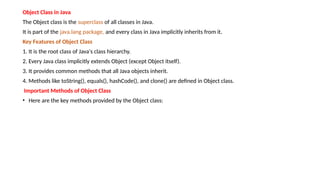
Object Class inJava
The Object class is the superclass of all classes in Java.
It is part of the java.lang package, and every class in Java implicitly inherits from it.
Key Features of Object Class
1. It is the root class of Java's class hierarchy.
2. Every Java class implicitly extends Object (except Object itself).
3. It provides common methods that all Java objects inherit.
4. Methods like toString(), equals(), hashCode(), and clone() are defined in Object class.
Important Methods of Object Class
• Here are the key methods provided by the Object class:
41.
Important Methods ofObject Class
S.NO Method Description
1 toString() Returns a string representation of an object
2 equals(Object obj) Compares two objects for equality
3 hashCode() Returns a unique integer (hash code) for an object
4 getClass() Returns the runtime class of the object
5 clone() Creates a copy of an object (used with Cloneable)
6 finalize() Called before garbage collection
7 wait(), notify(), notifyAll() Used for thread synchronization
42.
// Java Codeto demonstrate Object class
class Person
{
String n; //name
public Person(String n) // Constructor
{
this.n = n;
}
// Override toString() for a custom string representation
@Override
public String toString()
{
return "Person{name:'" + n + "'}";
}
public static void main(String[] args)
{
Person p = new Person("HELLO");
System.out.println(p.toString()); // Custom string representation
System.out.println(p.hashCode()); // Default hash code value
}
}
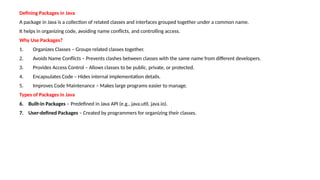
Defining Packages inJava
A package in Java is a collection of related classes and interfaces grouped together under a common name.
It helps in organizing code, avoiding name conflicts, and controlling access.
Why Use Packages?
1. Organizes Classes – Groups related classes together.
2. Avoids Name Conflicts – Prevents clashes between classes with the same name from different developers.
3. Provides Access Control – Allows classes to be public, private, or protected.
4. Encapsulates Code – Hides internal implementation details.
5. Improves Code Maintenance – Makes large programs easier to manage.
Types of Packages in Java
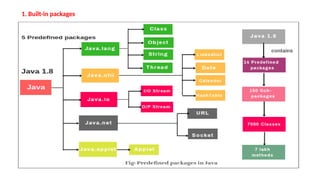
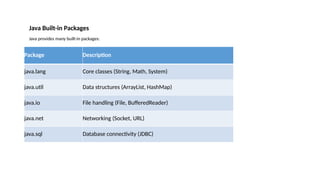
6. Built-in Packages – Predefined in Java API (e.g., java.util, java.io).
7. User-defined Packages – Created by programmers for organizing their classes.
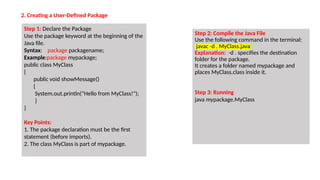
2. Creating aUser-Defined Package
Step 1: Declare the Package
Use the package keyword at the beginning of the
Java file.
Syntax: package packagename;
Example:package mypackage;
public class MyClass
{
public void showMessage()
{
System.out.println("Hello from MyClass!");
}
}
Key Points:
1. The package declaration must be the first
statement (before imports).
2. The class MyClass is part of mypackage.
Step 2: Compile the Java File
Use the following command in the terminal:
javac -d . MyClass.java
Explanation: -d . specifies the destination
folder for the package.
It creates a folder named mypackage and
places MyClass.class inside it.
Step 3: Running
java mypackage.MyClass
48.
Accessing pacakge fromanother package:
1. import package.*;
2. import package.classname;
3. fully qualified name.
1. Using import package.*;
• All the classes and interfaces of this package will be accessiable
• import keyword is used to make the classes and interface of another package acces to the current package.
import mypackage.*; // Importing user-defined package
public class TestPackage
{
public static void main(String[] args)
{
MyClass obj = new MyClass();
obj.showMessage();
}
}
Output:
Hello from MyClass!
49.
2. Using importpackage.classname;
if we import package.classname then only decalred class of this package will be accessible.
import mypackage.MyClass; // Importing user-defined package
public class TestPackage
{
public static void main(String[] args)
{
MyClass obj = new MyClass();
obj.showMessage();
}
}
Output:
Hello from MyClass!
3. Using fully qualified name
If we use fully qualified name then there is no need to import.
public class TestPackage
{
public static void main(String[] args)
{
mypackage.MyClass obj = new mypackage.MyClass();
obj.showMessage();
}
}
Output:
Hello from MyClass!
50.
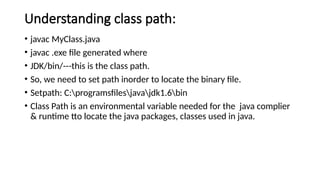
Understanding class path:
•javac MyClass.java
• javac .exe file generated where
• JDK/bin/---this is the class path.
• So, we need to set path inorder to locate the binary file.
• Setpath: C:programsfilesjavajdk1.6bin
• Class Path is an environmental variable needed for the java complier
& runtime tto locate the java packages, classes used in java.
51.
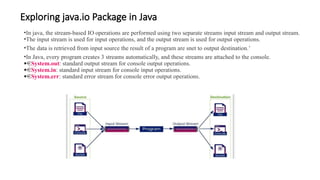
Exploring java.io Packagein Java
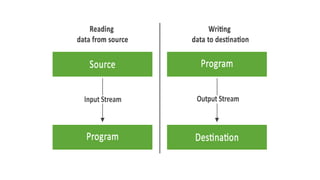
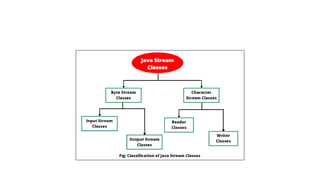
•In java, the stream-based IO operations are performed using two separate streams input stream and output stream.
•The input stream is used for input operations, and the output stream is used for output operations.
•The data is retrieved from input source the result of a program are snet to output destination.’
•In Java, every program creates 3 streams automatically, and these streams are attached to the console.
· System.out: standard output stream for console output operations.
· System.in: standard input stream for console input operations.
· System.err: standard error stream for console error output operations.
55.
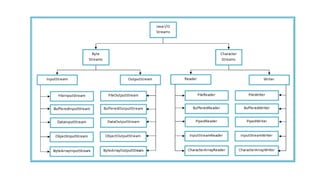
Byte Stream injava
1. In java, the byte stream is an 8 bits carrier, the byte stream in java allows us to transmit 8 bits of data.
2. The java byte stream is defined by two abstract classes, InputStream and OutputStream.
3. The InputStream class used for byte stream based input operations, and
4. the OutputStream class used for byte stream based output operations.
InputStream class
5. int available(): It returns the number of bytes that can be read from the input stream.
6. int read(): It reads the next byte from the input stream.
7. int read(byte[] b): It reads a chunk of bytes from the input stream and store them in its byte array, b.
8. void close(): It closes the input stream and also frees any resources connected with this input stream.
OutputStream class
9. void write(int n):It writes byte(contained in an int) to the output stream.
10. void write(byte[] b): It writes a whole byte array(b) to the output stream.
11. void flush():It flushes the output steam by forcing out buffered bytes to be written out.
12. void close():It closes the output stream and also frees any resources connected with this output stream.
56.
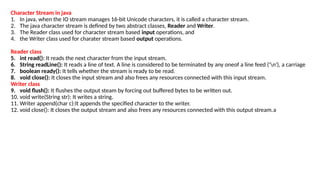
Character Stream injava
1. In java, when the IO stream manages 16-bit Unicode characters, it is called a character stream.
2. The java character stream is defined by two abstract classes, Reader and Writer.
3. The Reader class used for character stream based input operations, and
4. the Writer class used for charater stream based output operations.
Reader class
5. int read(): It reads the next character from the input stream.
6. String readLine(): It reads a line of text. A line is considered to be terminated by any oneof a line feed ('n'), a carriage
7. boolean ready(): It tells whether the stream is ready to be read.
8. void close(): It closes the input stream and also frees any resources connected with this input stream.
Writer class
9. void flush(): It flushes the output steam by forcing out buffered bytes to be written out.
10. void write(String str): It writes a string.
11. Writer append(char c):It appends the specified character to the writer.
12. void close(): It closes the output stream and also frees any resources connected with this output stream.a
58.
Reading data usingBufferedReader
We can use the BufferedReader class to read data from
the console. The BufferedInputStream class needs
InputStreamReaderclass.
The BufferedReader use a method read( ) to read a
value from the console, or file, or socket.
Example 1 - Reading from console
import java.io.*;
public class ReadingDemo
{
public static void main(String[] args) throws IOException
{
InputStreamReader isr = new
InputStreamReader(System.in); BufferedReader in =
new BufferedReader(isr);
String name = "";
System.out.print("Please enter your name: "); name =
in.readLine(); System.out.println("Hello, " + name + "!");
}
}
Example 2 - Reading from a file
import java.io.*;
public class ReadingDemo
{
public static void main(String[] args) throws
IOException
{
Reader in = new FileReader(); try {
char c = (char)input.read();
System.out.println("Data read from a file - '" + c + "'");
}
catch(Exception e) {
}
finally {
}
}
}
![Sample Program to demonstrate inheritance:
class Animal // Parent Class (Super Class)
{
void eat()
{
System.out.println("This animal eats food.");
}
}
class Dog extends Animal // Child Class (Sub Class)
{
void bark()
{
System.out.println("The dog barks.");
}
}
public class InheritanceExample // Main Class
{
public static void main(String[] args)
{
Dog myDog = new Dog();
myDog.eat(); // Inherited method
myDog.bark(); // Own method
}
}
Output:
This animal eats food
The dog barks.](https://image.slidesharecdn.com/unit-2-251224090436-b7243065/85/java-programming-unit-2-notes-Unit-2-pptx-5-320.jpg)
![Types of Inheritance in Java
1) Single Inheritance
One subclass inherits from a single superclass.
class Parent
{
void display()
{
System.out.println("Parent class method.");
}
}
class Child extends Parent
{
void show()
{
System.out.println("Child class method.");
}
}
public class SingleInheritance
{
public static void main(String[] args)
{
Child obj = new Child();
obj.display();
obj.show();
}
}](https://image.slidesharecdn.com/unit-2-251224090436-b7243065/85/java-programming-unit-2-notes-Unit-2-pptx-6-320.jpg)
![3) Multilevel Inheritance
A class inherits from another derived class.
class Grandparent
{
void method1()
{
System.out.println("Grandparent class method.");
}
}
class Parent extends Grandparent
{
void method2()
{
System.out.println("Parent class method.");
}
}
class Child extends Parent
{
void method3()
{
System.out.println("Child class method.");
}
}
public class MultilevelInheritance
{
public static void main(String[] args)
{
Child obj = new Child();
obj.method1();
obj.method2();
obj.method3();
}](https://image.slidesharecdn.com/unit-2-251224090436-b7243065/85/java-programming-unit-2-notes-Unit-2-pptx-7-320.jpg)
![4) Hierarchical Inheritance
One parent class is inherited by multiple child classes.
class Parent
{
void show()
{
System.out.println("Parent class method.");
}
}
class Child1 extends Parent
{
void display1()
{
System.out.println("Child1 class method.");
}
}
public class HierarchicalInheritance
{
public static void main(String[] args)
{
Child1 obj1 = new Child1();
obj1.show();
obj1.display1();
Child2 obj2 = new Child2();
obj2.show();
obj2.display2();
}
}
class Child2 extends Parent
{
void display2()
{
System.out.println("Child2 class method.");
}
}](https://image.slidesharecdn.com/unit-2-251224090436-b7243065/85/java-programming-unit-2-notes-Unit-2-pptx-8-320.jpg)

![2. Specification (Abstract Class & Interface Inheritance):
🔹 Specification defines only behavior without implementation.
🔹 Achieved using abstract classes or interfaces.
interface Animal
{
void makeSound(); // Only defined, no implementation
}
class Dog implements Animal
{
public void makeSound()
{
System.out.println("Dog barks.");
}
}
public class SpecificationExample
{
public static void main(String[] args)
{
Dog myDog = new Dog();
myDog.makeSound();
}
}
The Animal interface provides a specification without defining the behavior.
s](https://image.slidesharecdn.com/unit-2-251224090436-b7243065/85/java-programming-unit-2-notes-Unit-2-pptx-12-320.jpg)
![3. Construction (Building a More Generalized Class)
🔹 Construction inheritance is the reverse of specialization.
🔹 It combines multiple subclasses into a general superclass.
class SavingsAccount
{
double balance;
void deposit(double amount)
{
balance += amount;
}
}
class CurrentAccount
{
double balance;
void withdraw(double amount)
{
balance -= amount;
}
}
used for code reusability & avoiding duplication.
Solution: Create a generalized class BankAccount.
BankAccount is constructed as a generalized class
class BankAccount
{
double balance;
void deposit(double amount)
{
balance += amount;
}
void withdraw(double amount)
{
balance -= amount;
}
}
}
class SavingsAccount extends BankAccount
{
}
class CurrentAccount extends BankAccount
{
}
public class Example
{
public static void main(String[] args)
{
SavingsAccount sa=new SavingsAccount();
sa.deposit(5000);
CurrentAccount ca=new CurrentAccount();
ca.withdraw(2000); }](https://image.slidesharecdn.com/unit-2-251224090436-b7243065/85/java-programming-unit-2-notes-Unit-2-pptx-13-320.jpg)
![4. Extension (Adding New Features to Parent Class)
🔹 Extends the parent class without modifying existing
methods.
🔹 New features are added to the subclass.
class Phone
{
void call()
{
System.out.println("Calling...");
}
}
class Smartphone extends Phone
{
void browseInternet()
{
System.out.println("Browsing the Internet.");
}
}
public class Example
{
public static void main(String[] args)
{
Smartphone s = new Smartphone();
s.call();
s.browseInternet();
}
}
Key Point: Smartphone extends Phone by adding
an internet-browsing feature.](https://image.slidesharecdn.com/unit-2-251224090436-b7243065/85/java-programming-unit-2-notes-Unit-2-pptx-14-320.jpg)
![6. Combination (Using Multiple Inheritance via Interfaces)
🔹 Combines multiple base classes using interfaces.
🔹 Java does not support multiple class inheritance but allows
multiple interface inheritance.
interface Animal
{
void eat();
}
interface Pet
{
void play();
}
class Dog implements Animal, Pet
{
public void eat()
{
System.out.println("The dog eats food.");
}
public void play()
{
System.out.println("The dog plays with its owner.");
}
}
public class CombinationExample
{
public static void main(String[] args)
{
Dog myDog = new Dog();
myDog.eat();
myDog.play();
}
}
Dog combines behaviors from Animal and Pet.](https://image.slidesharecdn.com/unit-2-251224090436-b7243065/85/java-programming-unit-2-notes-Unit-2-pptx-16-320.jpg)
![Constructor Execution Order
• When a subclass object is created, the parent class constructor is executed first, followed by the subclass constructor.
• This ensures that the parent’s attributes are initialized before the child’s attributes.
class Parent
{
Parent()
{
System.out.println("Parent class constructor called.");
}
}
class Child extends Parent
{
Child()
{
System.out.println("Child class constructor called.");
}
}
public class ConstructorInheritance
{
public static void main(String[] args)
{
Child obj = new Child();
}
}
OutPut:
Parent class constructor called.
Child class constructor called.
Explanation: The parent class constructor executes before the child class constructor.](https://image.slidesharecdn.com/unit-2-251224090436-b7243065/85/java-programming-unit-2-notes-Unit-2-pptx-20-320.jpg)
![Example: Calling Parent Class Constructor
class Parent
{
Parent()
{
System.out.println("Parent Constructor Called");
}
}
class Child extends Parent
{
Child()
{
super(); // Calling Parent Constructor
System.out.println("Child Constructor Called");
}
}
public class Example
{
public static void main(String[] args)
{
Child obj = new Child();
}
}
Output:
Parent Constructor Called
Child Constructor Called
Even if super() is not written, Java
implicitly calls the parent constructor.
1. a)Using super() to Call the Parent Class Constructor
• When a subclass object is created, the parent class constructor is executed first.
• The super() keyword is used to explicitly call a parent class constructor.
• If not used explicitly, Java automatically calls the default constructor of the parent class.](https://image.slidesharecdn.com/unit-2-251224090436-b7243065/85/java-programming-unit-2-notes-Unit-2-pptx-22-320.jpg)
![1 b) Using super(parameters) to Call a Parameterized Constructor
If the parent class does not have a default constructor, the subclass
must call a parameterized constructor using super(arguments).
Example:
class Parent
{
Parent(String name)
{
System.out.println("Parent Constructor: " + name);
}
}
class Child extends Parent
{
Child(String name)
{
super(name); // Calling Parent Parameterized
Constructor
System.out.println("Child Constructor: " + name);
}
}
public class Example
{
public static void main(String[] args)
{
Child obj = new Child("John");
}
}
Output:
Parent Constructor: John
Child Constructor: John
If the parent class has only parameterized
constructors, the subclass must explicitly
call one of them.](https://image.slidesharecdn.com/unit-2-251224090436-b7243065/85/java-programming-unit-2-notes-Unit-2-pptx-23-320.jpg)
![Example:
class Parent
{
void show()
{
System.out.println("Parent Method");
}
}
class Child extends Parent
{
void show()
{
super.show(); // Calling Parent Method
System.out.println("Child Method");
}
}
public class SuperMethod {
public static void main(String[] args) {
Child obj = new Child();
obj.show();
}
}
Output:
Parent Method
Child Method
Key Point: super.show() calls the parent class method before
executing the overridden method in the child class.
2. Using super.methodName() to Call Parent Class Methods
If a subclass overrides a parent class method, super.methodName() can be used to call the parent’s version of the
method.](https://image.slidesharecdn.com/unit-2-251224090436-b7243065/85/java-programming-unit-2-notes-Unit-2-pptx-24-320.jpg)
![Example:
class Parent
{
String name = "Parent Variable";
}
class Child extends Parent
{
String name = "Child Variable";
void display()
{
System.out.println("Child Variable: " + name);
System.out.println("Parent Variable: " + super.name);
// Accessing Parent Variable
}
}
public class SuperVariable
{
public static void main(String[] args)
{
Child obj = new Child();
obj.display();
}
}
Output:
Child Variable: Child Variable
Parent Variable: Parent Variable
🔹 Key Point: super.name refers to the parent
class variable, avoiding conflict with the child
class variable.
3. Using super.variableName to Access Parent Class Variables
If a subclass has a variable with the same name as the parent class, the super keyword is used to access
the parent’s version.](https://image.slidesharecdn.com/unit-2-251224090436-b7243065/85/java-programming-unit-2-notes-Unit-2-pptx-25-320.jpg)
![Example: Using final Variable
class Test
{
final int VALUE = 100; // Final variable (constant)
void display()
{
VALUE = 200;
// ❌ ERROR: Cannot modify final variable
System.out.println("Final Variable: " + VALUE);
}
}
public class FinalVariable
{
public static void main(String[] args)
{
Test obj = new Test();
obj.display();
}
}
Output:
Final Variable: 100
Key Points:
final variables must be initialized only once.
Cannot modify the final variable after assignment.
1. final Variable (Constant Values)
1. Once a final variable is assigned, its value cannot be changed.
2. final variables must be initialized at the time of declaration or in the constructor.](https://image.slidesharecdn.com/unit-2-251224090436-b7243065/85/java-programming-unit-2-notes-Unit-2-pptx-27-320.jpg)
![Example: Using final Method
class Parent
{
final void show()
{
System.out.println("Final Method in Parent");
}
}
class Child extends Parent
{
void show()
{
// ❌ ERROR: Cannot override final method
System.out.println("Trying to override final
method");
}
}
public class FinalMethod
{
public static void main(String[] args)
{
Child obj = new Child();
obj.show(); // Calls Parent's final method
}
}
Output:
Final Method in Parent
Key Points:
final methods can be inherited but not overridden.
Trying to override a final method results in a compile-time
error.
2. final Method (Preventing Method Overriding)
A final method cannot be overridden by a subclass.](https://image.slidesharecdn.com/unit-2-251224090436-b7243065/85/java-programming-unit-2-notes-Unit-2-pptx-28-320.jpg)
![Example: Using final Class
final class Parent
{
void show()
{
System.out.println("Final Class Method");
}
}
class Child extends Parent
{
// ❌ ERROR: Cannot extend a final class //
}
public class Example
{
public static void main(String[] args)
{
Parent obj = new Parent();
obj.show();
}
}
3. final Class (Preventing Inheritance)
A final class cannot be extended (inherited).
Final Class Method
🔹 Key Points:
1.final classes cannot be extended (no child
classes).
2.Useful when you want to prevent
modification of a class.](https://image.slidesharecdn.com/unit-2-251224090436-b7243065/85/java-programming-unit-2-notes-Unit-2-pptx-29-320.jpg)
![abstract class Animal
{
// Abstract method (no implementation)
abstract void makeSound();
// Concrete method (has implementation)
void sleep()
{
System.out.println("Sleeping...");
}
}
class Dog extends Animal
{
@Override
void makeSound()
{
System.out.println("Dog barks");
}
}
public class Example
{
public static void main(String[] args)
{
Dog myDog = new Dog();
myDog.makeSound(); // Calls Dog's makeSound()
myDog.sleep(); // Calls Animal's sleep()
}
}
Output:
Dog barks
Sleeping...
abstract void makeSound(); → Must be implemented by
subclasses.
void sleep() → Already implemented, can be used by all
subclasses.
I. Defining an Abstract Class
Use the abstract keyword before the class name.
Abstract methods must be implemented in the subclass.](https://image.slidesharecdn.com/unit-2-251224090436-b7243065/85/java-programming-unit-2-notes-Unit-2-pptx-32-320.jpg)
![1. Defining an Interface
Use the interface keyword.
All methods are implicitly abstract.
Variables are public, static, and final.
interface Animal
{
abstract void makeSound(); // Abstract method (no implementation)
}
class Dog implements Animal
{
@Override
public void makeSound()
{
System.out.println("Dog barks");
}
}
public class Example
{
public static void main(String[] args)
{
Dog myDog = new Dog();
myDog.makeSound();
}
}
Output:
Dog barks](https://image.slidesharecdn.com/unit-2-251224090436-b7243065/85/java-programming-unit-2-notes-Unit-2-pptx-34-320.jpg)
![2. Interface with Variables
All variables in an interface are public, static, and final by default.
interface Vehicle
{
int MAX_SPEED = 120; // Public, static, and final
abstract void run();
}
class Car implements Vehicle
{
@Override
public void run()
{
System.out.println("Car is running at speed: " + MAX_SPEED);
}
}
public class InterfaceWithVariables
{
public static void main(String[] args)
{
Car c1= new Car();
c1.run();
}
}
Output:
Car is running at speed: 120
Key Points:
1. MAX_SPEED is implicitly public, static, and final.
2. Variables cannot be modified (final).](https://image.slidesharecdn.com/unit-2-251224090436-b7243065/85/java-programming-unit-2-notes-Unit-2-pptx-35-320.jpg)
![3. Multiple Interfaces in Java
A class can implement multiple interfaces.
interface Printable
{
void print();
}
interface Showable
{
void show();
}
class Document implements Printable, Showable
{
@Override
public void print()
{
System.out.println("Printing document...");
}
@Override
public void show()
{
System.out.println("Showing document...");
}
}
public class Example
{
public static void main(String[] args)
{
Document doc = new Document();
doc.print();
doc.show();
}
}
Output:
jPrinting document...
Showing document...
Explanation
Document class implements both Printable and Showable
interfaces.
Achieves multiple inheritance, which is not possible with classes.](https://image.slidesharecdn.com/unit-2-251224090436-b7243065/85/java-programming-unit-2-notes-Unit-2-pptx-36-320.jpg)
![// Java Code to demonstrate Object class
class Person
{
String n; //name
public Person(String n) // Constructor
{
this.n = n;
}
// Override toString() for a custom string representation
@Override
public String toString()
{
return "Person{name:'" + n + "'}";
}
public static void main(String[] args)
{
Person p = new Person("HELLO");
System.out.println(p.toString()); // Custom string representation
System.out.println(p.hashCode()); // Default hash code value
}
}](https://image.slidesharecdn.com/unit-2-251224090436-b7243065/85/java-programming-unit-2-notes-Unit-2-pptx-42-320.jpg)

![Accessing pacakge from another package:
1. import package.*;
2. import package.classname;
3. fully qualified name.
1. Using import package.*;
• All the classes and interfaces of this package will be accessiable
• import keyword is used to make the classes and interface of another package acces to the current package.
import mypackage.*; // Importing user-defined package
public class TestPackage
{
public static void main(String[] args)
{
MyClass obj = new MyClass();
obj.showMessage();
}
}
Output:
Hello from MyClass!](https://image.slidesharecdn.com/unit-2-251224090436-b7243065/85/java-programming-unit-2-notes-Unit-2-pptx-48-320.jpg)
![2. Using import package.classname;
if we import package.classname then only decalred class of this package will be accessible.
import mypackage.MyClass; // Importing user-defined package
public class TestPackage
{
public static void main(String[] args)
{
MyClass obj = new MyClass();
obj.showMessage();
}
}
Output:
Hello from MyClass!
3. Using fully qualified name
If we use fully qualified name then there is no need to import.
public class TestPackage
{
public static void main(String[] args)
{
mypackage.MyClass obj = new mypackage.MyClass();
obj.showMessage();
}
}
Output:
Hello from MyClass!](https://image.slidesharecdn.com/unit-2-251224090436-b7243065/85/java-programming-unit-2-notes-Unit-2-pptx-49-320.jpg)
![Byte Stream in java
1. In java, the byte stream is an 8 bits carrier, the byte stream in java allows us to transmit 8 bits of data.
2. The java byte stream is defined by two abstract classes, InputStream and OutputStream.
3. The InputStream class used for byte stream based input operations, and
4. the OutputStream class used for byte stream based output operations.
InputStream class
5. int available(): It returns the number of bytes that can be read from the input stream.
6. int read(): It reads the next byte from the input stream.
7. int read(byte[] b): It reads a chunk of bytes from the input stream and store them in its byte array, b.
8. void close(): It closes the input stream and also frees any resources connected with this input stream.
OutputStream class
9. void write(int n):It writes byte(contained in an int) to the output stream.
10. void write(byte[] b): It writes a whole byte array(b) to the output stream.
11. void flush():It flushes the output steam by forcing out buffered bytes to be written out.
12. void close():It closes the output stream and also frees any resources connected with this output stream.](https://image.slidesharecdn.com/unit-2-251224090436-b7243065/85/java-programming-unit-2-notes-Unit-2-pptx-55-320.jpg)

![Reading data using BufferedReader
We can use the BufferedReader class to read data from
the console. The BufferedInputStream class needs
InputStreamReaderclass.
The BufferedReader use a method read( ) to read a
value from the console, or file, or socket.
Example 1 - Reading from console
import java.io.*;
public class ReadingDemo
{
public static void main(String[] args) throws IOException
{
InputStreamReader isr = new
InputStreamReader(System.in); BufferedReader in =
new BufferedReader(isr);
String name = "";
System.out.print("Please enter your name: "); name =
in.readLine(); System.out.println("Hello, " + name + "!");
}
}
Example 2 - Reading from a file
import java.io.*;
public class ReadingDemo
{
public static void main(String[] args) throws
IOException
{
Reader in = new FileReader(); try {
char c = (char)input.read();
System.out.println("Data read from a file - '" + c + "'");
}
catch(Exception e) {
}
finally {
}
}
}](https://image.slidesharecdn.com/unit-2-251224090436-b7243065/85/java-programming-unit-2-notes-Unit-2-pptx-58-320.jpg)


![[Deck] What's New in Spark-Iceberg Integration via DSV2.pptx](https://cdn.slidesharecdn.com/ss_thumbnails/deckwhatsnewinspark-icebergintegrationviadsv2-260210005337-25955b12-thumbnail.jpg?width=640&height=640&fit=bounds)

