Java EE 6 Security
 in practice with
     GlassFish


                     Markus Eisele & Masoud Kalali
Agenda
• Introduction
• The Top 10 Most Critical Web Application
  Security Risks
• Take Away
Masoud Kalali                                       Markus Eisele
http://kalali.me                             http://blog.eisele.net
http://twitter.com/MasoudKalali         http://twitter.com/myfear
Masoud.Kalali@oracle.com          Markus.eisele@msg-systems.com

software engineer,                                     Java EE 7 EG,
author, blogger,                  architect, husband, father of two,
climber and flute enthusiast          photographer, speaker, writer
Java EE 6 & GlassFish


     glassfish.org
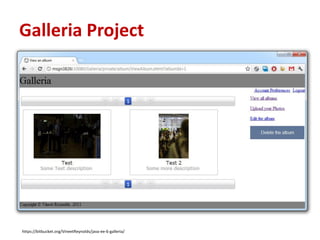
Galleria Project


https://bitbucket.org/VineetReynolds/java-ee-6-galleria/
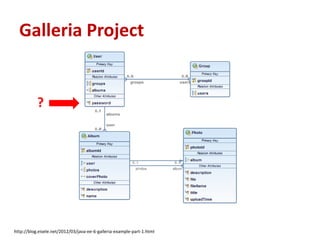
Galleria Project


           ?


http://blog.eisele.net/2012/03/java-ee-6-galleria-example-part-1.html
Galleria and Security
•   Form based authentication
•   JDBCRealm
•   request.login(userId, new String(password));
•   @RolesAllowed({ "RegisteredUsers" })


Enough? State-of-the-Art? Feeling-good-with-it™?
Motivation for this talk
•   Seen a lot
•   Providing a starting point
•   Sharing something
•   Making you aware


• Plus:
  Finding out about “the security state of Galleria”
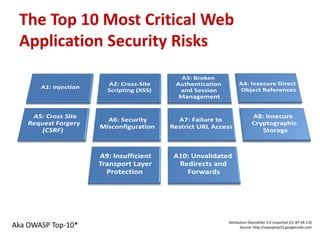
The Top 10 Most Critical Web
 Application Security Risks


                            Attribution-ShareAlike 3.0 Unported (CC BY-SA 3.0)
Aka OWASP Top-10*                  Source: http://owasptop10.googlecode.com
What is OWASP?
• Open Web Application Security Project
• Improving the security of (web) application software
   – Not-for-profit organization since 2001
   – Raise interest in secure development
• Documents
   – Top 10
   – Cheat Sheets
   – Development Guides
• Solutions
   – Enterprise Security API (ESAPI)
   – WebScarab
   – WebGoat
A1 - Injection
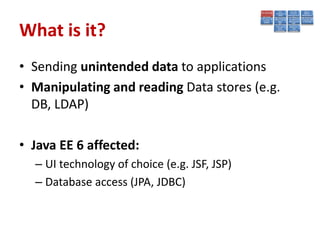
What is it?
• Sending unintended data to applications
• Manipulating and reading Data stores (e.g.
  DB, LDAP)

• Java EE 6 affected:
  – UI technology of choice (e.g. JSF, JSP)
  – Database access (JPA, JDBC)
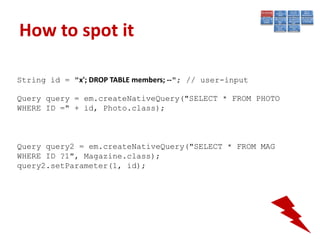
How to spot it

String id = "x'; DROP TABLE members; --"; // user-input

Query query = em.createNativeQuery("SELECT * FROM PHOTO
WHERE ID =" + id, Photo.class);


Query query2 = em.createNativeQuery("SELECT * FROM MAG
WHERE ID ?1", Magazine.class);
query2.setParameter(1, id);
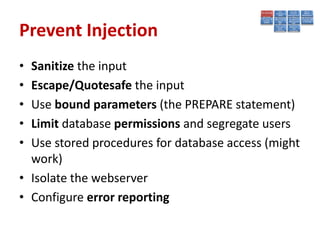
Prevent Injection
• Sanitize the input
• Escape/Quotesafe the input
• Use bound parameters (the PREPARE statement)
• Limit database permissions and segregate users
• Use stored procedures for database access (might
  work)
• Isolate the webserver
• Configure error reporting
A2 - Cross-Site Scripting (XSS)
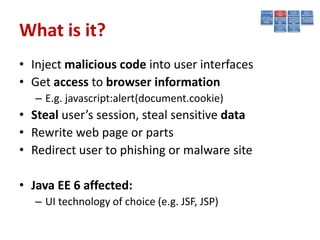
What is it?
• Inject malicious code into user interfaces
• Get access to browser information
   – E.g. javascript:alert(document.cookie)
• Steal user’s session, steal sensitive data
• Rewrite web page or parts
• Redirect user to phishing or malware site

• Java EE 6 affected:
   – UI technology of choice (e.g. JSF, JSP)
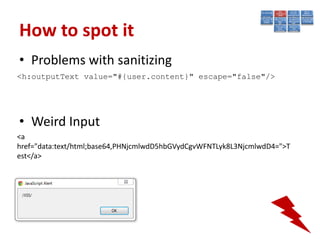
How to spot it
• Problems with sanitizing
<h:outputText value="#{user.content}" escape="false"/>


• Weird Input
<a
href="data:text/html;base64,PHNjcmlwdD5hbGVydCgvWFNTLyk8L3NjcmlwdD4=">T
est</a>
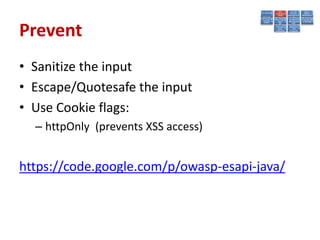
Prevent
• Sanitize the input
• Escape/Quotesafe the input
• Use Cookie flags:
  – httpOnly (prevents XSS access)


https://code.google.com/p/owasp-esapi-java/
A3 - Broken Authentication and
Session Management
What is it?
• Container Security vs. own solution
• Session Binding / Session Renewal
• Passwords
   – Strength (length/complexity)
   – Plain text passwords (http/https)
   – Recovery mechanisms
• Number of factors used for authentication

• Java EE 6 affected:
   – JAAS / JASPIC
   – Filter / PhaseListener
   – Container and Web-App configuration
How to spot it
•   Authentication over http
•   Custom security filter
•   Not using Container Functionality
•   No password strength requirements
•   No HttpSession binding
•   Way of saving Passwords
•   Not testing security
Best Practices
• Go with provided Standard Realms and
  LoginModules whenever possible
• If you need custom ones: Test them extremely
  carefully!
• Use transport layer encryption (TLS/SSL)
• Use Cookie flags:
  – secure (avoid clear text transmission)
A4 – Insecure Direct Object References
What is it?
• Accessing domain objects with their PK
  https://you.com/user/1 => https://you.com/user/21
• Opening opportunities for intruders
• Information hiding on the client
• Parameter value tampering

• Java EE 6 affected:
   – All layers
   – Especially data access
How to spot it
• Data separation for users (tenants)
• Request mode access for data (RUD)
• Query constraints
Best Practices
• Use AccessReferenceMaps
  http://app?file=Report123.xls
  http://app?file=1
  http://app?id=9182374
  http://app?id=7d3J93

• Validate object references
• Use data-driven security
• Always Perform additional data authorization
  on the view
A5 - Cross Site Request Forgery (CSRF)
What is it?
• Basically a capture-replay attack
• Malicious code executes functions on your
  behalf while being authenticated
• Deep links make this easier

• JavaEE 6 affected:
   – UI technology of choice (e.g. JSF, JSP)
How to spot it
•   A “secret Cookie”
•   Only POST requests
•   Wizard like transactions
•   Simple URL rewriting
Best Practices
• Add Unpredictability (tokens)
   – Hidden Field, Single-Use URLs
   – Request or Session Scope
• CSRFPreventionForm (JSF 1.2 & 2)
  http://blog.eisele.net/2011/02/preventing-csrf-with-jsf-20.html

• Use OWASP ESAPI
  http://www.jtmelton.com/2010/05/16/the-owasp-top-ten-and-esapi-part-6-cross-
  site-request-forgery-csrf/
A6 - Security Misconfiguration
What is it?
• Applies to
   –   Operating System
   –   Application Server
   –   Databases
   –   Additional Services

• Includes (beside _many_ others)
   – All security relevant configuration
   – Missing Patches
   – Default accounts
Worst Practices
• Not restricting GlassFish user nor enabling
  security manager
• Network interfaces/sockets access control
• Relaxed File system access control
• Using any defaults like:
   – Passwords: Admin, master password
   – Network interface binding: Listening on 0.0.0.0
   – Certificates: Self signed certificate
• Using a not hardened OS!
Policy Files location
• Global Policy File:
  java.home/jre/lib/security/java.policy
• User Policy File: user.home/.java.policy
• Domain Policy File:
  domain.home/config/server.policy
• Application Policy File:
  domain.home/generated/policy/<app.name>/
  <module.name>/granted.policy
Running GlassFish in a
Secure Environment
• Use the latest version (3.1.2.2)
• Enable secure admin (TLS/https)
• Use password aliasing
• Enable security manager and put forth a
  proper security policy file
• Set correct file system permissions


http://blog.eisele.net/2011/05/securing-your-glassfish-hardening-guide.html
http://docs.oracle.com/cd/E18930_01/html/821-2435/gkscr.html
Review the *.policy files

• Policy files precedence order
• Remove unused grants
• Add extra permissions only to applications or
  modules that require them, not to all
  applications deployed to a domain.
• Document your changes!
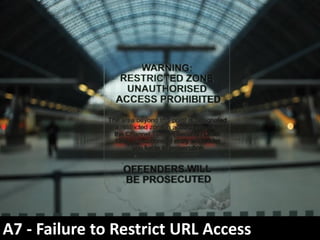
A7 - Failure to Restrict URL Access
What is it?
• Presentation layer access control
• Related to A4 – Insecure Direct Object
  References
Worst Practice
• Using home-grown security features instead
  of container provided ones
• Assuming people wont know some URLs to try
  them
• Assuming no one would misuse the extra
  permission and access they have
Java EE 6
• What you do to prevent, A4 plus:
  – Use Container security (security-constraint)
  – Use programmatic login of Java EE 6 if needed.
  – Properly configure security realms
  – Accurately map roles to principal/groups (auth-
    constraint / security-role-mapping)
  – Only allow supported/required HTTP methods
  – Accurately Categorize the URL patterns and permit
    the relevant roles for each
Best Practices
• Any none public URL should be protected
• Use container authentication/authorization
  features or extend on top of them
• If not enough use proven frameworks/
  products to protect the resources
• If user can get /getpic?id=1x118uf it does not
  mean you should show /getpic?id=1x22ug
A8 - Insecure Cryptographic Storage
What is it?
• Sensitive data kept unprotected
• Sensitive data exposed to wrong persons
• Could be:
  – Passwords
  – Financial/Health care data
  – Credit cards
Worst Practices
• Storing sensitive data unencrypted
• Storing comparative data unhashed
  (passwords/security question answer…)
• Keeping clear text copies of encrypted data
• Not keeping the keys/passwords well guarded
GlassFish
• Protect the keystore
• Protect GlassFish accounts
  – Use aliasing to protect the password and keep the
    master password safe to protect the aliases
• Ignoring digest authentication/hashed
  password storage
Prevention
• Identify sensitive data
• Wisely encrypt sensitive data
   – On every level (application, appserver, db)
   – with the right algorithm and
   – with the right mechanism
• Don’t keep clear text copies
• To decrypt and view clear text should be restricted to
  authorized personnel
• Keep the keys as protected as possible (HSM)
• Keep offsite encrypted backups in addition to on-site
  copies
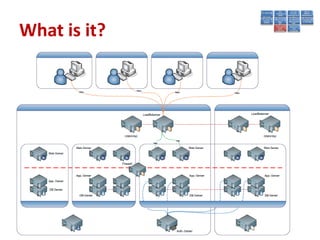
A9- Insufficient Transport Layer Protection
What is it?
Worst Practice
• Using basic/form authentication without SSL
• Not using HTTPS for pages with private
  information
• Using default self signed certificate
• Storing unencrypted cookies
• Not setting cookies to be securely transmitted
  Cookie.setSecure(true)
• Forgetting about the rest of the
  infrastructure
GlassFish
• Properly configure HTTPS listener/s (set the
  right keystore)
• Install the right server certificates to be used
  by SSL listeners
• Properly configure the ORB over SSL listeners
  if needed (set the right keystore)
• Enable auditing under Security and access log
  under HTTP Service
Java EE
• Group the resources in regard to transport
  sensitivity using web-resource-collection
• Use user-data-constraint as widely as you
  need for data integrity and encryption needs
• Ensure that login/logout pages (in case of
  form auth-type) are protected by <transport-
  guarantee>CONFIDENTIAL</transport-
  guarantee>
Best Practice
•   Use TLS on all connections with sensitive data
•   Individually encrypt messages
•   Sign messages before transmission
•   Use standard strong algorithms
•   Use proven mechanisms when sufficient
A10 - Unvalidated Redirects and Forwards
What is it?
• Redirecting to another URL computed by user
  provided parameters
• Forward to another URL computed by user
  provided parameters


http://www.java.net/external?url=http://www.adam-
bien.com/roller/abien/entry/conveniently_transactionally_a
nd_legally_starting
Worst Practices
• Not using a proper access control mechanism
  (e.g container managed and proper security-
  constraint )
• Redirecting to a user provided parameter, e.g
  to an external website
• Not to validate/verify the target with user’s
  access level before doing the forward
Java EE 6
• Don’t use redirect or forward as much as possible
• Accurately verify/validate the target URL before
  forwarding or redirecting
• Redirects are safe when using container managed
  authentication/authorization properly
• Forwards happen without authentication and
  thus requires triple check to prevent
  unauthorized access.
WRAP-UP
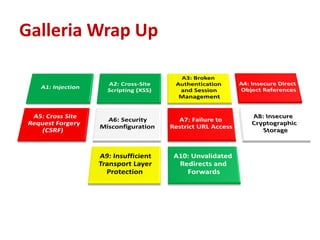
Galleria Wrap Up
Security isn‘t all candy..


                         … but you will love it in the end!
CC picture reference
•   http://www.flickr.com/photos/wallyg/2439494447/sizes/l/in/photostream/
•   http://www.flickr.com/photos/62983199@N04/7188112487/sizes/l/in/photostream/
•   http://www.flickr.com/photos/stuckincustoms/3466470709/sizes/l/in/photostream/
•   http://www.flickr.com/photos/lukemontague/187987292/sizes/l/in/photostream/
•   http://www.flickr.com/photos/082007/7108942911/sizes/l/in/photostream/
•   http://www.flickr.com/photos/ndrwfgg/140411433/sizes/l/in/photostream/
•   http://www.flickr.com/photos/gingerblokey/4130969725/sizes/l/in/photostream/
•   http://www.flickr.com/photos/bpc009/3328427457/sizes/l/in/photostream/
•   http://www.flickr.com/photos/marine_corps/6950409157/sizes/l/in/photostream/
•   http://www.flickr.com/photos/cindy47452/2898015652/sizes/l/in/photostream/

Java EE 6 Security in practice with GlassFish

  • 1.
    Java EE 6Security in practice with GlassFish Markus Eisele & Masoud Kalali
  • 2.
    Agenda • Introduction • TheTop 10 Most Critical Web Application Security Risks • Take Away
  • 3.
    Masoud Kalali Markus Eisele http://kalali.me http://blog.eisele.net http://twitter.com/MasoudKalali http://twitter.com/myfear Masoud.Kalali@oracle.com Markus.eisele@msg-systems.com software engineer, Java EE 7 EG, author, blogger, architect, husband, father of two, climber and flute enthusiast photographer, speaker, writer
  • 4.
    Java EE 6& GlassFish glassfish.org
  • 5.
  • 6.
    Galleria Project ? http://blog.eisele.net/2012/03/java-ee-6-galleria-example-part-1.html
  • 8.
    Galleria and Security • Form based authentication • JDBCRealm • request.login(userId, new String(password)); • @RolesAllowed({ "RegisteredUsers" }) Enough? State-of-the-Art? Feeling-good-with-it™?
  • 9.
    Motivation for thistalk • Seen a lot • Providing a starting point • Sharing something • Making you aware • Plus: Finding out about “the security state of Galleria”
  • 10.
    The Top 10Most Critical Web Application Security Risks Attribution-ShareAlike 3.0 Unported (CC BY-SA 3.0) Aka OWASP Top-10* Source: http://owasptop10.googlecode.com
  • 11.
    What is OWASP? •Open Web Application Security Project • Improving the security of (web) application software – Not-for-profit organization since 2001 – Raise interest in secure development • Documents – Top 10 – Cheat Sheets – Development Guides • Solutions – Enterprise Security API (ESAPI) – WebScarab – WebGoat
  • 12.
  • 13.
    What is it? •Sending unintended data to applications • Manipulating and reading Data stores (e.g. DB, LDAP) • Java EE 6 affected: – UI technology of choice (e.g. JSF, JSP) – Database access (JPA, JDBC)
  • 14.
    How to spotit String id = "x'; DROP TABLE members; --"; // user-input Query query = em.createNativeQuery("SELECT * FROM PHOTO WHERE ID =" + id, Photo.class); Query query2 = em.createNativeQuery("SELECT * FROM MAG WHERE ID ?1", Magazine.class); query2.setParameter(1, id);
  • 15.
    Prevent Injection • Sanitizethe input • Escape/Quotesafe the input • Use bound parameters (the PREPARE statement) • Limit database permissions and segregate users • Use stored procedures for database access (might work) • Isolate the webserver • Configure error reporting
  • 16.
    A2 - Cross-SiteScripting (XSS)
  • 17.
    What is it? •Inject malicious code into user interfaces • Get access to browser information – E.g. javascript:alert(document.cookie) • Steal user’s session, steal sensitive data • Rewrite web page or parts • Redirect user to phishing or malware site • Java EE 6 affected: – UI technology of choice (e.g. JSF, JSP)
  • 18.
    How to spotit • Problems with sanitizing <h:outputText value="#{user.content}" escape="false"/> • Weird Input <a href="data:text/html;base64,PHNjcmlwdD5hbGVydCgvWFNTLyk8L3NjcmlwdD4=">T est</a>
  • 19.
    Prevent • Sanitize theinput • Escape/Quotesafe the input • Use Cookie flags: – httpOnly (prevents XSS access) https://code.google.com/p/owasp-esapi-java/
  • 20.
    A3 - BrokenAuthentication and Session Management
  • 21.
    What is it? •Container Security vs. own solution • Session Binding / Session Renewal • Passwords – Strength (length/complexity) – Plain text passwords (http/https) – Recovery mechanisms • Number of factors used for authentication • Java EE 6 affected: – JAAS / JASPIC – Filter / PhaseListener – Container and Web-App configuration
  • 22.
    How to spotit • Authentication over http • Custom security filter • Not using Container Functionality • No password strength requirements • No HttpSession binding • Way of saving Passwords • Not testing security
  • 23.
    Best Practices • Gowith provided Standard Realms and LoginModules whenever possible • If you need custom ones: Test them extremely carefully! • Use transport layer encryption (TLS/SSL) • Use Cookie flags: – secure (avoid clear text transmission)
  • 24.
    A4 – InsecureDirect Object References
  • 25.
    What is it? •Accessing domain objects with their PK https://you.com/user/1 => https://you.com/user/21 • Opening opportunities for intruders • Information hiding on the client • Parameter value tampering • Java EE 6 affected: – All layers – Especially data access
  • 26.
    How to spotit • Data separation for users (tenants) • Request mode access for data (RUD) • Query constraints
  • 27.
    Best Practices • UseAccessReferenceMaps http://app?file=Report123.xls http://app?file=1 http://app?id=9182374 http://app?id=7d3J93 • Validate object references • Use data-driven security • Always Perform additional data authorization on the view
  • 28.
    A5 - CrossSite Request Forgery (CSRF)
  • 29.
    What is it? •Basically a capture-replay attack • Malicious code executes functions on your behalf while being authenticated • Deep links make this easier • JavaEE 6 affected: – UI technology of choice (e.g. JSF, JSP)
  • 30.
    How to spotit • A “secret Cookie” • Only POST requests • Wizard like transactions • Simple URL rewriting
  • 31.
    Best Practices • AddUnpredictability (tokens) – Hidden Field, Single-Use URLs – Request or Session Scope • CSRFPreventionForm (JSF 1.2 & 2) http://blog.eisele.net/2011/02/preventing-csrf-with-jsf-20.html • Use OWASP ESAPI http://www.jtmelton.com/2010/05/16/the-owasp-top-ten-and-esapi-part-6-cross- site-request-forgery-csrf/
  • 32.
    A6 - SecurityMisconfiguration
  • 33.
    What is it? •Applies to – Operating System – Application Server – Databases – Additional Services • Includes (beside _many_ others) – All security relevant configuration – Missing Patches – Default accounts
  • 34.
    Worst Practices • Notrestricting GlassFish user nor enabling security manager • Network interfaces/sockets access control • Relaxed File system access control • Using any defaults like: – Passwords: Admin, master password – Network interface binding: Listening on 0.0.0.0 – Certificates: Self signed certificate • Using a not hardened OS!
  • 35.
    Policy Files location •Global Policy File: java.home/jre/lib/security/java.policy • User Policy File: user.home/.java.policy • Domain Policy File: domain.home/config/server.policy • Application Policy File: domain.home/generated/policy/<app.name>/ <module.name>/granted.policy
  • 36.
    Running GlassFish ina Secure Environment • Use the latest version (3.1.2.2) • Enable secure admin (TLS/https) • Use password aliasing • Enable security manager and put forth a proper security policy file • Set correct file system permissions http://blog.eisele.net/2011/05/securing-your-glassfish-hardening-guide.html http://docs.oracle.com/cd/E18930_01/html/821-2435/gkscr.html
  • 37.
    Review the *.policyfiles • Policy files precedence order • Remove unused grants • Add extra permissions only to applications or modules that require them, not to all applications deployed to a domain. • Document your changes!
  • 38.
    A7 - Failureto Restrict URL Access
  • 39.
    What is it? •Presentation layer access control • Related to A4 – Insecure Direct Object References
  • 40.
    Worst Practice • Usinghome-grown security features instead of container provided ones • Assuming people wont know some URLs to try them • Assuming no one would misuse the extra permission and access they have
  • 41.
    Java EE 6 •What you do to prevent, A4 plus: – Use Container security (security-constraint) – Use programmatic login of Java EE 6 if needed. – Properly configure security realms – Accurately map roles to principal/groups (auth- constraint / security-role-mapping) – Only allow supported/required HTTP methods – Accurately Categorize the URL patterns and permit the relevant roles for each
  • 42.
    Best Practices • Anynone public URL should be protected • Use container authentication/authorization features or extend on top of them • If not enough use proven frameworks/ products to protect the resources • If user can get /getpic?id=1x118uf it does not mean you should show /getpic?id=1x22ug
  • 43.
    A8 - InsecureCryptographic Storage
  • 44.
    What is it? •Sensitive data kept unprotected • Sensitive data exposed to wrong persons • Could be: – Passwords – Financial/Health care data – Credit cards
  • 45.
    Worst Practices • Storingsensitive data unencrypted • Storing comparative data unhashed (passwords/security question answer…) • Keeping clear text copies of encrypted data • Not keeping the keys/passwords well guarded
  • 46.
    GlassFish • Protect thekeystore • Protect GlassFish accounts – Use aliasing to protect the password and keep the master password safe to protect the aliases • Ignoring digest authentication/hashed password storage
  • 47.
    Prevention • Identify sensitivedata • Wisely encrypt sensitive data – On every level (application, appserver, db) – with the right algorithm and – with the right mechanism • Don’t keep clear text copies • To decrypt and view clear text should be restricted to authorized personnel • Keep the keys as protected as possible (HSM) • Keep offsite encrypted backups in addition to on-site copies
  • 48.
  • 49.
  • 50.
    Worst Practice • Usingbasic/form authentication without SSL • Not using HTTPS for pages with private information • Using default self signed certificate • Storing unencrypted cookies • Not setting cookies to be securely transmitted Cookie.setSecure(true) • Forgetting about the rest of the infrastructure
  • 51.
    GlassFish • Properly configureHTTPS listener/s (set the right keystore) • Install the right server certificates to be used by SSL listeners • Properly configure the ORB over SSL listeners if needed (set the right keystore) • Enable auditing under Security and access log under HTTP Service
  • 52.
    Java EE • Groupthe resources in regard to transport sensitivity using web-resource-collection • Use user-data-constraint as widely as you need for data integrity and encryption needs • Ensure that login/logout pages (in case of form auth-type) are protected by <transport- guarantee>CONFIDENTIAL</transport- guarantee>
  • 53.
    Best Practice • Use TLS on all connections with sensitive data • Individually encrypt messages • Sign messages before transmission • Use standard strong algorithms • Use proven mechanisms when sufficient
  • 54.
    A10 - UnvalidatedRedirects and Forwards
  • 55.
    What is it? •Redirecting to another URL computed by user provided parameters • Forward to another URL computed by user provided parameters http://www.java.net/external?url=http://www.adam- bien.com/roller/abien/entry/conveniently_transactionally_a nd_legally_starting
  • 56.
    Worst Practices • Notusing a proper access control mechanism (e.g container managed and proper security- constraint ) • Redirecting to a user provided parameter, e.g to an external website • Not to validate/verify the target with user’s access level before doing the forward
  • 57.
    Java EE 6 •Don’t use redirect or forward as much as possible • Accurately verify/validate the target URL before forwarding or redirecting • Redirects are safe when using container managed authentication/authorization properly • Forwards happen without authentication and thus requires triple check to prevent unauthorized access.
  • 58.
  • 59.
  • 60.
    Security isn‘t allcandy.. … but you will love it in the end!
  • 61.
    CC picture reference • http://www.flickr.com/photos/wallyg/2439494447/sizes/l/in/photostream/ • http://www.flickr.com/photos/62983199@N04/7188112487/sizes/l/in/photostream/ • http://www.flickr.com/photos/stuckincustoms/3466470709/sizes/l/in/photostream/ • http://www.flickr.com/photos/lukemontague/187987292/sizes/l/in/photostream/ • http://www.flickr.com/photos/082007/7108942911/sizes/l/in/photostream/ • http://www.flickr.com/photos/ndrwfgg/140411433/sizes/l/in/photostream/ • http://www.flickr.com/photos/gingerblokey/4130969725/sizes/l/in/photostream/ • http://www.flickr.com/photos/bpc009/3328427457/sizes/l/in/photostream/ • http://www.flickr.com/photos/marine_corps/6950409157/sizes/l/in/photostream/ • http://www.flickr.com/photos/cindy47452/2898015652/sizes/l/in/photostream/