Scheme of Work
Form 4
PROBLEM-SOLVING AND PROGRAM DESIGN
GENERAL OBJECTIVE
On completion of this Section, students should have an understanding of the fundamental principles and
practices of problem-solving on the computer.

DURATIONSPECIFIC OBJECTIVES
(WK)

CONTENT

outline the steps in problem-solving;
1
WEEK

1
WEEK

Definition ofthe problem; propose and evaluate solutions;
determination of the most efficient solution; develop and represent
algorithm; test and validate the solution.

decompose a simple problem into its
significant parts;

The components are: input; process; storage; output.

distinguish
constants;

Variables as an area of storage whose value can change during
processing; the value of a constant never changes.

between

variables

and

use appropriate data types;

Integers, floating point (real), characters, literals.

explain the concept of algorithms;

Definition of algorithms; Characteristics: finite number of steps,
precise, unambiguous, flow of control from one process to another,
terminate.

identify ways of representing algorithms;

Representation of algorithms as Pseudocode or Flowcharts; Use of
flowchart symbols: input/output, process, decision, directional
arrows. Pseudocode - Use of: Read, Input, Store Write,
Output, Display, If-then; If-then-else;
For
loop; while loop; (questions which require nested conditionals or
nested loops will not be asked).

2
WEEKS

Truth Tables
Use of relational operators: <, >, =, <=, > =, <>. Logical
operators: AND, OR, NOT.
Arithmetic operators: +‚ –‚ *, /.
Simple problems including; average, maximum.

2
WEEKS

develop algorithms to solve

simple

Use ofproblem-solving techniques outlined in Specific Objective 1
problems;

to the solution of simple problems.

PROBLEM-SOLVING AND PROGRAM DESIGN (cont’d)
SPECIFIC OBJECTIVES

1

1

CONTENT

test algorithms for correctness;

Construction and use of trace tables to determine result. Trace
table consists of variable names (identifiers) as column headings
and values in the cells, one row for each pass.

use the top-down design approach to
problem solving.

Application of stepwise refinement to problems with two or
more tasks.
Scheme of Work
Form 4

Term 3 (Continued)

SPECIFIC OBJECTIVES

CONTENT

Students should be able to:
1.

distinguish between low-level and highlevel programming languages;

Low-level language (Machine or Assembly Language); High-level
language (Pascal, C).

2.

distinguish among the different
generations of programming languages;

Characterization of first through to fifth generation languages.

3.

list the sequence of steps associated with
implementing a program;

Create source code, compile, linking, executing, maintain
program.

4.

explain commonly used terms and
concepts in programming;

Testing, debugging, syntax errors, logic errors, run-time errors, dry
run, test data.

5.

declare elementary data types;

Integers, real numbers, characters.

6.

declare variables and constants;

Use of meaningful variable names and constants; assign initial
values.

7.

manipulate data;

Reading from and writing to variables, arithmetic operations.

use control structures;

Conditional branching: if-then, if-then-else, Loops: while, repeat,
for.

manipulate data in a list;

Declare 1-dimensional arrays; reading from and writing to
arrays; traversing arrays; linear search.

1
WEEK

1
WEEK

1
WEEK
8.

9.
1
WEEK
10.

11.

perform checks and tests
programs to verify correctness;
Write documented programs.

on

Testing and debugging techniques.

Importance of documentation; features of internal
documentation (use of mnemonic names, use of
comments, indentation, effective use of white spaces);
external documentation (user manuals).
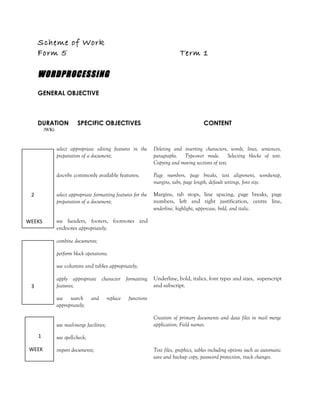
Scheme of Work
Form 5

Term 1

WORDPROCESSING
GENERAL OBJECTIVE

DURATION

SPECIFIC OBJECTIVES

CONTENT

(WK)

select appropriate editing features in the
preparation of a document;

Deleting and inserting characters, words, lines, sentences,
paragraphs. Type-over mode. Selecting blocks of text.
Copying and moving sections of text.

describe commonly available features;

Page numbers, page breaks, text alignment, wordwrap,
margins, tabs, page length, default settings, font size.

2

select appropriate formatting features for the
preparation of a document;

Margins, tab stops, line spacing, page breaks, page
numbers, left and right justification, centre line,
underline, highlight, uppercase, bold, and italic.

WEEKS

use headers, footers, footnotes and
endnotes appropriately;
combine documents;
perform block operations;
use columns and tables appropriately;
apply appropriate character formatting
features;

3

use search
appropriately;

and

use mail-merge facilities;
1
WEEK

replace

Underline, bold, italics, font types and sizes, superscript
and subscript.

functions
Creation of primary documents and data files in mail merge
application; Field names.

use spell-check;
import documents;

Text files, graphics, tables including options such as automatic
save and backup copy, password protection, track changes.
WORDPROCESSING &PRESENTATION (cont’d)
B: PRESENTATION
DURATION

SPECIFIC OBJECTIVES

CONTENT

(WK)
1

WEEK

explain the uses of presentation software;

For example, to enhance public speaking; to deliver lectures; to
present project reports; to effectively present sales or marketing
ideas.

explain the concepts of wizards, templates
and slides;
choose appropriate slide layout;

WEEKS

Slide layout must relate to the type of information being
presented.

apply design templates to slides;

2

Choosing from a list of presentation designs.

use formatting features
enhance presentation;

effectively

to

create slide headers and footers;

2

Changing background colour, font size and other attributes,
such as font colour and bullets.
Use of the slide master to personalize the slides.

create and use speaker notes;
WEEKS

3

apply various types of animation effects to
slides;

Flying, drive-in, camera effects; flash-once, typewriter; laser,
reverse-texts, drop-in effects. Custom animation; timing and
sound effects.

insert graphics and moving pictures into a
slide;
manipulate multiple slides;

WEEKS

Insertion and deletionof slides; use of the slide sorter.

presenta slide show.

Use of slide show tools such as slide navigator, pointer options,
screen attributes.
WEB PAGE DESIGN

Form 5

DURATION

SPECIFIC OBJECTIVES

Term 2
CONTENT

(WK)

2 1.

WEEKS
2.

2 3.

4.

WEEKS

create a simple web page;

Choosing an appropriate design for a page; inserting and
deleting text and graphics; wrap text with image; create
thumbnail image, index page, home page, hyperlink.

create hyperlinks;

Linking to another web page; link to a location within the web
page; link to an email address; link to user-created files.

test the website;

Use of a web browser; verify that all the hyperlinks work
correctly; use a test audience.

publish and maintain a website.

Registering domain names; locate hosting company; the use of
the file transfer protocol (FTP) for uploading files.

SPREADSHEETS
DURATION
(WK)
1

1.

SPECIFIC OBJECTIVES

explain the purpose of a spreadsheet;

Definition of spreadsheet: a spreadsheet is a table consisting of
cells (rows, column locations) that hold accounting or financial
data and simulates the traditional physical spreadsheet; it
captures displays and manipulates data.

use appropriate terminology and notions
commonly associated with spreadsheets;

Row, column, cell, cell address, label, value, formula, function,
worksheet, template, range, title, window, record.

select basic pre-defined systems functions;

Including sum, average, date, maximum, minimum, count, if,
vlookup, rank.

create advanced arithmetic formulae;

Formulae involving addition, subtraction; multiplication;
division; powers; square roots, the use of brackets.

explain the use of common features of

Row/column title locking, relative addressing, absolute

WEEK

1

2.

3.
WEEK
1 4.
5.
WEEK

CONTENT
spreadsheet software;
1 6.
7.
WEEK

8.

1 9.
10.

addressing.

invoke row and column title locking;

Horizontal, vertical, both.

replicate (copy) formulae into other cells;

Relative versus absolute addressing.

manipulate data on a spreadsheet;

Effects of move, copy, delete operations on formulae.

manipulate columns and rows;

Insert and delete columns and rows.

format a spreadsheet;

Numeric data formatting, text formatting, alignment,
borders.

sort a spreadsheet;

Primary field, secondary field, ascending vs. descending
order.

WEEK

11.

1 12.

find a record matching a given

criterion;

Simple criterion, complex criterion, record - find
command.
Bar charts, line graphs, pie charts, graph titles, labels on
axes.

13.

perform charting operations;

14.

select appropriate graphical representation
of data;

15.

manipulate multiple worksheets;

Use of two or more worksheets to solve problems involving
some or all of the functions and operations listed above.

import files.

Graphics, tables.

WEEK

1

16.
WEEK
DATABASE
DURATION

SPECIFIC OBJECTIVES

CONTENT

(WK)

1 1.

explain the concept of a database;

Definition of database: repository of information; collection of
tables that are related to each other.

use terminology commonly associated with
a database;

Database terminology: table (relation), entity, tuple, attribute,
primary key, secondary key, composite key, candidate key,
alternate key, foreign key.

3.

distinguish among terminology associated
with files and databases;

Row (tuple, record), column (attribute, field), key.
Data types: alphanumeric; numeric; data; logical.

4.

outline the advantages and limitations of
databases;

Comparison with files with regards to: Speed; Ad hoc queries;
standardization; present multiple views of the same data.

5.

create a database;

Table structure with at least three data types and
populate with at least twenty-five records. Use of wizard
is prohibited.

modify a table structure;

Adding new fields, deleting fields, changing field definitions.

sort a database;

Arranging data in numeric, alphabetic; or alphanumeric
format. Report generating facilities of the database
package, including use of sorting, grouping statistical and
summary features, for example, count, sum and average.

8.

establish relationships;

Use of joins, merge tables/files.

9.

query a database using multiple search
conditions;

Using more than one criterion; use of select, calculated fields.

10.

determine the results of a search on a
database given multiple conditions;

Two or more fields involving the use of relational and
logical operators.

11.

generate reports to the screen, printer and
files.

Report generating facilities of the database package, including
use of sorting, grouping, statistical and summary features, for
example, count, sum and average.

2.
WEEK

1

WEEK

6.

1 7.

WEEK

1

WEEK

It scheme of_work_f4_f5

  • 1.
    Scheme of Work Form4 PROBLEM-SOLVING AND PROGRAM DESIGN GENERAL OBJECTIVE On completion of this Section, students should have an understanding of the fundamental principles and practices of problem-solving on the computer. DURATIONSPECIFIC OBJECTIVES (WK) CONTENT outline the steps in problem-solving; 1 WEEK 1 WEEK Definition ofthe problem; propose and evaluate solutions; determination of the most efficient solution; develop and represent algorithm; test and validate the solution. decompose a simple problem into its significant parts; The components are: input; process; storage; output. distinguish constants; Variables as an area of storage whose value can change during processing; the value of a constant never changes. between variables and use appropriate data types; Integers, floating point (real), characters, literals. explain the concept of algorithms; Definition of algorithms; Characteristics: finite number of steps, precise, unambiguous, flow of control from one process to another, terminate. identify ways of representing algorithms; Representation of algorithms as Pseudocode or Flowcharts; Use of flowchart symbols: input/output, process, decision, directional arrows. Pseudocode - Use of: Read, Input, Store Write, Output, Display, If-then; If-then-else; For loop; while loop; (questions which require nested conditionals or nested loops will not be asked). 2 WEEKS Truth Tables Use of relational operators: <, >, =, <=, > =, <>. Logical operators: AND, OR, NOT. Arithmetic operators: +‚ –‚ *, /. Simple problems including; average, maximum. 2 WEEKS develop algorithms to solve simple Use ofproblem-solving techniques outlined in Specific Objective 1
  • 2.
    problems; to the solutionof simple problems. PROBLEM-SOLVING AND PROGRAM DESIGN (cont’d) SPECIFIC OBJECTIVES 1 1 CONTENT test algorithms for correctness; Construction and use of trace tables to determine result. Trace table consists of variable names (identifiers) as column headings and values in the cells, one row for each pass. use the top-down design approach to problem solving. Application of stepwise refinement to problems with two or more tasks.
  • 3.
    Scheme of Work Form4 Term 3 (Continued) SPECIFIC OBJECTIVES CONTENT Students should be able to: 1. distinguish between low-level and highlevel programming languages; Low-level language (Machine or Assembly Language); High-level language (Pascal, C). 2. distinguish among the different generations of programming languages; Characterization of first through to fifth generation languages. 3. list the sequence of steps associated with implementing a program; Create source code, compile, linking, executing, maintain program. 4. explain commonly used terms and concepts in programming; Testing, debugging, syntax errors, logic errors, run-time errors, dry run, test data. 5. declare elementary data types; Integers, real numbers, characters. 6. declare variables and constants; Use of meaningful variable names and constants; assign initial values. 7. manipulate data; Reading from and writing to variables, arithmetic operations. use control structures; Conditional branching: if-then, if-then-else, Loops: while, repeat, for. manipulate data in a list; Declare 1-dimensional arrays; reading from and writing to arrays; traversing arrays; linear search. 1 WEEK 1 WEEK 1 WEEK 8. 9. 1 WEEK 10. 11. perform checks and tests programs to verify correctness; Write documented programs. on Testing and debugging techniques. Importance of documentation; features of internal documentation (use of mnemonic names, use of comments, indentation, effective use of white spaces); external documentation (user manuals).
  • 4.
    Scheme of Work Form5 Term 1 WORDPROCESSING GENERAL OBJECTIVE DURATION SPECIFIC OBJECTIVES CONTENT (WK) select appropriate editing features in the preparation of a document; Deleting and inserting characters, words, lines, sentences, paragraphs. Type-over mode. Selecting blocks of text. Copying and moving sections of text. describe commonly available features; Page numbers, page breaks, text alignment, wordwrap, margins, tabs, page length, default settings, font size. 2 select appropriate formatting features for the preparation of a document; Margins, tab stops, line spacing, page breaks, page numbers, left and right justification, centre line, underline, highlight, uppercase, bold, and italic. WEEKS use headers, footers, footnotes and endnotes appropriately; combine documents; perform block operations; use columns and tables appropriately; apply appropriate character formatting features; 3 use search appropriately; and use mail-merge facilities; 1 WEEK replace Underline, bold, italics, font types and sizes, superscript and subscript. functions Creation of primary documents and data files in mail merge application; Field names. use spell-check; import documents; Text files, graphics, tables including options such as automatic save and backup copy, password protection, track changes.
  • 5.
    WORDPROCESSING &PRESENTATION (cont’d) B:PRESENTATION DURATION SPECIFIC OBJECTIVES CONTENT (WK) 1 WEEK explain the uses of presentation software; For example, to enhance public speaking; to deliver lectures; to present project reports; to effectively present sales or marketing ideas. explain the concepts of wizards, templates and slides; choose appropriate slide layout; WEEKS Slide layout must relate to the type of information being presented. apply design templates to slides; 2 Choosing from a list of presentation designs. use formatting features enhance presentation; effectively to create slide headers and footers; 2 Changing background colour, font size and other attributes, such as font colour and bullets. Use of the slide master to personalize the slides. create and use speaker notes; WEEKS 3 apply various types of animation effects to slides; Flying, drive-in, camera effects; flash-once, typewriter; laser, reverse-texts, drop-in effects. Custom animation; timing and sound effects. insert graphics and moving pictures into a slide; manipulate multiple slides; WEEKS Insertion and deletionof slides; use of the slide sorter. presenta slide show. Use of slide show tools such as slide navigator, pointer options, screen attributes.
  • 6.
    WEB PAGE DESIGN Form5 DURATION SPECIFIC OBJECTIVES Term 2 CONTENT (WK) 2 1. WEEKS 2. 2 3. 4. WEEKS create a simple web page; Choosing an appropriate design for a page; inserting and deleting text and graphics; wrap text with image; create thumbnail image, index page, home page, hyperlink. create hyperlinks; Linking to another web page; link to a location within the web page; link to an email address; link to user-created files. test the website; Use of a web browser; verify that all the hyperlinks work correctly; use a test audience. publish and maintain a website. Registering domain names; locate hosting company; the use of the file transfer protocol (FTP) for uploading files. SPREADSHEETS DURATION (WK) 1 1. SPECIFIC OBJECTIVES explain the purpose of a spreadsheet; Definition of spreadsheet: a spreadsheet is a table consisting of cells (rows, column locations) that hold accounting or financial data and simulates the traditional physical spreadsheet; it captures displays and manipulates data. use appropriate terminology and notions commonly associated with spreadsheets; Row, column, cell, cell address, label, value, formula, function, worksheet, template, range, title, window, record. select basic pre-defined systems functions; Including sum, average, date, maximum, minimum, count, if, vlookup, rank. create advanced arithmetic formulae; Formulae involving addition, subtraction; multiplication; division; powers; square roots, the use of brackets. explain the use of common features of Row/column title locking, relative addressing, absolute WEEK 1 2. 3. WEEK 1 4. 5. WEEK CONTENT
  • 7.
    spreadsheet software; 1 6. 7. WEEK 8. 19. 10. addressing. invoke row and column title locking; Horizontal, vertical, both. replicate (copy) formulae into other cells; Relative versus absolute addressing. manipulate data on a spreadsheet; Effects of move, copy, delete operations on formulae. manipulate columns and rows; Insert and delete columns and rows. format a spreadsheet; Numeric data formatting, text formatting, alignment, borders. sort a spreadsheet; Primary field, secondary field, ascending vs. descending order. WEEK 11. 1 12. find a record matching a given criterion; Simple criterion, complex criterion, record - find command. Bar charts, line graphs, pie charts, graph titles, labels on axes. 13. perform charting operations; 14. select appropriate graphical representation of data; 15. manipulate multiple worksheets; Use of two or more worksheets to solve problems involving some or all of the functions and operations listed above. import files. Graphics, tables. WEEK 1 16. WEEK
  • 8.
    DATABASE DURATION SPECIFIC OBJECTIVES CONTENT (WK) 1 1. explainthe concept of a database; Definition of database: repository of information; collection of tables that are related to each other. use terminology commonly associated with a database; Database terminology: table (relation), entity, tuple, attribute, primary key, secondary key, composite key, candidate key, alternate key, foreign key. 3. distinguish among terminology associated with files and databases; Row (tuple, record), column (attribute, field), key. Data types: alphanumeric; numeric; data; logical. 4. outline the advantages and limitations of databases; Comparison with files with regards to: Speed; Ad hoc queries; standardization; present multiple views of the same data. 5. create a database; Table structure with at least three data types and populate with at least twenty-five records. Use of wizard is prohibited. modify a table structure; Adding new fields, deleting fields, changing field definitions. sort a database; Arranging data in numeric, alphabetic; or alphanumeric format. Report generating facilities of the database package, including use of sorting, grouping statistical and summary features, for example, count, sum and average. 8. establish relationships; Use of joins, merge tables/files. 9. query a database using multiple search conditions; Using more than one criterion; use of select, calculated fields. 10. determine the results of a search on a database given multiple conditions; Two or more fields involving the use of relational and logical operators. 11. generate reports to the screen, printer and files. Report generating facilities of the database package, including use of sorting, grouping, statistical and summary features, for example, count, sum and average. 2. WEEK 1 WEEK 6. 1 7. WEEK 1 WEEK