A brief overview of our
SharePoint HR System
www.isritechnologies.com
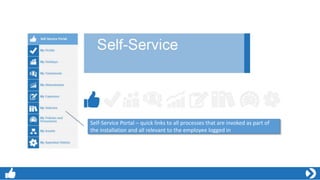
Self-Service Portal – quick links to all processes that are invoked as part of
the installation and all relevant to the employee logged in
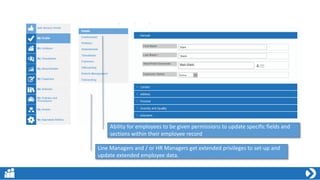
Ability for employees to be given permissions to update specific fields and
sections within their employee record
Line Managers and / or HR Managers get extended privileges to set-up and
update extended employee data.
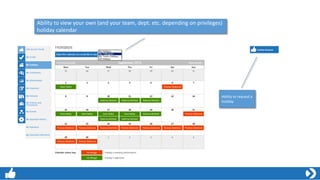
Ability to view your own (and your team, dept. etc. depending on privileges)
holiday calendar
Ability to request a
holiday
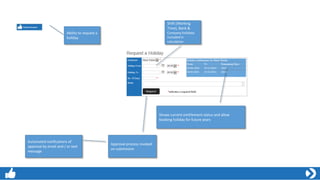
Ability to request a
holiday
Shows current entitlement status and allow
booking holiday for future years
Approval process invoked
on submission
Shift (Working
Time), Bank &
Company holidays
included in
calculation
Automated notifications of
approval by email and / or text
message
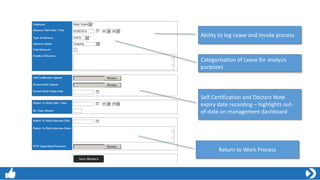
Ability to log Leave and invoke process
Self Certification and Doctors Note
expiry date recording – highlights out-
of-date on management dashboard
Categorisation of Leave for analysis
purposes
Return to Work Process
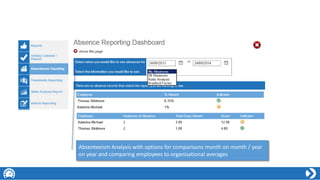
Absenteeism Analysis with options for comparisons month on month / year
on year and comparing employees to organisational averages
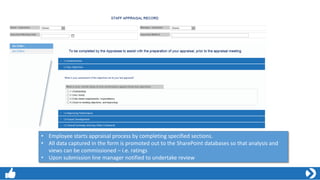
• Employee starts appraisal process by completing specified sections.
• All data captured in the form is promoted out to the SharePoint databases so that analysis and
views can be commissioned – i.e. ratings
• Upon submission line manager notified to undertake review
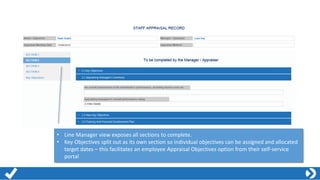
• Line Manager view exposes all sections to complete.
• Key Objectives split out as its own section so individual objectives can be assigned and allocated
target dates – this facilitates an employee Appraisal Objectives option from their self-service
portal
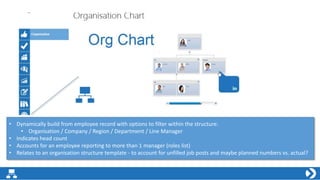
• Dynamically build from employee record with options to filter within the structure:
• Organisation / Company / Region / Department / Line Manager
• Indicates head count
• Accounts for an employee reporting to more than 1 manager (roles list)
• Relates to an organisation structure template - to account for unfilled job posts and maybe planned numbers vs. actual?

isritechnologies

  • 1.
    A brief overviewof our SharePoint HR System www.isritechnologies.com
  • 2.
    Self-Service Portal –quick links to all processes that are invoked as part of the installation and all relevant to the employee logged in
  • 3.
    Ability for employeesto be given permissions to update specific fields and sections within their employee record Line Managers and / or HR Managers get extended privileges to set-up and update extended employee data.
  • 4.
    Ability to viewyour own (and your team, dept. etc. depending on privileges) holiday calendar Ability to request a holiday
  • 5.
    Ability to requesta holiday Shows current entitlement status and allow booking holiday for future years Approval process invoked on submission Shift (Working Time), Bank & Company holidays included in calculation Automated notifications of approval by email and / or text message
  • 6.
    Ability to logLeave and invoke process Self Certification and Doctors Note expiry date recording – highlights out- of-date on management dashboard Categorisation of Leave for analysis purposes Return to Work Process
  • 7.
    Absenteeism Analysis withoptions for comparisons month on month / year on year and comparing employees to organisational averages
  • 8.
    • Employee startsappraisal process by completing specified sections. • All data captured in the form is promoted out to the SharePoint databases so that analysis and views can be commissioned – i.e. ratings • Upon submission line manager notified to undertake review
  • 9.
    • Line Managerview exposes all sections to complete. • Key Objectives split out as its own section so individual objectives can be assigned and allocated target dates – this facilitates an employee Appraisal Objectives option from their self-service portal
  • 10.
    • Dynamically buildfrom employee record with options to filter within the structure: • Organisation / Company / Region / Department / Line Manager • Indicates head count • Accounts for an employee reporting to more than 1 manager (roles list) • Relates to an organisation structure template - to account for unfilled job posts and maybe planned numbers vs. actual?