Is Your
Website ADA
Compliant?
(and tips for those pesky PDFs!) Michael Rivera
Account Executive
Streamline
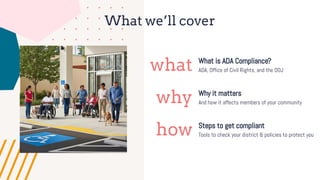
What we’ll cover
what
why
how
What is ADA Compliance?
Why it matters
Steps to get compliant
ADA, Office of Civil Rights, and the DOJ
And how it affects members of your community
Tools to check your district & policies to protect you
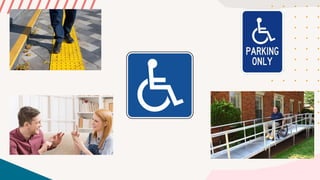
What comes to
mind when you
hear the word
“accessibility?”
Pop quiz!
Why is accessibility important?
Social responsibility: providing accessible services for individuals with disabilities
is the right thing to do!
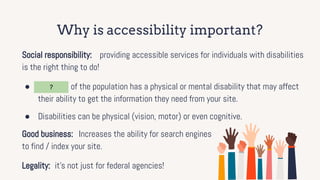
● 15 - 20% of the population has a physical or mental disability that may affect
their ability to get the information they need from your site.
● Disabilities can be physical (vision, motor) or even cognitive.
Good business: Increases the ability for search engines
to find / index your site.
Legality: it’s not just for federal agencies!
?
Why is accessibility important?
Social responsibility: providing accessible services for individuals with disabilities
is the right thing to do!
● 15 - 20% of the population has a physical or mental disability that may affect
their ability to get the information they need from your site.
● Disabilities can be physical (vision, motor) or even cognitive.
Good business: Increases the ability for search engines
to find / index your site.
Legality: it’s not just for federal agencies!
How does someone with a disability:
1. Read about an evacuation notice or service outage?
2. Report an issue with a playground?
3. Request a book rental?
4. Contact the district?
5. Check the tax rates?
6. See how to dispose of hazardous materials?
7. Read your most recent agenda?
8. Make a donation to your volunteer department?
What does
“accessible”
mean?
What does “accessible” mean?
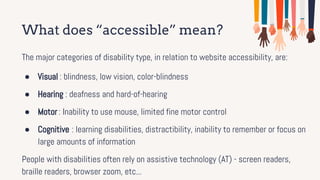
The major categories of disability type, in relation to website accessibility, are:
● Visual : blindness, low vision, color-blindness
● Hearing : deafness and hard-of-hearing
● Motor : Inability to use mouse, limited fine motor control
● Cognitive : learning disabilities, distractibility, inability to remember or focus on
large amounts of information
People with disabilities often rely on assistive technology (AT) - screen readers,
braille readers, browser zoom, etc...
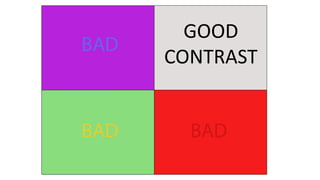
GOOD
CONTRAST
4
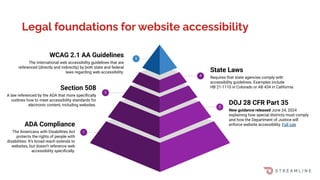
WCAG 2.1 AA Guidelines
The international web accessibility guidelines that are
referenced (directly and indirectly) by both state and federal
laws regarding web accessibility.
2
DOJ 28 CFR Part 35
New guidance released June 24, 2024
explaining how special districts must comply
and how the Department of Justice will
enforce website accessibility. Full rule
State Laws
Requires that state agencies comply with
accessibility guidelines. Examples include
HB 21-1110 in Colorado or AB 434 in California.
3
Section 508
A law referenced by the ADA that more specifically
outlines how to meet accessibility standards for
electronic content, including websites.
Legal foundations for website accessibility
ADA Compliance
The Americans with Disabilities Act
protects the rights of people with
disabilities. It’s broad reach extends to
websites, but doesn’t reference web
accessibility specifically.
1
5
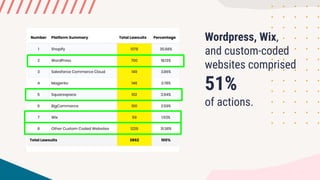
Wordpress, Wix,
and custom-coded
websites comprised
51%
of actions.
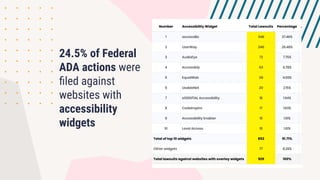
24.5% of Federal
ADA actions were
filed against
websites with
accessibility
widgets
5 Steps to be Compliant
No need to fear!
Accessibility is achievable.
Understand What is Required
1
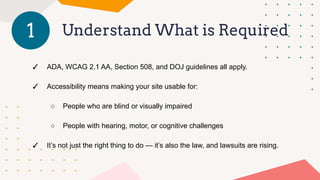
✓ ADA, WCAG 2.1 AA, Section 508, and DOJ guidelines all apply.
✓ Accessibility means making your site usable for:
○ People who are blind or visually impaired
○ People with hearing, motor, or cognitive challenges
✓ It’s not just the right thing to do — it’s also the law, and lawsuits are rising.
Set up Your Compliance
Foundation
2
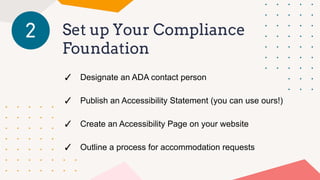
✓ Designate an ADA contact person
✓ Publish an Accessibility Statement (you can use ours!)
✓ Create an Accessibility Page on your website
✓ Outline a process for accommodation requests
Clean up Your Content
3
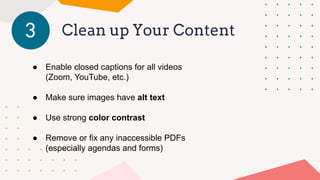
● Enable closed captions for all videos
(Zoom, YouTube, etc.)
● Make sure images have alt text
● Use strong color contrast
● Remove or fix any inaccessible PDFs
(especially agendas and forms)
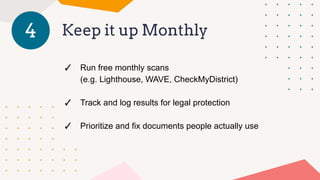
Keep it up Monthly
4
✓ Run free monthly scans
(e.g. Lighthouse, WAVE, CheckMyDistrict)
✓ Track and log results for legal protection
✓ Prioritize and fix documents people actually use
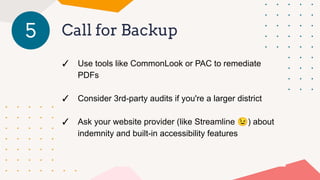
Call for Backup
5
✓ Use tools like CommonLook or PAC to remediate
PDFs
✓ Consider 3rd-party audits if you're a larger district
✓ Ask your website provider (like Streamline 😉) about
indemnity and built-in accessibility features
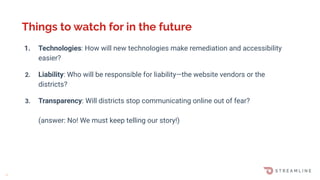
1. Technologies: How will new technologies make remediation and accessibility
easier?
2. Liability: Who will be responsible for liability—the website vendors or the
districts?
3. Transparency: Will districts stop communicating online out of fear?
(answer: No! We must keep telling our story!)
Things to watch for in the future
M
Contact us!
We’re here to help! Michael Rivera
michael.rivera@getstreamline.com

Is Your Website ADA Compliant? Michael Rivera

  • 1.
    Is Your Website ADA Compliant? (andtips for those pesky PDFs!) Michael Rivera Account Executive Streamline
  • 2.
    What we’ll cover what why how Whatis ADA Compliance? Why it matters Steps to get compliant ADA, Office of Civil Rights, and the DOJ And how it affects members of your community Tools to check your district & policies to protect you
  • 3.
    What comes to mindwhen you hear the word “accessibility?”
  • 5.
  • 6.
    Why is accessibilityimportant? Social responsibility: providing accessible services for individuals with disabilities is the right thing to do! ● 15 - 20% of the population has a physical or mental disability that may affect their ability to get the information they need from your site. ● Disabilities can be physical (vision, motor) or even cognitive. Good business: Increases the ability for search engines to find / index your site. Legality: it’s not just for federal agencies! ?
  • 7.
    Why is accessibilityimportant? Social responsibility: providing accessible services for individuals with disabilities is the right thing to do! ● 15 - 20% of the population has a physical or mental disability that may affect their ability to get the information they need from your site. ● Disabilities can be physical (vision, motor) or even cognitive. Good business: Increases the ability for search engines to find / index your site. Legality: it’s not just for federal agencies!
  • 8.
    How does someonewith a disability: 1. Read about an evacuation notice or service outage? 2. Report an issue with a playground? 3. Request a book rental? 4. Contact the district? 5. Check the tax rates? 6. See how to dispose of hazardous materials? 7. Read your most recent agenda? 8. Make a donation to your volunteer department?
  • 9.
  • 10.
    What does “accessible”mean? The major categories of disability type, in relation to website accessibility, are: ● Visual : blindness, low vision, color-blindness ● Hearing : deafness and hard-of-hearing ● Motor : Inability to use mouse, limited fine motor control ● Cognitive : learning disabilities, distractibility, inability to remember or focus on large amounts of information People with disabilities often rely on assistive technology (AT) - screen readers, braille readers, browser zoom, etc...
  • 11.
  • 12.
    4 WCAG 2.1 AAGuidelines The international web accessibility guidelines that are referenced (directly and indirectly) by both state and federal laws regarding web accessibility. 2 DOJ 28 CFR Part 35 New guidance released June 24, 2024 explaining how special districts must comply and how the Department of Justice will enforce website accessibility. Full rule State Laws Requires that state agencies comply with accessibility guidelines. Examples include HB 21-1110 in Colorado or AB 434 in California. 3 Section 508 A law referenced by the ADA that more specifically outlines how to meet accessibility standards for electronic content, including websites. Legal foundations for website accessibility ADA Compliance The Americans with Disabilities Act protects the rights of people with disabilities. It’s broad reach extends to websites, but doesn’t reference web accessibility specifically. 1 5
  • 13.
  • 14.
    24.5% of Federal ADAactions were filed against websites with accessibility widgets
  • 15.
    5 Steps tobe Compliant No need to fear! Accessibility is achievable.
  • 16.
    Understand What isRequired 1 ✓ ADA, WCAG 2.1 AA, Section 508, and DOJ guidelines all apply. ✓ Accessibility means making your site usable for: ○ People who are blind or visually impaired ○ People with hearing, motor, or cognitive challenges ✓ It’s not just the right thing to do — it’s also the law, and lawsuits are rising.
  • 17.
    Set up YourCompliance Foundation 2 ✓ Designate an ADA contact person ✓ Publish an Accessibility Statement (you can use ours!) ✓ Create an Accessibility Page on your website ✓ Outline a process for accommodation requests
  • 18.
    Clean up YourContent 3 ● Enable closed captions for all videos (Zoom, YouTube, etc.) ● Make sure images have alt text ● Use strong color contrast ● Remove or fix any inaccessible PDFs (especially agendas and forms)
  • 19.
    Keep it upMonthly 4 ✓ Run free monthly scans (e.g. Lighthouse, WAVE, CheckMyDistrict) ✓ Track and log results for legal protection ✓ Prioritize and fix documents people actually use
  • 20.
    Call for Backup 5 ✓Use tools like CommonLook or PAC to remediate PDFs ✓ Consider 3rd-party audits if you're a larger district ✓ Ask your website provider (like Streamline 😉) about indemnity and built-in accessibility features
  • 21.
    1. Technologies: Howwill new technologies make remediation and accessibility easier? 2. Liability: Who will be responsible for liability—the website vendors or the districts? 3. Transparency: Will districts stop communicating online out of fear? (answer: No! We must keep telling our story!) Things to watch for in the future M
  • 22.
    Contact us! We’re hereto help! Michael Rivera michael.rivera@getstreamline.com