iPad Self Service SolutioniPad Self Service Solution
Solution storyboard & walkthrough
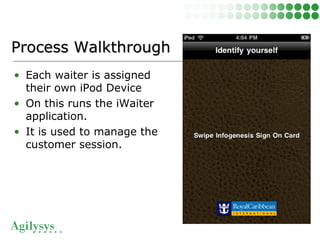
• Each waiter is assigned
their own iPod Device
• On this runs the iWaiter
application.
• It is used to manage the
customer session.
Process WalkthroughProcess Walkthrough
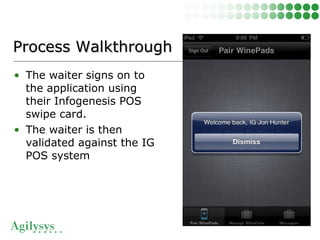
• The waiter signs on to
the application using
their Infogenesis POS
swipe card.
• The waiter is then
validated against the IG
POS system
Process WalkthroughProcess Walkthrough
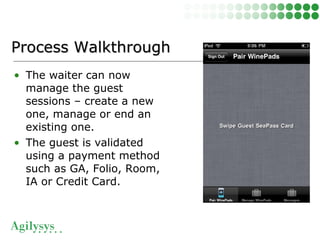
• The waiter can now
manage the guest
sessions – create a new
one, manage or end an
existing one.
• The guest is validated
using a payment method
such as GA, Folio, Room,
IA or Credit Card.
Process WalkthroughProcess Walkthrough
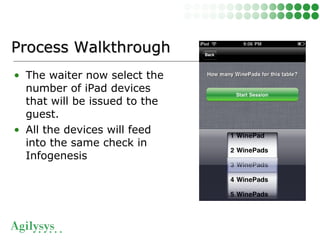
• The waiter now select the
number of iPad devices
that will be issued to the
guest.
• All the devices will feed
into the same check in
Infogenesis
Process WalkthroughProcess Walkthrough
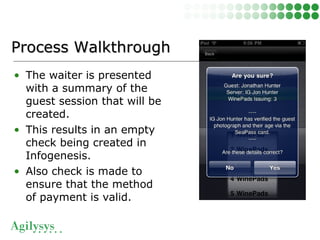
• The waiter is presented
with a summary of the
guest session that will be
created.
• This results in an empty
check being created in
Infogenesis.
• Also check is made to
ensure that the method
of payment is valid.
Process WalkthroughProcess Walkthrough
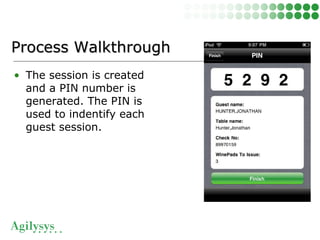
• The session is created
and a PIN number is
generated. The PIN is
used to indentify each
guest session.
Process WalkthroughProcess Walkthrough
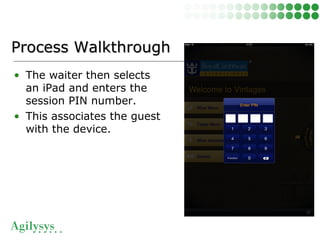
• The waiter then selects
an iPad and enters the
session PIN number.
• This associates the guest
with the device.
Process WalkthroughProcess Walkthrough
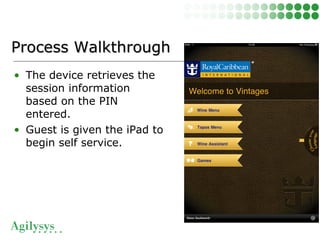
• The device retrieves the
session information
based on the PIN
entered.
• Guest is given the iPad to
begin self service.
Process WalkthroughProcess Walkthrough
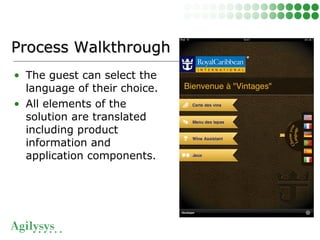
• The guest can select the
language of their choice.
• All elements of the
solution are translated
including product
information and
application components.
Process WalkthroughProcess Walkthrough
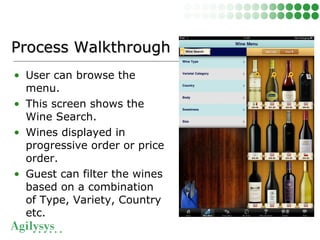
• User can browse the
menu.
• This screen shows the
Wine Search.
• Wines displayed in
progressive order or price
order.
• Guest can filter the wines
based on a combination
of Type, Variety, Country
etc.
Process WalkthroughProcess Walkthrough
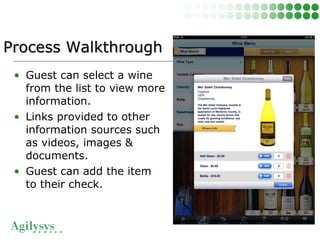
• Guest can select a wine
from the list to view more
information.
• Links provided to other
information sources such
as videos, images &
documents.
• Guest can add the item
to their check.
Process WalkthroughProcess Walkthrough
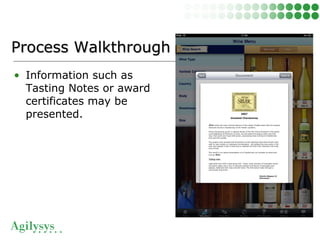
• Information such as
Tasting Notes or award
certificates may be
presented.
Process WalkthroughProcess Walkthrough
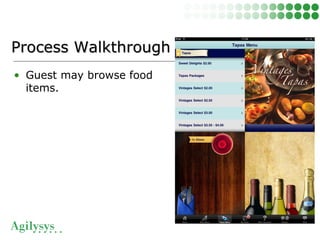
• Guest may browse food
items.
Process WalkthroughProcess Walkthrough
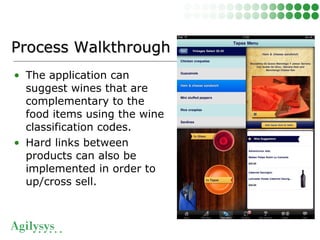
• The application can
suggest wines that are
complementary to the
food items using the wine
classification codes.
• Hard links between
products can also be
implemented in order to
up/cross sell.
Process WalkthroughProcess Walkthrough
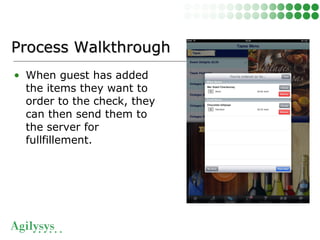
• When guest has added
the items they want to
order to the check, they
can then send them to
the server for
fullfillement.
Process WalkthroughProcess Walkthrough
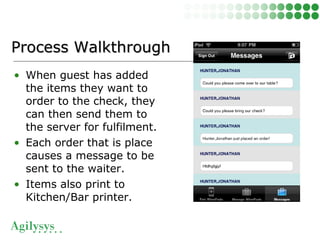
• When guest has added
the items they want to
order to the check, they
can then send them to
the server for fulfilment.
• Each order that is place
causes a message to be
sent to the waiter.
• Items also print to
Kitchen/Bar printer.
Process WalkthroughProcess Walkthrough
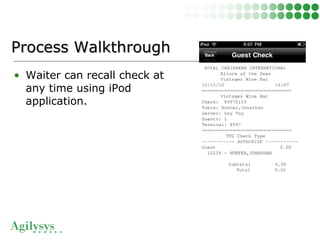
• Waiter can recall check at
any time using iPod
application.
Process WalkthroughProcess Walkthrough
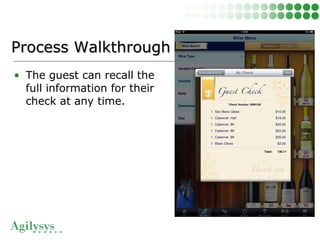
• The guest can recall the
full information for their
check at any time.
Process WalkthroughProcess Walkthrough
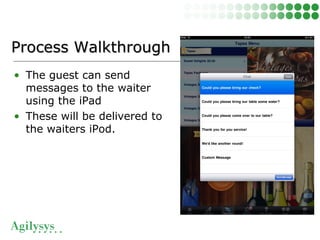
• The guest can send
messages to the waiter
using the iPad
• These will be delivered to
the waiters iPod.
Process WalkthroughProcess Walkthrough
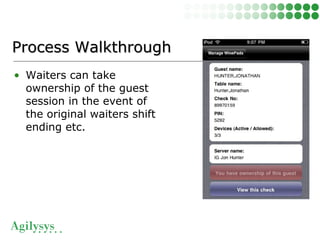
• Waiters can take
ownership of the guest
session in the event of
the original waiters shift
ending etc.
Process WalkthroughProcess Walkthrough

Ipad Self Service from Agilysys

  • 1.
    iPad Self ServiceSolutioniPad Self Service Solution Solution storyboard & walkthrough
  • 2.
    • Each waiteris assigned their own iPod Device • On this runs the iWaiter application. • It is used to manage the customer session. Process WalkthroughProcess Walkthrough
  • 3.
    • The waitersigns on to the application using their Infogenesis POS swipe card. • The waiter is then validated against the IG POS system Process WalkthroughProcess Walkthrough
  • 4.
    • The waitercan now manage the guest sessions – create a new one, manage or end an existing one. • The guest is validated using a payment method such as GA, Folio, Room, IA or Credit Card. Process WalkthroughProcess Walkthrough
  • 5.
    • The waiternow select the number of iPad devices that will be issued to the guest. • All the devices will feed into the same check in Infogenesis Process WalkthroughProcess Walkthrough
  • 6.
    • The waiteris presented with a summary of the guest session that will be created. • This results in an empty check being created in Infogenesis. • Also check is made to ensure that the method of payment is valid. Process WalkthroughProcess Walkthrough
  • 7.
    • The sessionis created and a PIN number is generated. The PIN is used to indentify each guest session. Process WalkthroughProcess Walkthrough
  • 8.
    • The waiterthen selects an iPad and enters the session PIN number. • This associates the guest with the device. Process WalkthroughProcess Walkthrough
  • 9.
    • The deviceretrieves the session information based on the PIN entered. • Guest is given the iPad to begin self service. Process WalkthroughProcess Walkthrough
  • 10.
    • The guestcan select the language of their choice. • All elements of the solution are translated including product information and application components. Process WalkthroughProcess Walkthrough
  • 11.
    • User canbrowse the menu. • This screen shows the Wine Search. • Wines displayed in progressive order or price order. • Guest can filter the wines based on a combination of Type, Variety, Country etc. Process WalkthroughProcess Walkthrough
  • 12.
    • Guest canselect a wine from the list to view more information. • Links provided to other information sources such as videos, images & documents. • Guest can add the item to their check. Process WalkthroughProcess Walkthrough
  • 13.
    • Information suchas Tasting Notes or award certificates may be presented. Process WalkthroughProcess Walkthrough
  • 14.
    • Guest maybrowse food items. Process WalkthroughProcess Walkthrough
  • 15.
    • The applicationcan suggest wines that are complementary to the food items using the wine classification codes. • Hard links between products can also be implemented in order to up/cross sell. Process WalkthroughProcess Walkthrough
  • 16.
    • When guesthas added the items they want to order to the check, they can then send them to the server for fullfillement. Process WalkthroughProcess Walkthrough
  • 17.
    • When guesthas added the items they want to order to the check, they can then send them to the server for fulfilment. • Each order that is place causes a message to be sent to the waiter. • Items also print to Kitchen/Bar printer. Process WalkthroughProcess Walkthrough
  • 18.
    • Waiter canrecall check at any time using iPod application. Process WalkthroughProcess Walkthrough
  • 19.
    • The guestcan recall the full information for their check at any time. Process WalkthroughProcess Walkthrough
  • 20.
    • The guestcan send messages to the waiter using the iPad • These will be delivered to the waiters iPod. Process WalkthroughProcess Walkthrough
  • 21.
    • Waiters cantake ownership of the guest session in the event of the original waiters shift ending etc. Process WalkthroughProcess Walkthrough