IADCS Diploma Course Input/Output and Serialization U Nyein Oo COO/Director(IT) Myanma Computer Co., Ltd
How the Java Platform Supports I/O The package java.io supports console I/O and file I/O Console I/O is character keyboard input and output without the mouse graphics of a graphical user interface File I/O involves reading and writing data to and from a mass storage device, typically the computer’s hard drive The new I/O (NIO) package java.nio supplements the original I/O package
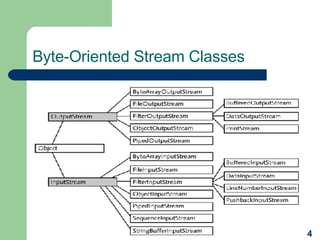
Programming I/O In stream I/O, characters or bytes are read or written sequentially The Java platform includes two dual hierarchies of classes that support streams:   byte-oriented input and output  character-oriented input and output The class RandomAccessFile is used to read and write arbitrary locations within a file without first having to read or write all the bytes or characters that precede that location
Byte-Oriented Stream Classes
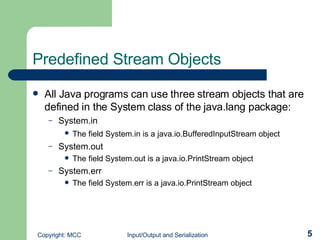
Predefined Stream Objects All Java programs can use three stream objects that are defined in the System class of the java.lang package:  System.in The field System.in is a java.io.BufferedInputStream object   System.out The field System.out is a java.io.PrintStream object System.err The field System.err is a java.io.PrintStream object
Input Methods Input methods of the java.io.InputStream class: int available() void close() void mark( int  readlimit ) boolean markSupported() int read() int read(byte[]  buffer ) int read( byte[]  buffer , int  offset , int  length )  void reset() long skip(long  bytecount )
Output Methods Output methods of the java.io.OutputStream class: void close() void flush() void write( int  b ) void write(byte[]  buffer ) void write( byte[]  buffer , int  offset , int  length )
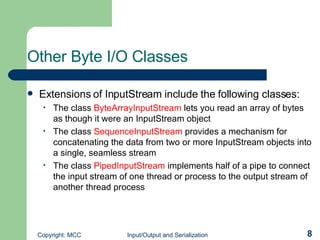
Other Byte I/O Classes   Extensions of InputStream   include the following classes: The class  ByteArrayInputStream   lets you read an array of bytes as though it were an InputStream   object The class  SequenceInputStream   provides a mechanism for concatenating the data from two or more InputStream   objects into a single, seamless stream The class  PipedInputStream   implements half of a pipe to connect the input stream of one thread or process to the output stream of another thread process
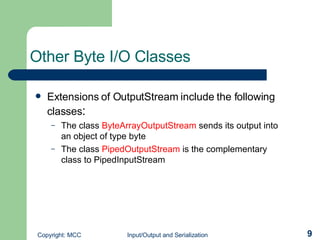
Other Byte I/O Classes   Extensions of OutputStream   include the following classes : The class  ByteArrayOutputStream   sends its output into an object of type byte The class  PipedOutputStream   is the complementary class to PipedInputStream
Parsing an Input Stream The next step after reading a line of input is to parse it, or break it into separate tokens A token usually consists of a sequence of characters that does not include a space, newline, tab, or other nonprinting character To tokenize a string, you can use the  StringTokenizer  class provided by the java.util package
Random-Access File I/O The class RandomAccessFile supports byte-oriented I/O to and from random-access files The class RandomAccessFile extends Object RandomAccessFile combines input and output operations in one class The seek method selects the position within the file where the next I/O operation will begin
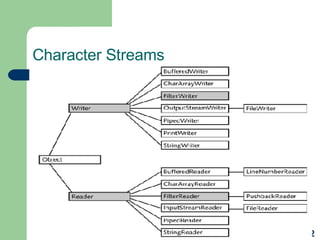
Character Streams
Connecting Byte & Character I/O Classes The Java platform includes adapter classes that bridge between character I/O classes and byte I/O classes : InputStreamReader OutputStreamWriter
Using Other Character I/O Classes Extensions of the Reader   object include the following: The class  CharArrayReader   lets you read an array of characters as though it were a Reader object The class  StringReader   lets you read a String object as though it were a Reader object The class  PipedReader   implements half of a pipe and is especially useful for communication between threads.
Using Other Character I/O Classes Extensions of the Writer   object include the following: The class  CharArrayWriter   sends its output into an object of type char[] The class  StringWriter   lets you write to a StringBuffer object as though it were a Writer   object The class  PipedWriter   is the complementary class to PipedReader The class  PrintWriter   is the character I/O equivalent of the PrintStream class
The New I/O (NIO) Interface The java.nio package provides new features : Support for buffer management A new primitive I/O abstraction called a channel File locking at the process level Memory mapping
Buffers Capacity:  the maximum number of data elements that the buffer can contain Limit : a reflection of the amount of data that the buffer currently contains and is defined as the index of the first element in the buffer that should not be read or written Mark : the index to which the position value will be set if the buffer is reset  Position : the index of the next element to be read or written and can never exceed the limit
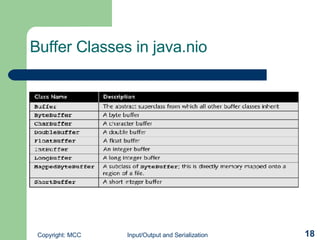
Buffer Classes in java.nio
Object Serialization  Object serialization :   a general solution that lets you write objects to I/O streams and then read them, without defining any additional methods Enables t ransmission of objects over a network or save objects to files between runs of your program The object serialization feature is an important component of the Java Remote Method Invocation (RMI) enterprise API
Using Object Streams Two stream classes support object serialization:  ObjectOutputStream  - a subclass of OutputStream ObjectInputStream  - a subclass of InputStream To create an  ObjectOutputStream object, provide an existing OutputStream object as the argument of the constructor To create an ObjectInputStream object, provide an existing InputStream object as the argument of the constructor
Suppressing Serialization of Fields Include the qualifier transient when you declare fields to indicate that they should not be serialized with instances of the class Fields that have the transient qualifier are not output when the object is serialized When the object is deserialized later, transient fields are given the default value normally used for fields of their type

IO and serialization

  • 1.
    IADCS Diploma CourseInput/Output and Serialization U Nyein Oo COO/Director(IT) Myanma Computer Co., Ltd
  • 2.
    How the JavaPlatform Supports I/O The package java.io supports console I/O and file I/O Console I/O is character keyboard input and output without the mouse graphics of a graphical user interface File I/O involves reading and writing data to and from a mass storage device, typically the computer’s hard drive The new I/O (NIO) package java.nio supplements the original I/O package
  • 3.
    Programming I/O Instream I/O, characters or bytes are read or written sequentially The Java platform includes two dual hierarchies of classes that support streams: byte-oriented input and output character-oriented input and output The class RandomAccessFile is used to read and write arbitrary locations within a file without first having to read or write all the bytes or characters that precede that location
  • 4.
  • 5.
    Predefined Stream ObjectsAll Java programs can use three stream objects that are defined in the System class of the java.lang package: System.in The field System.in is a java.io.BufferedInputStream object System.out The field System.out is a java.io.PrintStream object System.err The field System.err is a java.io.PrintStream object
  • 6.
    Input Methods Inputmethods of the java.io.InputStream class: int available() void close() void mark( int readlimit ) boolean markSupported() int read() int read(byte[] buffer ) int read( byte[] buffer , int offset , int length ) void reset() long skip(long bytecount )
  • 7.
    Output Methods Outputmethods of the java.io.OutputStream class: void close() void flush() void write( int b ) void write(byte[] buffer ) void write( byte[] buffer , int offset , int length )
  • 8.
    Other Byte I/OClasses Extensions of InputStream include the following classes: The class ByteArrayInputStream lets you read an array of bytes as though it were an InputStream object The class SequenceInputStream provides a mechanism for concatenating the data from two or more InputStream objects into a single, seamless stream The class PipedInputStream implements half of a pipe to connect the input stream of one thread or process to the output stream of another thread process
  • 9.
    Other Byte I/OClasses Extensions of OutputStream include the following classes : The class ByteArrayOutputStream sends its output into an object of type byte The class PipedOutputStream is the complementary class to PipedInputStream
  • 10.
    Parsing an InputStream The next step after reading a line of input is to parse it, or break it into separate tokens A token usually consists of a sequence of characters that does not include a space, newline, tab, or other nonprinting character To tokenize a string, you can use the StringTokenizer class provided by the java.util package
  • 11.
    Random-Access File I/OThe class RandomAccessFile supports byte-oriented I/O to and from random-access files The class RandomAccessFile extends Object RandomAccessFile combines input and output operations in one class The seek method selects the position within the file where the next I/O operation will begin
  • 12.
  • 13.
    Connecting Byte &Character I/O Classes The Java platform includes adapter classes that bridge between character I/O classes and byte I/O classes : InputStreamReader OutputStreamWriter
  • 14.
    Using Other CharacterI/O Classes Extensions of the Reader object include the following: The class CharArrayReader lets you read an array of characters as though it were a Reader object The class StringReader lets you read a String object as though it were a Reader object The class PipedReader implements half of a pipe and is especially useful for communication between threads.
  • 15.
    Using Other CharacterI/O Classes Extensions of the Writer object include the following: The class CharArrayWriter sends its output into an object of type char[] The class StringWriter lets you write to a StringBuffer object as though it were a Writer object The class PipedWriter is the complementary class to PipedReader The class PrintWriter is the character I/O equivalent of the PrintStream class
  • 16.
    The New I/O(NIO) Interface The java.nio package provides new features : Support for buffer management A new primitive I/O abstraction called a channel File locking at the process level Memory mapping
  • 17.
    Buffers Capacity: the maximum number of data elements that the buffer can contain Limit : a reflection of the amount of data that the buffer currently contains and is defined as the index of the first element in the buffer that should not be read or written Mark : the index to which the position value will be set if the buffer is reset  Position : the index of the next element to be read or written and can never exceed the limit
  • 18.
  • 19.
    Object Serialization Object serialization : a general solution that lets you write objects to I/O streams and then read them, without defining any additional methods Enables t ransmission of objects over a network or save objects to files between runs of your program The object serialization feature is an important component of the Java Remote Method Invocation (RMI) enterprise API
  • 20.
    Using Object StreamsTwo stream classes support object serialization: ObjectOutputStream - a subclass of OutputStream ObjectInputStream - a subclass of InputStream To create an ObjectOutputStream object, provide an existing OutputStream object as the argument of the constructor To create an ObjectInputStream object, provide an existing InputStream object as the argument of the constructor
  • 21.
    Suppressing Serialization ofFields Include the qualifier transient when you declare fields to indicate that they should not be serialized with instances of the class Fields that have the transient qualifier are not output when the object is serialized When the object is deserialized later, transient fields are given the default value normally used for fields of their type